WINDOWS SWITCH MERCEDES-BENZ E-Class COUPE 2017 C207 Owner's Manual
[x] Cancel search | Manufacturer: MERCEDES-BENZ, Model Year: 2017, Model line: E-Class COUPE, Model: MERCEDES-BENZ E-Class COUPE 2017 C207Pages: 318, PDF Size: 7.35 MB
Page 8 of 318
On the front-passenger seat ............ 60
Rearward-facing restraint system ....60
Top Tether ....................................... 59
Child-proof locks
Important safety notes .................... 61
Children
Special seat belt retractor ............... 57
Cigarette lighter ................................ 242
Cleaning
Mirror turn signal ........................... 262
Climate control
Automatic climate control (3-
zone) ..............................................1 13
Controlling automatically ...............1 15
Cooling with air dehumidification .. 115
Defrosting the windows ................. 118
Defrosting the windshield .............. 117
Dual-zone automatic climate con-
trol ................................................. 112
General notes ................................ 111
Indicator lamp ................................ 115
Information about using auto-
matic climate control ..................... 114
Maximum cooling .......................... 117
Overview of systems ......................1 11
Problem with the rear window
defroster ........................................ 119
Problems with cooling with air
dehumidification ............................ 115
Rear control panel ......................... 113
Refrigerant ..................................... 313
Refrigerant filling capacity ............. 313
Setting the air distribution ............. 116
Setting the air vents ......................1 20
Setting the airflow ......................... 117
Setting the climate mode ...............1 16
Setting the temperature ................ 116
Setting the temperature with 3-
zone automatic climate control ..... 116
Setting the temperature with dual-
zone automatic climate control ..... 116
Switching air-recirculation mode
on/off ............................................ 119
Switching on/off ........................... 114
Switching residual heat on/off ...... 119
Sw
itching the rear window
defroster on/off ............................ 118 Switching the ZONE function on/
off ..................................................1
17
Cockpit
Overview .......................................... 32
see Instrument cluster
COLLISION PREVENTION ASSIST
PLUS
Activating/deactivating ................. 192
Display message ............................ 200
Operation/notes .............................. 65
COMAND
Switching on/off ........................... 230
COMAND display
Cleaning ......................................... 263
Combination switch .......................... 104
Connecting a USB device
see also Digital Operator's Man-
ual ..................................................2 29
Consumption statistics (on-board
computer) .......................................... 187
Controller ...........................................2 30
Convenience closing feature .............. 84
Convenience opening feature ............ 83
Coolant (engine)
Checking the level ......................... 256
Display message ............................ 207
Filling capacity ............................... 312
Important safety notes .................. 312
Temperature gauge ........................ 184
Warning lamp ................................. 225
Cooling
see Climate control
Copyright ............................................. 31
Cornering light function
Display message ............................ 206
Function/notes .............................1 05
Cruise control
Activation conditions ..................... 145
Cruise control lever ....................... 145
Deactivating ................................... 146
Display message ............................ 213
Driving system ............................... 145
Function/notes .............................1 45
Important safety notes .................. 145
Setting a speed .............................. 146
Storing and maintaining current
speed ............................................. 145
6Index
Page 16 of 318
P
Paint code number............................307
Paintwork (cleaning instructions) ... 260
Panic alarm .......................................... 40
Panorama roof with power tilt/
sliding panel
Important safety notes .................... 86
Operating ......................................... 87
Operating the roller sunblinds for
the sliding sunroof ........................... 87
Problem (malfunction) ..................... 90
Reversing feature .............................8 7
Parking
Important safety notes .................. 138
Parking brake ................................ 139
Position of exterior mirror, front-
passenger side ...............................1 01
Rear view camera .......................... 165
see PARKTRONIC
Parking aid
Active Parking Assist ..................... 161
see Exterior mirrors
see PARKTRONIC
Parking assistance
see PARKTRONIC
Parking brake
Display message ............................ 199
Notes/function .............................. 139
Warning lamp ................................. 221
Parking lamps
Switching on/off ........................... 104
PARKTRONIC
Deactivating/activating ................. 160
Driving system ............................... 158
Function/notes .............................1 58
Important safety notes .................. 158
Problem (malfunction) ................... 161
Range of the sensors ..................... 158
Warning display ............................. 159
PASSENGER AIR BAG
Display message ............................ 204
PASSENGER AIR BAG OFF
Indicator lamp .................................. 41
Problems (malfunctions) ................ 204
Pets in the vehicle ............................... 62 Phone book
see also Digital Operator's Man-
ual .................................................. 229
Plastic trim (cleaning instruc-
tions) .................................................. 263
Power washers .................................. 260
Power windows
see Side windows
PRE-SAFE
®(anticipatory occupant
protection)
Display messa
ge ............................ 200
Operation ......................................... 55
PRE-SAFE
®Brake
Activating/deactivating ................. 192
Display message ............................ 201
Function/notes ................................ 69
Important safety notes .................... 70
Warning lamp ................................. 227
PRE-SAFE
®PLUS (anticipatory
occupant protection PLUS)
Display message ............................ 201
Operation ......................................... 56
Program selector button .................. 131
Protection against theft
ATA (Anti-Theft Alarm system) ......... 72
Immobilizer ...................................... 72
Protection of the environment
General notes .................................. 24
Pulling away
Automatic transmission ................. 124
General notes ................................ 124
Q
QR codeMercedes-Benz Guide App ................. 1
Rescue card ..................................... 29
Qualified specialist workshop ........... 28
R
Radio
Selecting a station ......................... 189
see separate operating instructions
Radio mode
see also Digital Operator's Man-
ual .................................................. 229
14Index
Page 17 of 318
Radio-wave reception/transmis-
sion in the vehicleDeclaration of conformity ................ 27
Reading lamp ..................................... 107
Rear compartment
Setting the temperature ................ 116
Rear fog lamp
Display message ............................ 206
Switching on/off ........................... 104
Rear seats
Display message ............................ 217
Rear view camera
Cleaning instructions ..................... 262
Display in the multimedia system .. 166
Function/notes ............................. 165
Switching on/off ........................... 166
Rear window blind ............................ 241
Rear window defroster
Problem (malfunction) ................... 119
Switching on/off ........................... 118
Rear-view mirror
Anti-glare (manual) .......................... 99
Dipping (automatic) ....................... 100
Refrigerant (air-conditioning sys-
tem)
Important safety notes .................. 313
Refueling
Fuel gauge ....................................... 33
Important safety notes .................. 135
Refueling process .......................... 136
see Fuel
Remote control
Garage door opener ....................... 250
Programming (garage door
opener) .......................................... 250
Replacing bulbs
Important safety notes .................. 107
Overview of bulb types .................. 108
Reporting safety defects .................... 28
Rescue card ......................................... 29
Reserve (fuel tank)
see Fuel
Reserve fuel
Display message ............................ 208
Warning lamp ................................. 225
see Fuel
Residual heat (climate control) ........ 119Restraint system
Display message ............................ 202
Introduction ..................................... 40
Problem (malfunction) ................... 224
Warning lamp (function) ................... 40
Reversing feature
Panorama sliding sunroof ................ 87
Roller sunblinds ............................... 88
Side windows ................................... 82
Sliding sunroof ................................. 87
Reversing lamps (display mes-
sage) ................................................... 206
Roads ide A
ssistance (breakdown)
.... 26
Roller sunblind
Panorama roof with power tilt/
sliding panel ..................................... 87
Rear window .................................. 241
Roof lining and carpets (cleaning
guidelines) ......................................... 265
Roof load (maximum) ........................ 313
Route guidance
see also Digital Operator's Man-
ual .................................................. 229
S
SafetyChildren in the vehicle ..................... 56
see Occupant safety
Safety system
see Driving safety systems
SD memory card
Ejecting .......................................... 234
Inserting ........................................ 234
Inserting/removing ........................ 234
see also Digital Operator's Man-
ual .................................................. 229
Selecting ........................................ 189
Search & Send
see also Digital Operator's Man-
ual .................................................. 229
Seat belts
Adjusting the driver's and front-
passenger seat belt ......................... 45
Automatic comfort-fit feature .......... 44
Cleaning ......................................... 264
Correct usage .................................. 43
Fastening ......................................... 43
Index15
Page 18 of 318
Important safety guidelines .............42
Introduction .....................................4 1
Releasin g ......................................... 44
Switching belt adjustment on/off
(on-board computer) ...................... 196
Warning lamp ................................. 220
Warning lamp (function) ................... 45
Seats
Adjusting (electrically) ..................... 92
Adjusting the 4-way lumbar sup-
port .................................................. 94
Adjusting the head restraint ............ 93
Adjusting the multicontour seat ....... 94
Cleaning the cover ......................... 264
Correct driver's seat position ........... 91
Folding the backrests forward/
back ................................................. 93
Important safety notes .................... 91
Overview .......................................... 91
Seat backrest display message ..... 217
Seat heating .................................... 95
Seat heating problem ...................... 96
Storing settings (memory func-
tion) ............................................... 102
Switching seat heating on/off ......... 95
Switching seat ventilation on/
off .................................................... 95
Section
Trunk ............................................... 80
Securing cargo .................................. 238
Selector lever
Cleaning ......................................... 263
Sensors (cleaning instructions) ....... 262
Service menu (on-board com-
puter) .................................................. 193
Service message
see ASSYST PLUS
Service products
Brake fluid ..................................... 311
Coolant (engine) ............................ 312
Engine oil ....................................... 311
Fuel ................................................ 309
Important safety notes .................. 308
Refrigerant (air-conditioning sys-
tem) ............................................... 313
Washer fluid ................................... 312
Setting the air distribution ............... 116Setting the airflow
............................ 117
Setting the date/time format
see also Digital Operator's Man-
ual .................................................. 229
Setting the language
see also Digital Operator's Man-
ual .................................................. 229
Setting the time
see also Digital Ope rator's Ma
n-
ual .................................................. 229
Settings
Factory (on-board computer) ......... 196
On-board computer ....................... 193
Side impact air bag ............................. 47
Side marker lamp (display mes-
sage) ................................................... 206
Side windows
Cleaning ......................................... 261
Convenience closing feature ............ 84
Convenience opening feature .......... 83
Important safety information ........... 82
Opening/closing .............................. 83
Problem (malfunction) ..................... 86
Resetting ......................................... 85
Reversing feature ............................. 82
SIRIUS services
see also Digital Operator's Man-
ual .................................................. 229
Sliding sunroof
see Panorama roof with power
tilt/sliding panel
SmartKey
Changing the battery ....................... 76
Changing the programming ............. 74
Checking the battery ....................... 76
Convenience closing feature ............ 84
Convenience opening feature .......... 83
Display message ............................ 218
Door central locking/unlocking ....... 73
Important safety notes .................... 73
Loss ................................................. 77
Mechanical key ................................ 75
Overview .......................................... 73
Positions (ignition lock) ................. 122
Problem (malfunction) ..................... 77
Starting the engine ........................ 124
16Index
Page 22 of 318
Locking (in an emergency) ............... 80
Locking (SmartKey) .......................... 73
Lowering ........................................ 303
Maintenance .................................... 26
Parking for a long period ................ 140
Pulling away ................................... 124
Raising ........................................... 301
Reporting problems ......................... 28
Securing from rolling away ............ 300
Towing away .................................. 276
Transporting .................................. 278
Unlocking (in an emergency) ........... 80
Unlocking (SmartKey) ...................... 73
Vehicle data ................................... 313
Vehicle data ....................................... 313
Vehicle dimensions ........................... 313
Vehicle emergency locking ................ 80
Vehicle identification number
see VIN
Vehicle identification plate .............. 307
Vehicle tool kit .................................. 266
Video
Operating the DVD ......................... 189
see also Digital Operator's Man-
ual .................................................. 229
VIN
Seat ............................................... 308
Type plate ...................................... 307
Voice Control System
see Separate operating instructions
W
Warning and indicator lampsABS ................................................ 222
Brakes ........................................... 221
Check Engine ................................. 225
Coolant .......................................... 225
Distance warning ........................... 227
ESP
®.............................................. 222
ESP®OFF ....................................... 223
Fuel tank ........................................ 225
General notes ................................ 219
Overview .......................................... 33
PASSENGER AIR BAG OFF ............... 41
Reserve fuel ................................... 225
Restraint system ............................ 224
Seat belt ........................................ 220 Tire pressure monitor .................... 228
Warranty .............................................. 25
Washer fluid
Display message ............................ 218
Wheel and tire combinations
Tires ............................................... 303
Wheel bolt tightening torque ........... 303
Wheel chock ...................................... 300
Wheels
Changing a wheel .......................... 299
Checking ........................................ 281
Cleaning ......................................... 261
Emergency spare wheel ................. 304
Important safety notes .................. 281
Information on driving .................... 281
Interchanging/changing ................ 299
Mounting a new wheel ................... 302
Mounting a wheel .......................... 300
Removing a wheel .......................... 302
Storing ........................................... 300
Tightening torque ........................... 303
Wheel size/tire size ....................... 303
Window curtain air bag
Operation ......................................... 48
Windows
see Side windows
Windshield
Defrosting ...................................... 117
Windshield washer fluid
see Windshield washer system
Windshield washer system
Adding washer fluid ....................... 257
Important safety notes .................. 312
Windshield wipers
Problem (malfunction) ................... 110
Replacing the wiper blades ............ 109
Switching on/off ........................... 108
Winter driving
Important safety notes .................. 283
Slippery road surfaces ................... 144
Snow chains .................................. 283
Winter tires
M+S tires ....................................... 283
Wiper blades
Cleaning ......................................... 261
Important safety notes .................. 109
Replacing ....................................... 109
20Index
Page 58 of 318
PRE-SAFE®PLUS (anticipatory occu-
pant protection system PLUS)
Introduction
PRE-SAFE®PLUS is only available in vehicles
with the Driving Assistance package.
Using the radar sensor system, PRE-SAFE
®
PLUS is able to detect that a head-on or rear-end
collision is imminent. In certain hazardous sit-
uations, PRE-SAFE
®PLUS takes pre-emptive
measures to protect the vehicle occupants.
Important safety notes
The intervention of PRE-SAFE®PLUS cannot
prevent an imminent collision.
The driver is not warned about the intervention
of PRE-SAFE
®PLUS.
PRE-SAFE®PLUS does not intervene if the vehi-
cle is backing up.
When driving, or when parking or exiting a park-
ing space with assistance from Active Parking
Assist, PRE-SAFE
®PLUS will not apply the
brakes.
Function
PRE-SAFE®PLUS intervenes in certain situa-
tions if the radar sensor system detects an
imminent head-on or rear-end collision.
PRE-SAFE
®PLUS takes the following measures
depending on the hazardous situation detected:
Rif the radar sensor system detects that a
head-on collision is imminent, the seat belts
are pre-tensioned.
Rif the radar sensor system detects that a rear-
end collision is imminent:
-the brake pressure is increased if the driver
applies the brakes when the vehicle is sta- tionary.
-the seat belts are pre-tensioned.
The PRE-SAFE®PLUS braking application is can-
celed:
Rif the accelerator pedal is depressed when a
gear is engaged
Rif the risk of a collision passes or is no longer
detected
Rif DISTRONIC PLUS indicates an intention to
pull away If the hazardous situation passes without result-
ing in an accident, the original settings are
restored.
Automatic measures after an acci-
dent
Immediately after an accident, the following
measures are implemented, depending on the
type and severity of the impact:
Rthe hazard warning lamps are activated
Rthe emergency lighting is activated
Rthe vehicle doors are unlocked
Rthe front side windows are lowered
Rvehicles with a memory function: the electri-
cally adjustable steering wheel is raised
Rthe engine is switched off and the fuel supply
is cut off
Rvehicles with mbrace: automatic emergency
call
Children in the vehicle
Important safety notes
Accident statistics show that children secured
in the rear seats are safer than children secured
in the front-passenger seat. For this reason,
Mercedes-Benz strongly advises that you install
a child restraint system on a rear seat. Children
are generally better protected there.
If a child younger than twelve years old and
under 5 ft (1.50 m) in height is traveling in the
vehicle:
Ralways secure the child in a child restraint
system suitable for Mercedes-Benz vehicles.
The child restraint system must be appropri-
ate to the age, weight and size of the child
Rbe sure to observe the instructions and safety
notes in this section in addition to the child
restraint system manufacturer's installation
instructions
Rbe sure to observe the instructions and safety
notes on the "Occupant classification system
(OCS)" (
Ypage 48)
56Children in the vehicle
Safety
Page 63 of 318
extender of the front-passenger seat to the
shoulder belt guide on the child restraint sys-
tem. The shoulder belt strap must be routed for-
wards from the retracted seat-belt extender for
the front-passenger seat.
Always observe the child restraint system man-
ufacturer's installation and operating instruc-
tions.
Child-proof locks
Important safety notes
GWARNING
If children are traveling in the vehicle, they
could:
Ropen doors, thus endangering other people
or road users
Rexit the vehicle and be caught by oncoming
traffic
Roperate vehicle equipment and become
trapped
There is a risk of an accident and injury.
Always activate the child-proof locks and
override feature if children are traveling in the vehicle. When leaving the vehicle, always take
the key with you and lock the vehicle. Never
leave children unattended in the vehicle.
Override feature for the rear side windows
(
Ypage 61).
GWARNING
If you leave children unsupervised in the vehi-
cle, they could set it in motion by, for example:
Rrelease the parking brake.
Rshift the automatic transmission out of the
parking position P.
Rstart the engine.
In addition, they may operate vehicle equip-
ment and become trapped. There is a risk of
an accident and injury.
When leaving the vehicle, always take the
SmartKey with you and lock the vehicle. Never
leave children unsupervised in the vehicle.
GWARNING
If persons, particularly children are subjected to prolonged exposure to extreme heat or
cold, there is a risk of injury, possibly even
fatal. Never leave children unattended in the
vehicle.
GWARNING
If the child restraint system is subjected to
direct sunlight, parts may get very hot. Chil-
dren may burn themselves on these parts,
particularly on the metal parts of the child
restraint system. There is a risk of injury.
If you leave the vehicle, taking the child with
you, always ensure that the child restraint
system is not exposed to direct sunlight. Pro- tect it with a blanket, for example. If the child
restraint system has been exposed to direct
sunlight, let it cool down before securing the
child in it. Never leave children unattended in
the vehicle.
Override feature for the rear side win-
dows
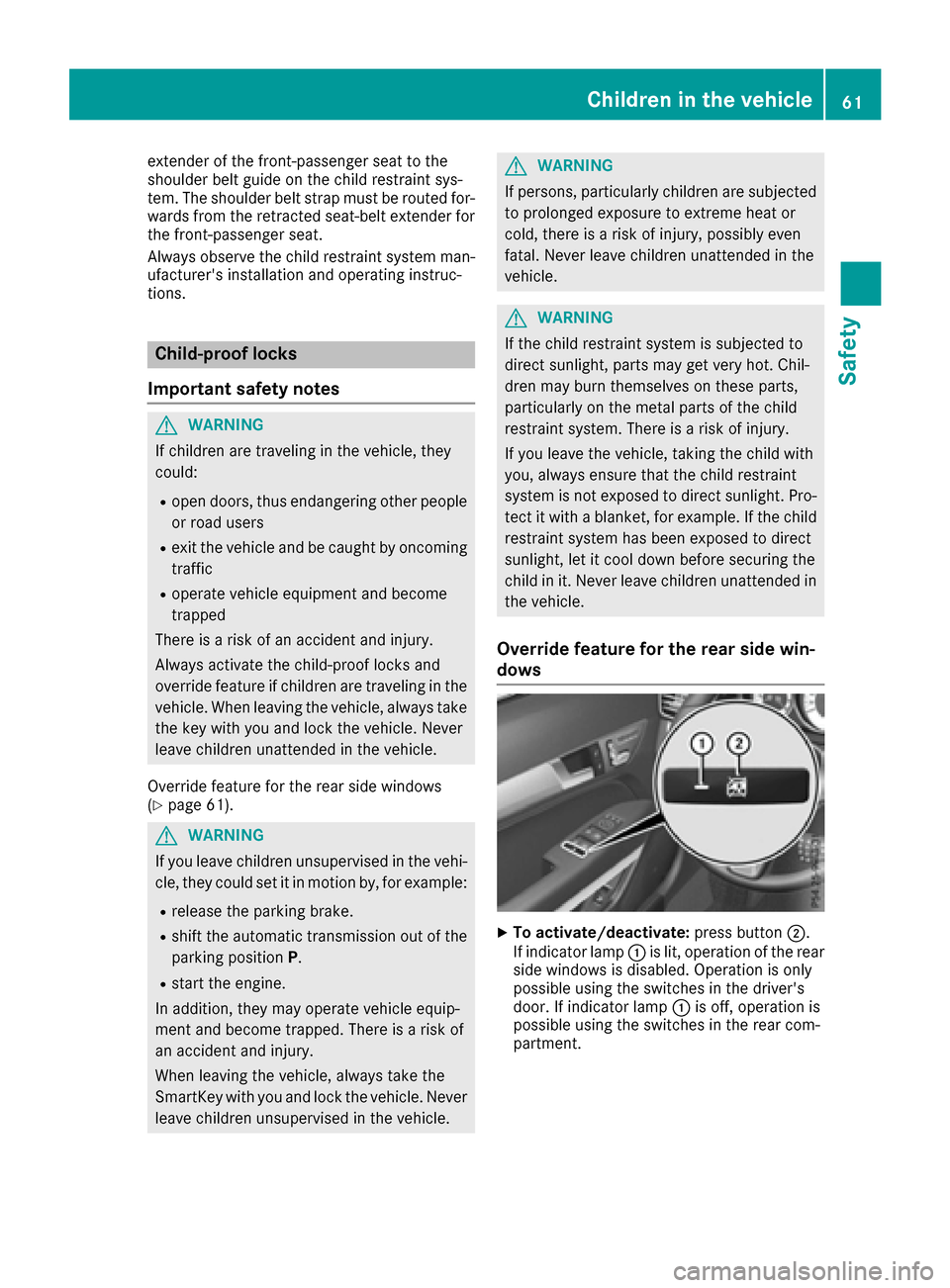
XTo activate/deactivate: press button;.
If indicator lamp :is lit, operation of the rear
side windows is disabled. Operation is only
possible using the switches in the driver's
door. If indicator lamp :is off, operation is
possible using the switches in the rear com-
partment.
Children in the vehicle61
Safety
Z
Page 80 of 318
ProblemPossible causes/consequences andMSolutions
The engine cannot be
started using the Smart-
Key.The on-board voltage is too low.
XSwitch off non-essential consumers, e.g. seat heating or interior
lighting, and try to start the engine again.
If this does not work:
XCheck the starter battery and charge it if necessary (Ypage 272).
or
XJump-start the vehicle (Ypage 274).
or
XConsult a qualified specialist workshop.
The engine cannot be
started using KEYLESS-
GO. The SmartKey is in
the vehicle.The vehicle is locked.
XUnlock the vehicle and try to start the vehicle again.
There is interference from a powerful source of radio waves.
XStart your vehicle with the SmartKey in the ignition lock.
You have lost a Smart-
Key.XHave the SmartKey deactivated at a qualified specialist workshop.
XReport the loss immediately to the vehicle insurers.
XIf necessary, have the locks changed as well.
You have lost the
mechanical key.XReport the loss immediately to the vehicle insurers.
XIf necessary, have the locks changed as well.
Doors
Important safety notes
GWARNING
If children are left unsupervised in the vehicle,
they could:
Ropen the doors, thus endangering other
people or road users.
Rget out and disrupt traffic.
Roperate the vehicle's equipment.
Additionally, children could set the vehicle in
motion if, for example, they:
Rrelease the parking brake.
Rshifting the automatic transmission out of
park position P
RStart the engine.
There is a risk of an accident and injury.
When leaving the vehicle, always take the
SmartKey with you and lock the vehicle. Never
leave children or animals unattended in the
vehicle. Always keep the SmartKey out of
reach of children.
Unlocking and opening doors from
the inside
!
The side windows will not open/close if the
battery is discharged or if the side windows
have iced up. It will then not be possible to
close the door. Do not attempt to force the
door closed. You could otherwise damage the
door or the side window.
78Doors
Opening and closing
Page 84 of 318
XTurn the mechanical key from position1
counter-clockwise as far as it will go to posi-
tion 2. Simultaneously pull the trunk lid han-
dle.
The trunk is unlocked.
XTurn the mechanical key back to position 1
and remove it.
XInsert the mechanical key into the SmartKey
(Ypage 75).
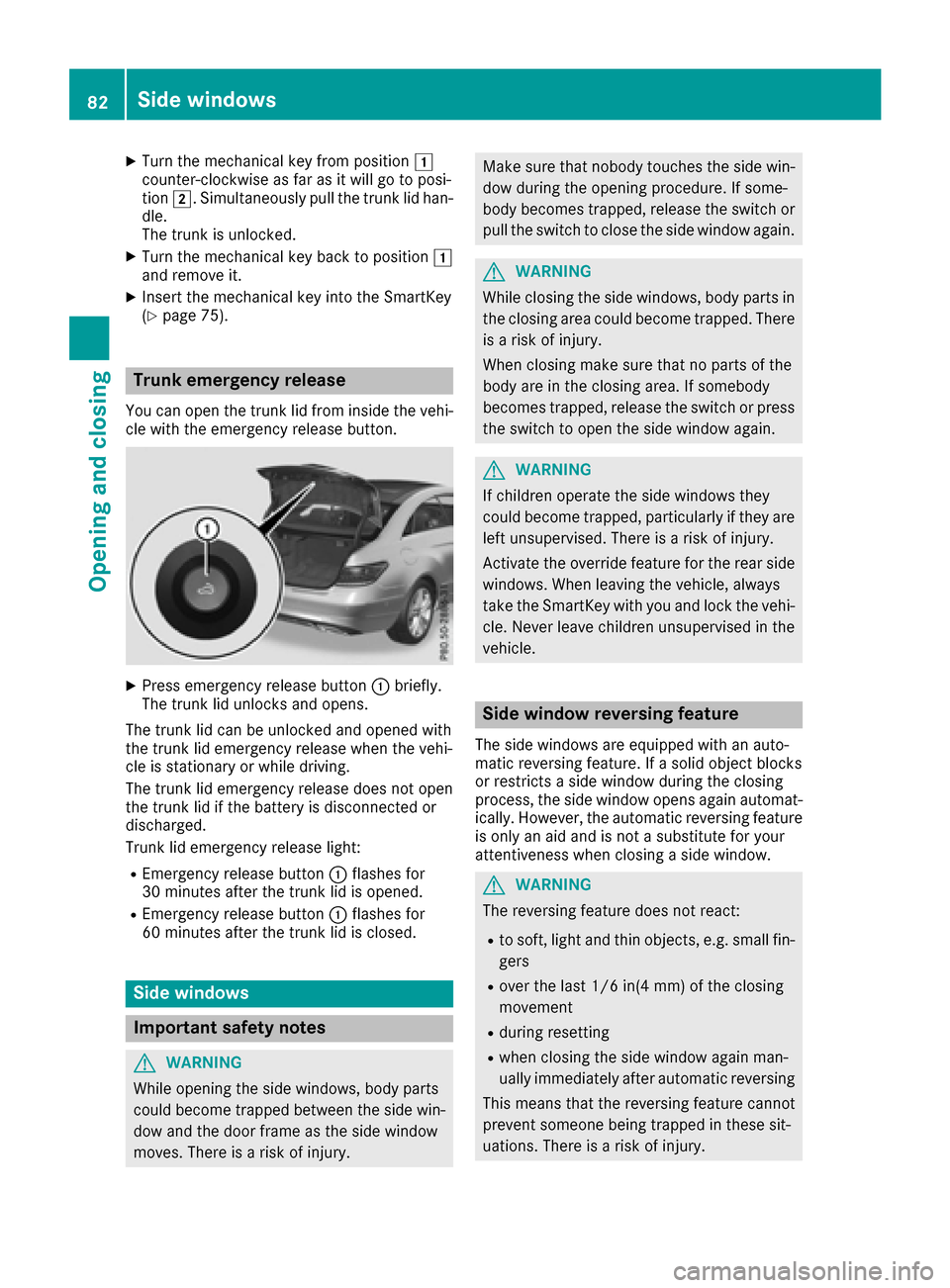
Trunk emergency release
You can open the trunk lid from inside the vehi-
cle with the emergency release button.
XPress emergency release button :briefly.
The trunk lid unlocks and opens.
The trunk lid can be unlocked and opened with
the trunk lid emergency release when the vehi-
cle is stationary or while driving.
The trunk lid emergency release does not open
the trunk lid if the battery is disconnected or
discharged.
Trunk lid emergency release light:
REmergency release button :flashes for
30 minutes after the trunk lid is opened.
REmergency release button :flashes for
60 minutes after the trunk lid is closed.
Side windows
Important safety notes
GWARNING
While opening the side windows, body parts
could become trapped between the side win-
dow and the door frame as the side window
moves. There is a risk of injury.
Make sure that nobody touches the side win- dow during the opening procedure. If some-
body becomes trapped, release the switch or
pull the switch to close the side window again.
GWARNING
While closing the side windows, body parts in
the closing area could become trapped. There is a risk of injury.
When closing make sure that no parts of the
body are in the closing area. If somebody
becomes trapped, release the switch or press
the switch to open the side window again.
GWARNING
If children operate the side windows they
could become trapped, particularly if they are left unsupervised. There is a risk of injury.
Activate the override feature for the rear side
windows. When leaving the vehicle, always
take the SmartKey with you and lock the vehi-
cle. Never leave children unsupervised in the
vehicle.
Side window reversing feature
The side windows are equipped with an auto-
matic reversing feature. If a solid object blocks
or restricts a side window during the closing
process, the side window opens again automat-
ically. However, the automatic reversing feature
is only an aid and is not a substitute for your
attentiveness when closing a side window.
GWARNING
The reversing feature does not react:
Rto soft, light and thin objects, e.g. small fin-
gers
Rover the last 1/6 in(4 mm) of the closing
movement
Rduring resetting
Rwhen closing the side window again man-
ually immediately after automatic reversing
This means that the reversing feature cannot
prevent someone being trapped in these sit-
uations. There is a risk of injury.
82Side windows
Opening and closing
Page 85 of 318
Make sure that no body parts are in close
proximity during the closing procedure. If
someone becomes trapped, press the switch
to open the side window again.
Opening and closing the side win-
dows
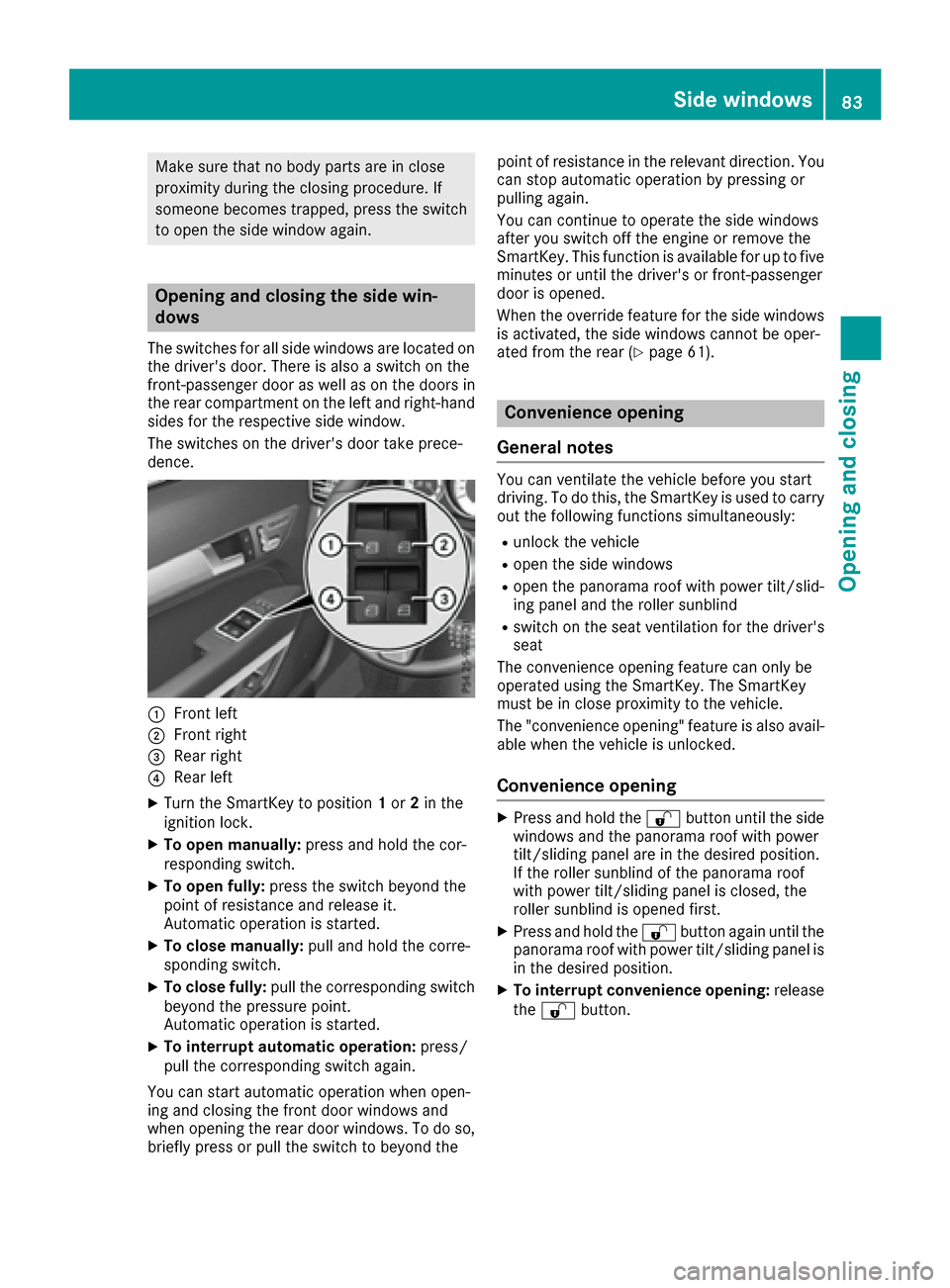
The switches for all side windows are located onthe driver's door. There is also a switch on the
front-passenger door as well as on the doors in
the rear compartment on the left and right-hand
sides for the respective side window.
The switches on the driver's door take prece-
dence.
:Front left
;Front right
=Rear right
?Rear left
XTurn the SmartKey to position 1or 2in the
ignition lock.
XTo open manually: press and hold the cor-
responding switch.
XTo open fully: press the switch beyond the
point of resistance and release it.
Automatic operation is started.
XTo close manually: pull and hold the corre-
sponding switch.
XTo close fully: pull the corresponding switch
beyond the pressure point.
Automatic operation is started.
XTo interrupt automatic operation: press/
pull the corresponding switch again.
You can start automatic operation when open-
ing and closing the front door windows and
when opening the rear door windows. To do so,
briefly press or pull the switch to beyond the point of resistance in the relevant direction. You
can stop automatic operation by pressing or
pulling again.
You can continue to operate the side windows
after you switch off the engine or remove the
SmartKey. This function is available for up to five
minutes or until the driver's or front-passenger
door is opened.
When the override feature for the side windows
is activated, the side windows cannot be oper-
ated from the rear (
Ypage 61).
Convenience opening
General notes
You can ventilate the vehicle before you start
driving. To do this, the SmartKey is used to carry out the following functions simultaneously:
Runlock the vehicle
Ropen the side windows
Ropen the panorama roof with power tilt/slid-
ing panel and the roller sunblind
Rswitch on the seat ventilation for the driver's
seat
The convenience opening feature can only be
operated using the SmartKey. The SmartKey
must be in close proximity to the vehicle.
The "convenience opening" feature is also avail-
able when the vehicle is unlocked.
Convenience opening
XPress and hold the %button until the side
windows and the panorama roof with power
tilt/sliding panel are in the desired position.
If the roller sunblind of the panorama roof
with power tilt/sliding panel is closed, the
roller sunblind is opened first.
XPress and hold the %button again until the
panorama roof with power tilt/sliding panel is
in the desired position.
XTo interrupt convenience opening: release
the % button.
Side windows83
Opening and closing
Z