page 73 MERCEDES-BENZ E-Class COUPE 2017 C207 Owner's Manual
[x] Cancel search | Manufacturer: MERCEDES-BENZ, Model Year: 2017, Model line: E-Class COUPE, Model: MERCEDES-BENZ E-Class COUPE 2017 C207Pages: 318, PDF Size: 7.35 MB
Page 2 of 318
Publication details
Internet
Further information about Mercedes-Benz vehi-
cles and about Daimler AG can be found on the
following websites:
http://www.mbusa.com (USA only)
http://www.mercedes-benz.ca (Canada only)
Editorial office
©Daimler AG: not to be reprinted, translated or
otherwise reproduced, in whole or in part, with- out written permission from Daimler AG.
Vehicle manufacturer
Daimler AG
Mercedesstraße 137
70327 Stuttgart
Germany
Symbols
Registered trademarks:
RBluetooth®is a registered trademark of Blue-
tooth SIG Inc.
RDTS™ is a registered trademark of DTS, Inc.
RDolby®and MLP™ are registered trademarks
of DOLBY Laboratories.
RBabySmart™, ESP®and PRE-SAFE®are reg-
istered trademarks of Daimler AG.
RHomeLink®is a registered trademark of John-
son Controls.
RiPod®and iTunes®are registered trademarks
of Apple Inc.
RLogic7®is a registered trademark of Harman
International Industries.
RMicrosoft®and Windows media®are regis-
tered trademarks of Microsoft Corporation.
RSIRIUS®is a registered trademark of Sirius
XM Radio Inc.
RHD Radio™ is a registered trademark of iBiq-
uity Digital Corporation.
RGracenote®is a registered trademark of
Gracenote, Inc.
RZAGAT Survey®and related brands are regis-
tered trademarks of Zagat Survey, LLC.
In this Operator's Manual you will find the fol-
lowing symbols:
GWARNING
Warning notes make you aware of dangers
which could pose a threat to your health or
life, or to the health and life of others.
HEnvironmental note
Environmental notes provide you with infor-
mation on environmentally aware actions or
disposal.
!Notes on material damage alert you to dan-
gers that could lead to damage to your vehi-
cle.
iPractical tips or further information that
could be helpful to you.
X This symbol indicates an instruction
that must be followed.
X Several of these symbols in succession
indicate an instruction with several
steps. (Y
page)
This symbol tells you where you can find
more information about a topic.
YY This symbol indicates a warning or an
instruction that is continued on the next
page.
Dis‐
playThis text indicates a message on the
multifunction display/multimedia dis-
play.
~ This symbol tells you that you can find
further information in the Digital Oper-
ator's Manual.
As at 01.04.2015
Page 24 of 318
Introduction
The printedOperator's Manual provide sinfor-
mation about th esaf eoperation of your vehicle.
The Digital Operator's Manual additionally
describe sfurther function sand equipmen t
installed in your vehicle. The function sof th e
vehicl eand multimedia system are describe din
th eDigital Operator's Manual. You can call up
th eDigital Operator's Manual via th emultimedia
system.
iYou will no tincur any cost swhen calling up
th eDigital Operator's Manual. The Digital
Operator's Manual works without connecting
to th eInternet .
Ther eare three ways to access th etopic sof th e
Digital Operator's Manual:
RVisua lsearch
The visual search allows you to explor eyour
vehicl e"virtually". Starting from either th e
vehicl eexterio rvie wor interio rview, you can
access man yof th edifferen ttopic scovered
by th eDigital Operator's Manual. To access
th evehicl einterior section ,select th e"Vehi-
cle interior" view.
RKeywor dsearch
The keyword search allows you to search for a
keyword by enterin gcharacters. Further
information can be foun din th eDigital Oper -
ator's Manual in th e"Audio 20 "or "COMAND "
section under th e"Character entr y(teleph -
ony)" keyword .
RContents
You can select individual section sin th econ-
tents
.
iThe Digital Operator's Manual is deactiva-
te dfor safet yreason swhile driving .
Operation
Calling up the Digital Operator's Man-
ual
XPress theØ buttonin th ecenter console.
The overview relating to th evehicl eappears.
XSelec tth e"Operator' sManual" men uitem by
turnin g3 or pressin g7 thecontroller .
XConfirm7 themessage about th ewarning
and safet ynotes.
The basic men ufor th eDigital Operator's
Manual appears.
Operating the Digital Operator's Man-
ual
General notes
Pleas eobserv eth einformation about th eoper -
ation of th econtroller (Ypage 230).
Content pages
The conten tpages can be accessed by mean sof
a visual search , akeyword search or usin gth e
contents .
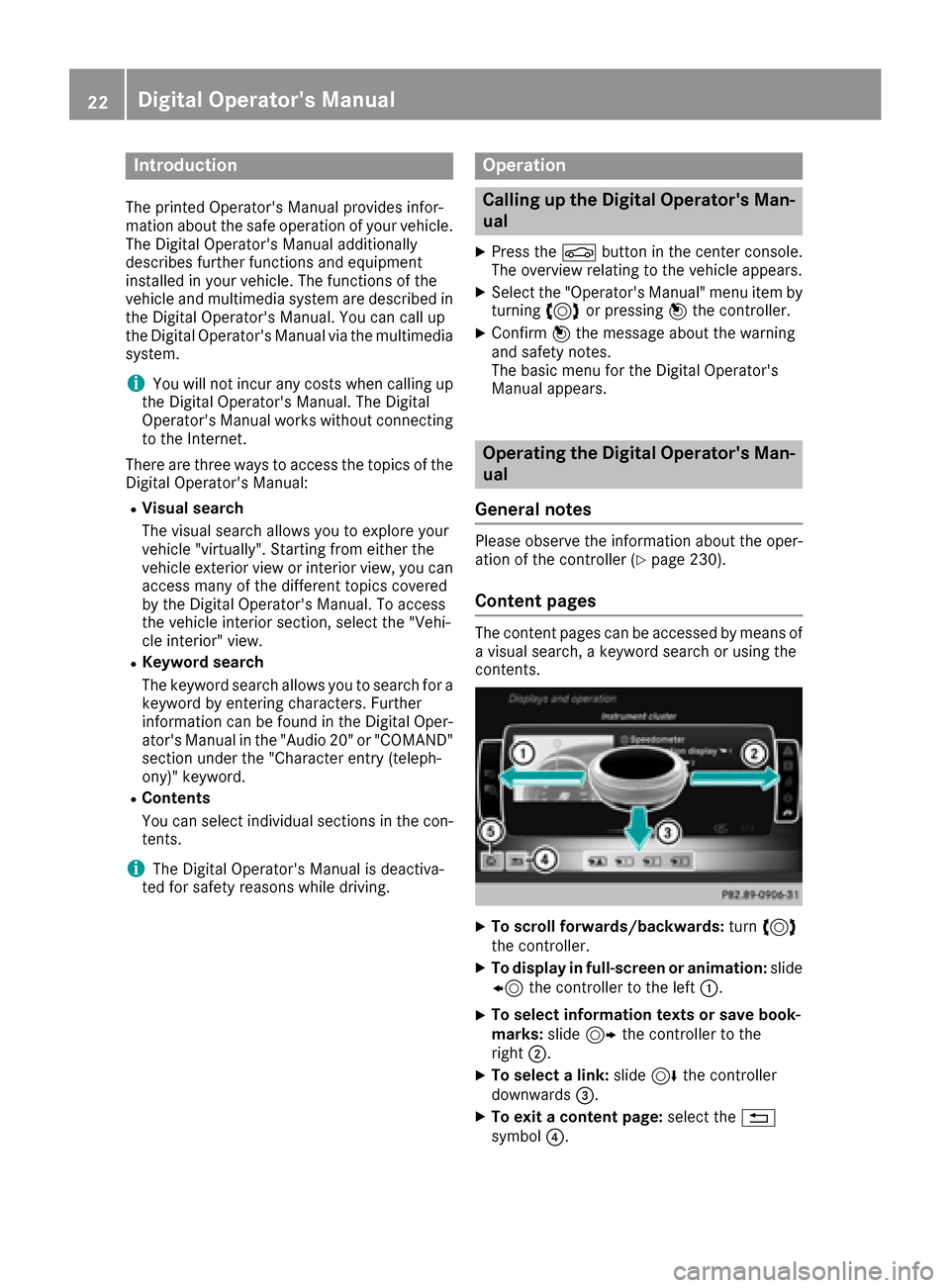
XTo scroll forwards/backwards: turn3
th econtroller .
XTo displayin full-screen or animation: slide
8 thecontroller to th elef t:.
XTo select information texts or sav ebook -
marks: slide9 thecontroller to th e
right ;.
XTo select alink :slide 6thecontroller
downwards =.
XTo exitacontent page: select the%
symbol ?.
22Digital Operator's Manual
Page 27 of 318
systems, e.g. the brake system. Use only genu-
ine Mercedes-Benz parts or parts of equal qual-ity. Only use tires, wheels and accessories that
have been specifically approved for your vehi-
cle.
Genuine Mercedes-Benz parts are subject to
strict quality control. Every part has been spe-
cifically developed, manufactured or selected
for and adapted to Mercedes-Benz vehicles.
Only genuine Mercedes-Benz parts should
therefore be used.
More than 300,000 different genuine
Mercedes-Benz parts are available for
Mercedes-Benz models.
All authorized Mercedes-Benz Centers maintain
a supply of genuine Mercedes-Benz parts for
necessary service and repair work. In addition,
strategically located parts delivery centers pro-
vide quick and reliable parts service.
Always specify the vehicle identification number
(VIN) when ordering genuine Mercedes-Benz
parts (
Ypage 307).
Operator's Manual
Vehicle equipment
i
This Operator's Manual describes all models
and all standard and optional equipment of
your vehicle available at the time of going to
print. Country-specific differences are possi-
ble. Bear in mind that your vehicle may not
feature all functions described here. This also applies to safety-relevant systems and func-
tions. The equipment in your vehicle may
therefore differ from that shown in the
descriptions and illustrations.
The original purchase agreement lists all sys-
tems installed in your vehicle.
Should you have any questions concerning
equipment and operation, please consult an
authorized Mercedes-Benz Center.
The Operator's Manual and Maintenance Book-
let are important documents and should be kept
in the vehicle.
Service and vehicle operation
Warranty
The implied warranty for your vehicle applies in
accordance with the warranty terms and condi- tions in the Service and Warranty Information
booklet.
Your authorized Mercedes-Benz Center will
replace and repair all factory-installed parts in
accordance with the following warranty terms
and conditions:
RNew Vehicle Limited Warranty
REmission System Warranty
REmission Performance Warranty
RCalifornia, Connecticut, Maine, Massachu-
setts, New York, Pennsylvania, Rhode Island
and Vermont Emission Control System War-
ranty
RState warranty enforcement laws (lemon
laws)
Replacement parts and accessories are covered
by the Mercedes-Benz Parts and Accessories
warranties. These are available at any author-
ized Mercedes-Benz Center.
iShould you lose your Service and Warranty
Information booklet, have an authorized
Mercedes-Benz Center arrange for a replace-
ment. The new Service and Warranty Infor-
mation booklet will be posted to you.
Information for customers in Califor-
nia
Under California law you may be entitled to a
replacement of your vehicle or a refund of the
purchase price or lease price, if after a reason-
able number of repair attempts Mercedes-Benz
USA, LLC and/or its authorized repair or service
facilities fail to fix one or more substantial
defects or malfunctions in the vehicle that are
covered by its express warranty.
During the period of 18 months from original
delivery of the vehicle or the accumulation of
18,000 miles (approximately 29,000 km) on the
odometer of the vehicle, whichever occurs first,
a reasonable number of repair attempts is pre-
sumed for a retail buyer or lessee if one or more of the following occurs:
(1) the same substantial defect or malfunction results in a condition that is likely to cause
death or serious bodily injury if the vehicle is
driven, that defect or malfunction has been
subject to repair two or more times, and you
Service and vehicle operation25
Introduction
Z
Page 34 of 318
Cockpit
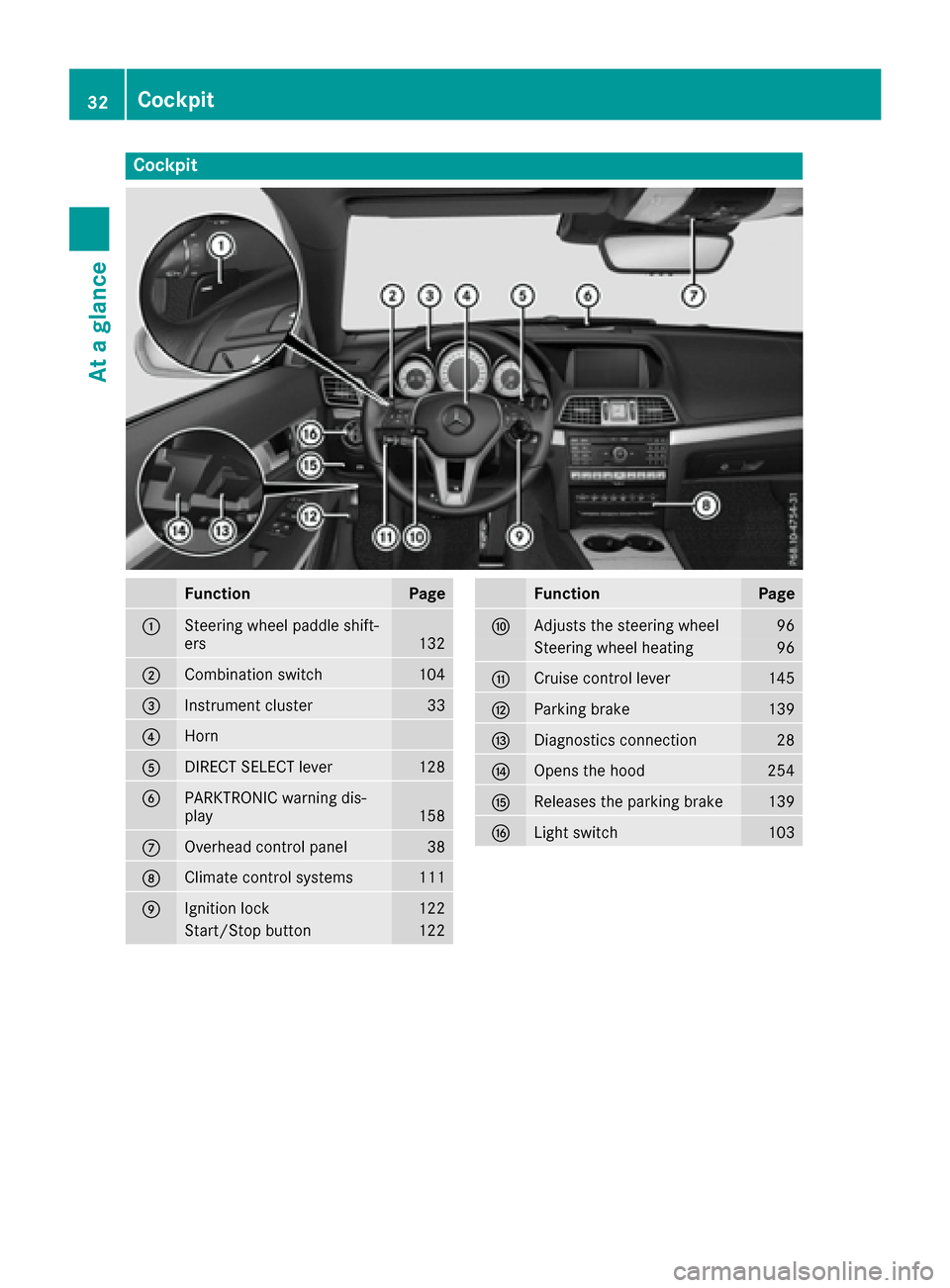
FunctionPage
:Steering wheel paddle shift-
ers132
;Combination switch104
=Instrument cluster33
?Horn
ADIRECT SELECT lever128
BPARKTRONIC warning dis-
play158
COverhead control panel38
DClimate control systems111
EIgnition lock122
Start/Stop button122
FunctionPage
FAdjusts the steering wheel96
Steering wheel heating96
GCruise control lever145
HParking brake139
IDiagnostics connection28
JOpens the hood254
KReleases the parking brake139
LLight switch103
32Cockpit
At a glance
Page 35 of 318
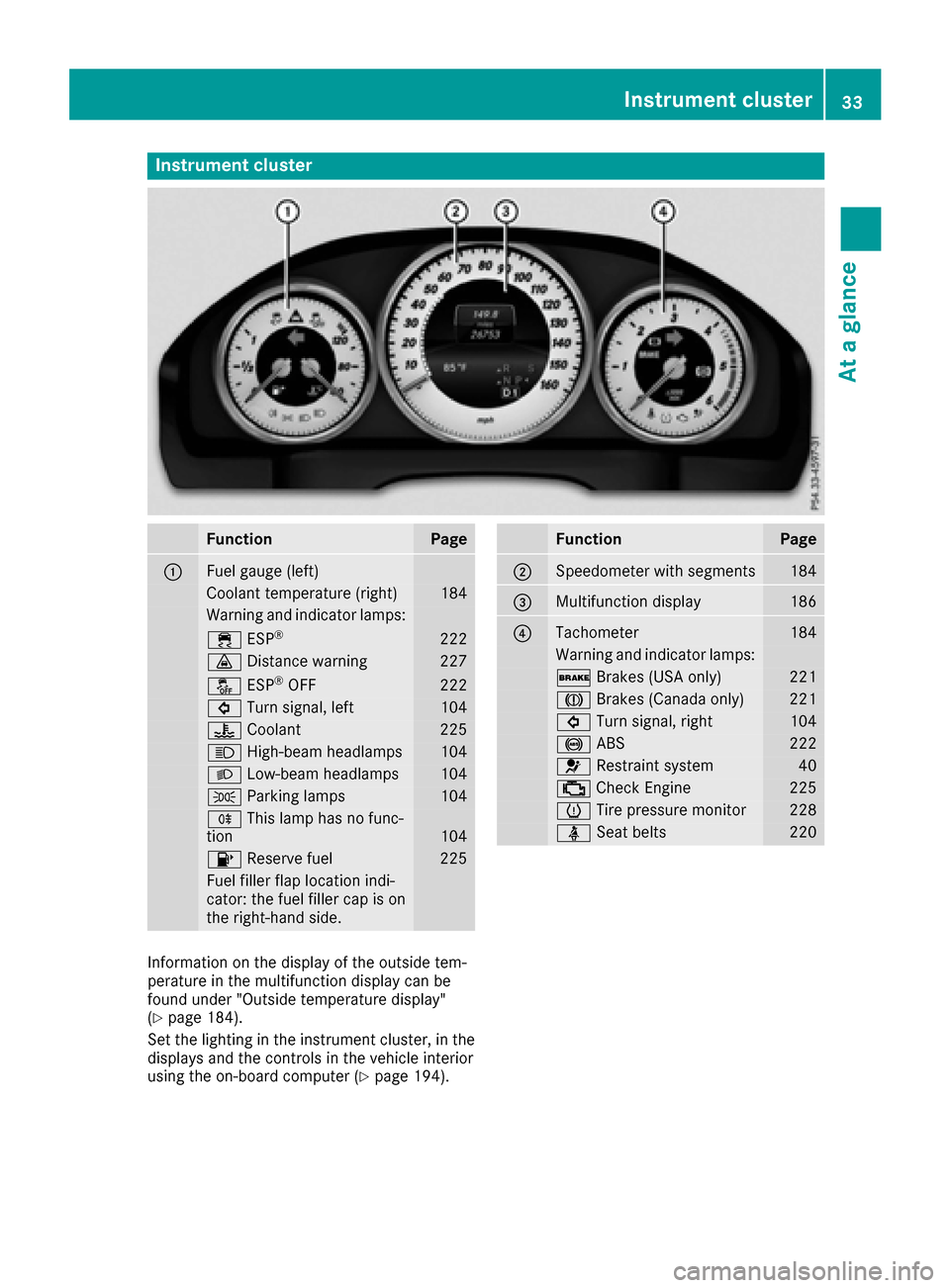
Instrument cluster
FunctionPage
:Fuelgauge (left)
Coolan ttemperature (right )184
Warning and indicator lamps:
÷ ESP®22 2
· Distanc ewarning22 7
å ESP®OF F222
# Turn signal, lef t104
? Coolan t225
K High-beam headlamps104
L Low-beam headlamps104
T Parking lamp s104
R This lamp has no func-
tion10 4
8 Reserve fuel225
Fue lfiller flap location indi-
cator: th efuel filler cap is on
th eright-hand side .
FunctionPage
;Speedometer wit hsegments18 4
=Multifunction display186
?Tachometer184
Warning and indicator lamps:
$ Brakes(US Aonly)22 1
J Brakes(Canada only)22 1
# Turn signal, right104
! ABS222
6 Restrain tsystem40
; CheckEngin e225
h Tirepressur emonitor22 8
ü Seat belt s220
Information on th edisplay of th eoutside tem-
peratur ein th emultifunction display can be
foun dunder "Outside temperature display"
(
Ypage 184).
Se tth elighting in th einstrumen tcluster, in th e
displays and th econtrol sin th evehicl einterior
usin gth eon-board computer (
Ypage 194).
Instrument cluster33
At a glance
Page 36 of 318
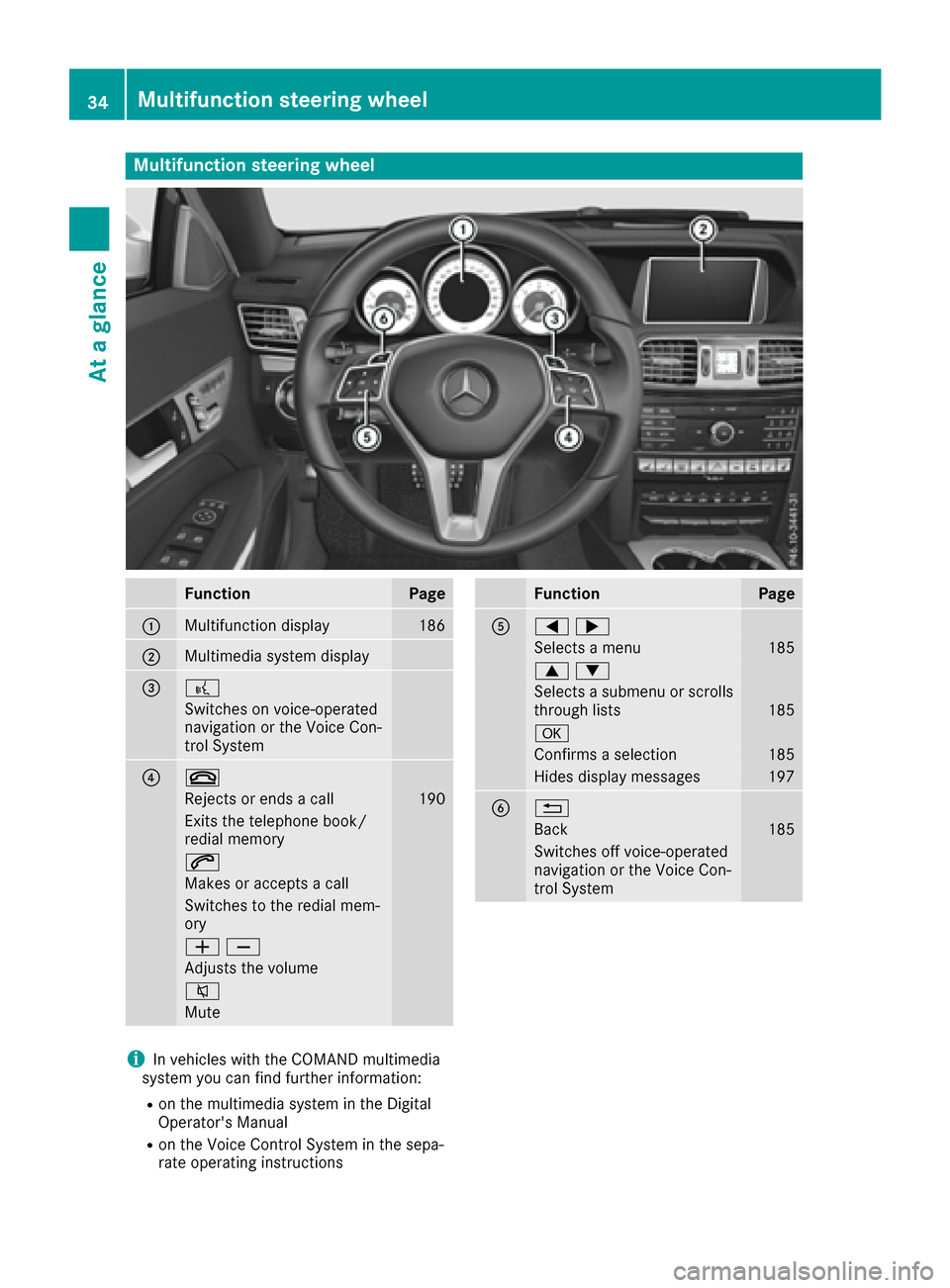
Multifunction steering wheel
FunctionPage
:Multifunction display186
;Multimedia system display
=?
Switches on voice-operated
navigation or the Voice Con-
trol System
?~
Rejects or ends a call190
Exits the telephone book/
redial memory
6
Makes or accepts a call
Switches to the redial mem-
ory
WX
Adjusts the volume
8
Mute
FunctionPage
A=;
Selects a menu185
9:
Selects a submenu or scrolls
through lists185
a
Confirms a selection185
Hides display messages197
B%
Back185
Switches off voice-operated
navigation or the Voice Con-
trol System
iIn vehicles with the COMAND multimedia
system you can find further information:
Ron the multimedia system in the Digital
Operator's Manual
Ron the Voice Control System in the sepa-
rate operating instructions
34Multifunction steering wheel
At a glance
Page 38 of 318
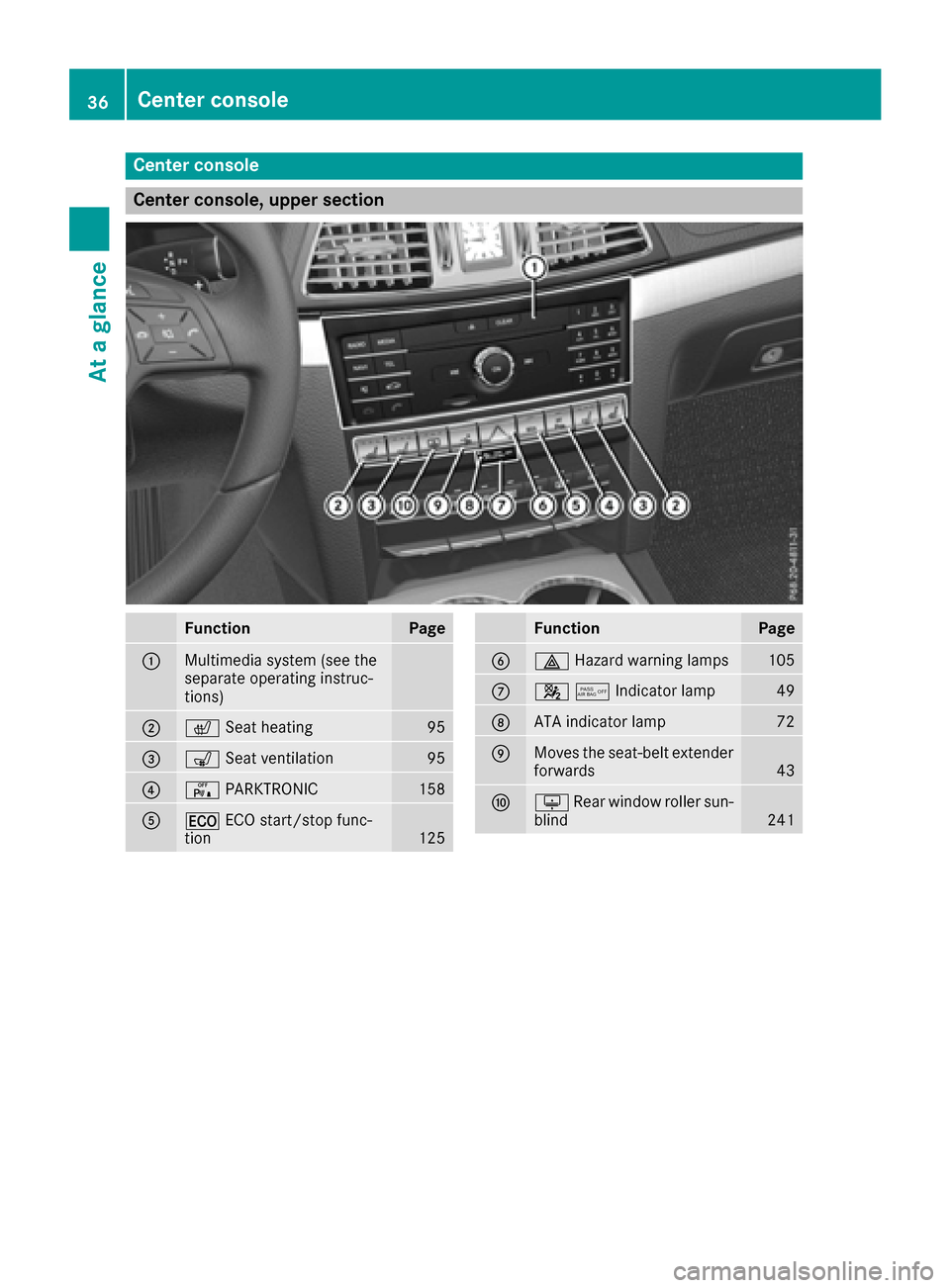
Center console
Center console, upper section
FunctionPage
:Multimedia system (see the
separate operating instruc-
tions)
;cSeat heating95
=sSeat ventilation95
?cPARKTRONIC158
A¤ECO start/stop func-
tion125
FunctionPage
B£ Hazard warning lamps105
C45Indicator lamp49
DATA indicator lamp72
EMoves the seat-belt extender
forwards43
FuRear window roller sun-
blind241
36Center console
At a glance
Page 39 of 318
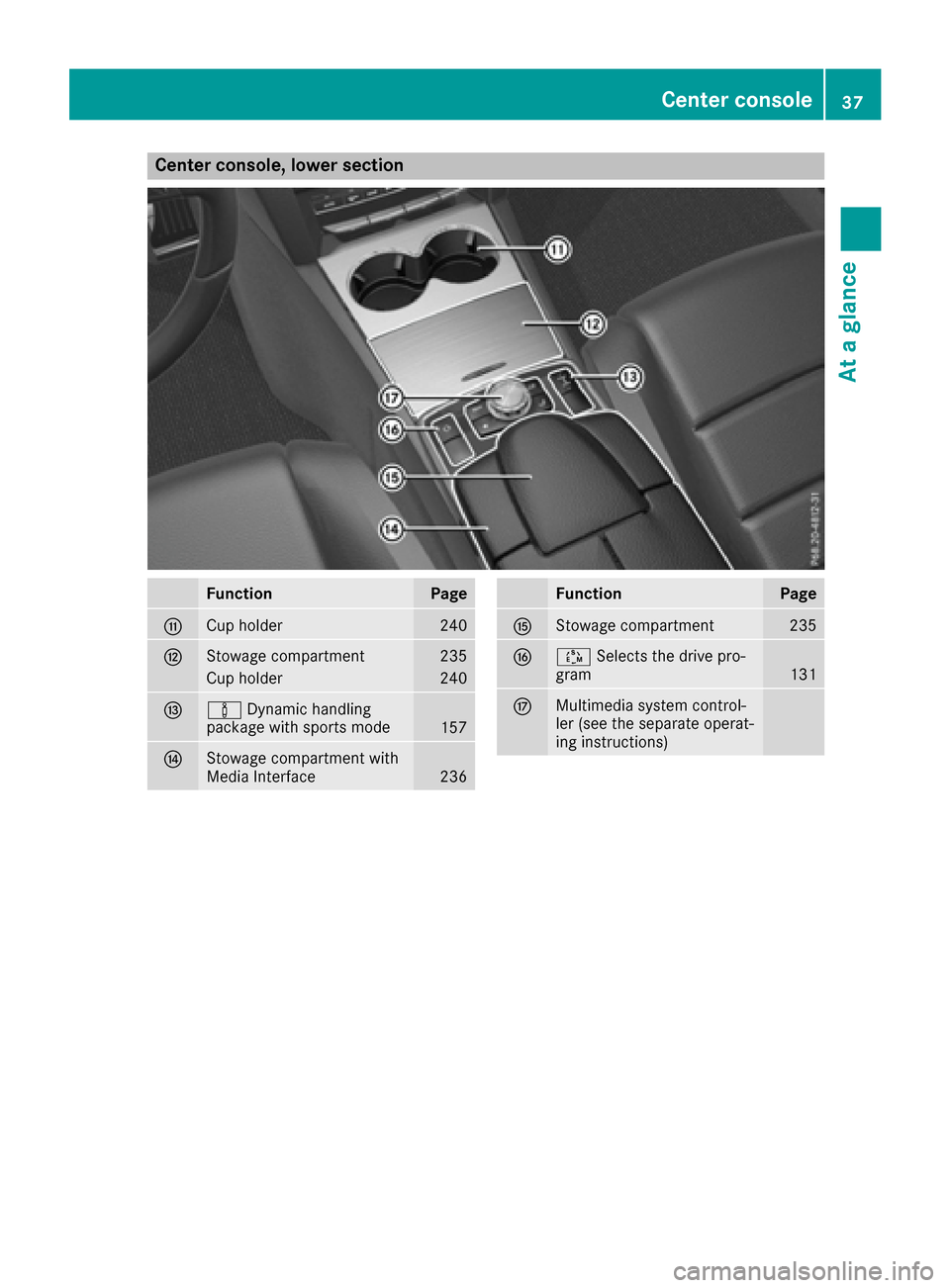
Center console, lower section
FunctionPage
GCup holder240
HStowage compartment235
Cup holder240
IàDynamic handling
package with sports mode157
JStowage compartment with
Media Interface236
FunctionPage
KStowage compartment235
LÚ Selects the drive pro-
gram131
MMultimedia system control-
ler (see the separate operat-
ing instructions)
Center console37
At a glance
Page 40 of 318
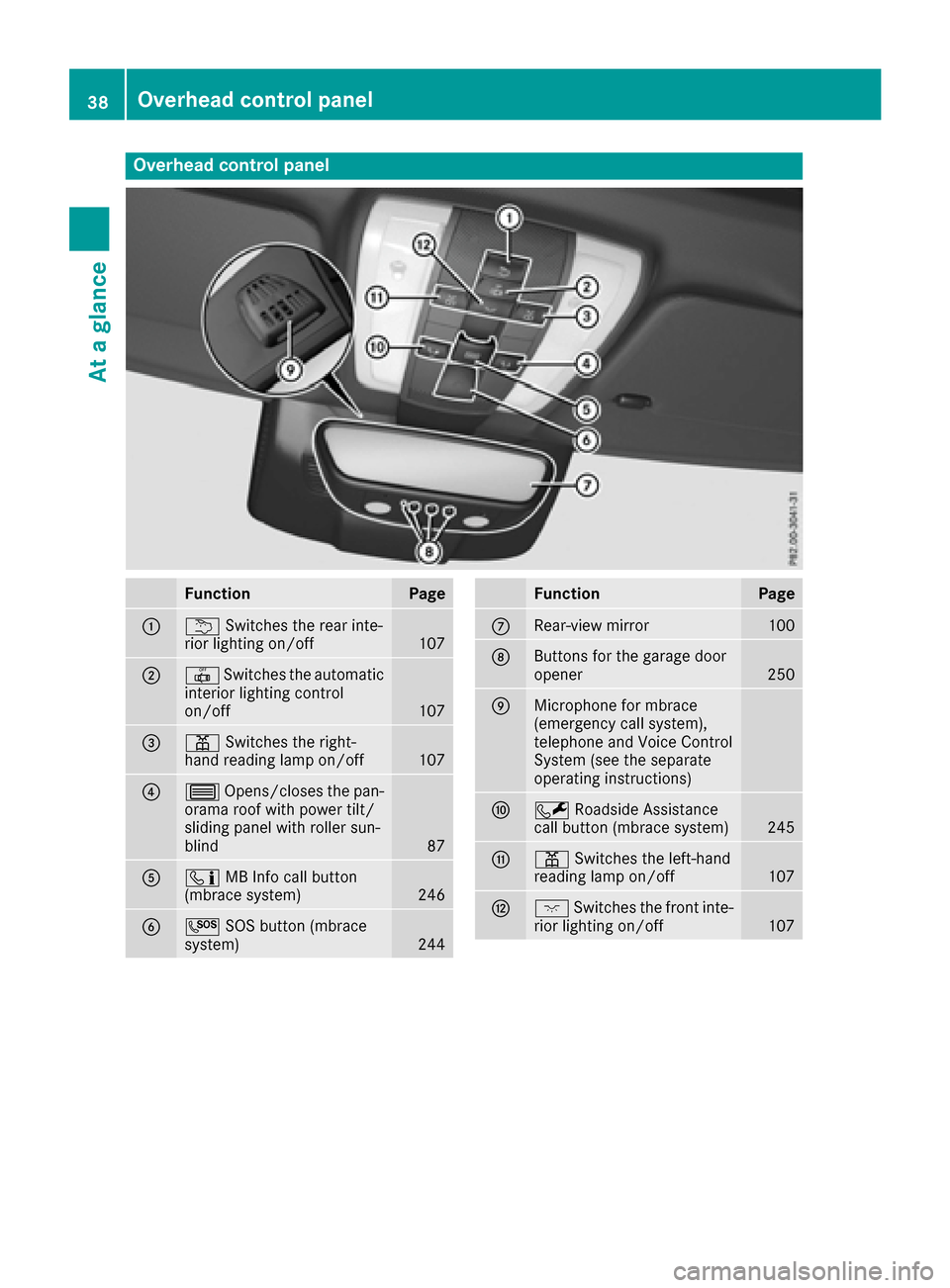
Overhead control panel
FunctionPage
:uSwitches the rear inte-
rior lighting on/off107
;| Switches the automatic
interior lighting control
on/off
107
=p Switches the right-
hand reading lamp on/off107
?3 Opens/closes the pan-
orama roof with power tilt/
sliding panel with roller sun-
blind
87
Aï MB Info call button
(mbrace system)246
BG SOS button (mbrace
system)244
FunctionPage
CRear-view mirror100
DButtons for the garage door
opener250
EMicrophone for mbrace
(emergency call system),
telephone and Voice Control
System (see the separate
operating instructions)
FF Roadside Assistance
call button (mbrace system)245
Gp Switches the left-hand
reading lamp on/off107
Hc Switches the front inte-
rior lighting on/off107
38Overhead control panel
At a glance
Page 41 of 318

Door controlpanel
FunctionPage
:r 45=
Stores settings for the seat,
exterior mirrors and steering
wheel
102
;Adjusts the seats electrically92
=%& Unlocks/locks
the vehicle79
?Opens the door78
A7 Zö\
Adjusts and folds the exterior
mirrors in/out electrically
99
FunctionPage
BW Opens/closes the side
windows83
Cn Activates/deactivates
the override feature for the
side windows in the rear
compartment
61
Do Opens the trunk lid81
Door control panel39
At a glance