trunk MERCEDES-BENZ E-Class COUPE 2017 C207 Owner's Manual
[x] Cancel search | Manufacturer: MERCEDES-BENZ, Model Year: 2017, Model line: E-Class COUPE, Model: MERCEDES-BENZ E-Class COUPE 2017 C207Pages: 318, PDF Size: 7.35 MB
Page 10 of 318
EBD (electronic brake force distri-
bution) ............................................. 69
ESP
®(Electronic Stability Pro-
gram) ............................................... 67
Important safety information ........... 62
Overview .......................................... 62
PRE-SAFE
®Brake ............................. 69
STEER CONTROL ............................. 71
Driving systems
360°camera .................................. 169
Active Blind Spot Assist ................. 178
Active Driving Assistance pack-
age .................................................1 78
Active Lane Keeping Assist ............ 181
Active Parking Assist ..................... 161
ATTENTION ASSIST ........................ 172
Blind Spot Assist ............................ 175
Cruise control ................................ 145
Display message ............................ 209
DISTRONIC PLUS ........................... 147
DISTRONIC PLUS with Steering
Assist and Stop&Go Pilot ...............1 54
Dynamic handling package with
sports mode .................................. 157
HOLD function ............................... 156
Lane Keeping Assist ......................1 77
Lane Tracking package .................. 175
PARKTRONIC ................................. 158
Rear view camera .......................... 165
Traffic Sign Assist .......................... 174
Driving tips
Automatic transmission ................. 130
Brakes ...........................................1 42
Break-in period .............................. 121
Downhill gradient ........................... 142
Drinking and driving ....................... 141
Driving in winter .............................1 44
Driving on flooded roads ................ 144
Driving on wet roads ......................1 43
Exhaust check ............................... 141
Fuel ................................................ 140
General .......................................... 140
Hydroplaning ................................. 143
Icy road surfaces ........................... 144
Limited braking efficiency on sal-
ted roads ....................................... 143
Snow chains .................................. 283
Wet roa
d surface ........................... 142 DVD video
Operating (on-board computer) ..... 189
see also Digital Operator's Man-
ual ..................................................2 29
Dynamic handling package with
sports mode ....................................... 157
E
E10
see Fuel
EASY-ENTRY feature
Activating/deactivating ................. 195
Function/notes ................................ 98
EASY-EXIT feature
Crash-responsive .............................9 9
Function/notes ................................ 98
Switching on/off ........................... 195
EBD (electronic brake force distri-
bution)
Display message ............................ 199
Function/notes ................................ 69
ECO display
Function/notes ............................. 141
On-board computer ....................... 187
ECO start/stop function
Automatic engine start .................. 125
Automatic engine switch-off .......... 125
Deactivating/activating ................. 126
General information ....................... 125
Important safety notes .................. 125
Introduction ................................... 125
Electronic Stability Program
see ESP
®(Electronic Stability Program)
Emergency
Automatic measures after an acci-
dent ................................................. 56
Emergency release
Driver's door .................................... 80
Trunk ............................................... 82
Vehicle ............................................. 80
Emergency spare wheel
General notes ................................ 304
Important safety notes .................. 304
Removing ....................................... 305
Storage location ............................ 305
Stowing .......................................... 305
Technical data ............................... 304
8Index
Page 12 of 318
Fuel filler flapOpening ........................................ .136
Fuel level
Calling up the range (on-board
computer) ...................................... 187
Fuel tank
Capacity ........................................ 309
Problem (malfunction) ................... 138
Fuse allocation chart (vehicle tool
kit) ...................................................... 266
Fuses
Allocation chart .............................2 79
Before changing .............................2 79
Dashboard fuse box ....................... 279
Fuse box in the engine compart-
ment .............................................. 280
Fuse box in the trunk ..................... 280
Important safety notes .................. 279
G
Garage door opener
Clearing the memory ..................... 253
General notes ................................ 250
Important safety notes .................. 250
Opening/closing the garage door .. 252
Problems when programming ........2 52
Programming (button in the rear-
view mirror) ................................... 250
Synchronizing the rolling code ....... 251
Gasoline ............................................. 309
Genuine parts ...................................... 24
Glove box ...........................................2 36
Google™ Local Search
see also Digital Operator's Man-
ual ..................................................2 29
H
Handbrake
see Parking brake
Hazard warning lamps ......................105
Head bags
Display message ............................ 203
Head restraints
Adjusting ......................................... 93
Adjusting (electrically) ..................... 93
see NECK-PRO head restraints Headlamps
Fogging up ..................................... 106
see Automatic headlamp mode
Heating
see Climate control
High beam flasher .............................1 04
High-beam headlamps
Adaptive Highbeam Assist ............. 105
Changing bulbs .............................. 108
Display message ............................ 206
Switching on/off ........................... 104
Hill start assist .................................. 124
HOLD function
Activating ....................................... 156
Deactivating ................................... 156
Display message ............................ 209
Function/notes .............................1 56
Home address
see also Digital Operator's Man-
ual ..................................................2 29
Hood
Closing ...........................................2 55
Display message ............................ 217
Important safety notes .................. 254
Opening ......................................... 254
Horn ...................................................... 32
Hydroplaning ..................................... 143
I
Ignition lock
see Key positions
Immobilizer .......................................... 72
Indicator and warning lamps
COLLISION PREVENTION ASSIST
PLUS .............................................. 227
Indicator lamps
see Warning and indicator lamps
Indicators
see Turn signals
Instrument cluster
Overview .......................................... 33
Settings ......................................... 193
Warning and indicator lamps ........... 33
Instrument cluster lighting .............. 194
Interior lighting
Automatic control .......................... 107
10Index
Page 18 of 318
Important safety guidelines .............42
Introduction .....................................4 1
Releasin g ......................................... 44
Switching belt adjustment on/off
(on-board computer) ...................... 196
Warning lamp ................................. 220
Warning lamp (function) ................... 45
Seats
Adjusting (electrically) ..................... 92
Adjusting the 4-way lumbar sup-
port .................................................. 94
Adjusting the head restraint ............ 93
Adjusting the multicontour seat ....... 94
Cleaning the cover ......................... 264
Correct driver's seat position ........... 91
Folding the backrests forward/
back ................................................. 93
Important safety notes .................... 91
Overview .......................................... 91
Seat backrest display message ..... 217
Seat heating .................................... 95
Seat heating problem ...................... 96
Storing settings (memory func-
tion) ............................................... 102
Switching seat heating on/off ......... 95
Switching seat ventilation on/
off .................................................... 95
Section
Trunk ............................................... 80
Securing cargo .................................. 238
Selector lever
Cleaning ......................................... 263
Sensors (cleaning instructions) ....... 262
Service menu (on-board com-
puter) .................................................. 193
Service message
see ASSYST PLUS
Service products
Brake fluid ..................................... 311
Coolant (engine) ............................ 312
Engine oil ....................................... 311
Fuel ................................................ 309
Important safety notes .................. 308
Refrigerant (air-conditioning sys-
tem) ............................................... 313
Washer fluid ................................... 312
Setting the air distribution ............... 116Setting the airflow
............................ 117
Setting the date/time format
see also Digital Operator's Man-
ual .................................................. 229
Setting the language
see also Digital Operator's Man-
ual .................................................. 229
Setting the time
see also Digital Ope rator's Ma
n-
ual .................................................. 229
Settings
Factory (on-board computer) ......... 196
On-board computer ....................... 193
Side impact air bag ............................. 47
Side marker lamp (display mes-
sage) ................................................... 206
Side windows
Cleaning ......................................... 261
Convenience closing feature ............ 84
Convenience opening feature .......... 83
Important safety information ........... 82
Opening/closing .............................. 83
Problem (malfunction) ..................... 86
Resetting ......................................... 85
Reversing feature ............................. 82
SIRIUS services
see also Digital Operator's Man-
ual .................................................. 229
Sliding sunroof
see Panorama roof with power
tilt/sliding panel
SmartKey
Changing the battery ....................... 76
Changing the programming ............. 74
Checking the battery ....................... 76
Convenience closing feature ............ 84
Convenience opening feature .......... 83
Display message ............................ 218
Door central locking/unlocking ....... 73
Important safety notes .................... 73
Loss ................................................. 77
Mechanical key ................................ 75
Overview .......................................... 73
Positions (ignition lock) ................. 122
Problem (malfunction) ..................... 77
Starting the engine ........................ 124
16Index
Page 19 of 318
SMSsee also Digital Operator's Man-
ual .................................................. 229
Snow chains ...................................... 283
Sockets
General notes ................................ 243
Rear compartment .........................2 43
Sound
Switching on/off ........................... 230
Special seat belt retractor .................. 57
Specialist workshop ............................ 28
Speed, controlling
see Cruise control
Speedometer
Digital ............................................ 187
In the Instrument cluster ................. 33
Segments ...................................... 184
Selecting the display unit ...............1 93
Standing lamps
Display message ............................ 206
Switching on/off ........................... 104
Start/stop function
see ECO start/stop function
Starting (engine) ................................ 123
STEER CONTROL .................................. 71
Steering
Display message ............................ 218
Steering Assist and Stop&Go Pilot
(DISTRONIC PLUS)
Activating/deactivating ................. 192
Display message ............................ 213
Steering assistant STEER CON-
TROL
see STEER CONTROL
Steering wheel
Adjusting (electrically) ..................... 96
Button overview ............................... 34
Buttons (on-board computer) ......... 185
Cleaning ......................................... 263
Important safety notes .................... 96
Paddle shifters ............................... 132
Steering wheel heating .................... 96
Storing settings (memory func-
tion) ............................................... 102
Steering wheel heating
Problem (malfunction) ..................... 98
Switching on/off .............................. 96 Steering wheel paddle shifters
........132
Stowage areas ................................... 235
Stowage compartments
Armrest (under) .............................2 36
Center console .............................. 236
Cup holders ..................... .............. 240
G
love box ....................................... 236
Important safety information ......... 235
Stowage net ................................... 237
Under driver's seat/front-
passenger seat .............................. 236
Stowage net ....................................... 237
Stowage well beneath the trunk
floor .................................................... 239
Summer tires ..................................... 283
Sun visor ............................................ 240
Surround lighting (on-board com-
puter) .................................................. 194
Switching air-recirculation mode
on/off ................................................. 119
Switching on media mode
Via the device list .......................... 234
T
Tachometer ........................................ 184
Tail lamps
Display message ............................ 206
Tank
see Fuel tank
Tank content
Fuel gauge ....................................... 33
Technical data
Capacities ...................................... 308
Emergency spare wheel ................. 304
Information .................................... 306
Tires/wheels ................................. 303
Vehicle data ................................... 313
Telephone
Accepting a call (multifunction
steering wheel) .............................. 190
Authorizing a mobile phone (con-
necting) ......................................... 233
Connecting a mobile phone (gen-
eral information) ............................ 232
Display message ............................ 217
Menu (on-board computer) ............ 190
Number from the phone book ........ 190
Index17
Page 21 of 318
Tire tread ....................................... 282
Tire tread (definition) ..................... 299
Total load limit (definition) ............. 299
Traction ......................................... 293
Traction (definition) ....................... 299
Tread wear ..................................... 293
Uniform Tire Quality Grading
Standards ...................................... 293
Uniform Tire Quality Grading
Standards (definition) .................... 297
Wear indicator (definition) ............. 299
Wheel and tire combination ........... 303
Wheel rim (definition) .................... 298
see Flat tire
Top Tether ............................................ 59
Tow-starting
Emergency engine starting ............ 278
Important safety notes .................. 276
Towing a trailer
ESP
®(Electronic Stability Pro-
gram) ............................................... 69
Towing away
Important safety guidelines ........... 276
Installing the towing eye ................ 277
Removing the towing eye ............... 277
Transporting the vehicle ................ 278
With both axles on the ground ....... 277
With the rear axle raised ................ 278
Towing eye ......................................... 266
Traffic reports
see also Digital Operator's Man-
ual .................................................. 229
Traffic Sign Assist
Display message ............................ 209
Function/notes ............................. 174
Important safety notes .................. 174
Instrument cluster display ............. 174
Transfer case ..................................... 135
Transmission
see Automatic transmission
Transmission position display ......... 128
Transmission position display
(DIRECT SELECT lever) ...................... 128
Transporting the vehicle .................. 278
Trim pieces (cleaning instruc-
tions) .................................................. 264 Trip computer (on-board com-
puter)
.................................................. 187
Trip odometer
Calling up ....................................... 186
Resetting (on-board computer) ...... 187
Trunk
Emerg ency re
lease .......................... 81
Important safety notes .................... 80
Locking separately ........................... 81
Opening (automatically from
inside) .............................................. 81
Opening/closing (manually from
outside) ............................................ 80
Trunk lid
Display message ............................ 217
Opening dimensions ...................... 313
Trunk load (maximum) ...................... 313
Turn signals
Display message ............................ 206
Switching on/off ........................... 104
Two-way radio
Frequencies ................................... 306
Installation ..................................... 306
Transmission output (maximum) .... 306
Type identification plate
see Vehicle identification plate
U
UnlockingEmergency unlocking ....................... 80
From inside the vehicle (central
unlocking button) ............................. 79
USB devices
Connecting to the Media Inter-
face ............................................... 234
V
Vanity mirror (in the sun visor) ........ 241
Vehicle
Correct use ...................................... 28
Data acquisition ............................... 29
Display message ............................ 215
Equipment ....................................... 25
Individual settings .......................... 193
Limited Warranty ............................. 29
Loading .......................................... 290
Index19
Page 41 of 318

Door controlpanel
FunctionPage
:r 45=
Stores settings for the seat,
exterior mirrors and steering
wheel
102
;Adjusts the seats electrically92
=%& Unlocks/locks
the vehicle79
?Opens the door78
A7 Zö\
Adjusts and folds the exterior
mirrors in/out electrically
99
FunctionPage
BW Opens/closes the side
windows83
Cn Activates/deactivates
the override feature for the
side windows in the rear
compartment
61
Do Opens the trunk lid81
Door control panel39
At a glance
Page 74 of 318
Protection against theft
Immobilizer
The immobilizer prevents your vehicle from
being started without the correct SmartKey.
XTo activate with the SmartKey:remove the
SmartKey from the ignition lock.
XTo activate with KEYLESS-GO: switch the
ignition off and open the driver's door.
XTo deactivate: switch on the ignition.
When leaving the vehicle, always take the
SmartKey with you and lock the vehicle. Anyone
can start the engine if a valid SmartKey has been
left inside the vehicle.
iThe immobilizer is always deactivated when
you start the engine.
In the event that the engine cannot be started
(yet the vehicle's battery is charged), the sys-
tem is not operational. Contact an authorized
Mercedes-Benz Center or call
1-800-FOR-MERCedes (in the USA) or
1-800-387-0100 (in Canada).
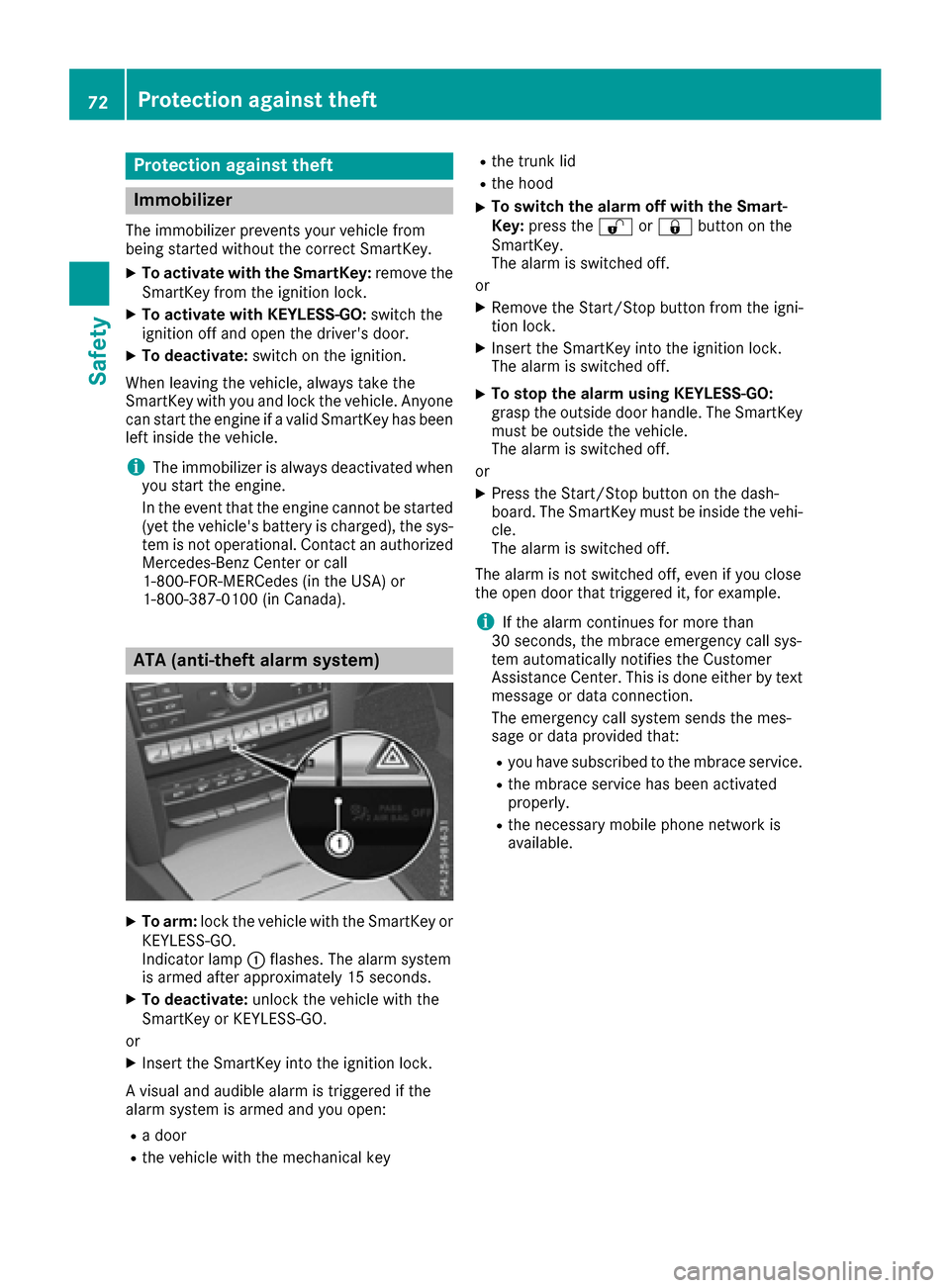
ATA (anti-theft alarm system)
XTo arm: lock the vehicle with the SmartKey or
KEYLESS-GO.
Indicator lamp :flashes. The alarm system
is armed after approximately 15 seconds.
XTo deactivate: unlock the vehicle with the
SmartKey or KEYLESS-GO.
or
XInsert the SmartKey into the ignition lock.
A visual and audible alarm is triggered if the
alarm system is armed and you open:
Ra door
Rthe vehicle with the mechanical key
Rthe trunk lid
Rthe hood
XTo switch the alarm off with the Smart-
Key: press the %or& button on the
SmartKey.
The alarm is switched off.
or
XRemove the Start/Stop button from the igni-
tion lock.
XInsert the SmartKey into the ignition lock.
The alarm is switched off.
XTo stop the alarm using KEYLESS-GO:
grasp the outside door handle. The SmartKey
must be outside the vehicle.
The alarm is switched off.
or
XPress the Start/Stop button on the dash-
board. The SmartKey must be inside the vehi-
cle.
The alarm is switched off.
The alarm is not switched off, even if you close
the open door that triggered it, for example.
iIf the alarm continues for more than
30 seconds, the mbrace emergency call sys-
tem automatically notifies the Customer
Assistance Center. This is done either by text message or data connection.
The emergency call system sends the mes-
sage or data provided that:
Ryou have subscribed to the mbrace service.
Rthe mbrace service has been activated
properly.
Rthe necessary mobile phone network is
available.
72Protection against theft
Safety
Page 75 of 318
SmartKey
Important safety notes
GWARNING
If children are left unsupervised in the vehicle,
they could:
Ropen the doors, thus endangering other
people or road users.
Rget out and disrupt traffic.
Roperate the vehicle's equipment.
Additionally, children could set the vehicle in
motion if, for example, they:
Rrelease the parking brake.
Rshifting the automatic transmission out of
park position P
RStart the engine.
There is a risk of an accident and injury.
When leaving the vehicle, always take the
SmartKey with you and lock the vehicle. Never
leave children or animals unattended in the
vehicle. Always keep the SmartKey out of
reach of children.
GWARNING
If you attach heavy or large objects to the
SmartKey, the SmartKey could be uninten-
tionally turned in the ignition lock. This could
cause the engine to be switched off. There is a risk of an accident.
Do not attach any heavy or large objects to the
SmartKey. Remove any bulky key rings before
inserting the SmartKey into the ignition lock.
!Keep the SmartKey away from strong mag-
netic fields. Otherwise, the remote control
function could be affected.
Strong magnetic fields can occur in the vicin-
ity of powerful electrical installations.
Do not keep the SmartKey:
Rwith electronic devices, e.g. a mobile phone
or another SmartKey.
Rwith metallic objects, e.g. coins or metal foil.
Rinside metallic objects, e.g. a metal case.
This can affect the functionality of the Smart- Key.
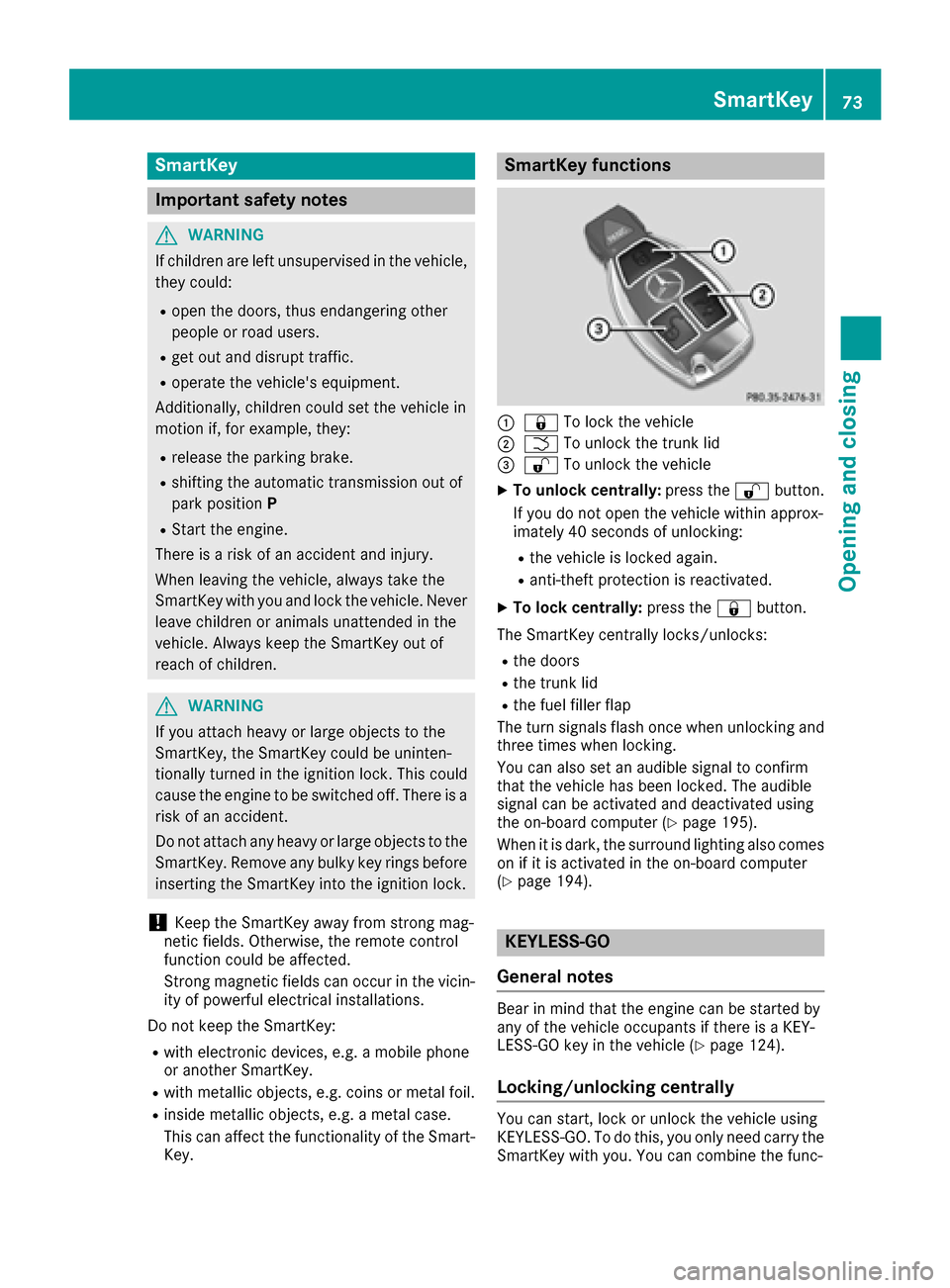
SmartKey functions
:& To lock the vehicle
;FTo unlock the trunk lid
=%To unlock the vehicle
XTo unlock centrally: press the%button.
If you do not open the vehicle within approx-
imately 40 seconds of unlocking:
Rthe vehicle is locked again.
Ranti-theft protection is reactivated.
XTo lock centrally: press the&button.
The SmartKey centrally locks/unlocks:
Rthe doors
Rthe trunk lid
Rthe fuel filler flap
The turn signals flash once when unlocking and
three times when locking.
You can also set an audible signal to confirm
that the vehicle has been locked. The audible
signal can be activated and deactivated using
the on-board computer (
Ypage 195).
When it is dark, the surround lighting also comes
on if it is activated in the on-board computer
(
Ypage 194).
KEYLESS-GO
General notes
Bear in mind that the engine can be started by
any of the vehicle occupants if there is a KEY-
LESS-GO key in the vehicle (
Ypage 124).
Locking/unlocking centrally
You can start, lock or unlock the vehicle using
KEYLESS-GO. To do this, you only need carry the
SmartKey with you. You can combine the func-
SmartKey73
Opening and closing
Z
Page 76 of 318
tions of KEYLESS-GO with those of a conven-
tional SmartKey. Unlock the vehicle by using
KEYLESS-GO, for instance, and lock it using the
&button on the SmartKey.
When locking or unlocking with KEYLESS-GO,
the distance between the SmartKey and the cor-
responding door handle must not be greater
than 3 ft (1 m).
A check which periodically establishes a radio
connection between the vehicle and the Smart-
Key determines whether a valid SmartKey is in
the vehicle. This occurs, for example:
Rwhen the external door handles are touched
Rwhen starting the engine
Rwhile the vehicle is in motion
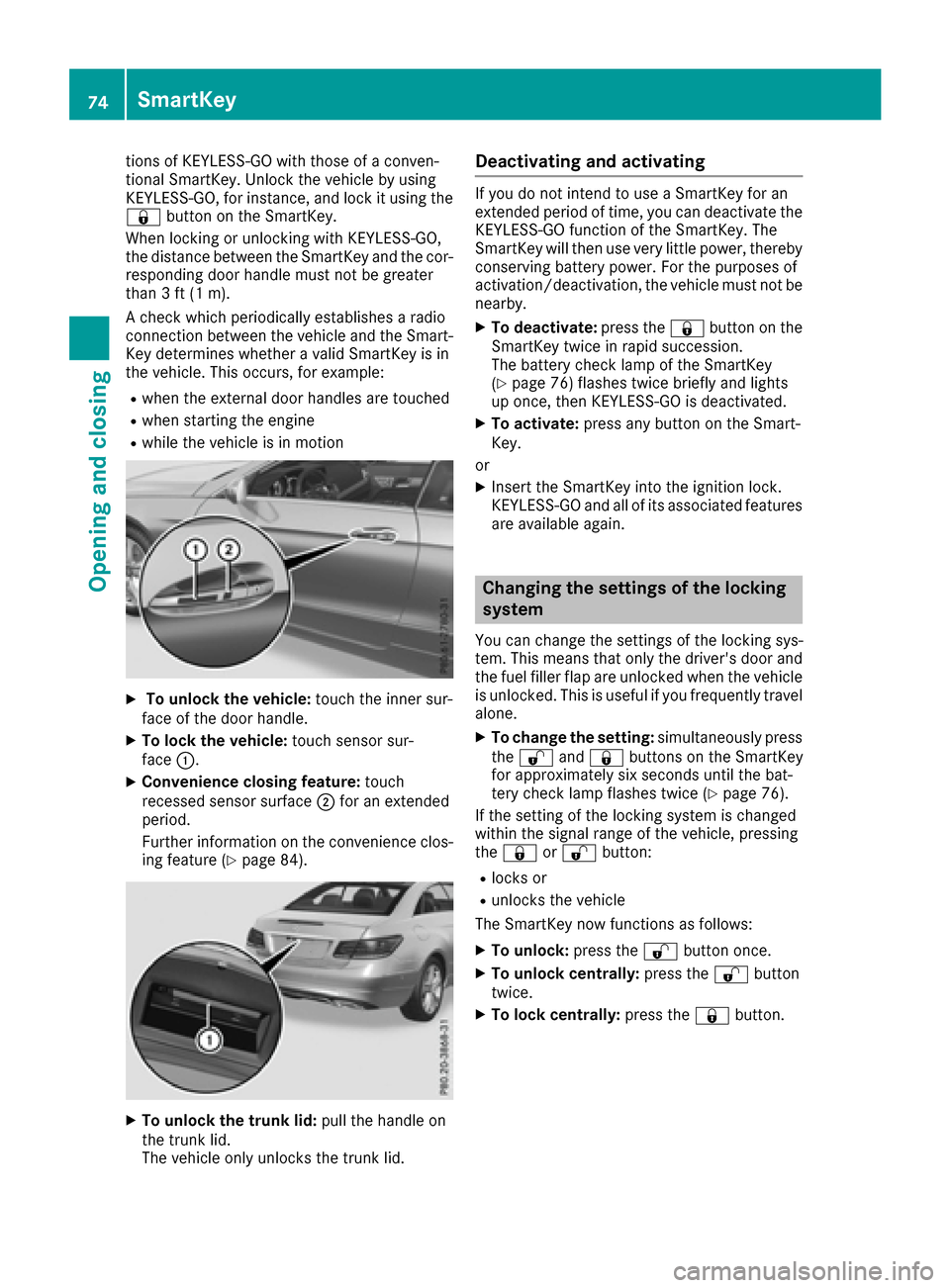
XTo unlock the vehicle: touch the inner sur-
face of the door handle.
XTo lock the vehicle: touch sensor sur-
face :.
XConvenience closing feature: touch
recessed sensor surface ;for an extended
period.
Further information on the convenience clos-
ing feature (
Ypage 84).
XTo unlock the trunk lid: pull the handle on
the trunk lid.
The vehicle only unlocks the trunk lid.
Deactivating and activating
If you do not intend to use a SmartKey for an
extended period of time, you can deactivate the
KEYLESS-GO function of the SmartKey. The
SmartKey will then use very little power, thereby
conserving battery power. For the purposes of
activation/deactivation, the vehicle must not be
nearby.
XTo deactivate: press the&button on the
SmartKey twice in rapid succession.
The battery check lamp of the SmartKey
(
Ypage 76) flashes twice briefly and lights
up once, then KEYLESS-GO is deactivated.
XTo activate: press any button on the Smart-
Key.
or
XInsert the SmartKey into the ignition lock.
KEYLESS-GO and all of its associated features
are available again.
Changing the settings of the locking
system
You can change the settings of the locking sys-
tem. This means that only the driver's door and
the fuel filler flap are unlocked when the vehicle
is unlocked. This is useful if you frequently travel
alone.
XTo change the setting: simultaneously press
the % and& buttons on the SmartKey
for approximately six seconds until the bat-
tery check lamp flashes twice (
Ypage 76).
If the setting of the locking system is changed
within the signal range of the vehicle, pressing
the & or% button:
Rlocks or
Runlocks the vehicle
The SmartKey now functions as follows:
XTo unlock: press the%button once.
XTo unlock centrally: press the%button
twice.
XTo lock centrally: press the&button.
74SmartKey
Opening and closing
Page 77 of 318
The KEYLESS-GO function is changed as fol-
lows:
XTo unlock the driver's door:touch the inner
surface of the door handle on the driver's
door.
XTo unlock centrally: touch the inner surface
of the front-passenger door handle.
XTo lock centrally: touch the outer sensor
surface on one of the door handles.
XTo restore the factory settings: press and
hold down the %and& buttons simul-
taneously for approximately six seconds until
the battery check lamp flashes twice
(
Ypage 76).
Mechanical key
General notes
If the vehicle can no longer be locked or
unlocked with the SmartKey, use the mechani-
cal key.
If you use the mechanical key to unlock and
open the driver's door or the trunk lid, the anti-
theft alarm system will be triggered. Switch off
the alarm (
Ypage 72).
If you unlock the vehicle using the mechanical
key, the fuel filler flap will not be unlocked auto-
matically.
XTo unlock the fuel filler flap: insert the
SmartKey into the ignition lock.
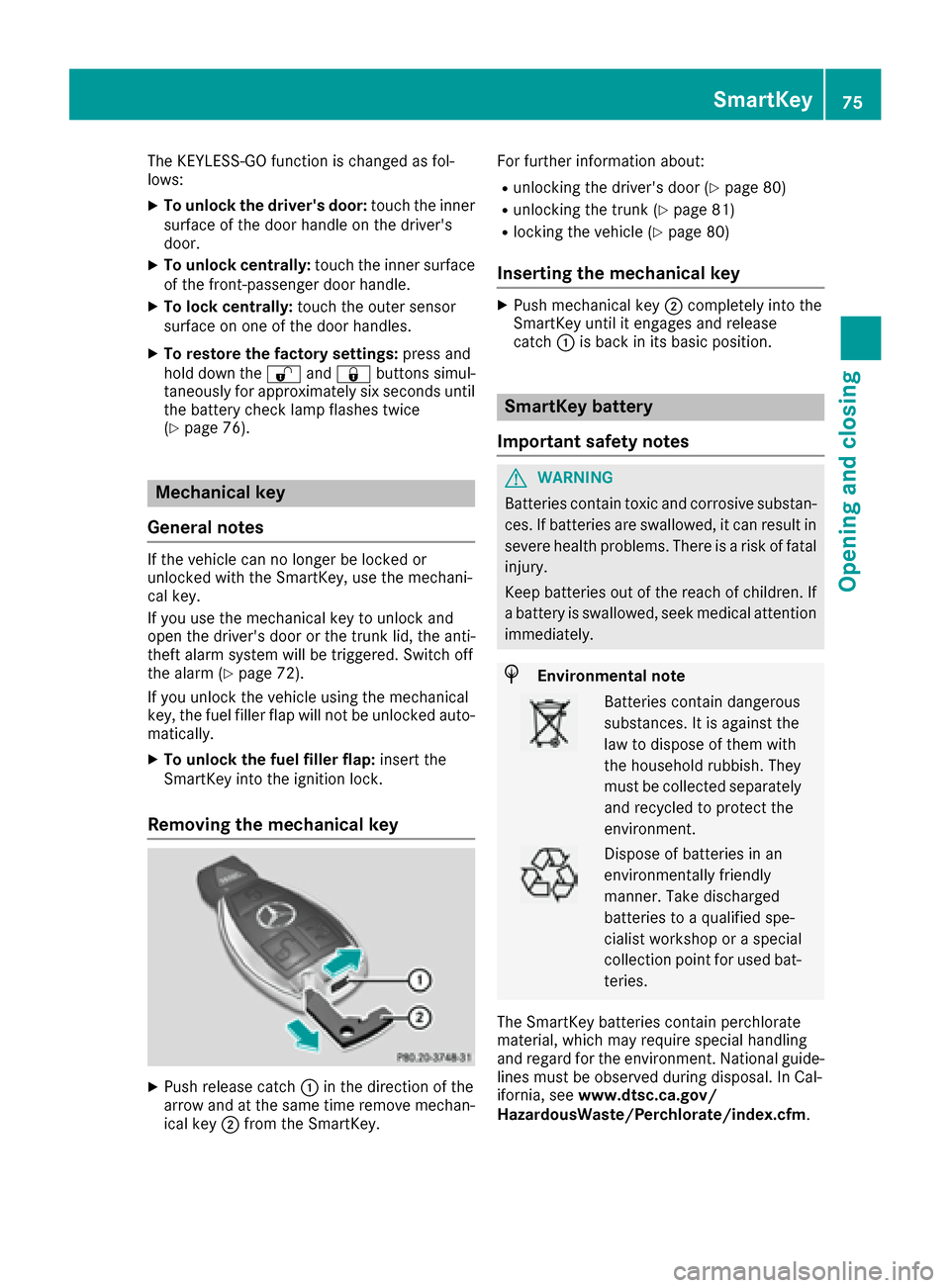
Removing the mechanical key
XPush release catch :in the direction of the
arrow and at the same time remove mechan- ical key ;from the SmartKey. For further information about:
Runlocking the driver's door (Ypage 80)
Runlocking the trunk (Ypage 81)
Rlocking the vehicle (Ypage 80)
Inserting the mechanical key
XPush mechanical key
;completely into the
SmartKey until it engages and release
catch :is back in its basic position.
SmartKey battery
Important safety notes
GWARNING
Batteries contain toxic and corrosive substan- ces. If batteries are swallowed, it can result in
severe health problems. There is a risk of fatalinjury.
Keep batteries out of the reach of children. If
a battery is swallowed, seek medical attention
immediately.
HEnvironmental note
Batteries contain dangerous
substances. It is against the
law to dispose of them with
the household rubbish. They
must be collected separately and recycled to protect the
environment.
Dispose of batteries in an
environmentally friendly
manner. Take discharged
batteries to a qualified spe-
cialist workshop or a special
collection point for used bat-
teries.
The SmartKey batteries contain perchlorate
material, which may require special handling
and regard for the environment. National guide-
lines must be observed during disposal. In Cal-
ifornia, see www.dtsc.ca.gov/
HazardousWaste/Perchlorate/index.cfm.
SmartKey75
Opening and closing
Z