charging MERCEDES-BENZ E-CLASS COUPE 2017 User Guide
[x] Cancel search | Manufacturer: MERCEDES-BENZ, Model Year: 2017, Model line: E-CLASS COUPE, Model: MERCEDES-BENZ E-CLASS COUPE 2017Pages: 541, PDF Size: 10.71 MB
Page 381 of 541
#
Avoid fire , naked flames, creating
spar ksand smoking. #
Make sure that there is suf ficient venti‐
lation du ring thech arging process and
during starting assis tance. #
Do not lean over a batter y. If
th e indicator/warning lamps in the instrument
clus ter do not light up at low temp eratures, it is
ve ry likely that the dischar ged battery has fro‐
zen. &
WARNING Risk ofexplosion from a fro‐
zen battery
A dischar ged battery may freeze at temp era‐
tures slightly abo veor below freezing point.
During starting assis tance or battery charg‐
ing, bat tery gas may be released. #
Alw aysth aw a frozen bat tery out first
before charging it or per form ing start‐
ing assis tance. The service li
feof a battery that has been
th awe d may be dramatically shor tened. It is
recommended that you ha veathaw ed bat‐
te ry checked at a qualified specialist workshop.
All vehicles
* NO
TEDama gecaused bynumerous or
ex tended attem ptsto start the engine Nume
rous or extended attem ptsto start the
engine may damage the catalytic con verter
due tonon-combu sted fuel. #
Avoid numerous and extended attem pts
to start the engine. Obser
vethefo llowing points during starting
assis tance and when charging the battery:
R Only use undamaged jump leads/charging
cables with a suf ficient cross-section and
insula tedte rm inal clamps.
R Non- insulated parts of thete rm inal clamps
must not come into con tact wi thother me tal
parts while the jump lead/charging cable is
connected tothe battery/jump-s tart connec‐
tion point. R
The jump lead/charging cable must not
come into contact wi thany parts which may
mo vewhen the engine is running.
R Alw ays make sure that nei ther you nor the
battery is elect rostatically charge d.
R Keep away from fire and naked flames.
R Do not lean overth e batter y.
R When charging: only use battery charge rs
te sted and appr ovedby Mercedes-Benz and
re ad the battery charge r's operating instruc‐
tions before charging the batter y.
Obser vethe additional following points during
st arting assis tance:
R Starting assis tance may only be pr ovided
using batteries with a nominal voltage of 12
V.
R The vehicles must not touch.
R Petrol engine: Only acce ptstarting assis‐
ta nce if the engine and exhaust sy stem are
cold. #
Secure theve hicle byapplying the electric
parking brake. 378
Breakdown assis tance
Page 382 of 541
#
Automatic transmission: Shiftthe trans‐
mission toposition j. #
Manual transmission: Shift into neutral.#
Make sure that the ignition and all electrical
consumers are switched off. #
Open the engine bonn et. #
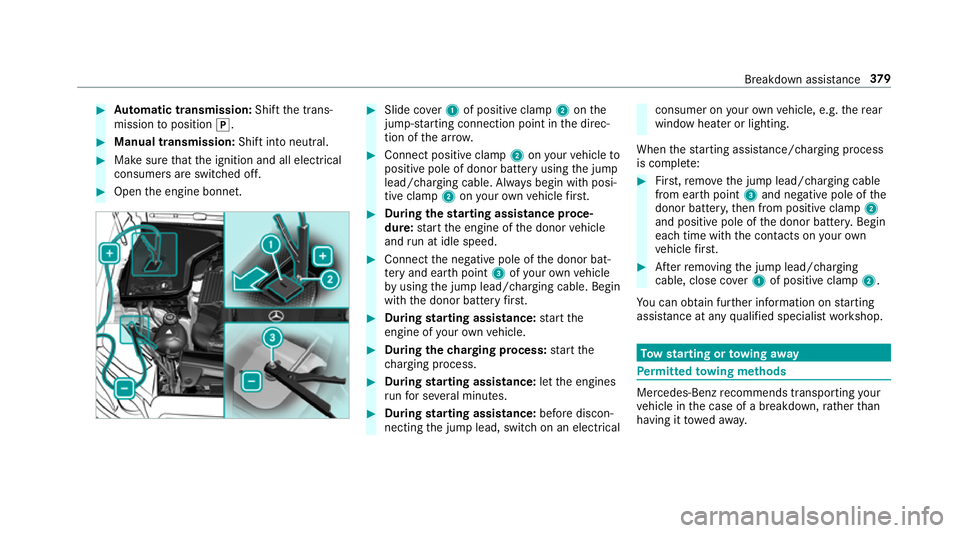
Slide co ver1 of positive clamp 2onthe
jump-s tarting connection point in the direc‐
tion of the ar row. #
Connect positive clamp 2onyour vehicle to
positive pole of donor battery using the jump
lead/charging cable. Alw ays begin with posi‐
tive clamp 2onyour ow nve hicle firs t. #
During thest arting assi stance proce‐
dure: start the engine of the donor vehicle
and run at idle speed. #
Connect the negative pole of the donor bat‐
te ry and ear thpoint 3ofyour ow nve hicle
by using the jump lead/charging cable. Begin
with the donor battery firs t. #
During starting assi stance: start the
engine of your ow nve hicle. #
During thech arging process: start the
ch arging process. #
During starting assi stance: letthe engines
ru nfo r se veral minutes. #
During starting assi stance: before discon‐
necting the jump lead, switch on an electrical consumer on
your ow nve hicle, e.g. there ar
wind owheater or lighting.
When thest arting assis tance/charging process
is compl ete: #
First,re mo vethe jump lead/charging cable
from ear thpoint 3and negative pole of the
donor batter y,then from positive clamp 2
and positive pole of the donor batter y.Begin
ea ch time wi th the conta cts onyour own
ve hicle firs t. #
Afterre moving the jump lead/charging
cable, close co ver1 of positive clamp 2.
Yo u can obtain fur ther information on starting
assis tance at any qualified specialist workshop. To
w starting or towing away Pe
rm itted towing me thods Mercedes-Benz
recommends transporting your
ve hicle in the case of a breakdown, rath er than
having it towe daw ay. Breakdown assis
tance 37 9
Page 503 of 541
Kickdown .............................................
15 3
Manual gearshifting ............................ .153
Selecting park position ........................ 15 2
Shifting toneutral ................................ 15 2
St eering wheel gearshift paddles ........ 15 3
Tr ansmission position display .............. 15 0
Tr ansmission positions ........................ 15 0
Au tomatic transmission
see Selector le ver
Axle load Perm issible .......................................... 41 0
Tr ailer operation .................................. 422 B
Bag hook .................................................. 104
Ball ne ck
Fo lding in/out .................................... .228
BA S (Brake Assist Sy stem) .................... .170
Battery Key ........................................................ 60
Re mo tecontrol (s tationary heater) ...... 137
Battery (vehicle) Charging .............................................. 377No
tes ................................................... 375
St arting assis tance .............................. 377
Battery (vehicle) see Vehicle battery
Belt .............................................................29
Bic ycle rack
Tr ailer operation .................................. 231
Blind Spot Assist .................................... .222
Ac tivating/deactivating ...................... .224
Fu nction/no tes ................................... 222
Sy stem limits ....................................... 222
Blind Spot Assist see Active Blind Spot Assi st
Blo wer
see Climate control
BlueTEC see AdBlue ®
Blue tooth ®
Ac tivating/deactivating ...................... .267
Setting up an Internet connection ....... 320
Settings ............................................... 267 Switching profile (DUN/PAN) .............. 321 Blue
tooth ®
Au dio
Ac tivating ............................................ 338
De-authorising (de-regis tering) the
device .................................................. 338
Information .......................................... 335
Overview .............................................3 36
Sear ching for and auth orisingthe
device .................................................. 337
Switching device via NFC .................... 338
Boot lid .......................................................67
Ac tivating/deactivating the boot lid
opening limiter ...................................... 72
Closing .................................................. 68 HANDS-FREE ACCESS .......................... .70
Loc ked separately .................................72
Opening .................................................67
Opening dimensions ............................4 19
Boot lid see Boot lid
see Locking/unlocking
Brake Assi stSystem
see BAS (Brake Assi stSystem)
Brake fluid Notes ................................................... 41 8500
Index
Page 522 of 541
Damage de
tection (pa rked vehicle) ...... 167
Locking theve hicle ................................ 63
St arting theve hicle .............................. 141
Un locking theve hicle ............................63
Wi reless charging ................................ .112
Mobile phone see Hands-free sy stem
see Locking/unlocking
see Telephone
Mobile phone voice recognition
St arting .............................................. .300
St opping ..............................................3 00
Model type ................................................ 41 0
MOExtended tyres .................................. 369
Mo torw ay mode ....................................... 11 8
MULTIBEAM LED see Intelligent Light Sy stem
Multifunction display (on-board com‐
puter) ........................................................ 237
Multifunction steering wheel
Overview of buttons ............................ 235
Multifunction steering wheel
see Steering wheel Multimedia sy
stem ........................ .258, 266
Ac tivating/deactivating standby
mode .................................................. .168
Ad justing thevo lume .......................... .264
Calling up lists and menus .................. .261
Central cont rol elements .................... .258
Configu ring displ aysettings ................2 66
Main functions ..................................... 261
Overview ............................................. 258
Re storing thefa ctory settings .............. 273
Switching the sound on/off ................2 63 N
Na vigation
Ac tivating ............................................ .274
Calling up the Digital Owner's Man‐
ual .......................................................2 96
Menu (on-boa rdcompu ter) .................. 241
Showing/hiding the menu ...................2 74
Up dating the map data ........................ 294
Vo ice commands (LINGU ATRO NIC) ...... 251
Na vigation
see Destination
see Destination entry
see Map see
Route
see Route guidance
see Traf fic information
Na vigation announcements ...................284
Ac tivating/deactivating ...................... .284
Ad justing thevo lume .......................... .285
Re peating ............................................ 285
Switching audio fadeout on/off .......... 285
Switching on/off during a phone call .. 284
Na vigation messages
On-board computer .............................. 241
Ne arField Communication (NFC) .......... 299
Connecting the mobile phone tothe
multimedia sy stem .............................. 299
St arting theve hicle (mobile phone) ..... 141
Switching Blu etoo th®
audio equip‐
ment .................................................... 338
Swit ching mobile phones .................... 299
Ne utral
Selecting ............................................. 15 2
NFC see Near Field Communication (NFC)
No ise
Wheels and tyres ................................ .388 Index
519
Page 531 of 541
No
tes on language selection ............... 270
Re set function (multimedia sy stem) ....2 73
Setting the dis tance unit ...................... 271
Software upda te.................................. 273
Sy stem settings
see Multimedia sy stem T
Ta ilgate
see Boot lid
Ta ilpipes (Care) ........................................ 363
Ta ke -back of end-of-life vehicles .............. 19
Ta nk capacity
Ad Blue ®
............................................... 416
Fu el ...................................................... 41 5
Re ser ve(fuel) .......................................4 15
Te ch nical data ......................................... 408
Axle load (trailer operation) ................. 422
Information .......................................... 408
No tes (trailer hitch) .............................. 421
To ngue weight .................................... .421
To wing weight (t owing a trailer) .......... .421
Ty re pressure monitoring sy stem ........ 393
Ve hicle identification plate ...................4 10Te
lephone ................................................ .296
Ac tivating functions du ring a call ......... 301
Auth orising a mobile phone (Remo te
Pa rking Pilot) ...................................... .216
Call and ringtone volume .................... .300
Calls with se veral participants ............ .301
Connecting a mobile phone (Near
Field Communication (NFC)) .............. .299
Connecting a mobile phone (Pass‐
ke y) .................................................... .298
Connecting a mobile phone (Secu re
Simple Pairing) .................................... 298
Disconnecting the mobile phone ......... 299
Incoming call during an existing call .... 301
Locking theve hicle (mobile phone) .......63
Menu (on-board computer) .................. 24 3
Mobile phone voice recognition .......... 300
No tes ................................................... 297
Re ception and transmission volume .... 300
St arting theve hicle (mobile phone) ..... 141
Switching mobile phones .................... 299
Switching mobile phones (Near Field
Communication (NFC)) ........................ 299
Te lephone menu overview .................. .296
Te lephone operation ............................ 300
Unlocking theve hicle (mobile phone) ....63 Using Near Field Communication
(NFC) ................................................... 299
Vo
ice commands (LINGU ATRO NIC) .....2 53
Wi reless charging (mobile phone) ........ 11 2
Te lephone
see Mobile phone
Te lephone module
Ac tivating/deactivating ...................... .306
Ac tivating/deactivating caller ID
transmission ........................................ 308
Ac tivating/deactivating da taroam‐
ing ...................................................... .308
Ac tivating/deactivating network pro‐
vider restriction ................................... 308
Ac tivating/deactivating text mes‐
sa ge trans fer ....................................... 308
Ad justing the brightness ..................... 308
Charging a mobile phone ..................... 310
Connecting .......................................... 306
Deleting call lists ................................ .309
Disconnecting ...................................... 310
Es tablishing a connection tothe
mobile phone ....................................... 307
Fitting/removing ................................. 306
Inserting/removing a SIM card .......... .307 528
Index
Page 538 of 541
Wi
-Fi
Overview ............................................. 267
Setting ................................................ .268
Setting up a hotspot ............................ 269
Setting up an Internet connection ....... 320
Wi ndow airbag ...........................................34
Wi ndow lif ter ............................................. 73
Wi ndo ws ..................................................... 73
Closing .................................................. 73
Opening .................................................73
Wi ndo ws(Care) ...................................... .363
Wi ndscreen .............................. 122, 124, 12 9
Demi sting ............................................ 12 9
Infrared reflective ................................ 12 8
Re placing the wiper blades ..........1 22,124
Wi ndscreen
see Windsc reen
Wi ndscreen washer fluid ........................ 419
No tes ................................................... 419
Wi ndscreen washer sy stem
To pping up ...........................................3 59
Wi ndscreen wipers
Re placing the wiper blades ..........1 22,124 Switching on/off .................................
12 2
Wi nter operation
Snow chains ........................................ 388
Wi nter tyres
Setting the permanent speed limit ...... 183
Wi per blades
Ca re .................................................... 363
Changing ..................................... 122, 124
Wire lesscharging
Fu nction/no tes .................................... 111
Mobile phone ....................................... 11 2
Wire lessvehicle comp onents
Declaration of Conformity .................... .22
Wo rkshop
see Qualified specialist workshop Index
535