climate control MERCEDES-BENZ E-CLASS COUPE 2017 User Guide
[x] Cancel search | Manufacturer: MERCEDES-BENZ, Model Year: 2017, Model line: E-CLASS COUPE, Model: MERCEDES-BENZ E-CLASS COUPE 2017Pages: 541, PDF Size: 10.71 MB
Page 140 of 541
Fu
rther possible displa ys:
R Time: activated departure time.
R Zero minutes: theru nning time forth est a‐
tionary heater is inc reased, as the engine has
not yetre ached operating temp erature when
it is star ted.
R OFF: thest ationary heater/ stationary venti‐
lation is switched off.
Re placing the remo tecont rol bat tery (sta‐
tiona ryheater) &
DANG ER Serious damage tohealth
caused byswallowing batteries
Batteries contain toxic and cor rosive sub‐
st ances. Swallowing bat teries may cause
serious damage tohealth.
There is a risk of fata l injur y. #
Keep batteries out of there ach of chil‐
dren. #
If batteries are swallo wed, seek medical
attention immediately. +
ENVIRONMEN
TALNO TEEnvironmental
dama gedue toimproper disposal of bat‐
te ries Batteries conta
intoxic and cor ro‐
sive subs tances. #
Ta
ke dischar ged batteries to a
qu alified specialist workshop or to a
collection point for used batteries. Re
quirement:
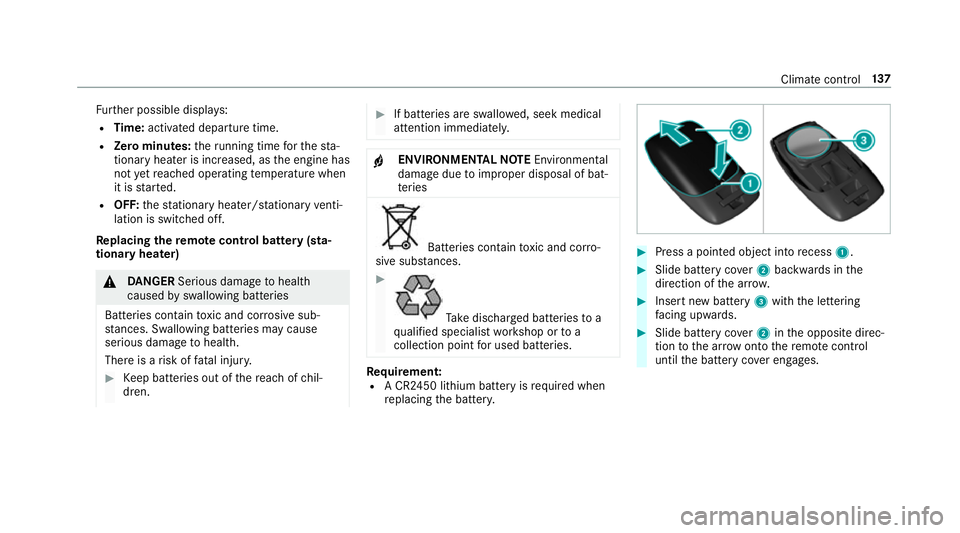
R A CR2450 lithium battery is requ ired when
re placing the batter y. #
Press a pointed object into recess 1. #
Slide battery co ver2 backwards in the
direction of the ar row. #
Insert new battery 3with the lettering
fa cing up wards. #
Slide battery co ver2 inthe opposite direc‐
tion tothe ar row onto there mo tecontrol
until the battery co ver engages. Climate control
137
Page 142 of 541
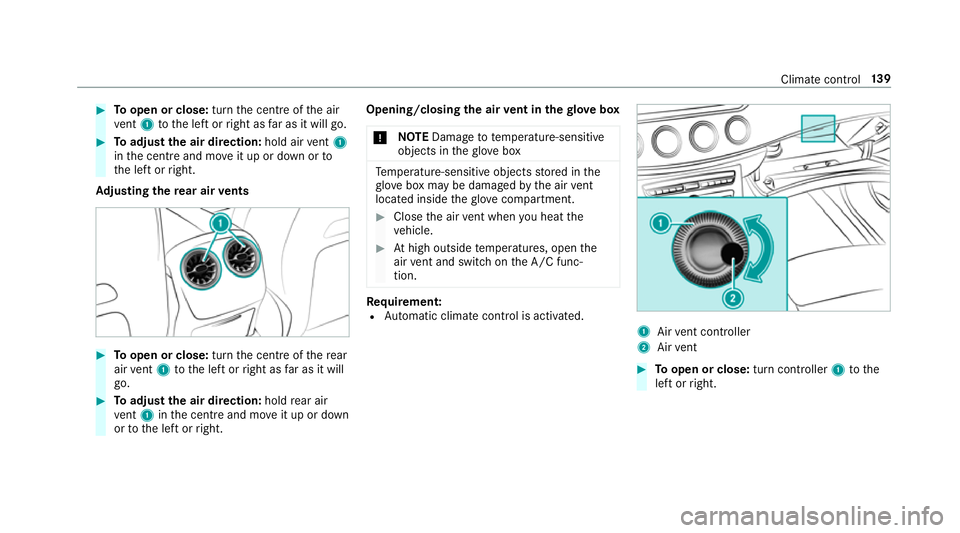
#
Toopen or close: turnthe cent reofthe air
ve nt 1 tothe left or right as far as it will go. #
Toadjust the air direction: hold airvent 1
in the cent reand mo veit up or down or to
th e left or right.
Ad justing the rear air vents #
Toopen or close: turnthe cent reofthere ar
air vent 1 tothe left or right as far as it will
go. #
Toadjust the air direction: holdrear air
ve nt 1 inthe cent reand mo veit up or down
or tothe left or right. Opening/closing
the air vent in thegl ove box
* NO
TEDama geto te mperature-sensitive
objects in theglove box Te
mp erature-sensitive objects stored in the
gl ove box may be damaged bythe air vent
located inside theglove compa rtment. #
Close the air vent when you heat the
ve hicle. #
Athigh outside temp eratures, open the
air vent and switch on the A/C func‐
tion. Re
quirement:
R Automatic clima tecontrol is acti vated. 1
Airvent controller
2 Airvent #
Toopen or close: turn controller1tothe
left or right. Climate control
13 9
Page 259 of 541
Vo
ice command Function
Text message to
crea tea message. All address book names are available.
Reply To
reply toa message
Forward text message To
forw ard a message Ve
hicle voice commands Yo
u can use theve hicle voice commands to
directly call up the cor responding menus forthe
ve hicle settings. Vo
ice command Function
Ambient light To
display ambient light settings
Display settings To
show display settings
Assistance settings To
display assis tance settings
Scent To
display fragrancing settings
Energy flow To
display energy flow settings
Ionisation To
display ionisation settings
Climate control To
display climate control settings 256
LINGU ATRO NIC
Page 277 of 541
Na
vigation Switching navigation on
Multimedia sy
stem:
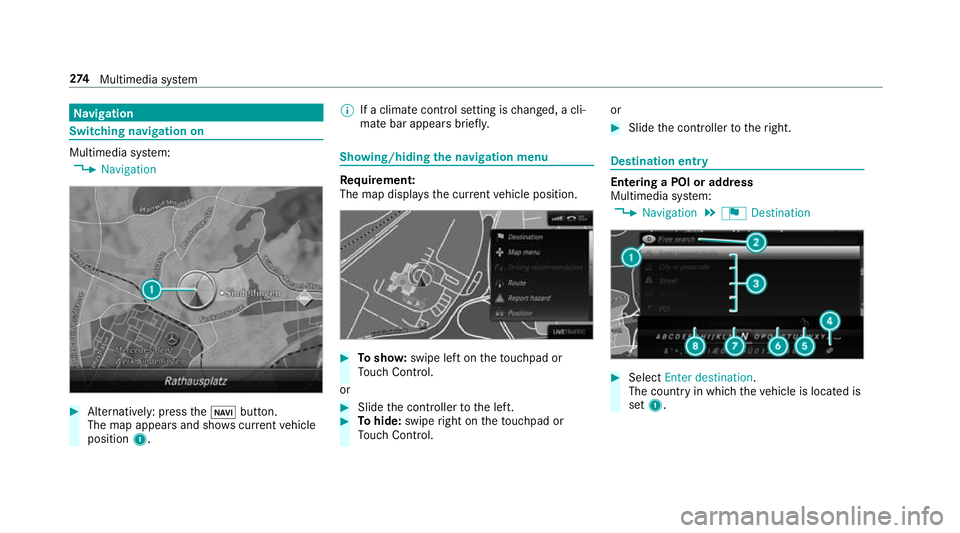
, Navigation #
Alternatively: press theß button.
The map appears and sho wscurrent vehicle
position 1. %
If a climate contro l setting ischanged, a cli‐
mate bar appears brief ly. Showing/hiding
the navigation menu Re
quirement:
The map displa ys the cur rent vehicle position. #
Tosho w:swipe left on theto uchpad or
To uch Control.
or #
Slide the controller tothe left. #
Tohide: swipe right on theto uchpad or
To uch Control. or #
Slide the controller totheright. Destination entry
Entering a POI or addre
ss
Multimedia sy stem:
, Navigation .
¬ Destination #
Select Enter destination.
The count ryin which theve hicle is located is
set 1. 274
Multimedia sy stem
Page 474 of 541
Display messages
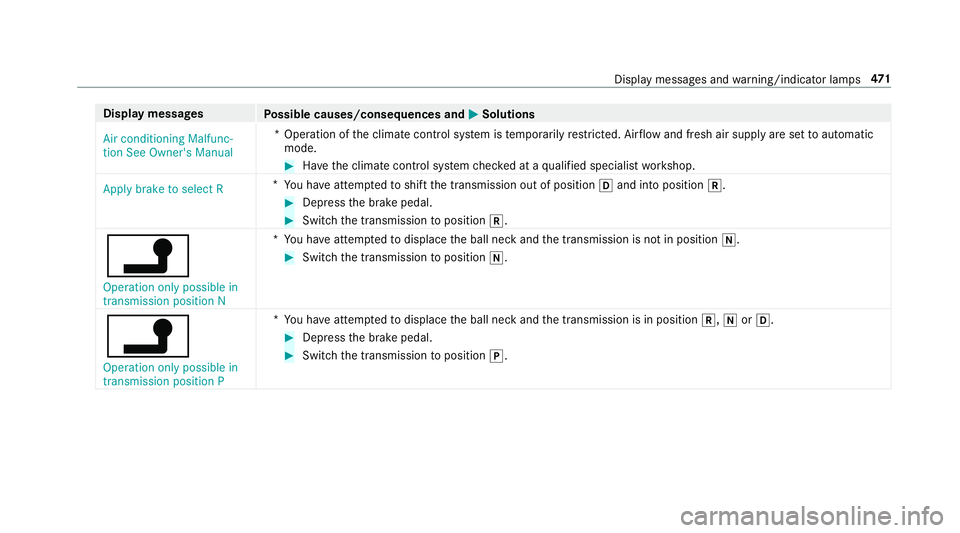
Possible causes/consequences and M
MSolutions
Air conditioning Malfunc-
tion See Owner's Manual *O
peration of the climate control sy stem is temp orarily restricted. Air flow and fresh air supply are set toautomatic
mode. #
Have the climate control sy stem checked at a qualified specialist workshop.
Apply brake to select R *
Yo u ha veattem ptedto shift the transmission out of position hand into position k. #
Depress the brake pedal. #
Switch the transmission toposition k.
j
Operation only possible in
transmission position N *
Yo u ha veattem ptedto displace the ball neck and the transmission is not in position i. #
Switch the transmission toposition i.
j
Operation only possible in
transmission position P *
Yo u ha veattem ptedto displace the ball neck and the transmission is in position k,iorh. #
Depress the brake pedal. #
Switch the transmission toposition j. Display messages and
warning/indicator lamps 471
Page 476 of 541
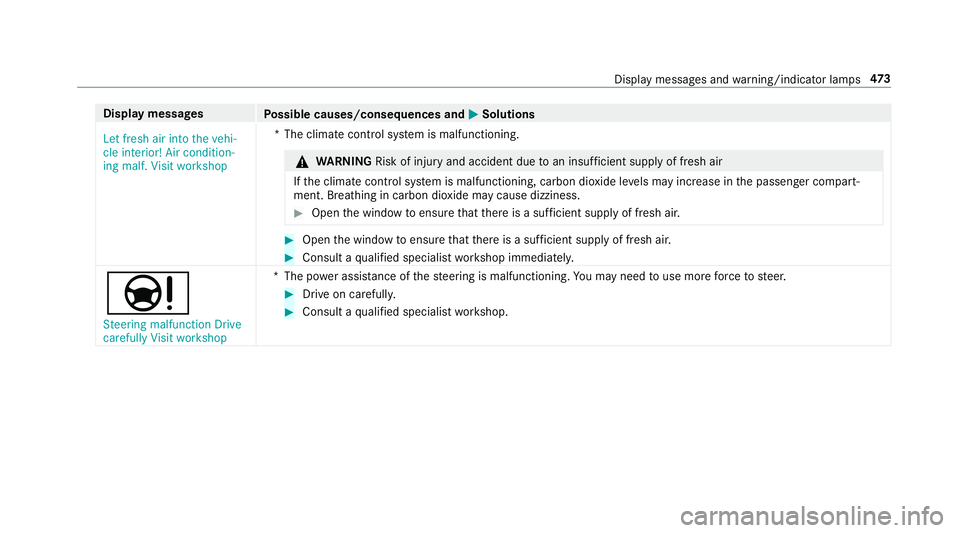
Display messages
Possible causes/consequences and M
MSolutions
Let fresh air into the vehi-
cle interior! Air condition-
ing malf. Visit workshop *T
he climate contro l system is malfunctioning. &
WARNING Risk of inju ryand accident due toan insuf ficient supply of fresh air
If th e climate control sy stem is malfunctioning, carbon dioxide le vels may inc rease in the passenger compart‐
ment. Breathing in carbon dioxide may cause dizziness. #
Open the window toensure that there is a suf ficient supply of fresh ai r. #
Open the window toensure that there is a suf ficient supply of fresh ai r. #
Consult a qualified specialist workshop immediatel y.
Ð
Steering malfunction Drive
carefully Visit workshop *T
he po wer assi stance of thesteering is malfunctioning. You may need touse more forc eto steer. #
Drive on carefull y. #
Consult a qualified specialist workshop. Display messages and
warning/indicator lamps 473
Page 501 of 541
Ad
dress book
see Contacts
Ad justing the balance/ fader
Burmes ter®
high-end 3D sur round
sound sy stem ...................................... 350
Burmes ter®
sur round sound sy stem ... 350
Ad justing the sound focus
Burmes ter®
sur round sound sy stem ... 350
Ad justing the sound optimisation
Burmes ter®
high-end 3D sur round
sound sy stem ...................................... 351
Ad justing treble, mid and bass
Burmes ter®
high-end 3D sur round
sound sy stem ...................................... 350
ADS PLUS damping sy stem
see AIR BODY CONTROL
Ad versewe ather light ............................ .118
Af ter-sales service centre
see ASS YST PLUS
AIR BODY CONT ROL................................ 19 5
Setting ................................................. 19 6
Suspension .......................................... 19 5Air conditioning sy
stem
see Climate control
Air distribution ........................................ 12 9
Air freshener sy stem
see Frag rance sy stem
Air suspension see AIR BODY CONTROL
Air vents ................................................... 13 8
Ad justing (front) .................................. 13 8
Ad justing (rear) .................................... 13 9
Glo vebox .............................................1 39
Air vents
see Air vents
Ai r-re circulation mode ............................ 13 2
Airbag Activation .............................................. 28
Fr ont airbag ...........................................34
Ins tallation locations ............................ .34
Knee airbag ........................................... 34
Overview ............................................... 34
Pr otection ..............................................35
Re duced pr otection ...............................36
Side impact airbag ................................ 34 Wi
ndow airbag ....................................... 34
Ai rflow ...................................................... 12 9
Alarm see Panic alarm
Alarm sy stem
see Anti- theft pr otection
Alternative route
see Route
Ambient lighting ...................................... 121
Android Auto ............................................ 312
Connecting a mobile phone ................ .312
Ending ................................................. .312
Overview ..............................................3 12
To ne settings ....................................... 312
Tr ans ferred vehicle data ....................... 313
Animals Pets in theve hicle ................................. 57
Anti-lock braking sy stem
see ABS (Anti-lock Braking Sy stem)
Anti-theft alarm sy stem
Anti- theft pr otection .............................. 82 498
Index
Page 503 of 541
Kickdown .............................................
15 3
Manual gearshifting ............................ .153
Selecting park position ........................ 15 2
Shifting toneutral ................................ 15 2
St eering wheel gearshift paddles ........ 15 3
Tr ansmission position display .............. 15 0
Tr ansmission positions ........................ 15 0
Au tomatic transmission
see Selector le ver
Axle load Perm issible .......................................... 41 0
Tr ailer operation .................................. 422 B
Bag hook .................................................. 104
Ball ne ck
Fo lding in/out .................................... .228
BA S (Brake Assist Sy stem) .................... .170
Battery Key ........................................................ 60
Re mo tecontrol (s tationary heater) ...... 137
Battery (vehicle) Charging .............................................. 377No
tes ................................................... 375
St arting assis tance .............................. 377
Battery (vehicle) see Vehicle battery
Belt .............................................................29
Bic ycle rack
Tr ailer operation .................................. 231
Blind Spot Assist .................................... .222
Ac tivating/deactivating ...................... .224
Fu nction/no tes ................................... 222
Sy stem limits ....................................... 222
Blind Spot Assist see Active Blind Spot Assi st
Blo wer
see Climate control
BlueTEC see AdBlue ®
Blue tooth ®
Ac tivating/deactivating ...................... .267
Setting up an Internet connection ....... 320
Settings ............................................... 267 Switching profile (DUN/PAN) .............. 321 Blue
tooth ®
Au dio
Ac tivating ............................................ 338
De-authorising (de-regis tering) the
device .................................................. 338
Information .......................................... 335
Overview .............................................3 36
Sear ching for and auth orisingthe
device .................................................. 337
Switching device via NFC .................... 338
Boot lid .......................................................67
Ac tivating/deactivating the boot lid
opening limiter ...................................... 72
Closing .................................................. 68 HANDS-FREE ACCESS .......................... .70
Loc ked separately .................................72
Opening .................................................67
Opening dimensions ............................4 19
Boot lid see Boot lid
see Locking/unlocking
Brake Assi stSystem
see BAS (Brake Assi stSystem)
Brake fluid Notes ................................................... 41 8500
Index
Page 505 of 541
see
Reversing camera
Car wash
see Care
Car wash (care) ....................................... 360
Care ..........................................................3 65
Car wash ............................................. 360
Carpet .................................................3 65
Displ ay................................................ 365
Exterior lighting ................................... 363
Genuine wood/trim elements .............3 65
High-p ressure cleaner .........................3 60
Matt finish ........................................... 362
Pa int .................................................... 362
Plastic trim .......................................... 365
Re versing camera/360° Camera ........ 363
Ro of lining ...........................................3 65
Seat belt .............................................. 365
Seat co ver ........................................... 365
Sensors ............................................... 363
Ta ilpipes .............................................. 363
Tr ailer hit ch......................................... 363
Wa shing byhand ..................................3 61
Wheels/rims ....................................... 363
Wi ndo ws .............................................. 363
Wi per blades .......................................3 63Carpet (Care)
.......................................... .365
Changing hub caps .................................. 401
Changing the lights
Driving abroad (symm etrical dipped
beam) ................................................... 11 4
Channel tracking Setting ................................................ .341
Cha rging
Bat tery (vehicle) .................................. 377
Mobile phone (wireless) ....................... 111
Child saf ety lock
Re ar side wind ows................................. 56
Child seat ................................................... 42
At tach ing (no tes) ................................... 49
Fr ont passenger seat (no tes) ................. 47
Fr ont passenger seat (rear ward-
fa cing/for ward-facing) .......................... 48
Fr ont passenger seat (without airbag
shutoff) .................................................. 47
ISOFIX/i-Size (fitting) ............................ 44
No tes ..................................................... 42
Re commended child restra int sys‐
te ms ...................................................... 54Seats suitable
for belt-secu redch ild
re stra int sy stems ................................... 50
Seats suitable for i‑Size child
re stra int sy stems ................................... 53
Seats suitable for ISOFIX child
re stra int sy stems ................................... 51
To pTe ther ..............................................45
Child ren
Re stra int sy stems ..................................42
Chock Storage location ..................................4 00
Cho ck
see Wheel chock
Cigar ette lighter ...................................... 109
City lighting .............................................. 11 8
Cleaning see Care
Climate control ........................................ 12 9
Ac tivating/deactivating the A/C
function (cont rol panel) ...................... .130
Ac tivating/deactivating the A/C
function (multimedia sy stem) .............. 13 0502
Index
Page 506 of 541
Ac
tivating/deactivating the synchro‐
nisation function (cont rol panel) .......... 131
Ac tivating/deactivating the synchro‐
nisation function (multimedia sys‐
te m) ..................................................... 13 2
Air di stribution settings ........................ 131
Air-reci rculation mode ........................ .132
Au tomatic control ................................ 131
Climate style function .......................... 131
Demi sting the windo ws....................... 13 2
Demi sting the windscreen ...................1 29
Fr ont air vents ..................................... 13 8
Glo vebox air vent ................................ 13 9
Inserting/removing theflacon (fra‐
gr ance sy stem) .................................... 13 3
ionisation ............................................ .132
Re ar air vents ...................................... 13 9
Re ar operating unit .............................. 12 9
Re sidual heat ....................................... 13 2
Setting the air distribution ...................1 29
Setting the air flow ............................... 12 9
Setting the climate style ......................1 31
Setting the fragrance sy stem ............... 13 2
Setting thete mp erature ......................1 29
St ationary heater/ ventilation .............. 13 4
Switching on/off ................................. 13 0Switching
there ar wind owheater
on/off .................................................1 29
THERMATIC control panel .................... 12 9
THERMOTRONIC contro l panel ............12 9
Climate style
Fu nction ............................................... 131
Setting ................................................. 131
Cockpit ........................................................ .6
Overview .................................................6
COMAND Online see Multimedia sy stem
COMAND Touch ....................................... 270
Child saf ety lock .................................. 270
Managing devices ................................ 270
COMAND Touch App
see COMAND Touch
Combination swit ch
see Turn signal light
Compass .................................................. 295
Computer .................................................2 36
Connection status
Displ ays ............................................... 323
Overview ............................................. 322 Contacts
................................................... 301
Calling up ............................................ 302
Deleting ............................................... 303
Downloading (from mobile phone) ...... 302
Importing ............................................ 302
Information .......................................... 301
Making a call ....................................... 303
Na me form at ...................................... .302
Options ................................................ 303
Saving ................................................. 303
Controller Operating ............................................ 259
Conv enience closing ................................ .75
Con venience opening ................................ 75
Coolant (engine) Levelch eck ......................................... 358
No tes ................................................... 41 8
Cooling see Climate control
Copyright .................................................. .26
Cornering light function ..........................11 7
Cross Traf fic Alert .................................... 217 Index
503