roof MERCEDES-BENZ E-CLASS COUPE 2017 User Guide
[x] Cancel search | Manufacturer: MERCEDES-BENZ, Model Year: 2017, Model line: E-CLASS COUPE, Model: MERCEDES-BENZ E-CLASS COUPE 2017Pages: 541, PDF Size: 10.71 MB
Page 108 of 541

#
Pull handle 1up and hook it into rain
trough 2. At
taching thero of rack &
WARNING Risk of inju ryby ex ceeding
th e maximum roof load
When you load thero of, theve hicle centre of
gr av ity rises and the driving characteristics
ch ange.
If yo uexc eed the maximum roof load, the
driving characteristics, as well as thesteer‐
ing and braking, will be greatly impaired. #
Neverexc eed the maximum roof load
and adjust your driving style. The maximum
roof load can be found under
"Technical data".
* NO
TEVehicle damage from non-
appr ovedro of racks The
vehicle could be damaged byroof racks
which ha venot been tested and appr ovedby
Mercedes-Benz. #
Only use roof rack ste sted and
appr ovedby Mercedes-Benz. #
Depending on theve hicle equipment,
ensure that when thero of rack isfitted:
R the sliding sunroof can be fully
ra ised.
R the boot lid can be fully opened. #
Position the load on thero of rack in
such a wayth at theve hicle will not sus‐
ta in damage even when it is in motion. *
NO
TEImpo rtant points toremember
when a roof rack isfitted When a
roof rack isfitted, raising or opening
th e sliding sunroof may be limited. #
Check whe ther the sliding sunroof can
be raised or opened when a roof rack is
fi tted. #
If in doubt, do not raise or open the
sliding sunroof. Seats and
stowing 105
Page 164 of 541
#
Vehicles with manual transmission:
Engage firs t1 orreve rsege ar k. #
Vehicles with automatic transmission:
Engage transmission position j.#
Apply the electric parking brake. #
Press button 1once.
% When you swit choff theve hicle, you can still
opera tethe side windo wsand the panoramic
sliding sunroof forfive minutes. Garage door opener
Prog
ramming buttons for the garage door
opener &
WARNING Risk ofexhaust gas poisoning
Combustion engines emit poisonous exhaust
ga ses such as carbon monoxide. Inhaling
th ese exhaust gases causes poisoning. #
Never lea vethe engine running in an
enclosed space wi thout suf ficient venti‐
lation. &
WARNING Risk of inju ryand ent rapment
when opening thega rage door using the
ga rage door opener
When you operate or program thega rage
door with the integrated garage door opener,
persons in thera nge of mo vement of the
ga rage door can become trapped or stru ck
by thega rage door. #
When using the integrated garage door
opener, alw ays make sure that nobody
is within the sweep of thega rage door. Prior
toprog ramming a garage door opener, park
th eve hicle outside thega rage and swit choff the
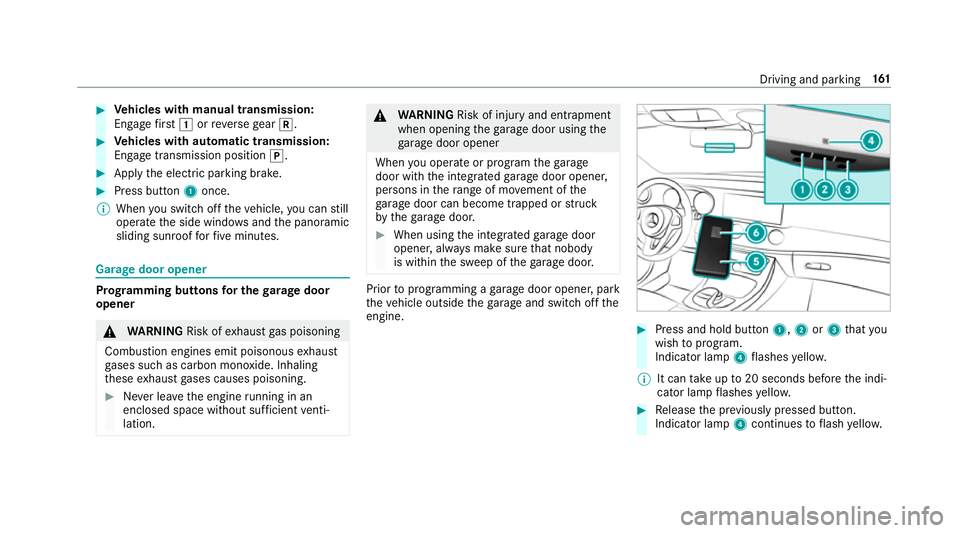
engine. #
Press and hold button 1,2or3 that you
wish toprog ram.
Indicator lamp 4flashes yello w.
% It can take up to20 seconds before the indi‐
cator lamp flashes yello w. #
Release the pr eviously pressed button.
Indicator lamp 4continues toflash yello w. Driving and pa
rking 161
Page 363 of 541
#
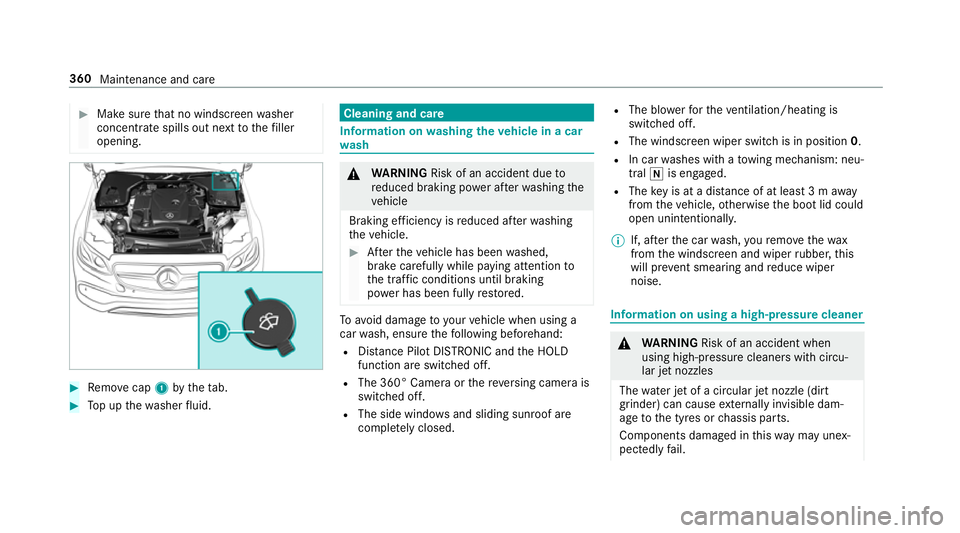
Make sure that no windsc reen washer
concentrate spills out next tothefiller
opening. #
Remo vecap 1bytheta b. #
Top up thewa sher fluid. Cleaning and care
Information on
washing theve hicle in a car
wa sh &
WARNING Risk of an accident due to
re duced braking po wer af terwa shing the
ve hicle
Braking ef ficiency is reduced af terwa shing
th eve hicle. #
Afterth eve hicle has been washed,
brake carefully while paying attention to
th e traf fic conditions until braking
po we r has been fully restored. To
avo id damage to yourvehicle when using a
car wash, ensure thefo llowing beforehand:
R Distance Pilot DISTRONIC and the HOLD
function are switched off.
R The 360° Camera or there ve rsing camera is
switched off.
R The side windo wsand sliding sun roof are
comple tely closed. R
The bl owerforth eve ntilation/heating is
switched off.
R The windsc reen wiper switch is in position 0.
R In car washes with a towing mechanism: neu‐
tral iis engaged.
R The key is at a dis tance of at least 3 m away
from theve hicle, otherwise the boot lid could
open unintentionall y.
% If, af terth e car wash, youre mo vethewax
from the windscreen and wiper rubber, this
will pr event smearing and reduce wiper
noise. Information on using a high-p
ressure cleaner &
WARNING Risk of an accident when
using high-pressure cleane rswith circu‐
lar jet nozzles
The wate r jet of a circular jet nozzle (dirt
grinder) can cause extern ally invisible dam‐
age tothe tyres or chassis parts.
Components damaged in this wa y may unex‐
pec tedly fail. 360
Maintenance and care
Page 412 of 541
*
NO
TEInva lidation of the operating per‐
mit due tofailure tocomply wi th the
instructions for ins tallation and use The operating permit may be in
validated if
th e instructions for ins tallation and use of RF
transmitters are not obser ved. #
Only use appr oved frequency bands. #
Obser vethe maximum permissible out‐
put po wer in these frequency bands. #
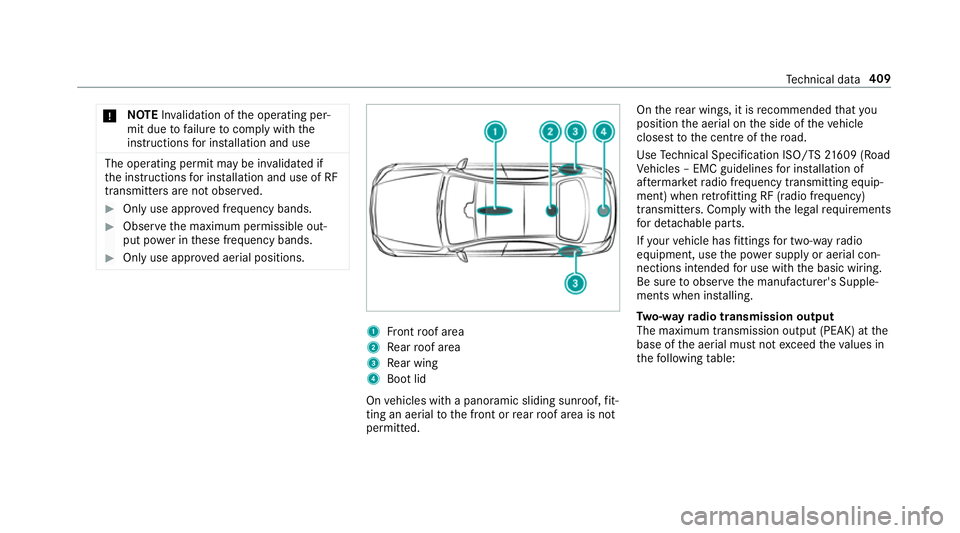
Only use appr oved aerial positions. 1
Front roof area
2 Rear roof area
3 Rear wing
4 Boot lid
On vehicles with a panoramic sliding sunroof, fit‐
ting an ae rial to the front or rear roof area is not
permitted. On
there ar wings, it is recommended that you
position the aerial on the side of theve hicle
closest tothe cent reofthero ad.
Use Tech nical Specification ISO/TS 21609 (Road
Ve hicles – EMC guidelines for ins tallation of
af te rm arke tra dio frequency transmitting equip‐
ment) when retrofitting RF (radio frequency)
transmitters. Co mply wi th th e legal requirements
fo r de tach able parts.
If yo ur vehicle has fittings for two-w ayradio
equipment, use the po wer supp lyor aerial con‐
nections intended for use with the basic wiring.
Be sure toobser vethe manufacturer's Supple‐
ments when ins talling.
Tw o-w ayradio transmission output
The maximum transmission output (PEAK) at the
base of the aerial must not exceed theva lues in
th efo llowing table: Te
ch nical da ta409
Page 424 of 541
We
ights and loads Please no
tethat forth e specified vehicle data:
R items of optional equipment increase the
unladen weight and reduce the maximum
pa yload.
R vehicle-specific weight information can be
fo und on theve hicle identification plate .
Ro of load All models
Maximum
roof load 75kg Tr
ailer hitch Gene
ral no tes on the trailer hit ch Not all models can be used
to tow a trailer
(→ page 227).
Modifications tothe engine cooling sy stem may
be necessar y,depending on theve hicle model.
The retrofitting of a trailer hitch is only pe rmissi‐
ble if a towing capacity is specified in your vehi‐
cle documents. Fu
rther information on the trailer hitch can be
obtained at a qualified specialist workshop. Pe
rm issible towing capacity The
tongue weight is not included in theto wing
capacity.
Pe rm issible towing capacit y,braked (at a
minimum start-off gradeability of 8%) Model
Perm issible towing
capacit y,braked
E 200, manual trans‐
mission 15
00 kg
All other models 1800 kg Pe
rm issible towing capacit y,braked (at a
minimum start-off gradeability of 12%) Model
Perm issible towing
capacit y,braked
E 200, manual trans‐
mission 15
00 kg
All other models 1800 kg Pe
rm issible towing capacit y,unbraked Model
Perm issible towing
capacit y,unbraked
All model s7 50kg Maximum
tongue weight *
NO
TEDama gecaused bythe trailer
coming loose If
th eto ngue weight used is too lo w,the
trailer may come loose. Te
ch nical da ta421
Page 524 of 541
Pa
int code ................................................ .410
Pa nel heating
Setting ................................................... 95
Pa nic alarm ................................................ 59
Ac tivating/deactivating ......................... 59
Pa norama sliding sunroof
see Sliding sunroof
Pa rk position
Selecting ............................................. 15 2
Selecting au tomatical ly....................... 15 2
Pa rking .................................................... .165
Pa rking aid
see Parking Assist PARKTRONIC
see Remo teParking Pilot
Pa rking Assist PARKTRONIC ................... 19 8
Ac tivating ............................................ 200
Ad justing warning tones ...................... 201
Fu nction .............................................. 19 8
Side impact pr otection ........................ 19 9
Switching off ....................................... 200
Sy stem limitations ...............................1 98
Pa rking assistance sy stems
see Parking Pilot Pa
rking brake
see Electric parking brake
Pa rking lights .......................................... .114
Pa rking Pilot ............................................ 207
Cross Traf fic Alert ................................ 217
Drive AwayAssi st................................ 216
Exiting a pa rking space ........................ 210
Fu nction .............................................. 207
Manoeuvring assi stance ...................... 218
Pa rking ................................................ 209
Sy stem limits ....................................... 207
Pa rking Pilot
see Remo teParking Pilot
Pa rking position
Outside mir rors ................................... 12 6
Pa ssenger outside mir ror — storing
using there ve rsege ar ........................ .127
Pa rking up ................................................ 16 8
Pe destrian pr otection
see Active bonnet (pedestrian pr otection)
Pe rfume
see Fragrance sy stem Pe
rfume vial
see Fragrance sy stem
Pe riod out of use
Ac tivating/deactivating standby
mode .................................................. .168
Pe rm issible axle load .............................. 41 0
Pe rm issible gross mass .......................... 41 0
Pe rm itted towing me thods .................... .379
Pe rsonalisation
see User profile
Pe trol ........................................................ 413
Pe ts in the vehicle .................................... .57
Phone book see Contacts
Picture form ats
see Video mode
Picture settings see Video mode
PIN pr otection for data export ............... 272
Plastic trim (Care) ................................... 365 Index
521
Page 525 of 541
Playback options
Selecting ............................................. 330
POI symbols Custom ................................................ 292
Po we r supp ly
Switching on (s tart/s top button) .........1 40
PRE-SAFE ®
(anticipatory occupant
pr otection)
Fu nction ................................................. 41
PRE-SAFE ®
Sound ..................................41
Re versing measures .............................. .41
PRE-SAFE ®
(anticipatory occupant
pr otection)
see Anticipatory occupant pr otection
see Occupant saf ety
see Pr eventati veoccupant pr otection sy stem
PRE-SAFE ®
PLUS (anticipa tory occu‐
pant pr otection plus)
Fu nction ................................................ 42
Re versing measures .............................. .41
PRE-SAFE ®
PLUS (anticipatory occu‐
pant pr otection plus)
see Anticipatory occupant pr otection see Occupant saf
ety
Pr ev entative occupant pr otection sys‐
te m .............................................................. 41
Prog ramme in form ation
TV channel .......................................... 345
Prog rams
see DYNA MIC SELECT
Pr otection of the environment
No tes ..................................................... 19
Re turning an end-of-life vehicle .............19 Q
Qibla ......................................................... 295
QR code Rescue card .......................................... 25
Qualified specialist workshop .................. 24 R
Ra dar senso rs.......................................... 16 9
Ra dio
Ac tivating ............................................ 338
Ac tivating/deactivating radio text ....... 341
Calling up a slide show ........................ 340 Calling up
thest ation list .................... .340
Deleting stations ................................ .340
Direct frequency entry ........................ 340
Displ aying information ........................ .341
Editing station presets ........................ .340
Fr equency fix ....................................... 341
Menu (on-boa rdcompu ter) .................. 24 2
Moving stations .................................. .340
Overview ............................................. 339
Sear ching forst ations ........................ .340
Setting a station .................................. 340
Setting station tracking ...................... .341
Setting the frequency band ................. 340
Setting the traf fic information
service volume inc rease ...................... 341
St oring stations .................................. .340
Switching traf fic announcements
on/off .................................................. 341
Ta gging music trac ks........................... 341
To display radio text ............................. 341
Vo ice commands (LINGU ATRO NIC) .....2 54
Ra dio stations
Selecting (on-boa rdcompu ter) ............ 24 2
Ra in-closing feature
Sliding sunroof ...................................... 79 522
Index
Page 529 of 541
Skid
chains .............................................. 388
Sliding sunroof .......................................... 77
Au tomatic features ................................ 79
Closing .................................................. 77
Closing with theke y .............................. 75
Opening .................................................77
Opening with theke y ............................ .75
Problem .................................................80
Ra in-closing feature .............................. .79
Smartphone see Android Auto
see Apple CarPlay™
see Telephone
Snow chains ............................................ 388
Snow chains
see Skid chains
Soc ket (12 V) ............................................ 109
Fr ont centre console ........................... 109
Re ar passenger compartment ............ .109
Soc ket (230 V) ......................................... 11 0
Re ar .................................................... .110
Software update Information .......................................... 272Pe
rforming ...........................................2 73
Sound PRE-SAFE ®
Sound ..................................41
Sound see Burmes ter®
sur round sound sy stem
see Tone settings
Spare wheel ............................................. 406
Spectacles co mpartment ........................ 101
Speech dialogue sy stem
see LINGU ATRO NIC
Speed limit for winter tyres
Setting ................................................. 183
Speed Limit Pilot ............................. 183, 221
Displ ay................................................. 183
Setting ................................................. 221
Speedome ter
Digital .................................................. 239
St andby mode
Ac tivating/deactivating ...................... .168
Fu nction .............................................. 16 8
St anding lights ......................................... 11 4St
art/S top button
St arting vehicle .................................... 141
Switching off theve hicle ..................... 16 0
Switching on the po wer supply or
ignition ................................................ 14 0
St art/s top function
see ECO start/ stop function
St arting assi stance ................................. 377
St arting assi stance
see Jump -sta rt connection
St arting the engine
see Vehicle
St arting-o ffaid
see Hill start assist
St ation
Deleting ............................................... 340
Direct frequency entry ........................ 340
Fr equency fix ....................................... 341
Moving ................................................ 340
Sea rching ............................................ 340
Setting .................................................3 40
St oring ................................................ 340 526
Index