boot MERCEDES-BENZ E-CLASS COUPE 2017 Owner's Manual
[x] Cancel search | Manufacturer: MERCEDES-BENZ, Model Year: 2017, Model line: E-CLASS COUPE, Model: MERCEDES-BENZ E-CLASS COUPE 2017Pages: 541, PDF Size: 10.71 MB
Page 204 of 541
Ad
justing the warning tones of Parking
Assist PARKTRONIC
Multimedia sy stem:
, Vehicle .
k Assistance .
Cam. &
Parking Pilot .
Set warning tone
Ad justing the volume of thewa rning tones #
Select Warning tone volume. #
Adjust theva lue.
Specifying thest arting point for the warning
to nes
Yo u can specify whe ther thePa rking Assist
PA RKTRONIC warning tones should commence
when theve hicle is fur ther aw ay from an obs ta‐
cle. #
Select Warn early. #
Activate Oor deacti vate ª the function.
Ac tivating/deactivating audio fadeout
Yo u can specify whe ther thevo lume of a media
source in the multimedia sy stem is tobe
re duced when Parking Assist PARKTRONIC gives
an audible warning. #
Select Audio fadeout during warning tones . #
Activate Oor deacti vate ª the function. Re
versing camera Fu
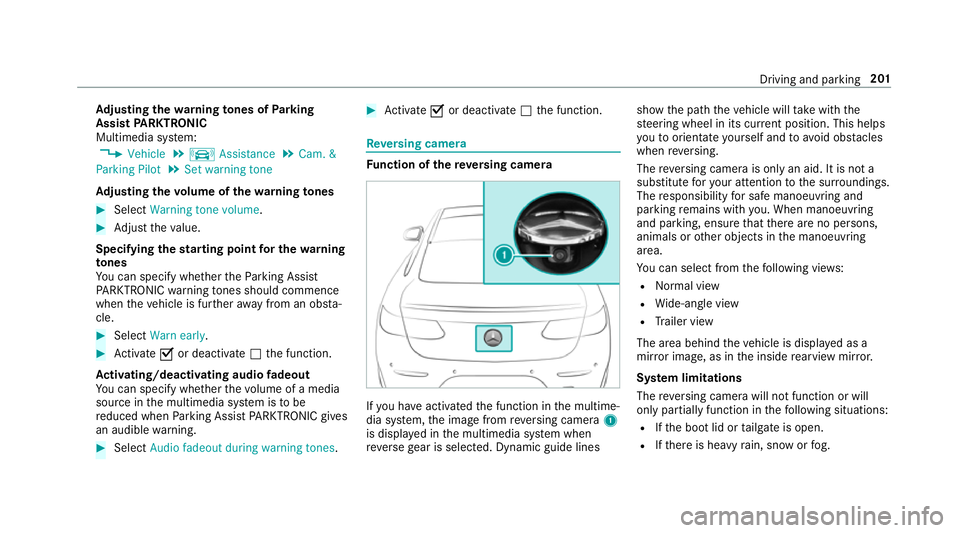
nction of there ve rsing camera If
yo u ha veactivated the function in the multime‐
dia sy stem, the image from reve rsing camera 1
is displa yed in the multimedia sy stem when
re ve rsege ar is selec ted. Dynamic guide lines show
the path theve hicle will take with the
st eering wheel in its cur rent position. This helps
yo uto orientate yourself and toavo id obs tacles
when reve rsing.
The reve rsing camera is only an aid. It is not a
substitute foryo ur attention tothe sur roundings.
The responsibility for safe manoeuvring and
parking remains with you. When manoeuv ring
and pa rking, ensure that there are no persons,
animals or other objects in the manoeuvring
area.
Yo u can select from thefo llowing vie ws:
R Normal view
R Wide-angle view
R Trailer view
The area behind theve hicle is displa yed as a
mir ror image, as in the inside rearview mir ror.
Sy stem limitations
The reve rsing camera will not function or will
only partially function in thefo llowing situations:
R Ifth e boot lid or tailgate is open.
R Ifth ere is heavy rain, snow or fog. Driving and parking
201
Page 209 of 541
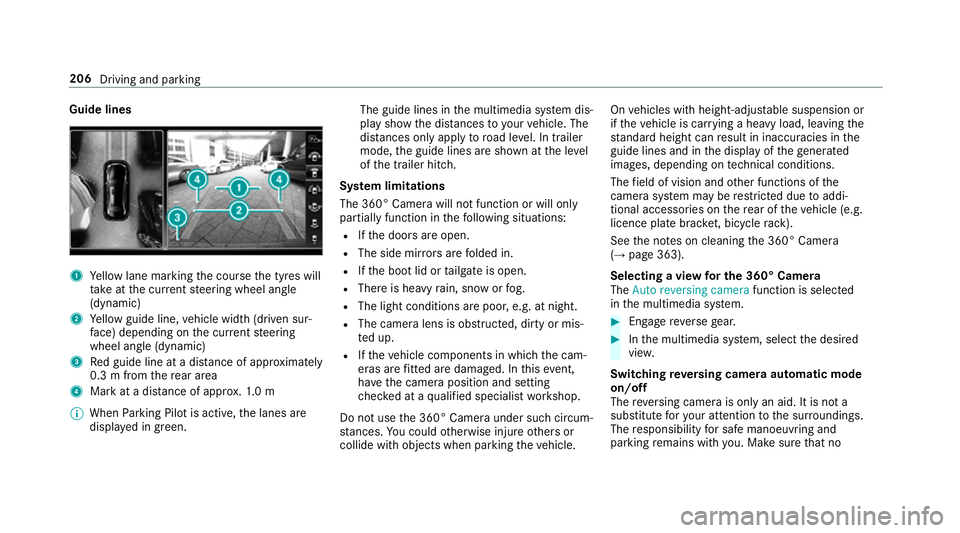
Guide lines
1
Yellow lane marking the course the tyres will
ta ke atthe cur rent steering wheel angle
(dynamic)
2 Yellow guide line, vehicle width (driven sur‐
fa ce) depending on the cur rent steering
wheel angle (dynamic)
3 Red guide line at a dis tance of appr oximately
0.3 m from there ar area
4 Mark at a distance of appr ox.1. 0 m
% When Parking Pilot is active, the lanes are
displa yed in green. The guide lines in
the multimedia sy stem dis‐
play show the dis tances toyour vehicle. The
dis tances only apply toroad le vel. In trailer
mode, the guide lines are shown at the le vel
of the trailer hitch.
Sy stem limitations
The 360° Camera will not function or will only
partially function in thefo llowing situations:
R Ifth e doors are open.
R The side mir rors are folded in.
R Ifth e boot lid or tailgate is open.
R There is heavy rain, snow or fog.
R The light conditions are poor, e.g. at night.
R The camera lens is obstructed, dirty or mis‐
ted up.
R Ifth eve hicle components in which the cam‐
eras are fitted are dama ged. In this event,
ha ve the camera position and setting
ch ecked at a qualified specialist workshop.
Do not use the 360° Camera under such circum‐
st ances. You could otherwise injure others or
collide with objects when parking theve hicle. On
vehicles with height-adjus table suspension or
if th eve hicle is car rying a heavy load, leaving the
st andard height can result in inaccuracies in the
guide lines and in the display of thege nerated
ima ges, depending on tech nical conditions.
The field of vision and other functions of the
came rasystem may be restricted due toaddi‐
tional accesso ries on there ar of theve hicle (e.g.
licence plate brac ket, bicycle rack ).
See the no tes on cleaning the 360° Camera
(→ page 363).
Selecting a view for the 360° Camera
The Auto reversing camera function is selected
in the multimedia sy stem. #
Enga gereve rsege ar. #
Inthe multimedia sy stem, select the desired
vie w.
Switching reve rsing camera automatic mode
on/off
The reve rsing camera is only an aid. It is not a
substitute foryo ur attention tothe sur roundings.
The responsibility for safe manoeuvring and
parking remains with you. Make sure that no 206
Driving and parking
Page 218 of 541
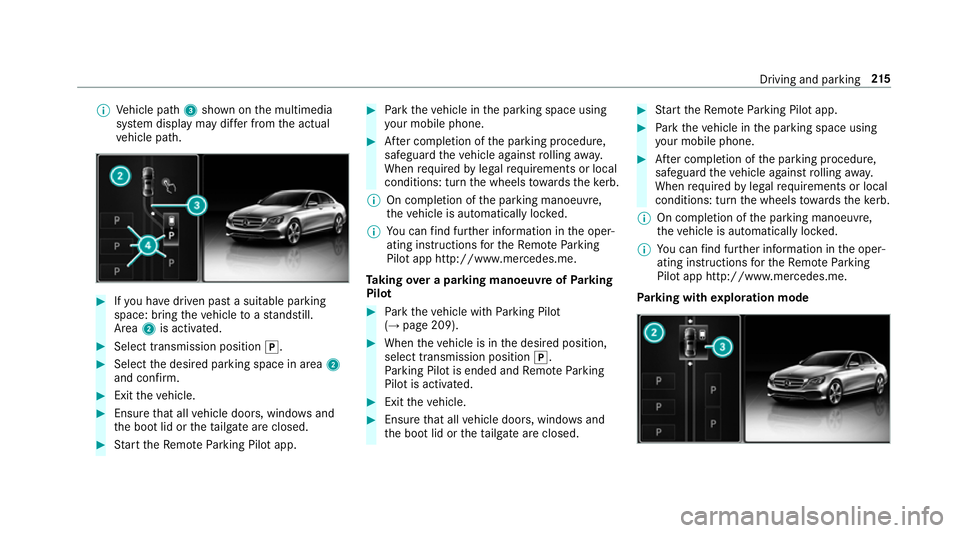
%
Vehicle path 3shown on the multimedia
sy stem display may dif fer from the actual
ve hicle path. #
Ifyo u ha vedriven past a suitable parking
space: bring theve hicle toast andstill.
Area 2is activated. #
Select transmission position j.#
Select the desired parking space in area 2
and confi rm. #
Exit theve hicle. #
Ensure that all vehicle doors, windo wsand
th e boot lid or theta ilgate are closed. #
Start theRe mo teParking Pilot app. #
Park theve hicle in the parking space using
yo ur mobile phone. #
After completion of the parking procedure,
safeguard theve hicle against rolling away.
When requ ired bylegal requirements or local
conditions: turn the wheels towa rdsth eke rb.
% On completion of the parking manoeuvre,
th eve hicle is automatically loc ked.
% You can find fur ther information in the oper‐
ating instructions forth eRe mo teParking
Pilot app http://www.me rcedes.me.
Ta king over a parking manoeuv reofParking
Pilot #
Park theve hicle with Parking Pilot
(→ page 209). #
When theve hicle is in the desired position,
select transmission position j.
Pa rking Pilot is ended and Remo teParking
Pilot is activated. #
Exit theve hicle. #
Ensure that all vehicle doors, windo wsand
th e boot lid or theta ilgate are closed. #
Start theRe mo teParking Pilot app. #
Park theve hicle in the parking space using
yo ur mobile phone. #
After completion of the parking procedure,
safeguard theve hicle against rolling away.
When requ ired bylegal requirements or local
conditions: turn the wheels towa rdsth eke rb.
% On completion of the parking manoeuvre,
th eve hicle is automatically loc ked.
% You can find fur ther information in the oper‐
ating instructions forth eRe mo teParking
Pilot app http://www.me rcedes.me.
Pa rking with explo ration mode Driving and pa
rking 215
Page 219 of 541
#
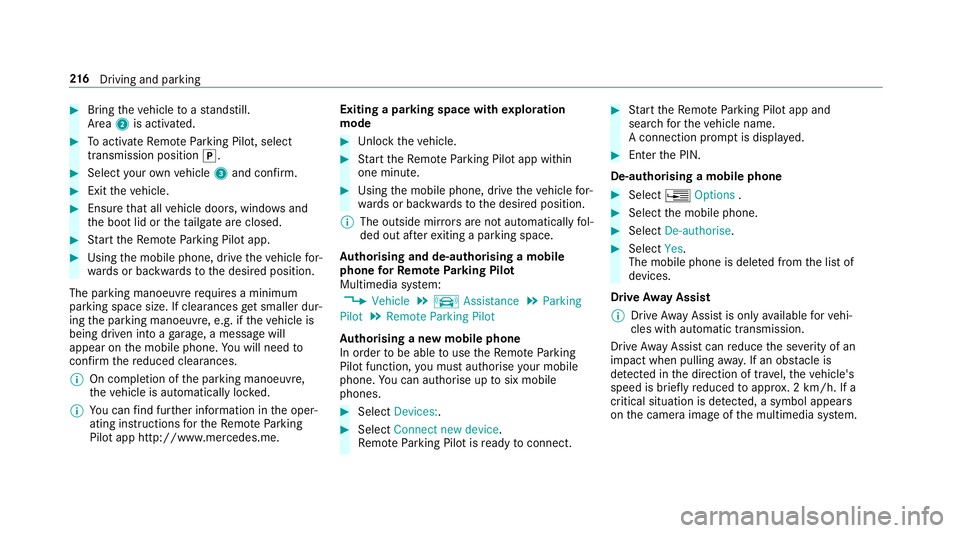
Bring theve hicle toast andstill.
Area 2is activated. #
Toactivate Remo teParking Pilot, select
transmission position j.#
Select your ow nve hicle 3and confirm. #
Exit theve hicle. #
Ensure that all vehicle doors, windo wsand
th e boot lid or theta ilgate are closed. #
Start theRe mo teParking Pilot app. #
Using the mobile phone, drive theve hicle for‐
wa rds or backwards tothe desired position.
The parking manoeuvre requires a minimum
parking space size. If clearances get smaller dur‐
ing the parking manoeuvre, e.g. if theve hicle is
being driven into a garage , a message will
appear on the mobile phone. You will need to
confirm there duced clearances.
% On completion of the parking manoeuvre,
th eve hicle is automatically loc ked.
% You can find fur ther information in the oper‐
ating instructions forth eRe mo teParking
Pilot app http://www.me rcedes.me. Exiting a parking space with
explo ration
mode #
Unlock theve hicle. #
Start theRe mo teParking Pilot app within
one minute. #
Using the mobile phone, drive theve hicle for‐
wa rds or backwards tothe desired position.
% The outside mir rors are not automatically fol‐
ded out af terex iting a parking space.
Au thorising and de-authorising a mobile
phone forRe mo teParking Pilot
Multimedia sy stem:
, Vehicle .
k Assistance .
Parking
Pilot .
Remote Parking Pilot
Au thorising a new mobile phone
In order tobe able touse theRe mo teParking
Pilot function, you must authorise your mobile
phone. You can authorise up tosix mobile
phones. #
Select Devices:. #
Select Connect new device .
Re mo teParking Pilot is ready toconnect. #
Start theRe mo teParking Pilot app and
sear chforth eve hicle name.
A connection prom ptis displa yed. #
Ente rth e PIN.
De-authorising a mobile phone #
Select ¥Options . #
Select the mobile phone. #
Select De-authorise. #
Select Yes.
The mobile phone is dele ted from the list of
devices.
Drive Away Assist
% Drive AwayAssi stis only available forve hi‐
cles with automatic transmission.
Drive AwayAssi stcan reduce the se verity of an
impact when pulling away. If an obs tacle is
de tected in the direction of tr avel, theve hicle's
speed is brief lyreduced toappr ox. 2 km/h. If a
critical situation is de tected, a symbol appea rs
on the camera image of the multimedia sy stem. 216
Driving and pa rking
Page 345 of 541
In some countries,
thest andards may not be
av ailable, or may not be available in all areas.
A CA module (Conditional Access Module),
whi chis not included in the scope of deliver y,is
used todecrypt HD programmes according to
th e CI+ standard. In some countries, an addi‐
tional smart card is requ ired, which is inse rted
into theCA module (see the manufacturer's
operating manual).
The TVtuner is Under the boot floor. The CA
module is inser ted into theTV tune r.
* NO
TEDama getotheCA module and
Smart Card The
CAmodule is designed for use in the
home. When used on the mo ve,th eCA mod‐
ule may overheat in consis tently high outside
te mp eratures and may be damaged. #
Make sure that theCA module is not
subject tohigh temp eratures forex ten‐
ded pe riods of time.
If th eCA module is dama ged, no
enc rypte dch annels can be recei ved. The
TVtuner can recei veprogrammes in Dolby
Digital Plus. Produced under licence
byDol byLaboratories.
Dolby and the double-D symbol are trademar ks
of Dolby Laboratories.
The TVtuner au tomatically sets theTV standard.
TV reception is dependent on thefo llowing fac‐
to rs:
R speed
R characteristics of the selected TVchannel TV
reception may be impaired due tothefo llow‐
ing factors:
R electronic devices being transpor ted in the
ve hicle
R changing reception conditions while theve hi‐
cle is in motion
Po or reception conditions can ha vethefo llowing
ef fect:
R theTV tuner switches toan alternative chan‐
nel with better reception whi chis digitally
broadcasting the same programme conte nt
R theTV tuner mu testh e sound, freezes the
screen or hides it. The tsymbol appears
in the displa y. Switching
toTV mode Multimedia sy
stem:
, Media .
à Devices #
Select TV.
The TVpicture appears. If available, the
ch annel and prog ramme information is dis‐
pla yed. 342
Multimedia sy stem
Page 351 of 541
Displaying
telete xt
Multimedia sy stem:
, Media .
à Devi-
ces .
TV .
p Teletext #
Tocall up the pr evious or next telete xt
page: swipe upwards or down wards on the
to uchpad. #
Toenter numbers: press and holdthe
to uchpad. #
Enterth e numbers in quick succession. #
Toselect a subpage: swipe left orright on
th eto uchpad.
% The subpage cur rently selected is ma rked by
a blue symbol. #
Toreturn totheTV prog ramme: press and
hold the% button.
MHEG-5 digital telete xt #
Ifth ete lete xt is displ ayed, press and hold on
th eto uchpad.
A colour selection bar appears. #
Select Red,Green, YelloworBlue .
The data content is displ ayed. #
Toenter numbers: select123. #
Enterth e numbers in quick succession. #
Toreturn totheTV prog ramme: selectTV. Pictu
resettings Picture settings
overview
The following picture form at settings are availa‐
ble:
R Automatic
R 16:9
R 4:3
R Zoom
The brightness is automatically set.
Selecting picture settings
Multimedia sy stem:
, Media .
à Devi-
ces .
TV .
Z Options #
Select Picture format. #
Select the picture form at. HD prog
rammes Inse
rting theCA module
* NO
TEDama getotheCA module and
Smart Card The
CAmodule is designed for use in the
home. When used on the mo ve,th eCA mod‐
ule may overheat in consis tently high outside
te mp eratures and may be damaged. #
Make sure that theCA module is not
subject tohigh temp eratures forex ten‐
ded pe riods of time.
If th eCA module is dama ged, no
enc rypte dch annels can be recei ved. The
TVtuner is Under the boot floor. #
Ifre qu ired (countr y-dependent): insert the
Smart Ca rdinto theCA module slot. #
Remo vethe pr otective cap from theTV tune r. #
Insert theCA module into theTV tuner sl ot. 348
Multimedia sy stem
Page 363 of 541
#
Make sure that no windsc reen washer
concentrate spills out next tothefiller
opening. #
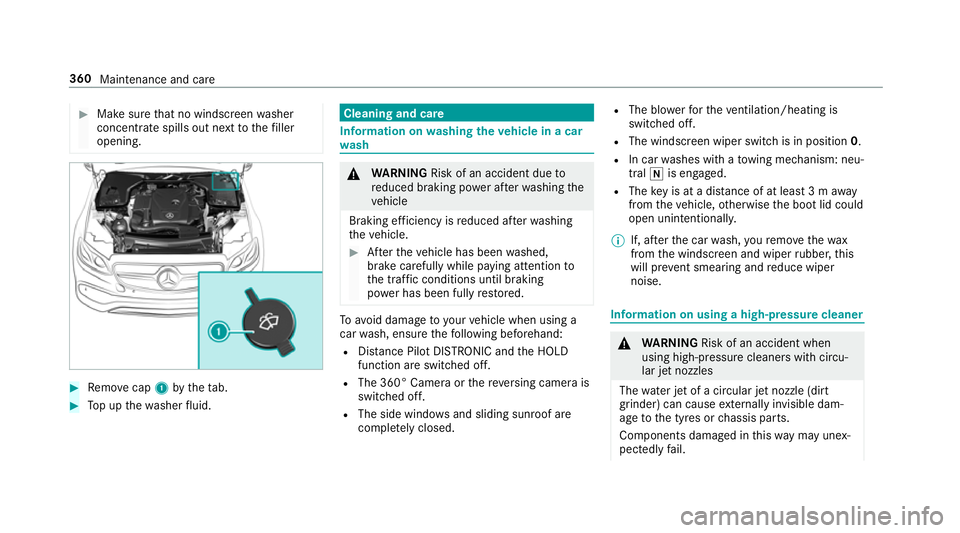
Remo vecap 1bytheta b. #
Top up thewa sher fluid. Cleaning and care
Information on
washing theve hicle in a car
wa sh &
WARNING Risk of an accident due to
re duced braking po wer af terwa shing the
ve hicle
Braking ef ficiency is reduced af terwa shing
th eve hicle. #
Afterth eve hicle has been washed,
brake carefully while paying attention to
th e traf fic conditions until braking
po we r has been fully restored. To
avo id damage to yourvehicle when using a
car wash, ensure thefo llowing beforehand:
R Distance Pilot DISTRONIC and the HOLD
function are switched off.
R The 360° Camera or there ve rsing camera is
switched off.
R The side windo wsand sliding sun roof are
comple tely closed. R
The bl owerforth eve ntilation/heating is
switched off.
R The windsc reen wiper switch is in position 0.
R In car washes with a towing mechanism: neu‐
tral iis engaged.
R The key is at a dis tance of at least 3 m away
from theve hicle, otherwise the boot lid could
open unintentionall y.
% If, af terth e car wash, youre mo vethewax
from the windscreen and wiper rubber, this
will pr event smearing and reduce wiper
noise. Information on using a high-p
ressure cleaner &
WARNING Risk of an accident when
using high-pressure cleane rswith circu‐
lar jet nozzles
The wate r jet of a circular jet nozzle (dirt
grinder) can cause extern ally invisible dam‐
age tothe tyres or chassis parts.
Components damaged in this wa y may unex‐
pec tedly fail. 360
Maintenance and care
Page 364 of 541
#
Do not use high-pressure cleane rswith
circular jet nozzles toclean theve hicle. #
Have damaged tyres or chassis parts
re placed immediatel y. To
avo id damage to yourvehicle, obser vethefo l‐
lowing when using a high-pressure cleaner:
R Keep theke y at least 3 m away from the
ve hicle. Otherwise the boot lid could open
unintentionall y.
R Maintain a dis tance of at least 30 cm tothe
ve hicle.
R Vehicles with deco rative foil: parts of your
ve hicle are co vered with a decorative foil. Maintain a dis
tance of at least 70 cm
between thefo il-c ove red parts of theve hicle
and the nozzle of the high pressure cleaner.
Mo vethe high-pressure cleaner nozzle
around whilst cleaning.
R Obser vethe information on the cor rect dis‐
ta nce in the equipment manufacturer's oper‐
ating instructions.
R Do not point the nozzle of the high-pressure
cleaner directly at sensitive parts such as
tyres, slits, electrical component parts, bat‐
te ries, light sources and ventilation sl ots. Wa
shing theve hicle byhand Obser
vethe legal requ irements, e.g. in some
countries, washing byhand is only allo wed at
specially equipped washing ba ys. #
Use a mild cleaning agent, such as a car
shampoo. #
Washtheve hicle with luk ewarmwate r using
a soft car sponge. When doing so, do not
ex pose theve hicle todirect sunlight. #
Carefully hose theve hicle off with water and
dry using a chamois. Take care not topoint
th ewate r jet directly towa rdsth e air inlet
grille. Maintenance and care
361
Page 371 of 541
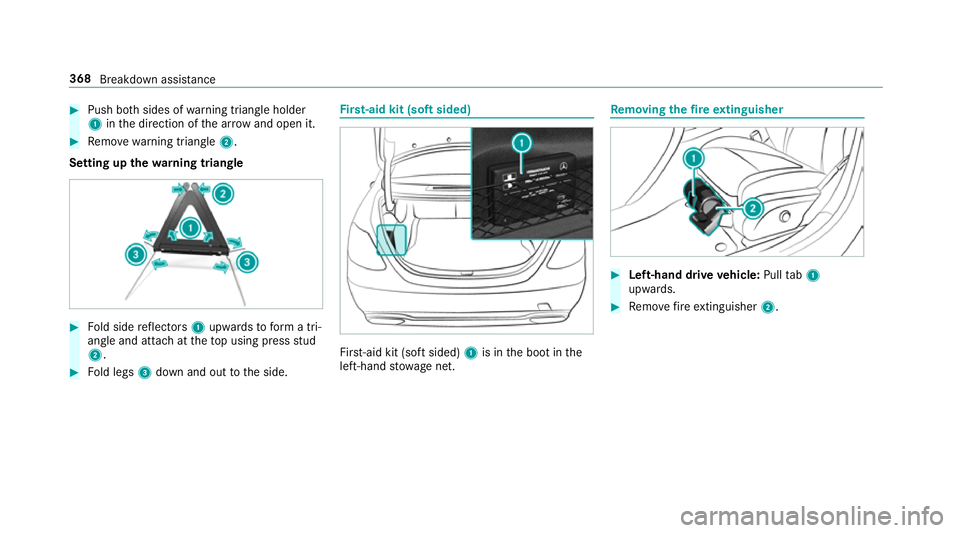
#
Push bo thsides of warning triangle holder
1 inthe direction of the ar row and open it. #
Remo ve wa rning triangle 2.
Setting up thewa rning triangle #
Fold side reflectors 1upwards toform a tri‐
angle and attach at theto p using press stud
2. #
Fold legs 3down and out tothe side. Fi
rs t-aid kit (soft sided) Fir
st-aid kit (so ftsided) 1is in the boot in the
left-hand stowage net. Re
moving the fire extinguisher #
Left-hand drive vehicle: Pulltab1
upwards. #
Remo vefire extinguisher 2. 368
Breakdown assi stance
Page 373 of 541
#
After driving in emergency mode ha ve
th erims checkedby aqu alified special‐
ist workshop with rega rd totheir fur ther
use. #
The defective tyre must be replaced in
eve rycase. Wi
th MOExtended tyres (run-flat tyres), you can
continue todrive your vehicle even if there is a
tot al loss of pressure in one or more tyres. How‐
eve r,th e tyre af fected must not show any clearly
visible damage.
Yo u can recognise MOExtended tyres bythe
MOExtended marking which appears on the side
wa ll of the tyre.
Ve hicles with tyre pressure loss warning sys‐
te m: MOExtended tyres may only be used in
conjunction wi than activated tyre pressure loss
wa rning sy stem.
Ve hicles with tyre pressure monitoring sys‐
te m: MOExtended tyres may only be used in
conjunction wi than activated tyre pressure mon‐
itoring sy stem. If a pressure loss
warning message appears in
th e multifunction display:
R Check the tyre for dama ge.
R If driving on, obser vethefo llowing no tes.
Driving distance possible in limp-home mode
af te r the pressure loss warning: Load condition Driving distance pos‐
sible in limp-homemode
Pa rtially laden 80 km
Fu lly laden 30 km R
The driving dis tance possible in li mp-home
mode may vary depending on the driving
st yle.
R Maximum permissible speed 80 km/h.
If a tyre has gone flat and cannot be replaced
with an MOEx tended tyre, you can use a stand‐
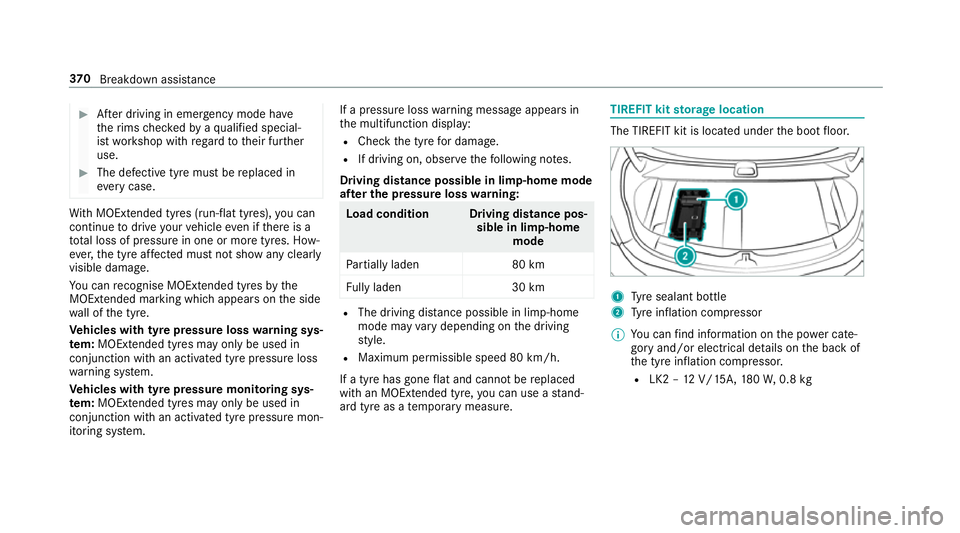
ard tyre as a temp orary measure. TIREFIT kit
storage location The TIREFIT kit is located under
the boot floor. 1
Tyre sealant bottle
2 Tyre inflation compressor
% You can find information on the po wer cate‐
gory and/or electrical de tails on the back of
th e tyre inflation compressor.
R LK2 – 12V/15A, 180W, 0.8 kg 37 0
Breakdown assis tance