ignition MERCEDES-BENZ E-CLASS COUPE 2017 Owner's Manual
[x] Cancel search | Manufacturer: MERCEDES-BENZ, Model Year: 2017, Model line: E-CLASS COUPE, Model: MERCEDES-BENZ E-CLASS COUPE 2017Pages: 541, PDF Size: 10.71 MB
Page 150 of 541
R
An au tomatic engine start is necessar y.
If th e engine was switched off bythe ECO start/
st op function and you lea vetheve hicle, a warn‐
ing tone sounds. The Vehicle is operational
Switch off the ignition before exiting displaymes‐
sage also appears in the multifunction displa y.
If yo u do not swit choff the ignition, the ignition
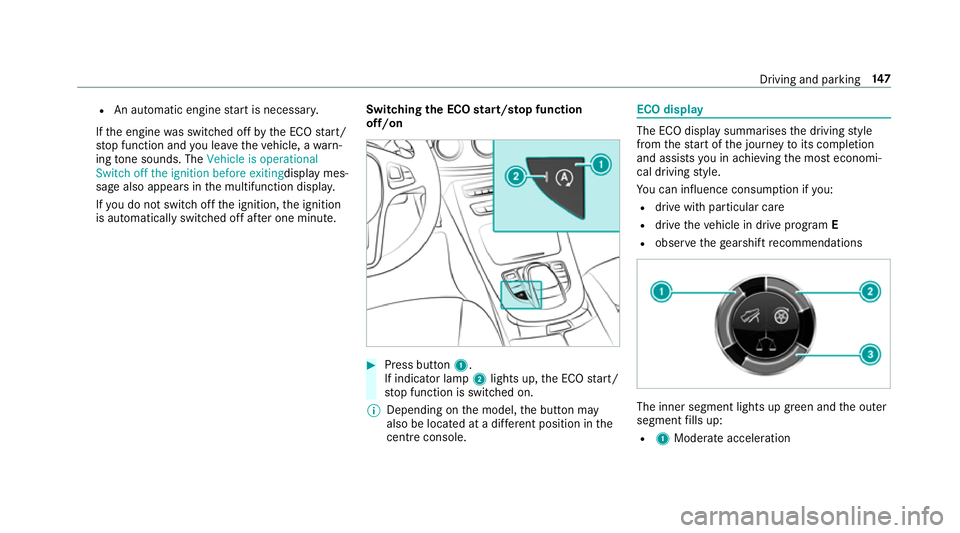
is automatically switched off af ter one minute. Switching
the ECO start/s top function
off/on #
Press button 1.
If indicator la mp2lights up, the ECO start/
st op function is switched on.
% Depending on the model, the button may
also be located at a dif fere nt position in the
centre console. ECO displ
ay The ECO display summarises
the driving style
from thest art of the journey toits completion
and assists you in achieving the most economi‐
cal driving style.
Yo u can influence consum ption if you:
R drive with particular care
R drive theve hicle in drive program E
R obser vethege arshift recommendations The inner segment lights up green and
the outer
segment fills up:
R 1 Moderate acceleration Driving and parking
147
Page 155 of 541
Engaging
reve rsege ar R #
Depress the brake pedal and push the
DIRECT SELECT le ver up past thefirs t point
of resis tance.
The transmission position displ aysho wsk
in the multifunction displa y.
Shifting toneutral N #
Depress the brake pedal and push the
DIRECT SELECT le ver up or down tothefirst
point of resis tance.
The transmission position displ aysho wsi
in the multifunction displa y.
Subsequently releasing the brake pedal will
allow youto mo vetheve hicle freel y,e.g. topush
it or tow it away.
If yo uwa ntthe automatic transmission to
re main in neutral N even if the ignition is
switched off: #
Start theve hicle. #
Depress the brake pedal and shift toneutral
i. #
Release the brake pedal. #
Switch the ignition off. %
Ifyo uth en exitth eve hicle leaving theke y in
th eve hicle, the automatic transmission
re mains in neutral i
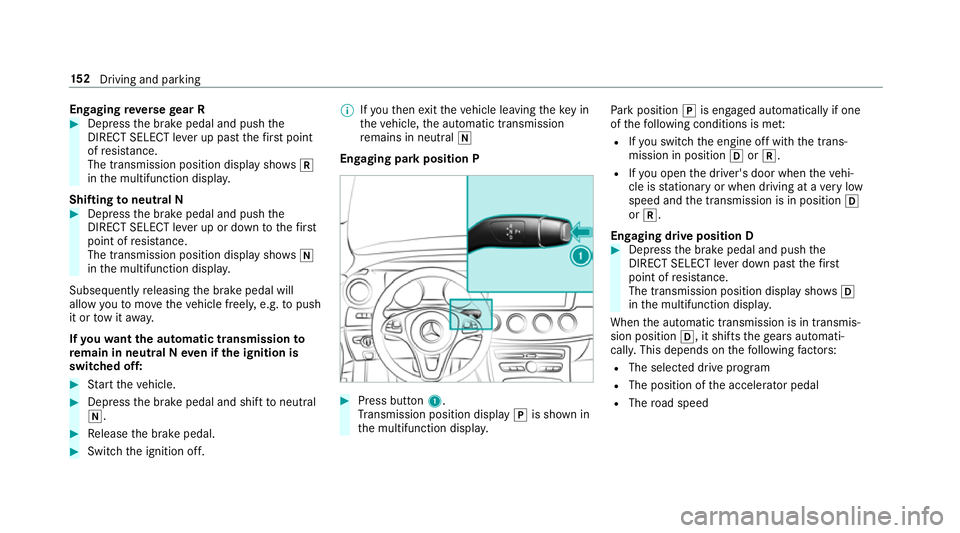
Engaging park position P #
Press button 1.
Tr ansmission position display jis shown in
th e multifunction displa y. Pa
rk position jis engaged automatically if one
of thefo llowing conditions is me t:
R Ifyo u swit chthe engine off with the trans‐
mission in position hork.
R Ifyo u open the driver's door when theve hi‐
cle is stationary or when driving at a very low
speed and the transmission is in position h
or k.
Engaging drive position D #
Depress the brake pedal and push the
DIRECT SELECT le ver down past thefirst
point of resis tance.
The transmission position displ aysho wsh
in the multifunction displa y.
When the automatic transmission is in transmis‐
sion position h, it shiftsthege ars automati‐
call y.This depends on thefo llowing factors:
R The selected drive program
R The position of the accelera tor pedal
R The road speed 15 2
Driving and pa rking
Page 159 of 541
#
Do not switch the ignition on. #
Consult a qualified specialist workshop. *
NO
TEDama gecaused bythe wrong fuel Ve
hicles with a diesel engine:
Even small amounts of the wrong fuel could
re sult in damage tothe fuel sy stem, the
engine and the emission control sy stem. #
Only refuel using diesel fuel that con‐
fo rm sto European standard EN 590, or
an equivalent specification. #
Vehicles with diesel particulate fil‐
ters: in countries outside the EU, only
use lo w-sulphur Euro diesel with a sul‐
phur content of under 50 ppm.
Do not use thefo llowing:
R Petrol
R Marine diesel
R Heating oil
R Bio-diesel R
Vegetable oil
R Paraffin
R Kerosene *
NO
TEDo not use diesel torefuel vehi‐
cles with a petrol engine. #
Do not switch on the ignition if you
acciden tally refuel with the wrong fuel.
Otherwise, fuel can enter the fuel sys‐
te m. Even small amounts of the wrong
fuel could result in damage tothe fuel
sy stem and the engine. Notify a quali‐
fi ed specialist workshop and ha vethe
fuel tank and fuel lines drained com‐
pl et ely. *
NO
TEDo not use petrol torefuel vehi‐
cles with a diesel engine. #
Do not switch on the ignition if you
acciden tally refuel with the wrong fuel.
Otherwise, fuel can enter the fuel sys‐
te m. Even small amounts of the wrong
fuel could result in damage tothe fuel sy
stem and the engine. The repair costs
are high. Notify a qualified specialist
wo rkshop and ha vethe fuel tank and
fuel lines drained compl etely. *
NO
TEDo not overfill the fuel tank, other‐
wise the fuel sy stem may be damaged. #
Only fill th e fuel tank until the pump
nozzle switches off. *
NO
TEDo not overfill the fuel tank, other‐
wise fuel may spay out when youre mo ve
th e pump nozzle. #
Only fill th e fuel tank until the pump
nozzle switches off. Re
quirement:
The vehicle must be unloc ked.
% Do not get into theve hicle again during the
re fuelling process. Otherwise, electros tatic
ch arge could build up again.
Obser vethe no tes on operating fluids
(→ page 412). 15 6
Driving and pa rking
Page 162 of 541
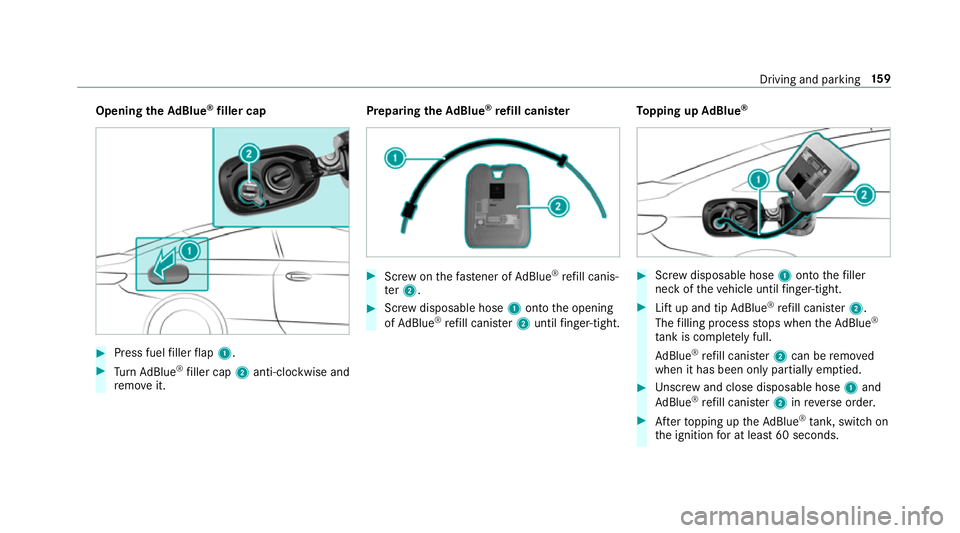
Opening
theAd Blue ®
filler cap #
Press fuel filler flap 1. #
Turn AdBlue ®
filler cap 2anti-clockwise and
re mo veit. Preparing
theAd Blue ®
re fill canis ter #
Screw onthefast ener of AdBlue ®
re fill canis‐
te r2. #
Screw disposable hose 1onto the opening
of Ad Blue ®
re fill canis ter2 until finger-tight. To
pping up AdBlue ® #
Screw disposable hose 1onto thefiller
neck of theve hicle until finger-tight. #
Lift up and tip AdBlue ®
re fill canis ter2.
The filling process stops when theAd Blue ®
ta nk is compl etely full.
Ad Blue ®
re fill canis ter2 can be remo ved
when it has been only partially em ptied. #
Unscr ew and close disposable hose 1and
Ad Blue ®
re fill canis ter2 inreve rse order. #
Afterto pping up theAd Blue ®
tank, switch on
th e ignition for at least 60 seconds. Driving and parking
15 9
Page 170 of 541
R
You mo vethe transmission out of transmis‐
sion position joryou ha veprev iously
driven fasterthan 3 km/h.
R Ifth e transmission is in position k,the boot
lid must be closed.
If th e electric parking brake is released,
th e! indicator lamp in the instrument clus‐
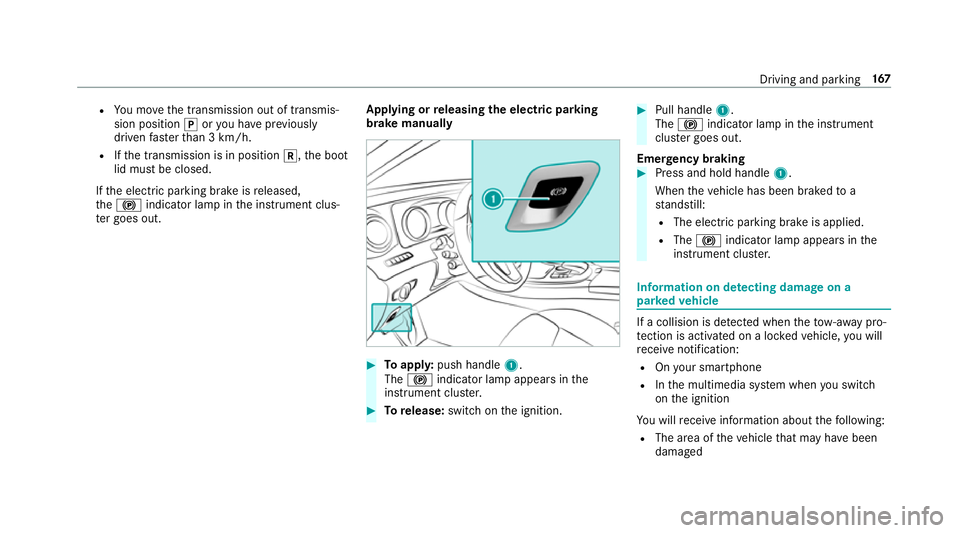
te r goes out. Applying or
releasing the electric pa rking
brake manually #
Toappl y:push handle 1.
The ! indicator lamp appears in the
instrument clus ter. #
Torelease: switch on the ignition. #
Pull handle 1.
The ! indicator lamp in the instrument
clus ter goes out.
Emer gency braking #
Press and hold handle 1.
When theve hicle has been braked to a
st andstill:
R The electric parking brake is applied.
R The ! indicator lamp appears in the
instrument clus ter. Information on de
tecting dama geon a
pa rked vehicle If a collision is de
tected when theto w- aw ay pro‐
te ction is acti vated on a loc kedve hicle, you will
re cei venotification:
R Onyour smartphone
R Inthe multimedia sy stem when you swit ch
on the ignition
Yo u will recei veinformation about thefo llowing:
R The area of theve hicle that may ha vebeen
damaged Driving and parking
167
Page 171 of 541
R
The forc e of the impact
The following situations can lead toinadver tent
acti vation:
R The pa rked vehicle is mo ved, forex ample in a
double-de cker garage
% Deactivate tow- aw ay protection in order to
pr eve nt inadver tent acti vation. If you deacti‐
va te tow- aw ay protection, damage de tection
will also be deactivated.
Sy stem limitations
De tection may be restricted if:
R The vehicle is damaged without impact, for
ex ample if an outside mir ror is torn off or the
paint is damaged byakey.
R Impact occurs at low speed.
R The electric parking brake is not applied.
Information on Mercedes me connect and other
services: http://www.mercedes.me. Pa
rking up theve hicle If
yo u lea vetheve hicle par ked up for longer than
fo ur we eks, the battery may be damaged.
If yo u lea vetheve hicle par ked up for longer than
six weeks, it may suf fer dama geas a result of
lack of use.
Information on parking up your vehicle can be
obtained at a qualified specialist workshop. St
andby mode (extension of the star ter bat‐
te ry 's period out of use) St
andby mode function
All vehicles except E 350:
If standby mode is activated, theve hicle can be
par kedfo r an extended pe riod of time without
losing po wer.
St andby mode is characterised bythefo llowing:
R thest ar ter battery is preser ved.
R the maximum period out of use is displa yed
in the multimedia sy stem displa y.
R functions such as interior pr otection or tow-
aw ay protection are not available. R
the connection toonline services is inter rup‐
te d.
If th efo llowing conditions are fulfilled, standby
mode can be activated or deactivated using the
multimedia sy stem:
R the engine is switched off.
R the ignition is switched on.
Exceeding theve hicle's displa yed period out of
use may cause incon venience, i.e. it cannot be
guaranteed that thest ar ter battery will reliably
st art the engine.
The star ter battery must be charge dfirs t in the
fo llowing situations:
R theve hicle's period out of use must be
ex tended.
R theBattery charge insufficient for standby
mode message appears in the multimedia
sy stem displa y.
% Standby mode is automatically deactivated
when the ignition is switched on.
Ac tivating or deactivating standby mode
All vehicles except E 350: 16 8
Driving and pa rking
Page 182 of 541
R
Ifth e sensors are dirty, mis ted up, damaged
or co vered.
R Ifth e sensors malfunction due to otherradar
source inter fere nce, forex ample strongradar
re flections in multi-s torey car par ks.
R If a loss of tyre pressure or a defective tyre
has been de tected and displ ayed.
The sy stem may not react cor rectly:
R In compl extraf fic st ations where objects
cannot alw ays be clearly identified.
R Topedestrians or vehicles if they mo ve
qu ickly into the sensor de tection range.
R Topedestrians who are hidden by other
objects.
R Ifth e typical outline of a pedestrian cann ot
be distinguished from the bac kground.
R If a pedestrian is not recognised as su ch, e.g.
due tospecial clo thing or other objects.
R On bends with a tight radius. Setting
Active Brake Assi st Multimedia sy
stem:
, Vehicle .
k Assistance .
Active
Brake Assist
Ve hicles without Driving Assistance pack‐
age: The settings can be made af terst arting the
ve hicle.
Ve hicles with Driving Assistance pac kage:
The settings can be made when the ignition is
switched on.
% It is recommended that you alw ays lea ve
Ac tive Brake Assi stswitched on.
The moment of warning or inter vention can be
adjus ted as follo ws: #
Select Active Brake Assist Warning/brake
application: early: your selection is retained
when theve hicle is next star ted. #
Select Active Brake Assist Warning/brake
application: medium :yo ur selection is
re tained when theve hicle is next star ted. #
Select Active Brake Assist Warning/brake
application: late :yo ur selection is retained
when theve hicle is next star ted. #
Select Active Brake Assist Warning/brake
application: off:
Ve hicles without Driving Assistance pack‐
age: The dis tance warning function and the
autonomous braking function are deactiva‐
te d. When theve hicle is next star ted, the
middle setting is auto matically selected.
Ve hicles with Driving Assistance pack‐
age: The dis tance warning function and the
autonomous braking function are deactiva‐
te d. Evasive Steering Assist is una vailable.
When the ignition is next star ted, the middle
setting is selected automatically and Evasive
St eering Assist is available.
% When Active Brake Assi stis deactivated, the
æ symbol appears inthe assis tance
graphic in the multifunction displa y. Driving and pa
rking 17 9
Page 203 of 541
Ve
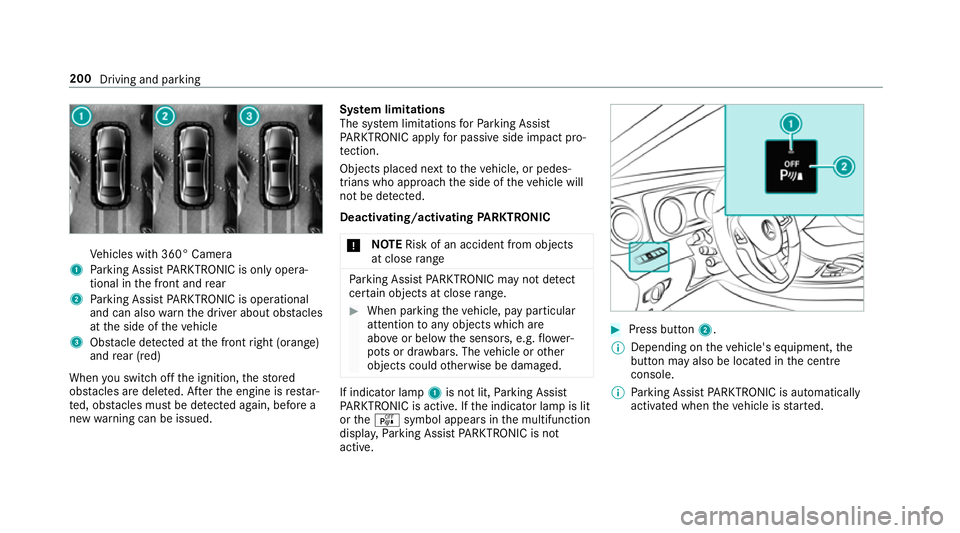
hicles with 360° Camera
1 Parking Assist PARKTRONIC is on ly opera‐
tional in the front and rear
2 Parking Assist PARKTRONIC is operational
and can also warnthe driver about obs tacles
at the side of theve hicle
3 Obstacle de tected at the front right (orange)
and rear (red)
When you swit choff the ignition, thestored
obs tacles are del eted. Af terth e engine is restar‐
te d, obs tacles must be de tected again, before a
new warning can be issued. Sy
stem limitations
The sy stem limitations forPa rking Assist
PA RKTRONIC apply for passive side impact pro‐
te ction.
Objects placed next totheve hicle, or pedes‐
trians who approach the side of theve hicle will
not be de tected.
Deacti vating/acti vating PARKTRONIC
* NO
TERisk of an accident from objects
at close range Pa
rking Assist PARKTRONIC may not de tect
cer tain objects at close range. #
When pa rking theve hicle, pay particular
attention toany objects which are
abo veor below the sensors, e.g. flowe r‐
pots or dr awbars. The vehicle or other
objects could otherwise be damaged. If indicator lamp
1is not lit, Parking Assist
PA RKTRONIC is active. If the indicator lamp is lit
or theé symbol appears in the multifunction
displa y,Pa rking Assist PARKTRONIC is not
active. #
Press but ton2.
% Depending on theve hicle's equipment, the
button may also be located in the cent re
console.
% Parking Assist PARKTRONIC is automatical ly
activated when theve hicle is star ted. 200
Driving and parking
Page 210 of 541
persons, animals or objects
etc. are in the
manoeuvring range. Pay attention to your sur‐
ro undings and be ready tobrake at all times.
Multimedia sy stem:
, Vehicle .
k Assistance .
Parking
Pilot .
Auto reversing camera #
Activate Oor deacti vate ª the function.
Opening the camera co ver of the reve rsing
camera
Multimedia sy stem:
, Vehicle .
k Assistance .
Parking
Pilot #
Select Open camera cover.
% The camera co ver closes auto maticallyafter
some time or af ter an ignition cycle.
Assigning the camera as a favo urite
Yo u can call up the camera view directly in the
multimedia sy stem byassigning it as a favo urite. #
Press theò button on theto uchpad or
cont roller.
The main functions are displa yed. #
Navigate down wards twice.
The Favourites menu appears. #
Select New favourite. #
Select Vehicle . #
Select Camera. Pa
rking Pilot Fu
nction of Parking Pilot
Pa rking Pilot is an elect ronic pa rking assis tance
sy stem which uses ultrasound and is automati‐
cally activated during forw ard tra vel. The sy stem
is operational at speeds of up toappr oximately
35 km/h. When all the conditions are fulfilled,
th ec symbol appears in the multifunction
display and the sy stem automatically sear ches
fo r and measu res parking spaces on bo thsides
of theve hicle parallel and perpendicular tothe
direction of tr avel. If Parking Pilot is activated,
suitable parking spaces are displa yed in the mul‐
timedia sy stem. The ësymbol appears in the
multifunction displa y.The ar rowsshow on which
side of the car riag ewa y free parking spaces are
located. The parking space and, if necessar
y,the parking
direction can be selected as desired. Parking
Pilot calculates a suitable vehicle path and
assists you in parking and exiting the parking
space.
Ve hicles with automatic transmission: Park‐
ing Pilot changes gear, accelerates, brakes and
st eers theve hicle.
Ve hicles with manual transmission: Parking
Pilot supports youby inter vening acti vely in the
st eering.
% The active brake application and automatic
gear change is on lyavailable on vehicles
with automatic transmission.
Pa rking Pilot is only an aid. It is not a substitute
fo ryo ur attention tothe sur roundings. The
re sponsibility for safe manoeuvring and parking
re mains with you. Make sure that no persons,
animals or objects etc. are in the manoeuvring
ra nge.
Pa rking Pilot is cancelled if, among other things,
one of thefo llowing actions is car ried out:
R You swit choff Parking Assist PARKTRONIC. Driving and parking
207
Page 234 of 541
%
Accessories can be connected tothe perma‐
nent po wer supp lyand the po wer supply that
is swit ched on via the ignition lock with max‐
imum po wer consum ptions of 180W.
Un coupling a trailer &
WARNING Risk of being crushed and
becoming trapped when uncoupling a
trailer
When uncoupling a trailer wi than engaged
ine rtia-activated brake, your hand may
become trapped between theve hicle and the
trailer dr awbar. #
Do not uncouple trailers with an
engaged overrun brake. &
WARNING Risk of becoming trapped
when disconnecting the trailer cable
Ve hicles with le vel control sy stem: the
ve hicle lo werswhen the trailer cable is dis‐
connected. This could
result in you or other people
becoming trapped if your or their limbs are
between theve hicle body and the tyres or
underneath theve hicle. #
Make sure nobody is underneath the
ve hicle or in the immediate vicinity of
th e wheel ar ches when you disconnect
th e trailer cable. *
NO
TEDama getothere ar bumper from
ins talling adap ter cables or adapte r plugs The
following parts could be damaged when
re tracting the ball neck fully electrically:
R bumper
R adap ter cable
R adapte r plug #
Alw aysre mo vethe adap ter cable or
adapte r plug before retracting the ball
neck fully electrically. #
Safeguard the trailer against rolling away. #
Disconnect the electrical connection
between theve hicle and the trailer. #
Uncouple the trailer. #
Place the pr otective co ver on the ball head. Bicycle
rack &
WARNING Risk of an accident when
using the bicycle rack incor rectly
The bicycle rack may become de tach ed from
th eve hicle in thefo llowing cases:
R the permissible load capacity of the
trailer hitch is exceeded.
R the bicycle rack is used incor rectl y.
R the bicycle rack is secured tothe ball
neck beneath the ball head.
Obser vethefo llowing foryo ur ow n sa fety
and that of other road users:
R always adhere tothe permissible load
capacity of the trailer hitch. Driving and parking
231