reset MERCEDES-BENZ E-CLASS COUPE 2017 Owner's Manual
[x] Cancel search | Manufacturer: MERCEDES-BENZ, Model Year: 2017, Model line: E-CLASS COUPE, Model: MERCEDES-BENZ E-CLASS COUPE 2017Pages: 541, PDF Size: 10.71 MB
Page 356 of 541
Battery disconnection periods
The AS
SYST PLUS service inter val display
can only calculate the service due da tewhen
th e bat tery is connected. #
Notedown the service due date displa yed in
th e instrument display before disconnecting
th e battery (→ page 352). Engine compartment
Ac
tive bonn et(pedestrian pr otection) Operation of
the active bonnet (pedestrian
pr otection)
In cer tain accident situations, therisk of injury
to pedestrians can be reduced bythe actuation
of the active bonn et. The rear area of the engine
bonn etisraised byappr oximately 85 mm.
Fo rth e drive tothewo rkshop, reset the trig‐
ge red active bonn etyourself. If the active bonn et
has been triggered, pedestrian pr otection may
be limited.
A qu alified specialist workshop must re-ins tate
th e full functionality of the active bonn et. The active bonnet is not
available in all coun‐
tries.
Re setting the active bonnet &
WARNING Danger of bu rns from hot
component parts in the engine compart‐
ment
Cer tain component parts in the engine com‐
partment may be very hot, e.g. the engine,
th era diator and parts of theex haust sy stem. #
Let the engine cool down and only
to uch the component parts described
below: #
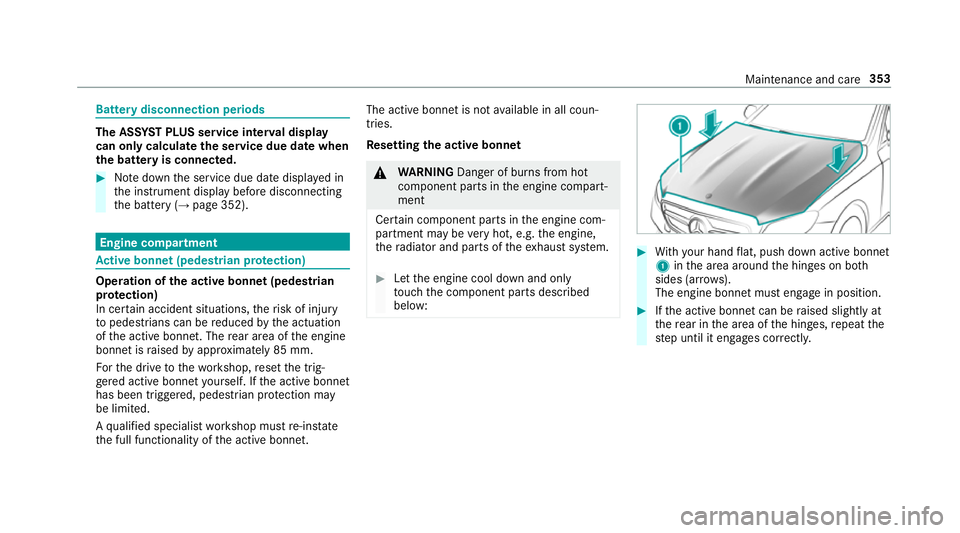
With your hand flat, push down active bonnet
1 inthe area around the hinges on bo th
sides (ar rows).
The engine bonnet must engage in position. #
Ifth e active bonn etcan be raised slight lyat
th ere ar in the area of the hinges, repeat the
st ep until it engages cor rectl y. Maintenance and care
353
Page 520 of 541
Re
gis tering on Mercedes me ............... 288
Loading guidelines .................................... 99
Loads Secu ring ................................................ 99
Lo cking ...................................................... .58
Locking/unlocking ........................ 62, 63, 67
Lu bricant additives
see Additives
Lu ggage
Securing ................................................ 99
Lu mbar support
see Lumbar support (4-w ay)
Lu mbar support (4-w ay).......................... .89 M
MAGIC VISION CONTROL Windsc reen wipers .............................. 124
Main beam Adaptive Highbeam Assist Plus ............ 11 9
Switching on/off .................................. 11 6
Maintenance see ASS YST PLUS Malfunction
Restra int sy stem ................................... 28
Manual transmission Operating thege arshift le ver ............... 14 9
Map .......................................... .289, 290, 291
Av oiding (changing) an area ................2 93
Av oiding an area ..................................2 93
Av oiding an area (deleting) .................. 294
Av oiding an area (o verview) ................ .293
Displ aying auto zoom when turning .... .295
Displ aying Qibla .................................. 295
Displaying the compass ....................... 295
Displaying the map version ................ .293
Displ aying the next intersecting
st re et ................................................... 292
Displaying the satellite map ................2 95
Displ aying the tra ffic map .................. .289
Displ aying traf fic signs ........................ 293
Displaying weather information .......... .296
Map data ............................................. 294
Moving ................................................. 291
Overview ............................................. 290
Selecting POI symbols ......................... 292
Selecting text information ................... 292
Selecting the map orientation .............2 92Setting
the map scale .......................... 291
Up dating .............................................. 294
Map and compass Overview .............................................2 90
Massage prog rammes
Selecting the front seats ....................... 92
Massage prog rams
Overview ............................................... 92
Massage settings Resetting ............................................... 92
Matt finish (cleaning instructions) ........ 362
Maximum speed see Limiter
MB Info call see Service call
Mecca .......................................................2 95
Media Menu (on-boa rdcompu ter) .................. 24 3
Sea rching ............................................ 333
Media display Notes .................................................. 258 Index
517
Page 525 of 541
Playback options
Selecting ............................................. 330
POI symbols Custom ................................................ 292
Po we r supp ly
Switching on (s tart/s top button) .........1 40
PRE-SAFE ®
(anticipatory occupant
pr otection)
Fu nction ................................................. 41
PRE-SAFE ®
Sound ..................................41
Re versing measures .............................. .41
PRE-SAFE ®
(anticipatory occupant
pr otection)
see Anticipatory occupant pr otection
see Occupant saf ety
see Pr eventati veoccupant pr otection sy stem
PRE-SAFE ®
PLUS (anticipa tory occu‐
pant pr otection plus)
Fu nction ................................................ 42
Re versing measures .............................. .41
PRE-SAFE ®
PLUS (anticipatory occu‐
pant pr otection plus)
see Anticipatory occupant pr otection see Occupant saf
ety
Pr ev entative occupant pr otection sys‐
te m .............................................................. 41
Prog ramme in form ation
TV channel .......................................... 345
Prog rams
see DYNA MIC SELECT
Pr otection of the environment
No tes ..................................................... 19
Re turning an end-of-life vehicle .............19 Q
Qibla ......................................................... 295
QR code Rescue card .......................................... 25
Qualified specialist workshop .................. 24 R
Ra dar senso rs.......................................... 16 9
Ra dio
Ac tivating ............................................ 338
Ac tivating/deactivating radio text ....... 341
Calling up a slide show ........................ 340 Calling up
thest ation list .................... .340
Deleting stations ................................ .340
Direct frequency entry ........................ 340
Displ aying information ........................ .341
Editing station presets ........................ .340
Fr equency fix ....................................... 341
Menu (on-boa rdcompu ter) .................. 24 2
Moving stations .................................. .340
Overview ............................................. 339
Sear ching forst ations ........................ .340
Setting a station .................................. 340
Setting station tracking ...................... .341
Setting the frequency band ................. 340
Setting the traf fic information
service volume inc rease ...................... 341
St oring stations .................................. .340
Switching traf fic announcements
on/off .................................................. 341
Ta gging music trac ks........................... 341
To display radio text ............................. 341
Vo ice commands (LINGU ATRO NIC) .....2 54
Ra dio stations
Selecting (on-boa rdcompu ter) ............ 24 2
Ra in-closing feature
Sliding sunroof ...................................... 79 522
Index
Page 526 of 541
Ra
ising
Ve hicle ................................................ 402
Ra nge
Displaying ............................................ 239
Re ading lamp
see Interior lighting
Re ar fog light ............................................ 11 5
Re ar seat
see Seat
Re ar seat belt
St atus display ........................................ 33
Re ar seat belt status display .................... 33
Re ar window
Ro ller sunblind ...................................... .72
Re ar window heater ................................ 12 9
Re ar-view mir ror
see Outside mir rors
Re cycling
see Take -ba ckof end-of-life vehicles
Re ducing agent
see AdBlue ® Re
fuelling
Re fuelling theve hicle .......................... 154
To pping up AdBlue ®
............................. 15 8
Re gistration
Ve hicle ................................................... 24
Re mo tecont rol (stationa ryheater)
Displ ays ............................................... 13 6
Problems ............................................. 13 8
Re placing the battery .......................... 137
Setting ................................................. 13 5
Re mo teParking Pilot .............................. .212
Auth orising a mobile phone ................. 216
Fu nction/no tes .................................... 212
Operating ............................................. 213
Sy stem limitations ...............................2 12
Re scue card ............................................... 25
Re ser ve
Fu el ...................................................... 41 5
Re set function (multimedia sy stem) .....2 73
Re sidual heat ...........................................1 32
Re storing (factory settings)
see Reset function (multimedia sy stem) Re
stra int sy stem
Children ................................................ .42
Fu nction in an accident ........................ .28
Fu nctionality .......................................... 28
Malfunction ........................................... 28
Pr otection ..............................................27
Re duced pr otection ...............................27
Sy stem self-test .....................................28
Wa rning lamp ........................................ 28
Re stra int sy stem
see Occupant saf ety
Re turning an end-of-li fevehicle
Pr otection of the environment ............... 19
Re versege ar
Selecting ............................................. 15 2
Re versing camera .................................... 201
Assigning as a favo urite ...................... .207
Care .................................................... 363
Fu nction .............................................. 201
Opening the camera co ver .................. 207
Switching auto matic mode on/off ..... .206
RF transmitters see Two-w ayradios
Rims (Care) .............................................. 363 Index
523
Page 530 of 541
St
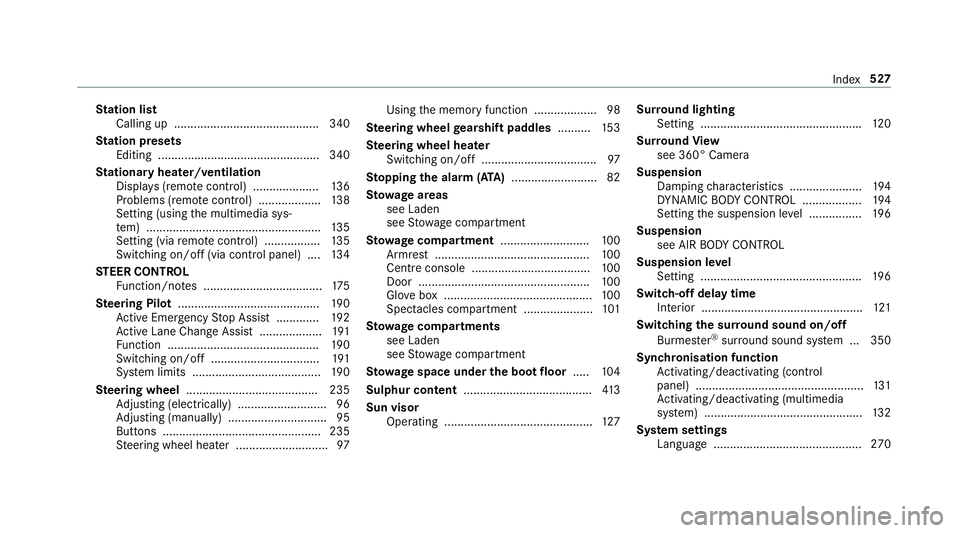
ation list
Calling up ............................................ 340
St ation presets
Editing ................................................. 340
St ationary heater/ventilation
Displ ays (remo tecontrol) .................... 13 6
Problems (remo tecontrol) ................... 13 8
Setting (using the multimedia sys‐
te m) ..................................................... 13 5
Setting (via remo tecontrol) ................. 13 5
Switching on/off (via control panel) .... 13 4
ST EER CONT ROL
Fu nction/no tes .................................... 175
Ste ering Pilot .......................................... .190
Ac tive Emergency Stop Assist .............1 92
Ac tive Lane Change Assi st................... 191
Fu nction .............................................. 19 0
Switching on/off ................................. 191
Sy stem limits ....................................... 19 0
Ste ering wheel ........................................ 235
Ad justing (electrically) ........................... 96
Ad justing (manually) .............................. 95
Buttons ................................................ 235
St eering wheel heater ............................97 Using
the memory function ...................98
Ste ering wheel gearshift paddles ..........15 3
Ste ering wheel heater
Swit ching on/off .................................. .97
St opping the ala rm(ATA ).......................... 82
St ow age areas
see Laden
see Stow age compartment
St ow age comp artment........................... 100
Armrest ............................................... 100
Centre console .................................... 100
Door ................................................... .100
Glove box .............................................1 00
Spectacles compartment ..................... 101
St ow age comp artments
see Laden
see Stow age compartment
St ow age space under the boot floor .....1 04
Sulphur content ....................................... 413
Sun visor Operating ............................................. 127Sur
round lighting
Setting ................................................ .120
Sur round View
see 360° Camera
Suspension Damping characteristics ...................... 194
DY NA MIC BODY CONTROL .................. 194
Setting the suspension le vel ................ 19 6
Suspension see AIR BODY CONTROL
Suspension le vel
Setting ................................................. 19 6
Switch-off delay time Interior .................................................1 21
Switching the sur round sound on/off
Burmes ter®
sur round sound sy stem ... 350
Synchronisation function Activating/deactivating (control
panel) ................................................... 131
Ac tivating/deactivating (multimedia
sy stem) ................................................ 13 2
Sy stem settings
Language ............................................ .270 Index
527