battery MERCEDES-BENZ E-CLASS COUPE 2017 Owner's Guide
[x] Cancel search | Manufacturer: MERCEDES-BENZ, Model Year: 2017, Model line: E-CLASS COUPE, Model: MERCEDES-BENZ E-CLASS COUPE 2017Pages: 541, PDF Size: 10.71 MB
Page 455 of 541
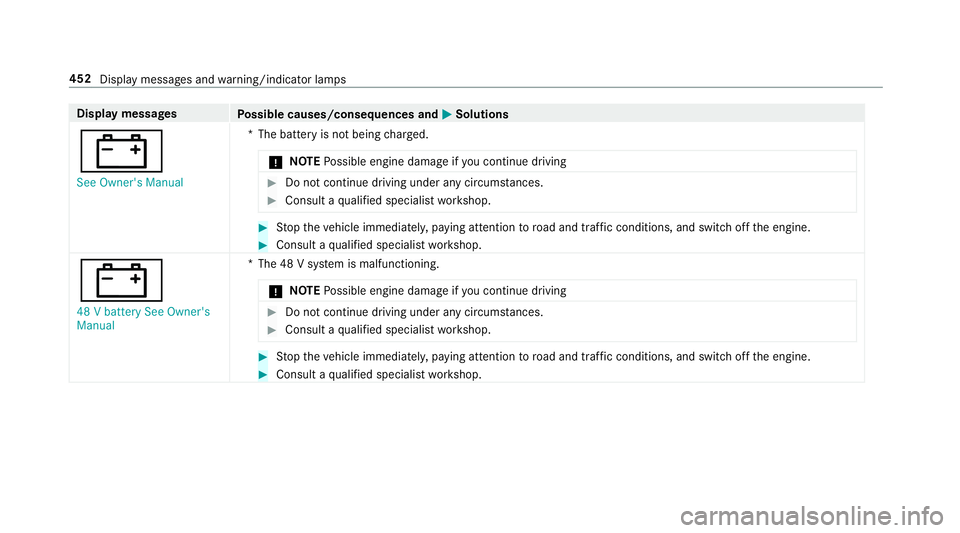
Display messages
Possible causes/consequences and M
MSolutions
# See Owner's Manual *T
he battery is not being charge d.
* NO
TEPossible engine damage if you continue driving #
Do not continue driving under any circum stances. #
Consult a qualified specialist workshop. #
Stop theve hicle immediately, paying attention toroad and traf fic conditions, and switch off the engine. #
Consult a qualified specialist workshop.
# 48 V battery See Owner's
Manual *T
he 48 V sy stem is malfunctioning.
* NO
TEPossible engine damage if you continue driving #
Do not continue driving under any circum stances. #
Consult a qualified specialist workshop. #
Stop theve hicle immediately, paying attention toroad and traf fic conditions, and switch off the engine. #
Consult a qualified specialist workshop. 452
Display messages and warning/indicator lamps
Page 456 of 541
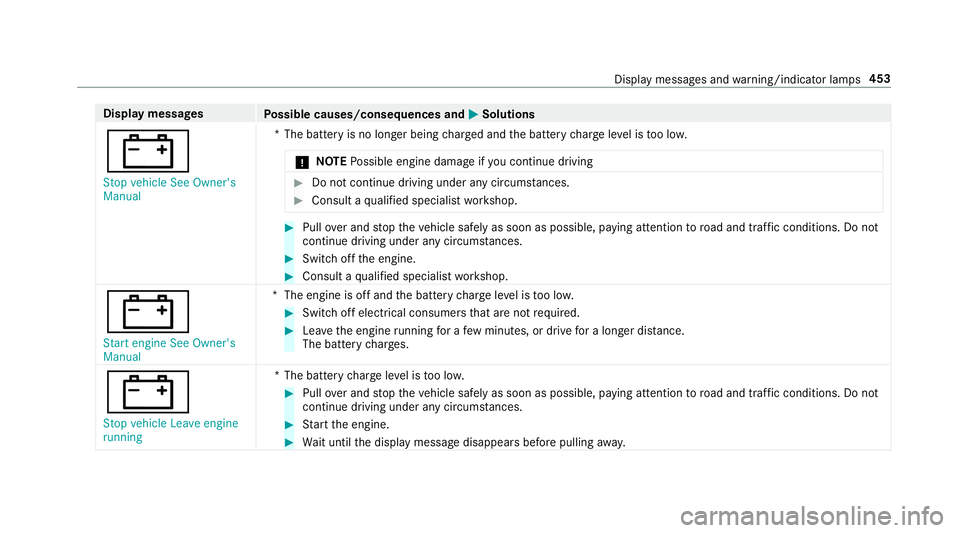
Display messages
Possible causes/consequences and M
MSolutions
# Stop vehicle See Owner's
Manual *T
he battery is no longer being charge d and the battery charge leve l is too lo w.
* NO
TEPossible engine damage if you continue driving #
Do not continue driving under any circum stances. #
Consult a qualified specialist workshop. #
Pull over and stop theve hicle safely as soon as possible, paying attention toroad and traf fic conditions. Do not
continue driving under any circums tances. #
Switch off the engine. #
Consult a qualified specialist workshop.
# Start engine See Owner's
Manual *T
he engine is off and the battery charge leve l is too lo w. #
Switch off electrical consumers that are not required. #
Lea vethe engine running for a few minutes, or drive for a longer dis tance.
The battery charge s.
#
Stop vehicle Leave engine
running *T
he battery charge leve l is too lo w. #
Pull over and stop theve hicle safely as soon as possible, paying attention toroad and traf fic conditions. Do not
continue driving under any circums tances. #
Start the engine. #
Wait until the display message disappears before pulling away. Displ
aymessa ges and warning/indicator lamps 453
Page 467 of 541
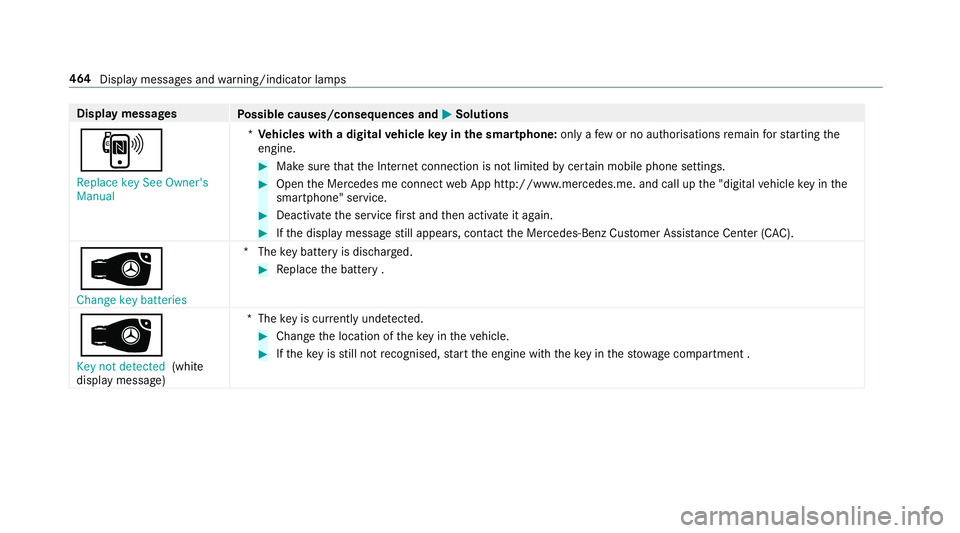
Display messages
Possible causes/consequences and M
MSolutions
, Replace key See Owner's
Manual *
Ve hicles with a digital vehicle key in the sma rtphone: only afew or no authorisations remain forst arting the
engine. #
Make sure that the Internet connection is not limited bycer tain mobile phone settings. #
Open the Mercedes me connect web App http://www.mercedes.me. and call up the "digital vehicle key in the
smartphone" service. #
Deactivate the service firs t and then activate it again. #
Ifth e display message still appears, con tact the Mercedes-Benz Cus tomer Assis tance Center (C AC).
 Change key batteries *T
hekey bat tery is dischar ged. #
Replace the battery .
Â
Key not detected (white
display message) *T
hekey is cur rently und etected. #
Change the location of theke y in theve hicle. #
Ifth eke y is still not recognised, start the engine with theke y in thestow age compartment . 464
Display messages and warning/indicator lamps
Page 472 of 541
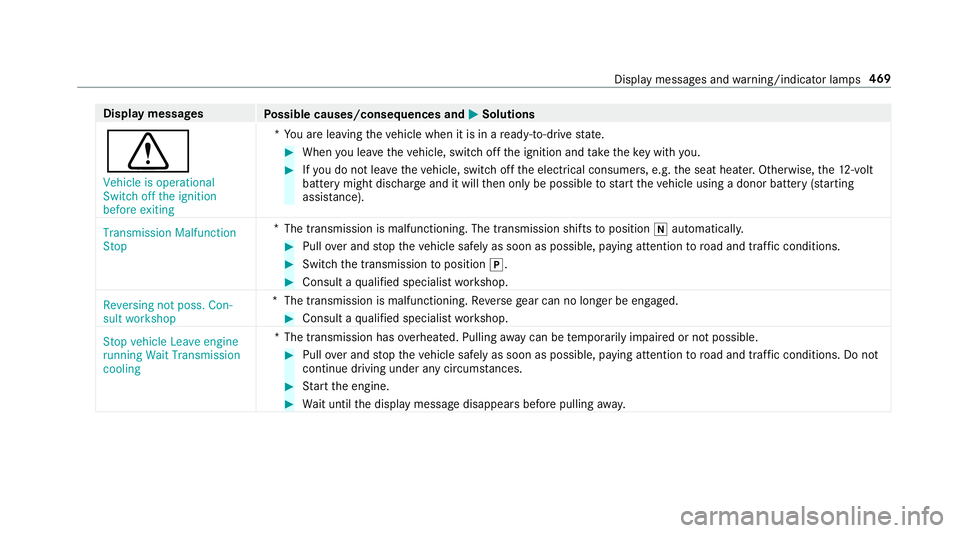
Display messages
Possible causes/consequences and M
MSolutions
d Vehicle is operational
Switch off the ignition
before exiting *Y
ou are leaving theve hicle when it is in a ready-to-drive state. #
When you lea vetheve hicle, switch off the ignition and take theke y with you. #
Ifyo u do not lea vetheve hicle, switch off the electrical consumers, e.g. the seat heater. Otherwise, the12 ‑volt
battery might discha rge and it will then only be possible tostart theve hicle using a donor battery (s tarting
assis tance).
Transmission Malfunction
Stop *
The transmission is malfunctioning. The transmission shi fts to position iautomaticall y. #
Pull over and stop theve hicle safely as soon as possible, paying attention toroad and traf fic conditions. #
Switch the transmission toposition j. #
Consult a qualified specialist workshop.
Reversing not poss. Con-
sult workshop *T
he transmission is malfunctioning. Reversege ar can no lon ger be engaged. #
Consult a qualified specialist workshop.
Stop vehicle Leave engine
running Wait Transmission
cooling *T
he transmission has overheated. Pulling away can be temp orarily impaired or not possible. #
Pull over and stop theve hicle safely as soon as possible, paying attention toroad and traf fic conditions. Do not
continue driving under any circums tances. #
Start the engine. #
Wait until the display message disappears before pulling away. Displ
aymessa ges and warning/indicator lamps 469
Page 473 of 541
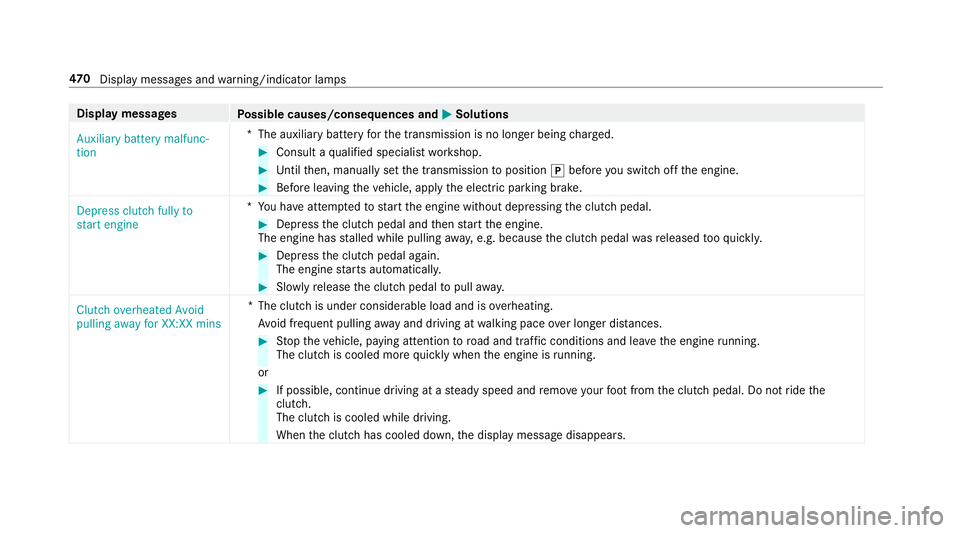
Display messages
Possible causes/consequences and M
MSolutions
Auxiliary battery malfunc-
tion *T
he auxiliary batteryforth e transmission is no longer being charge d. #
Consult a qualified specialist workshop. #
Untilthen, manually set the transmission toposition jbefore you swit choff the engine. #
Before leaving theve hicle, apply the electric parking brake.
Depress clutch fully to
start engine *Y
ou ha veattem ptedto start the engine without depressing the clutch pedal. #
Depress the clutch pedal and then start the engine.
The engine has stalled while pulling away, e.g. because the clutch pedal wasre leased tooqu ickl y. #
Dep ress the clutch pedal again.
The engine starts automaticall y. #
Slowly release the clutch pedal topull away.
Clutch overheated Avoid
pulling away for XX:XX mins *T
he clutch is under considerable load and is overheating.
Av oid frequent pulling away and driving at walking pace over longer dis tances. #
Stop theve hicle, paying attention toroad and traf fic conditions and le avethe engine running.
The clutch is cooled more quickly when the engine is running.
or #
If possible, continue driving at a steady speed and remo veyour foot from the clutch pedal. Do not ride the
clutch.
The clutch is cooled while driving.
When the clutch has cooled down, the display message disappears. 47 0
Displaymessa ges and warning/indicator lamps
Page 478 of 541
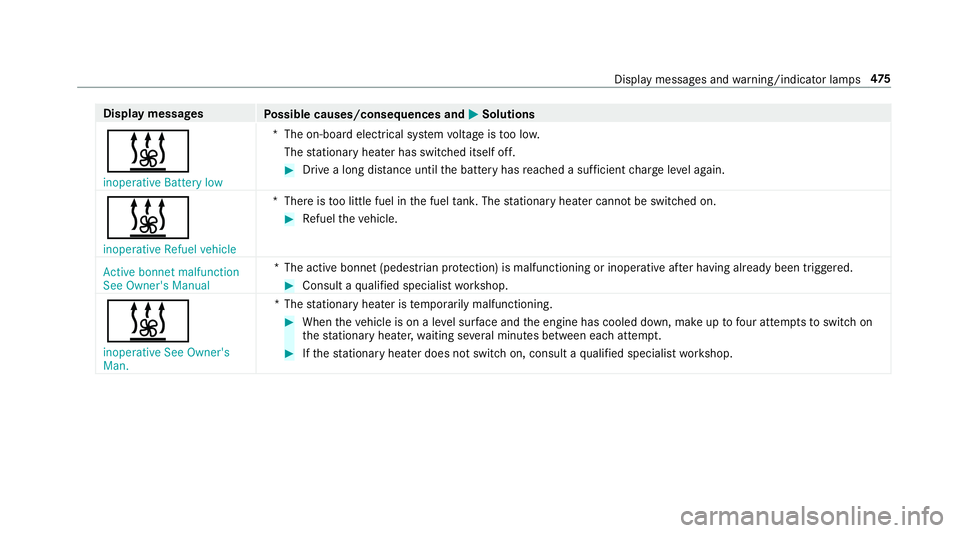
Display messages
Possible causes/consequences and M
MSolutions
& inoperative Battery low *T
he on-board electrical sy stem voltage is too lo w.
The stationary heater has swit ched itself off. #
Drive a long dis tance until the battery has reached a suf ficient charge leve l again.
& inoperative Refuel vehicle *T
here is too little fuel in the fuel tank. The stationary heater cannot be swit ched on. #
Refuel theve hicle.
Active bonnet malfunction
See Owner's Manual *T
he active bonnet (pedestrian pr otection) is malfunctioning or inoperative af ter having already been triggered. #
Consult a qualified specialist workshop.
& inoperative See Owner's
Man. *T
hestationary heater is temp orarily malfunctioning. #
When theve hicle is on a le vel sur face and the engine has cooled down, make up tofour attem ptsto switch on
th est ationary heater, waiting se veral minutes between each attem pt. #
Ifth est ationary heater does not swit chon, consult a qualified specialist workshop. Display messages and
warning/indicator lamps 475
Page 502 of 541
Anti-theft pr
otection ................................ .82
Ad ditional door lock .............................. 62
AT A (anti-theft alarm sy stem) ................82
Immobiliser ........................................... 82
Interior pr otection ................................. 83
St opping the alarm (A TA) .......................82
To w- aw ay protection ............................. 83
Anticipatory occupant pr otection ......41, 42
Apple CarPlay™ .......................................3 10
Connecting an iPhone ®
........................ 311
Ending .................................................. 311
Overview ..............................................3 10
To ne settings ........................................ 311
Tr ans ferred vehicle data ....................... 313
Asht ray
Fr ont centre console ........................... 108
Re ar .................................................... .108
Assistance graphic
Menu (on-boa rdcompu ter) .................. 238
Assistance sy stems
see Driving saf ety sy stem
ASS YST PLUS ........................................... 352
Battery disconnection pe riods .............3 53
Displ aying the service due date ........... 352 Fu
nction/no tes ................................... 352
Re gular service work ........................... 352
Special service requirements .............. 352
ATA (anti-theft ala rmsystem)
Fu nction ................................................ 82
St opping the alarm ................................ 82
ATA (anti-theft ala rmsystem)
see Anti- theft pr otection
AT TENTION ASSI ST.......................... 218, 219
Ac tivating/deactivating ...................... .219
Fu nction ............................................... 218
Sy stem limitations ...............................2 18
At tention assistant
see ATTENTION ASSIST
Au dio mode
Ac tivating media mode ........................ 328
Connecting USB devices ..................... 330
Co pyright ............................................. 328
Information .......................................... 327
Inserting/re moving an SD card .......... .328
Media sea rch ....................................... 333
Overview ............................................. 329
Pa use and playback function .............. .330
Selecting a track ................................. 330 Selecting playba
ckoptions .................. 330
Tr ack list .............................................. 330
Au thorised workshop
see Qualified specialist workshop
Au tomatic distance control
see Dis tance Pilot DISTRONIC
Au tomatic driving lights ..........................11 5
Au tomatic engine start (ECO start/
sto p function) .......................................... 14 6
Au tomatic engine stop (ECO start/
sto p function) .......................................... 14 6
Au tomatic front passen ger airbag
shu toff
see Front passenger airbag shutoff
Au tomatic mir rorfo lding function
Ac tivating/deactivating ...................... .127
Au tomatic transmission
DIRECT SELECT le ver ........................... 15 0
Drive program display .......................... 14 8
Drive programs .................................... 14 8
DY NA MIC SELECT switch .................... 14 8
Engaging drive position ....................... 15 2
Engaging reve rsege ar ........................ .152 Index
499
Page 503 of 541
Kickdown .............................................
15 3
Manual gearshifting ............................ .153
Selecting park position ........................ 15 2
Shifting toneutral ................................ 15 2
St eering wheel gearshift paddles ........ 15 3
Tr ansmission position display .............. 15 0
Tr ansmission positions ........................ 15 0
Au tomatic transmission
see Selector le ver
Axle load Perm issible .......................................... 41 0
Tr ailer operation .................................. 422 B
Bag hook .................................................. 104
Ball ne ck
Fo lding in/out .................................... .228
BA S (Brake Assist Sy stem) .................... .170
Battery Key ........................................................ 60
Re mo tecontrol (s tationary heater) ...... 137
Battery (vehicle) Charging .............................................. 377No
tes ................................................... 375
St arting assis tance .............................. 377
Battery (vehicle) see Vehicle battery
Belt .............................................................29
Bic ycle rack
Tr ailer operation .................................. 231
Blind Spot Assist .................................... .222
Ac tivating/deactivating ...................... .224
Fu nction/no tes ................................... 222
Sy stem limits ....................................... 222
Blind Spot Assist see Active Blind Spot Assi st
Blo wer
see Climate control
BlueTEC see AdBlue ®
Blue tooth ®
Ac tivating/deactivating ...................... .267
Setting up an Internet connection ....... 320
Settings ............................................... 267 Switching profile (DUN/PAN) .............. 321 Blue
tooth ®
Au dio
Ac tivating ............................................ 338
De-authorising (de-regis tering) the
device .................................................. 338
Information .......................................... 335
Overview .............................................3 36
Sear ching for and auth orisingthe
device .................................................. 337
Switching device via NFC .................... 338
Boot lid .......................................................67
Ac tivating/deactivating the boot lid
opening limiter ...................................... 72
Closing .................................................. 68 HANDS-FREE ACCESS .......................... .70
Loc ked separately .................................72
Opening .................................................67
Opening dimensions ............................4 19
Boot lid see Boot lid
see Locking/unlocking
Brake Assi stSystem
see BAS (Brake Assi stSystem)
Brake fluid Notes ................................................... 41 8500
Index
Page 508 of 541
DIRECT SELECT le
ver............................... 15 0
Fu nction .............................................. 15 0
DIRECT SELECT selector le ver
Engaging drive position ....................... 15 2
Engaging pa rkposition automatically .. 15 2
Engaging reve rsege ar ........................ .152
Selecting park position ........................ 15 2
Shifting toneutral ................................ 15 2
Display Care .................................................... 365
Display (multimedia sy stem)
Settings .............................................. .266
Display (on-board comp uter).................. 237
Display message .................................... .423
Calling up (on-boa rdcompu ter) ........... 423
No tes .................................................. 423
Display messages ? ................................................... 450
C ................................................... 476
M ................................................... 476
N ................................................... 477
¯ .................................................... 449Ac
tive Blind Spot Assi stcur rently
una vailable See Owner's Manual .........445
Ac tive Blind Spot Assi stinope rative ....445
Ac tive Blind Spot Assi stnot available
when towing a trailer See Owner's
Manual ................................................ 445
Ac tive bonnet malfunction See Own‐
er's Manual .......................................... 475
Ac tive Brake Assi stFunctions cur‐
re ntly limited See Owner's Manual ...... 434
Ac tive Brake Assi stFunctions limited
See Owner's Manual ........................... 435
Ac tive Lane Keeping Assist Camera
view restricted See Owner's Manual ...444
Ac tive Lane Keeping Assist cur rently
una vailable See Owner's Manual .........443
Ac tive Lane Keeping Assist inopera‐
tive ...................................................... 443
b Active Light Sy stem inoperative ..478 Ad
aptive Highbeam Assist Plus Cam‐
era view restricted See Owner's
Manual ................................................ 480
Ad aptive Highbeam Assist Plus cur‐
re ntly una vailable See Owner's Man‐
ual ...................................................... .479
Ad aptive Highbeam Assist Plus inop‐
erative ................................................ .479
4Ad d 1 litre engine oil when next
re fuelling ............................................. 455
Air conditioning Malfunction See
Owner's Manual ................................... 471
App lybrake todeselect Park (P)
position ...............................................4 67
App lybrake toselect R ........................ 471
À ATTENTION ASSIST inoperative ...440
À ATTENTION ASSIS T:Take a
break! .................................................. 440
b AUTO lights inope rative ............... 479
Au xilia rybattery malfunction ...............470 Index
505
Page 518 of 541
Switching Blu
etoo th®
profile (DUN/
PA N) .................................................... 321
Vi a Blue tooth®
..................................... 320
Vi a communication module ................ .320
Vi aWi -Fi .............................................. 320
In tern etradio
Calling up ............................................ 325
Deleting stations ................................ .326
Logging in ............................................ 327
Logging out ......................................... 327
Overview ............................................. 326
Saving stations .................................... 326
Selecting and connecting toast ation
............................................................ .326
Selecting stre am ................................ .327
Setting options .................................... 327
Te rm s of use ........................................3 27
Ionisation ................................................ .132
iPhone ®
see Apple CarPlay™
ISOFIX child seat attachment
Seats suitable for attaching ................... 51
ISOFIX child seat securing sy stem
Mounting .............................................. .44 J
Jack Declaration of Conformity ..................... 22
Storage location ..................................4 00
Jump-start connection ............................377 K
Ke y.............................................................. 58
Battery .................................................. 60
Emer gency key element ........................ 60
Energy consum ption .............................. 59
Ke yring attachment .............................. 60
Overview ............................................... 58
Pa nic alarm ........................................... 59
Problem ................................................. 61
Un locking setting .................................. 59
Key see Ignition key
see Locking
see Vehicle key
KEYLESS-GO Locking theve hicle ................................ 64
Problem .................................................65
Un locking setting .................................. 59 Un
locking theve hicle ............................64
Kickd own.................................................1 53
Using ................................................... 15 3
Knee airbag ................................................ 34 L
Laden ........................................................ 103
Bag hook ............................................. 104
No tes ..................................................... 99
Ro ofrack ............................................. 105
St ow age space under the boot floor ....1 04
Ti e-down eyes ...................................... 103
Lamp see In terior lighting
Lamp (instrument display) see Warning/indicator lamps
Lane Keeping Assist
see Active Lane Keeping Assist
Language Notes ................................................... 270
Setting ................................................. 270
Last destinations Selecting ............................................ .277 Index
515