seats MERCEDES-BENZ E-CLASS COUPE 2017 Service Manual
[x] Cancel search | Manufacturer: MERCEDES-BENZ, Model Year: 2017, Model line: E-CLASS COUPE, Model: MERCEDES-BENZ E-CLASS COUPE 2017Pages: 541, PDF Size: 10.71 MB
Page 394 of 541
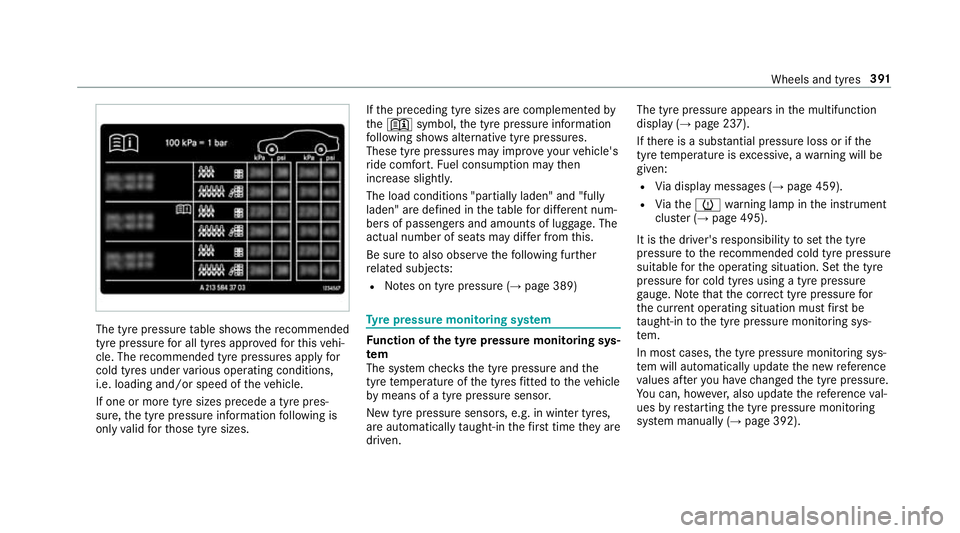
The tyre pressure
table sho ws there commended
tyre pressure for all tyres appro vedfo rth is vehi‐
cle. The recommended tyre pressures apply for
cold tyres under various operating conditions,
i.e. loading and/or speed of theve hicle.
If one or more tyre sizes precede a tyre pres‐
sure, the tyre pressure information following is
only valid forth ose tyre sizes. If
th e preceding tyre sizes are complemented by
th e+ symbol, the tyre pressure information
fo llowing sho wsalternative tyre pressures.
These tyre pressures may impr oveyour vehicle's
ri de comfort. Fuel consum ption may then
increase slightl y.
The load conditions "partially laden" and "fully
laden" are defined in theta ble for dif fere nt num‐
be rs of passengers and amounts of luggage. The
actual number of seats may dif fer from this.
Be sure toalso obse rveth efo llowing fur ther
re lated subjects:
R Notes on tyre pressure (→ page 389) Ty
re pressure moni toring sy stem Fu
nction of the ty repressure moni toring sys‐
tem
The sy stem checks the tyre pressure and the
tyre temp erature of the tyres fitted totheve hicle
by means of a tyre pressu resensor.
New tyre pressure sensors, e.g. in winter tyres,
are automatically taught-in thefirs t time they are
driven. The tyre pressure appears in
the multifunction
display (→ page 237).
If th ere is a subs tantial pressure loss or if the
tyre temp erature is excessive, a warning will be
given:
R Via display messages (→ page 459).
R Viath eh warning lamp in the instrument
clus ter (→ page 495).
It is the driver's responsibility toset the tyre
pressure tothere commended cold tyre pressure
suitable forth e operating situation. Set the tyre
pressure for cold tyres using a tyre pressu re
ga uge. Notethat the cor rect tyre pressure for
th e cur rent operating situation mu stfirs t be
ta ught-in tothe tyre pressure monitoring sys‐
te m.
In most cases, the tyre pressure monitoring sys‐
te m will auto maticallyupdate the new refere nce
va lues af teryo u ha vechanged the tyre pressure.
Yo u can, ho wever,also update there fere nce val‐
ues byrestarting the tyre pressure monitoring
sy stem manually (→ page 392). Wheels and tyres
391
Page 505 of 541
see
Reversing camera
Car wash
see Care
Car wash (care) ....................................... 360
Care ..........................................................3 65
Car wash ............................................. 360
Carpet .................................................3 65
Displ ay................................................ 365
Exterior lighting ................................... 363
Genuine wood/trim elements .............3 65
High-p ressure cleaner .........................3 60
Matt finish ........................................... 362
Pa int .................................................... 362
Plastic trim .......................................... 365
Re versing camera/360° Camera ........ 363
Ro of lining ...........................................3 65
Seat belt .............................................. 365
Seat co ver ........................................... 365
Sensors ............................................... 363
Ta ilpipes .............................................. 363
Tr ailer hit ch......................................... 363
Wa shing byhand ..................................3 61
Wheels/rims ....................................... 363
Wi ndo ws .............................................. 363
Wi per blades .......................................3 63Carpet (Care)
.......................................... .365
Changing hub caps .................................. 401
Changing the lights
Driving abroad (symm etrical dipped
beam) ................................................... 11 4
Channel tracking Setting ................................................ .341
Cha rging
Bat tery (vehicle) .................................. 377
Mobile phone (wireless) ....................... 111
Child saf ety lock
Re ar side wind ows................................. 56
Child seat ................................................... 42
At tach ing (no tes) ................................... 49
Fr ont passenger seat (no tes) ................. 47
Fr ont passenger seat (rear ward-
fa cing/for ward-facing) .......................... 48
Fr ont passenger seat (without airbag
shutoff) .................................................. 47
ISOFIX/i-Size (fitting) ............................ 44
No tes ..................................................... 42
Re commended child restra int sys‐
te ms ...................................................... 54Seats suitable
for belt-secu redch ild
re stra int sy stems ................................... 50
Seats suitable for i‑Size child
re stra int sy stems ................................... 53
Seats suitable for ISOFIX child
re stra int sy stems ................................... 51
To pTe ther ..............................................45
Child ren
Re stra int sy stems ..................................42
Chock Storage location ..................................4 00
Cho ck
see Wheel chock
Cigar ette lighter ...................................... 109
City lighting .............................................. 11 8
Cleaning see Care
Climate control ........................................ 12 9
Ac tivating/deactivating the A/C
function (cont rol panel) ...................... .130
Ac tivating/deactivating the A/C
function (multimedia sy stem) .............. 13 0502
Index
Page 516 of 541
G
Garage door opener Clearing the memory ........................... 16 3
Opening or closing thega rage door .....1 63
Programming buttons .......................... 161
Ra dio equipment appr oval number ...... 16 4
Re solving problems ............................. 16 2
Synchronising thero lling code ............ 16 2
Gearshift paddles see Steering wheel gearshift paddles
Gea rshift recommendation ............150, 15 3
Genuine parts ............................................ 20
Genuine wood (Care) .............................. 365
Glide mode .............................................. .154
Glo vebox
Air vent ................................................ 13 9
Locking/unlocking ...............................1 01
Gross mass ............................................... 41 0H
Handbrake see Electric parking brake Handling
characteristics (unusual) ....... 388
HANDS-FREE ACCESS ................................ 70
HANDS-FREE ACCESS
see Opening the boot lid using your foot
Hands-free sy stem .................................... 63
Hazard warning lights ............................ .116
HD prog rammes
see CAmodule (TV)
Head restra int .......................................... .89
Fr ont (adjusting manually) ..................... 89
Re ar (adjusting) .................................... .91
Head-up display Adjusting brightness (on-board com‐
pu ter) .................................................. 24 4
Ad justing display elements (on-board
compu ter) ............................................ 24 4
Fu nction .............................................. 24 5
Menu (on-board computer) .................. 24 4
Setting the position (on-board com‐
puter) .................................................. 24 4
Switching on/off ................................. 24 6
Using the memory function ...................98 Head-up display
see Menu (on-boa rdcompu ter)
Head-up display menu see On-board computer
Headlamp flashing ................................... 11 6
Heating see Climate control
High-pressure cleaner (care) ................. 360
Hill start assi st........................................ 19 3
HOLD function ......................................... 19 3
Ac tivating/deactivating ...................... .193
Fu nction/no tes ................................... 19 3 I
i-Size child seat attachment
Seats suitable for attaching ................... 53
i-Size child seat securing sy stem
Mounting .............................................. .44
Identification pla te
Engine ................................................. .410
Ve hicle .................................................4 10 Index
513
Page 518 of 541
Switching Blu
etoo th®
profile (DUN/
PA N) .................................................... 321
Vi a Blue tooth®
..................................... 320
Vi a communication module ................ .320
Vi aWi -Fi .............................................. 320
In tern etradio
Calling up ............................................ 325
Deleting stations ................................ .326
Logging in ............................................ 327
Logging out ......................................... 327
Overview ............................................. 326
Saving stations .................................... 326
Selecting and connecting toast ation
............................................................ .326
Selecting stre am ................................ .327
Setting options .................................... 327
Te rm s of use ........................................3 27
Ionisation ................................................ .132
iPhone ®
see Apple CarPlay™
ISOFIX child seat attachment
Seats suitable for attaching ................... 51
ISOFIX child seat securing sy stem
Mounting .............................................. .44 J
Jack Declaration of Conformity ..................... 22
Storage location ..................................4 00
Jump-start connection ............................377 K
Ke y.............................................................. 58
Battery .................................................. 60
Emer gency key element ........................ 60
Energy consum ption .............................. 59
Ke yring attachment .............................. 60
Overview ............................................... 58
Pa nic alarm ........................................... 59
Problem ................................................. 61
Un locking setting .................................. 59
Key see Ignition key
see Locking
see Vehicle key
KEYLESS-GO Locking theve hicle ................................ 64
Problem .................................................65
Un locking setting .................................. 59 Un
locking theve hicle ............................64
Kickd own.................................................1 53
Using ................................................... 15 3
Knee airbag ................................................ 34 L
Laden ........................................................ 103
Bag hook ............................................. 104
No tes ..................................................... 99
Ro ofrack ............................................. 105
St ow age space under the boot floor ....1 04
Ti e-down eyes ...................................... 103
Lamp see In terior lighting
Lamp (instrument display) see Warning/indicator lamps
Lane Keeping Assist
see Active Lane Keeping Assist
Language Notes ................................................... 270
Setting ................................................. 270
Last destinations Selecting ............................................ .277 Index
515
Page 520 of 541
Re
gis tering on Mercedes me ............... 288
Loading guidelines .................................... 99
Loads Secu ring ................................................ 99
Lo cking ...................................................... .58
Locking/unlocking ........................ 62, 63, 67
Lu bricant additives
see Additives
Lu ggage
Securing ................................................ 99
Lu mbar support
see Lumbar support (4-w ay)
Lu mbar support (4-w ay).......................... .89 M
MAGIC VISION CONTROL Windsc reen wipers .............................. 124
Main beam Adaptive Highbeam Assist Plus ............ 11 9
Switching on/off .................................. 11 6
Maintenance see ASS YST PLUS Malfunction
Restra int sy stem ................................... 28
Manual transmission Operating thege arshift le ver ............... 14 9
Map .......................................... .289, 290, 291
Av oiding (changing) an area ................2 93
Av oiding an area ..................................2 93
Av oiding an area (deleting) .................. 294
Av oiding an area (o verview) ................ .293
Displ aying auto zoom when turning .... .295
Displ aying Qibla .................................. 295
Displaying the compass ....................... 295
Displaying the map version ................ .293
Displ aying the next intersecting
st re et ................................................... 292
Displaying the satellite map ................2 95
Displ aying the tra ffic map .................. .289
Displ aying traf fic signs ........................ 293
Displaying weather information .......... .296
Map data ............................................. 294
Moving ................................................. 291
Overview ............................................. 290
Selecting POI symbols ......................... 292
Selecting text information ................... 292
Selecting the map orientation .............2 92Setting
the map scale .......................... 291
Up dating .............................................. 294
Map and compass Overview .............................................2 90
Massage prog rammes
Selecting the front seats ....................... 92
Massage prog rams
Overview ............................................... 92
Massage settings Resetting ............................................... 92
Matt finish (cleaning instructions) ........ 362
Maximum speed see Limiter
MB Info call see Service call
Mecca .......................................................2 95
Media Menu (on-boa rdcompu ter) .................. 24 3
Sea rching ............................................ 333
Media display Notes .................................................. 258 Index
517