engine MERCEDES-BENZ E-CLASS COUPE 2017 Workshop Manual
[x] Cancel search | Manufacturer: MERCEDES-BENZ, Model Year: 2017, Model line: E-CLASS COUPE, Model: MERCEDES-BENZ E-CLASS COUPE 2017Pages: 541, PDF Size: 10.71 MB
Page 196 of 541
R
Activating or deacti vating Steering Pilot or
Dis tance Pilot DISTRONIC
The driver mu stbe ready totake control of the
ve hicle at any time. Information on Hill
Start Assist Hill
Start Assist holds theve hicle when pulling
aw ay on a hill under thefo llowing conditions:
R Vehicles with automatic transmission:
The transmission is in position hork.
R The electric parking brake is released. &
WARNING Risk of accident and inju ry
caused bytheve hicle rolling away
Af ter a short time, Hill Start Assist no lon ger
holds theve hicle and it can rollaw ay. #
Therefore, swiftly mo veyour foot from
th e brake pedal tothe accelerator
pedal. Ne ver attem pttolea vetheve hi‐
cle if it is being held byHill Start Assist. HOLD function
HOLD function
The HOLD function holds
theve hicle at a stand‐
st ill without requ iring youto depress the brake
pedal, such as when pulling away on steep
slopes.
Sy stem limits
The incline must not be greaterth an 30%.
Ac tivating/deactivating the HOLD function &
WARNING Risk of an accident due tothe
HOLD function being active when you
lea vetheve hicle
If yo u lea vetheve hicle while only the HOLD
function is braking theve hicle, theve hicle
can rollaw ay inthefo llowing situations:
R Ifth ere is a malfunction in the sy stem or
in the po wer supp ly.
R Ifth e HOLD function is deactivated by
depressing the accelera tor pedal or the
brake pedal, e.g. byave hicle occupant. R
Ifth e electrics in the engine compart‐
ment, the battery or the fuses are tam‐
pered with.
R Ifth e battery is disconnected. #
Alw ays deactivate the HOLD function
and secure theve hicle against rolling
aw ay before leaving theve hicle. *
NO
TEDama gefrom auto matic braking If
Ac tive Brake Assi st, Dis tance Pilot
DISTRONIC or the HOLD function is activa‐
te d, theve hicle brakes automatically in cer‐
ta in situations.
To avo id damage totheve hicle, deactivate
th ese sy stems in thefo llowing or similar sit‐
uations: #
During towing #
In a car wash Re
quirements:
R The vehicle is stationar y. Driving and pa
rking 19 3
Page 197 of 541
R
The driver's door is closed or the seat belt on
th e driver's side is fastened.
R The engine is running or has been au tomati‐
cally switched off bythe ECO start/ stop
function.
R The electric parking brake is released.
R Distan ce Pil otDISTRONIC is not acti vated.
R Vehicles with automatic transmission:
The transmission is in position h,kori.
Ac tivating the HOLD function #
Dep ress the brake pedal and af ter a short
time depress fur ther until theë display
appears in the multifunction displa y.#
Release the brake pedal.
Deactivating the HOLD function #
Depress the accelerator pedal topull away.
or #
Depress the brake pedal until theë dis‐
play disappears from the multifunction dis‐
pla y. The HOLD function is deactivated in
thefo llow‐
ing situations:
R If Dis tance Pilot DISTRONIC has been acti va‐
te d.
R Vehicles with automatic transmission:
When transmission position jis selected.
R When theve hicle is secured with the electric
parking brake.
In thefo llowing situations, theve hicle is held by
th e transmission position jorby the electric
parking brake:
R When the seat belt is unfas tened and the
driver's door is opened.
R When the engine is switched off.
R When there is a malfunction in the sy stem or
if th e po wer supp lyis insuf ficient.
Ve hicles with manual transmission:
The Brake immediately message may also
appear in the multifunction displa y: #
Immedia tely depress the brake pedal firm ly
until thewa rning message disappears.
The HOLD function is deactivated. A horn sounds at
regular inter vals if you turn off
th e engine, remo veyour seat belt and open the
driver's door while the HOLD function is activa‐
te d. If you attem pttolock theve hicle, the horn
to ne becomes louder. The vehicle cannot be
loc ked until you ha vedeactivated the HOLD
function.
% Once you ha veswitched off the engine, you
cannot restart the engine until you ha ve
deactivated the HOLD function. DY
NA MIC BODY CONT ROL DY
NA MIC BODY CONTROL has thefo llowing
ch aracteristics:
R Variable damping characteristics
R Continual adjustment of the damping forc es
The damping characteristics adapt tothe cur rent
operating and driving situation.
The da mping is tuned individually for each wheel
and is af fected bythefo llowing factors:
R The road sur face conditions
R The drive program selected 194
Driving and pa rking
Page 200 of 541
#
When leaving theve hicle, make sure
th at nobody is in the vicinity of the
wheel ar ches or the underbody. Re
quirements:
R The vehicle's engine or must be switched on.
R The vehicle must not be moving fasterthan
60 km/h. Ra
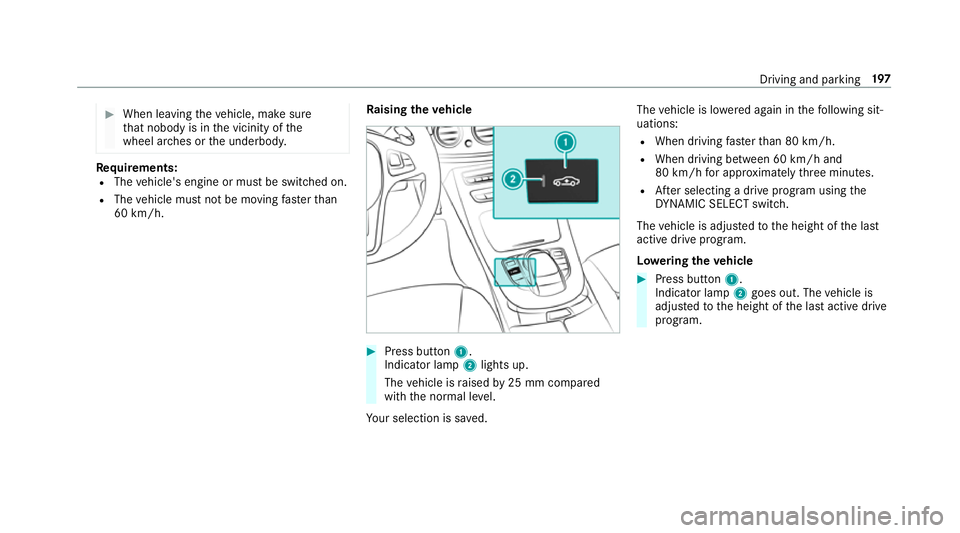
ising the vehicle #
Press button 1.
Indica tor lamp 2lights up.
The vehicle is raised by25 mm compared
with the normal le vel.
Yo ur selection is sa ved. The
vehicle is lo wered again in thefo llowing sit‐
uations:
R When driving fasterthan 80 km/h.
R When driving between 60 km/h and
80 km/h for appro ximately thre e minutes.
R After selecting a drive program using the
DY NA MIC SELECT switch.
The vehicle is adjus tedto the height of the last
active drive program.
Lo weri ngtheve hicle #
Press button 1.
Indica tor lamp 2goes out. The vehicle is
adjus tedto the height of the last active drive
program. Driving and parking
197
Page 203 of 541
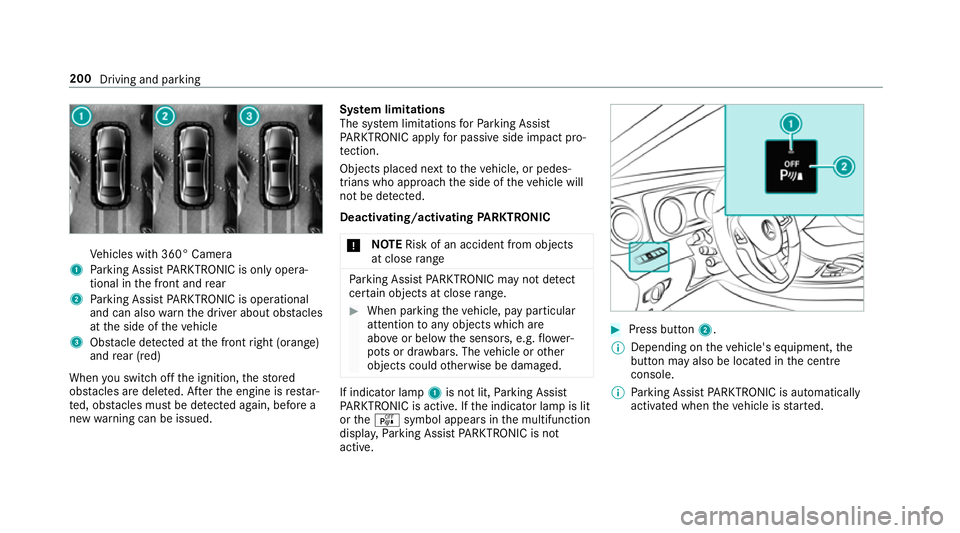
Ve
hicles with 360° Camera
1 Parking Assist PARKTRONIC is on ly opera‐
tional in the front and rear
2 Parking Assist PARKTRONIC is operational
and can also warnthe driver about obs tacles
at the side of theve hicle
3 Obstacle de tected at the front right (orange)
and rear (red)
When you swit choff the ignition, thestored
obs tacles are del eted. Af terth e engine is restar‐
te d, obs tacles must be de tected again, before a
new warning can be issued. Sy
stem limitations
The sy stem limitations forPa rking Assist
PA RKTRONIC apply for passive side impact pro‐
te ction.
Objects placed next totheve hicle, or pedes‐
trians who approach the side of theve hicle will
not be de tected.
Deacti vating/acti vating PARKTRONIC
* NO
TERisk of an accident from objects
at close range Pa
rking Assist PARKTRONIC may not de tect
cer tain objects at close range. #
When pa rking theve hicle, pay particular
attention toany objects which are
abo veor below the sensors, e.g. flowe r‐
pots or dr awbars. The vehicle or other
objects could otherwise be damaged. If indicator lamp
1is not lit, Parking Assist
PA RKTRONIC is active. If the indicator lamp is lit
or theé symbol appears in the multifunction
displa y,Pa rking Assist PARKTRONIC is not
active. #
Press but ton2.
% Depending on theve hicle's equipment, the
button may also be located in the cent re
console.
% Parking Assist PARKTRONIC is automatical ly
activated when theve hicle is star ted. 200
Driving and parking
Page 221 of 541
Ac
tivating/deactivating manoeuv ring assis‐
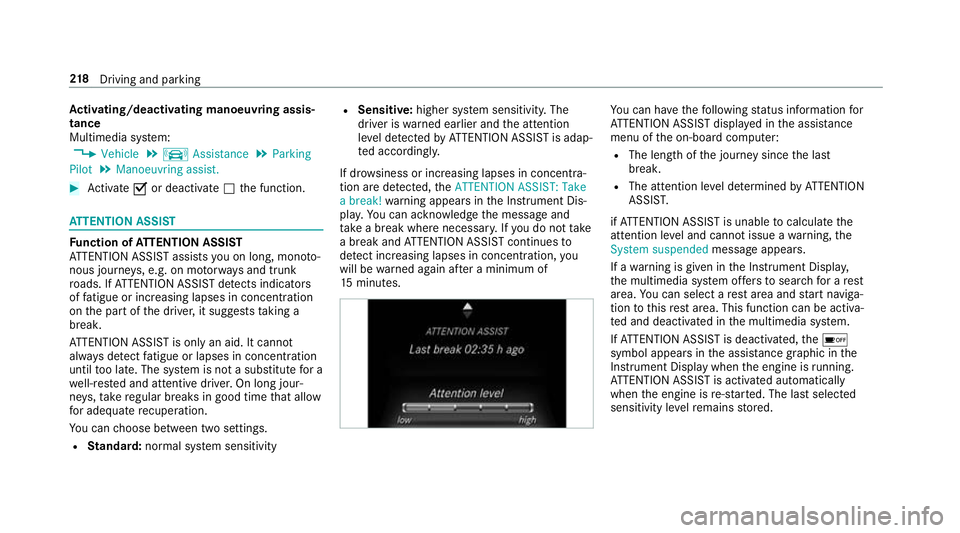
tance
Multimedia sy stem:
, Vehicle .
k Assistance .
Parking
Pilot .
Manoeuvring assist. #
Activate Oor deacti vate ª the function. AT
TENTION ASSI STFu
nction of ATTENTION ASSI ST
AT TENTION ASSIST assists you on long, mon oto‐
nous journe ys, e.g. on mo torw ays and trunk
ro ads. If ATTENTION ASSIST de tects indicators
of fatigue or increasing lapses in concentration
on the part of the driver, it suggests taking a
brea k.
AT TENTION ASSIST is only an aid. It cannot
alw ays de tect fatigue or lapses in concentration
until too late. The sy stem is not a substitute for a
we ll-res ted and attentive driver. On long jour‐
ne ys,tak ere gular breaks in good time that allow
fo r adequ aterecuperation.
Yo u can choose between two settings.
R Standard: normal sy stem sensitivity R
Sensitive: higher system sensitivity. The
driver is warned earlier and the attention
le ve l de tected byATTENTION ASSIST is adap‐
te d accordingly.
If dr owsiness or inc reasing lapses in concentra‐
tion are de tected, theATTENTION ASSIST: Take
a break! warning appears in the Instrument Dis‐
pla y.Yo u can ackn owledge the message and
ta ke a break where necessar y.Ifyo u do not take
a break and ATTENTION ASSIST continues to
de tect increasing lapses in concentration, you
will be warned again af ter a minimum of
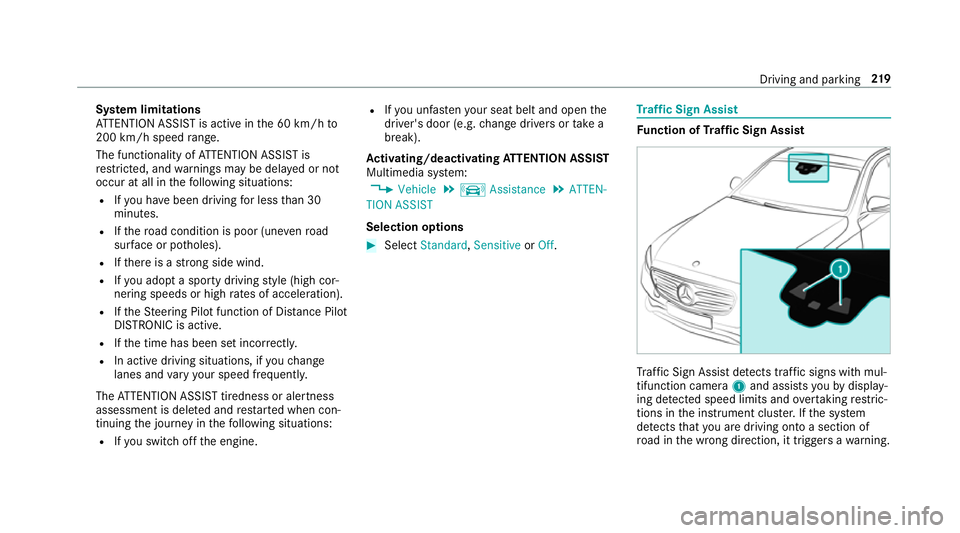
15 minutes. Yo
u can ha vethefo llowing status information for
AT TENTION ASSIST displa yed in the assis tance
menu of the on-board computer:
R The length of the journey since the last
break.
R The attention le vel de term ined byATTENTION
ASSIS T.
if AT TENTION ASSIST is unable tocalculate the
attention le vel and cannot issue a warning, the
System suspended messageappears.
If a warning is given in the Instrument Displa y,
th e multimedia sy stem of fers to sear chfor a rest
area. You can select a rest area and start naviga‐
tion tothis rest area. This function can be activa‐
te d and deactivated in the multimedia sy stem.
If AT TENTION ASSIST is deactivated, theé
symbol appears in the assis tance graphic in the
Instrument Display when the engine is running.
AT TENTION ASSIST is activated automatically
when the engine is re-sta rted. The last selected
sensitivity le velre mains stored. 218
Driving and pa rking
Page 222 of 541
Sy
stem limitations
AT TENTION ASSIST is active in the 60 km/h to
200 km/h speed range.
The functionality of ATTENTION ASSIST is
re stricted, and warnings may be dela yed or not
occur at all in thefo llowing situations:
R Ifyo u ha vebeen driving for less than 30
minutes.
R Ifth ero ad condition is poor (une venro ad
sur face or po tholes).
R Ifth ere is a strong side wind.
R Ifyo u adopt a sporty driving style (high cor‐
nering speeds or high rates of acceleration).
R Ifth eSt eering Pilot function of Dis tance Pil ot
DISTRONIC is acti ve.
R Ifth e time has been set incor rectly.
R In acti vedriving situations, if youch ange
lanes and vary your speed frequentl y.
The ATTENTION ASSIST tiredness or alertness
assessment is dele ted and restar ted when con‐
tinuing the journey in thefo llowing situations:
R Ifyo u swit choff the engine. R
Ifyo u unfas tenyo ur seat belt and open the
driver's door (e.g. change drivers or take a
break).
Ac tivating/deactivating ATTENTION ASSI ST
Multimedia sy stem:
, Vehicle .
k Assistance .
ATTEN-
TION ASSIST
Selection options #
Select Standard, SensitiveorOff. Tr
af fic Sign Assist Fu
nction of Traf fic Sign Assist Tr
af fic Sign Assi stdetects traf fic signs wi thmul‐
tifunction camera 1and assi stsyo uby display‐
ing de tected speed limits and overtaking restric‐
tions in the instrument clus ter.If th e sy stem
de tects that you are driving on toa section of
ro ad in the wrong direction, it triggers a warning. Driving and parking
219
Page 238 of 541
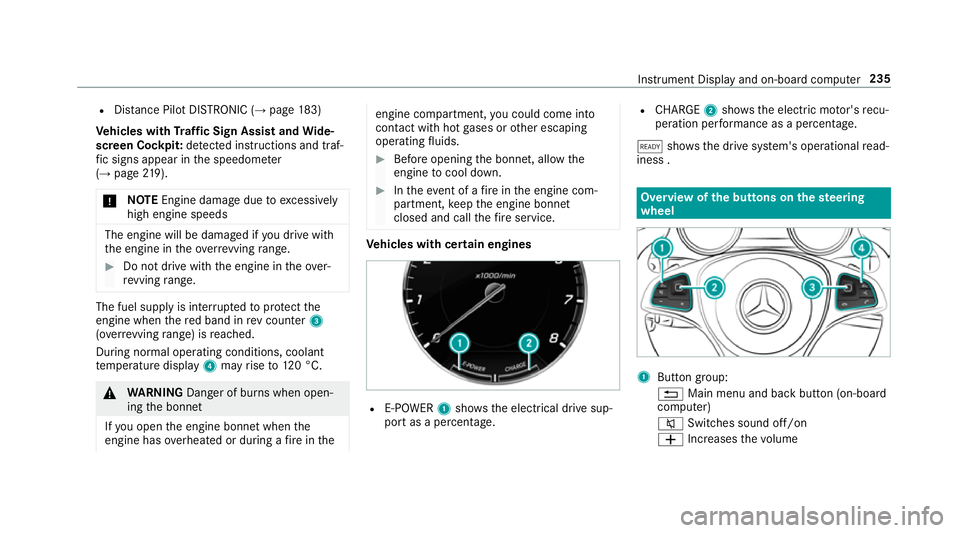
R
Distance Pilot DISTRONIC (→ page 183)
Ve hicles with Traf fic Sign Assist and Wide‐
sc reen Cockpit: detected instructions and traf‐
fi c signs appear in the speedome ter
( → page 219).
* NO
TEEngine damage due toexc essively
high engine speeds The engine will be damaged if
you drive with
th e engine in theov errevving range. #
Do not drive wi th the engine in theove r‐
re vving range. The fuel supply is inter
rupted toprotect the
engine when there d band in rev counter 3
(o ve rrev ving range) is reached.
During no rmal operating conditions, coolant
te mp erature display 4may rise to120 °C. &
WARNING Danger of bu rns when open‐
ing the bonn et
If yo u open the engine bonn etwhen the
engine has overheated or during a fire inthe engine compartment,
you could come into
contact with hot gases or other escaping
operating fluids. #
Before opening the bonn et, allow the
engine tocool down. #
Intheeve nt of a fire inthe engine com‐
partment, keep the engine bonn et
closed and call thefire service. Ve
hicles with cert ain engines R
E-POWER 1shows th e electrical drive sup‐
port as a percentage. R
CHARGE 2showsthe electric mo tor's recu‐
peration per form ance as a percen tage.
õ showsthe drive sy stem's operational read‐
iness . Overview of
the but tons on thest eering
wheel 1
Button group:
% Main menu and ba ckbutton (on-board
computer)
8 Switches sound off/on
W Increases thevo lume Instrument Display and on-board computer
235
Page 241 of 541
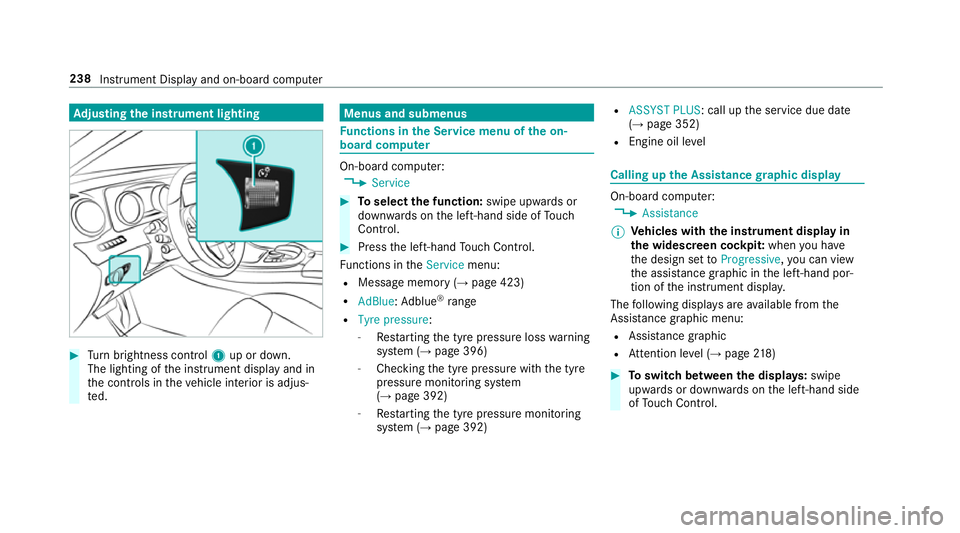
Ad
justing the in stru ment lighting #
Turn brightness control 1up or down.
The lighting of the instrument display and in
th e controls in theve hicle interior is adjus‐
te d. Menus and submenus
Fu
nctions in the Service menu of the on-
board compu ter On-board computer:
, Service #
Toselect the function: swipe upwards or
down wards on the left-hand side of Touch
Control. #
Press the left-hand Touch Control.
Fu nctions in theService menu:
R Message memory (→ page 423)
R AdBlue: Adblue ®
ra nge
R Tyre pressure :
- Restarting the tyre pressure loss warning
sy stem (→ page 396)
- Checking the tyre pressure with the tyre
pressure monitoring sy stem
(→ page 392)
- Restarting the tyre pressure monitoring
sy stem (→ page 392) R
ASSYST PLUS: call up the service due date
(→ page 352)
R Engine oil le vel Calling up
the Assistance graphic display On-board computer:
, Assistance
% Ve
hicles with the instrument display in
th e widescreen cockpit: whenyou ha ve
th e design set toProgressive ,yo u can view
th e assis tance graphic in the left-hand por‐
tion of the instrument displa y.
The following displa ysare available from the
Assi stance graphic menu:
R Assis tance graphic
R Attention le vel (→ page 218) #
Toswitch between the displa ys:swipe
up wa rds or down wards on the left-hand side
of Touch Control. 238
Instru ment Display and on-board computer
Page 242 of 541
St
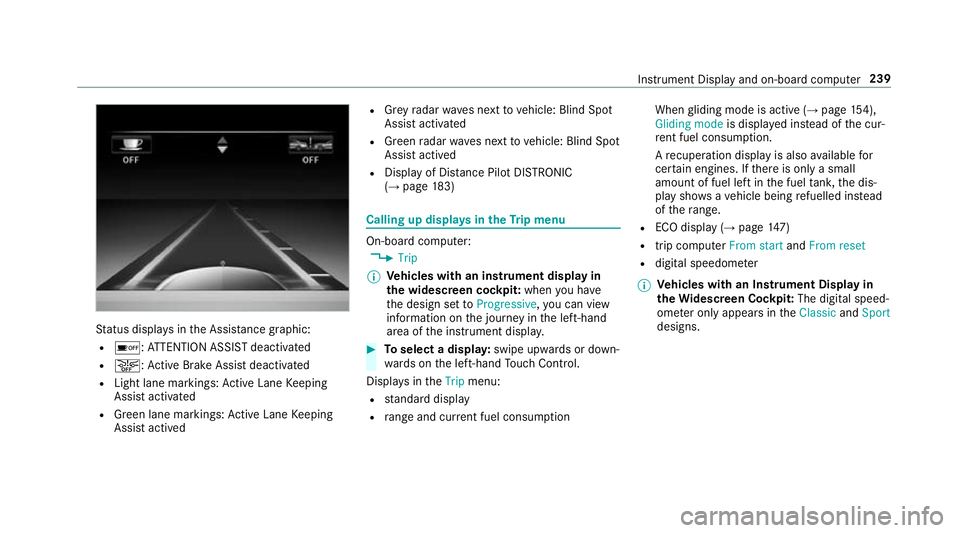
atus displa ysinthe Assis tance graphic:
R é: ATTENTION ASSIST deactivated
R æ: Active Brake Assi stdeactivated
R Light lane markings: Active Lane Keeping
Assist activated
R Green lane markings: Active Lane Keeping
Assist actived R
Grey radar waves next tovehicle: Blind Spot
Assist activated
R Green radar waves next tovehicle: Blind Spot
Assist actived
R Display of Dis tance Pilot DISTRONIC
(→ page 183) Calling up
displays in theTr ip menu On-board computer:
, Trip
% Ve
hicles with an instrument display in
th e widescreen cockpit: whenyou ha ve
th e design set toProgressive ,yo u can view
information on the journey in the left-hand
area of the instrument displa y. #
Toselect a displa y:swipe upwards or down‐
wa rds on the left-hand Touch Control.
Displa ysintheTrip menu:
R standard display
R range and cur rent fuel consu mption When
gliding mode is active (→ page154),
Gliding mode is displayed ins tead of the cur‐
re nt fuel consu mption.
A recuperation displ ayis also available for
cer tain engines. If there is only a small
amount of fuel left in the fuel tank, the dis‐
play sho wsave hicle being refuelled ins tead
of thera nge.
R ECO displ ay (→page 147)
R trip computer From startandFrom reset
R digital speedome ter
% Ve
hicles with an Instrument Display in
th eWi descreen Co ckpit: The digital speed‐
ome ter only appears in theClassic andSport
designs. Instrument Display and on-board computer
239
Page 243 of 541
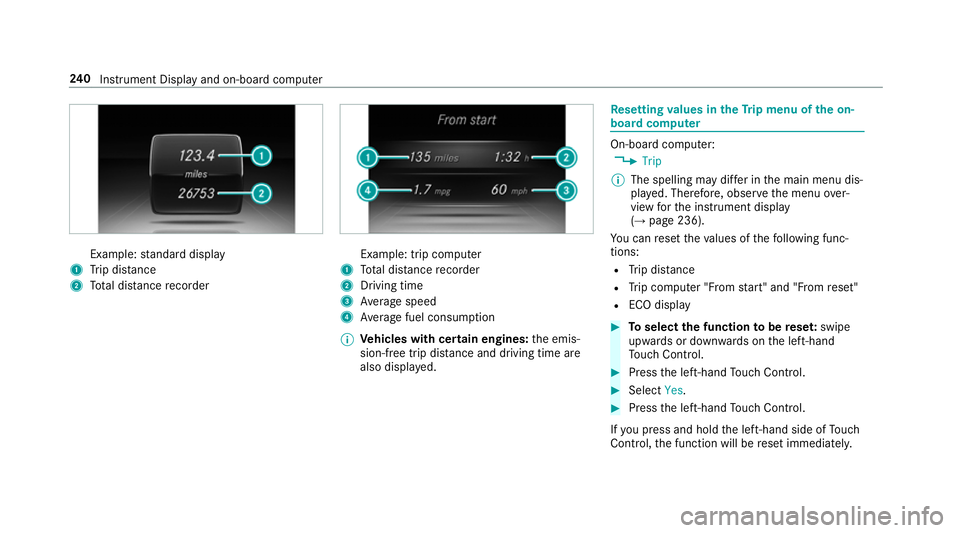
Example:
standard display
1 Trip dis tance
2 Total dis tance recorder Example: trip compu
ter
1 Total dis tance recorder
2 Driving time
3 Average speed
4 Average fuel consum ption
% Vehicles with cert ain engines:the emis‐
sion-free trip dis tance and driving time are
also displ ayed. Re
setting values in theTr ip menu of the on-
board compu ter On-board computer:
, Trip
% The spelling may dif fer in the main menu dis‐
pla yed. Therefore, obser vethe menu over‐
view forth e instrument display
(→ page 236).
Yo u can reset theva lues of thefo llowing func‐
tions:
R Trip dis tance
R Trip computer "F rom start" and "F rom reset"
R ECO display #
Toselect the function tobe rese t:swipe
upwards or down wards on the left-hand
To uch Control. #
Press the left-hand Touch Control. #
Select Yes. #
Press the left-hand Touch Control.
If yo u press and hold the left-hand side of Touch
Control, the function will be reset immediately. 240
Instrument Display and on-board computer