roof MERCEDES-BENZ E-CLASS COUPE 2018 User Guide
[x] Cancel search | Manufacturer: MERCEDES-BENZ, Model Year: 2018, Model line: E-CLASS COUPE, Model: MERCEDES-BENZ E-CLASS COUPE 2018Pages: 486, PDF Size: 6.31 MB
Page 80 of 486
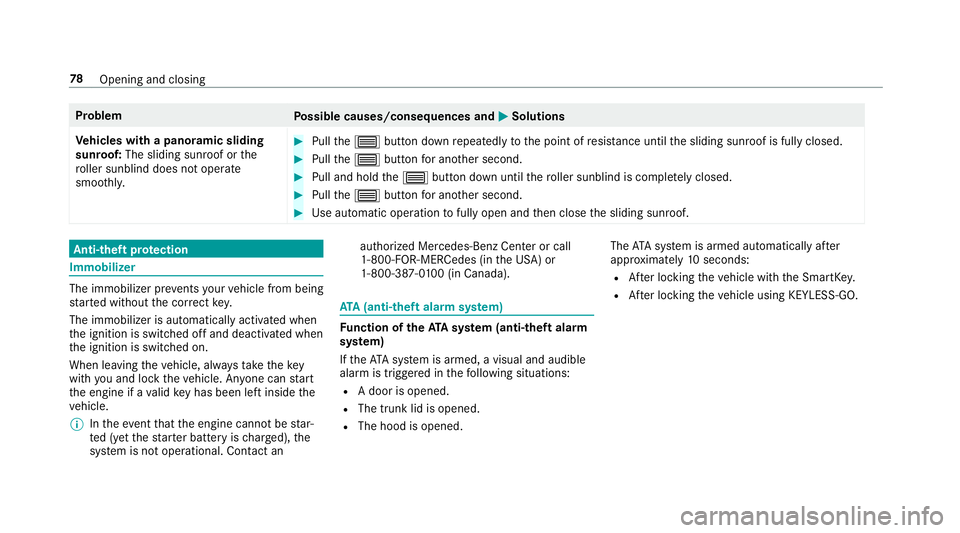
ProblemPossible causes/consequences and MSolutions
Ve hicles with a panoramic sliding
sunroof: The sliding sunroof or the
ro ller sunblind does not opera te
smoo thly.
#Pull the3 button down repeatedly tothe point of resis tance until the sliding sunroof is fully closed.
#Pull the3 button for ano ther second.
#Pull and hold the3 button down until thero ller sunblind is comple tely closed.
#Pull the3 button for ano ther second.
#Use automatic operation tofully open and then close the sliding sunroof.
Anti-theft pr otection
Immobilizer
The immobilizer pr events your vehicle from being
st ar ted without the cor rect key.
The immobilizer is automatically activated when
th e ignition is switched off and deactivated when
th e ignition is switched on.
When leaving theve hicle, alw aysta ke theke y
with you and lock theve hicle. An yone can start
th e engine if a valid keyhas been lef tinside the
ve hicle.
% Intheeve ntthat the engine cannot bestar‐
te d (y etthest ar ter battery is charge d), the
sy stem is not operational. Contact an authorized Mercedes-Benz Center or call
1-800-FO
R-MERCedes (in the USA) or
1-800-387-0 100 (in Canada).
ATA (anti-theft alarm system)
Fu nction of theATA system (anti-theft ala rm
sy stem)
If th eATA system is armed, a visual and audible
alarm is triggered in thefo llowing situations:
RA door is opened.
RThe trunk lid is opened.
RThe hood is opened. The
ATA sy stem is armed automatically af ter
appr oximately 10seconds:
RAfter locking theve hicle with the SmartK ey.
RAf ter locking theve hicle using KEYLESS-GO.
78
Opening and closing
Page 102 of 486
Attachin gth ero of rack
&
WARNING Risk of injury by exceeding
th e maximum roof load
When you load thero of, theve hicle center of
gr av ity rises and the driving characteristics
ch ange.
If yo uexc eed the maximum roof load, the
driving characteristics, as well as thesteer‐
ing and braking, will be greatly impaired.
#Ne verexc eed the maximum roof load
and adjust your dr ivingst yle.
The maximum roof load can be found under
"T echnical data".
* NO
TEVehicle damage from non-
appr ovedro of rack s
The vehicle could be damaged byroof rack s
which ha venot been tested and appr ovedby
Mercedes-Benz.
#Only use roof rack ste sted and
appr ovedby Mercedes-Benz.
#Depending on theve hicle equipment,
ensure that when thero of rack is ins tal‐
led:
RThe sliding sunroof can be fully
ra ised.
RThe trunk lid can be fully opened.
#Po sition the load on thero of rack in
such a wayth at theve hicle will not sus‐
ta in damage even when it is in motion.
* NO
TEImpo rtant points toremember
when a roof rack is ins talled
When a roof rack is ins talled, raising or open‐
ing the sliding sunroof may be limited.
#Check whe ther the sliding sunroof can
be raised or opened when a roof rack is
ins talled.
#If in doubt, do not raise or open the
sliding sunroof.
* NO
TEDama getothe co vers
The co vers may be dama ged and scratched
when being opened.
#Do not use me tallic or hard objects.
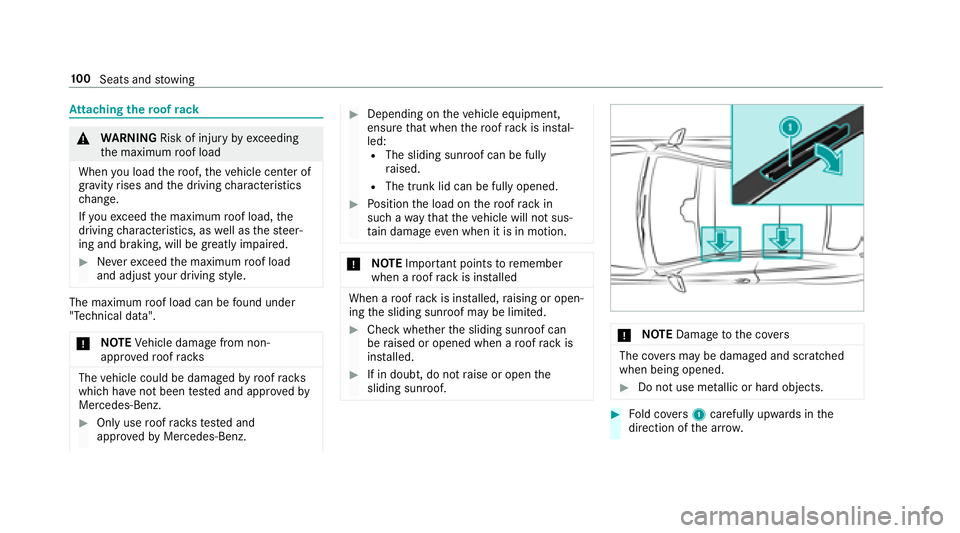
#Fo ld co vers 1 carefully up wards in the
direction of the ar row.
100
Seats and stowing
Page 132 of 486
Starting theve hicle using a smartphone
&
WARNING Risk of crushing or entrap‐
ment due tounin tentional starting of the
engine
Limbs could be crushed or trapped if the
engine is star ted unintentionally during
service or maintenance work.
#Alw ays secure the engine against unin‐
te ntional starting before car rying out
maintenance or repair work.
Re quirementsRPark position jis selected.
RThe anti- theft alarm sy stem is not armed.
RThe panic alarm is not armed.
RThe hazard warning lights are switched off.
RThe engine hood is closed.
RThe doors are closed and loc ked.
RThe windo wsand sliding sunro of are closed.
#Start theve hicle using the smartphone:
RAf tereve ryvehicle start, the engine runs for
te n minu tes.
RYo u can car ryout a maximum of two consec‐
utive starting attem pts.
RYo u can stop theve hicle again at any time.
RFu rther information can be found in the
smartphone app.
Securing the engine against starting before
car rying out maintenance or repair work:
#Switch on the hazard warning lights.
or
#Un lock the doors.
or
#Open a side window or the sliding sunroof.
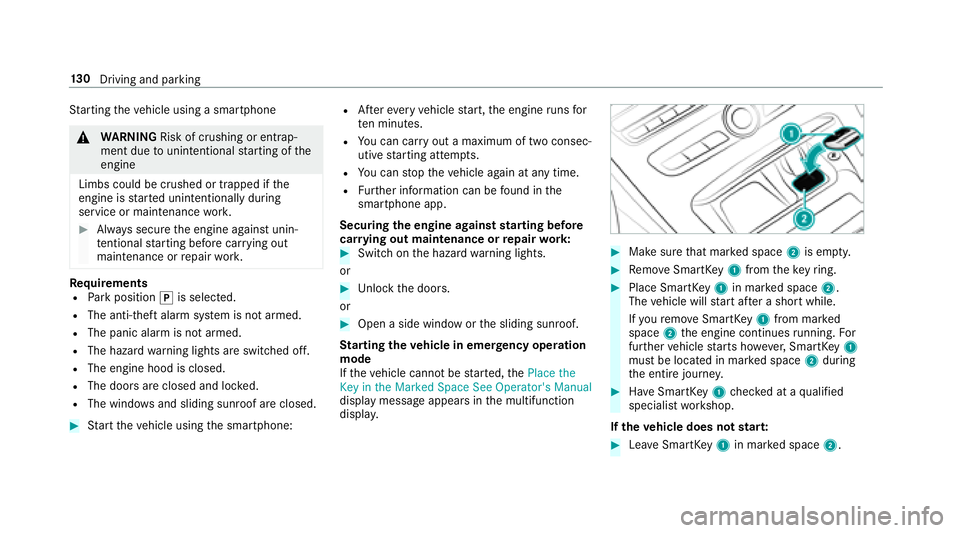
St arting theve hicle in emer gency operation
mode
If th eve hicle cannot be star ted, the3ODFH WKH
.H\ LQ WKH 0DUNHG 6SDFH 6HH 2SHUDWRU
V 0DQXDO
display message appears in the multifunction
displa y.
#Make sure that mar ked space 2is em pty.
#Re mo veSmartK ey1 from theke yring.
#Place Smart Key1 in mar ked space 2.
The vehicle will start af ter a short while.
If yo ure mo veSmartK ey1 from mar ked
space 2the engine continues running. For
fur ther vehicle starts ho wever,SmartK ey1
must be located in mar ked space 2during
th e entire journe y.
#Have SmartK ey1 checked at a qualified
specialist workshop.
If th eve hicle does not star t:
#Lea veSmartK ey1 in mar ked space 2.
130
Driving and pa rking
Page 145 of 486
*NO
TEDama getotheve hicle or the driv‐
et ra in caused bytheve hicle rolling away
#Alw ays proper lysecure theve hicle
against rolling away.
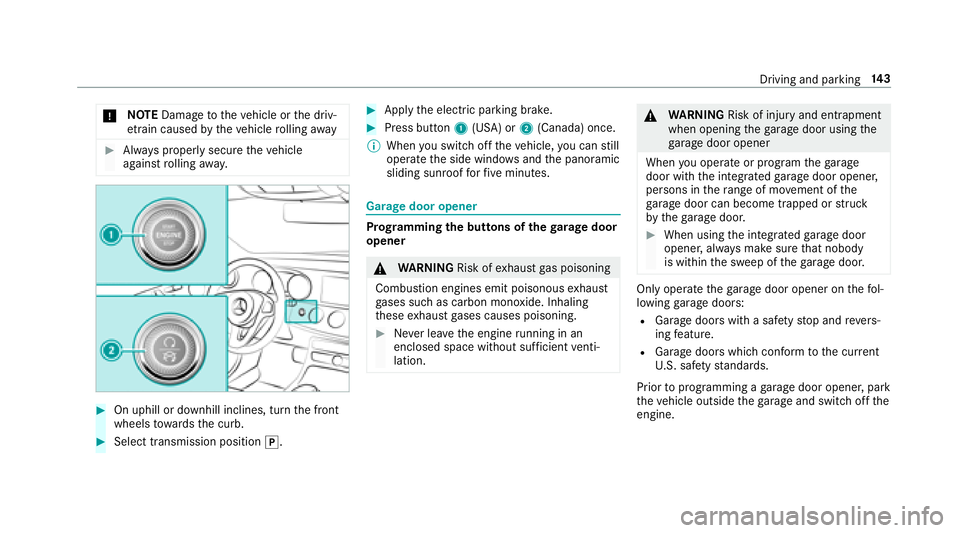
#On uphill or downhill inclines, turn the front
wheels towa rdsth e curb.
#Select transmission position j.
#Applythe electric parking brake.
#Press button 1(USA) or 2(Canada) once.
% When youswit choff theve hicle, you can still
opera tethe side windo wsand the panoramic
sliding sunroof forfive minutes.
Garage door opener
Prog ramming the buttons of the garage door
opener
& WARNING Risk ofexhaust gas poisoning
Combustion engines emit poisonous exhaust
ga ses such as carbon monoxide. Inhaling
th ese exhaust gases causes poisoning.
#Ne ver lea vethe engine running in an
enclosed space wi thout suf ficient venti‐
lation.
& WARNING Risk of injury and entrapment
when opening thega rage door using the
ga rage door opener
When you operate or program thega rage
door with the integrated garage door opener,
persons in thera nge of mo vement of the
ga rage door can become trapped or stru ck
by thega rage door.
#When using the integrated garage door
opener, alw ays make sure that nobody
is within the sweep of thega rage door.
Only operate thega rage door opener on thefo l‐
lowing garage doors:
RGarage doors with a saf etyst op and reve rs‐
ing feature.
RGarage doors which con form tothe cur rent
U. S. safe tystandards.
Prior toprogramming a garage door opener, park
th eve hicle outside thega rage and switch offthe
engine.
Driving and parking 14
3
Page 375 of 486
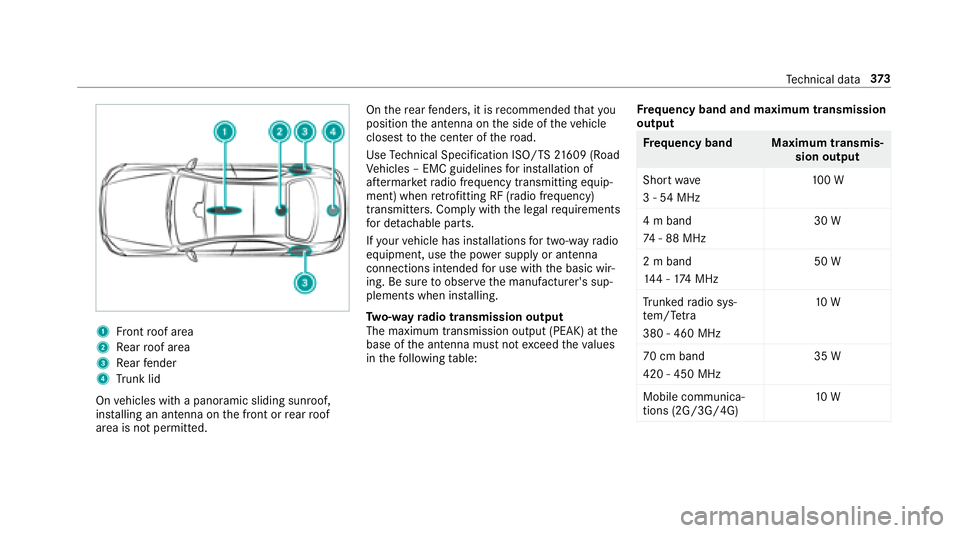
1Front roof area
2Re ar roof area
3Re ar fender
4Trunk lid
On vehicles with a panoramic sliding sunroof,
ins talling an antenna on the front or rear roof
area is not permitted. On
there ar fende rs, it is recommended that you
position the antenna on the side of theve hicle
closest tothe center of thero ad.
Use Tech nical Specification ISO/TS 21609 (Road
Ve hicles – EMC guidelines for ins tallation of
af te rm arke tra dio frequency transmitting equip‐
ment) when retrofitting RF (radio frequency)
transmitters. Co mply wi th th e legal requirements
fo r de tach able parts.
If yo ur vehicle has ins tallations for two-w ayradio
equipment, use the po wer supp lyor antenna
connections intended for use with the basic wir‐
ing. Be sure toobser vethe manufacturer's sup‐
plements when ins talling.
Tw o-w ayradio transmission output
The maximum transmission output (PEAK) at the
base of the antenna must not exceed theva lues
in thefo llowing table: Fr
equency band and maximum transmission
output
Fr equency band Maximum transmis‐
sion output
Sho rtwa ve
3 - 54 MHz 10
0 W
4 m band
74 - 88 MHz 30 W
2 m band
14 4 - 174 MHz 50 W
Tr unked radio sys‐
te m/T etra
380 - 460 MHz 10
W
70 cm band
420 - 450 MHz 35 W
Mobile communica‐
tions (2G/3G/4G) 10
W
Tech nical da ta37
3
Page 385 of 486
E 400 4MATIC
Wheelbase113.1 in
(28 73mm)
Ve hicle height 56.7 in
(1439 mm)
Tu rning radius 38.1ft
(1 1. 61 m)
We ights and loads
Please no tethat forth e specified vehicle data:
RItems of optional equipment increase the
curb weight and reduce the maximum pay‐
load.
Ro of load and trunk load
All models
Maximum roof load 165 lb (75 kg)
Tech nical da ta383
Page 471 of 486
Outside mirror.......................................... 118
Pa rking position .................................. .118
Outside mir rors ................................ 117, 118
Anti-gla remode (auto matic) ................. 118
Au tomatic mir rorfo lding function ........ 119
Fo lding in/out ...................................... 117
Setting ................................................. 117
Using the memory function .................. .92
Overhead control panel ............................12
Overview Satellite radio ...................................... 303
P
Pa int code ................................................ 374
Pa intwork (cleaning instructions) ..........317
Pa nel heating
Setting ................................................... 89
Pa nic alarm ................................................ 56
Ac tivating/deactivating ......................... 56
Pa noramic sliding sunroof
see Sliding sunroof
Pa rk position
Selecting ............................................. 138 Selecting au
tomatical ly....................... 138
Pa rking ............................................ .148,149
Pa rking aid
see Parking Assist PARKTRONI C
see Remo teParking Pilot
Pa rking Assist PARKTRONIC ................... 176
Ac tivating .............................................1 78
Ad justing warning tones ...................... 179
Deactivating ......................................... 178
Fu nction ............................................... 176
Side impact pr otection ........................ 177
Sy stem limitations .............................. .176
Pa rking assistance sy stems
see Parking Pilot
Pa rking brake
see Electric parking brake
Pa rking lights .......................................... .108
Pa rking Pilot ............................................ 185
Cross Traf fic Alert ................................ 194
Drive AwayAssist ................................ 193
Exiting a pa rking space ...................... ..
187
Fu ncti
on .............................................. 185
Maneuvering assis tance ...................... 195 Pa
rking ................................................ 186
Sy stem limits ....................................... 185
Pa rking Pilot
see Remo teParking Pilot
Pa rking position
Outside mir ror ...................................... 118
Pa ssenger outside mir ror — storing
using there ve rsege ar .......................... 119
Pa yload
Calculation example ............................ 351
De term ining the maximum .................. 350
Pe destrian pr otection
see Active hood (pedestrian pr otection)
Pe rfume
see Fragrance sy stem
Pe rfume vial
see Fragrance sy stem
Pe riod out of use
Ac tivating/deactivating standby
mode .................................................. .150
Pe rm itted towing me thods .................... .333
Pe rsonalization
see User profile
Index 469
Page 473 of 486
Todisplay radio text ............................. 301
Vo ice commands (Voice Cont rol Sys‐
te m) ..................................................... 224
Ra dio station list
Calling up ............................................ 300
Ra dio stations
Dial (on-boa rdcompute r) ..................... 213
Ra in closing function
Sliding sunroof ...................................... .76
Ra nge
Displaying ............................................ 210
Re ading lamp
see Interior lighting
Re ar fog light .......................................... .109
Re ar seat
see Seat
Re ar view camera ....................................1 79
Assigning as a favo rite ......................... 184
Care .................................................... .318
Fu nction .............................................. 179
Re ar window
Ro ller sun blind ...................................... 69
Re ar window heater ................................ 121 Re
ar-view mir ror
see Outside mir rors
Re frigerant (air conditioning sy stem)
No tes ................................................... 381
Re fueling
Re fueling theve hicle ........................... 140
Re mo teParking Pilot .............................. 189
Au thorizing a mobile phone ................. 193
Fu nction/no tes ................................... 189
Operating ............................................
190
Sy stem limitat
ions .............................. .189
Re porting malfunctions releva nt to
saf ety .......................................................... 25
Re scue card ............................................... 26
Re ser ve
Fu el ..................................................... 378
Re set function (multimedia sy stem) .....2 43
Re sidual heat ...........................................1 24
Re storing (factory settings)
see Reset function (multimedia sy stem)
Re stra int sy stem
Children ................................................ .45 Fu
nction in an accident .........................3 1
Fu nctionality .......................................... 31
Malfunction ...........................................3 1
Pr otection ..............................................3 0
Re duced pr otection .............................. .30
Sy stem self-test .................................... .31
Wa rning lamp ........................................ .31
Re stra int sy stem
see Occupant saf ety
Re versege ar
Selecting ............................................. 137
Re versing camera
Opening the camera co ver .................. 184
RF transmitters see Two-w ayradios
Rims (Care) .............................. .....
...........
.318
Ro adside Assistance ................................. 21
Ro llaw ay protection
see HOLD function
Ro ller sun blind
Re ar wind ow.......................................... 69
Ro of lining (care) .................................... .319
Index 47
1
Page 474 of 486
Roof load .................................................. 383
Ro ofrack .................................................. 100
Ro ute ................................................ 249, 25 1
Cal culating .......................................... 249
Displ aying destination information ...... 251
Selecting a type .................................. 250
Selecting an alternative route .............. 251
Selecting notifications ........................ .251
Selecting options ................................. 251
Switching the automatic gasst ation
sear chon/off ...................................... 252
Wi th intermediate destinations ............ 248
Ro ute guidance ....................................... 252
Canceling ............................................ 255
Changing direction .............................. 252
Continuing ...........................................2 55
Destination reached ............................ 253
Fr om an off-road location .................... 255
Lane recommendations ....................... 253
No tes .................................................. 252
Off-road ............................................... 255
To an off- road destination .................. .255
Ro ute guidance
see Navigation announcements Ru
n-flat characteristics
MOExtended tires ................................ 323
S
Saf ety
see Child seat
Saf ety sy stems
see Driving saf etysy stem
Saf etyve st ............................................... 322
Satelli temap ........................................... 263
Satelli te radio
Ac tivating ............................................ 302
Del eting a channel .............................. .304
Display ing EPG information ................ .304
Display ing service information ............ 305
Information .......................................... 301
Moving a channel ................................ 304
Music and sport alerts function .......... 304
Overview ............................................ .303
Re gis tering .......................................... 301
Re strictions ......................................... 301
Saving a channel ................................ .304
Selecting a category ............................ 304
Selecting a channel ............................ .304 Setting
the music and sport alerts ...... 304
Setting the parental control ................. 304
SD card Inserting/removing ............................. 287
Seat ............................................................ 96
4-w aylumbar support .......................... .84
Ad justing (electrically) ........................... 83
Ad justing (manually and electrically) .....
81
Ba
ckrest (rear) folding forw ard .............. 96
Cor rect driver's seat position ................ 80
Fo lding back the backrest (rear
passenger compartment) ..................... .97
Fo lding the backrest forw ards/back .... .88
Locking the backrest (rear passenger
compartment) ....................................... 98
Massage program overview .................. .87
Pa nel heating ......................................... 89
Re setting the settings ........................... .87
Selecting a massage program ...............8 7
Setting options ...................................... 14
Using the memory function .................. .92
Seat see Head restra int
47 2
Index
Page 476 of 486
Convenience closing feature .................. 71
Con venience opening ............................ 71
Opening .................................................7 0
Opening with the SmartK ey................... 71
Problem .................................................7 2
Side windo ws
see Window li fter
see Windo ws
Size designation (tires) ........................... 357
Skid chains .............................................. 343
Sliding sunroof .......................................... 73
Au tomatic functions .............................. 76
Closin g .................................................. 73
Closin gwit hth e SmartK ey.................... 72
Opening .................................................7 3
Opening with the SmartK ey................... 71
Problem .................................................7 6
Ra in closing function ............................ .76
SmartK ey................................................... 55
Emergency key ...................................... 57
Ke yring attachment .............................. 57
Overview ............................................... 55
Pa nic alarm ........................................... 56
Problem ................................................. 58 Un
locking setting .................................. 56
Sma rtKe y
see Ignition key
see Locking
see Vehicle key
Smartphone Starting vehicle ................................... 130
Smartphone see Android Auto
see Apple CarPlay
™
see Telephone
Snow chains ............................................ 343
Snow chains
see Skid chains
Soc ket (12 V) ............................................ 103
Fr ont center console ........................... 103
Fr ont passenger foot we ll .................... .103
Re ar passenger compartment ............ .103
Soc ket (1 15V) .......................................... 104
Re ar passenger compartment ............ .104
Software update Information .......................................... 242
Pe rforming ...........................................2 43Sound
PRE-SAFE
®Sound ................................. 44
Sound see Burmes ter
®sur round sound sy stem
see Sound settings
Sound settings ....................................... .305
Ad justing treble, mid and bass ............ 305
Information .......................................... 305
Speech dialog sy stem
see Voice Cont rol Sy stem
Speed limit for winter tires
Setting ................................................. 162
Speed Limit Pilot ............................. 162, 198
Displ ay................................................. 162
Setting ................................................. 198
Speed rating (ti res) ................................. 357
Speedome ter
Digital ..................................................2 10
St andby mode
Ac tivating/deactivating .......................1 50
Fu nction .............................................. 150
St anding lights ........................................ 108
474
Index