phone MERCEDES-BENZ E-CLASS COUPE 2018 User Guide
[x] Cancel search | Manufacturer: MERCEDES-BENZ, Model Year: 2018, Model line: E-CLASS COUPE, Model: MERCEDES-BENZ E-CLASS COUPE 2018Pages: 593, PDF Size: 10.63 MB
Page 118 of 593
St
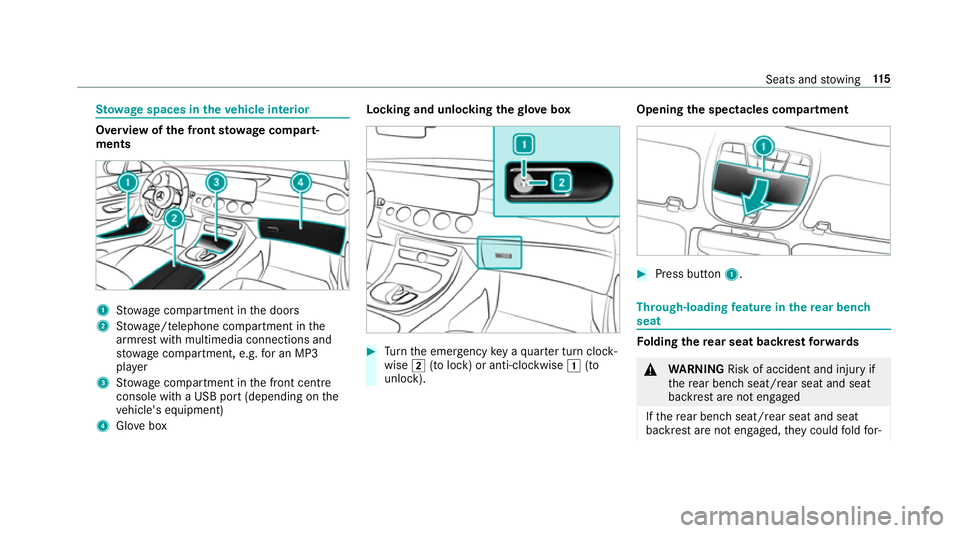
ow age spaces in theve hicle interior Overview of
the front stowage compa rt‐
ments 1
Stow age compartment in the doors
2 Stow age/telephone compartment in the
armrest with multimedia connections and
stow age compartment, e.g. for an MP3
pla yer
3 Stow age compartment in the front cent re
console wi tha USB port (depending on the
ve hicle's equipment)
4 Glovebox Locking and unlocking
thegl ove box #
Turn the emer gency key a quarter turn clock‐
wise 2(to lock) or anti-clockwise 1(to
unlock). Opening
the spectacles compa rtment #
Press button 1. Through-loading
feature in there ar ben ch
seat Fo
lding there ar seat backrest forw ards &
WARNING Risk of accident and inju ryif
th ere ar ben chseat/rear seat and seat
backrest are not engaged
If th ere ar ben chseat/rear seat and seat
backrest are not engaged, they could fold for‐ Seats and
stowing 11 5
Page 122 of 593
#
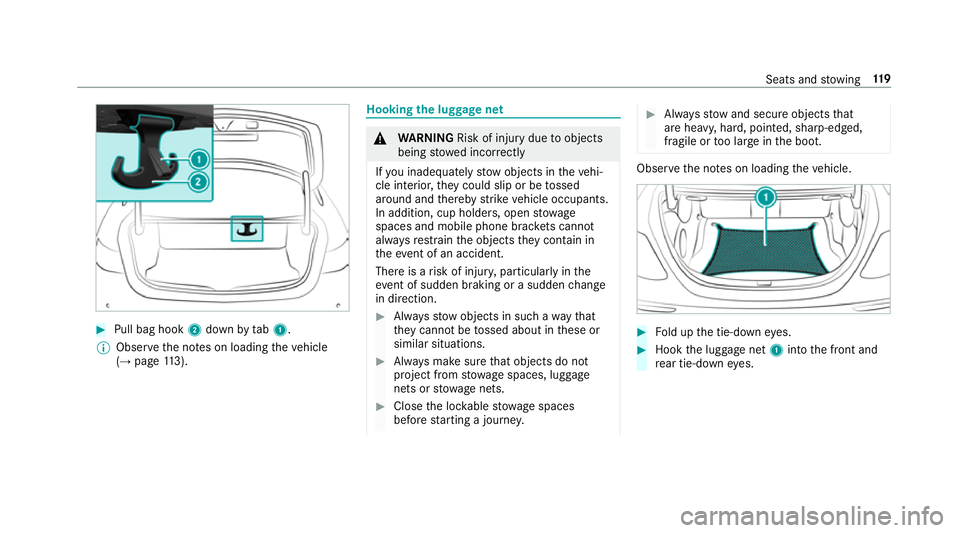
Pull bag hook 2down bytab1.
% Obser vethe no tes on loading theve hicle
(→ page 113). Hooking
the luggage net &
WARNING Risk of inju rydue toobjects
being stowed incor rectly
If yo u inadequately stowobjects in theve hi‐
cle interior, they could slip or be tossed
around and thereby strike vehicle occupants.
In addition, cup holders, open stowage
spaces and mobile phone brac kets cann ot
alw aysre stra in the objects they contain in
th eev ent of an accident.
There is a risk of injur y,particularly in the
ev ent of sudden braking or a sudden change
in direction. #
Alw aysstow objects in such a wayth at
th ey cannot be tossed about in these or
similar situations. #
Alw ays make sure that objects do not
project from stowage spaces, luggage
nets or stowage nets. #
Close the loc kable stow age spaces
before starting a journe y. #
Alw aysstow and secure objects that
are heavy, hard, poin ted, sharp-edged,
fragile or too large in the boot. Obser
vethe no tes on loading theve hicle. #
Fold up the tie-down eyes. #
Hook the luggage net 1into the front and
re ar tie-down eyes. Seats and
stowing 11 9
Page 127 of 593
Re
quirements:
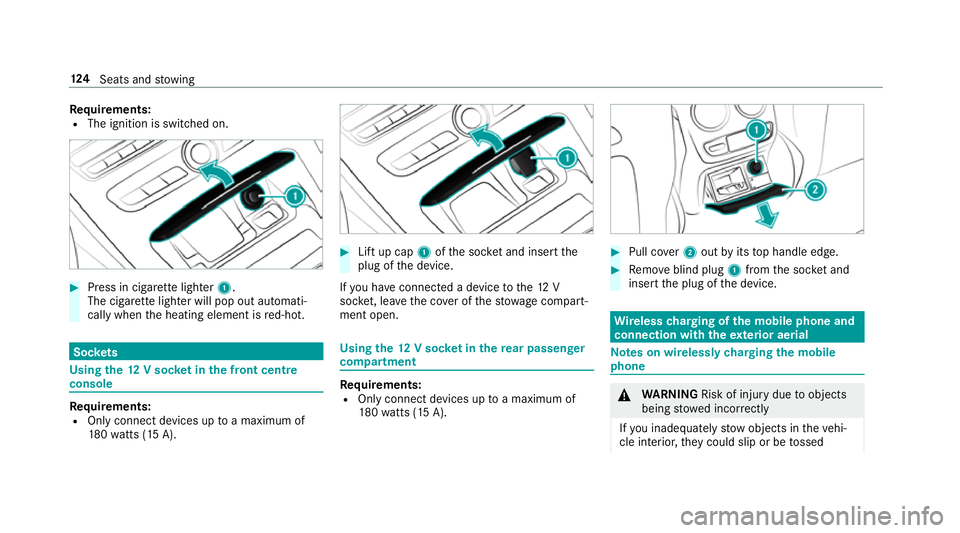
R The ignition is switched on. #
Press in cigar ette lighter 1.
The cigar ette lighter will pop out automati‐
cally when the heating element is red-hot. Soc
kets Using the
12V so cket inthe front centre
console Re
quirements:
R Only connect devices up toa maximum of
18 0wa tts (15 A). #
Lift up cap 1ofthe soc ket and insert the
plug of the device.
If yo u ha veconnected a device tothe12 V
soc ket, le ave the co ver of thestow age compart‐
ment open. Using
the12 V so cket inthere ar passenger
comp artment Re
quirements:
R Only connect devices up toa maximum of
18 0wa tts (15 A). #
Pull co ver2 out byits top handle edge. #
Remo veblind plug 1from the soc ket and
insert the plug of the device. Wire
lesscharging of the mobile phone and
connection with theex terior aerial Note
s on wirelessly charging the mobile
phone &
WARNING Risk of inju rydue toobjects
being stowed inco rrectly
If yo u inadequately stowobjects in theve hi‐
cle interior, they could slip or be tossed 124
Seats and stowing
Page 128 of 593
around and
thereby strike vehicle occupants.
In addition, cup holders, open stowage
spaces and mobile phone brac kets cann ot
alw aysre stra in the objects they contain in
th eev ent of an accident.
There is a risk of injur y,particularly in the
ev ent of sudden braking or a sudden change
in direction. #
Alw aysstow objects in such a wayth at
th ey cannot be tossed about in these or
similar situations. #
Alw ays make sure that objects do not
project from stowage spaces, luggage
nets or stowage nets. #
Close the loc kable stow age spaces
before starting a journe y. #
Alw aysstow and secure objects that
are heavy, hard, poin ted, sharp-edged,
fragile or too large in the boot. Obser
vethe no tes on loading theve hicle. &
WARNING Risk offire from placing
objects in the mobile phone stowage
compartment
If yo u place objects in the mobile phone
stow age compartment, they may heat up
exc essively and even catch fire. #
Do not place additional objects, espe‐
cially those mode of me tal, in the
mobile phone stowage compartment. *
NO
TEDama getoobjects caused by
placing them in the mobile phone stow‐
age compartment If objects are placed in
the mobile phone
stow age compartment, they may be dam‐
aged byelectromagnetic fields. #
Do not place credit cards, storage
media or other objects sensitive to
electromagnetic fields in the mobile
phone stowage compartment. *
NO
TEDama getothe mobile phone
stow age compartment caused byliquids If liquids enter
the mobile phone stowage
compartment, the compartment may be
damaged. #
Ensure that no liquids enter the mobile
phone stowage compartment. R
Depending on theve hicle equipment, the
mobile phone is connected totheve hicle's
ex terior aerial via thech arging module.
R The charging function and wireless connec‐
tion of the mobile phone totheve hicle's
ex terior aerial are only available if the ignition
is switched on.
R Small mobile phones may not be able tobe
ch arge d in everyposition of the mobile
phone stowage compartment.
R Largemobile phones which do not rest flat in
th e mobile phone stowage compartment may
not be able tobe charge d or connec ted with
th eve hicle's exterior aerial. Seats and
stowing 12 5
Page 129 of 593
R
The mobile phone may heat up during the
ch arging process. The mobile phone can be
cooled in the mobile phone stowage com‐
partment when the air conditioning sy stem is
switched on. The cooling output in the
mobile phone stowage compartment is high‐
est when the controller in theglove box is
closed.
R Toensure more ef ficient charging and con‐
nection with theve hicle's exterior aerial,
re mo vethe pr otective co ver from the mobile
phone.
R When charging, the mat should be used if
possible. Wire
lesscharging of the mobile phone Requ
irements:
R The mobile phone is suitable for wireless
ch arging (Qi-compatible mobile phone). Yo u
can find a li stof Qi-compatible mobile
phones at:
http://www.mercedes-benz.com/connect #
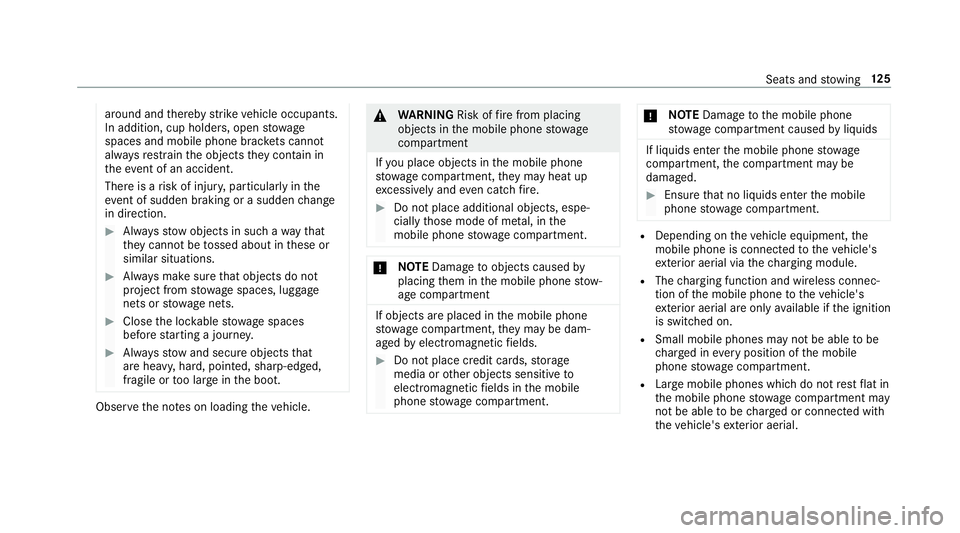
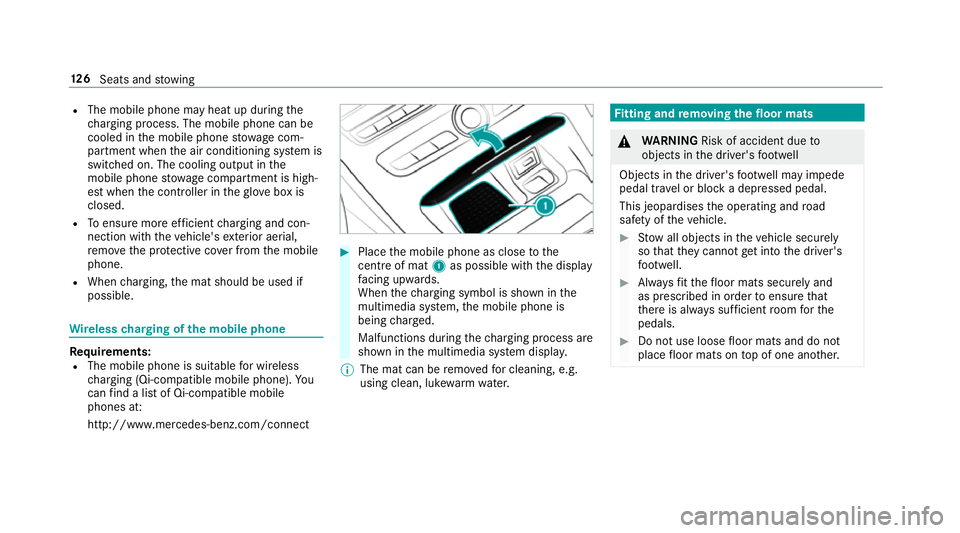
Place the mobile phone as close tothe
centre of mat 1as possible wi th the display
fa cing up wards.
When thech arging symbol is shown in the
multimedia sy stem, the mobile phone is
being charge d.
Malfunctions during thech arging process are
shown in the multimedia sy stem displa y.
% The mat can be remo vedfo r cleaning, e.g.
using clean, luk ewarmwate r. Fi
tting and removing the floormats &
WARNING Risk of accident due to
objects in the driver's foot we ll
Objects in the driver's foot we ll may impede
pedal tr avel or block a depressed pedal.
This jeopardises the operating and road
saf ety of theve hicle. #
Stow all objects in theve hicle securely
so that they cannot getinto the driver's
fo ot we ll. #
Alw aysfit th efloor mats securely and
as prescribed in order toensure that
th ere is alw ays suf ficient room forthe
pedals. #
Do not use loose floor mats and do not
place floor mats on top of one ano ther. 12 6
Seats and stowing
Page 163 of 593
#
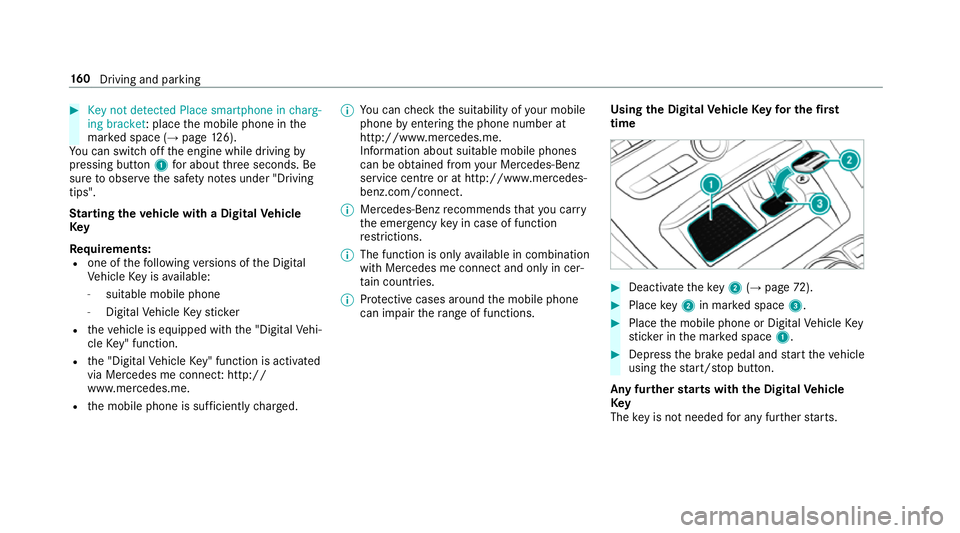
Key not detected Place smartphone in charg-
ing bracket: place the mobile phone in the
mar ked space (→ page126).
Yo u can swit choff the engine while driving by
pressing button 1for about thre e seconds. Be
sure toobser vethe saf ety no tes under "Driving
tips".
St arting theve hicle with a Digital Vehicle
Key
Requ irements:
R one of thefo llowing versions of the Digital
Ve hicle Key is available:
- suitable mobile phone
- Digital Vehicle Keyst icker
R theve hicle is equipped with the "Digital Vehi‐
cle Key" function.
R the "Digital Vehicle Key" function is activated
via Mercedes me connec t:http://
www.mercedes.me.
R the mobile phone is suf ficiently charge d. %
You can check the suitability of your mobile
phone byentering the phone number at
http://www.mercedes.me.
Information about suitable mobile phones
can be obtained from your Mercedes-Benz
service centre or at http://www.mercedes-
benz.com/connect.
% Mercedes-Benz recommends that you car ry
th e emer gency key in case of function
re strictions.
% The function is only available in combination
with Mercedes me connect and on lyin cer‐
ta in countries.
% Protective cases around the mobile phone
can impair thera nge of functions. Using the Digital
Vehicle Keyfo r the first
time #
Deactivate theke y2 (→page 72). #
Place key2 in mar ked space 3. #
Place the mobile phone or Digital Vehicle Key
st icke r in the mar ked space 1. #
Depress the brake pedal and start theve hicle
using thest art/ stop button.
Any fur ther starts with th e DigitalVehicle
Key
The key is not needed for any fur ther starts. 16 0
Driving and pa rking
Page 164 of 593
#
Place the mobile phone or Digital Vehicle Key
st icke r in the mar ked space 1. #
Depress the brake pedal and start theve hicle
using thest art/ stop button.
The "Digital Vehicle Key" service can be deacti‐
va ted in Mercedes me connect at http://
www.mercedes.me. The function is then deacti‐
va ted in the mobile phone via an online connec‐
tion. If connection tothe Internet is not possible,
e.g. af terth e mobile phone or the Digital Vehicle
Ke yst icke r has been stolen, theke y function can
be deacti vated at a Mercedes-Benz service
centre.
St arting theve hicle in emer gency operation
mode
If th eve hicle does not start and thePlace the
key in the marked space See Owner's Manual
message appears in the multifunction displa y,
yo u can start theve hicle in emer gency operation
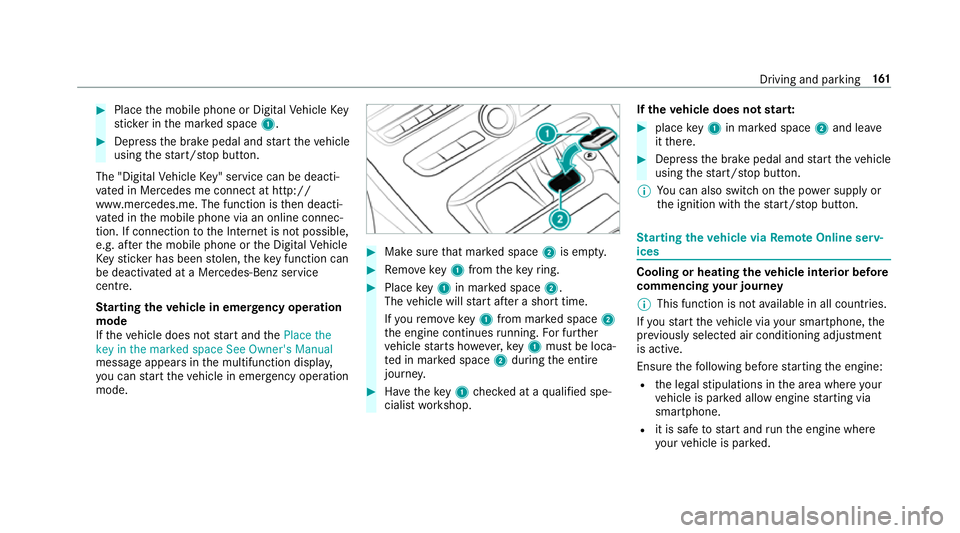
mode. #
Makesure that mar ked space 2is em pty. #
Remo vekey1 from theke yring. #
Place key1 in mar ked space 2.
The vehicle will start af ter a short time.
If yo ure mo vekey1 from mar ked space 2
th e engine continues running. For fur ther
ve hicle starts ho wever,ke y1 must be loca‐
te d in mar ked space 2during the entire
journe y. #
Have theke y1 checked at a qualified spe‐
cialist workshop. If
th eve hicle does not star t: #
place key1 in mar ked space 2and lea ve
it th ere. #
Depress the brake pedal and start theve hicle
using thest art/ stop button.
% You can also swit chon the po wer supp lyor
th e ignition with thest art/ stop button. St
arting theve hicle via Remo teOnline serv‐
ices Cooling or heating
theve hicle interior before
commencing your journey
% This function is not available in all countries.
If yo ustart theve hicle via your smartphone, the
pr ev iously selec ted air conditioning adjustment
is active.
Ensure thefo llowing before starting the engine:
R the legal stipulations in the area where your
ve hicle is par ked allow engine starting via
smartphone.
R it is safe tostart and runth e engine where
yo ur vehicle is par ked. Driving and parking
161
Page 165 of 593
R
the fuel tank is su fficiently filled.
R thest ar ter battery is suf ficiently charge d.
% You can also set thete mp erature with your
smartphone. In form ation on Mercedes me
connect and other services: http://
www.mercedes.me
This function is not available for all models.
Charging the bat tery before commencing
yo ur journey
R Ifth eve hicle battery is discharged, you
re cei vea message on your smartphone.
R You can then start theve hicle with the
smartphone tocharge the batter y.
R The vehicle is automatically switched off
af te rte n minu tes.
Ensure thefo llowing before starting the engine:
R the legal stipulations in the area where your
ve hicle is par ked allow engine starting via
smartphone.
R it is safe tostart and runth e engine where
yo ur vehicle is par ked.
R the fuel tank is su fficiently filled. St
arting theve hicle &
WARNING Risk of crushing or entrap‐
ment due tounin tentional starting of the
engine
Limbs could be crushed or trapped if the
engine is star ted unintentionally during
service or maintenance work. #
Alw ays secure the engine against unin‐
te ntional starting before car rying out
maintenance or repair work. Re
quirements:
R park position jis selected.
R the anti- theft alarm sy stem is not activated.
R the panic alarm is not activated.
R the hazard warning lights are switched off.
R the bonn etis closed.
R the doors are closed and loc ked.
R the windo wsand sliding sun roof are closed. #
Start theve hicle using the smartphone: R
afte reve ryvehicle start, the engine runs for
te n minu tes.
R you can car ryout a maximum of two consec‐
utive starting attem pts. The vehicle must be
st ar ted once with theke y before trying to
st art theve hicle again with the smartphone.
R you can stop theve hicle again at any time.
R further information can be found in the
smartphone app.
Securing the engine against starting before
car rying out maintenance or repair work: #
switch on the hazard warning lights.
or #
unlock the doors.
or #
open a side window or the sliding sunroof. Ru
nning-in no tes Mercedes-AMG
vehicles: observeth e no tes in
th e Supplement. Otherwise, you may failto rec‐
ognise dangers. 16 2
Driving and pa rking
Page 240 of 593
Fu
nction of Remo teParking Assist
% Remo teParking Assist is an additional func‐
tion of Active Parking Assist. Comply with
local traf fic la wsand regulations when using
Re mo teParking Assist on public roads.
Re mo teParking Assist supports the manoeu‐
vring or parking procedure while you are outside
yo ur vehicle. Once you ha veselected a suitable
parking space, youth en exitth eve hicle and
guide it into the parking space using a suitable
mobile phone. Remo teParking Assist changes
ge ar, accelerates, brakes and steers theve hicle.
While Remo teParking Assist is active, theve hi‐
cle is loc ked. You can inter rupt the parking proc‐
ess at any time with the mobile phone or the
ve hicle key and then take ove rth eve hicle your‐
self.
Yo u can also use your mobile phone tomo ve
yo ur vehicle backwards and forw ards in the
st ra ight-ahead position (exploration mode). This
is useful, forex ample, if a garage is so nar row
th at it is dif ficult or impossible toget in or out of
th eve hicle af ter it has been par ked. Re mo te
Pa rking Assist automatically per form s any minor
st eering cor rections that are requ ired. Re
mo teParking Assist is only an aid. It is not a
substitute foryo ur attention tothe sur roundings.
The responsibility for safe manoeuvring and
parking remains with you. In terrupt or term inate
th e parking procedure if necessar y.Make sure
th at no persons, animals or objects etc. are in
th e manoeuvring range.
Fo rth eRe mo teParking Assist function, you
re qu ire a mobile phone and the cur rent Remo te
Pa rking Assist App.
The following operating sy stems are suppor ted:
R Android™
R Apple ®
iOS
If th e connection between theve hicle and the
mobile phone is inter rupte d while a parking
manoeuvre is being per form ed, the manoeuvre
can be continued if the connection is re-es tab‐
lished within about two minutes.
The following scenarios are suppor ted:
R Parking in a parking space parallel tothe
direction of tra vel.
R Parking in a parking space at right angles to
th e direction of tra vel. R
Exiting a parking space at right angles tothe
direction of tra vel (exploration mode).
R Parking in a stra ight-ahead position, e.g. into
a ga rage or carport (exploration mode).
R Exiting a parking space in a stra ight-ahead
position, e.g. from a garage or carport (explo‐
ra tion mode).
If a malfunction or a sy stem limitation is de tec‐
te d during parking or manoeuvring (e.g. the per‐
mitted downhill gradient is exceeded), thefo l‐
lowing actions are per form ed automatically:
R The parking manoeuvre is cancelled.
R The vehicle is brought toast andstill.
R Transmission position jis engaged.
R theve hicle is switched off.
R The vehicle remains loc ked.
If th e parking manoeuvre is cancelled, a cor re‐
sponding message is displa yed on the mobile
phone. You can then take ove r and manoeuvre
th eve hicle into the parking space yourself. Alter‐
nativel y,yo u can mo vetheve hicle back toits
original position, if necessar y. Driving and pa
rking 237
Page 241 of 593
Yo
u can inter rupt the parking procedure with
Ac tive Parking Assist in order totake control of
th eve hicle with Remo teParking Assist and
manoeuvre it into its final position.
% You can find fur ther information in the oper‐
ating instructions forth eRe mo teParking
Assist App http://www.me rcedes.me.
Sy stem limitations
Sn owfa ll or heavy rain may lead toa parking
space being measured inaccurately or, in cer tain
cases, toconnection problems wi th the mobile
phone. Parking spaces that are partial ly occu‐
pied bytrailer dr awbars might not be identified
as such or be measured incor rectl y.Only use
Re mo teParking Assist on a le vel, high- grip sur‐
fa ce. The pa rking space must be at least 0.60 m
wider than theve hicle without the outside mir‐
ro rs.
Do not use Remo teParking Assist in thefo llow‐
ing situations:
R The weather conditions are extreme, e.g.
th ere is ice or pac ked snow or heavy rain.
R Ifyo u are transpo rting a load that pr otru des
be yond theve hicle. R
Ifyo u ha veinstalled snow chains.
R Ifth e parking space is on a downhill or uphill
incline.
Re mo teParking Assist is cancelled if, among
ot her things, one of thefo llowing actions is car‐
ri ed out:
R You deactivate Active Parking Assist.
R You press a but ton on thekey.
R ESP ®
inter venes.
During the parking procedure, you should not
st and more than appr ox. 3.0 maw ay from the
ve hicle. Atgreater dis tances, the procedure will
be inter rupte d and a cor responding message will
be displa yed on the mobile phone. If you mo ve
closer totheve hicle, you will be able tocontinue
th e procedure.
Fu rther information on cancelling the function
can be found in the operating instructions for
th eRe mo teParking Assist App. Operating
Remo tePark ing Assist &
WARNING Risk of accident due to
objects located abo veor below the
de tection range of Active Parking Assist
If th ere are objects abo veor below the
de tection range, thefo llowing situations may
arise:
R Active Parking Assist may steer too ear ly.
R Vehicles with automatic transmis‐
sion: Thevehicle may not stop in front of
th ese objects.
This could cause a collision. #
Inthese situations, do not use Active
Pa rking Assist. Objects located abo
veor below the de tection
ra nge of thePa rking Assist are not de tected
when the parking space is being measured.
These are also not take n into account when the
parking manoeuvre is calculated, e.g. overhang‐
ing loads, overhangs or loading ramp s of lor ries
or the boundaries of parking spaces. In some cir‐ 238
Driving and parking