seat adjustment MERCEDES-BENZ E-CLASS COUPE 2018 User Guide
[x] Cancel search | Manufacturer: MERCEDES-BENZ, Model Year: 2018, Model line: E-CLASS COUPE, Model: MERCEDES-BENZ E-CLASS COUPE 2018Pages: 593, PDF Size: 10.63 MB
Page 116 of 593
ke
y if the "Digital Vehicle Key" function
is activated via Mercedes me connect. The memory function can be used when
the igni‐
tion is switched off.
St oring
Seat adjustments for up tothre e people can be
st ored and called up using the memory function.
The following sy stems can be selected:
R Seat, backrest and head restra int
R Steering wheel
R Outside mir rors
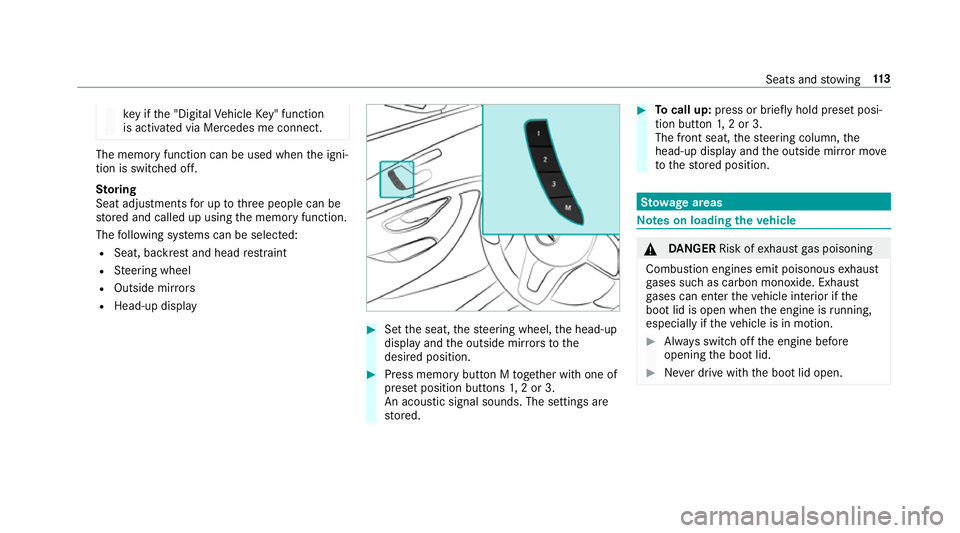
R Head-up display #
Set the seat, thesteering wheel, the head-up
display and the outside mir rors to the
desired position. #
Press memory button M toge ther with one of
preset position buttons 1,2 or 3.
An acou stic signal sounds. The settings are
st ored. #
Tocall up: press or brief lyhold preset posi‐
tion button 1,2 or 3.
The front seat, thesteering column, the
head-up display and the outside mir ror mo ve
to thestored position. St
ow age areas Note
s on loading theve hicle &
DANG ER Risk of exhaust gas poisoning
Combustion engines emit poisonous exhaust
ga ses such as carbon monoxide. Exhaust
ga ses can enter theve hicle interior if the
boot lid is open when the engine is running,
especially if theve hicle is in motion. #
Alw ays switch off the engine before
opening the boot lid. #
Never drive with the boot lid open. Seats and
stowing 11 3
Page 221 of 593
R
Vehicles with automatic transmission: the
transmission is in position h,kori.
Ac tivating the HOLD function #
Dep ress the brake pedal and af ter a short
time depress fur ther until theë display
appears in the multifunction displa y.#
Release the brake pedal.
Deactivating the HOLD function #
Depress the accelerator pedal topull away.
or #
Depress the brake pedal until theë dis‐
play disappears from the multifunction dis‐
pla y.
The HOLD function is deactivated in thefo llow‐
ing situations:
R When Active Dis tance Assi stDISTRONIC is
acti vated.
R Vehicles with automatic transmission:
when transmission position jis selected.
R When theve hicle is secured with the electric
parking brake. In
thefo llowing situations, theve hicle is held by
th e transmission position jorby the electric
parking brake:
R When the seat belt is unfas tened and the
driver's door is opened.
R When the engine is switched off.
R When there is a malfunction in the sy stem or
if th e po wer supply is insuf ficient. DY
NA MIC BODY CONT ROL function DY
NA MIC BODY CONTROL continuously adjusts
th ech aracteristics of the suspension dampers to
th e cur rent operating and driving conditions.
The da mping is tuned individually for each wheel
and is af fected bythefo llowing factors:
R The road sur face conditions
R Vehicle load
R The drive program selected
R The driving style
The drive program can be adjus ted using the
DY NA MIC SELECT switch. AIR
BODY CONT ROL AIR
BODY CONT ROL function
AIR BODY CONTROL is an air suspension sy stem
with variable damping for impr oved driving com‐
fo rt. The all-round le vel control sy stem ensures
th e best possible suspension and const ant
ground clearance, even wi tha laden vehicle.
When driving at speed, theve hicle is lo wered
automatically toimpr ovedriving saf ety and to
re duce fuel consum ption. You also ha vethe
option of manually adjusting theve hicle le vel.
AIR BODY CONTROL includes thefo llowing com‐
ponents and functions:
R air suspension with variable spring rate
R automatic le vel control sy stem.
R speed-dependent lo wering toreduce fuel
consum ption
R manually selec table high-le vel setting for
greater ground clearance
R ADS PLUS (Adaptive Damping Sy stem with
const ant damping forc e adjustment)
R DYNA MIC SELECT switch and le vel button 218
Driving and pa rking
Page 290 of 593
Vo
ice command Function
Scent menu To
display fragrance settings
Energy flow To
display energy flow settings
Ionisation menu To
display ionisation settings
Climate control menu To
display climate control settings
Automatic climate control driver on To
switch on the automatic climate control settings on the driver's side
Light menu To
display light settings
Massage menu To
display massage settings
Massage driver's seat on To
switch on the massage function forth e driver's seat
Massage driver's seat off To
switch off the massage function forth e driver's seat
Outside temperature To
display the outside temp erature
Engine data To
display engine data
Seats menu To
display seat adjustment settings
Seat heating front passenger level "2" To
set the seat heating forth e front passenger seat toleve l 2 LINGU
ATRO NIC 287
Page 401 of 593
R
Surround sound
R Sound focus
R Other sound settings #
Select a function.
Ad justing the treble, mid and bass settings
on the Burmes ter®
sur round sound sy stem
Multimedia sy stem:
Media àSound Equaliser #
Select Treble, MidorBass. #
Set the desired values.
Ac tivating/deactivating volume adjustment
in the Bu rmester ®
sur round sound sy stem
Multimedia sy stem:
Media àSound Automatic volume
adjustment
Au tomatic volume adjustment compensates for
dif fering volumes when changing between audio
sources. #
Activate Oor deacti vate ª the function. Ad
justing the balance/ fader in the
Burmes ter®
sur round sound sy stem
Multimedia sy stem:
Media àSound Balance and Fader #
Adjust the balance and fader. #
Toexitth e menu: pressthe% button.
Switching sur round sound on/off in the
Burmes ter®
sur round sound sy stem
Multimedia sy stem:
Media àSound Surround sound #
Activate Oor deacti vate ª the function.
Ad justing the sound focus in the Bu rmester ®
sur round sound sy stem
Multimedia sy stem:
Media àSound Sound focus #
Adjust the sound focus. Burmes
ter®
high-end 3D sur round sound
sy stem Information on
the Bu rmester ®
high-end 3D
sur round sound sy stem
The Burmes ter®
high-end 3D sur round sound
sy stem has a total output of 1450 watts and is
equipped wi th23 spea kers. It is available for all
functions in thera dio and media modes.
Calling up the sound menu in the
Bu rm ester ®
high-end 3D sur round sound
sy stem
Multimedia sy stem:
Media àSound
The following functions are available:
R Equaliser
R Balance and Fader
R Automatic volume adjustment
R VIP seat (seat-based sound optimisation)
R Sound profiles
R Other sound settings #
Select a sound menu. 398
Multimedia sy stem
Page 402 of 593
Ad
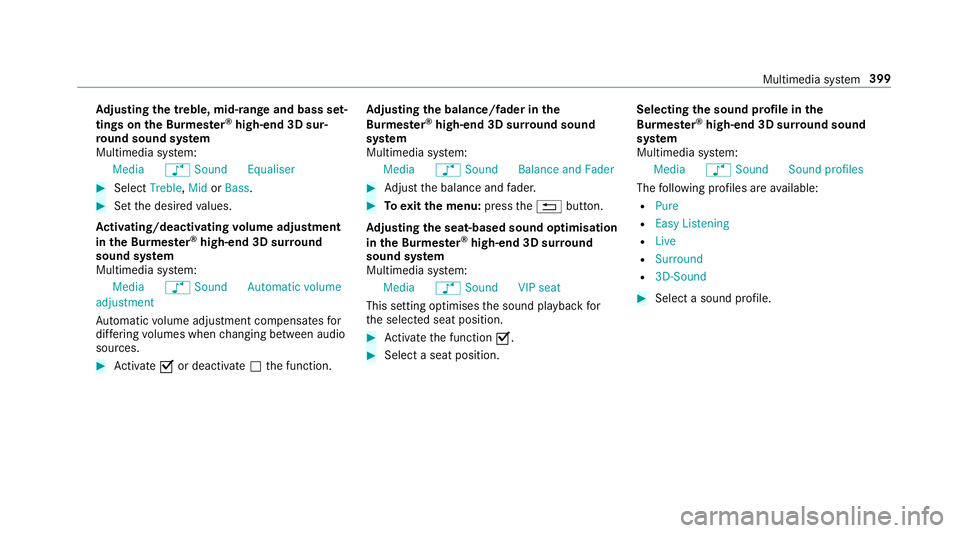
justing the treble, mid- range and bass set‐
tings on the Bu rmester ®
high-end 3D sur‐
ro und sound sy stem
Multimedia sy stem:
Media àSound Equaliser #
Select Treble, MidorBass. #
Set the desired values.
Ac tivating/deactivating volume adjustment
in the Bu rmester ®
high-end 3D sur round
sound sy stem
Multimedia sy stem:
Media àSound Automatic volume
adjustment
Au tomatic volume adjustment compensates for
dif fering volumes when changing between audio
sources. #
Activate Oor deacti vate ª the function. Ad
justing the balance/ fader in the
Burmes ter®
high-end 3D sur round sound
sy stem
Multimedia sy stem:
Media àSound Balance and Fader #
Adjust the balance and fader. #
Toexitth e menu: pressthe% button.
Ad justing the seat-based sound optimisation
in the Burmes ter®
high-end 3D sur round
sound sy stem
Multimedia sy stem:
Media àSound VIP seat
This setting optimises the sound playback for
th e selected seat position. #
Activate the function O. #
Select a seat position. Selecting
the sound profile in the
Bu rm ester ®
high-end 3D sur round sound
sy stem
Multimedia sy stem:
Media àSound Sound profiles
The following profiles are available:
R Pure
R Easy Listening
R Live
R Surround
R 3D-Sound #
Select a sound profile. Multimedia sy
stem 399
Page 554 of 593
Ad
justing treble, mid-range and bass
settings ............................................... 398
Au tomatic volume adjustment ............ .398
Calling up the sound menu .................. 397
Information .......................................... 397
Switching the sur round sound on/off
............................................................ .398
Buttons Steering wheel .....................................2 61C
Call list Making a call ...................................... .350
Overview ............................................. 350
Calling up the sound menu
Burmes ter®
high-end 3D sur round
sound sy stem ...................................... 398
Burmes ter®
sur round sound sy stem ....3 97
Calls .......................................................... 346
Ac cepting ............................................ 346
Ac tivating functions du ring a call ......... 347
Calls wi thseveral participants ............ .347
Declining ............................................. 346
Ending a call ........................................ 346 Incoming call du
ring an existing call .... 347
Making ................................................ 346
Vi ath eove rhead control panel
(Mercedes me connect) ......................3 59
Camera see 360° Camera
see Reversing camera
Car key
see Key
Car wash
see Care
Car wash (care) ....................................... 408
Care ........................................................... 416
Air-water duct ...................................... 408
Car wash ............................................. 408
Carpet .................................................. 416
Deco rative foil ...................................... 412
Displ ay................................................. 416
Exterior lighting .................................... 414
High-pressu recleaner ......................... 409
Matt finish ............................................ 411
Pa int wo rk ............................................. 411
Plastic trim ...........................................4 16
Re alwo od/trim elements .................... 416Re
versing camera ................................ 414
Ro of lining ............................................ 416
Seat belt .............................................. 416
Seat co ver ............................................ 416
Senso rs................................................ 414
Ta ilpipes .............................................. .414
Tr ailer hit ch.......................................... 414
Wa shing byhand ..................................4 10
Wheels/rims ........................................4 14
Wi ndo ws .............................................. 414
Wi per blades ........................................ 414
Carpet (Care) ............................................ 416
Changing gears ........................................ 173
Manually ..............................................1 73
Changing hub caps .................................454
Changing the lights
Driving abroad (symm etrical dipped
beam) .................................................. 12 8
Cha rging
Bat tery (vehicle) .................................. 430
Mobile phone (wireless) .......................1 24
Chassis Damping characteristics ...................... 218
DY NA MIC BODY CONTROL .................. 218 Index
551
Page 578 of 593
Switching au
tomatic operation
on/off (360° Camera) ......................... 231
Rims (Care) ............................................... 414
Ro llaw ay protection
see HOLD function
Ro ller sunblind
Re ar wind ow.......................................... 85
Ro of lining (care) ...................................... 416
Ro of load .................................................. 475
Ro ofrack
At tach ing ............................................ .120
Loading ................................................ 12 0
Ro ute ................................................ 319, 322
Ac tivating a commuter route .............. .322
Calculating .......................................... .319
Displ aying destination information ...... 321
Planning .............................................. .316
Selecting a type .................................. 320
Selecting an al tern ative route ............ .322
Selecting notifications ......................... 321
Selecting options ................................. 321
St arting the automatic service sta‐
tion sear ch.......................................... 322 Switching
the automatic filling sta‐
tion sear chon/off ...............................3 22
Using auto maticfilling station sear ch
............................................................. 322
Wi th intermediate destinations ............ 317
Ro ute guidance ....................................... 323
Cancelling .......................................... .327
Changing direction .............................. 324
De stination reached ............................ 325
Fr om an off-road location .................... 327
Lane recommendations ....................... 324
No tes .................................................. 323
Off-road ............................................... 327
To an off- road destination .................. .327
Ro ute-based speed adaptation
Displ ays in the instrument display .......2 15
Fu nction .............................................. 209
Ro ute-based speed adjustment
Setting ................................................ .211
Ru n-flat characteristics
MOExtended tyres ............................... 421
Ru nning-in no tes .....................................1 62 S
Saf ety sy stems
see Driving saf ety sy stem
Saf etyve st ................................................ 41 8
Satellite map ............................................ 337
SD card Inserting/removing .............................. 374
Seat ............................................... 98, 99, 11 5
4-w aylumbar support .......................... 102
Ad justing (electrically) ........................ .102
Ad justing (manually and electrically)
....................................................... 99, 101
Backrest (rear) locking ......................... 11 7
Cor rect driver's seat position ................ 98
Fo lding the backrest (rear) back ..........1 17
Fo lding the backrest (rear) forw ards .... 11 5
Fo lding the backrest forw ards/back
(with memory function) ...................... .105
Fo lding the backrest forw ards/back‐
wa rds (without memory function) ........ 105
Massage program overview ................ .104
Operating the memory function ........... 11 2
Pa nel heating ....................................... 107
Re setting the settings .......................... 104 Index
575
Page 579 of 593
Setting options ......................................
14
Switching AIRSCARF on/off ................ 108
Seat belt ............................................... 32, 37
Ac tivating/deactivating seat belt
adjustment ............................................ 37
Care .................................................... .416
Fa stening ............................................... 36
Pr otection ..............................................32
Re ar seat belt status display .................. 37
Re duced pr otection ...............................33
Re leasing .............................................. .37
Seat belt adjustment (function) ............. 37
Seat belt extender ................................. 35
Wa rning lamp ........................................ 37
Seat belt adjustment Activating/deactivating ......................... 37
Fu nction ................................................ 37
Seat belt extender .....................................35
Seat belt tensioners
Ac tivation .............................................. 31
Seat belt warning
see Seat belt
Seat co ver (Care) .................................... .416 Seat heater
Activating/deactivating ...................... .106
Seat settings Configu ring .......................................... 104
Seat ventilation
Ac tivating/deactivating ...................... .108
Second telephone ............................ 341, 342
Connecting .......................................... 341
Fe atures .............................................. 342
Selecting a gear
see Changing gears
Selecting the sound profile
Burmes ter®
high-end 3D sur round
sound sy stem ...................................... 399
Selector le ver
see DIRECT SELECT le ver
Self-test Automatic front passenger front air‐
bag shutoff ............................................ 42
Sensors (Care) .......................................... 414
Service Menu (on-board computer) .................. 265 Service
see ASS YST PLUS
Service centre see Qualified specialist workshop
Service inter val display
see AS SYST PLUS
Service station sear ch
St arting automatic sear ch................... 322
Setting a speed see Cruise control
Setting summer time .............................. 299
Setting the date form at .......................... 299
Setting the distance unit ........................ 304
Setting the map scale
see Map
Shift paddles see Steering wheel gearshift paddles
Shifting gears
Gea rshift recommendation .................. 173
Short messages see Text messa ges
Side impact airbag .................................... 38576
Index