brake light MERCEDES-BENZ E-CLASS COUPE 2018 Owner's Manual
[x] Cancel search | Manufacturer: MERCEDES-BENZ, Model Year: 2018, Model line: E-CLASS COUPE, Model: MERCEDES-BENZ E-CLASS COUPE 2018Pages: 593, PDF Size: 10.63 MB
Page 208 of 593
Setting
the speed limitation for winter tyres
Multimedia sy stem:
Vehicle îVehicle settings Winter
tyres limit #
Select a speed or deactivate the function. Ac
tive Di stance Assist DISTRO NICFu
nction of Active Di stance Assist
DISTRO NIC Ac
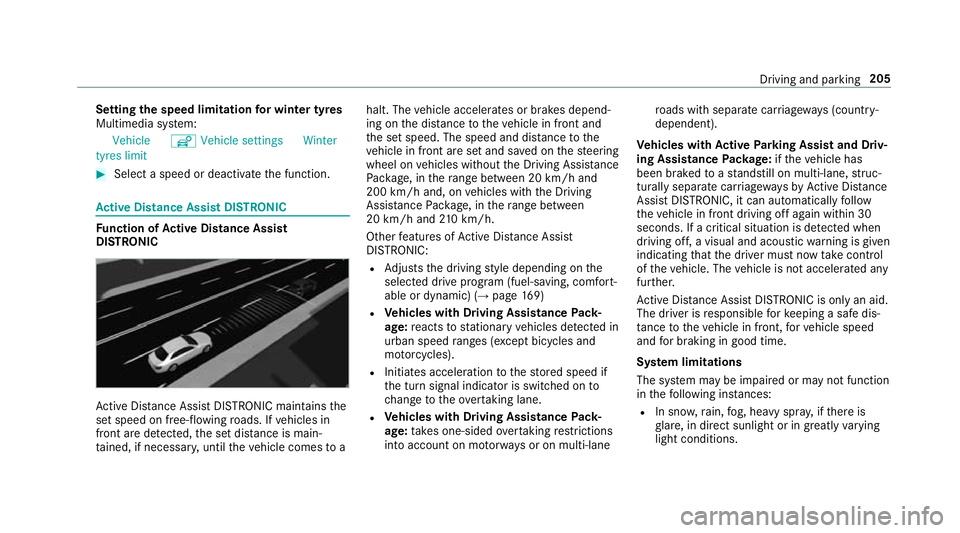
tive Dis tance Assi stDISTRONIC maintains the
set speed on free-flowing roads. If vehicles in
front are de tected, the set dis tance is main‐
ta ined, if necessar y,until theve hicle comes to ahalt. The
vehicle accelerates or brakes depend‐
ing on the dis tance totheve hicle in front and
th e set speed. The speed and dis tance tothe
ve hicle in front are set and sa ved on thesteering
wheel on vehicles without the Driving Assis tance
Pa ckage, in thera nge between 20 km/h and
200 km/h and, on vehicles with the Driving
Assis tance Package, in thera nge between
20 km/h and 210 km/h.
Other features of Active Dis tance Assi st
DISTRONIC:
R Adjusts the driving style depending on the
selected drive program (fuel-saving, comfort‐
able or dynamic) (→ page169)
R Vehicles with Driving Assistance Pack‐
age: reacts tostationary vehicles de tected in
urban speed ranges (e xcept bicycles and
mo torcyc les).
R Initiates acceleration tothestored speed if
th e turn signal indicator is switched on to
ch ange totheove rtaking lane.
R Vehicles with Driving Assistance Pack‐
age: take s one-sided overtak ing restrictions
into account on mo torw ays or on multi-lane ro
ads with separate car riag ewa ys(countr y-
dependent).
Ve hicles with Active Park ing Assist and Driv‐
ing Assistance Package: ifth eve hicle has
been braked toast andstill on multi-lane, stru c‐
turally separate car riag ewa ysby Active Dis tance
Assi stDISTRONIC, it can au tomatical lyfollow
th eve hicle in front driving off again within 30
seconds. If a critical situation is de tected when
driving off, a visual and acoustic warning is given
indicating that the driver must now take control
of theve hicle. The vehicle is not accelerated any
fur ther.
Ac tive Dis tance Assi stDISTRONIC is only an aid.
The driver is responsible forke eping a safe dis‐
tan cetotheve hicle in front, forve hicle speed
and for braking in good time.
Sy stem limitations
The sy stem may be impaired or may not function
in thefo llowing ins tances:
R In sno w,rain, fog, heavy spr ay, if there is
gl are, in direct sunlight or in greatlyvarying
light conditions. Driving and parking
205
Page 213 of 593
When Dis
tance Assi stDISTRONIC is acti ve,the
function adju ststh e speed depending on the
ro ute events ahead. Depending on the drive pro‐
gram selected, theve hicle negotiates thero ute
eve nt ahead in a fuel-s aving, com fortable or
dynamic manner. When thero ute event has been
passed, theve hicle accelerates again tothe
st ored speed. The set dis tancetotheve hicle in
front, vehicles de tected ahead and speed restric‐
tions ahead are take n into account.
Ro ute-based speed adjustment can byconfig‐
ured in the multimedia sy stem (→ page211).
Ro ute events ahead are:
R Bends
R T-junctions, roundabouts and tollst ations
R Turns and exits
R Traf fic jams ahead (only wi thLive Traf fic
( → page 329))
% When theto llst ation is reached, Active Dis‐
ta nce Assi stDISTRONIC adopts the speed as
th estored speed. Also,
the speed is reduced if the turn signal to
ch ange lanes is swit ched on and one of thefo l‐
lowing situations is de tected:
R Turning off at junctions
R Driving on slowing-down lanes
R Driving on lanes adjacent toslowing-down
lanes
The driver is responsible forch oosing theright
speed and observing other road users. This
applies in particular tojunctions, roundabouts
and traf fic lights, as route-based speed adap ta‐
tion does not brake theve hicle toast andstill.
When route guidance is active, thefirs t speed
adjustment is car ried out automaticall y.Ifthe
turn signal indica tor is switched on, the selected
ro ute is confirmed and fur ther speed adjustment
is activated.
Speed adjustment is cancelled in thefo llowing
cases:
R Ifth e turn signal indicator is switched off
before thero ute event.
R Ifth e driver depresses the accelera tor or
brake pedal during the process. Sy
stem limitations
Ro ute-based speed adap tation does not take
ri ght of wayre gulations into account. The driver
is responsible for complying with road traf fic
re gulations and driving at a suitable speed.
In dif ficult conditions (e.g. unclear roads, nar row
lanes, wetro ad sur faces, snow or ice) or when
driving wi tha trailer, the speed adjustment made
by the sy stem may not alw ays be suitable. In
th ese situations the driver must inter vene
acco rding ly. &
WARNING Risk of accident in spi teof
ro ute-based speed adjustment
Ro ute-based speed adjustment might mal‐
function or be temp orarily una vailable in the
fo llowing situations:
R If map data is not up todate or available
R Ifyo u do not follow the selected route
guidance
R Ifth e set route is re-planned
R Inroad con stru ction areas 210
Driving and pa rking
Page 217 of 593
must be initia
ted. An immediate lane change is
on ly possible on mo torw ay sections without
speed limits.
If th e sy stem is impaired, Active Lane Change
Assi stmay be cancelled. If it is cancelled, the
Lane change cancelled message appears inthe
multifunction display and a warning tone sounds. &
WARNING Risk of accident from chang‐
ing lane toan occupied adjacent lane
Lane Chan geAssi stcannot al ways detect
clear lyifth e adjacent lane is free.
The lane change might be initiated although
th e adjacent lane is not free. #
Before changing lanes, make sure that
th e neighbouring lane is free and there
is no danger to otherroad users. #
Monitor the lane change. &
WARNING Risk of accident if Lane
Change Assi stunexpectedly stops func‐
tioning
If th e sy stem limitations for Lane Change
Assist ha vebeen reached, there is no guar‐
antee that the sy stem will remain active.
Lane Change Assist cannot then assist you
by applying steering torques. #
Alw ays monitor the lane change and
ke ep your hands on thesteering wheel.
Obser vethe tra ffic conditions and steer
and/or brake if necessar y. Sy
stem limitations
The sy stem limitations of Active Steering Assist
apply toActive Lane Change Assi st
( → page 211).
The sy stem may also be impaired or may not
function in thefo llowing situations:
R The sensors in there ar bumper are dirty,
damaged or co vered, for ins tance by a
st icke r or ice and sno w.
R The exterior lighting is malfunctioning. Ac
tivating/deactivating Active Lane Change
Assi st
Multimedia sy stem:
Vehicle kAssistance #
Select Lane change assist. #
Activate Oor deacti vate ª the function.
Fu nction of Active Eme rgency Stop Assist
If th e driver continually ignores the visual or
acoustic warning toput their hands on thesteer‐
ing wheel, theBeginning emergency stop mes‐
sage appears in the multifunction displa y.Ifthe
driver still does not respond, Active Dis tance
Assi stDISTRONIC reduces the speed. The vehi‐
cle is decelerated in stages toast andstill. At
speeds below 60 km/h the hazard warning
lights switch on automaticall y.
When theve hicle is stationar y,thefo llowing
actions are car ried out:
R theve hicle is secured with the electric park‐
ing brake
R Active Dis tance Assi stDISTRONIC is ended
R theve hicle is unloc ked 214
Driving and pa rking
Page 219 of 593
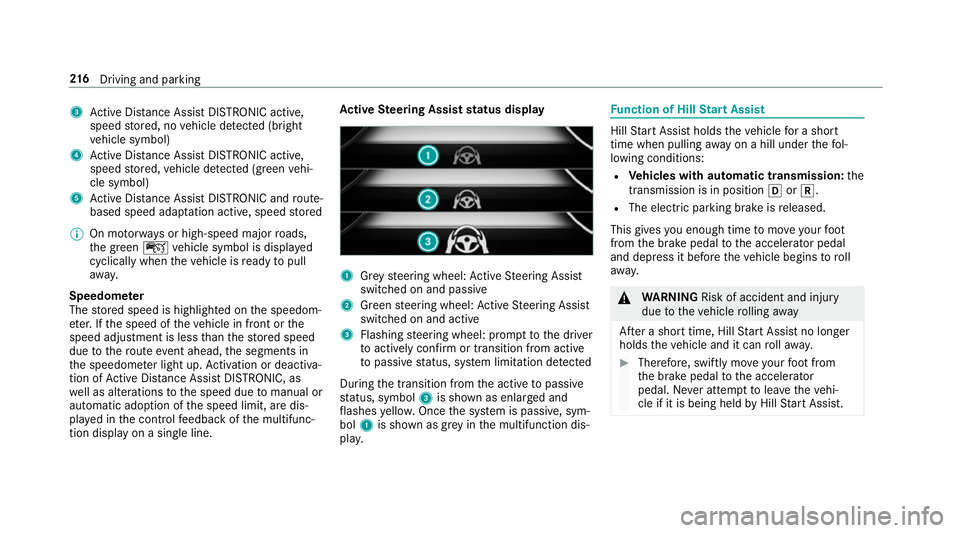
3
Active Dis tance Assi stDISTRONIC acti ve,
speed stored, no vehicle de tected (bright
ve hicle symbol)
4 Active Dis tance Assi stDISTRONIC acti ve,
speed stored, vehicle de tected (green vehi‐
cle symbol)
5 Active Dis tance Assi stDISTRONIC and route-
based speed adap tation acti ve, speed stored
% On mo torw ays or high-speed major roads,
th e green çvehicle symbol is displa yed
cyclically when theve hicle is ready topull
aw ay.
Speedome ter
The stored speed is highlighted on the speedom‐
et er. If the speed of theve hicle in front or the
speed adjustment is less than thestored speed
due tothero ute event ahead, the segments in
th e speedome ter light up. Activation or deacti va‐
tion of Active Dis tance Assi stDISTRONIC, as
we ll as alterations tothe speed due tomanual or
auto matic adoption of the speed limit, are dis‐
pla yed in the control feedback of the multifunc‐
tion display on a single line. Ac
tive Steering Assist status display 1
Grey steering wheel: Active Steering Assist
switched on and passive
2 Green steering wheel: Active Steering Assist
switched on and active
3 Flashing steering wheel: prom pttothe driver
to actively con firm or transition from active
to passive status, sy stem limitation de tected
During the transition from the active topassive
st atus, symbol 3is shown as enlar ged and
fl ashes yello w. Once the sy stem is passive, sym‐
bol 1is shown as gr eyinthe multifunction dis‐
pla y. Fu
nction of Hill Start Assist Hill
Start Assist holds theve hicle for a short
time when pulling away on a hill under thefo l‐
lowing conditions:
R Vehicles with automatic transmission: the
transmission is in position hork.
R The electric pa rking brake is released.
This gives you enough time tomo veyour foot
from the brake pedal tothe accelera tor pedal
and depress it before theve hicle begins toroll
aw ay. &
WARNING Risk of accident and inju ry
due totheve hicle rolling away
Af ter a short time, Hill Start Assist no lon ger
holds theve hicle and it can rollaw ay. #
Therefore, swiftly mo veyour foot from
th e brake pedal tothe accelerator
pedal. Ne ver attem pttolea vetheve hi‐
cle if it is being held byHill Start Assist. 216
Driving and pa rking
Page 234 of 593
Sy
stem limitations
The 360° Camera will not function or will only
partially function in thefo llowing situations:
R The doors are open.
R The side mir rors are folded in.
R The boot lid is open.
R There is heavy rain, snow or fog.
R The light conditions are poor, e.g. at night.
R The camera lens is obstructed, dirty or mis‐
te d up.
R If cameras or vehicle components in which
th e cameras are fitted are dama ged. In this
eve nt, ha vethe cameras, their positions and th
eir setting checked at a qualified specialist
wo rkshop.
Do not use the 360° Camera under such circum‐
st ances. You could otherwise injure others or
collide with objects when parking or manoeu‐
vring theve hicle.
On vehicles with height-adjus table suspension or
if th eve hicle is car rying a heavy load, leaving the
st andard height can result in inaccuracies in the
guide lines and in the display of thege nerated
ima ges, depending on tech nical conditions.
The field of vision and other functions of the
came rasystem may be restricted due toaddi‐
tional attachments on theve hicle (e.g. licence
plate brac ket, bicycle rack ).
See the no tes on cleaning the 360° Camera
(→ page 414).
Selecting a view for the 360° camera
Requ irements:
R The Auto reversing camera function is selec‐
te d in the multimedia sy stem. #
Enga gereve rsege ar. #
Inthe multimedia sy stem, select the desired
vie w.
Switching reve rsing camera automatic mode
on/off
The reve rsing camera is only an aid. It is not a
substitute foryo ur attention tothe sur roundings.
The responsibility for safe manoeuvring and
parking remains with you. Make sure that no
persons, animals or objects etc. are in the
manoeuvring range. Pay attention to your sur‐
ro undings and be ready tobrake at all times.
Multimedia sy stem:
Vehicle kAssistance Camera &
Park. Assist Auto reversing camera #
Activate Oor deacti vate ª the function.
Opening the camera co ver of the reve rsing
camera
Multimedia sy stem:
Vehicle kAssistance Camera &
Park. Assist #
Select Open camera cover. Driving and parking
231
Page 252 of 593
The course-cor
recting brake application is availa‐
ble in the speed range between appr oximately
30 km/h and 200 km/h. &
WARNING Risk of accident despi te
brake application of Active Blind Spot
Assi st
A cou rse-co rrecting brake application cann ot
alw ays pr event a collision. #
Alw aysst eer, brake or accelera teyour‐
self, especially if Active Blind Spot
Assi stwa rnsyo u or makes a course-
co rrecting brake application. #
Alw ays maintain a safe dis tance at the
sides. &
WARNING Risk of accident despi te
Ac tive Blind Spot Assi st
Ac tive Blind Spot Assi stdoes not react tothe
fo llowing:
R ifve hicles overtake too closely on the
side, placing them in the blind spot area R
vehicles approaching and overtaking you
at a greatly di fferent speed
As a result, Active Blind Spot Assi stmay nei‐
th er give warnings nor inter vene in su chsit‐
uations. #
Alw ays pay careful attention tothe traf‐
fi c situation and maintain a safe dis‐
ta nce at the side of theve hicle. If a course-cor
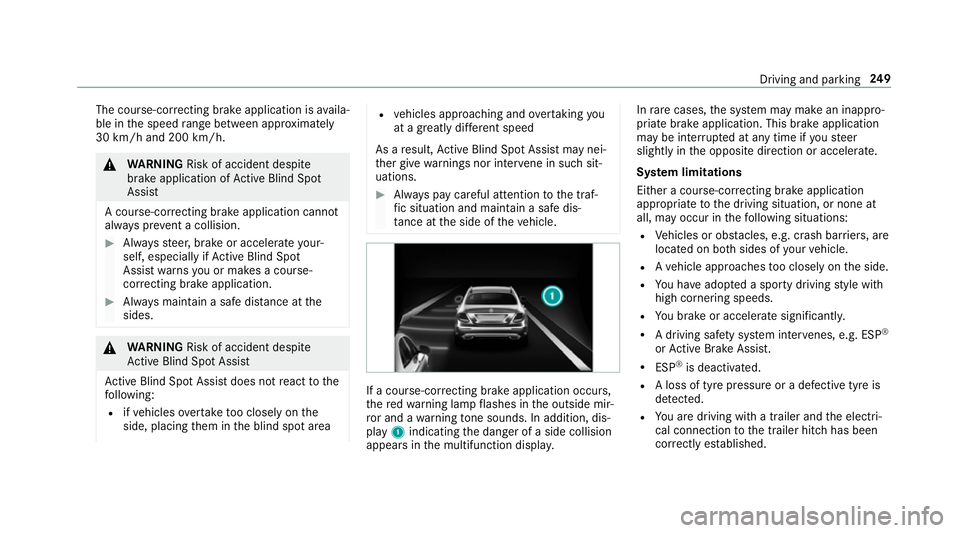
recting brake application occu rs,
th ere dwa rning lamp flashes in the outside mir‐
ro r and a warning tone sounds. In addition, dis‐
pl ay 1 indicating the danger of a side collision
appears in the multifunction displa y.In
rare cases, the sy stem may make an inappro‐
priate brake application. This brake application
may be inter rupte d at any time if yousteer
slightly in the opposite direction or accelera te.
Sy stem limitations
Either a course-cor recting brake application
appropria teto the driving situation, or none at
all, may occur in thefo llowing situations:
R Vehicles or obs tacles, e.g. crash ba rriers, are
located on bo thsides of your vehicle.
R Ave hicle approaches too closely on the side.
R You ha veadop ted a sporty driving style with
high cornering speeds.
R You brake or accelerate significantl y.
R A driving sa fety sy stem inter venes, e.g. ESP ®
or Active Brake Assi st.
R ESP ®
is deacti vated.
R A loss of tyre pressure or a defective tyre is
detected.
R You are driving with a trailer and the electri‐
cal connection tothe trailer hitch has been
cor rectly es tablished. Driving and parking
249
Page 255 of 593
R
Ifth e car riag ewa y is very nar row and wind‐
ing.
Ve hicles with Driving Assistance pac kage or
Driving Assistance Plus pa ckage: Active Lane
Ke eping Assist uses radar sensors tomonitor
se veral areas around theve hicle. If thera dar
sensors in there ar bumper are dirty or co vered
with sn ow,th e sy stem may be impaired or may
not function. If an obs tacle in the lane in which
yo u are driving has been de tected, no lane-cor‐
re cting brake application occu rs.
Ac tivating/deactivating Active Lane Keeping
Assist (vehicles with Parking Assist
PA RKTRONIC) &
WARNING Risk of accident despi te
Ac tive Lane Keeping Assist warning
A lane-cor recting brake application cannot
al wa ys bring theve hicle back into the origi‐
nal lane. #
Alw aysst eer, brake or accelera teyour‐
self, especially if Active Lane Keeping Assist
warnsyo u or makes a lane-cor‐
re cting brake application. &
WARNING Risk of accident despi teinter‐
ve ntion of Active Lane Keeping Assist
Ac tive Lane Keeping Assist does not de tect
traf fic conditions or road users. In very rare
cases, the sy stem may make an inappropri‐
ate brake application, e.g. af ter intentional ly
driving over a solid lane marking.
The brake application can be inter rupte d at
any time if yousteer slightly in the opposite
direction. #
Alw ays make sure that there is suf fi‐
cient di stance tothe side forot her traf‐
fi c or obs tacles. &
WARNING Risk of accident despi teLane
Ke eping Assist
Lane Keeping Assist cann otalw ays clearly
de tect lane markings. In su
chcases, Lane Keeping Assist can:
R give an unnecessary warning
R not give a warning #
Alw ays pay particular attention tothe
traf fic situation and keep within the
lane, especially if Active Lane Keeping
Assist alerts you. Be sure
toobser vethe sy stem limitations of
Ac tive Lane Keeping Assist. 252
Driving and parking
Page 259 of 593
The operation of
thefo llowing sy stems depends
on the trailer being connected cor rectly:
R Active Lane Keeping Assist
R ESP ®
R Parking Assist PARKTRONIC
R Active Parking Assist
R Blind Spot Assist or Active Blind Spot Assi st
Coupling up a trailer
* NO
TEDama getotheve hicle battery due
to full dischar ge Charging
the trailer battery using the po wer
supply of the trailer can damage theve hicle
batter y. #
Do not use theve hicle's po wer supply
to charge the trailer batter y.#
Remo vethe co ver from the ball head and
st ore it in a safe place (→ page113). #
Position the trailer on a le vel sur face behind
th eve hicle and couple it up totheve hicle. #
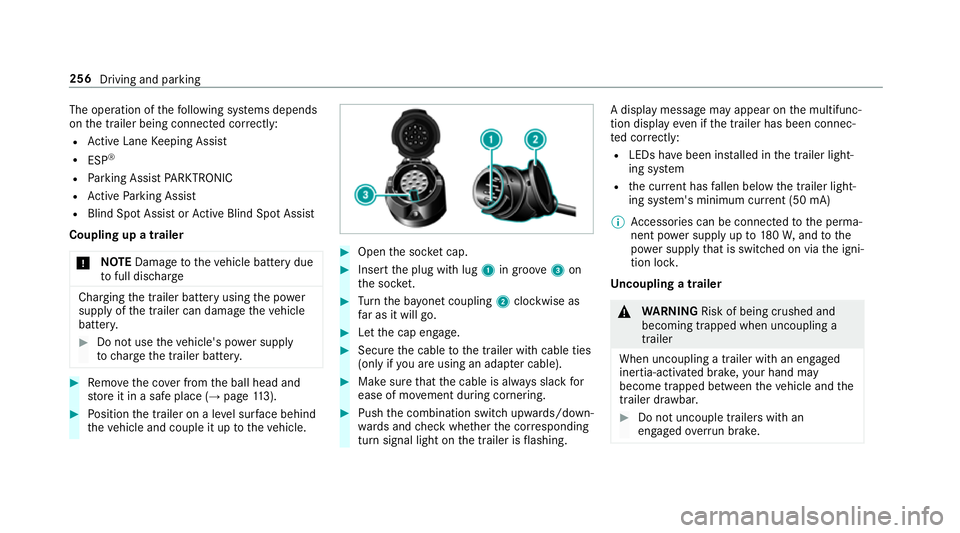
Open the soc ket cap. #
Inse rtthe plug with lug 1in groo ve3 on
th e soc ket. #
Turn the ba yonet coupling 2clockwise as
fa r as it will go. #
Let the cap engage. #
Secure the cable tothe trailer with cable ties
(only if you are using an adap ter cable). #
Make sure that the cable is alw ays slack for
ease of mo vement during cornering. #
Push the combination switch upwards/down‐
wa rds and check whe ther the cor responding
turn signal light on the trailer is flashing. A display message may appear on
the multifunc‐
tion display even if the trailer has been connec‐
te d cor rectly:
R LEDs ha vebeen ins talled in the trailer light‐
ing sy stem
R the cur rent has fallen below the trailer light‐
ing sy stem's minimum cur rent (50 mA)
% Accessories can be connected tothe perma‐
nent po wer supp lyup to180W, and tothe
po we r supp lythat is swit ched on via the igni‐
tion loc k.
Un coupling a trailer &
WARNING Risk of being crushed and
becoming trapped when uncoupling a
trailer
When uncoupling a trailer wi than engaged
ine rtia-activated brake, your hand may
become trapped between theve hicle and the
trailer dr awbar. #
Do not uncouple trailers with an
engaged overrun brake. 256
Driving and pa rking
Page 269 of 593
St
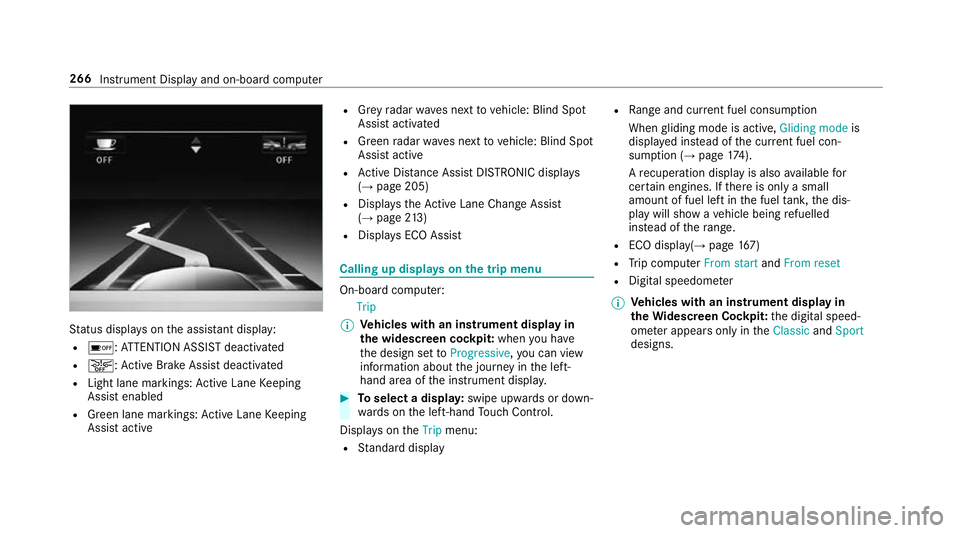
atus displa yson the assis tant displ ay:
R é :AT TENTION ASSIST deactivated
R æ: Active Brake Assi stdeactivated
R Light lane markings: Active Lane Keeping
Assist enabled
R Green lane markings: Active Lane Keeping
Assist active R
Grey radar waves next tovehicle: Blind Spot
Assist activated
R Green radar waves next tovehicle: Blind Spot
Assist active
R Active Dis tance Assi stDISTRONIC displa ys
( → page 205)
R Displa ys theAc tive Lane Change Assi st
( → page 213)
R Displ ays ECO Assist Calling up displa
yson the trip menu On-board computer:
Trip
% Ve
hicles with an instrument display in
th e widescreen cockpit: whenyou ha ve
th e design set toProgressive ,yo u can view
information about the journey in the left-
hand area of the instrument displa y. #
Toselect a displa y:swipe upwards or down‐
wa rds on the left-hand Touch Control.
Displa yson theTrip menu:
R Standard display R
Range and cur rent fuel consu mption
When gliding mode is active, Gliding modeis
displa yed ins tead of the cur rent fuel con‐
su mp tion (→ page 174).
A recuperation displ ayis also available for
cer tain engines. If there is only a small
amount of fuel left in the fuel tank, the dis‐
play will show a vehicle being refuelled
ins tead of thera nge.
R ECO displ ay(→page 167)
R Trip computer From startandFrom reset
R Digital speedom eter
% Ve
hicles with an instrument display in
th eWi descreen Co ckpit: the digital speed‐
ome ter appears only in theClassic andSport
designs. 266
Instrument Display and on-board computer
Page 414 of 593
Note
s on paint work/matt finish paint workcare Obser
vethefo llowing information: Cleaning and car
eA voiding paintwork damage
Pa intwork R
Insect remains: soak with insect remo ver and rinse off the
trea ted areas af terw ards.
R Bird droppings: soak with water and rinse off af terw ards.
R Tree resin, oils, fuels and greases: remo veby rubbing gen‐
tly wi tha clo thsoaked in petroleum ether or lighter fluid.
R Coolant and brake fluid: remo vewith a damp clo thand
clean water.
R Tarst ains: use tarre mo ver.
R Wax: use silicone remo ver. R
Do not attach sticke rs,fi lms or similar.
R Remo vedirt immediatel y,where possible. Maintenance and care
411