reset MERCEDES-BENZ E-CLASS COUPE 2018 Owner's Guide
[x] Cancel search | Manufacturer: MERCEDES-BENZ, Model Year: 2018, Model line: E-CLASS COUPE, Model: MERCEDES-BENZ E-CLASS COUPE 2018Pages: 593, PDF Size: 10.63 MB
Page 399 of 593
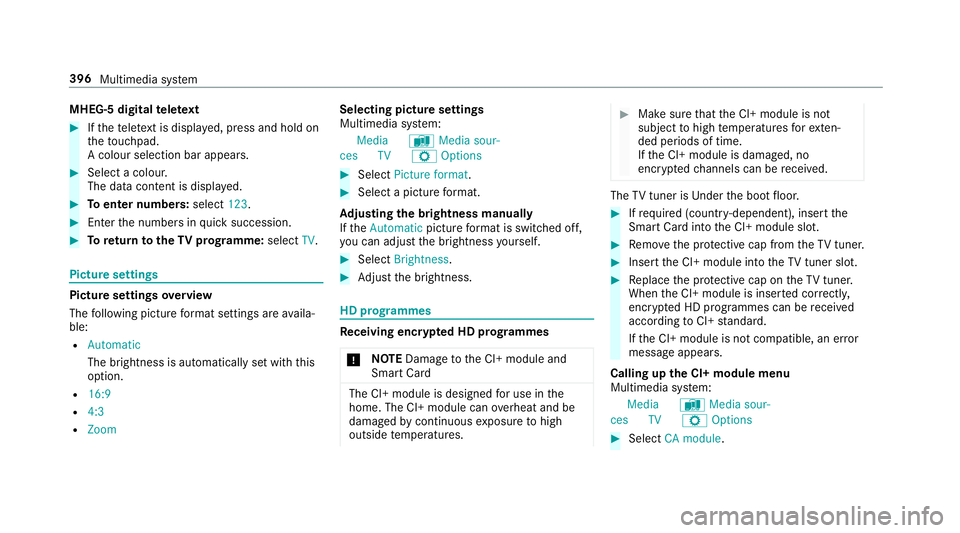
MHEG-5 digital
telete xt #
Ifth ete lete xt is displ ayed, press and hold on
th eto uchpad.
A colour selection bar appears. #
Select a colour.
The data content is displ ayed. #
Toenter numbers: select123. #
Enterth e numbers in quick succession. #
Toreturn totheTV prog ramme: selectTV. Pictu
resettings Picture settings
overview
The following picture form at settings are availa‐
ble:
R Automatic
The brightness is automatically set with this
option.
R 16:9
R 4:3
R Zoom Selecting picture settings
Multimedia sy
stem:
Media àMedia sour-
ces TV ZOptions #
Select Picture format. #
Select a picture form at.
Ad justing the brightness manually
If th eAutomatic pictureform at is swit ched off,
yo u can adjust the brightness yourself. #
Select Brightness. #
Adjust the brightness. HD prog
rammes Re
ceiving encryp ted HD prog rammes
* NO
TEDama getothe CI+ module and
Smart Card The CI+ module is designed
for use in the
home. The CI+ module can overheat and be
damaged bycontinuous exposure tohigh
outside temp eratures. #
Make sure that the CI+ module is not
subject tohigh temp eratures forex ten‐
ded pe riods of time.
If th e CI+ module is damaged, no
encryp tedch annels can be recei ved. The
TVtuner is Under the boot floor. #
Ifre qu ired (countr y-dependent), insert the
Smart Ca rdinto the CI+ module slot. #
Remo vethe pr otective cap from theTV tune r. #
Insert the CI+ module into theTV tuner sl ot. #
Replace the pr otective cap on theTV tune r.
When the CI+ module is inser ted cor rectly,
encryp ted HD programmes can be recei ved
according toCI+ standard.
If th e CI+ module is not compatible, an er ror
messa geappears.
Calling up the CI+ module menu
Multimedia sy stem:
Media àMedia sour-
ces TV ZOptions #
Select CA module. 396
Multimedia sy stem
Page 404 of 593
fi
ed based on the actual operating conditions
and/or loads.
Examples of arduous operating conditions:
R regular city driving with frequent intermedi‐
ate stops
R mainly short-dis tance driving
R frequent operation in mountainous terrain or
on poor road sur faces
R when the engine is of ten le ftidling for long
periods
R operation in particula rly dusty conditions
and/or if air-recirculation mode is frequently
used
In these or similar operating conditions, ha vethe
interior air filter, engine air cleaner, engine oil
and oil filter etc. changed more frequent ly. The
ty re s must be checked more frequently if the
ve hicle is operated under increased loads. Fur‐
th er information can be obtained at a qualified
specialist workshop. Battery disconnection periods
The ASS
YST PLUS se rvice inter val display
can only calculate the service due da tewhen
th e bat tery is connected. #
Notedown the service due date displa yed on
th e instrument display before disconnecting
th e battery (→ page 400). Engine compartment
Ac
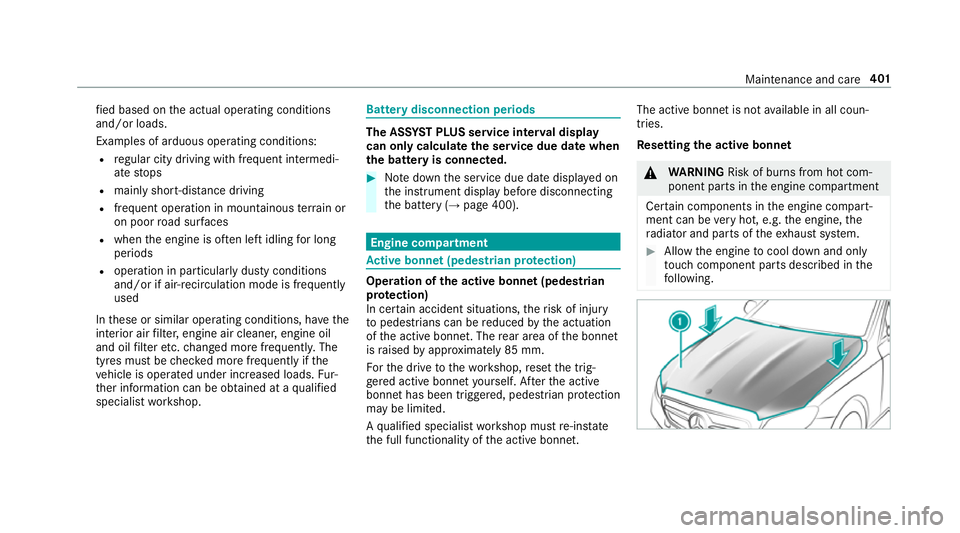
tive bonn et(pedestrian pr otection) Operation of
the active bonnet (pedestrian
pr otection)
In cer tain accident situations, therisk of injury
to pedestrians can be reduced bythe actuation
of the active bonn et. The rear area of the bonn et
is raised byappr oximately 85 mm.
Fo rth e drive tothewo rkshop, reset the trig‐
ge red active bonn etyourself. Af terth e active
bonn ethas been triggered, pedestrian pr otection
may be limited.
A qu alified specialist workshop must re-ins tate
th e full functionality of the active bonn et. The active bonnet is not
available in all coun‐
tries.
Re setting the active bonnet &
WARNING Risk of bu rns from hot com‐
ponent parts in the engine compartment
Cer tain components in the engine compart‐
ment can be very hot, e.g. the engine, the
ra diator and parts of theex haust sy stem. #
Allow the engine tocool down and only
to uch co mponent parts described in the
fo llowing. Maintenance and care
401
Page 571 of 593
Displ
aying the satellite map ................. 337
Displaying the tra ffic map .................. .330
Displ aying weather information .......... .337
Map data ............................................. 336
Moving ................................................ 333
Overview ............................................. 332
Selecting POI symbols .........................3 33
Selecting text information ................... 334
Selecting the map orientation .............3 33
Setting the map scale .......................... 333
Setting the map scale automatically ....3 37
Up dating .............................................3 36
Map and comp ass
Overview ............................................. 332
Massage prog rammes
Re setting the settings .......................... 104
Massage prog rams
Overview ............................................ .104
Selecting the front seats ..................... 104
Massage settings Resetting ............................................. 104
Matt finish (cleaning instructions) .........411
Maximum gross vehicle weight ............ .463 Maximum speed
see Limi ter
Mecca ...................................................... .337
Media Menu (on-boa rdcompu ter) .................. 270
Sea rching ............................................ 379
Media display Notes .................................................. 289
Media Inter face
Ac tivating ............................................ 380
Information .......................................... 379
Overview ..............................................3 81
Media mode Activating ............................................ .374
Media playback Operating (on-boa rdcompu ter) .......... .270
Media sear ch
St arting .............................................. .379
Media source Selecting (on-boa rdcompu ter) ............ 270
Memory function Head-up display — Calling up stored
settings ................................................ 11 2Head-up display —
Storing settings ...... 11 2
Operating ............................................. 11 2
Outside mir rors — Calling up stored
settings ................................................ 11 2
Outside mir rors —St oring settings .......1 12
Seat — Calling up stored settings ......... 11 2
Seat — Storing settings ........................ 11 2
St eering wheel — Calling up sa ved
settings ................................................ 11 2
St eering wheel — Saving settings ......... 11 2
Menu (on-board computer) Assis tant displ ay................................. 265
Designs ............................................... 263
Head-up displ ay................................... 271
Media .................................................. 270
Na vigation .......................................... .268
Overview ............................................. 262
Ra dio ...................................................2 69
Service ................................................ 265
Te lephone ............................................ 270
Tr ip ...................................................... 266
Mercedes me connect ............................ 359
Ac cident and breakdown mana ge‐
ment .................................................... 360
Ar ranging a service appointment ........ 360 568
Index
Page 576 of 593
POI
Selecting ..............................................3 15
POI symbols Selecting ............................................. 333
Po we r supp ly
Switching on (S tart/S top button) ........ 15 8
Po we r windo ws
see Side windo ws
PRE-SAFE ®
(anticipatory occupant
pr otection) ................................................ .45
Fu nction ................................................ 45
PRE-SAFE ®
Sound ................................. 45
Re versing measures .............................. 45
PRE- SAFE®
PLUS (anticipa tory occu‐
pant pr otection plus) ................................ 45
Fu nction ................................................ 45
Re versing measures .............................. 45
Pr ev entative occupant pr otection sys‐
tem
see PRE-SAFE ®
(anticipatory occu‐
pant pr otection)
Pr ev ious destinations
Selecting .............................................. 315Prog
ramme in form ation
TV channel .......................................... 393
Prog rams
see DYNA MIC SELECT
Pr otection of the environment
No tes ..................................................... 19
Ta ke -ba ckof end-of-life vehicles ............ 19 Q
Qibla ......................................................... 337
QR code Rescue card .......................................... 26
Qualified specialist workshop ................. 25 R
Ra dar senso rs
Fo il co vering ........................................ 19 0
Ra dio
Ac tivating/deactivating radio text ....... 388
Calling up a slide show ........................ 387
Calling up thest ation list .................... .387
Del eting channels ................................ 387
Direct frequency ent ry......................... 387 Displaying information ......................... 388
Displaying
radio text ............................ 388
Editing station presets ........................ .387
Fr equency fix ....................................... 388
Menu (on-boa rdcompu ter) .................. 269
Moving stations .................................. .387
Overview ............................................. 386
Sear ching forst ations ........................ .387
Setting a channel ................................ .387
Setting station tracking ...................... .388
Setting the frequency band ................. 387
Setting the tra ffic information
service volume inc rease ...................... 388
St oring radio stations .......................... 387
Swit ching on ...................................... .385
Switching traf fic announcements
on/off ................................................. 388
Ta gging music trac ks........................... 388
Vo ice commands (LINGU ATRO NIC) .....2 82
Ra dio stations
Dialling (on-boa rdcompu ter) ............... 269
Ra in closing function
Sliding sunroof ...................................... 93
Ra in-closing feature
Side wind ows........................................ 87 Index
573
Page 577 of 593
Ra
nge
Ad Blue ®
............................................... 265
Displaying ............................................ 266
REA CHregulation ...................................... 26
Re ading light
see Interior lighting
Re alwo od (Care) ...................................... 416
Re ar fog light
Switching on/off .................................1 29
Re ar seat
see Seat
Re ar seat belt
St atus display ........................................ 37
Re ar seat belt status display .................... 37
Re ar window
Ro ller sunblind ...................................... 85
Re ar window heater ................................ 14 5
Re ar-view mir ror
see Outside mir rors
Re cycling
see Take -ba ckof end-of-life vehicles Re
ducing agent
see AdBlue ®
Re fuelling
Re fuelling theve hicle ........................... 175
To pping up AdBlue ®
............................. 17 9
Re gistration
Ve hicle .................................................. 25
Re mo tecont rol (stationa ryheater/
ve ntilation)
Displa ys............................................... 15 2
Problems ............................................. 154
Re placing the battery .......................... 15 3
Setting ................................................. 15 2
Re mo teOnline
Charging the battery ............................1 62
Cooling or heating theve hicle inte‐
ri or .......................................................1 61
St arting theve hicle ............................. 16 2
Re mo teParking Assist ............................ 237
Auth orising a mobile phone ................. 241
Fu nction .............................................. 237
Ope rating ............................................ 238
Sy stem limitations ...............................2 37
Re scue card ............................................... 26 Re
ser ve
Fu el ..................................................... 469
Re set function (multimedia sy stem) .....3 09
Re sidual heat ...........................................1 48
Re storing (factory settings)
see Reset function (multimedia sy stem)
Re stra int sy stem ...................................... .30
Basic instructions forch ildren .............. .46
Fu nction in an accident ........................ .31
Fu nctionality .......................................... 31
Malfunction ...........................................31
Pr otection ..............................................30
Re duced pr otection ...............................30
Self-test ................................................. 31
Wa rning lamp ........................................ .31
Re versege ar
Inserting .............................................. 172
Re versing camera .................................. .225
Care ..................................................... 414
Fu nction .............................................. 225
Opening the camera co ver (360°
Camera) ............................................... 231
Setting favo urites (360° Camera) ...... .232 574
Index
Page 581 of 593
St
arting assi stance
see Jump -star t connection
St arting the engine
see Vehicle
St arting-o ffaid
see Hill Start Assist
St ation
Deleting ............................................... 387
Direct frequency entry ......................... 387
Fr equency fix ....................................... 388
Moving ................................................ 387
Sea rching ............................................ 387
Setting .................................................3 87
St oring .................................................3 87
St ation list
Calling up ............................................ 387
St ation presets
Modifying ............................................ 387
St ation tracking
Setting ................................................. 388
St ationary heater/ventilation
Displ ays (remo tecontrol) .................... 15 2
Problems (remo tecontrol) ................... 154Re
placing the battery (remo tecon‐
trol) ...................................................... 15 3
Setting (multimedia sy stem) ................1 51
Setting (remo tecontrol) ...................... 15 2
Switching on/off (control panel) ......... 15 0
ST EER CONT ROL
Fu nction/no tes ................................... 19 6
Ste ering wheel ........................................ .261
Ad justing (electrically) ......................... 11 0
Ad justing (manually) ............................ 109
Buttons ................................................ 261
Ope rating the memory function ........... 11 2
St eering wheel heater .......................... 11 0
Ste ering wheel gearshift paddles ..........173
Ste ering wheel heater
Swit ching on/off .................................. 11 0
St ow age areas
see Loading
see Stow age compartment
St ow age comp artment............................ 11 5
Armrest ................................................ 11 5
Centre console .................................... .115
Door ..................................................... 11 5
Glo vebox .............................................1 15Spectacles compa
rtment .................... .115
St ow age comp artments
see Loading
see Stow age compartment
St ow age space under the boot floor .....1 20
Sulphur content ....................................... 467
Sun visor Operating ............................................ 14 3
Sur round lighting .................................... 13 5
Setting ................................................. 13 5
Sur round View
see 360° Camera
Suspension Adjusting thech assis le vel (AIR
BO DY CONTROL) .................................2 20
Suspension see AIR BODY CONTROL
SV HC (substances of very high con‐
cern ).......................................................... .26
Switch-off delay time Exterior ................................................ 13 5
Interior ................................................. 13 6578
Index