change time MERCEDES-BENZ E-CLASS COUPE 2018 Workshop Manual
[x] Cancel search | Manufacturer: MERCEDES-BENZ, Model Year: 2018, Model line: E-CLASS COUPE, Model: MERCEDES-BENZ E-CLASS COUPE 2018Pages: 593, PDF Size: 10.63 MB
Page 458 of 593
#
Attach wheel spanner 3tosoc ket2 and
tighten the hub cap clockwise.
Specified tightening torq ue: 25 Nm. Ra
ising theve hicle when changing a wheel Re
quirements:
R There are no persons in theve hicle.
R The vehicle has been prepared for a wheel
ch ange (→ page 453).
R The hub caps ha vebeen remo ved
( → page 454).
Impor tant no tes on using the jack:
R Use only theve hicle-specific jack that has
been tested and appr ovedby Mercedes-Benz
to raise theve hicle.
R The jack is only designed forra ising and
holding theve hicle for a short time while a
wheel is being changed and not for mainte‐
nance workunder theve hicle.
R The jack must be placed on a firm ,fl at and
non-slip sur face. If necessar y,use a lar ge,
fl at, load-bearing, non-slip unde rlay. R
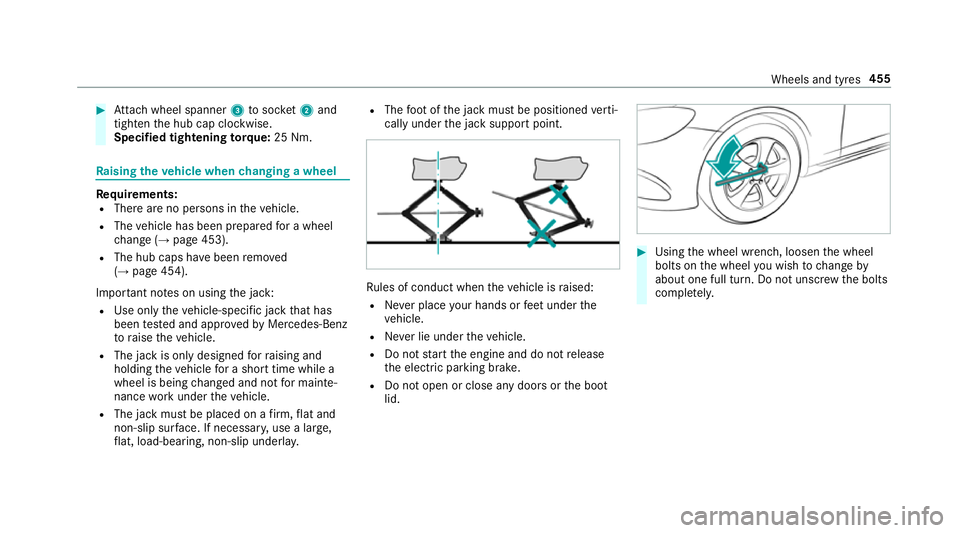
The foot ofthe jack must be positioned verti‐
cally under the jack support point. Ru
les of conduct when theve hicle is raised:
R Never place your hands or feet under the
ve hicle.
R Never lie under theve hicle.
R Do not start the engine and do not release
th e electric parking brake.
R Do not open or close any doors or the boot
lid. #
Using the wheel wrench, loosen the wheel
bolts on the wheel you wish tochange by
about one full turn. Do not unscr ewthe bolts
comple tely. Wheels and tyres
455
Page 548 of 593
1,
2, 3 ...
4MATIC ..................................................... 175
Fu nction ............................................... 175
12 V battery
see Battery (vehicle)
12 V so cket
see Soc ket (12 V)
48 V on-board electrical sy stem
Operating saf ety .................................... 21
360° Camera .......................................... .228
Fu nction .............................................. 228
Opening the camera co ver (r eve rsing
camera) .............................................. .231
Selecting a view ................................... 231
Setting favo urites ................................ 232
Swit ching automatic operation
on/off (r eversing camera) .................. .231 A
A/C function Activating/deactivating (multimedia
sy stem) ................................................ 147
Switching on/off (control panel) .......... 147ABS (Anti-lock Braking Sy
stem) ............ .190
Ac celeration
see Kickdown
Ac cess data
Editing (Blue tooth®
) .............................3 67
Setting (Blue tooth®
) ............................ 366
Ac cident and breakdown manage‐
ment
Mercedes me connect ........................ .360
Ac oustic locking verification signal
Ac tivating/deactivating ......................... 72
Ac tivating/deactivating automatic
vo lume adjustment
Burmes ter®
sur round sound sy stem ... 398
Ac tive Blind Spot Assi st.......................... 247
Ac tivating/deactivating ...................... .250
Brake application ................................. 24 8
Fu nction .............................................. 247
Sy stem limitations ...............................2 47
Tr ailer operation .................................. 24 8
Ac tive bonn et(pedestrian pr otection) ...4 01
Operation ............................................ 401
Re setting ............................................. 401 Ac
tive Brake Assi st
Fu nction/no tes ................................... 19 6
Setting ................................................. 200
Ac tive Di stance Assist DISTRO NIC........ 205
Ac tive Emergency Stop Assist .............. 214
Ac tive Lane Change Assi st................... 213
Calling up a speed .............................. .207
Displ ays in the instrument display .......2 15
Fu nction .............................................. 205
Increasing/decreasing speed .............. 207
Re quirements: .................................... .207
Ro ute-based speed adap tation ........... .209
Selecting ............................................. 207
St eering wheel buttons ........................ 207
St oring a speed ................................... 207
Switching off/deactivating .................. 207
Switching on/activating ......................2 07
Sy stem limitations ...............................2 05
Ac tive Eme rgency Stop Assist ................ 214
Ac tive headlamps .................................... 131
Ac tive Lane Change Assi st...................... 213
Ac tivating/deactivating ...................... .214
Fu nction ............................................... 213 Index
545