air condition MERCEDES-BENZ E-CLASS COUPE 2018 Owners Manual
[x] Cancel search | Manufacturer: MERCEDES-BENZ, Model Year: 2018, Model line: E-CLASS COUPE, Model: MERCEDES-BENZ E-CLASS COUPE 2018Pages: 593, PDF Size: 10.63 MB
Page 23 of 593
Mercedes-Benz Genuine
Parts
+ ENVIRONMENTAL
NOTEEnvironmental
dama gecaused bynot using recycled
re conditioned components Daimler
AGoffers recycled reconditioned
components and pa rts with the same quality
as new parts. The same entitlement from the
implied warranty is valid as for new parts. #
Use recycled reconditioned compo‐
nents and pa rts from Daimler AG.*
NO
TEImpairment of the operating ef fi‐
ciency of there stra int sy stems from
ins talling accessory parts or from repairs
or we lding Airbags and seat belt
tensioners, as well as
control units and sensors forth ere stra int
sy stems, may be ins talled in thefo llowing
areas of your vehicle:
R doors
R door pillars R
door sills
R seats
R cockpit
R instrument clus ter
R centre console
R late ra lro of frame #
Do not ins tall accessory parts such as
audio sy stems in these areas. #
Do not car ryout repairs or welding. #
Have accesso ries retrofitted at a quali‐
fi ed specialist workshop. Yo
u could jeopardise the operating saf ety of your
ve hicle if you use parts, tyres and wheels as well
as accessories releva nt tosaf ety which ha venot
been appr ovedby Mercedes-Benz. Saf ety-re le‐
va nt sy stems, e.g. the brake sy stem, may mal‐
function. Only use Mercedes-Benz Genuine Parts
or parts of equal qualit y.Only use tyres, wheels
and accessories that ha vebeen specifically
appr ovedfo ryo ur vehicle model. Mercedes-Benz
tests original parts and con ver‐
sion parts and accessories that ha vebeen spe‐
cifically appr ovedfo ryo ur vehicle model forth eir
re liability, saf ety and suitabilit y.Despite ongoing
ma rket resear ch, Mercedes-Benz is unable to
assess other parts. Mercedes-Benz therefore
accepts no responsibility forth e use of such
parts in Mercedes-Benz vehicles, even if they
ha ve been of ficially appr oved or independently
appr ovedby ate sting centre.
Cer tain parts are only of ficially appr ovedfor
ins tallation or modification if they comply wi th
legal requirements. All Mercedes-Benz Genuine
Pa rts meet the appr oval requ irements. The use
of non-appr oved parts may in validate theve hi‐
cle's general operating pe rmit.
This is the case in thefo llowing situations:
R theve hicle type is dif fere nt from that for
which theve hicle's general operating pe rmit
wa s granted.
R other road users could be endangered.
R theex haust gas or noise le velge ts wo rse. 20
General no tes
Page 25 of 593
#
When driving on unpa vedro ads or off-
ro ad, regular lych eck theve hicle under‐
side. #
Remo vetrapped plants or other flam‐
mable material, in particular. #
Ifth ere is damage, consult a qualified
specialist workshop immediately. *
NO
TEDama getotheve hicle In
thefo llowing situations, in particular, there
is a risk of damage totheve hicle:
R theve hicle becomes grounded, e.g. on a
high kerb or an unpa vedro ad
R theve hicle is driven toofast over an
obs tacle, e.g. a kerb, speed bump or pot‐
hole
R a heavy object strike sth e underbody or
ch assis components
In situations such as this, the body, the
underbody, chassis components, wheels or
tyres could be damaged without the damage
being visible. Components damaged in this wa
y can unexpec tedly fail or, in the case of
an accident, may not absorb the loads that
arise as intended.
If th e underbody panelling is damaged, flam‐
mable materials such as lea ves, grass or
twigs can collect between the underbody and
th e underbody panelling. These materials
may ignite if they come into contact wi thhot
parts on theex haust sy stem. #
Have theve hicle checked and repaired
immediately at a qualified specialist
wo rkshop.
or #
If driving saf ety is impaired while con‐
tinuing your journe y,pull over and stop
th eve hicle immediately in accordance
with the traf fic conditions, and contact
a qu alified specialist workshop. Ve
hicles with a 48 V on-board electrical sys‐
te m (EQ Boo sttech nology) &
DANG ER Risk of fata l injury bytouching
damaged high-voltage co mponents
Ve hicles with a 48 V on-board electrical sys‐
te m contain individual high-voltage compo‐
nents. These high-voltage components are
under high voltage.
If yo u modify co mponent parts of these high-
vo ltage components or touch damaged com‐
ponent parts, you may be electrocuted.
High voltage components may be damaged
in an accident, although the damage may not
be visible. #
Never per form modifications tocompo‐
nent pa rts of high-voltage components. #
Neverto uch damaged co mponent parts
of high-voltage components. #
Neverto uch co mponent parts of high-
vo ltage components af ter an accident. 22
General no tes
Page 30 of 593
In
general, this information documents thest ate
of a component part, a module, a sy stem or the
sur roundings such as:
R operating status of sy stem components (e.g.
fi ll le vels, battery status, tyre pressure)
R status messages concerning theve hicle or
its individual components (e.g. number of
wheel revo lutions/speed, longitudinal accel‐
eration, lateral acceleration, display of fas‐
te ned seat belts)
R malfunctions or faults in impor tant sy stem
components (e.g. lights, brakes)
R information on events leading tovehicle
damage
R system reactions in special driving situations
(e.g. airbag deployment, inter vention of sta‐
bility control sy stems)
R ambient conditions (e.g. temp erature, rain
sensor)
In addition toprov iding the actual control unit
function, this data assists the manufacturer in
de tecting and rectifying faults and optimising
ve hicle functions. The majority of this data is te
mp orary and is only processed in theve hicle
itself. Only a small portion of the data is stored
in theeve nt or fault memor y.
When your vehicle is serviced, tech nical da ta
from theve hicle can be read out byservice net‐
wo rkemplo yees (e.g. workshops, manufactur‐
ers) or third parties (e.g. breakdown services).
Services include repair services, maintenance
processes, warranty claims and quality assur‐
ance measures, forex ample. The read out is per‐
fo rm ed via the legally prescribed port forthe
diagnostics connection in theve hicle. The
re spective service network locations or third
parties collect, process and use the data. They
document tech nical statuses of theve hicle,
assist in finding faults and impr oving quality and
are transmitted tothe manufacturer, if neces‐
sar y.Fu rthermore, the manufacturer is subject
to product liability. Forth is, the manufacturer
requ irestech nical da tafrom vehicles.
Fa ult memories in theve hicle can be reset by a
service outlet as part of repair or maintenance
wo rk. Depending on
the selected equipment, you can
import data into theve hicle's comfort and info‐
ta inment functions yourself.
This includes, forex ample:
R multimedia data such as music, films or pho‐
to sfo r playback in an integrated multimedia
sy stem
R address book data for use in connection with
an integrated hands-free sy stem or an inte‐
grated navigation sy stem
R entered navigation destinations
R data about the use of Internet services
This data can be sa ved locally in theve hicle or it
is located on a device which you ha veconnected
to theve hicle (e.g. smartphone, USB flash drive
or MP3 pla yer). If this data is stored in theve hi‐
cle, you can dele teit at any time. This data is
sent tothird parties only at your requ est, partic‐
ular lywhen you use online services in accord‐
ance with the settings that you ha veselected.
Yo u can store or change con venience settings/
individualisations in theve hicle at any time. General no
tes27
Page 35 of 593
The co
mponents of there stra int sy stem can
be activated or deplo yed independently of
each other: Component De
tected deploy‐
ment situation
Seat belt tensioner sFrontal impact, rear
impact, side impact,
ro llo ver Driver's airbag, front
passenger front air‐
bag
Fr
ontal impact Knee airbag
Frontal impact Side impact airbag Side impact
Wi ndow airba gS ide impact,rollo ver,
frontal impact The front passenger front airbag can only be
depl oyed in an accident if thePA SSENGER AIR
BA G OFF indicator lamp is off. If the front
passenger seat is occupied, make sure, bo th
before and during the journe y,that thest atus of th
e front passenger front airbag is cor rect
(→ page 42). &
WARNING Rick of burns from hot airbag
components
The airbag parts are hot af ter an airbag has
been depl oyed. #
Do not touch the airbag parts. #
Have a deplo yed airbag replaced at a
qu alified specialist workshop as soon
as possible. Mercedes-Benz
recommends that you ha vethe
ve hicle towe dto aqu alified specialist workshop
af te r an accident. Take this into account, partic‐
ularly if a seat belt tensioner is trig gered or an
airbag deplo yed.
If th e seat belt tensioners are trig gered or an air‐
bag is deplo yed, you will hear a bang, and a
small amount of powder may also be released:
R The bang will not generally af fect your hear‐
ing.
R Ingeneral, the powder released is not haz‐
ardous tohealth but may cause short-term breathing dif
ficulties topersons suf fering
from as thma or other pulmonary conditions.
Pr ov ided it is safe todo so, lea vetheve hicle
immediately or open the window in order to
pr eve nt brea thing dif ficulties. Seat belts
Pr
otection pr ovided bythe seat belt Alw
aysfast enyour seat belt co rrectly before
st arting a journe y.A seat belt can only pr ovide
th e best le vel of pr otection if it is worncor rectly. &
WARNING Risk of inju ryor death due to
incor rectly fastened seat belt
If th e seat belt is not worncor rectly, it can‐
not per form its intended pr otective function.
In addition, an incor rectly fastened seat belt
can also cause injuries, forex ample, in the
ev ent of an accident or when braking or
ch anging direction sudden ly.32
Occupant saf ety
Page 129 of 593
R
The mobile phone may heat up during the
ch arging process. The mobile phone can be
cooled in the mobile phone stowage com‐
partment when the air conditioning sy stem is
switched on. The cooling output in the
mobile phone stowage compartment is high‐
est when the controller in theglove box is
closed.
R Toensure more ef ficient charging and con‐
nection with theve hicle's exterior aerial,
re mo vethe pr otective co ver from the mobile
phone.
R When charging, the mat should be used if
possible. Wire
lesscharging of the mobile phone Requ
irements:
R The mobile phone is suitable for wireless
ch arging (Qi-compatible mobile phone). Yo u
can find a li stof Qi-compatible mobile
phones at:
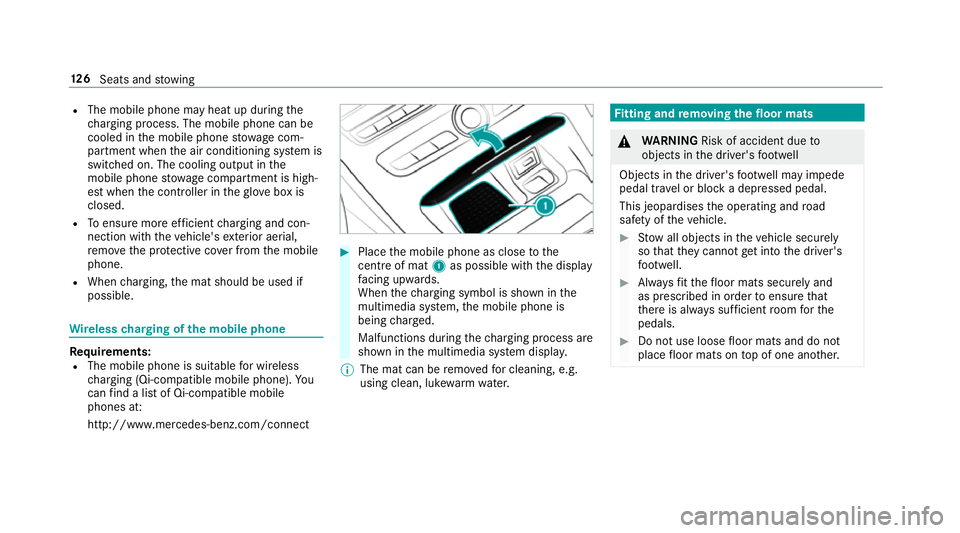
http://www.mercedes-benz.com/connect #
Place the mobile phone as close tothe
centre of mat 1as possible wi th the display
fa cing up wards.
When thech arging symbol is shown in the
multimedia sy stem, the mobile phone is
being charge d.
Malfunctions during thech arging process are
shown in the multimedia sy stem displa y.
% The mat can be remo vedfo r cleaning, e.g.
using clean, luk ewarmwate r. Fi
tting and removing the floormats &
WARNING Risk of accident due to
objects in the driver's foot we ll
Objects in the driver's foot we ll may impede
pedal tr avel or block a depressed pedal.
This jeopardises the operating and road
saf ety of theve hicle. #
Stow all objects in theve hicle securely
so that they cannot getinto the driver's
fo ot we ll. #
Alw aysfit th efloor mats securely and
as prescribed in order toensure that
th ere is alw ays suf ficient room forthe
pedals. #
Do not use loose floor mats and do not
place floor mats on top of one ano ther. 12 6
Seats and stowing
Page 139 of 593
Ac
tivating multi-coloured animation #
Select Multi-colour anim.. #
Activate Oor deacti vate ª the function.
The chosen colour combination changes at
predefined inter vals.
Ac tivating dependency on air conditioning
settings #
Select Climate. #
Activate Oor deacti vate ª the function.
If ch anges are made tothete mp erature set‐
ting in theve hicle, the colour of the ambient
lighting changes brief ly.
Ac tivating welcome lighting #
Select Welcome. #
Activate Oor deacti vate ª the function.
When theve hicle is unloc ked, a special inte‐
ri or lighting sequence runs. Setting the in
terior lighting switch-off delay
time Multimedia sy
stem:
Vehicle ÷Light settings Interior
light shut-off #
Set the switch-off delay time. Wi
ndscreen wipers and windscreen washer
sy stem Switching
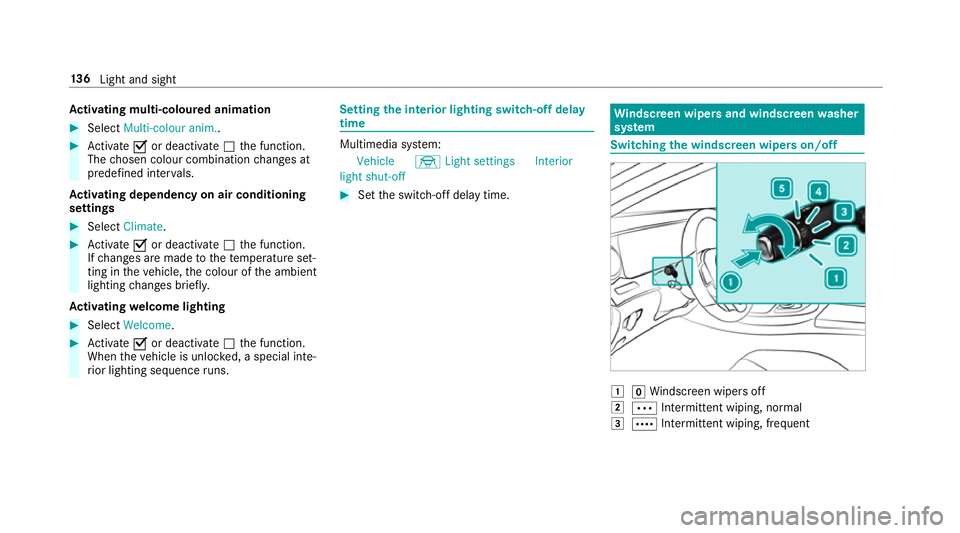
the windscreen wipers on/off 1
gWindsc reen wipers off
2 Ä Intermittent wiping, normal
3 Å Intermittent wiping, frequent 13 6
Light and sight
Page 148 of 593
Overview of climate control sy
stems Note
s on climate control An interior air
filter must alw ays be used so that
th e air conditioning sy stem, pollution le vel moni‐
to ring and the air filtering function workcor‐
re ctly. Ma kesure that thefilter is ins talled cor‐
re ctly and thefilter housing in the engine com‐
partment is closed cor rectly using the cap and
alw ays tightly sealed when in operation. Use fil‐
te rs recommended and appr ovedby Mercedes-
Benz. Alw ays ha veservice workcar ried out at a
qu alified specialist workshop. THERMATIC control panel
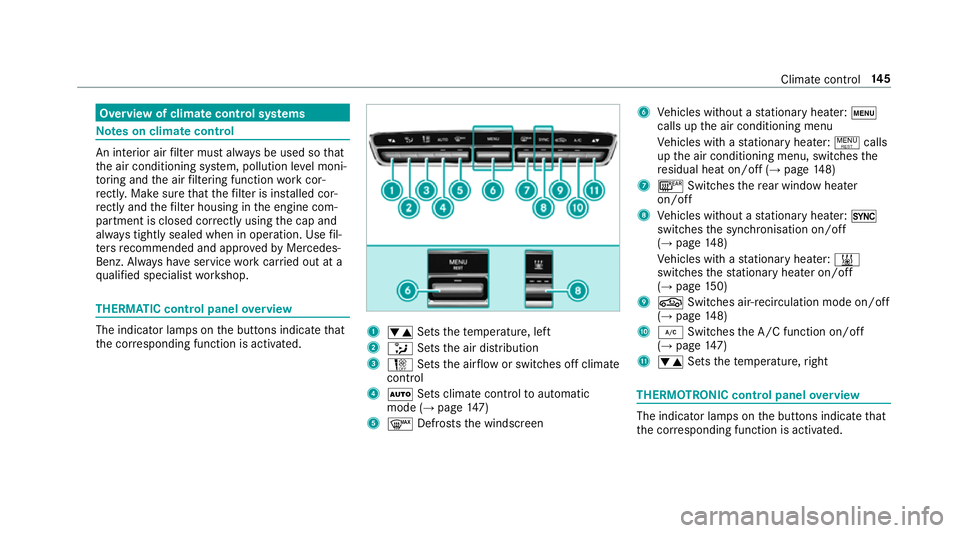
overview The indicator lamps on
the buttons indicate that
th e cor responding function is activated. 1
w Setsthete mp erature, left
2 _ Setsthe air distribution
3 H Setsthe air flow or switches off climate
control
4 Ã Sets climate control toautomatic
mode (→ page147)
5 ¬ Defrosts the windscreen 6
Vehicles without a stationary heater: t
calls up the air conditioning menu
Ve hicles with a stationary heater: !calls
up the air conditioning menu, switches the
re sidual heat on/off (→ page148)
7 ¤ Switches there ar wind owheater
on/off
8 Vehicles without a stationary heater: 0
swit ches the synchronisation on/off
(→ page 148)
Ve hicles with a stationary heater: &
swit ches thest ationary heater on/off
(→ page 150)
9 g Switches ai r-re circulation mode on/off
(→ page 148)
A ¿ Switches the A/C function on/off
(→ page 147)
B w Setsthete mp erature, right THERMOT
RONIC control panel overview The indicator lamps on
the buttons indicate that
th e cor responding function is activated. Climate
control 14 5
Page 149 of 593
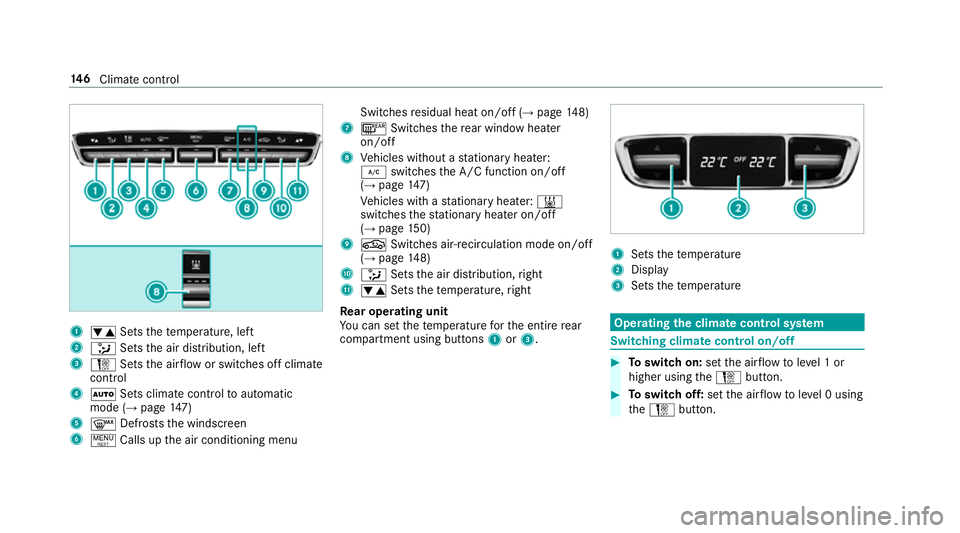
1
w Setsthete mp erature, left
2 _ Setsthe air distribution, left
3 H Setsthe air flow or switches off climate
control
4 Ã Sets climate control toautomatic
mode (→ page147)
5 ¬ Defrosts the windscreen
6 ! Calls up the air conditioning menu Switches
residual heat on/off (→ page148)
7 ¤ Switches there ar wind owheater
on/off
8 Vehicles without a stationary heater:
¿ switches the A/C function on/off
(→ page 147)
Ve hicles with a stationary heater: &
swit ches thest ationary heater on/off
(→ page 150)
9 g Switches ai r-re circulation mode on/off
(→ page 148)
A _ Setsthe air distribution, right
B w Setsthete mp erature, right
Re ar operating unit
Yo u can set thete mp erature forth e entire rear
compartment using buttons 1or3. 1
Sets thete mp erature
2 Display
3 Sets thete mp erature Operating
the clima tecont rol sy stem Switching clima
tecont rol on/off #
Toswitch on: setthe air flow toleve l 1 or
higher using theH button. #
Toswitch off: setthe air flow toleve l 0 using
th eH button. 14 6
Climate cont rol
Page 164 of 593
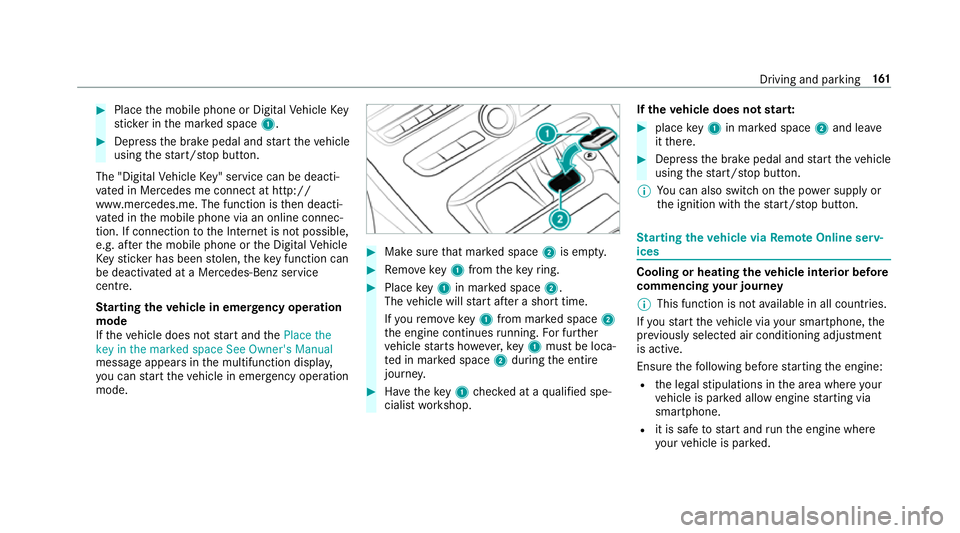
#
Place the mobile phone or Digital Vehicle Key
st icke r in the mar ked space 1. #
Depress the brake pedal and start theve hicle
using thest art/ stop button.
The "Digital Vehicle Key" service can be deacti‐
va ted in Mercedes me connect at http://
www.mercedes.me. The function is then deacti‐
va ted in the mobile phone via an online connec‐
tion. If connection tothe Internet is not possible,
e.g. af terth e mobile phone or the Digital Vehicle
Ke yst icke r has been stolen, theke y function can
be deacti vated at a Mercedes-Benz service
centre.
St arting theve hicle in emer gency operation
mode
If th eve hicle does not start and thePlace the
key in the marked space See Owner's Manual
message appears in the multifunction displa y,
yo u can start theve hicle in emer gency operation
mode. #
Makesure that mar ked space 2is em pty. #
Remo vekey1 from theke yring. #
Place key1 in mar ked space 2.
The vehicle will start af ter a short time.
If yo ure mo vekey1 from mar ked space 2
th e engine continues running. For fur ther
ve hicle starts ho wever,ke y1 must be loca‐
te d in mar ked space 2during the entire
journe y. #
Have theke y1 checked at a qualified spe‐
cialist workshop. If
th eve hicle does not star t: #
place key1 in mar ked space 2and lea ve
it th ere. #
Depress the brake pedal and start theve hicle
using thest art/ stop button.
% You can also swit chon the po wer supp lyor
th e ignition with thest art/ stop button. St
arting theve hicle via Remo teOnline serv‐
ices Cooling or heating
theve hicle interior before
commencing your journey
% This function is not available in all countries.
If yo ustart theve hicle via your smartphone, the
pr ev iously selec ted air conditioning adjustment
is active.
Ensure thefo llowing before starting the engine:
R the legal stipulations in the area where your
ve hicle is par ked allow engine starting via
smartphone.
R it is safe tostart and runth e engine where
yo ur vehicle is par ked. Driving and parking
161
Page 172 of 593
ECO Assi
stis active only in drive programs ;
and A.
Sy stem limitations
ECO Assist can function more precisely if the
ro ute is main tained when route guidance is
active. The basic function is also available with‐
out active route guidance. Notall information
and traf fic situations can be fore seen. The qual‐
ity depends on the map data.
ECO Assist is only an aid. The driver is responsi‐
ble forke eping a safe dis tance from theve hicle
in front, forve hicle speed and for braking in
good time. The driver must be ready tobrake at
all times ir respective of whe ther the sy stem
inter venes.
The sy stem may be impaired or may not function
in thefo llowing situations:
R Ifth ere is poor visibility, e.g. due toinsuf fi‐
cient illumination of thero ad, high lyvariable
shade conditions, rain, sno w,fog or heavy
spr ay.
R Ifth ere is glare, e.g. from oncoming traf fic,
di re ct sunlight or reflections. R
Ifth ere is dirt on the windscreen in the vicin‐
ity of the multifunction camera or the camera
is mis ted up, damaged or obscured.
R Ifth e traf fic signs are ha rdtodetect, e.g. due
to dirt or snow or insuf ficient lighting, or
because they are obscured.
R Ifth e information on the navigation sy stem's
digital map is incor rect or out of da te.
R Ifth e signs are ambiguous, e.g. traf fic signs
in roadwor ksor in adjacent lanes. Displaying ECO Assist
On-board computer:
Assistance #
Select ECO Assist. DY
NA MIC SELECT switch Fu
nction of theDY NA MIC SELECT switch Mercedes-AMG
vehicles: observeth e no tes in
th e Supplement. Otherwise, you may failto rec‐
ognise dangers. Use
theDY NA MIC SELECT switch tochange
between thefo llowing drive programs:
R = (Individual): individual settings
R B (Sport Plus): particularly sporty driving
st yle
R C (Sport): sporty driving style
R A (Comfort): comfortable and economi‐
cal driving style
R ; (Eco): particular lyeconomical driving
st yle
Depending on the drive program selected, the
fo llowing vehicle characteristics will change:
R drive
- engine and transmission management
- Active Dis tance Assi stDISTRONIC
R ESP ®
R vehicles with AIR BODY CONT ROL or
DY NA MIC BODY CONT ROL:suspension
R steering Driving and parking
16 9