check oil MERCEDES-BENZ E-CLASS COUPE 2018 Owners Manual
[x] Cancel search | Manufacturer: MERCEDES-BENZ, Model Year: 2018, Model line: E-CLASS COUPE, Model: MERCEDES-BENZ E-CLASS COUPE 2018Pages: 593, PDF Size: 10.63 MB
Page 193 of 593
Fu
nction of thera dar senso rs Some driving and driving sa
fety sy stems use
ra dar sensors tomonitor the area in front of,
behind or next totheve hicle (depending on the
ve hicle's equipment).
Depending on theve hicle's equipment, thera dar
sensors are integrated behind the bumpers
and/or behind the Mercedes star. Keep these
parts free of dirt, ice and slush (→ page414).
The sensors must not be co vered, forex ample
by cycle rack s, ove rhanging loads, sticke rs,fo il
or foils toprotect against stone chipping. In the
eve nt of dama getothe bumpers or radiator
grille, or following a collision impacting the
bumpers or radiator grille, ha vethe function of
th era dar sensors checked at a qualified special‐
ist workshop. The driver assis tance sy stem may
no longer workproper ly. Overview of driving sy
stems and driving
saf ety sy stems In
this section, you will find information about
th efo llowing driving sy stems and driving saf ety
sy stems:
R 360° Camera (→ page 228)
R ABS (A nti-lock Braking System)
(→ page 190)
R Active Dis tance Assi stDISTRONIC
(→ page 205)
R Adaptive brake lights (→ page 201)
R AIR BODY CONTROL (→ page218)
R Active Brake Assi st (→page 196)
R Active Lane Keeping Assist (→ page 250)
R ATTENTION ASSIST (→ page243)
R BAS (Brak eAssist System) (→ page191)
R Hill Start Assist (→ page216)
R DYNA MIC BODY CONTROL (→ page218)
R EBD ( Electronic Brakeforc eDistribution)
(→ page 195) R
ESP ®
(Electronic Stability Program)
(→ page 191)
R Active Speed Limit Assi st (→page 208)
R HOLD function (→ page217)
R STEER CONTROL (→ page 196)
R Active Steering Assist (→ page211)
R Speed limi ter (→ page 202)
R Active Parking Assist (→ page 232)
R Parking Assist PARKTRONIC (→ page 221)
R Reversing camera (→ page 225)
R Cruise control (→ page 201)
R Blind Spot Assist and Active Blind Spot Assi st
( → page 247)
R Traf fic Sign Assi st (→page 245) Fu
nction of ABS (Anti-lock Braking Sy stem) ABS
regulates the brake pressure in critical driv‐
ing situations:
R During braking, e.g. at full brake application
or insuf ficient tyre traction, the wheels are
pr eve nted from lo cking. 19 0
Driving and pa rking
Page 404 of 593
fi
ed based on the actual operating conditions
and/or loads.
Examples of arduous operating conditions:
R regular city driving with frequent intermedi‐
ate stops
R mainly short-dis tance driving
R frequent operation in mountainous terrain or
on poor road sur faces
R when the engine is of ten le ftidling for long
periods
R operation in particula rly dusty conditions
and/or if air-recirculation mode is frequently
used
In these or similar operating conditions, ha vethe
interior air filter, engine air cleaner, engine oil
and oil filter etc. changed more frequent ly. The
ty re s must be checked more frequently if the
ve hicle is operated under increased loads. Fur‐
th er information can be obtained at a qualified
specialist workshop. Battery disconnection periods
The ASS
YST PLUS se rvice inter val display
can only calculate the service due da tewhen
th e bat tery is connected. #
Notedown the service due date displa yed on
th e instrument display before disconnecting
th e battery (→ page 400). Engine compartment
Ac
tive bonn et(pedestrian pr otection) Operation of
the active bonnet (pedestrian
pr otection)
In cer tain accident situations, therisk of injury
to pedestrians can be reduced bythe actuation
of the active bonn et. The rear area of the bonn et
is raised byappr oximately 85 mm.
Fo rth e drive tothewo rkshop, reset the trig‐
ge red active bonn etyourself. Af terth e active
bonn ethas been triggered, pedestrian pr otection
may be limited.
A qu alified specialist workshop must re-ins tate
th e full functionality of the active bonn et. The active bonnet is not
available in all coun‐
tries.
Re setting the active bonnet &
WARNING Risk of bu rns from hot com‐
ponent parts in the engine compartment
Cer tain components in the engine compart‐
ment can be very hot, e.g. the engine, the
ra diator and parts of theex haust sy stem. #
Allow the engine tocool down and only
to uch co mponent parts described in the
fo llowing. Maintenance and care
401
Page 407 of 593
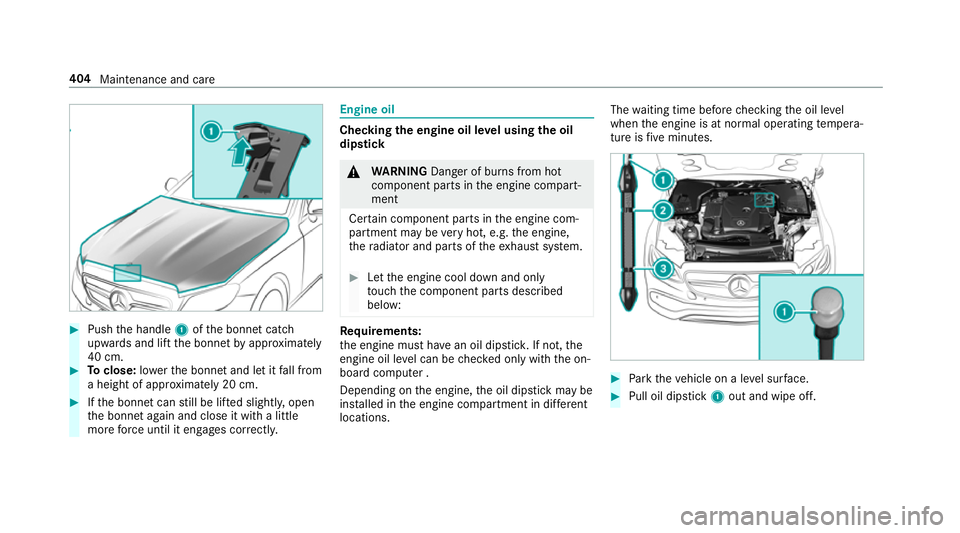
#
Push the handle 1ofthe bonn etcatch
up wa rds and lift the bonn etby appr oximately
40 cm. #
Toclose: lowe rth e bonn etand let it fall from
a height of appr oximately 20 cm. #
Ifth e bonn etcan still be lif ted slightl y,open
th e bonn etagain and close it with a little
more forc e until it engages cor rectly. Engine oil
Che
cking the engine oil le vel using the oil
dip stick &
WARNING Danger of bu rns from hot
component parts in the engine compart‐
ment
Cer tain component parts in the engine com‐
partment may be very hot, e.g. the engine,
th era diator and parts of theex haust sy stem. #
Let the engine cool down and only
to uch the component parts described
below: Re
quirements:
th e engine must ha vean oil dipstic k.If not, the
engine oil le vel can be checked only with the on-
board computer .
Depending on the engine, the oil dipstick may be
ins talled in the engine compartment in dif fere nt
locations. The
waiting time before checking the oil le vel
when the engine is at normal operating temp era‐
ture is five minutes. #
Park theve hicle on a le vel sur face. #
Pull oil dipstick 1out and wipe off. 404
Maintenance and care
Page 408 of 593
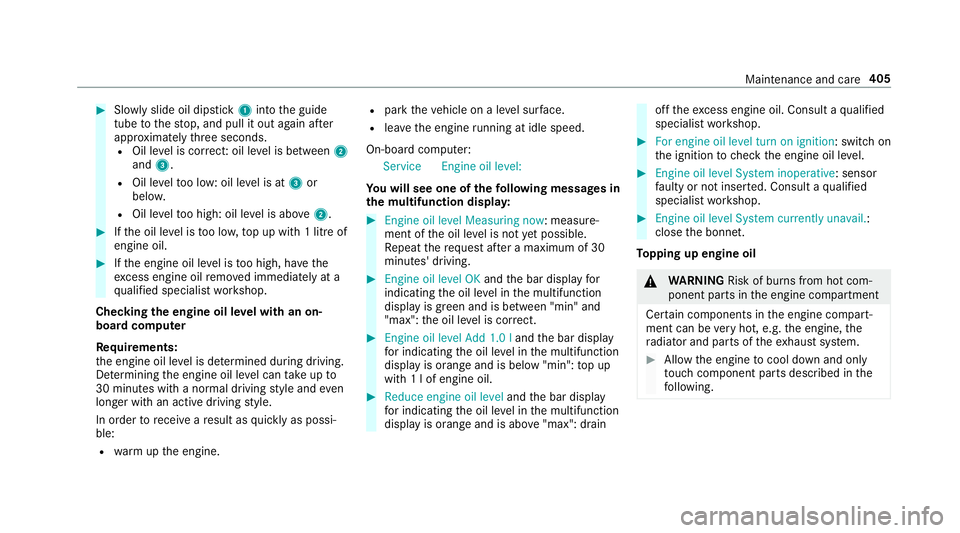
#
Slowly slide oil dipstick 1into the guide
tube tothestop, and pull it out again af ter
appr oximately thre e seconds.
R Oil le vel is cor rect: oil le vel is between 2
and 3.
R Oil le velto o low: oil le vel is at 3or
belo w.
R Oil le velto o high: oil le vel is abo ve2 . #
Ifth e oil le vel is too lo w,top up with 1 litre of
engine oil. #
Ifth e engine oil le vel is too high, ha vethe
exc ess engine oil remo ved immediately at a
qu alified specialist workshop.
Checking the engine oil le vel with an on-
board computer
Re quirements:
th e engine oil le vel is de term ined during driving.
De term ining the engine oil le vel can take up to
30 minutes with a normal driving style and even
longer with an active driving style.
In order torecei veare sult as quickly as possi‐
ble:
R warm upthe engine. R
park theve hicle on a le vel sur face.
R leav eth e engine running at idle speed.
On-board compu ter:
Service Engine oil level:
Yo u will see one of thefo llowing messa ges in
th e multifunction displa y: #
Engine oil level Measuring now: measu re‐
ment of the oil le vel is not yet possible.
Re peat there qu est af ter a maximum of 30
minutes' driving. #
Engine oil level OK andthe bar display for
indicating the oil le vel in the multifunction
display is green and is between "min" and
"max": the oil le vel is cor rect. #
Engine oil level Add 1.0 l andthe bar display
fo r indicating the oil le vel in the multifunction
display is orange and is below "min": top up
with 1 l of engine oil. #
Reduce engine oil level andthe bar display
fo r indicating the oil le vel in the multifunction
display is orange and is abo ve"max": drain off
theexc ess engine oil. Consult a qualified
specialist workshop. #
For engine oil level turn on ignition: switch on
the ignition tocheck the engine oil le vel. #
Engine oil level System inoperative : sensor
fa ulty or not inser ted. Consult a qualified
specialist workshop. #
Engine oil level System currently unavail. :
close the bonn et.
To pping up engine oil &
WARNING Risk of bu rns from hot com‐
ponent parts in the engine compartment
Cer tain components in the engine compart‐
ment can be very hot, e.g. the engine, the
ra diator and parts of theex haust sy stem. #
Allow the engine tocool down and only
to uch co mponent parts described in the
fo llowing. Maintenance and care
405
Page 409 of 593
&
WARNING Risk offire and injury from
engine oil
If engine oil comes into con tact wi thhot
component parts in the engine compart‐
ment, it may ignite. #
Make sure that no engine oil is spilled
next tothefiller opening. #
Allow the engine tocool off and thor‐
oughly clean the engine oil from compo‐
nent parts before starting theve hicle. *
NO
TEEngine dama gecaused byan
incor rect oil filter, incor rect oil or addi‐
tives #
Do not use engine oils or oil filters
which do not cor respond tothe specifi‐
cations explicitly prescribed forthe
service inter vals. #
Do not alter the engine oil or oil filter in
order toachie velonger change inter vals
th an presc ribed. #
Do not use additives. #
Follow the instructions in the service
inter val display rega rding the oil
ch ange. *
NO
TEDama gecaused bytopping up too
much engine oil To
o much engine oil can damage the engine
or the catalytic con verter. #
Have excess engine oil remo ved at a
qu alified specialist workshop. #
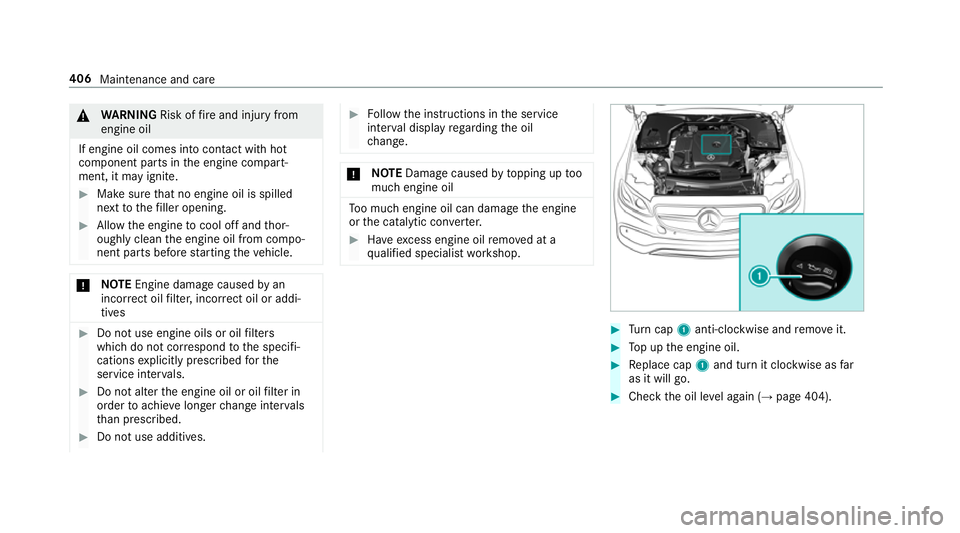
Turn cap 1anti-clockwise and remo veit. #
Top up the engine oil. #
Replace cap 1and turn it clockwise as far
as it will go. #
Check the oil le vel again (→ page 404). 406
Maintenance and care
Page 474 of 593
ing conditions may dif
fer from the consum ption
fi gures calculated. AdBlue ®
consu mption is
between 1% and 5% of fuel consum ption. Ha ve
th eAd Blue ®
supply checked at a qualified spe‐
cialist workshop before making journe ysoutside
of Europe. Before a longer stay outside of
Europe, consult a qualified specialist workshop.
Display theAd Blue ®
ra nge and le vel
( → page 265). Engine oil
Note
s on engine oil
Obser vethe no tes on operating fluids
(→ page 465). *
NO
TEEngine dama gecaused byan
incor rect oil filter, incor rect oil or addi‐
tives #
Do not use engine oils or oil filters
which do not cor respond tothe specifi‐
cations explicitly prescribed forthe
service inter vals. #
Do not alter the engine oil or oil filter in
order toachie velonger change inter vals
th an presc ribed. #
Do not use additives. #
Have the engine oil rene we d at regular
inter vals. Mercedes-Benz
recommends that you ha vethe
oil change car ried out at a qualified specialist
wo rkshop.
Only Mercedes-Benz appr oved engine oils may
be used in Mercedes-Benz engines.
Fu rther information on engine oil and oil filters is
av ailable at thefo llowing locations:
R inthe Mercedes-Benz Specifications for
Operating Fluids byentering the designation -
at http://be vo.mercedes-benz.com
- inthe Mercedes-Benz BeVo app
R at a qualified specialist workshop
Pet rol engines: for cer tain countries, dif fere nt
engine oils can be used in conjunction wi th
re duced maintenance inter vals.
% Further information on dif fere nt engine oils
can be ob tained at a qualified specialist
wo rkshop.
Quality and capacity of engine oil
MB-F reigabe or MB-Appr oval Pe
trol engine sM B-Freigabe or MB-
Appr oval
All models 229.3, 229.5, 229.51,
229.52, 229.6
E 350 229.51,229.52,
229.6 1,229.71
E 450 4MATIC 229.5, 229.6 Te
ch nical da ta471
Page 511 of 593
Display messages
Possible causes/consequences and M
MSolutions
4 Engine oil level Reduce oil
level *D
isplay message only for cer tain engines:
The engine oil le vel is too high.
* NO
TEEngine dama gecaused bydriving with excess engine oil #
Avoid long journe yswith excess engine oil. #
Consult a qualified specialist workshop immediately and ha vethe engine oil siphoned off.
4 Engine oil level Stop vehi-
cle Switch engine off *D
isplay message only for cer tain engines:
The engine oil le vel is too lo w.
* NO
TEEngine dama gecaused bydriving with insuf ficient engine oil #
Avoid long journe yswith insuf ficient engine oil. #
Pull over and stop theve hicle safely as soon as possible, paying attention toroad and traf fic conditions. Do not
continue driving under any circums tances. #
Switch off the engine. #
Add 1 l engine oil. #
Check the engine oil le vel.
To p up engine oil (→ page 405).
No tes on engine oil (→ page471). 508
Displaymessa ges and warning/indicator lamps
Page 513 of 593

Display messages
Possible causes/consequences and M
MSolutions
4 Check eng. oil lev. when
next refuelling *T
he engine oil le vel has dropped tothe minimum le vel.
* NO
TEEngine dama gecaused bydriving with insuf ficient engine oil #
Avoid long journe yswith insuf ficient engine oil. #
Check the engine oil le vel when next refuelling.
To p up the engine oil (→ page 405).
No tes on engine oil (→ page471). Exhaus
tga s af tertre atment Display messages
Possible causes/consequences and M MSolutions
Ø Refill AdBlue See Owner’s
Manual *
The AdBlue ®
leve l has fallen below there ser verange. #
Top up AdBlue ®
immediately (→ page 179).
Ø *
The AdBlue ®
tank is em pty. Yo u can no lon gerst art the engine. #
Top up at least 4.5 l of AdBlue ®
(→ page 179). 51 0
Displaymessa ges and warning/indicator lamps
Page 559 of 593
Ad
aptive Highbeam Assist Plus inop‐
erative ................................................ .530
¯ AdBlue sy stem fault Engine
st art not possible ................................ .512
¯ AdBlue sy stem fault Perf.
re duced in XXX km See Owner's
Manual .................................................5 11
¯ AdBlue sy stem fault Perf.
re duced: XXX mph No start in XXX
miles .................................................... 511
¯ AdBlue sy stem fault See Own‐
er's Manual .......................................... 511
4 Add 1 litre engine oil when next
re fuelling ............................................. 509
Air conditioning Malfunction See
Owner's Manual .................................. 526
Apply brake todeselect Park (P)
position ................................................ 513
App lybrake toselect R ........................ 514
À ATTENTION ASSIST inoperative ... 498ÀAT
TENTION ASSIS T:Take a
break! .................................................. 495
bAu tomatic driving lights inoper‐
ative .................................................... 529
Au xilia rybattery malfunction ...............514
Beginning eme rgency stop .................. 490
Blind Spot Assist cur rently una vaila‐
ble See Owner's Manual ...................... 501
Blind Spot Assist inope rative ............... 494
Blind Spot Assi stnot available when
to wing a trailer See Owner's Manual ...4 97
Cann otstart engine See Owner's
Manual ................................................ 505
ÁChan gekey bat teries .................. 520
JCheck brake fluid le vel................ 483
Check brake pads See Owner's Man‐
ual ...................................................... .493
4Che ckeng. oil le v.when next
re fuelling .............................................. 51 0ï
Check trailer hit chlock (white
display message) ................................ .525
Che cktyre pressu resth en restart
Ru n Flat Indicator ................................. 519
h Check tyre(s) .............................. .516
! Clean the fuel filter .................... .503
?Coolant Stop vehicle Switch
engine off ............................................ 505
Cruise contro l and Limiter inope ra‐
tive ...................................................... 500
Cruise control inope rative ................... 500
Cruise control off ................................ 500
!cu rrently unavailable See Own‐
er's Manual ........................................ .485
÷cur rently una vailable See Own‐
er's Manual .......................................... 479
5 Engine oil le vel cannot be
measured ............................................ 507
4Engine oil le velRe duce oil le vel...5 08 556
Index
Page 564 of 593
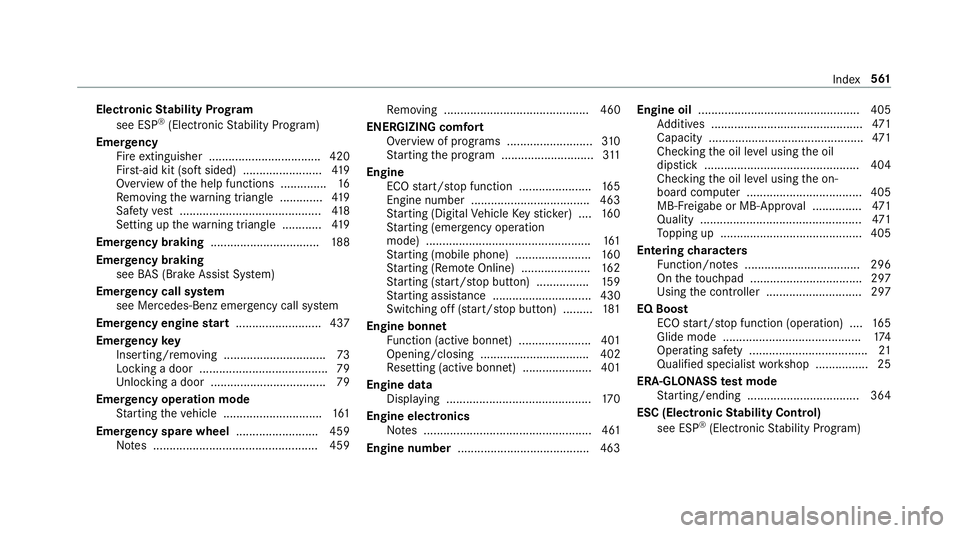
Electronic
Stability Prog ram
see ESP ®
(Electronic Stability Prog ram)
Emer gency
Fire extinguisher ................................. .420
Fir st-aid kit (so ftsided) ........................ 419
Overview of the help functions .............. 16
Re moving thewa rning triangle ............ .419
Saf etyve st ........................................... 41 8
Setting up thewa rning triangle ............ 419
Emer gency braking ................................. 188
Emer gency braking
see BAS (Brake Assi stSystem)
Emer gency call sy stem
see Mercedes-Benz emer gency call sy stem
Emer gency engine start .......................... 437
Emer gency key
Inserting/removing ............................... 73
Locking a door ....................................... 79
Un locking a door .................................. .79
Emer gency operation mode
St arting theve hicle .............................. 161
Emer gency spare wheel .........................4 59
No tes .................................................. 459 Re
moving ............................................ 460
ENERGIZI NGcomfort
Overview of programs .......................... 310
St arting the program ............................3 11
Engine ECO start/ stop function ......................1 65
Engine number ................................... .463
St arting (Digital Vehicle Keyst icke r) .... 16 0
St arting (eme rgency operation
mode) .................................................. 161
St arting (mobile phone) ...................... .160
St arting (Remo teOnline) ..................... 16 2
St arting (s tart/s top button) ................ 15 9
St arting assis tance .............................. 430
Switching off (s tart/s top button) .........1 81
Engine bonnet Function (active bonnet) ...................... 401
Opening/closing ................................. 402
Re setting (active bonnet) ..................... 401
Engine data Displaying ............................................ 17 0
Engine electronics Notes ................................................... 461
Engine number ........................................4 63Engine oil
................................................. 405
Ad ditives .............................................. 471
Capacity .............................................. .471
Checking the oil le vel using the oil
dipstick ............................................... 404
Checking the oil le vel using the on-
board computer ................................... 405
MB-Fr eigabe or MB-Appr oval .............. .471
Quality ................................................. 471
To pping up ...........................................4 05
Entering characters
Fu nction/no tes ................................... 296
On theto uchpad .................................. 297
Using the controller ............................. 297
EQ Boost ECO start/ stop function (operation) ....1 65
Glide mode .......................................... 174
Operating saf ety .................................... 21
Qualified specialist workshop ................25
ERA-GLONASS test mode
St arting/ending .................................. 364
ESC (Elect ronic Stability Control)
see ESP ®
(Electronic Stability Prog ram) Index
561