key MERCEDES-BENZ E-CLASS COUPE 2020 Owner's Guide
[x] Cancel search | Manufacturer: MERCEDES-BENZ, Model Year: 2020, Model line: E-CLASS COUPE, Model: MERCEDES-BENZ E-CLASS COUPE 2020Pages: 473, PDF Size: 8.5 MB
Page 183 of 473
R
get out and be stru ck byoncoming traf‐
fi c.
R ope rate vehicle equipment and become
trapped, forex ample.
In addition, thech ildren could also set the
ve hicle in motion, forex ample by:
R releasing the parking brake.
R changing the transmission position.
R starting theve hicle. #
Never lea vechildren unat tended in the
ve hicle. #
When leaving theve hicle, alw aysta ke
th eke y with you and lock theve hicle. #
Keep theve hicle key out of reach of
ch ildren. This also applies
tothe Digital Vehicle Key
st icke r.
The electric parking brake is applied if the trans‐
mission is in position jand one of thefo llow‐
ing conditions is fulfilled:
R The engine is switched off. R
The seat belt tongue is not inser ted in the
seat belt buckle of the driver's seat and the
driver's door is opened.
% Toprev ent application: pull the handle of the
electric parking brake.
In thefo llowing situations, the electric parking
brake is also applied:
R Active Dis tance Assi stDISTRONIC is bringing
th eve hicle toast andstill.
R The HOLD function is keeping theve hicle sta‐
tionar y.
R Active Parking Assist is keeping theve hicle
st ationar y.
This is the case if one of thefo llowing conditions
is also fulfilled:
R The engine is switched off.
R The seat belt tongue is not inser ted in the
seat belt buckle of the driver's seat and the
driver's door is opened.
R There is a sy stem malfunction.
R The po wer supply is insuf ficient.
R The vehicle is stationary for a lengt hyperiod. When
the electric parking brake is applied, the
re d! indicator lamp lights up in the instru‐
ment clus ter.
The electric parking brake is not automatically
applied if the engine is switched off bythe ECO
st art/ stop function.
Electric parking brake function (releasing
automatically)
The electric parking brake is released when the
fo llowing conditions are fulfilled:
R The driver's door is closed.
R The engine is running.
R The transmission is in position hork and
yo u depress the accelera tor pedal or you
shift from transmission position jtoh or
k when on le velground withthe driver's
door closed.
R Ifth e transmission is in position k,the boot
lid must be closed.
R The seat belt tongue is inser ted into the seat
belt buckle of the driver's seat. 18 0
Driving and pa rking
Page 185 of 473
re
cei vea notification in the multimedia sy stem
when you swit chon the ignition.
Yo u will recei veinformation about thefo llowing
points:
R The area of theve hicle that may ha vebeen
damaged.
R The forc e of the impact.
The following situations can lead toinadver tent
acti vation:
R The pa rked vehicle is mo ved, e.g. in a two-
st or ey garage.
% Deactivate tow- aw ay protection in order to
pr eve nt inadver tent acti vation. If you deacti‐
va te tow- aw ay protection, collision de tection
will also be deactivated.
Sy stem limits
De tection may be restricted in thefo llowing sit‐
uations:
R theve hicle is damaged without impact, e.g. if
an outside mir ror is torn off or the paint is
damaged byakey
R an impact occurs at low speed R
the electric parking brake is not applied Note
s on parking up theve hicle If
yo u lea vetheve hicle par ked up for longer than
six weeks, it may suf fer dama gethro ugh disuse.
The 12V battery may also be impaired or dam‐
aged byheavy discharging.
% Further information can be obtained at a
qu alified specialist workshop. St
andby mode (extension of the star ter bat‐
te ry 's period out of use) St
andby mode function
% This function is not available for all models.
If standby mode is activated, ene rgy loss will be
minimised during extended pe riods of non-oper‐
ation.
St andby mode is characterised bythefo llowing:
R thest ar ter battery is preser ved.
R the maximum non-operational time appears
in the media displa y. R
the connection toonline services is inter rup‐
te d.
R theAT A (anti-theft alarm sy stem) is not avail‐
able.
R the interior pr otection and tow- aw ay protec‐
tion functions are not available.
R the function for de tecting collisions on a
pa rked vehicle is not available.
If th efo llowing conditions are fulfilled, standby
mode can be activated or deactivated using the
multimedia sy stem:
R The engine is switched off.
R The ignition is switched on.
Exceeding theve hicle's displa yed non-opera‐
tional time may cause inco nvenience, i.e. it can‐
not be guaranteed that thest ar ter battery will
re liably start the engine.
The star ter battery must be charge dfirs t in the
fo llowing situations:
R The vehicle's non-operational time must be
ex tended. 18 2
Driving and pa rking
Page 264 of 473
#
Todeactivate the learning function for
one da y:activate Deact. learn. for 24h .
Fo r24 hours no new actions will be trained
and no data recorded forth e active profile.
Suggestions will continue tobe shown.
Example: if the option is switched on and a
ro ute toa new destination has been calcula‐
te d, this destination would not be take n into
account forth e learning function.
Creating new themes #
Select ©. #
Select THEMES . #
Select WSet theme.
The settings which are sa ved in theth eme
are shown. #
Select Continue r. #
Select AudioandNavigation (Navigation) and
st ore the active settings in theth eme. #
Select Continue r. #
Select an entry screen. #
Select Continue r. #
Select an image. #
Enter the names into the entry field and con‐
fi rm with a. #
Select Save. Sy
stem settings Overview of
the sy stem settings menu In
the sy stem settings menu, you can make set‐
tings in thefo llowing menus and control ele‐
ments:
R Display
- Styles
- Instrument lighting
- Display brightness
- Edge lighting
- Day/night design
R Control elements
- Keyboard language and handwriting rec‐
ognition
- Touchpad sensitivity
- Sensitivity of theTo uch Controls R
LINGU ATRO NIC
R MBUX Interior Assis tant
R Sound
- Enter tainment
- Navigation and traf fic announcements
- Telephone
- Voice amplification tothere ar
R Connectivity
- Wi-Fi, Blu etoo th, NFC
R MBUX Remo teControl
- Auth orising and deauthorising devices
R Time & date
R Langua ge
R Units for dis tance
R Software upda tes
R Data import/expo rt
R PIN pr otection
R System Reset MBUX multimedia sy
stem 261
Page 266 of 473
Multimedia sy
stem:
4 © 5
Settings 5
System
5 Wi-Fi & Bluetooth
Ac tivating/deactivating Wi-Fi #
Select Wi-Fi.
Connecting the multimedia sy stem with an
ex tern al hotspot using Wi-Fi
The type of connection es tablished must be
selected on the multimedia sy stem and on the
device tobe connec ted.
% The connection procedure may dif fer
depending on the device. Follow the instruc‐
tions that are shown in the displa y.Fu rther
information can be found in the manufactur‐
er's operating instructions. #
Select Internet settings . #
Select Connect via Wi-Fi. #
Select Add hotspot.
Connecting using a security key#
Select the options rofthe desired Wi-Fi
networ k. #
Select Connect using security key . #
Have the security key displa yed on the device
to be connec ted (see the manufacturer's
operating instructions). #
Ente rth is security key on the multimedia sys‐
te m. #
Confirm the entry with¡.
Connecting using a WPS PIN #
Select the options rofthe desired Wi-Fi
networ k. #
Select Connect using WPS PIN input .
The multimedia sy stem generates an eight-
digit PIN. #
Enter this PIN on the device tobe connec ted. #
Confirm the entry.
Connecting using a but ton #
Select the options rofthe desired Wi-Fi
networ k. #
Select Connect via WPS PBC . #
Select "Connect via WPS PBC" in the options
on the device tobe connec ted (see the man‐
ufacturer's operating instructions). #
Press the WPS button on the device tobe
connec ted. #
Select Continue inthe multimedia sy stem.
Ac tivating automatic connection #
Select Connect via Wi-Fi . #
Select the options rofthe desired Wi-Fi
networ k. #
Activate Permanent Internet connection .
Connecting with a known Wi-Fi #
Select Connect via Wi-Fi . #
Select a Wi-Fi networ k.
The connection is es tablished again.
Configuring the multimedia sy stem as a Wi-
Fi hotspot forex tern al devices
The type of connection es tablished depends on
th e device tobe connec ted. The function must
be suppor tedby the multimedia sy stem and by
th e device tobe connec ted. The type of connec‐
tion es tablished must be selected on the multi‐ MBUX multimedia sy
stem 263
Page 267 of 473
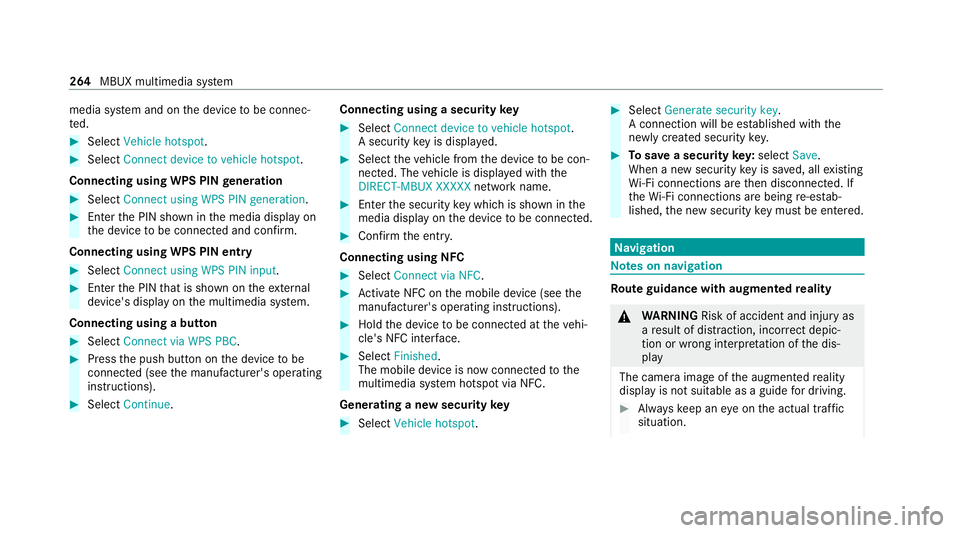
media sy
stem and on the device tobe connec‐
te d. #
Select Vehicle hotspot. #
Select Connect device to vehicle hotspot .
Connecting using WPS PIN generation #
Select Connect using WPS PIN generation. #
Ente rth e PIN shown in the media display on
th e device tobe connec ted and con firm.
Connecting using WPS PIN entry #
Select Connect using WPS PIN input. #
Enterth e PIN that is shown on theex tern al
device's display on the multimedia sy stem.
Connecting using a button #
Select Connect via WPS PBC. #
Press the push button on the device tobe
connec ted (see the manufacturer's operating
instructions). #
Select Continue. Connecting using a security
key #
Select Connect device to vehicle hotspot .
A secu rity key is displa yed. #
Select theve hicle from the device tobe con‐
nec ted. The vehicle is displa yed with the
DIRECT-MBUX XXXXX network name. #
Enter the security key which is shown in the
media display on the device tobe connec ted. #
Confirm the entry.
Connecting using NFC #
Select Connect via NFC. #
Activate NFC on the mobile device (see the
manufacturer's operating instructions). #
Hold the device tobe connec ted at theve hi‐
cle's NFC inter face. #
Select Finished.
The mobile device is now connected tothe
multimedia sy stem hotspot via NFC.
Generating a new security key #
Select Vehicle hotspot. #
Select Generate security key .
A connection will be es tablished with the
newly crea ted security key. #
Tosave a security key:select Save.
When a new security key is sa ved, all existing
Wi -Fi connections are then disconnected. If
th eWi -Fi connections are being re-es tab‐
lished, the new security key must be en tere d. Na
vigation Note
s on navigation Ro
ute guidance with augmented reality &
WARNING Risk of accident and inju ryas
a re sult of distraction, incor rect depic‐
tion or wrong interpr etation of the dis‐
play
The camera image of the augmented reality
display is not suitable as a guide for driving. #
Alw ayske ep an eye on the actual traf fic
situation. 264
MBUX multimedia sy stem
Page 372 of 473
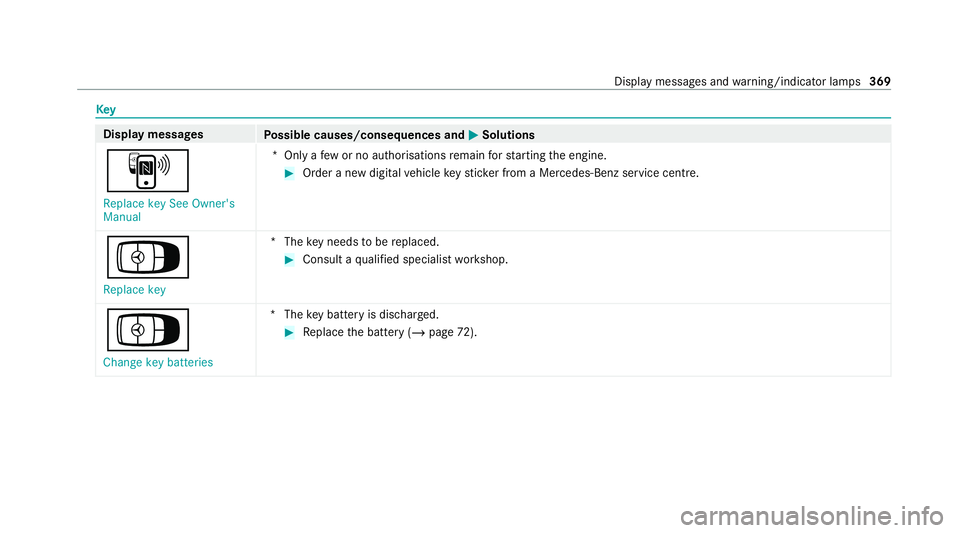
Key
Display messages
Possible causes/consequences and M
MSolutions
À Replace key See Owner's
Manual *O
nly a few or no authorisations remain forst arting the engine. #
Order a new digital vehicle keyst icke r from a Mercedes-Benz service centre.
Á
Replace key *T
hekey needs tobe replaced. #
Consult a qualified specialist workshop.
Á Change key batteries *T
hekey bat tery is dischar ged. #
Replace the battery (/ page72). Display messages and
warning/indicator lamps 369
Page 373 of 473
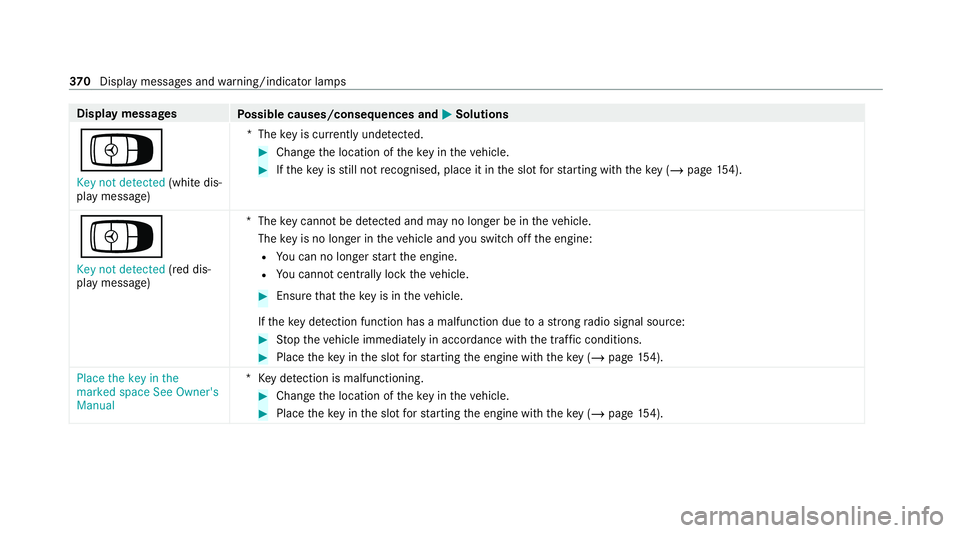
Display messages
Possible causes/consequences and M
MSolutions
Á Key not detected (white dis‐
play message) *T
hekey is cur rently und etected. #
Change the location of theke y in theve hicle. #
Ifth eke y is still not recognised, place it in the slot forst arting with theke y (/ page154).
Á
Key not detected (red dis‐
pl ay messa ge) *T
hekey cannot be de tected and may no longer be in theve hicle.
The key is no lon ger in theve hicle and you swit choff the engine:
R You can no lon gerst art the engine.
R You cannot centrally lock theve hicle. #
Ensure that theke y is in theve hicle.
If th eke y de tection function has a malfunction due toast ro ng radio signal source: #
Stop theve hicle immediately in accordance with the traf fic conditions. #
Place theke y in the slot forst arting the engine with theke y (/ page154).
Place the key in the
marked space See Owner's
Manual *K
eydetection is malfunctioning. #
Change the location of theke y in theve hicle. #
Place theke y in the slot forst arting the engine with theke y (/ page154). 37 0
Displaymessa ges and warning/indicator lamps
Page 439 of 473
Au
thorised workshop
see Qualified specialist workshop
Au tomatic distance control
see Active Dis tance Assi stDISTRONIC
Au tomatic driving lights .........................124
Au tomatic engine start (ECO start/
sto p function) .......................................... 16 0
Au tomatic engine stop (ECO start/
sto p function) .......................................... 16 0
Au tomatic front passen ger front air‐
bag deacti vation sy stem
see Automatic front passenger front
airbag shutoff
Au tomatic front passen ger front air‐
bag shu toff ........................................... 45, 47
Fu nction of the automatic front
passenger front airbag deactivation
sy stem ................................................... 45
PA SSENGER AIR BAG indicator lamp .... .47
Au tomatic mir rorfo lding function
Ac tivating/deactivating ...................... .139
Au tomatic seat adjustment
Setting ................................................. 100Au
tomatic transmission
DIRECT SELECT le ver ........................... 16 6
Drive program display .......................... 16 5
Drive programs .................................... 16 4
DY NA MIC SELECT switch .................... 16 4
Engaging drive position ....................... 16 8
Engaging neutral .................................. 167
Engaging pa rkposition ........................ 16 8
Engaging reve rsege ar ........................ .167
Kickdown ............................................. 16 9
Manual gear changing ........................ .168
St eering wheel gearshift paddles ........ .168
Tr ansmission position display .............. 16 6
Tr ansmission positions ........................ 16 6
Axle load Perm issible .......................................... 349
Tr ailer operation .................................. 364 B
Bag hook .................................................. .116
Ball ne ck
Extending/r etra cting (MBUX multi‐
media sy stem) .....................................2 38
Fo lding out/in .................................... .237 BA
S (Brake Assist Sy stem) .................... .185
Battery Key ........................................................ 72
Re mo tecontrol (s tationary heater) ...... 14 8
Battery see Battery (vehicle)
Battery (vehicle) ...................................... 322
Charging .............................................. 321
Charging (Remo teOnline) .................... 15 5
No tes ................................................... 317
No tes (s tarting assis tance and
ch arging) .............................................. 319
Re placing ............................................ 322
St arting assis tance .............................. 321
Belt see Seat belt
Bic ycle rack
Load capacity ...................................... 363
Tr ailer operation .................................. .241
Blind Spot Assi st..................................... 230
Ac tivating/deactivating ...................... .233
Fu nction .............................................. 230
Sy stem limitations ...............................2 30436
Index
Page 440 of 473
Blo
wer
see Climate control
BlueTEC see AdBlue ®
Bonn et
Re setting (active bonnet) .................... 296
Boot lid Closing .................................................. 79
HANDS-FREE ACCESS .......................... .81
Locking separa tely ................................ 82
Opening ................................................ .78
Opening dimensions ............................3 61
Brake Assi stSystem
see BAS (Brake Assi stSystem)
Brake fluid Notes .................................................. 359
Brake forc e distribution
EBD (Elect ronic Brake forc e Distribu‐
tion) ..................................................... 188
Brakes ABS (Anti-lock Braking Sy stem) ........... 185
Ac tive Brake Assi st.............................. 188
Ad aptive brake lights .......................... .193 BA
S (Brake Assi stSystem) .................. 185
Driving tips .......................................... 15 8
EBD (Electronic Brake forc e Distribu‐
tion) ..................................................... 188
HOLD function .................................... .207
Limited braking ef fect (salt-trea ted
ro ads) .................................................. 15 8
New/replaced brakepads/brake
discs .................................................... 15 6
Ru nning-in no tes ..................................1 56
Braking assi stance
see BAS (Brake Assi stSystem)
Breakdown Overview of the help functions .............. 16
To w- starting ........................................ 327
To wing away ........................................ 323
Tr ansporting theve hicle ......................3 25
Wheel change ...................................... 341
Breakdown see Flat tyre
Buttons Steering wheel .....................................2 46 C
Calls Mercedes me ....................................... 276
Camera see 360° Camera
see Reversing camera
Car key
see Key
Car wash
see Care
Car wash (care) ....................................... 302
Car-to-X-Communication Displaying hazard warnings ................ .270
Care .......................................................... 307
360° Camera ...................................... 305
Air-water duct ...................................... 302
Car wash ............................................. 302
Carpet .................................................3 07
Deco rative foil .................................... .304
Displ ay................................................ 307
Exterior lighting ................................... 305
High-pressure cleaner ......................... 303
Matt finish ........................................... 304 Index
437
Page 443 of 473
Data acquisition
Vehicle ................................................... 31
Data storage
Electronic control units .......................... 31
Online services ...................................... 33
Ve hicle ................................................... 31
Deactivating the ala rm(ATA ).................... 92
Dealership see Qualified specialist workshop
Declaration of conformity Electromagnetic compatibility ............... 24
Jack ...................................................... .27
TIREFIT kit ............................................. 28
Wi reless vehicle components ................24
Decorative foil (cleaning instructions)
.................................................................. .304
DeNO x agent
see AdBlue ®
De stination entry .................................... 267
En tering a POI or address .................... 267
De tecting inat tentiveness
see ATTENTION ASSIST
Diagnostics connection ............................28Diesel
Low outside temp eratures ...................3 54
No tes ................................................... 354
Digital Owner's Manual .............................18
Digital Vehicle Keyst icker
Locking theve hicle ................................ 75
St arting theve hicle ............................. 154
Un locking theve hicle ............................75
Dinghy towing
see Tow- bar sy stem
Dipped beam Setting .................................................1 31
DIRECT SELECT le ver............................... 16 6
Engaging drive position ....................... 16 8
Engaging neutral .................................. 167
Engaging pa rkposition ........................ 16 8
Engaging pa rkposition automatically .. 16 8
Engaging reve rsege ar ........................ .167
Fu nction .............................................. 16 6
Display (care) .......................................... .307
Display (MBUX multimedia sy stem)
Home screen ...................................... .253 Display (multimedia sy
stem) ................ .254
Operating ............................................ 254
Display (on-board computer) Displa yson the multifunction display .. 24 8
Display message .................................... .365
Calling up (on-boa rdcompu ter) .......... .365
No tes .................................................. 365
Display messages ¯ - - - km/h ................................... 389
ç - - - km/h ................................... 390
È - - - km/h ................................... 389
# 12V battery See Owner's Man‐
ual ....................................................... 406
Û 48 V battery See Owner's Man‐
ual ....................................................... 407
: Active Light Sy stem inopera‐
tive ...................................................... 372
¯ AdBlue sy stem fault Emer. op.:
max. XXX km/h Start not poss. in
XXX km ................................................ 41 5440
Index