transmission MERCEDES-BENZ E-CLASS COUPE 2020 Owner's Guide
[x] Cancel search | Manufacturer: MERCEDES-BENZ, Model Year: 2020, Model line: E-CLASS COUPE, Model: MERCEDES-BENZ E-CLASS COUPE 2020Pages: 473, PDF Size: 8.5 MB
Page 225 of 473
Ac
tive Parking Assist Fu
nction of Active Parking Assist
Ac tive Parking Assist is an elect ronic pa rking
assis tance sy stem, which uses ultrasound with
th e assis tance of there ve rsing camera and 360°
Camera. When you are driving forw ards up to
appr oximately 35 km/h, the sy stem automati‐
cally measures parking spaces on bo thsides of
th eve hicle.
Ac tive Parking Assist of fers thefo llowing func‐
tions:
Ve hicles with reve rsing camera
R Parking in parking spaces parallel tothero ad
Ve hicles with 360° Camera
R Parking in parking spaces parallel tothero ad
R Parking in parking spaces perpendicular to
th ero ad (optionally either forw ards or
re ve rse)
R Parking in parking spaces that are delineated
on lyby markings (for example at thero ad‐
side)
R Exiting a parking space parallel tothero ad As soon as all
requirements are met for search‐
ing for parking spaces, theÇ display appears
in the multifunction displa y.
When Active Parking Assist has de tected pa rking
spaces, theÈ display appears in the multi‐
function displa y.The ar rows show on which side
of thero ad de tected pa rking spaces are located.
They are then shown in the media displa y.
Ve hicles with reve rsing camera: the parking
space can be selected as desired. The vehicle is
par ked in reve rse.
Ve hicles with 360° Camera: the parking space
can be selected as desired. Depending on the
location of the parking space, the parking direc‐
tion (backwards or forw ards) can also be selec‐
te d as desired.
When Active Parking Assist is activated, the turn
signal indicators are activated based on the cal‐
culated path of your vehicle.
The parking procedure is assis tedby accelerat‐
ing, braking, steering and gear changes.
Ac tive Parking Assist is only an aid. It is not a
substitute foryo ur attention tothe sur roundings.
The responsibility for safe manoeuvring and parking
remains with you. Make sure that no
persons, animals or objects etc. are in the
manoeuvring range.
Ac tive Parking Assist will be cancelled in thefo l‐
lowing situations:
R Parking Assist PARKTRONIC is deacti vated.
R You begin steering.
R You en gage transmission position j.
R ESP ®
inter venes.
R You open the driver's door.
R After activating Active Parking Assist, you
press thec button again (/ page 223).
Sy stem limits
If th eex terior lighting is malfunctioning, Active
Pa rking Assist is not available.
Objects located abo veor below the de tection
ra nge of the sensors, e.g. overhanging loads,
ove rhangs or loading ramp s of goods vehicles, or
th e borders of parking spaces, are not de tected
du ring measu rement of the parking space. These
are also then not take n into account when calcu‐
lating the parking procedure. In some circum‐ 222
Driving and parking
Page 227 of 473
Pa
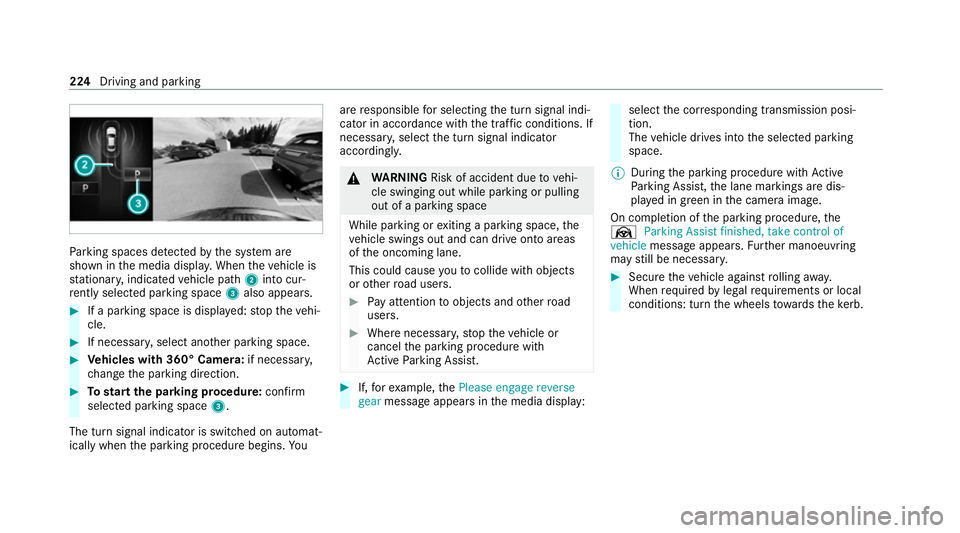
rking spaces de tected bythe sy stem are
shown in the media displa y.When theve hicle is
st ationar y,indicated vehicle path 2into cur‐
re ntly selected pa rking space 3also appears. #
If a parking space is displa yed: stop theve hi‐
cle. #
If necessar y,select ano ther parking space. #
Vehicles with 360° Camera: if necessary,
ch ange the parking direction. #
Tostart the pa rking procedure: confirm
selected parking space 3.
The turn signal indicator is switched on automat‐
ically when the parking procedure begins. Yo uare
responsible for selecting the turn signal indi‐
cator in accordance with the traf fic conditions. If
necessar y,select the turn signal indicator
accordingly. &
WARNING Risk of accident due tovehi‐
cle swinging out while parking or pulling
out of a parking space
While parking or exiting a parking space, the
ve hicle swings out and can drive onto areas
of the oncoming lane.
This could cause youto collide wi thobjects
or other road users. #
Pay attention toobjects and other road
users. #
Where necessar y,stop theve hicle or
cancel the parking procedure with
Ac tive Parking Assist. #
If,forex ample, thePlease engage reverse
gear message appears in the media display: select
the cor responding transmission posi‐
tion.
The vehicle drives into the selected parking
space.
% During the parking procedure with Active
Pa rking Assist, the lane markings are dis‐
pla yed in green in the camera image.
On completion of the parking procedure, the
Ø Parking Assist finished, take control of
vehicle message appears. Further manoeuvring
may still be necessar y. #
Secu retheve hicle against rolling away.
When requ ired bylegal requirements or local
conditions: turn the wheels towa rdsth eke rb. 224
Driving and parking
Page 228 of 473
%
You can stop theve hicle and change the
transmission position du ring the parking pro‐
cedure. The sy stem then calculates a new
ve hicle path. If no new vehicle path is availa‐
ble, the transmission position can be
ch anged again, or the process can be can‐
celled. You can also inter rupt the parking
procedure bybraking, forex ample tolet peo‐
ple get in or out of theve hicle. The parking
procedure can then be continued bybriefly
pressing the accelerator pedal.
Exiting a parking space with Active Parking
Assist
Re quirements:
R The vehicle is equipped with a 360° Camera.
R The vehicle has been par ked parallel tothe
ro ad with Active Parking Assist.
Please no tethat you are responsible forth eve hi‐
cle and sur roundings during the entire parking
procedure. #
Start theve hicle. #
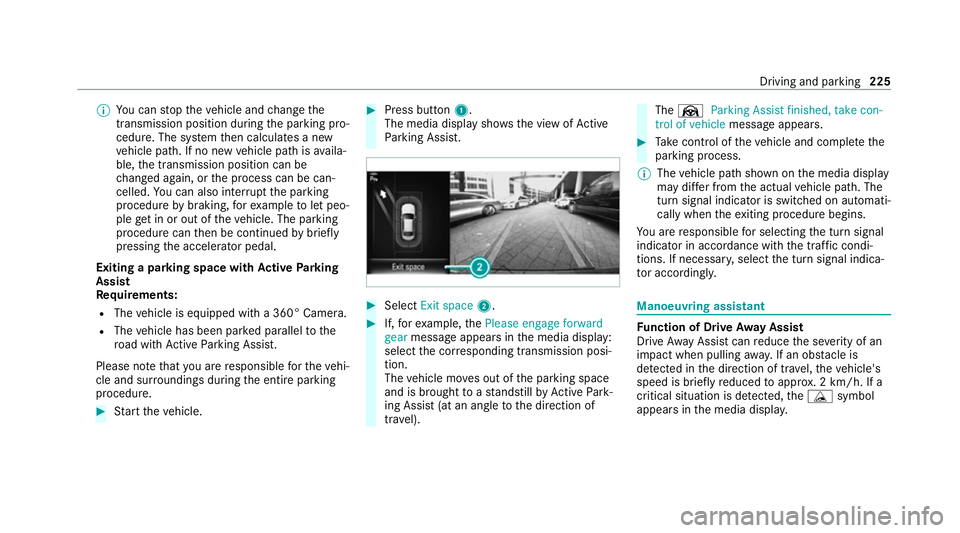
Press button 1.
The media display sho wsthe view of Active
Pa rking Assist. #
Select Exit space 2. #
If,forex ample, thePlease engage forward
gear message appears in the media display:
select the cor responding transmission posi‐
tion.
The vehicle mo ves out of the parking space
and is brought toast andstill byActive Park‐
ing Assist (at an angle tothe direction of
tra vel). The
Ø Parking Assist finished, take con-
trol of vehicle message appears. #
Take control of theve hicle and comple tethe
parking process.
% The vehicle path shown on the media display
may dif fer from the actual vehicle path. The
turn signal indicator is switched on automati‐
cally when theex iting procedure begins.
Yo u are responsible for selecting the turn signal
indicator in accordance with the traf fic condi‐
tions. If necessar y,select the turn signal indica‐
to r according ly. Manoeuvring assistant
Fu
nction of Drive Away Assist
Drive AwayAssi stcan reduce the se verity of an
impact when pulling away. If an obs tacle is
de tected in the direction of tr avel, theve hicle's
speed is brief lyreduced toappr ox. 2 km/h. If a
critical situation is de tected, theÉ symbol
appears in the media displa y. Driving and pa
rking 225
Page 229 of 473
%
You can cancel an inter vention byDrive
Aw ayAssi stat any time bydeactivating
Pa rking Assist PARKTRONIC (/ page213). &
WARNING Risk of accident caused by
limited de tection per form ance of Drive
Aw ayAssi st
Drive AwayAssi stcannot al ways clearly iden‐
tify objects and traf fic situations. #
Alw ays pay careful attention tothe traf‐
fi c situation; do not rely on Drive Away
Assi stalone. #
Be prepared tobrake or swer veas nec‐
essar y,prov ided the tra ffic situation
permits and that it is safe totake eva‐
sive action. Drive
AwayAssi stis only an aid. It is not a sub‐
st itute foryo ur attention tothe sur roundings.
The responsibility for safe manoeuvring and
parking remains with you. Make sure that no
persons, animals or objects etc. are in the
manoeuvring range. A
risk of a collision may arise in thefo llowing sit‐
uations, forex ample:
R Ifth e inter changes the accelerator and brake
pedals.
R If an incor rect transmission position is
engaged.
Drive AwayAssi stis active under thefo llowing
conditions:
R IfPa rking Assist PARKTRONIC is activated.
R Ifyo u shift the transmission position tok or
h when theve hicle is stationar y.
R Ifth e de tected obs tacle is less than appr ox.
1. 0 m away.
R Ifth e manoeuvring assis tant function is acti‐
va ted in the multimedia sy stem.
Sy stem limits
The per form ance of Drive AwayAssi stis limited
on inclines.
When driving with a trailer, Drive AwayAssi stis
not available.
% Also obse rveth e sy stem limits of Parking
Assist PARKTRONIC (/ page211). Fu
nction of Cross Traf fic Alert
% Cross Traf fic Alert is only available forve hi‐
cles with Blind Spot Assist or Active Blind
Spot Assi st.
Cross Traf fic Alert can warndrivers of any cross‐
ing tra ffic when reve rsing and manoeuvring out
of a parking space. The radar sensors in the
bumper also monitor the area adjacent tothe
ve hicle. If a critical situation is de tected, the
L symbol appears inthe media display and
th eve hicle can be braked automatically.
If th era dar sensors are obstructed byvehicles
or other objects, de tection is not possible.
When theve hicle is reve rsing at a walking pace,
Cross Traf fic Alert is au tomatically active.
% Also obser vethe instructions on Blind Spot
Assist and Active Blind Spot Assi st
( / page 230).
Sy stem limits
Cross Traf fic Alert is not available on inclines.
Cross Traf fic Alert is not available when driving
with a trailer. 226
Driving and parking
Page 249 of 473
8
Selected transmission position
9 Multifunction displ ay(exa mp le:standard dis‐
play for a trip): assi stance / telephone /
navigation / trip / media / radio / styles
and displa ys/ service / possible settings
fo r head-up display
A Fuel le vel and fuel filler flap location indica‐
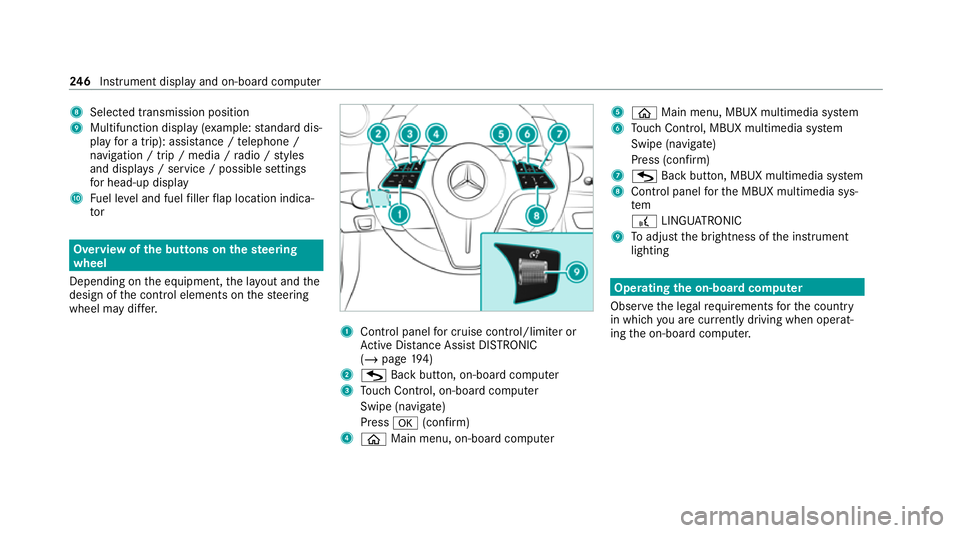
tor Overview of
the but tons on thest eering
wheel
Depending on the equipment, the la yout and the
design of the control elements on thesteering
wheel may dif fer. 1
Control panel for cruise control/limiter or
Ac tive Dis tance Assi stDISTRONIC
(/ page 194)
2 G Back button, on-boa rdcompu ter
3 Touch Control, on-board co mputer
Swipe (navigate)
Press a(confirm)
4 ò Main menu, on-board co mputer 5
ò Main menu, MBUX multimedia sy stem
6 Touch Control, MBUX multimedia sy stem
Swipe (navigate)
Press (confirm)
7 G Back button, MBUX multimedia sy stem
8 Control panel forth e MBUX multimedia sys‐
tem
£ LINGU ATRO NIC
9 Toadjust the brightness of the instrument
lighting Operating
the on-boa rdcompu ter
Obser vethe legal requ irements forth e count ry
in which you are cur rently driving when operat‐
ing the on-board computer. 246
Instrument display and on-board computer
Page 256 of 473
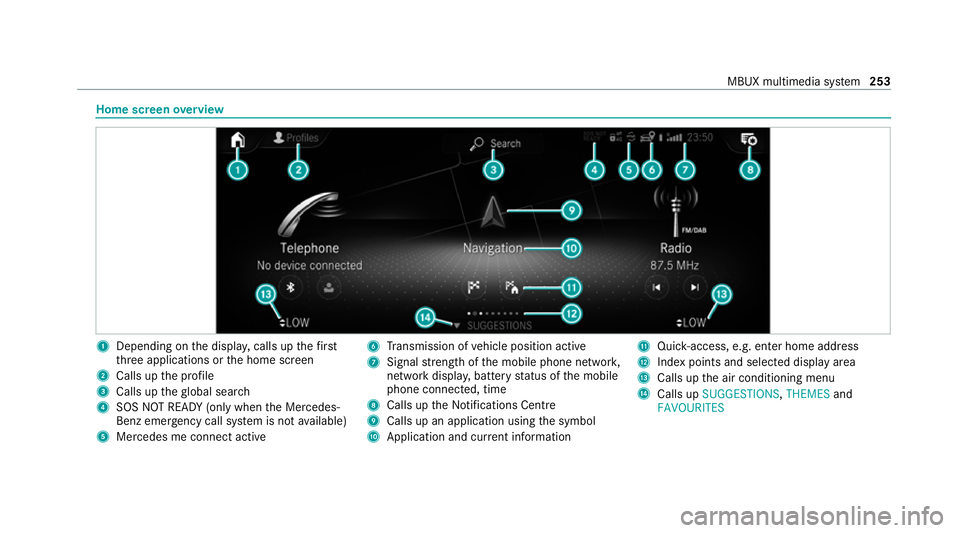
Home screen
overview 1
Depending on the displa y,calls up thefirst
th re e applications or the home screen
2 Calls up the profile
3 Calls up theglobal sear ch
4 SOS NOT READY (only when the Mercedes-
Benz emer gency call sy stem is not available)
5 Mercedes me connect active 6
Transmission of vehicle position active
7 Signal stre ngth of the mobile phone networ k,
network displ ay, battery status of the mobile
phone connected, time
8 Calls up the Notifications Centre
9 Calls up an application using the symbol
A Application and cur rent information B
Quick-access, e.g. enter home address
C Index points and selected displ ayarea
D Calls up the air conditioning menu
E Calls up SUGGESTIONS, THEMESand
FAVOURITES MBUX multimedia sy
stem 253
Page 257 of 473
%
If Mercedes me connect is active 5,the
ve hicle is linked with Mercedes me connect.
Ve hicle data is then transmit tedto the bac k-
end sy stem. What data is transmit ted
depends on which services are activated.
Fu rther de tails can be found in the Mercedes
me connect term s and conditions and data
pr otection information. The function is coun‐
tr y- dependent.
If Transmission of vehicle position is active
6, Mercedes me connect services ha ve
been activated forth is vehicle which access
th eve hicle's geoposition. In which ins tances
th ege oposition is transmitted depends on
th e particular services. Further de tails can
be found in the Mercedes me connect terms
and conditions and data pr otection informa‐
tion. The function is count ry-dependent. Ope
rating the MBUX multimedia sy stem Using
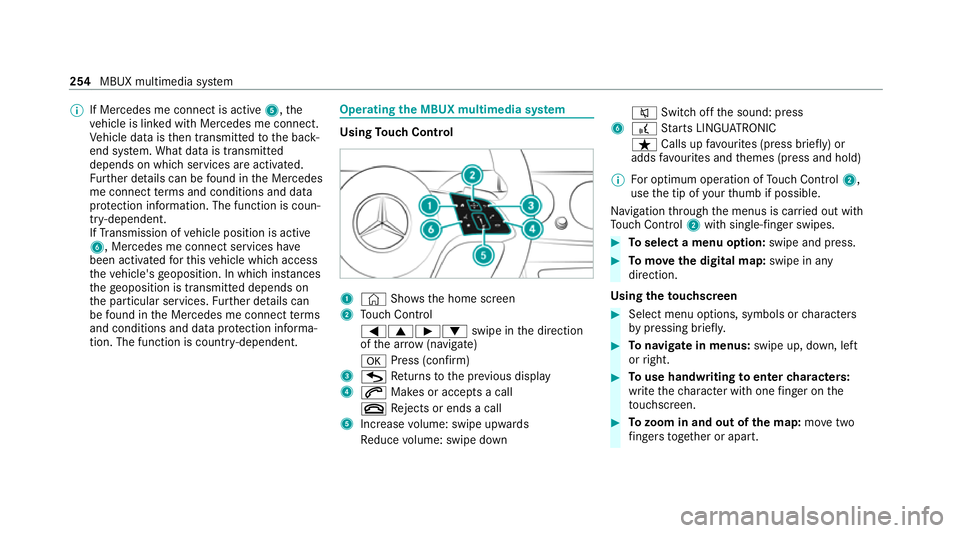
Touch Control 1
© Shows th e home screen
2 Touch Control
=9Ì :swipe in the direction
of the ar row (navigate)
a Press (con firm)
3 G Returns tothe pr evious display
4 6 Makes or accepts a call
~ Rejects or ends a call
5 Increase volume: swipe upwards
Re duce volume: swipe down 8
Switchoff the sound: press
6 £ Starts LINGU ATRO NIC
ß Calls up favo urites (press brief ly) or
adds favo urites and themes (press and hold)
% For optimum operation of Touch Control 2,
use the tip of your thumb if possible.
Na vigation thro ugh the menus is car ried out with
To uch Control 2with sin gle-finger swipes. #
Toselect a menu option: swipe and press. #
Tomo vethe digital map: swipe in any
direction.
Using theto uchscreen #
Select menu options, symbols or characters
by pressing briefly. #
Tonavigate in menus: swipe up, down, left
or right. #
Touse handwriting toenter characters:
write thech aracter with one finger on the
to uchsc reen. #
Tozoom in and out of the map: movetwo
fi ngers toget her or apart. 254
MBUX multimedia sy stem
Page 275 of 473
Obser
vethe additional information on stowing
mobile communications devices cor rectly:
R Loading theve hicle (/ page111 )
Blue tooth ®
connection:
The menu view and theav ailable functions in the
te lephone menu are in part dependent on the
Blu etoo th®
profile of the connected mobile
phone. Full functionality is only available if the
mobile phone supports bo thofthefo llowing
Blue tooth ®
profiles:
R PBAP (Phone Book Access Profile)
- The contacts on the mobile phone are
shown automatically on the multimedia
sy stem.
R MAP (Message Access Profile)
- The mobile phone message functions can
be used on the multimedia sy stem.
Ir re spective of this, Blue tooth ®
audio functional‐
ity can byused with any mobile radio unit.
Fo r information on thera nge of functions of the
mobile radio unit tobe connec ted, see the man‐
ufacturer's operating instructions. Ne
twork connection:
The following cases can lead tothe call being
disconnected while theve hicle is in motion:
R You swit chinto a transmission/reception
st ation, in which no communication channel
is free.
R The SIM card used is not compatible with the
network available
R a mobile phone with "Twincard" is logged into
th e network with the second SIM card at the
same time
The multimedia sy stem supports calls in HD
Vo ice ®
for impr oved speech qualit y.Arequ ire‐
ment forth is is that the mobile phone and the
mobile phone network pr ovider of the person
yo u are calling suppo rtHD Voice ®
.
Depending on thequ ality of the connection, the
vo ice quality may fluctuate.
Fu rther information can be obtained from a
Mercedes-Benz service centre or at: https://
www.mercedes-benz.com/connect 272
MBUX multimedia sy stem
Page 282 of 473
#
Select Yes.
Re leva nt identi fication da tais transmitted
automaticall y.
More information on Mercedes me: https://
www.mercedes.me
Tr ansfer red data during a Mercedes me call
If yo u initiate a service call using Mercedes me,
data is transfer redto enable targeted advice and
an ef ficient service.
The following requ irements must be fulfilled for
th e transfer of the data:
R The ignition is switched on.
R The requ ired data transfer tech nology is sup‐
po rted bythe mobile phone network pro‐
vider.
R The quality of the mobile connection is suf fi‐
cient.
Multi-s tage trans fer depends on thefo llowing
fa ctors:
R Reason forth e initiation of the call
R The available mobile phone transmission
te ch nology. R
The acti vated Mercedes me connect serv‐
ices.
R The service selected in thevo ice control sys‐
te m.
% A prom ptfor consent tothe data transmis‐
sion only occurs if the cor responding
Mercedes me connect service is not activa‐
te d.
Data transfer if Mercedes me connect serv‐
ices are not activated
If no Mercedes me connect services are activa‐
te d and the data pr otection prom pthas been
confirmed thefo llowing data is transmitted:
R Vehicle identification number
R Time of the call
R Reason forth e initiation of the call
R Confirmation of the data pr otection prom pt
R Country indicator of theve hicle
R Set language forth e multimedia sy stem
R Telephone number of the communication
platform ins talled in theve hicle If a call is made
for a service appointment via
th e service reminder, thefo llowing data is also
transmitte d:
R Cur rent milea geand main tenance da ta
If a call is made af ter auto matic accident or
breakdown de tection using the multimedia sys‐
te m, thefo llowing data is also transmitted:
R Cur rent milea geand main tenance da ta
R Cur rent vehicle location
If Ac cident and Breakdown Management is
called via thevo ice control sy stem and no
service has been activated, but the data pr otec‐
tion query has been confi rmed, thefo llowing
data can also be called up from theve hicle by
th e Mercedes-Benz Cus tomer Centre:
R Curr entvehicle location
If th e data pr otection prom pthas been rejected,
th efo llowing data is transmitte dto enable targe‐
te d advice and an ef ficient service:
R Reason forth e initiation of the call
R Rejection of the data pr otection prom pt
R Country indicator of theve hicle MBUX multimedia sy
stem 279
Page 324 of 473
Obser
vethe additional following points during
st arting assistance:
R Starting assis tance may only be pr ovided
using vehicles, batteries or other jump start
devices with a nominal voltage of 12V.
R The vehicles must not touch.
R Vehicles with a petrol engine: jump-start
th eve hicle only when the engine and exhaust
sy stem are cold. St
arting assi stance and charging the12 V
battery Requ
irements:
R The vehicle is secured with the electric park‐
ing brake.
R Vehicles with automatic transmission: the
transmission is in position j.
R The ignition and all electrical consumers are
switched off.
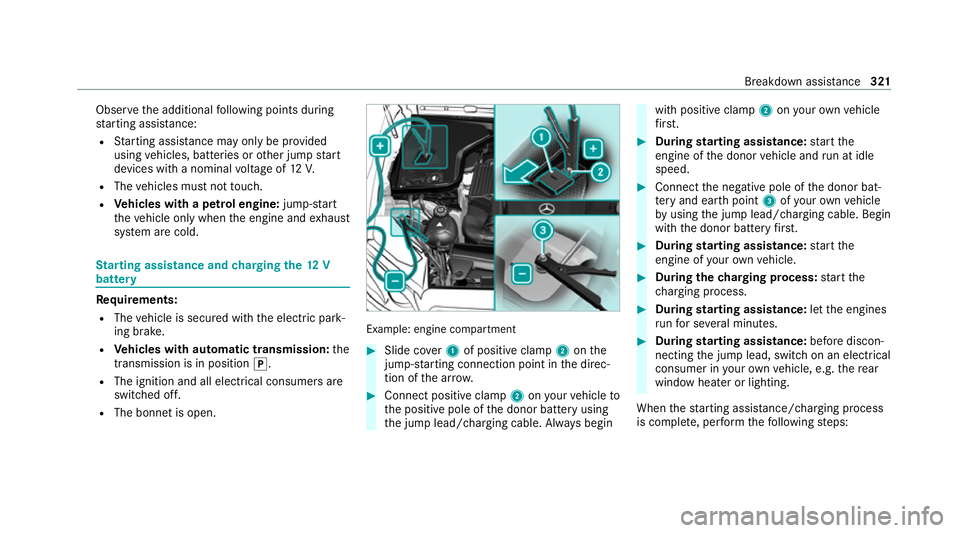
R The bonnet is open. Example: engine compartment
#
Slide co ver1 of positive clamp 2onthe
jump-s tarting connection point in the direc‐
tion of the ar row. #
Connect positive clamp 2onyour vehicle to
th e positive pole of the donor battery using
th e jump lead/charging cable. Alw ays begin with positive clamp
2onyour ow nve hicle
fi rs t. #
During starting assi stance: start the
engine of the donor vehicle and run at idle
speed. #
Connect the negative pole of the donor bat‐
te ry and ear thpoint 3ofyour ow nve hicle
by using the jump lead/charging cable. Begin
with the donor battery firs t. #
During starting assi stance: start the
engine of your ow nve hicle. #
During thech arging process: start the
ch arging process. #
During starting assi stance: letthe engines
ru nfo r se veral minutes. #
During starting assi stance: before discon‐
necting the jump lead, switch on an electrical
consumer in your ow nve hicle, e.g. there ar
wind owheater or lighting.
When thest arting assis tance/charging process
is compl ete, per form thefo llowing steps: Breakdown assis
tance 321