warning MERCEDES-BENZ E-CLASS COUPE 2021 Owner's Guide
[x] Cancel search | Manufacturer: MERCEDES-BENZ, Model Year: 2021, Model line: E-CLASS COUPE, Model: MERCEDES-BENZ E-CLASS COUPE 2021Pages: 446, PDF Size: 37.57 MB
Page 193 of 446
Dis
tance warning funct ion(vehicles with
Dr iving Assistance Packag e)
The distance warning func tion canaidyouin the
fo llo wing situat ionswithan intermit tent wa rning
to ne and awa rning lam p:
R atspeeds uptoappr oximat ely15 5mp h
(250 km/h)when approaching vehicles
ahead
R atspeeds uptoappr oximat ely62 mph
(1 00 km/ h)when approaching statio nary
ve hicles
R atspeeds uptoappr oximat ely50 mph
(80 km/ h)when approaching moving pedes‐
tr ians andcyclis tsahead
R atspeeds uptoappr oximat ely43 mph
(70 km/ h)when approaching statio nary
pedes trians ,cr oss ing vehicles andstatio nary
and cross ing cyclis ts Au
tonomous braking function (vehicles with‐
out Driving Assistance Packag e)
If th eve hicle istrave ling atspeeds above
appr oximat ely4 mp h(7 km/h), theaut onomous
br aking function mayint erve ne inthefo llo wing
situat ions:
R atspeeds uptoappr oximat ely12 4mp h
(200 km/h)when approaching vehicles
ahead
R atspeeds uptoappr oximat ely50 mph
(80 km/ h)when approaching cyclis tsahead
R atspeeds uptoappr oximat ely37 mph
(60 km/ h)when approaching statio naryve hi‐
cles ormo ving pedes trians
Au tonomous braking function (vehicles with
Dr iving Assistance Packag e)
If th eve hicle istrav eling atspeeds above
appr oximat ely4 mp h(7 km/h), theaut onomous
br aking function mayint erve ne inthefo llo wing
situat ions:
R atspeeds uptoappr oximat ely15 5mp h
(250 km/h)when approaching vehicles
ahead R
atspeeds uptoappr oximat ely62 mph
(1 00 km/ h)when approaching statio nary
ve hicles
R atspeeds uptoappr oximat ely50 mph
(80 km/ h)when approaching cyclis tsahead
R atspeeds uptoappr oximat ely43 mph
(70 km/ h)when approaching statio naryand
mo vingpedes trians ,cr oss ing vehicles and
st atio naryand cross ing cyclis ts
Sit uation -depen dent brak ing assistance
(v ehicles withou tDr iving Assistance Pack‐
ag e)
The situa tion-dep endentbraking assistanc ecan
int erve ne from aspe edofapprox imat ely4 mp h
(7 km/ h)inthefo llo wing situat ions:
R atspeeds uptoappr oximat ely15 5mp h
(250 km/h)when approaching vehicles
ahead
R atspeeds uptoappr oximat ely50 mph
(80 km/ h)when approaching statio naryve hi‐
cles andvehicles ahead Dr
iving andparking 19
1
Page 195 of 446
Mor
eover,th esteer ing suppor tpr ov ided by
Ev asive St eer ing Assis tis no tsuf ficie ntto
avo idacollis ion. #
Alw ayspa ycar eful attention tothetra f‐
fi c situ ation; donotre ly on Evasiv e
St eer ing Assis talone. #
Beprepar edtobrak eor sw erve ifnec ‐
essar y. #
End thesuppor tby act ivel yst eer ing in
non -critical situation s. #
Drive at an appr opriatespeed ifth er e
ar epedes trians close tothepat hof
yo ur vehicle. Sy
stem limit s
Fu llsy stem perform anc eis no tav ailable fora
fe w sec ond saf te rswitc hingontheignition or
af te rdr iving off.
If Ac tiveBr ak eAssi stisim pair edorinope rativ e
du eto amalf unction,the00C7 warning lam p
appear sin themultifunc tiondispla y. The
system maybe impair edorma yno tfunc ‐
tion ,par ticular lyin thefo llo wing situat ions:
R Insno w,rain, fog, hea vyspr ay,if th er eis
gl ar e, indir ect sunlight oringrea tly varying
ambien tlight .
R Ifth esensor sar edir ty,fo gg ed up, damag ed
or covered.
R Ifth esensor sar eim pair eddue tointerfer‐
ence from other radar sour ces, e.g.stro ng
ra dar reflect ions inpar king garage s.
R Ifaloss oftirepr essur eor afa ulty tirehas
been detected and displ ayed.
R Incom plextraf fic situ ations whereobject s
cann otalw aysbe clear lyidentif ied.
R Ifpedes trians orvehicles movequickl yint o
th esensor detection rang e.
R Ifpe destrians arehidde nby other object s.
R Ifth etypical outline ofapedes trian cann ot
be distinguished from thebac kground.
R Ifapedes trian isno tde tected assuch ,e.g.
due tospecial clothing orother object s.
R Ifth edr iver's seat beltisno tfa stened. R
Oncurveswit hatight radius.
% The ActiveBr ak eAssi stsensor sadjus taut o‐
matically whileacer tain dis tance isbe ing
dr iven afte rth eve hicle hasbeen delivered.
Ac tiveBr ak eAssi stisuna vailable oronl y
par tiall yav ailable during thete ac h-in proc‐
ess.
Se tting Activ eBr ak eAs sist
Re quirement s:
R The ignit ionisswitc hedon.
Multime diasystem:
4 © 5
Set ting s5
Assist ance
5 Act ive Brak eAssist #
Select thedesir edsetting.
The setting isretained when thedr ive sy stem
is ne xt star ted.
Deactiv atingActiv eBr ak eAs sist
% Itis recomme ndedthat youalw ayslea ve
Ac tiveBr ak eAssi stact ivat ed. Dr
ivin gand parking19
3
Page 196 of 446
#
Select Off.
The dist anc ewa rning func tion,th eaut ono‐
mous braking function andtheEv asiv eSt eer‐
ing Assis tar edeactiv ated.
When theve hicle isne xt star ted, themiddle
se tting isaut omaticall yselect ed.
% IfAc tiveBr ak eAssi stisdeact ivat ed, the
00D4 symbol appearsinthest atus barofthe
multifu nctiondisplay. Tr
af fic Sign Assis t Fu
nction ofTraf fic Sign Assis t
Tr af fic Sign Assistdetects traf fic sig ns with the
multifu nctioncamera(/ page16 8). Itas sist s
yo uby displa yingdetected spe edlimits and
ove rtakin gre strictions intheins trument cluster.
Obser vetheno teson driving systems andyour
re sponsibili ty;yo uma yot her wise failto recog‐
nize dangers(/ page 167).
Since Traf fic Sign Assistalso uses thedat a
st or ed inthena vig ation system, itcan updat e
th edispla yin thefo llo wing situat ionswithout
de tecting traf fic sig ns. The
came raalso detects traf fic sig ns with a
re striction indicated byan addit ionalsign (e.g.
when wet).The seareonly disp laye difare stric‐
tion appliesor ifth esy stem cann otcle arly de ter‐
mine whether there striction applies.
Wa rning when thema xim um permis sible
speed isexceeded
The system can warnyouif yo uunin tentio nally
ex ceed themaximum permissible speed.Todo
th is, youcan spec ifyinthemultimedia system
by howmuc hth emaximum permissible speed
can beexceed edbef oreawa rning isissued. You
can specify whether thewa rning isto be justa
visual warning oran acous ticone aswell. Displa
yin theIns trum ent Displa y In
stru ment Displa yin theWi descr eenCockpit
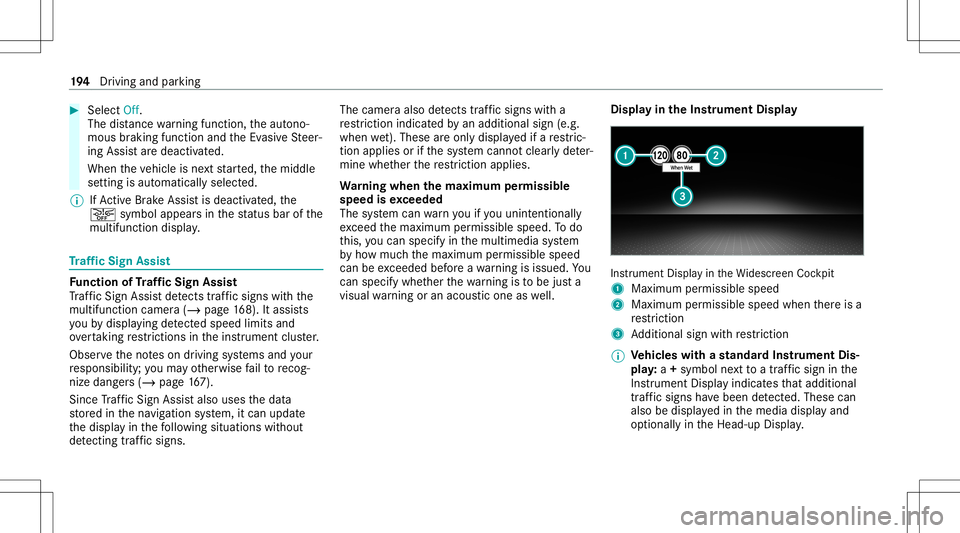
1 Maximum permissible speed
2 Maximum permissible speedwhenther eis a
re striction
3 Addition alsign withre striction
% Ve
hicl eswith ast andar dIns trument Dis‐
pla y:a+ symbo lne xt to atraf fic sig nin the
Ins trument Displayindicat esthat addit ional
traf fic sig ns have been detected. Thesecan
al so be displ ayed inthemedia displayand
op tion ally intheHead-up Display. 19
4
Driving and parking
Page 198 of 446
#
Activateor deacti vate thefunc tion.
Se tting thety pe ofwa rning #
Selec tVisual &Audible ,Visual orOff .
Se tting thewa rning threshold
This value determ ines thespeed atwhic ha
wa rning isissued whenexceeded. #
Select Warning Threshold. #
Setth edesir edspeed. Ov
ervie wof thetraf fic ligh tda ta ser vice &
WARNIN GRisk ofan acci dent orinju ry
due todis traction, incorrect ormissing
dat a
The traf fic light informati ondispl ayisan aid
and cannotre place theobser vatio nof the
act ual drivin gsit uatio n. #
Keep theactual traffic situat ioncon‐
st ant lyin view when approachingatraf‐
fi c light and whench ang inglane s. #
Avoid prolong edviewing oftheIns tru‐
ment Displa yand Head-up Display. The
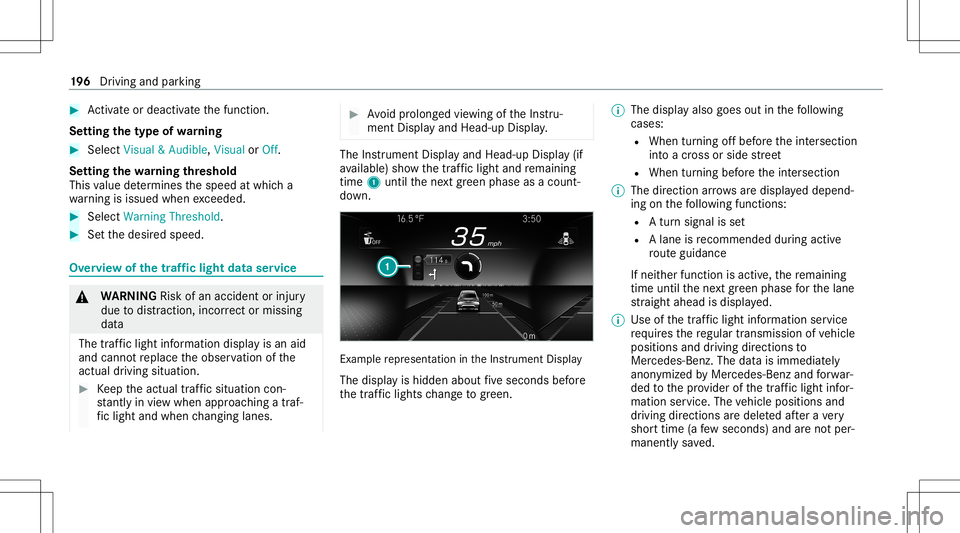
Instrument Displayand Head-up Display(if
av ailable) showthetra ffic light andremaini ng
time 1until thene xt green phase asacount ‐
do wn. Ex
am ple repr esent ation intheIns trument Display
The displa yis hidden aboutfive seconds before
th etraf fic lights chang eto gree n. %
Thedisp lay also goes outinthefo llo wing
cases :
R When turnin gof fbef oreth eint ersect ion
int oacr oss orside stre et
R When turning beforeth eint ersect ion
% The direct ion arrow sar edispla yeddepend‐
ing onthefo llo wing functions:
R Atur nsign alisset
R Alane isrecomme ndedduring acti ve
ro uteguidan ce
If ne ither function isact ive, there maini ng
time untilthene xt green phase forth elane
st ra ight ahead isdispla yed.
% Use ofthetraf fic light informati onser vice
re qu ires there gular transmission ofvehicle
positions anddriving directions to
Mer cedes-Ben z.The datais immediat ely
anon ymized byMer cedes-Ben zand forw ar‐
ded tothepr ov ider ofthetra ffic light infor‐
matio nser vice .The vehicle positions and
dr iving directions aredele tedaf te ra ve ry
shor ttime (afew sec ond s)and areno tper‐
man entlysave d. 19
6
Driving and parking
Page 200 of 446
R
Emerg encyvehicles orlocal publictranspor t
ar elocat edinthevicinit yof theint ersect ion.
R The datatra nsmiss ionfrom theve hicle has
been interru pte d.
R Light signal systems arelocat edinacon ‐
st ru ction sitear ea orarebei ng mai ntained.
R The light signal system ismalfunct ioning.
R The subscr iption totheser vice hasexpir ed. Switc
hingthetraf fic ligh tinf orma tion dis‐
pla yon oroff Mult
imed iasystem:
4 © 5
Set ting s5
Assist ance #
Switc hTraffic LightInformation onD or
of fE. Blind
SpotAssis tand Activ eBli nd Spo t
As sist wit hex itwa rning Fu
nction ofBlind SpotAssis tand Activ e
Bli nd Spo tAs sist wit hex itwa rning
Blin dSpo tAss istand ActiveBli nd Spo tAssi st
use twolat eral, rear-facin gra dar sensor sto monit
orthear ea up to130ft (40 m)behind and
10 ft(3 m) next to your vehicle.
If ave hicle isde tected atspe eds aboveappr ox‐
imat ely8 mp h(12 km/h) andthis vehicle subse‐
qu ent lyent ersth emonit oring rang edire ctly next
to your vehicle, thewa rning lam pin theoutside
mir rorlig hts upred.
Pe rm anen tst atus displa yin theins trument clus‐
te r:
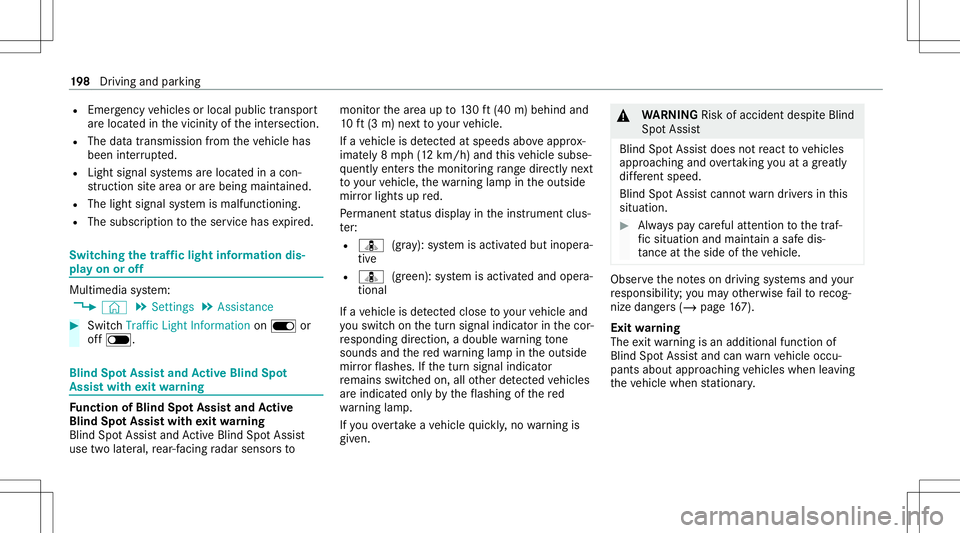
R ¸ (gra y): system isactiv ated but inoper a‐
tiv e
R ¸ (green): system isactiv ated and oper a‐
tion al
If ave hicle isde tected clos eto your vehicle and
yo uswit chon thetur nsignal indicat orinthecor‐
re sponding direction, adoubl ewa rning tone
sou nds and there dwa rning lam pin theoutside
mir rorflashes .If th etur nsignal indicat or
re mains switchedon,allother detected vehicles
ar eindicat edonlyby theflashin gof there d
wa rning lam p.
If yo uove rtak eave hicle quickl y, no warning is
giv en. &
WARNIN GRisk ofacci dent despite Blind
Spo tAssi st
Bli nd Spo tAssi stdoes notre act tovehicles
appr oaching andovertakin gyo uat agr ea tly
di ffer ent speed.
Blind SpotAssis tcann otwa rndriver sin this
situat ion. #
Alw ayspa ycar eful attention tothetra f‐
fi c situ ation and maintain asaf edis‐
ta nce attheside oftheve hicle. Obser
vetheno teson driving systems andyour
re sponsibili ty;yo uma yot her wise failto recog‐
nize dangers(/ page 167).
Exi twa rning
The exitwa rning isan addition alfunc tion of
Blin dSpo tAss istand canwarnvehicle occu‐
pants about approaching vehicles whenleaving
th eve hicle when statio nary. 19
8
Driving and parking
Page 204 of 446
Sy
stem limit s
No lane- correcting brak eap plica tion occu rsin
th efo llo wing situat ions:
R Youcle arly and activel yst eer ,br ak eor accel‐
er ate.
R Ifadr iving safetysy stem interve nes, such as
ES P®
,Ac tiveBr ak eAssi stor ActiveBli nd
Spo tAssi st.
R Youha ve adop tedaspor tydriving style wit h
high corner ing speeds orhigh ratesof accel‐
er ation.
R When ESP®
is deactiv ated.
R Ifaloss oftirepr essur eor afa ulty tirehas
been detected and displ ayed.
If yo udeac tivateth eAc tiveLa ne Keeping Assist
wa rning and thelane marking scann otbe clear ly
de tected, itis pos siblethat no lane correcting
br ak eap plica tion take splace (/page202).
The system maybe impair edorma yno tfunc tion
par ticular lyin thefo llo wing situat ions:
R Ifth er eis poor visibility ,e.g. due toinsuf fi‐
cie ntillu mina tionofthero ad, ifth er ear e highl
yva riable shade condition sor inrain,
sno w,fogor hea vyspr ay.
R Ifth er eis glar e, e.g .fr om oncom ingtraf fic,
th esun orreflect ions.
R Ifth ewindshield inthear ea ofthemultifunc ‐
tion camer ais dir ty,or ifth ecamer ais fog‐
ge dup, damag edorcovered.
R Ifth er ear eno lane marking s,or several
unc lear lane markingsarepr esen tfo rone
lane, e.g.around roadw orks .
R Ifth elane marking sar ewo rn,dar kor cov‐
er ed.
R Ifth edis tance from theve hicle infront istoo
shor tand thus thelane markings cannotbe
de tected.
R Ifth elane marking sch ang equ ickl y, e.g.
lanes branc hof f,cr oss one another or
mer ge.
R Ifth ero ad isvery nar row and wind ing.
R Vehicl eswith Drivin gAss istanc ePa ck‐
ag e:ifth era dar sensor sin there ar bum per
ar edir tyor coveredin sno wand anobs tacle is
de tected inyour lane ,no lane -cor recting
br ak eap plica tion take splace.
Ac tiv atin g/deac tivatin gAc tiv eLan eKe eping
Assis t
Multi media system:
4 © 5
Set ting s5
Quick Access
5 Act ive Lane Keeping Assist #
Activateor deacti vate thefunc tion.
Se tting Activ eLan eKe eping Assist
Multi media system:
4 © 5
Set ting s5
Assist ance
5 Act ive Lane Keeping Assist
Ac tiv atin gor deac tivatin gthe hapticwarning #
Selec tWarnin g.
Ac tivateor deacti vate thefunc tion. DY
NA MIC BODY CONT ROLfun ction DY
NA MIC BODY CONTR OLcontinuously adjusts
th ech aract eristic sof thesuspension dampersto
th ecur rent operati ng and drivi ng cond itions. 20
2
Driving and parking
Page 211 of 446
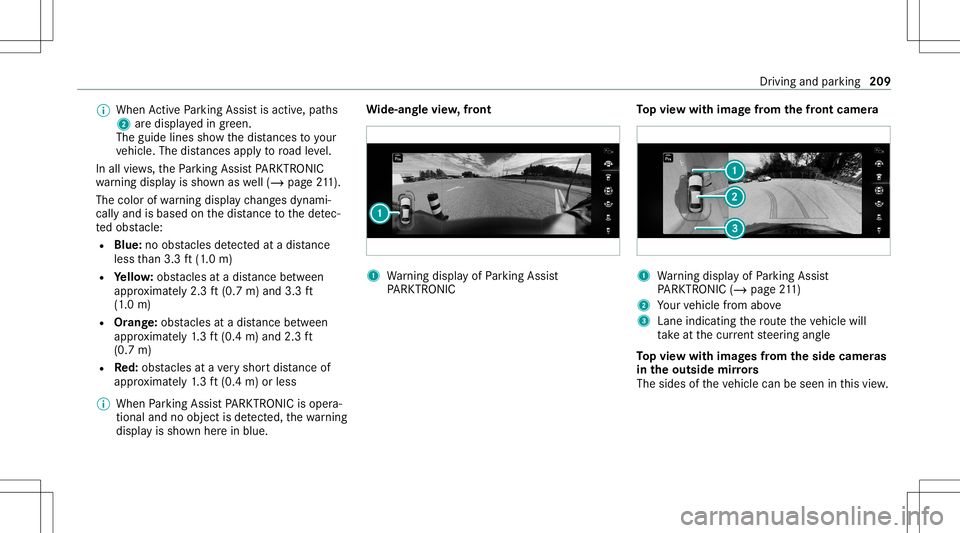
%
When ActivePa rking Assistis act ive, pat hs
2 aredispla yedin green.
The guide linesshowthedis tances toyour
ve hicle. Thedistances apply toroad leve l.
In all views,th ePa rking AssistPA RK TRONI C
wa rning displa yis sho wnaswell(/ page21 1).
Th ecolo rof wa rning displa ych ang esdynam i‐
call yand isbased onthedis tance tothede tec‐
te dobs tacle :
R Blue :no obs tacle sde tected atadi st anc e
less than 3.3ft (1.0 m)
R Yello w: obs tacle sat adi st anc ebe tween
appr oximat ely2. 3ft (0.7 m)and 3.3ft
(1 .0 m)
R Orang e:obs tacles atadis tance betwee n
ap prox imat ely1. 3 ft (0.4 m)and 2.3ft
(0.7 m)
R Red:obs tacle sat ave ry shor tdis tance of
ap prox imat ely1. 3 ft (0.4 m)orless
% When Parking AssistPA RK TRONI Cis oper a‐
ti on aland noobj ectis de tected, thewa rning
displa yis sho wnherein blue. Wi
de-an glevie w,front 1
Warning displa yof Parking Assist
PA RK TRONI C To
pvie wwi th imag efrom the fron tcame ra 1
Warning displa yof Parking Assist
PA RK TRONI C(/ page21 1)
2 Your vehicle from above
3 Lane indicating thero uteth eve hicle will
ta ke atthecur rent steer ing ang le
To pvie wwi th imag esfrom the side came ras
in theout side mirrors
The sides oftheve hicle canbeseen inthis vie w. Dr
iving and parking 209
Page 214 of 446
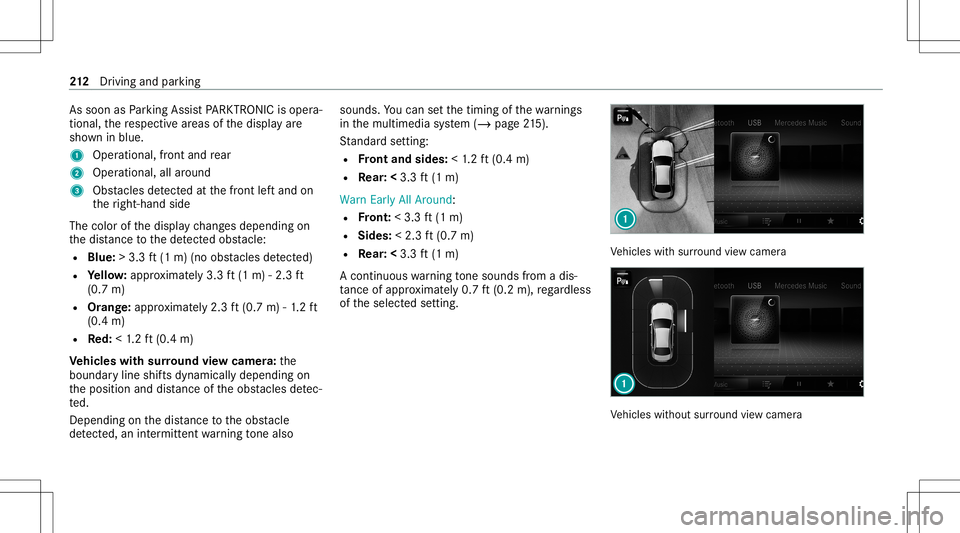
As
soo nas Parking AssistPA RK TRONI Cis oper a‐
ti on al, there spectiv ear eas ofthedispla yar e
sho wninblue.
1 Oper ational, front and rear
2 Operation al,allaroun d
3 Obstacle sde tected atthefront leftand on
th eright- hand side
The color ofthedispla ych ang esdepen dingon
th edis tance tothede tected obs tacle :
R Blue :> 3.3 ft(1 m) (no obstacle sde tected)
R Yello w: appr oximat ely3. 3ft (1 m) -2.3 ft
(0.7 m)
R Orang e:appr oximat ely2. 3ft (0.7 m)-1. 2 ft
(0.4 m)
R Red:<1.2 ft (0.4 m)
Ve hicl eswith surround viewcamer a:the
boundar yline shiftsdynamicall ydependin gon
th eposition anddistance oftheobs tacle sde tec‐
te d.
Depen dingonthedis tance totheobs tacle
de tected, anintermitt entwarning tone also sou
nds. Youcan setth etimin gof thewa rnings
in themultimedia system (/ page21 5).
St andar dse tting :
R Front and sides :< 1.2 ft (0.4 m)
R Rear: <3.3 ft(1 m)
Warn EarlyAllAro und :
R Front :< 3. 3ft (1 m)
R Sides: <2.3 ft(0.7 m)
R Rear: <3.3 ft(1 m)
A con tinuous warning tone sou nds from adi s‐
ta nce ofapprox imat ely0. 7ft (0.2 m),rega rdless
of theselect edsetting. Ve
hicles withsur round viewcam era Ve
hicles without surround viewcam era 21
2
Driving and parking
Page 217 of 446
Se
tting thewa rning tones ofParking Assis t
PA RK TRONI C
Mu ltimed iasystem:
4 © 5
Set ting s5
Assist ance
5 Camera &Parkin g
Ad jus tingthe volum eof thewa rning tones #
Select Warning ToneVolume. #
Seta va lue.
Ad jus tingthe pitchof the warning tones #
Select Warning TonePitch. #
Seta va lue.
Specif yingthest ar ting pointfo rthe warning
to nes
Yo ucan spec ifywhe ther thePa rking Assist
PA RK TRONI Cwa rning tones should comm ence
wh en theve hicle isfur ther aw ay from anobs ta‐
cle . #
Sele ctWa rnEarl yAll Arou nd. #
Activateor deacti vate thefunc tion. Ac
tiv atin g/deac tivatin gaudi ofa deo ut
Yo ucan spec ifywhe ther thevo lume ofamedia
sour ceinthemultimedia system isto be
re duced whenParking AssistPA RK TRONI C
soun dsawa rning tone. #
Select Aud ioFad eou tDuri ngWa rning Tones. #
Activateor deacti vate thefunc tion. Ac
tiv ePa rking Assis t Fu
nction ofActiv ePa rking Assis t
Ac tivePa rking Assistis an elect ronic parking
assis tance system, whic huses ultrasound with
th eassis tance ofthere ar vie wcam eraand sur‐
ro und viewcam era. When youar edr ivin gfo r‐
wa rdsup toappr oximat ely22 mph(35 km/h),
th esy stem automaticall ymeasur espar king
spaces onboth sides oftheve hicle.
Ac tivePa rking Assistof fers thefo llo wing func‐
tion s:
Ve hicles withre ar vie wcam era
R Parking inpar kingspaces parallel tothero ad Ve
hicles withsur round viewcam era
R Parking inpar kingspaces parallel tothero ad
R Parking inpar kingspaces perpendic ularto
th ero ad (op tionall yeit her forw ards or
re ve rse)
R Parking inpar kingspaces that can onlybe
de tected assuch due tomar kings (for exam‐
ple atthero adside )
R Exiting apar kingspac epar allel tothero ad
As soon asall requ iremen tsareme tfo rsearc h‐
ing forpar king space s,theÇ displa yappear s
in themultifunc tiondispla y.
When ActivePa rking Assisthas detected parking
spaces ,th eÈ displa yappear sin themulti‐
func tion displa y.The arro ws sho won whic hside
of thero ad detected parking spaces arelocat ed.
The yar eth en sho wninthemedia display.
Ve hicl eswith rear vie wcamer a:thepar king
space canbeselect edasdesir ed.The vehicle is
par kedin reve rse.
Ve hicl eswith surround viewcamer a:the
par kingspace canbeselect edasdesir ed.
Depen dingonthelocation ofthepar king space, Dr
iving andparking 21
5
Page 224 of 446
No
teson theIns trum ent Displa yand on-
boar dcom puter &
WARNIN GRisk ofacci dent dueto an
In stru ment Displa ymalfu nction
If th eIns trument Displayhas failed ormal‐
func tioned,thefunc tion restrictions applying
to saf etyre leva nt systems areno tvisible.
The oper ating safetyof your vehicle maybe
im pair ed. #
Drive on car efull y. #
Have theve hicle checkedimmediat ely
at aqu alif ied spec ialistwo rkshop. &
WARNIN GRisk ofdist ra ction from infor‐
mati onsystems andcomm unication s
eq uipment
If yo uoper ateinf ormat ionand comm unic a‐
tio neq uipme ntintegratedin theve hicle
when driving, youwill bedistract ed from the
tr af fic situ ation. Thiscou ldalso cau seyouto
lose control of theve hicle. #
Onlyoper ateth is eq uipmen twhen the
tr af fic situ ation per mits. #
Ifyo ucan notbe sur eof this, stop the
ve hicle whilstpa ying attention toroad
and traffic condi tions andoperate the
eq uipment withth eve hicle statio nary. *
NO
TEMercede s-AMG vehicles #
Obser vetheno tesin theSupplement .
Yo uco uld other wise failto recogni ze
da ngers. Yo
umus tobse rveth eleg alrequ iremen tsforth e
cou ntryin whi chyouar ecur rentl ydr ivi ng when
op erati ng theon- boar dcom puter.
The on-boar dcom putersho wsonlydispla ymes‐
sag esand warnings from spec ific systems on
th emultifunc tiondispla y.Yo umus tth er efor e
ensur eth at your vehicle isalw aysre liable.
If th eoper ating safetyof your vehicle is
im pair ed,parkth eve hicle immediat elyand
saf ely. Con tact aqu alif ied spec ialistwo rkshop. 222
Instrument Displayand on-boar dcom puter