lock MERCEDES-BENZ E-CLASS ESTATE 2009 Owners Manual
[x] Cancel search | Manufacturer: MERCEDES-BENZ, Model Year: 2009, Model line: E-CLASS ESTATE, Model: MERCEDES-BENZ E-CLASS ESTATE 2009Pages: 373, PDF Size: 12.37 MB
Page 254 of 373
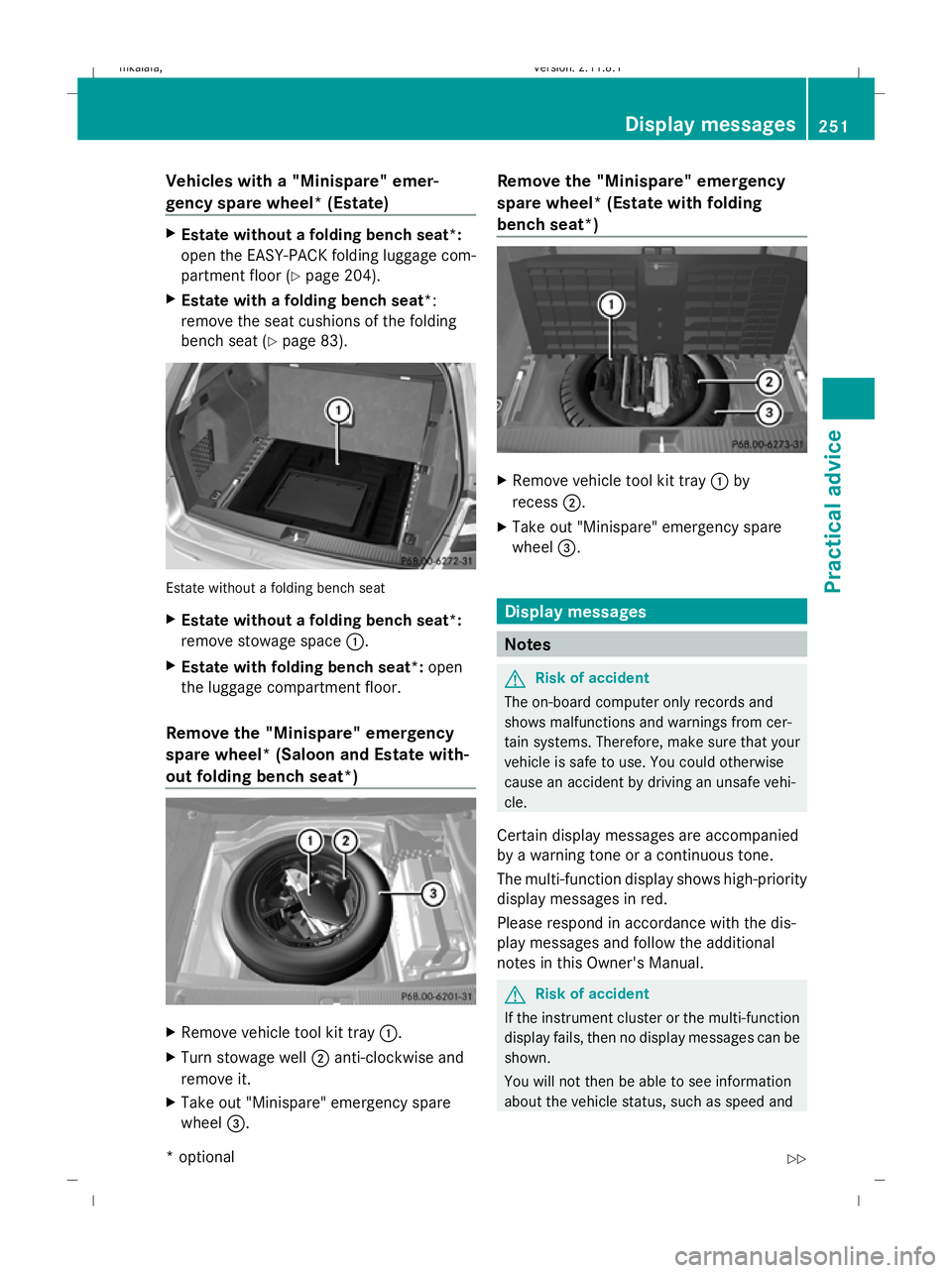
Vehicles with a "Minispare" emer-
gency spare wheel* (Estate)
X
Estate without a folding bench seat*:
open the EASY-PACK folding luggage com-
partment floor ( Ypage 204).
X Estate with a folding bench seat *:
remove the seat cushions of the folding
bench seat (Y page 83). Estate without a folding bench seat
X
Estate without a folding bench seat*:
remove stowage space :.
X Estate with folding bench seat*: open
the luggage compartment floor.
Remove the "Minispare" emergency
spare wheel* (Saloon and Estate with-
out folding bench seat*) X
Remove vehicle tool kit tray :.
X Turn stowage well ;anti-clockwise and
remove it.
X Take out "Minispare" emergency spare
wheel =. Remove the "Minispare" emergency
spare wheel* (Estate with folding
bench seat*)
X
Remove vehicle tool kit tray :by
recess ;.
X Take out "Minispare" emergency spare
wheel =. Display messages
Notes
G
Risk of accident
The on-board computer only records and
shows malfunctions and warnings from cer-
tain systems. Therefore, make sure that your
vehicle is safe to use. You could otherwise
cause an accident by driving an unsafe vehi-
cle.
Certain display messages are accompanied
by a warning tone or a continuous tone.
The multi-function display shows high-priority
display messages in red.
Please respond in accordance with the dis-
play messages and follow the additional
notes in this Owner's Manual. G
Risk of accident
If the instrument cluster or the multi-function
display fails, then no display messages can be
shown.
You will not then be able to see information
about the vehicle status, such as speed and Display messages
251Practical advice
* optional
212_AKB; 2; 4, en-GB
mkalafa,
Version: 2.11.8.1 2009-05-05T14:17:16+02:00 - Seite 251 Z
Dateiname: 6515346702_buchblock.pdf; erzeugt am 07. May 2009 14:17:07; WK
Page 255 of 373
outside temperature, warning and indicator
lamps, display messages or the failure of sys-
tems. The vehicle’s handling characteristics
may be affected. Adapt your driving style and
speed accordingly.
Immediately consult a qualified specialist
workshop which has the necessary specialist
knowledge and tools to carry out the work
required. Mercedes-Benz recommends that
you use a Mercedes-Benz Service Centre for
this purpose. In particular, work relevant to
safety or on safety-related systems must be
carried out at a qualified specialist workshop.
When you stop and park the vehicle, please
observe the instructions provided for HOLD
(Y page 151)and parking (Y page 107).
Calling up display messages The on-board computer saves certain display
messages, which you can call up.
X Press =or; on the steering wheel
to select the Servicemenu.
If there are display messages, the multi-
function display shows, e.g. 2 messages.
X Using 9or: select the entry, e.g.
2 messages. X
Confirm with a.
X Using :or9 scroll through the dis-
play messages.
Hiding display messages You cannot hide display messages of the
highest priority. The multi-function display
shows these messages continuously until
their causes have been remedied.
Use the buttons on the multi-function steer-
ing wheel.
X
Use the aor% button on the steer-
ing wheel to hide the display message.
The following tables contain all the display
messages. Text messages
G
Risk of accident and injury
The operating safety of the vehicle can be compromised if maintenance work is carried out
incorrectly. This could cause you to lose control of the vehicle and cause an accident. The safety
systems may also not be able to protect you or others as they are designed to do.
Always have maintenance work carried out at a qualified specialist workshop. The qualified spe-
cialist workshop must have the necessary specialist knowledge and tools to carry out the work
required. Mercedes-Benz recommends that you use a Mercedes-Benz Service Centre for this
purpose. In particular, work relevant to safety or on safety-related systems must be carried out
at a qualified specialist workshop. 252
Display messagesPractical advice
212_AKB; 2; 4, en-GB
mkalafa,
Version: 2.11.8.1 2009-05-05T14:17:16+02:00 - Seite 252
Dateiname: 6515346702_buchblock.pdf; erzeugt am 07. May 2009 14:17:07; WK
Page 256 of 373
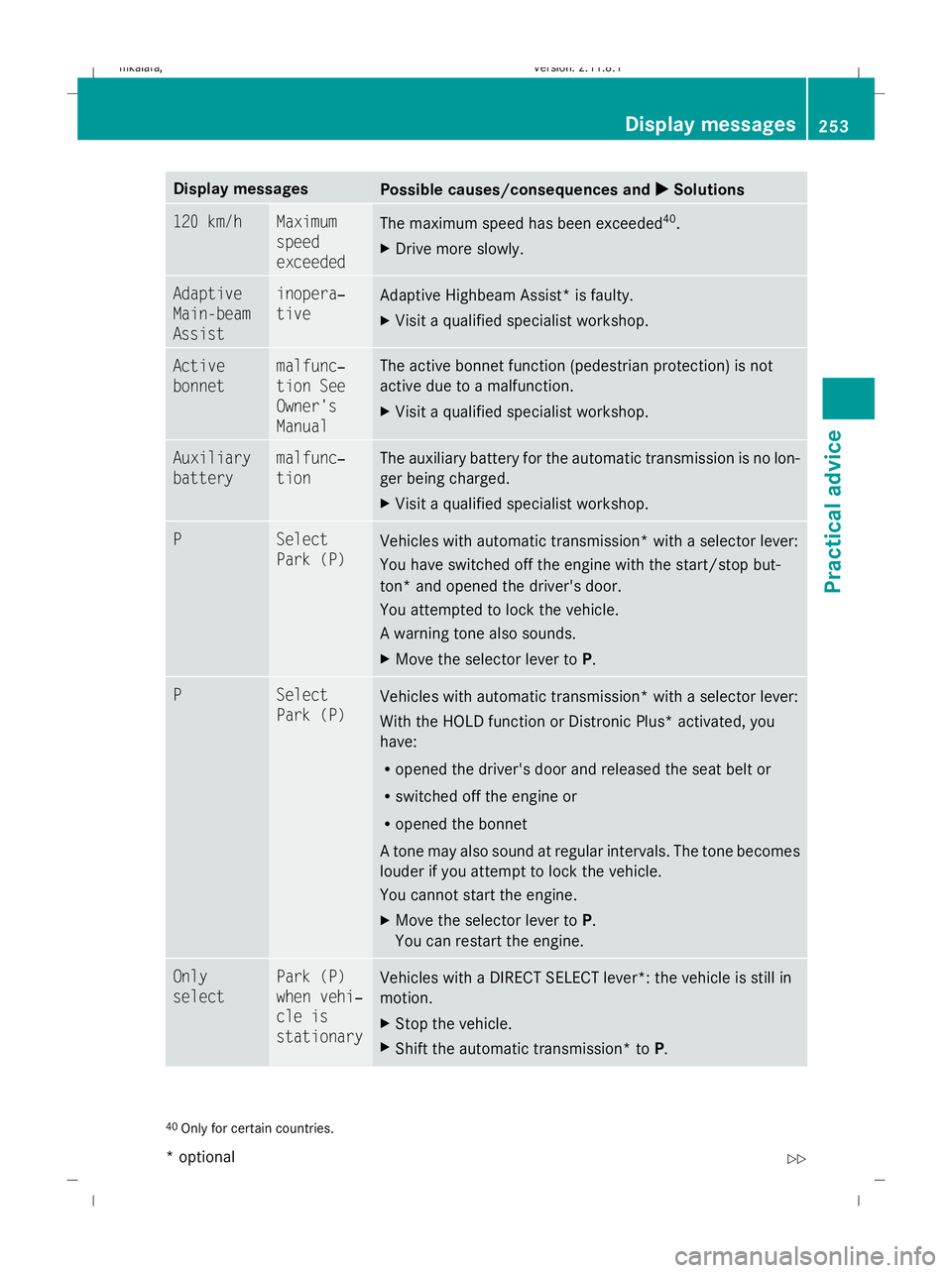
Display messages
Possible causes/consequences and
X
X Solutions 120 km/h Maximum
speed
exceeded
The maximum speed has been exceeded
40
.
X Drive more slowly. Adaptive
Main-beam
Assist inopera‐
tive
Adaptive Highbeam Assist* is faulty.
X
Visit a qualified specialist workshop. Active
bonnet malfunc‐
tion See
Owner's
Manual The active bonnet function (pedestrian protection) is not
active due to a malfunction.
X
Visit a qualified specialist workshop. Auxiliary
battery malfunc‐
tion The auxiliary battery for the automatic transmission is no lon-
ger being charged.
X
Visit a qualified specialist workshop. P Select
Park (P)
Vehicles with automatic transmission* with a selector lever:
You have switched off the engine with the start/stop but-
ton* and opened the driver's door.
You attempted to lock the vehicle.
A warning tone also sounds.
X
Move the selector lever to P.P Select
Park (P)
Vehicles with automatic transmission* with a selector lever:
With the HOLD function or Distronic Plus
*activated, you
have:
R opened the driver's door and released the seat belt or
R switched off the engine or
R opened the bonnet
A tone may also sound at regular intervals. The tone becomes
louder if you attempt to lock the vehicle.
You cannot start the engine.
X Move the selector lever to P.
You can restart the engine. Only
select Park (P)
when vehi‐
cle is
stationary
Vehicles with a DIRECT SELECT lever*: the vehicle is still in
motion.
X
Stop the vehicle.
X Shift the automatic transmission* to P.40
Only for certain countries. Display messages
253Practical advice
* optional
212_AKB; 2; 4, en-GB
mkalafa
,V ersion: 2.11.8.1
2009-05-05T14:17:16+02:00 - Seite 253 Z
Dateiname: 6515346702_buchblock.pdf; erzeugt am 07. May 2009 14:17:08; WK
Page 257 of 373
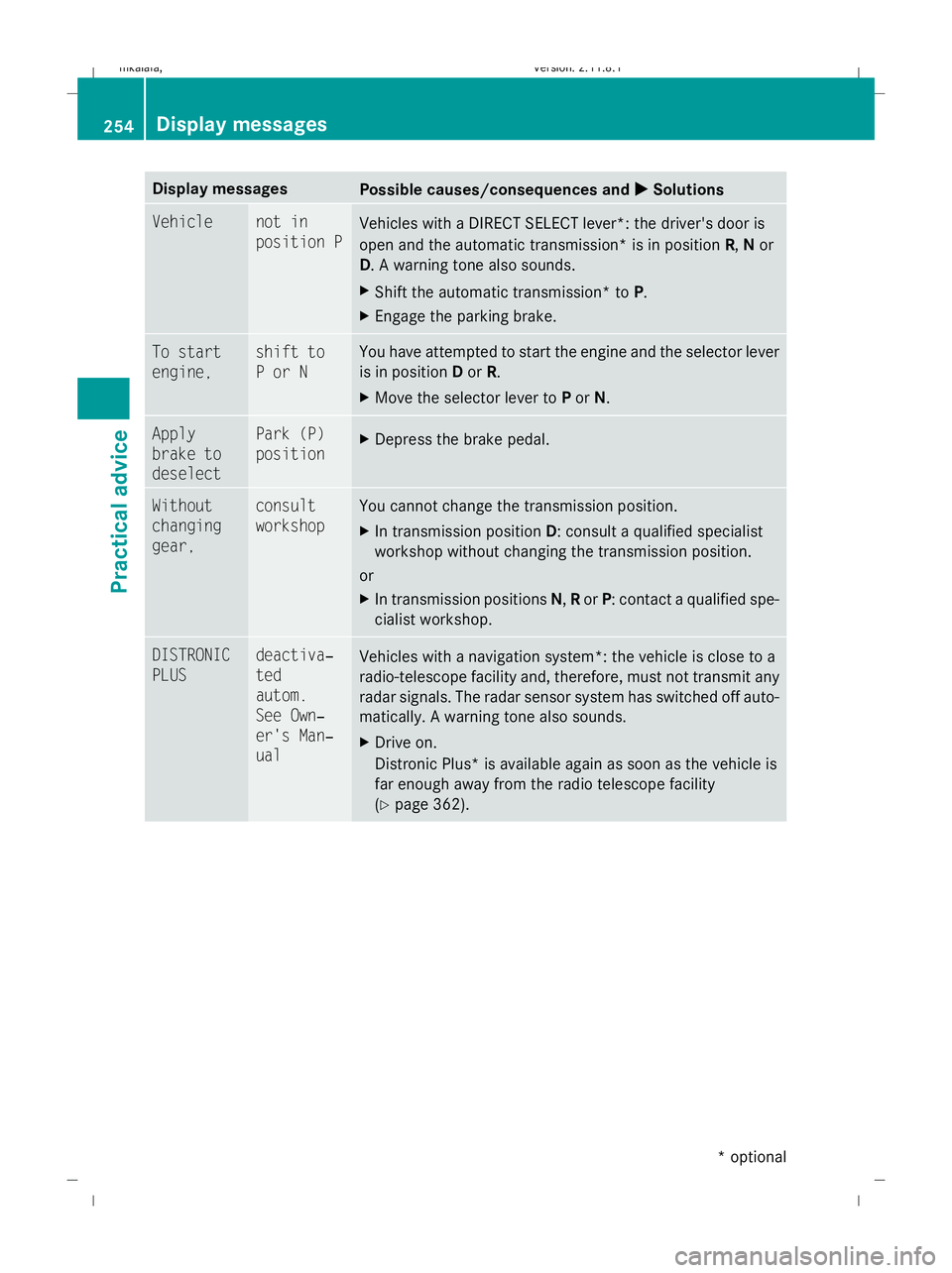
Display messages
Possible causes/consequences and
X
X Solutions Vehicle not in
position P
Vehicles with a DIRECT SELECT lever*: the driver's door is
open and the automatic transmission* is in position
R,Nor
D. A warning tone also sounds.
X Shift the automatic transmission* to P.
X Engage the parking brake. To start
engine, shift to
P or N You have attempted to start the engine and the selector lever
is in position
Dor R.
X Move the selector lever to Por N. Apply
brake to
deselect Park (P)
position
X
Depress the brake pedal. Without
changing
gear, consult
workshop You cannot change the transmission position.
X
In transmission position D: consult a qualified specialist
workshop without changing the transmission position.
or
X In transmission positions N,Ror P: contact a qualified spe-
cialist workshop. DISTRONIC
PLUS deactiva‐
ted
autom.
See Own‐
er's Man‐
ual
Vehicles with a navigation system*: the vehicle is close to a
radio-telescope facility and, therefore, must not transmit any
radar signals. The radar sensor system has switched off auto-
matically. A warning tone also sounds.
X
Drive on.
Distronic Plus* is available again as soon as the vehicle is
far enough away from the radio telescope facility
(Y page 362). 254
Display
messagesPractical advice
* optional
212_AKB; 2; 4, en-GB
mkalafa
,V ersion: 2.11.8.1
2009-05-05T14:17:16+02:00 - Seite 254
Dateiname: 6515346702_buchblock.pdf; erzeugt am 07. May 2009 14:17:08; WK
Page 258 of 373
Display messages
Possible causes/consequences and
X
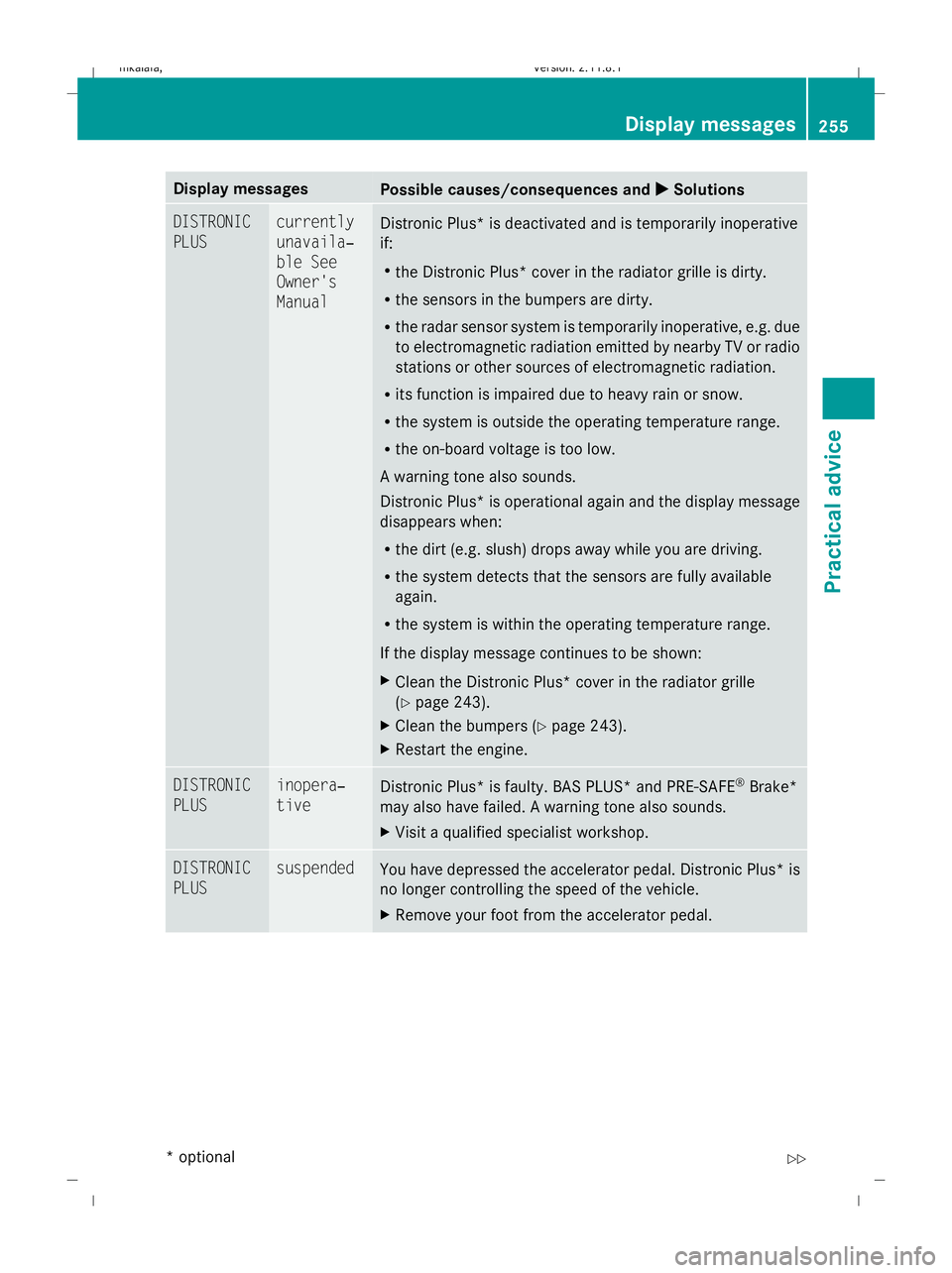
X Solutions DISTRONIC
PLUS currently
unavaila‐
ble See
Owner's
Manual
Distronic Plus* is deactivated and is temporarily inoperative
if:
R
the Distronic Plus* cover in the radiator grille is dirty.
R the sensors in the bumpers are dirty.
R the radar sensor system is temporarily inoperative, e.g. due
to electromagnetic radiation emitted by nearby TV or radio
stations or other sources of electromagnetic radiation.
R its function is impaired due to heavy rain or snow.
R the system is outside the operating temperature range.
R the on-board voltage is too low.
A warning tone also sounds.
Distronic Plus *is operational again and the display message
disappears when:
R the dirt (e.g. slush) drops away while you are driving.
R the system detects that the sensors are fully available
again.
R the system is within the operating temperature range.
If the display message continues to be shown:
X Clean the Distronic Plus* cover in the radiator grille
(Y page 243).
X Clean the bumpers (Y page 243).
X Restart the engine. DISTRONIC
PLUS inopera‐
tive
Distronic Plus* is faulty. BAS PLUS* and PRE-SAFE
®
Brake*
may also have failed. A warning tone also sounds.
X Visit a qualified specialist workshop. DISTRONIC
PLUS suspended
You have depressed the accelerator pedal. Distronic Plus* is
no longer controlling the speed of the vehicle.
X
Remove your foot from the accelerator pedal. Display messages
255Practical advice
* optional
212_AKB; 2; 4, en-GB
mkalafa,
Version: 2.11.8.1 2009-05-05T14:17:16+02:00 - Seite 255 Z
Dateiname: 6515346702_buchblock.pdf; erzeugt am 07. May 2009 14:17:08; WK
Page 259 of 373
Display messages
Possible causes/consequences and
X
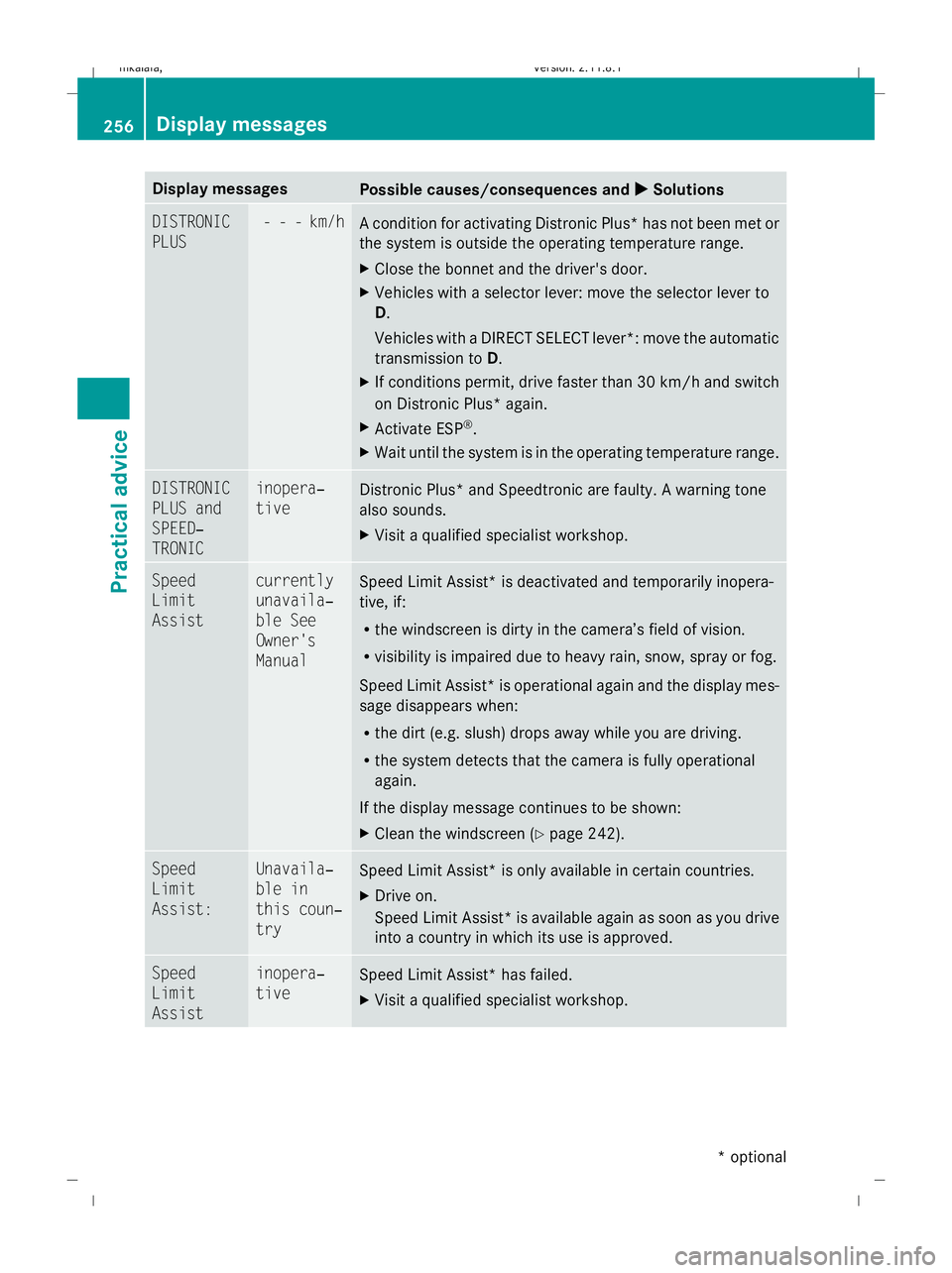
X Solutions DISTRONIC
PLUS - - - km/h
A condition for activating Distronic Plus
*has not been met or
the system is outside the operating temperature range.
X Close the bonnet and the driver's door.
X Vehicles with a selector lever: move the selector lever to
D.
Vehicles with a DIRECT SELECT lever*: move the automatic
transmission to D.
X If conditions permit, drive faster than 30 km/h and switch
on Distronic Plus* again.
X Activate ESP ®
.
X Wait until the system is in the operating temperature range. DISTRONIC
PLUS and
SPEED‐
TRONIC inopera‐
tive
Distronic Plus* and Speedtronic are faulty. A warning tone
also sounds.
X
Visit a qualified specialist workshop. Speed
Limit
Assist currently
unavaila‐
ble See
Owner's
Manual
Speed Limit Assist* is deactivated and temporarily inopera-
tive, if:
R
the windscreen is dirty in the camera’s field of vision.
R visibility is impaired due to heavy rain, snow, spray or fog.
Speed Limit Assist* is operational again and the display mes-
sage disappears when:
R the dirt (e.g. slush) drops away while you are driving.
R the system detects that the camera is fully operational
again.
If the display message continues to be shown:
X Clean the windscreen (Y page 242).Speed
Limit
Assist: Unavaila‐
ble in
this coun‐
try
Speed Limit Assist* is only available in certain countries.
X
Drive on.
Speed Limit Assist *is available again as soon as you drive
into a country in which its use is approved. Speed
Limit
Assist inopera‐
tive
Speed Limit Assist* has failed.
X
Visit a qualified specialist workshop. 256
Display messagesPractical advice
* optional
212_AKB; 2; 4, en-GB
mkalafa,
Version: 2.11.8.1 2009-05-05T14:17:16+02:00 - Seite 256
Dateiname: 6515346702_buchblock.pdf; erzeugt am 07. May 2009 14:17:08; WK
Page 260 of 373
Display messages
Possible causes/consequences and
X
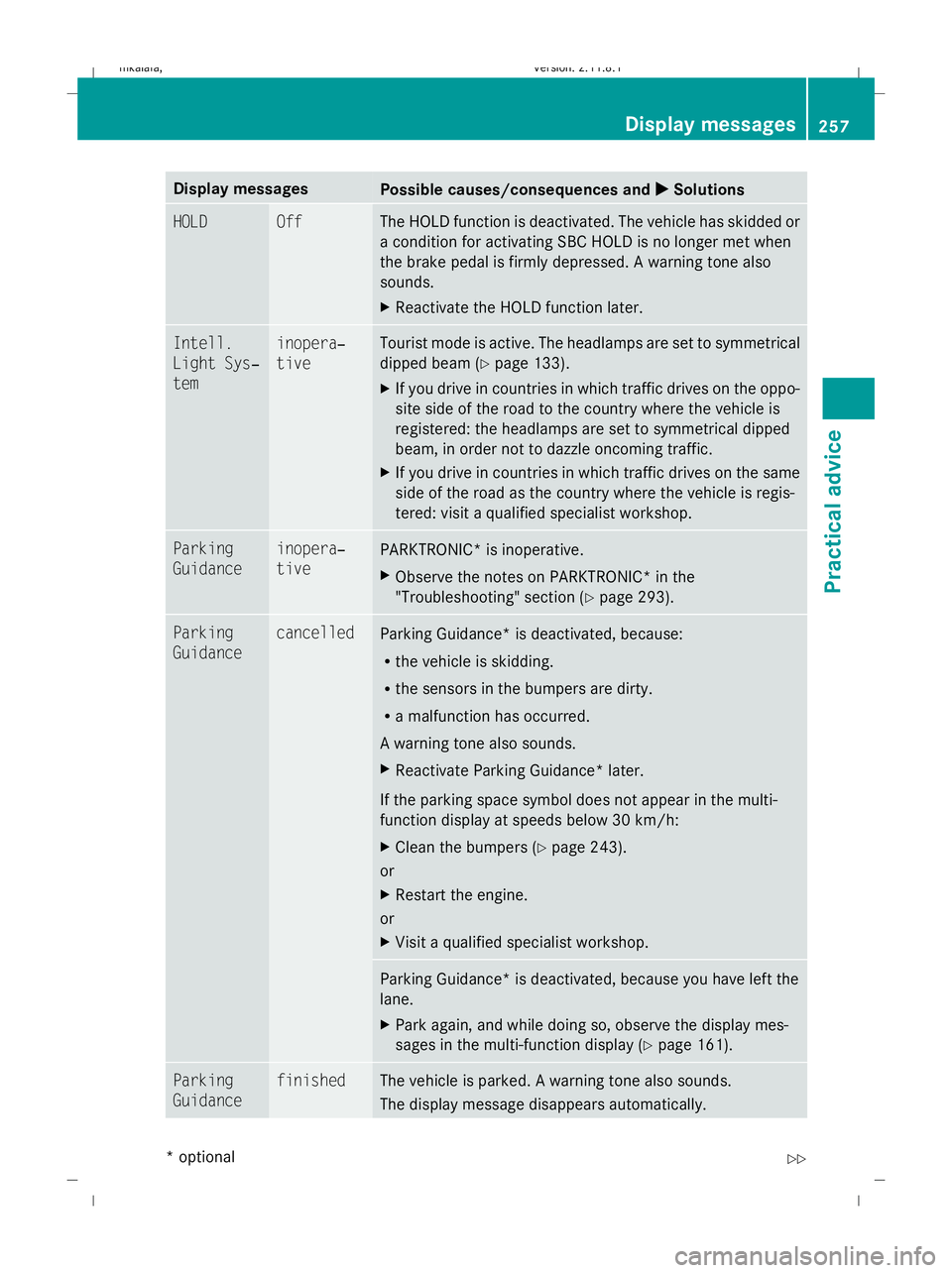
X Solutions HOLD Off The HOLD function is deactivated. The vehicle has skidded or
a condition for activating SBC HOLD is no longer met when
the brake pedal is firmly depressed. A warning tone also
sounds.
X
Reactivate the HOLD function later. Intell.
Light Sys‐
tem inopera‐
tive Tourist mode is active. The headlamps are set to symmetrical
dipped beam (
Ypage 133).
X If you drive in countries in which traffic drives on the oppo-
site side of the road to the country where the vehicle is
registered: the headlamps are set to symmetrical dipped
beam, in order not to dazzle oncoming traffic.
X If you drive in countries in which traffic drives on the same
side of the road as the country where the vehicle is regis-
tered: visit a qualified specialist workshop. Parking
Guidance inopera‐
tive
PARKTRONIC* is inoperative.
X
Observe the notes on PARKTRONIC* in the
"Troubleshooting" section (Y page 293).Parking
Guidance cancelled
Parking Guidance
*is deactivated, because:
R the vehicle is skidding.
R the sensors in the bumpers are dirty.
R a malfunction has occurred.
A warning tone also sounds.
X Reactivate Parking Guidance* later.
If the parking space symbol does not appear in the multi-
function display at speeds below 30 km/h:
X Clean the bumpers (Y page 243).
or
X Restart the engine.
or
X Visit a qualified specialist workshop. Parking Guidance* is deactivated, because you have left the
lane.
X
Park again, and while doing so, observe the display mes-
sages in the multi-function display (Y page 161).Parking
Guidance finished The vehicle is parked. A warning tone also sounds.
The display message disappears automatically. Display messages
257Practical advice
* optional
212_AKB; 2; 4, en-GB
mkalafa,
Version: 2.11.8.1 2009-05-05T14:17:16+02:00 - Seite 257 Z
Dateiname: 6515346702_buchblock.pdf; erzeugt am 07. May 2009 14:17:08; WK
Page 261 of 373
Display messages
Possible causes/consequences and
X
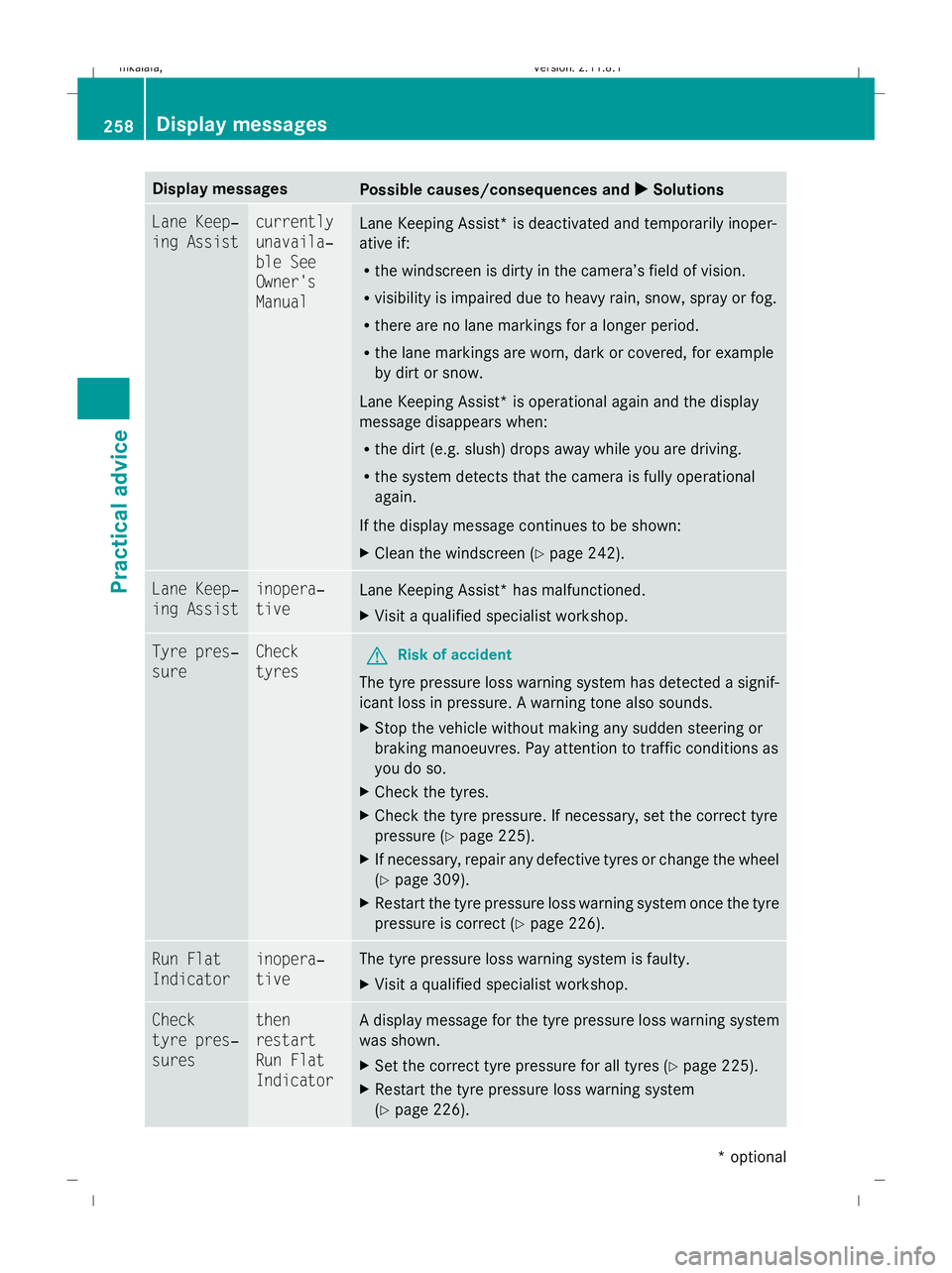
X Solutions Lane Keep‐
ing Assist currently
unavaila‐
ble See
Owner's
Manual
Lane Keeping Assist* is deactivated and temporarily inoper-
ative if:
R
the windscreen is dirty in the camera’s field of vision.
R visibility is impaired due to heavy rain, snow, spray or fog.
R there are no lane markings for a longer period.
R the lane markings are worn, dark or covered, for example
by dirt or snow.
Lane Keeping Assist* is operational again and the display
message disappears when:
R the dirt (e.g. slush) drops away while you are driving.
R the system detects that the camera is fully operational
again.
If the display message continues to be shown:
X Clean the windscreen (Y page 242).Lane Keep‐
ing Assist inopera‐
tive
Lane Keeping Assist* has malfunctioned.
X
Visit a qualified specialist workshop. Tyre pres‐
sure Check
tyres
G
Risk of accident
The tyre pressure loss warning system has detected a signif-
icant loss in pressure. A warning tone also sounds.
X Stop the vehicle without making any sudden steering or
braking manoeuvres. Pay attention to traffic conditions as
you do so.
X Check the tyres.
X Check the tyre pressure. If necessary, set the correct tyre
pressure ( Ypage 225).
X If necessary, repair any defective tyres or change the wheel
(Y page 309).
X Restart the tyre pressure loss warning system once the tyre
pressure is correct (Y page 226).Run Flat
Indicator inopera‐
tive The tyre pressure loss warning system is faulty.
X
Visit a qualified specialist workshop. Check
tyre pres‐
sures then
restart
Run Flat
Indicator A display message for the tyre pressure loss warning system
was shown.
X
Set the correct tyre pressure for all tyres (Y page 225).
X Restart the tyre pressure loss warning system
(Y page 226). 258
Display
messagesPractical advice
* optional
212_AKB; 2; 4, en-GB
mkalafa
,V ersion: 2.11.8.1
2009-05-05T14:17:16+02:00 - Seite 258
Dateiname: 6515346702_buchblock.pdf; erzeugt am 07. May 2009 14:17:08; WK
Page 262 of 373
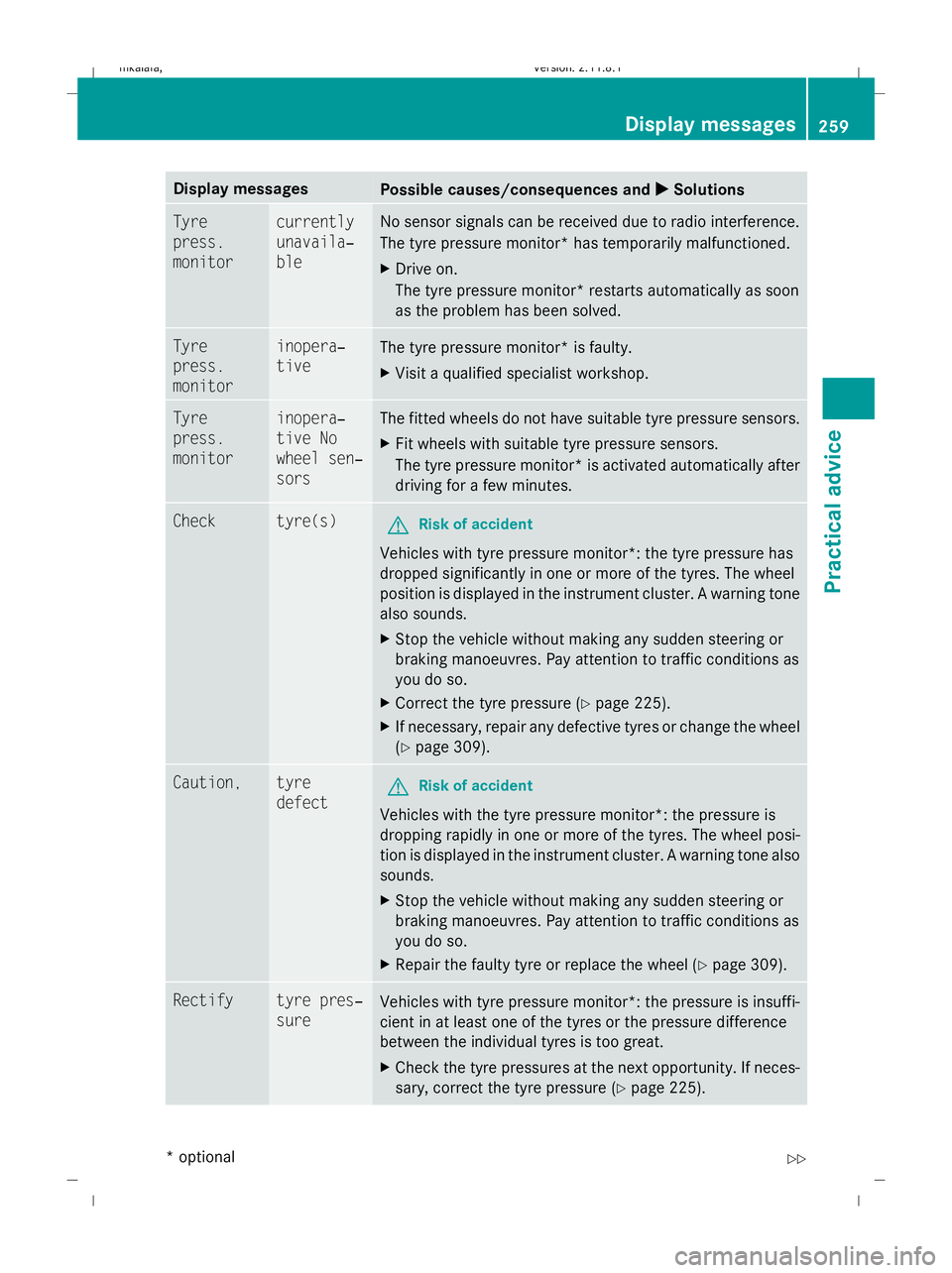
Display messages
Possible causes/consequences and
X
X Solutions Tyre
press.
monitor currently
unavaila‐
ble No sensor signals can be received due to radio interference.
The tyre pressure monitor* has temporarily malfunctioned.
X
Drive on.
The tyre pressure monitor* restarts automatically as soon
as the problem has been solved. Tyre
press.
monitor inopera‐
tive
The tyre pressure monitor* is faulty.
X
Visit a qualified specialist workshop. Tyre
press.
monitor inopera‐
tive No
wheel sen‐
sors The fitted wheels do not have suitable tyre pressure sensors.
X
Fit wheels with suitable tyre pressure sensors.
The tyre pressure monitor* is activated automatically after
driving for a few minutes. Check tyre(s)
G
Risk of accident
Vehicles with tyre pressure monitor*: the tyre pressure has
dropped significantly in one or more of the tyres. The wheel
position is displayed in the instrument cluster. A warning tone
also sounds.
X Stop the vehicle without making any sudden steering or
braking manoeuvres. Pay attention to traffic conditions as
you do so.
X Correct the tyre pressure (Y page 225).
X If necessary, repair any defective tyres or change the wheel
(Y page 309). Caution, tyre
defect
G
Risk of accident
Vehicles with the tyre pressure monitor*: the pressure is
dropping rapidly in one or more of the tyres. The wheel posi-
tion is displayed in the instrument cluster. A warning tone also
sounds.
X Stop the vehicle without making any sudden steering or
braking manoeuvres. Pay attention to traffic conditions as
you do so.
X Repair the faulty tyre or replace the wheel ( Ypage 309). Rectify tyre pres‐
sure
Vehicles with tyre pressure monitor*: the pressure is insuffi-
cient in at least one of the tyres or the pressure difference
between the individual tyres is too great.
X
Check the tyre pressures at the next opportunity. If neces-
sary, correct the tyre pressure (Y page 225). Display
messages
259Practical advice
* optional
212_AKB; 2; 4, en-GB
mkalafa
,V ersion: 2.11.8.1
2009-05-05T14:17:16+02:00 - Seite 259 Z
Dateiname: 6515346702_buchblock.pdf; erzeugt am 07. May 2009 14:17:08; WK
Page 263 of 373
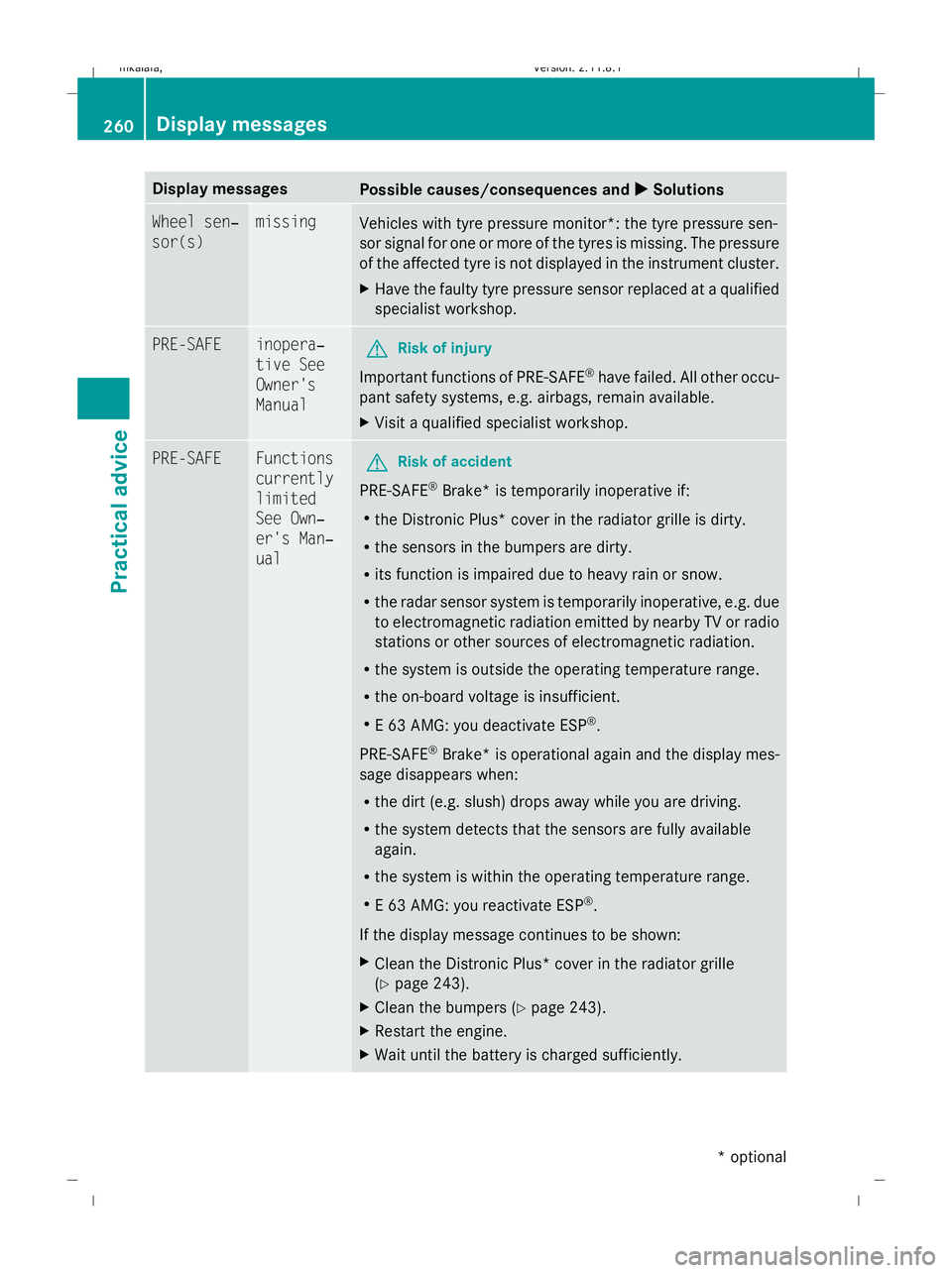
Display messages
Possible causes/consequences and
X
X Solutions Wheel sen‐
sor(s) missing
Vehicles with tyre pressure monitor*: the tyre pressure sen-
sor signal for one or more of the tyres is missing. The pressure
of the affected tyre is not displayed in the instrument cluster.
X
Have the faulty tyre pressure sensor replaced at a qualified
specialist workshop. PRE-SAFE inopera‐
tive See
Owner's
Manual
G
Risk of injury
Important functions of PRE-SAFE ®
have failed. All other occu-
pant safety systems, e.g. airbags, remain available.
X Visit a qualified specialist workshop. PRE-SAFE Functions
currently
limited
See Own‐
er's Man‐
ual
G
Risk of accident
PRE-SAFE ®
Brake* is temporarily inoperative if:
R the Distronic Plus* cover in the radiator grille is dirty.
R the sensors in the bumpers are dirty.
R its function is impaired due to heavy rain or snow.
R the radar sensor system is temporarily inoperative, e.g. due
to electromagnetic radiation emitted by nearby TV or radio
stations or other sources of electromagnetic radiation.
R the system is outside the operating temperature range.
R the on-board voltage is insufficient.
R E 63 AMG: you deactivate ESP ®
.
PRE-SAFE ®
Brake *is operational again and the display mes-
sage disappears when:
R the dirt (e.g. slush) drops away while you are driving.
R the system detects that the sensors are fully available
again.
R the system is within the operating temperature range.
R E 63 AMG: you reactivate ESP ®
.
If the display message continues to be shown:
X Clean the Distronic Plus* cover in the radiator grille
(Y page 243).
X Clean the bumpers (Y page 243).
X Restart the engine.
X Wait until the battery is charged sufficiently. 260
Display messagesPractical advice
* optional
212_AKB; 2; 4, en-GB
mkalafa,
Version: 2.11.8.1 2009-05-05T14:17:16+02:00 - Seite 260
Dateiname: 6515346702_buchblock.pdf; erzeugt am 07. May 2009 14:17:09; WK