maintenance MERCEDES-BENZ E-CLASS ESTATE 2011 Owners Manual
[x] Cancel search | Manufacturer: MERCEDES-BENZ, Model Year: 2011, Model line: E-CLASS ESTATE, Model: MERCEDES-BENZ E-CLASS ESTATE 2011Pages: 409, PDF Size: 10.47 MB
Page 6 of 409
Index
....................................................... 4Introduction
......................................... 23 At
ag lance ........................................... 27 Safety
................................................... 41 Opening and closing
...........................81 Seats, steering wheel and mirrors
..103 Lights and windscreen wipers
.........121 Climate control
................................. 135 Driving and parking
..........................153 On-board computer and displays
....229 Stowing and features
.......................289 Maintenance and care
......................319 Breakdown assistance
.....................335 Wheels and tyres
.............................. 361 Technical data
................................... 379 Contents
3
Page 17 of 409
Driving abroa
d............................... 122
Foglamps ....................................... 123
Foglamps (extended range) ...........126
Hazard warning lamps ...................125
Headlamp flasher ........................... 125
Headlamp range ............................ 124
Ligh tswitc h................................... 122
Main-beam headlamps ................... 125
Motorway mode ............................. 126
Parking lamps ................................ 122
Rea rfoglamp ................................. 123
Setting the ambient lighting
brightness (on-board computer) ....245
Switching Adaptive Highbeam
Assist on/off ................................. 245
Switching the daytime driving
lights on/off (on-board computer) .244
Switching the daytime driving
lights on/off (switch) .....................123
Switching the exterio rlighting
delayed switch-off on/off (on-
board computer )............................ 245
Switching the surround lighting
on/off (on-board computer) ..........245
Turn signals ................................... 124
see Changing bulbs
see Interior lighting
Light sensor (display message) .......262
LIM indicator lamp Cruise control ................................ 181
DISTRONI CPLUS ........................... 186
Variabl eSPEEDTRONIC .................183
Limiting the speed
see SPEEDTRONIC
Loading guidelines ............................290
Loading sill protector ........................ 306
Locking see Centra llocking
Locking (doors)
Automatic ........................................ 89
Emergency locking ........................... 90
From inside (central locking but-
ton) .................................................. 89
Locking centrally
see Centra llocking
Locking verification signal (on-
board computer) ............................... 247
Luggage compartment cover ...........299Luggage compartment enlarge-
ment
................................................... 296
Luggage compartment floor ............305
Luggage holde r(EASY-PACK load-
securing kit) ...................................... .304
Luggage net ....................................... 293
Lumbar support Adjusting ....................................... 110
Adjusting the 4-way lumba rsup-
por t................................................ 110
Luxu ry head restraint .......................107 M
M+S tyres ........................................... 364
Main-beam headlamps Changing bulbs .............................. 131
Display message ............................ 260
Switching Adaptive Highbeam
Assist on/off ................................. 127
Switching on/off ........................... 125
Maintenance
see ASSYST PLUS service interval
display
Manual transmission
Engaging revers egear ................... 164
Gea rlever ...................................... 163
Pulling away ................................... 157
Shifting to neutra l.......................... 164
Shift recommendatio n................... 164
Starting the engine ........................156
Massage function (PULSE) ...............110
Matt finish (cleaning instructions) ..328
Memory card (audio) .........................238
Memory function ............................... 119
Mercedes-Benz Service Centre see Qualified specialist workshop
Message memory (on-board com-
puter) ................................................. .253
Messages see Display messages
Mirrors
see Exterior mirrors
see Rear-view mirror
see Vanity mirror
Mobile phone
Frequencies ................................... 381
Installatio n..................................... 38114
Index
Page 26 of 409
Protection of the environment
Notes
H
Environmental note
Daimler's declared policy is one of compre-
hensive environmental protection.
Our objectives are to use the natural resour-
ces which form the basis of our existence on
this planet sparingly and in a manner which
takes the requirements of both nature and
humanity into consideration.
You too can help to protect the environment
by operating your vehicle in an environmen-
tally-responsible manner.
Fuel consumption and the rate of engine,
transmission, brake and tyre wear depend on
the following factors:
R operating conditions of your vehicle
R your personal driving style
You can influence both factors. Therefore,
please bear the following in mind:
Operating conditions:
R avoid short trips, as these increase fuel
consumption.
R observe the correct tyre pressure.
R do not carry any unnecessary weight in the
vehicle.
R monitor the vehicle's fuel consumption.
R remove the roof rack once you no longer
need it.
R a regularly serviced vehicle will contribute
to environmental protection. You should
therefore adhere to the service intervals.
R all maintenance work should be carried out
at a qualified specialist workshop.
Personal driving style:
R do not depress the accelerator pedal when
starting the engine.
R do not warm up the engine when the vehicle
is stationary.
R drive carefully and maintain a safe distance
from the vehicle in front.
R avoid frequent, sudden acceleration. R
change gear in good time and use each gear
only up to Ôof its maximum engine speed.
R switch off the engine in stationary traffic. Returning an end-of-life vehicle
Mercedes-Benz will take back your
Mercedes-Benz to dispose of it in an environ-
mentally responsible manner, in accordance
with the European Union (EU) End of Life
Vehicles Directive.
The End of Life Vehicles Directive applies to
vehicles with a gross vehicle weight of up to
3.5 t, in accordance with national regulations.
For several years, Mercedes-Benz has been
meeting all the legal requirements for a
design which allows for recycling and re-use.
There is a network of return points and dis-
assembly plants which can recycle your vehi-
cle in an environmentally-responsible man-
ner. The options for recycling vehicles and
parts are constantly being developed and
improved. This means that your Mercedes-
Benz will also continue to meet even the
increased recycling quotas in the future in
good time. You can obtain further information
from your national Mercedes-Benz homepage
or your national hotline number. Vehicle equipment
This Owner's Manual describes all models
and all standard and optional equipment of
your vehicle available at the time of publica-
tion of the Owner's Manual. Country-specific
deviations are possible. Please note that your
vehicle may not be equipped with all features
described. This is also the case for systems
and functions relevant to safety. The equip-
ment in your vehicle may therefore differ from
that shown in the descriptions and illustra-
tions.
All the systems found in your vehicle are listed
in the original purchase agreement of your
vehicle. Introduction
23 Z
Page 28 of 409
ponents and interference to your compo-
nents caused by other electrical/electronic
components can be largely prevented.
Diagnostics connection
G
WARNING
If you connect equipment to the diagnostics
connection, it can affect the operation of the
vehicle systems .This can impair the operating
safety of your vehicle while driving. There is a
risk of accident.
Do not connect any equipment to the diag-
nostics connection. G
WARNING
Loose equipment or equipment cables that
are connected to the diagnostics connection
can obstruct the area around the pedals. The
equipment or the cables could get between
the pedals in the event of sudden braking or
acceleration. As a result, the movement of the
pedals may be impaired. There is a risk of
accident.
Do not attach any equipment or cables in the
driver footwell.
! If the engine is switched off and equip-
ment on the diagnostics connection is
used, the starter battery may discharge.
The diagnostics connection is only intended
for the connection of diagnostic equipment at
a qualified specialist workshop.
Connecting equipment to the diagnostics
connection can, for example, lead to emis-
sions monitoring information being reset.
This may lead to the vehicle failing to meet
the requirements of the next emissions test
during the main inspection. Qualified specialist workshop
Aq ualified specialist workshop has the nec-
essary specialist knowledge, tools and quali-
fications to correctl ycarry out the work required on your vehicle
.This is especially the
case for work relevant to safety.
Observe the information in the Service Book-
let.
Always have the following work carried out at
a qualified specialist workshop:
R work relevant to safety
R service and maintenance work
R repair work
R alterations, installation work and modifica-
tions
R work on electronic components
Mercedes-Ben zrecommends that you use a
Mercedes-Benz Service Centre. Vehicle registration
Mercedes-Benz may ask its Service Centres
to carry out technical inspections on certain
vehicles to improve their quality or safety.
If you did not purchase your vehicle from an
authorised specialist dealer and your vehicle
has never been inspected at a Mercedes-
BenzS ervice Centre, it is possible that your
vehicle is not registered in your name with
Mercedes-Benz. Mercedes-Benz can only
infor myou about vehicle checks if it has your
registration data.
It is advisable to register your vehicle with a
Mercedes-Benz Service Centre.
InformM ercedes-Benza s soon as possible
abouta ny change in address or vehicle own-
ership. Correc
tuse G
WARNING
Various warning stickers are affixed to your
vehicle. Their purpose is to draw your atten-
tion, and the attention of others, to various
dangers. Therefore, do not remove any warn-
ing stickers unless the sticker clearly states
that you may do so. Introduction
25 Z
Page 233 of 409
Useful information
i This Owner's Manual describes all models
and all standard and optional equipment
available to your vehicle at the time of pub-
lication of the Owner's Manual. Country-
specific deviations are possible. Please
note that your vehicle may not be equipped
with all features described. This also
applies to safety-relevan tsystems and
functions.
i Please read the information on qualified
specialist workshops (Y page 25).Important safety notes
You will find an illustration of the instrument
cluster in the "At a glance" section
(Y page 30). G
WARNING
Only use the on-board computer when road
and traffic conditions permit .You would oth-
erwise be distracted and unable to concen-
trate properly on driving, and could cause an
accident. G
WARNING
No messages will be displayed if either the
instrument cluster or the multifunction dis-
play is inoperative.
As a result, you will not be able to see infor-
mation about your driving conditions, such as
speed, outside temperature, warning and indi-
cator lamps, display messages or system fail-
ures. Driving characteristics may be impaired.
Adjust your driving style and vehicle speed
accordingly.
Contact a qualified specialist workshop
immediately. G
WARNING
The on-board computer only records and dis-
plays malfunctions and warnings from certain
systems. For this reason, you should always make sure that your vehicle is safe to use. You
could otherwise cause an accident by driving
an unsafe vehicle.
G
WARNING
The operating safety of your vehicle could be
impaired if maintenance work is carried out
incorrectly. This could cause you to lose con-
trol of your vehicle and cause an accident.
Moreover, the safety systems may no longer
be able to protect you or others as they are
designed to do.
Always have service work carried out at a
qualified specialist workshop. Displays and operation
Coolant temperature gauge
The coolant temperature gauge is in the
instrument cluster on the right-hand side.
The reading may rise up to 120 †undernor-
mal driving conditions if the coolant has been
filled correctly.
At high outside temperatures and when driv-
ing uphill, the coolant temperature may rise
to the end of the scale. Rev counter
The red band in the rev counter indicates the
engine's overrevving range.
! Do not drive in the overrevving range.
Doing so will damage the engine.
The fuel supply is interrupted to protec tthe
engine when the red band is reached. Outside temperature display
The outside temperature displayi s in the mul-
tifunction display (Y page 232). G
WARNING
At temperatures just above freezing point, the
street may be icy, especially in wooded areas 230
Displays and operationOn-board computer and displays
Page 322 of 409
Useful information
............................320
Engine compartment ........................320
Maintenance ...................................... 325
Care .................................................... 326 319Maintenance and care
Page 323 of 409
Useful information
i This Owner's Manual describes all models
and all standard and optional equipment
available to your vehicle at the time of pub-
lication of the Owner's Manual. Country-
specific deviations are possible. Please
note that your vehicle may not be equipped
with all features described. This also
applies to safety-relevan tsystems and
functions.
i Please read the information on qualified
specialist workshops (Y page 25).Engine compartment
Bonnet
Active bonnet (pedestrian protection) Operating principle
i The active bonne tis only available in cer-
tain countries. It is available for all models,
except for AMG vehicles.
The active bonnet can reduce the risk of injury
to pedestrians in certain accident situations.
Raising the active bonnet increases the clear-
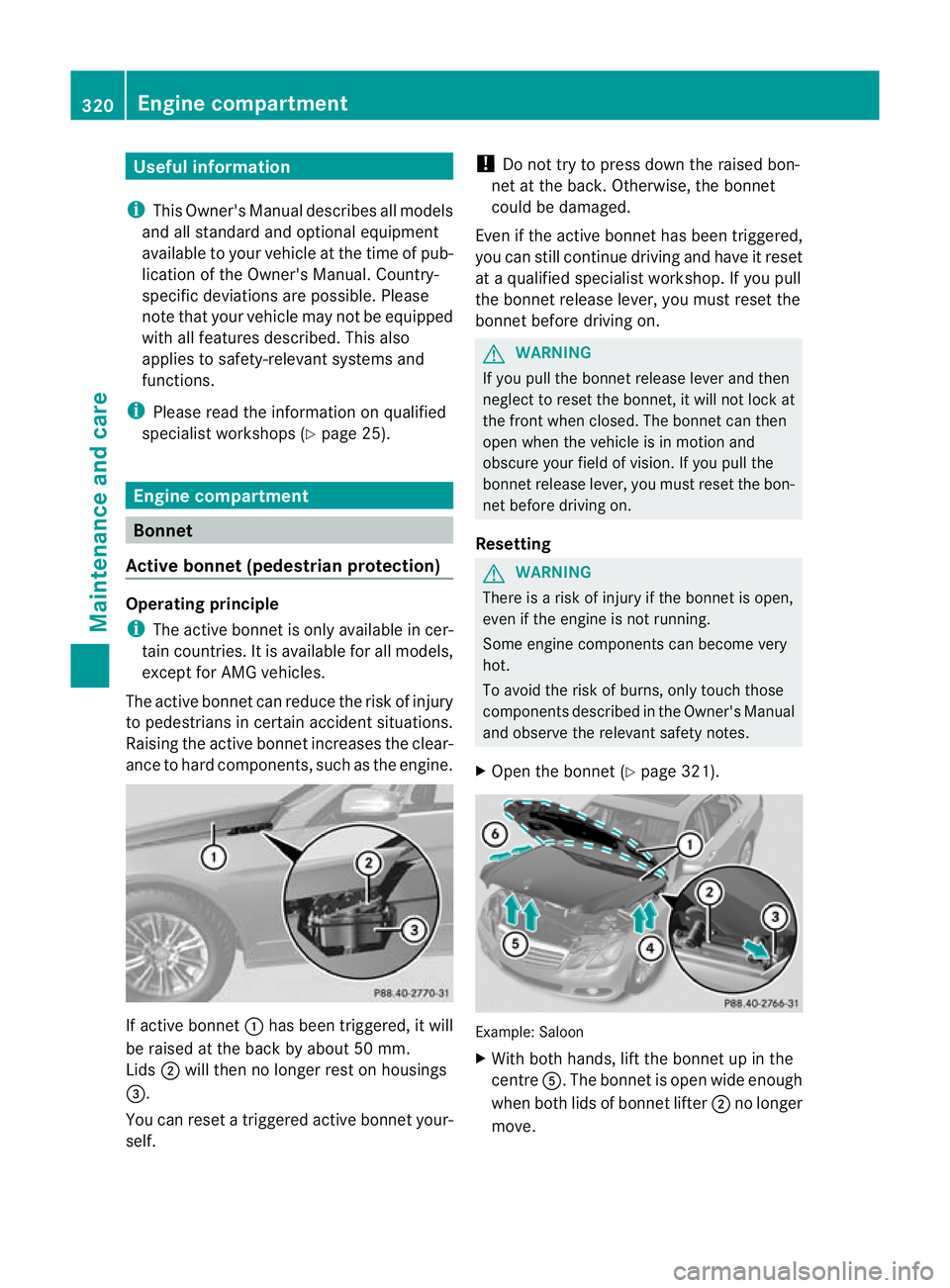
ance to hard components, such as the engine. If active bonnet
:has been triggered, it will
be raised at the back by about5 0mm.
Lids ;will then no longer rest on housings
=.
You can reset a triggere dactive bonne tyour-
self. !
Do not try to press down the raised bon-
net at the back. Otherwise, the bonnet
could be damaged.
Even if the active bonnet has been triggered,
you can still continue driving and have it reset
at a qualified specialist workshop. If you pull
the bonnet release lever, you must reset the
bonnet before driving on. G
WARNING
If you pull the bonnet release lever and then
neglect to reset the bonnet, it will not lock at
the front when closed. The bonnet can then
open when the vehicle is in motion and
obscure your field of vision. If you pull the
bonnet release lever, you must reset the bon-
net before driving on.
Resetting G
WARNING
There is a risk of injury if the bonnet is open,
even if the engine is not running.
Some engine components can become very
hot.
To avoid the risk of burns, only touch those
components described in the Owner's Manual
and observe the relevant safety notes.
X Open the bonnet (Y page 321). Example: Saloon
X
With both hands, lift the bonnet up in the
centre A.The bonnet is open wide enough
when both lids of bonnet lifter ;no longer
move. 320
Engine compartmentMaintenance and care
Page 324 of 409
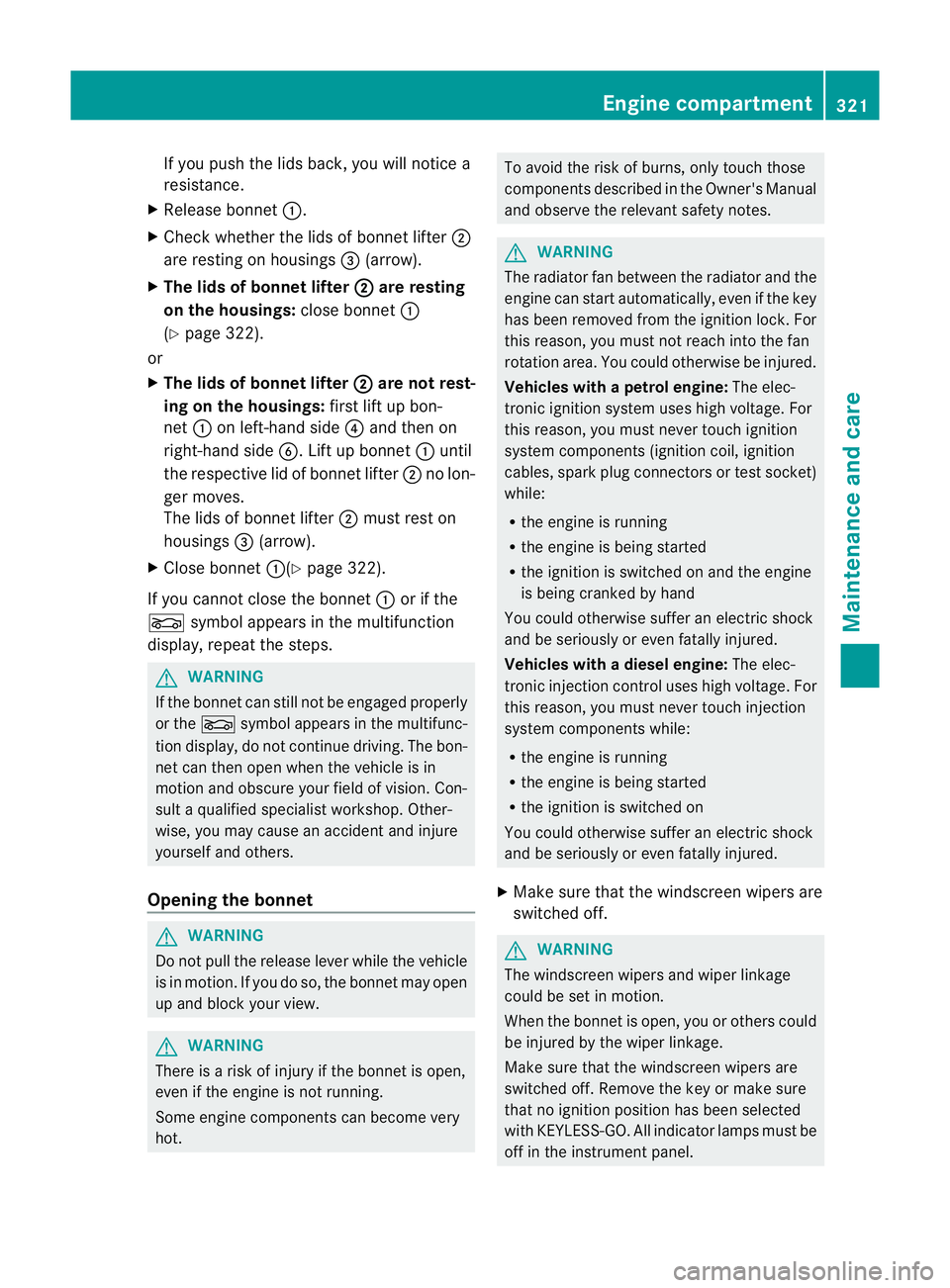
If you push the lids back, you will notice a
resistance.
X Release bonnet :.
X Check whether the lids of bonnet lifter ;
are resting on housings =(arrow).
X The lids of bonnet lifter ; are resting
on the housings: close bonnet:
(Y page 322).
or
X The lids of bonnet lifter ; are not rest-
ing on the housings: first lift up bon-
net :on left-hand side ?and then on
right-hand side B. Lift up bonnet :until
the respective lid of bonnet lifter ;no lon-
ger moves.
The lids of bonnet lifter ;must rest on
housings =(arrow).
X Close bonnet :(Ypage 322).
If you cannot close the bonnet :or if the
L symbol appears in the multifunction
display, repeatt he steps. G
WARNING
If the bonnet can still not be engaged properly
or the Lsymbol appears in the multifunc-
tion display, do not continue driving. The bon-
net can then open when the vehicle is in
motion and obscure your field of vision. Con-
sult a qualified specialist workshop. Other-
wise, you may cause an accident and injure
yourself and others.
Opening the bonnet G
WARNING
Do not pull the release lever while the vehicle
is in motion. If you do so, the bonnet may open
up and block your view. G
WARNING
There is a risk of injury if the bonnet is open,
even if the engine is not running.
Some engine components can become very
hot. To avoid the risk of burns, only touch those
components described in the Owner's Manual
and observe the relevant safety notes.
G
WARNING
The radiator fan between the radiator and the
engine can start automatically, even if the key
has been removed from the ignition lock. For
this reason, you must not reach into the fan
rotation area. You could otherwise be injured.
Vehicles with apetrol engine: The elec-
tronic ignitio nsystem uses high voltage. For
this reason, you mus tnever touch ignition
system components (ignition coil, ignition
cables, spark plug connectors or test socket)
while:
R the engine is running
R the engine is being started
R the ignition is switched on and the engine
is being cranked by hand
You could otherwise suffer an electric shock
and be seriously or even fatally injured.
Vehicles with adiesel engine: The elec-
tronic injection control uses high voltage. For
this reason, you must never touch injection
system components while:
R the engine is running
R the engine is being started
R the ignition is switched on
You could otherwise suffer an electric shock
and be seriously or even fatally injured.
X Make sure that the windscreen wipers are
switched off. G
WARNING
The windscreen wipers and wiper linkage
could be set in motion.
When the bonnet is open, you or others could
be injured by the wiper linkage.
Make sure that the windscreen wipers are
switched off. Remove the key or make sure
that no ignition position has been selected
with KEYLESS-GO. All indicator lamps must be
off in the instrument panel. Engine compartment
321Maintenance and care Z
Page 325 of 409
X
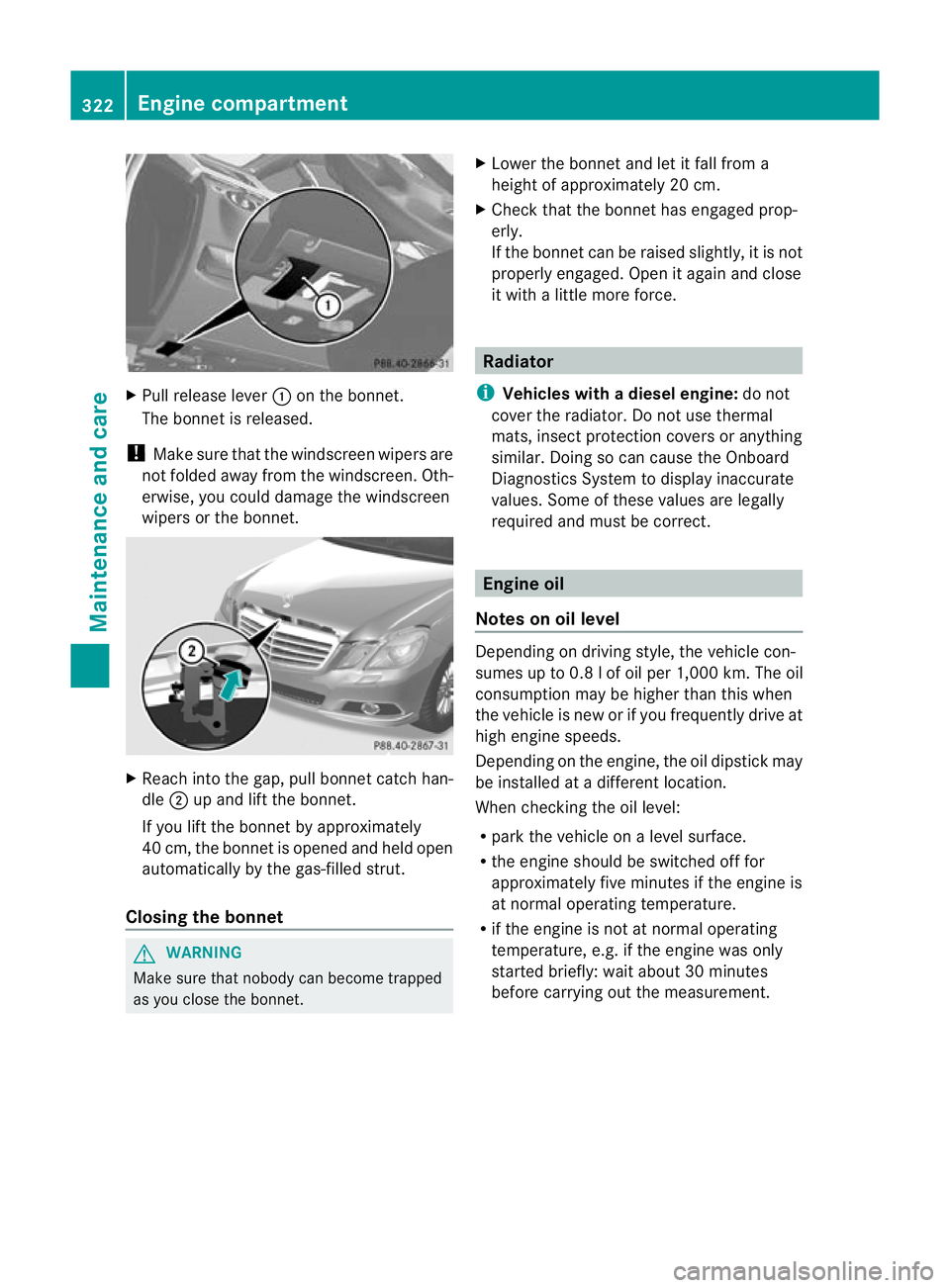
Pull release lever :on the bonnet.
The bonnet is released.
! Make sure that the windscreen wipers are
not folded away from the windscreen .Oth-
erwise, you could damage the windscreen
wipers or the bonnet. X
Reach into the gap, pull bonnet catch han-
dle ;up and lift the bonnet.
If you lift the bonnet by approximately
40 cm, the bonnet is opened and held open
automatically by the gas-filled strut.
Closing the bonnet G
WARNING
Make sure tha tnobody can become trapped
as you close the bonnet. X
Lower the bonnet and let it fall from a
height of approximately 20 cm.
X Check that the bonnet has engaged prop-
erly.
If the bonnet can be raised slightly, it is not
properly engaged. Open it again and close
it with a little more force. Radiator
i Vehicles with adiesel engine: do not
cover the radiator. Do not use thermal
mats, insect protection covers or anything
similar. Doing so can cause the Onboard
Diagnostics System to display inaccurate
values. Some of these values are legally
required and must be correct. Engine oil
Notes on oil level Depending on driving style, the vehicle con-
sumes up to 0.
8lof oil per 1,000 km .The oil
consumption may be higher than this when
the vehicle is new or if you frequently drive at
high engine speeds.
Depending on the engine, the oil dipstick may
be installed at a different location.
When checking the oil level:
R park the vehicle on a level surface.
R the engine should be switched off for
approximately five minutes if the engine is
at normal operating temperature.
R if the engine is not at normal operating
temperature, e.g. if the engine was only
started briefly: wait about 30 minutes
before carrying out the measurement. 322
Engine compartmentMaintenance and care
Page 326 of 409
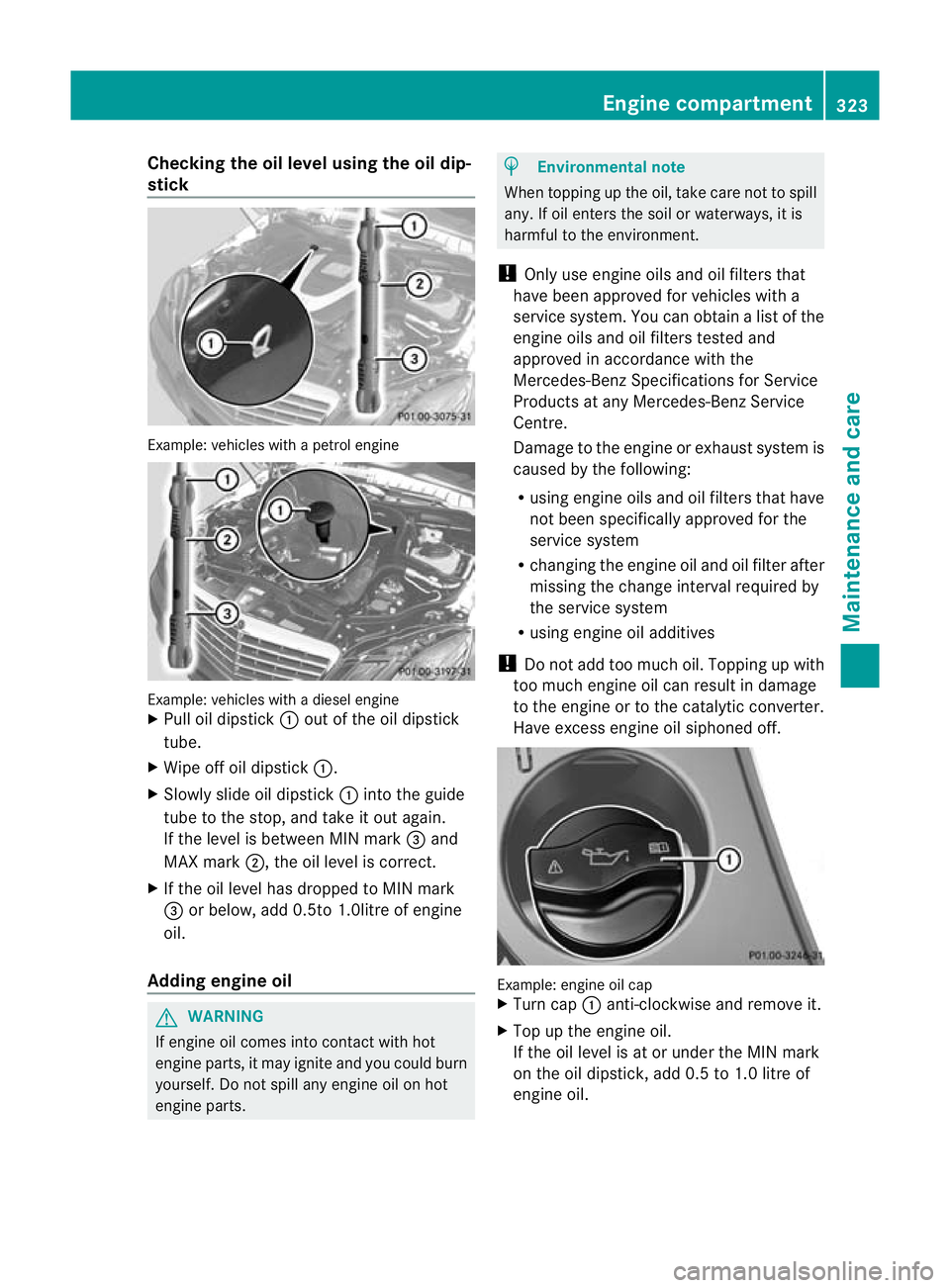
Checking the oil level using the oil dip-
stick Example
:vehicles with a petrol engine Example: vehicles with a diesel engine
X
Pull oil dipstick :out of the oil dipstick
tube.
X Wipe off oil dipstick :.
X Slowly slide oil dipstick :into the guide
tube to the stop, and take it out again.
If the level is between MIN mark =and
MAX mark ;, the oil level is correct.
X If the oil level has dropped to MIN mark
= or below, add 0.5to 1.0litre of engine
oil.
Adding engine oil G
WARNING
If engine oil comes into contact with hot
engine parts, it may ignite and you could burn
yourself. Do not spill any engine oil on hot
engine parts. H
Environmental note
When topping up the oil, take care not to spill
any. If oil enters the soil or waterways, it is
harmful to the environment.
! Only use engine oils and oil filters that
have been approved for vehicles with a
service system. You can obtain a list of the
engine oils and oil filters tested and
approved in accordance with the
Mercedes-Benz Specifications for Service
Products at any Mercedes-Benz Service
Centre.
Damage to the engine or exhaust system is
caused by the following:
R using engine oils and oil filters that have
not been specifically approved for the
service system
R changing the engine oil and oil filter after
missing the change interval required by
the service system
R using engine oil additives
! Do not add too much oil. Topping up with
too much engine oil can result in damage
to the engine or to the catalytic converter.
Have excess engine oil siphoned off. Example: engine oil cap
X
Turn cap :anti-clockwise and remove it.
X Top up the engine oil.
If the oil level is at or under the MIN mark
on the oil dipstick, add 0.5 to 1.0 litre of
engine oil. Engine compartment
323Maintenance and care Z