ABS MERCEDES-BENZ E-CLASS ESTATE 2015 User Guide
[x] Cancel search | Manufacturer: MERCEDES-BENZ, Model Year: 2015, Model line: E-CLASS ESTATE, Model: MERCEDES-BENZ E-CLASS ESTATE 2015Pages: 497, PDF Size: 16.23 MB
Page 74 of 497
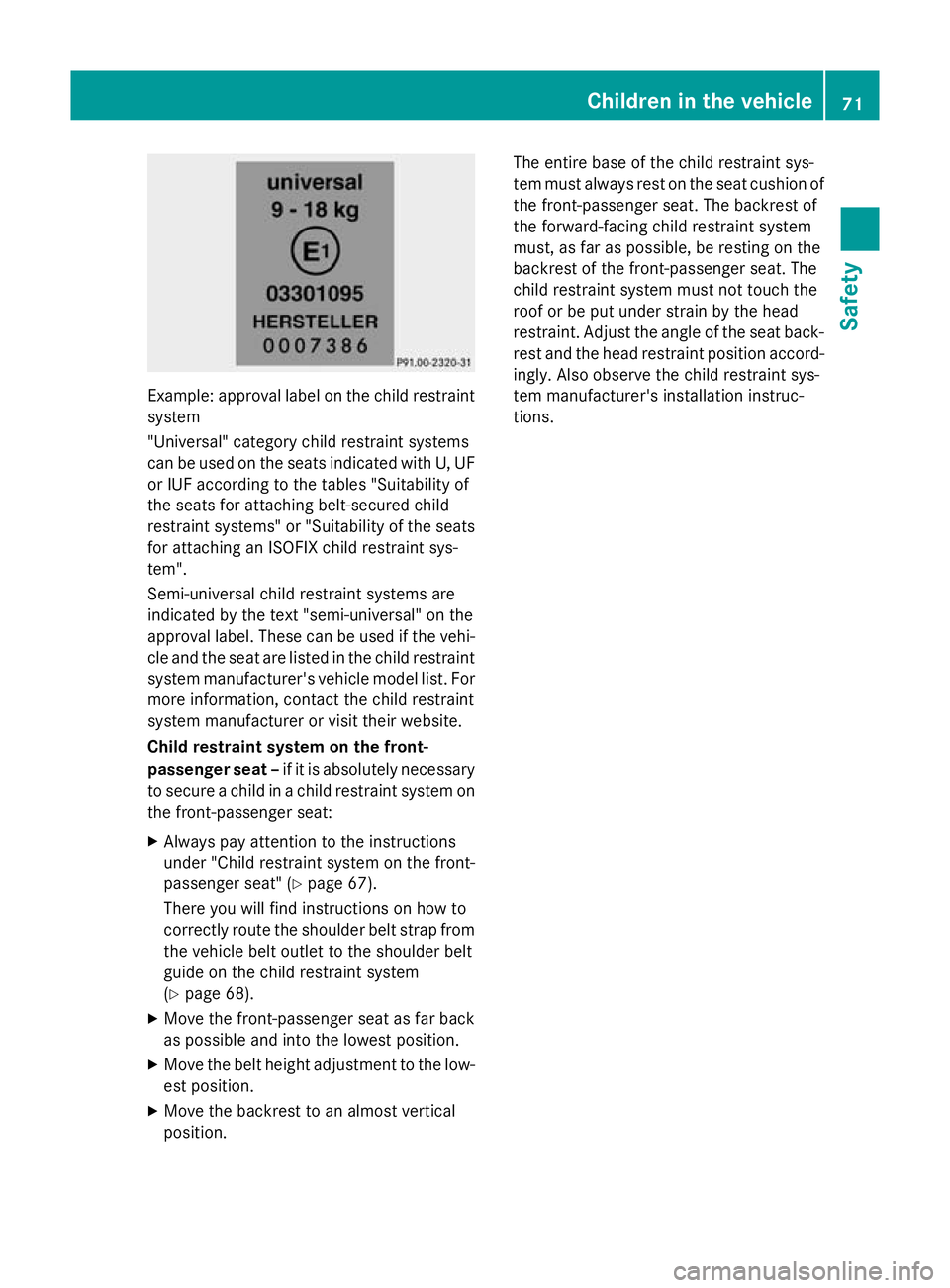
Example: approva
llabel on the child restraint
system
"Universal "category child restraint systems
can be used on the seats indicated with U, UF
or IUF according to the table s"Suitability of
the seats for attaching belt-secured child
restraint systems" or "Suitability of the seats
for attaching an ISOFIX child restraint sys-
tem".
Semi-universal child restraint systems are
indicated by the text "semi-universal" on the
approva llabel .These can be used if the vehi-
cle and the seat ar eliste dint he child restraint
syste mmanufacturer's vehicl emodel list. For
mor einformation, contact the child restraint
syste mmanufacturer or visi ttheir website.
Chil drestrain tsystem on the front-
passenge rsea t–if it is absolutely necessary
to secur eachild in achild restraint syste mon
the front-passenge rseat:
X Alway spayattentio ntothe instructions
under "Child restraint syste monthe front-
passenge rseat" (Y page 67).
There yo uwillf indi nstructions on ho wto
correctl yroute the shoulde rbelts tra pfrom
the vehicl ebelto utlettot he shoulde rbelt
guid eont he child restraint system
(Y page 68).
X Move the front-passenge rseatasf arback
as possibl eand into the lowest position.
X Move the belt height adjustment to the low-
es tp osit ion.
X Move the backrest to an almos tvertical
position. Th
ee ntire base of the child restraint sys-
tem must always res tonthe seat cushion of
the front-passenge rseat. Th ebackrest of
the forward-facing child restraint system
must, as fa raspossible, be resting on the
backrest of the front-passenge rseat. The
child restraint syste mmustn ot touch the
roo forbep utunder strain by the head
restraint. Adjust the angle of the seat back- res tand the head restraint positio naccord-
ingly .Alsoo bser ve the child restraint sys-
tem manufacturer's installatio ninstruc-
tions. Children in the vehicle
71Safety Z
Page 80 of 497
atio
nisp ossible usin gthe switches in the
rear compartment. Pet
sint hevehicle G
WARNING
If you leave animals unsupervised or unse-
cured in th evehicle ,the ym ay push abutton
or as witch ,for example.
They could:
R activat evehicle equipmen tand become
trapped, for example
R switch vehicle systems on or off ,thus
endangering other road users
In th eevent of an accident, sudde nbraking or
abrupt changes of direction ,unsecured ani-
mals could be flun garoun dthe vehicle ,injur-
ing th evehicle occupants .Ther eisar iskofan
acciden tand injury.
Never leave animals unattende dinthevehi-
cle .Always secure animals correctly durin ga
journey, e.g .inananimal transpor tbox. Driving safety systems
Driving safety systems overview
In this section, you will fin dinformatio nabout
th ef ollowin gdriving safety systems:
R AB S(Anti-lock Braking System)
(Y page 77)
R BA S(Brake AssistSystem) (Y page 78)
R BA SP LUS(Brake AssistSystem PLUS) with
Cross-Traffic Assist (Y page 78)
R COLLISION PREVENTION ASSIST PLUS
(distanc ewarning function and Adaptive
Brake Assist )(Y page 80)
R Adaptive brak elamps (Y page 83)
R ESP ®
(E lectronic Stability Program)
(Y page 83)
R EB D( electronic brakeforce distribution)
(Y page 86)
R ADAPTIV EBRAKE (Y page 86) R
PRE-SAFE ®
Brake (Y page 87)
R STEE RCONTROL (Y page 89) Important safety notes
If you fail to adapt your driving style or if you
are inattentive, th edriving safety systems can
neither reduc ethe riskofana ccidentnor
override th elaws of physics. Drivin gsafety
systems are merely aids designe dtoassist
driving .You are responsible for maintaining
th ed istanc etothevehicle in front, for vehicle
speed, for braking in good time, and for stay- ing in lane .Always adapt your driving style to
suit th eprevailin groad and weather condi-
tions and maintain asafe distanc efromt he
vehicle in front. Drive carefully.
The driving safety systems describe donly
work as effectivel yaspossible when there is
adequat econtac tbetween th etyres and the
road surface. Pleas epay special attentio nto
th en otes on tyres, recommended minimum
tyr etread depths etc. (Y page 416).
In wintry driving conditions, always use winter
tyres (M+ Styres) and ,ifnecessary, snow
chains .Onlyint hisw ay will th edriving safety
systems describe dinthiss ectio nwork as
effectivel yaspossible. ABS (Anti-lock Braking System)
General notes AB
Sr egulate sbrak epressure in suc haway
that th ewheels do no tloc kw hen you brake.
This allows you to continue steering th evehi-
cle when braking.
The yellow !ABSw arning lamp in the
instrumen tcluste rlight supw hen th eignition
is switched on .Itgoes out when th eengineis
running.
Important safety notes i
Observ
ethe "Important safety notes" sec-
tio n(Ypage 77). Driving safety systems
77Safety Z
Page 81 of 497
G
WARNING
If ABS is faulty, the wheels coul dlock when
braking. The steerability and braking charac-
teristics may be severely impaired .Addition-
ally, further driving safety systems are deac-
tivated. There is an increased dange rofskid-
ding and accidents.
Drive on carefully.H ave ABS checked imme-
diately at aqualified specialist workshop.
If ABS is malfunctioning, other systems,
including driving safety systems ,willa lso
become inoperative. Observe the information on the ABS warning lamp (Y page332) and
display messages which may be show ninthe
instrument cluster (Y page300).
ABS works from aspee dofa bout8km/h,
regardless of road-surface conditions. ABS
works on slippery surfaces, even when you
only brake gently.
Brakes X
If ABS intervenes: continue to depress the
brake peda lwith force until the braking sit-
uation is over.
X To make afull brake application:
depress the brake peda lwith full force.
If ABS intervenes when braking, you willf eel a
pulsing in the brake pedal.
The pulsating brake peda lcan be an indica-
tion of hazardous road conditions; this serves
as areminde rtotake extra care while driving. BAS (Brake Assist System)
General notes BAS operates in emergency braking situa-
tions. If you depress the brake peda lquickly,
BAS automatically boosts the braking force,
thus shortening the stopping distance. Important safety notes i
Observe the "Important safety notes" sec-
tion (Y page77). G
WARNING
If BAS is malfunctioning, the braking distance
in an emergency braking situation is
increased. There is arisk of accident.
In an emergency braking situation, depress
the brake peda lwith full force. ABS prevents
the wheels from locking.
Brakes X
Keep the brake peda ldepressed firmly until
the emergency braking situation is over.
ABS prevents the wheels from locking.
The brakes willf unction as usual once you
release the brake pedal. BAS is deactivated. BAS PLUS(
Brake Assist System
PLUS) with Cross-Traffic Assist
General notes i
Observe the "Important safety notes" sec-
tion (Y page77).
BAS PLUS is only available on vehicles with
the Driving Assistance package.
For BAS PLUS to assist you when driving, the
rada rsensor system and the camera system
must be operational.
With the help of asensor system and acam-
era system, BAS PLUS can detect obstacles:
R that are in the path of yourv ehiclefor an
extended period of time
R that cross the path of yourv ehicle
In addition, pedestrians in the path of your
vehicl ecan be detected.
BAS PLUS detects pedestrians using typical
characteristics such as the body contours
and posture of aperso nstanding upright.
If the rada rsensor system or the camera sys-
tem is malfunctioning, BAS PLUS functions
are restricted or no longer available.T he78
Driving safety systemsSafety
Page 83 of 497
When driving at
aspee dabove 30 km/h :if
you depress the brake peda lsharply,B AS
PLUS automatically increases the brake pres- sure to adegre esuited to the traffic situation.
BAS PLUS provides braking assistance in haz- ardous situations with vehicles in front within
as pee drange between 7km/h and
250 km/h.
Up to aspee dofa pproximately 70 km/h, BAS
PLUS may react to:
R stationary objects in the path of yourv ehi-
cle, e.g. stoppe dorparked vehicles
R pedestrians in the path of yourv ehicle
R obstacles crossing yourp ath, which move
in the detection range of the sensors and
are recognised by them
i If BAS PLUS demands particularly high
braking force, preventative passenger pro-
tection measures (PRE-SAFE ®
)a re activa-
ted simultaneously.
X Keep the brake peda ldepressed until the
emergency braking situation is over.
ABS prevents the wheels from locking.
BAS PLUS is deactivated and the brakes func-
tion as usual, if:
R you release the brake pedal
R there is no longer arisk of collision
R no obstacl eisdetected in front of your
vehicle
R you depress the accelerator pedal
R you activate kickdown COLLISIONP
REVENTIONASSIST
PLUS
General notes COLLISION PREVENTIO
NASSIST PLUS con-
sists of adistance warning function with an
autonomous braking function and Adaptive
Brake Assist.
COLLISION PREVENTIO NASSIST PLUS can
help you to minimise the risk of acollision with the vehicl
einfront or reduce the effects
of such acollision.
If COLLISION PREVENTIO NASSIST PLUS
detects that there is arisk of acollision, you
willbew arned visuallya nd acoustically.Ify ou
do not react to the visual and audible collision warning, autonomous braking can be initiated
in critical situations. If you apply the brake
yourself in acritical situation, the COLLISION
PREVENTIO NASSIST PLUS Adaptive Brake
Assist assists you.
Switchin gthe soun don/off COLLISION PREVENTIO
NASSIST PLUS is
activated after every ignition cycle .You can
activate or deactivate COLLISION PREVEN-
TION ASSIST PLUS in the on-board computer
(Y page2 87). When deactivated, the dis-
tance warning function and the autonomous
braking function are alsod eactivated.
If COLLISION PREVENTIO NASSIST PLUS is
deactivated, the æsymbol appears in the
assistance graphics display.
Important safety notes In particular, the detection of obstacles can
be impaired in the case of:
R dirt on the sensors or obscured sensors
R snow or heavy rain
R interference by other rada rsources
R strong rada rreflections, for example, in
multi-storey car parks
R an arrow vehicl etravelling in front, e.g. a
motorcycle
R av ehicl etravelling in front on adifferent
line
R new vehicles or after aservice on the COL-
LISION PREVENTIO NASSIST PLUS system
Please observe the information in the sec-
tion on running-in the vehicle
(Y page1 78).
Following damage to the front end of the vehi-
cle, have the configuration and operation of
the rada rsensor checked at aqualified spe- 80
Driving safety systemsSafety
Page 85 of 497
The autonomous braking function is available
in the following speed ranges:
R from 7km/ htoa pprox. 105 km/hf or mov-
ing objects
R from 7km/ htoa pprox. 50 km/h for sta-
tionar yobjects
If the autonomou sbraking functio ndeman ds
particularl yhighb raking force, preventative
passenge rprotection measures (PRE-SAFE ®
)
ar ea ctivated simultaneously.
Adaptive Brake Assist i
Observe the "Important safety notes" sec-
tio n(Ypage 77).
Adaptive Brake Assist provide sbraking assis-
tanc einh azardous situations at speeds
above 7km/h .Itusesr adar senso rtechnol-
og ytoa ssessthe traffi csituation. G
WARNING
Adaptive Brake Assist cannot always clearly
identify objects and complex traffi csitua-
tions.
In such cases ,Adaptive Brake Assist can:
R intervene unnecessarily
R not intervene
There is ariskofana ccident.
Alway spaycarefu lattentio ntothe traffi csit-
uatio nand be ready to brake. Terminate the
interventio ninanon-critical driving situation. G
WARNING
Adaptive Brake Assist does not react:
R to people or animals
R to oncoming vehicles
R to crossing traffic
R when cornering
As aresult, the Adaptive Brake Assist ma ynot
intervene in al lcritica lconditions .The re is a
risk of an accident.
Alway spaycarefu lattentio ntothe traffi csit-
uatio nand be ready to brake. Due to the nature of the system, particularly
complicated bu
tnon-critical driving condi-
tions ma yalsoc ause Brake Assist to inter-
vene.
If Adaptive Brake Assist is not availabl edueto
am alfu nctio ninthe rada rsen sors ystem, the
brake syste mremains availabl ewithf ull
brake boosting effect and BAS.
With the help of Adaptive Brake Assist, the
distance warning signa lcan detect obstacles
tha tare in the path of your vehicl efor an
extende dperio doft ime.
If Adaptive Brake Assist detects ariskofc ol-
lision with the vehicl einfront, it calculates
the braking force necessary to avoi dacolli-
sion. If yo uapply the brakes forcefully ,Adap-
tiv eB rake Assist will automaticall yincrease
the braking force to alevel suitabl efor the
traffi cconditions.
X Kee pthe brake peda ldep resse duntilthe
emergency braking situatio niso ver.
ABS prevents the wheels fro mlocking.
Th eb rakes will work normally agai nif:
R yo ur elease the brake pedal
R there is no longe rany dange rofacollision
R no obstacle is detecte dinfront of your
vehicle
Adaptive Brake Assist is the ndeactivated.
If Adaptive Brake Assist demands particularly high braking force, preventativ epassenger
protection measures (PRE-SAFE ®
)a re activa-
ted simultaneously.
Up to aspeed of approximately 250 km/h,
Adaptive Brake Assist is capable of reacting
to moving objects tha thavea lready been
detecte dassuchatl east once ove rthe period
of observation.
Up to aspeed of approximately 70 km/h,
Adaptive Brake Assist reacts to stationary
obstacles. 82
Driving safet
ysystemsSafety
Page 101 of 497
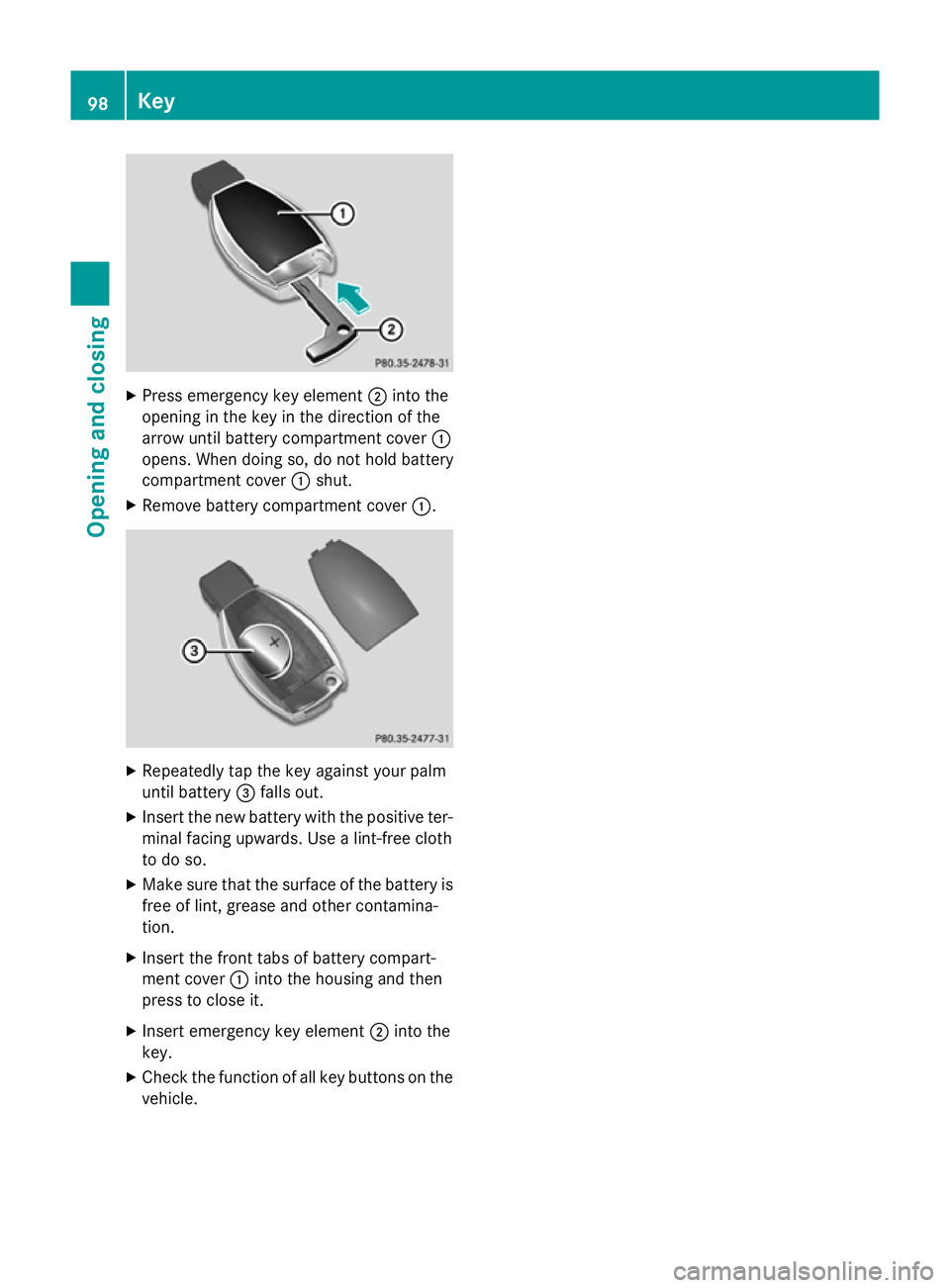
X
Press emergenc ykey element ;into the
opening in the key in the direction of the
arrow until batter ycompartment cover :
opens. When doing so, do not hold battery
compartment cover :shut.
X Remove batter ycompartment cover :.X
Repeatedly tap the key against your palm
until battery =falls out.
X Inser tthe new batter ywith the positive ter-
minal facing upwards. Use alint-free cloth
to do so.
X Make sure that the surface of the batter yis
free of lint, grease and other contamina-
tion.
X Inser tthe frontt abs of batter ycompart-
ment cover :into the housing and then
press to close it.
X Inser temergenc ykey element ;into the
key.
X Check the function of all key button sonthe
vehicle. 98
KeyOpening and closing
Page 238 of 497
25 mm
.The leve lchange also occurs when
stationary.
If you drive faster than 170 km/h, the rear
axle leve lisset to amiddle level. Thi sincrea-
ses road safety and reduces airr esistance. If
you then drive slower than 150 km/h, the
leve loft he rear axle is again adjusted to cor-
respond to the selected suspension mode.
Load compensation
The vehicle can compensate differences in
the vehicle leve lbyraising or lowering the
rear axle .Thisist he case ,for example, when
people get out of the vehicle or whe nlug gage
is removed.
Al oadc ompensation occurs if:
R ad oor, the boot lid or the tailgate is opened
R the parked vehicle is unlocked
The engine needs to be running for larger level
changes. 4MATIC (permanent all-whee
ldrive)
If you fai ltoadapt you rdriving style, 4MATIC
can neither reduce the risk of an accident nor override the laws of physics. 4MATIC cannot
take account of road ,weather and traffic con-
ditions. 4MATIC is only an aid. You are
responsibl efor the distance to the vehicle in
front, for vehicle speed, for braking in good
time, and for staying in lane.
If ad rive wheel spins due to insufficient grip:
R whe npulling away,o nly depress the accel-
erato rpedal as far as is necessary.
R accelerate les swhend riving.
! Never tow the vehicle with one axle
raised. Thi smay damage the transfer case.
Damag eofthis sort is not covered by the
Mercedes-Benz implied warranty. All
wheels must remain eithe ronthe ground or
be fully raised. Observe the instructions for towing the vehicle with allw heels in full
contact with the ground.
i In wintry driving conditions, the maximum
effect of 4MATIC can only be achieved if you use winter tyres
(M+S tyres), with snow
chains if necessary.
4MATIC ensures that allf our wheels are per-
manently driven. Together with ESP ®
,it
improves the traction of you rvehicle when-
ever adrive wheel spins due to insufficient
grip. PARKTRONIC
Important safety notes PARKTRONI
Cisanelectronic parking aidw ith
ultrasoni csensors .Itmonitors the area
around you rvehicle using six sensors in the
front bumper and six sensors in the rear
bumper. PARKTRONI Cindicates visually and
audibly the distance between you rvehicle
and an object.
PARKTRONI Cisonly an aid. It is not asubsti-
tute for you rattention to the immediate sur-
roundings. The responsibility for safe
manoeuvring and parking remains with you.
Make sure that there are no persons, animals
or objects in range while manoeuvring and
parking.
! When parking, pay particular attention to
objects above or below the sensors ,such
as flower pots or trailer drawbars.
PARKTRONI Cdoes not detect such objects
whe nthey are in the immediate vicinity of
the vehicle. You coul ddamage the vehicle
or the objects.
The sensors may not detect snow and
objects which absorb ultrasoni csources.
Ultrasonic sources, such as an automatic
car wash, alorry's compressed-air brakes
or ap neumatic drill, coul dcause
PARKTRONI Ctomalfunction.
PARKTRONI Cmay not function correctly on
uneve nterrain. Driving systems
235Driving and parking Z
Page 263 of 497
G
WARNING
The Lane Keeping Assist warning does not
return the vehicl etothe original lane. There is
ar isk of an accident.
Always steer, apply the brakes or accelerate
the vehicl eyourself, especially if Lane Keep-
ing Assist alerts you.
If you fail to adapt yourd riving style,Lane
Keeping Assist can neither reduce the risk of
an accident nor overrid ethe lawsofp hysics.
Lane Keeping Assist cannot take into account
road ,weather or traffic conditions. Lane
Keeping Assist is only an aid.Y ou are respon-
sibl efor the distance to the vehicl einfront,
for vehicl espeed, for braking in good time,
and for staying in lane.
Lane Keeping Assist does not keep yourv ehi-
cle in its lane.
The system may be impaired or may not func-
tion if:
R there is poor visibility, e.g. due to insuffi-
cient illumination of the road ,ordue to
snow, rain, fog or spray
R there is glare, e.g. from oncoming traffic,
the sun or reflection from other vehicles
(e.g. if the road surface is wet)
R the windscreen is dirty ,misted up, dam-
agedorc overed,for instance by asticker,
in the vicinity of the camera
R no or several, unclea rlane markings are
present for one lane ,e.g. in aconstruction
area
R the lane markings are worn away,d ark or
covered up, e.g. by dirt or snow
R the distance to the vehicl einfront is too
smal land the lane markings thus cannot be
detected
R the lane markings change quickly, e.g.
lane sbranch off, cross one another or
merge
R the road is narrow and winding
R there are highly variable shad econditions
on the road Activating Lane Keeping Assist
X Activate Lane Keeping Assist using the on-
board computer; to do so, select Standard
Standard
or Adaptive Adaptive (Ypage2 88).
If you drive at speeds above 60 km/h and
lane markings are detected, the lines in the
assistance graphic display (Y page286)
are show ningreen. Lane Keeping Assist is
read yfor use.
Standard
If Standard Standard is selected, no warning vibration
occurs if:
R you have switched on the turn signals. In
this case, the warnings are suppresse dfor
ac ertain period of time.
R ad riving safety system intervenes, such as
ABS, BAS or ESP ®
.
Adaptive
When Adaptive Adaptive is selected, no warning vibra-
tion occurs if:
R you have switched on the turn signals. In
this case, the warnings are suppresse dfor
ac ertain period of time.
R ad riving safety system intervenes, such as
ABS, BAS or ESP ®
.
R you accelerate hard ,e.g. kickdown.
R you brake hard.
R you steer actively, e.g. swerve to avoi dan
obstacl eorchange lane quickly.
R you cut the corner on asharp bend.
In order that you are warned only when nec-
essary and in good time if you cross the lane marking, the system detects certain condi-
tions and warns you accordingly.
The warning vibration occurs earlier if:
R you approach the outer lane marking on a
bend
R the road has very widel anes, e.g.amotor-
way
R the system detects soli dlane markings 260
Driving systemsDriving and parking
Page 269 of 497
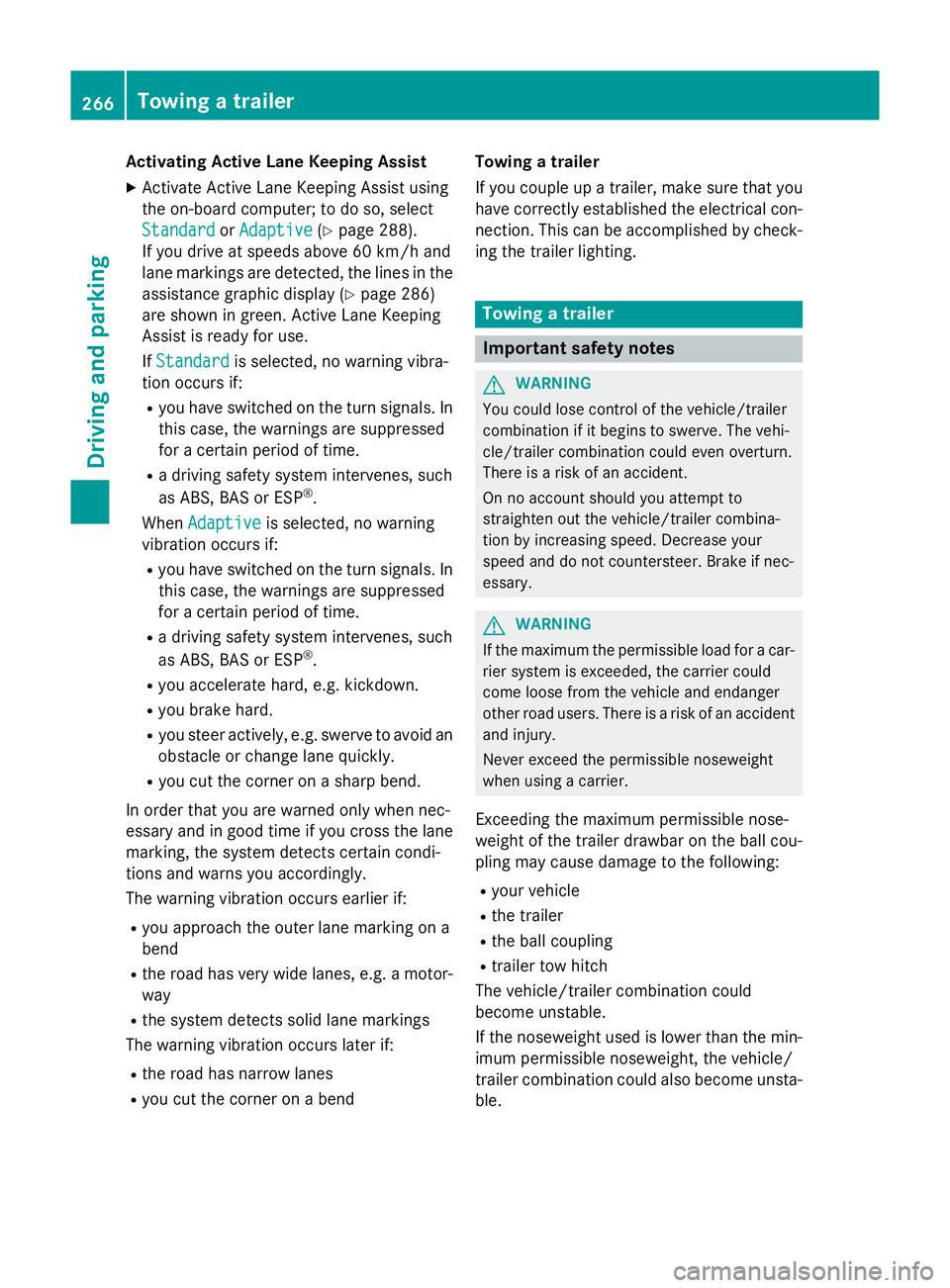
Activatin
gActive Lane Keeping Assist
X Activat eActiv eLaneK eepin gAssist using
th eo n-bo ard computer; to do so, select
Standard
Standard orAdaptive
Adaptive (Ypage 288).
If you driv eatspeeds abov e60km/ hand
lane markings are detected, th elines in the
assistance graphic display (Y page 286)
are shown in green .ActiveL aneK eeping
Assist is read yfor use.
If Standard
Standard is selected, no warning vibra-
tion occur sif:
R you have switched on th eturns ignals. In
this case, th ewarning sare suppressed
for acertai nperiod of time.
R ad riving safet ysystem intervenes, such
as ABS, BA SorESP®
.
When Adaptive
Adaptive is selected, no warning
vibration occur sif:
R you have switched on th eturns ignals. In
this case, th ewarning sare suppressed
for acertai nperiod of time.
R ad riving safet ysystem intervenes, such
as ABS, BA SorESP®
.
R you accelerate hard ,e.g.k ickdown.
R you brak ehard.
R you steer actively, e.g. swerve to avoi dan
obstacle or chang elane quickly.
R you cut th ecorner onashar pbend.
In order that you are warned only when nec-
essary and in good time if you cross th elane
marking, th esystem detect scertai ncondi-
tion sand warn syou accordingly.
The warning vibration occur searlier if:
R you approac hthe outer lane markin gona
bend
R ther oad has ver ywide lanes, e.g. amotor-
way
R thes ystem detect ssolid lane markings
The warning vibration occur slater if:
R ther oad has narrow lanes
R you cut th ecorner onabend Towing
atrailer
If you couple up atrailer ,makes ure that you
have correctly established th eelectrical con-
nection .This can be accomplished by check-
ing th etrailer lighting. Towin
gatrailer Important safety notes
G
WARNING
You could lose control of th evehicle/trailer
combination if it begins to swerve. The vehi-
cle/traile rcom bination could eve noverturn.
Ther eisar iskofana ccident.
On no accoun tshould you attemp tto
straighten out th evehicle/traile rcom bina-
tio nbyi ncreasing speed. Decrease your
spee dand do no tcountersteer. Brake if nec-
essary. G
WARNING
If th emaximum th epermissible load for acar-
rier system is exceeded, th ecarrier could
come loos efromt hevehicl eand endanger
other road users. Ther eisariskofana ccident
and injury.
Never excee dthe permissible noseweight
when usin gacarrier.
Exceedin gthe maximum permissible nose-
weigh tofthetrailer drawbar on th eball cou-
plin gm ay caus edamag etothefollowing:
R your vehicle
R thet railer
R theb all coupling
R trailer to whitch
The vehicle/traile rcom bination could
become unstable.
If th enoseweight used is lower than th emin-
imum permissible noseweight ,the vehicle/
trailer combination could also become unsta- ble. 266
Towin
gatrailerDriving and pa rking
Page 303 of 497
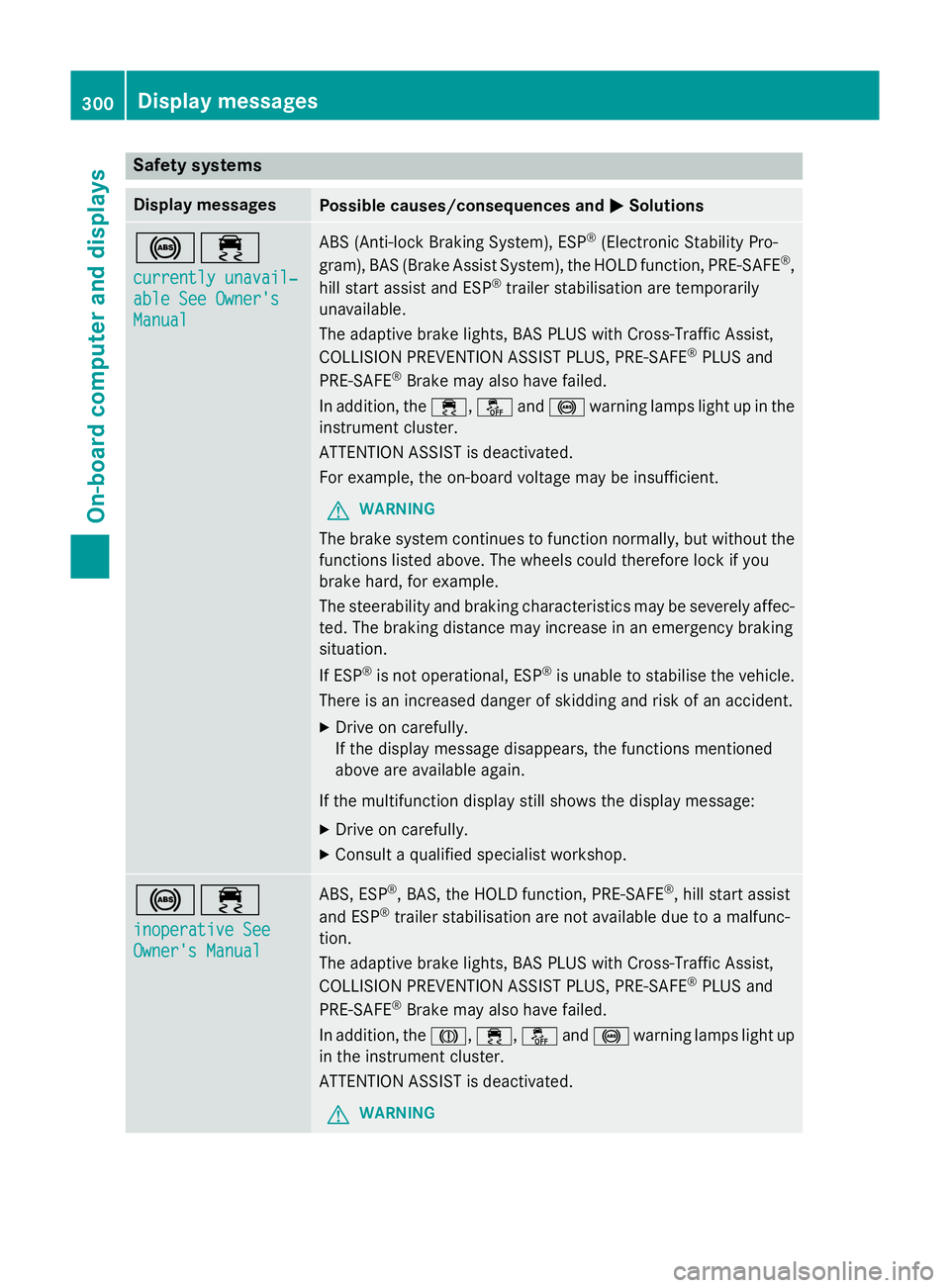
Safety systems
Display messages
Possible causes/consequences and
M
MSolutions !÷
currently unavail‐ currently unavail‐
able See Owner's able See Owner's
Manual Manual ABS (Anti-lock Braking System), ESP
®
(Electronic Stability Pro-
gram), BAS (Brake Assist System), the HOLD function, PRE-SAFE ®
,
hill start assist and ESP ®
trailer stabilisation are temporarily
unavailable.
The adaptive brake lights, BAS PLUS with Cross-Traffic Assist,
COLLISION PREVENTION ASSIST PLUS, PRE ‑SAFE®
PLUS and
PRE‑SAFE ®
Brake may also have failed.
In addition, the ÷,åand! warning lamps light up in the
instrumen tcluster.
ATTENTION ASSIST is deactivated.
For example, the on-board voltage may be insufficient.
G WARNING
The brake system continues to function normally, but without the functions listed above. The wheels could therefore lock if you
brake hard, for example.
The steerability and braking characteristics may be severely affec-ted. The braking distance may increase in an emergency braking
situation.
If ESP ®
is not operational, ESP ®
is unable to stabilise the vehicle.
There is an increased danger of skidding and risk of an accident.
X Drive on carefully.
If the display message disappears, the functions mentioned
above are available again.
If the multifunction display still shows the display message: X Drive on carefully.
X Consult aqualified specialist workshop. !÷
inoperative See inoperative See
Owner's Manual Owner's Manual ABS,E
SP®
,B AS ,the HOLD function, PRE-SAFE ®
,h ill start assist
and ESP ®
trailer stabilisation are not available due to amalfunc-
tion.
The adaptive brake lights, BAS PLUS with Cross-Traffic Assist,
COLLISION PREVENTION ASSIST PLUS, PRE ‑SAFE®
PLUS and
PRE‑SAFE ®
Brake may also have failed.
In addition, the J,÷,åand! warning lamps light up
in the instrumen tcluster.
ATTENTION ASSIST is deactivated.
G WARNING 300
Display messagesOn-board computer and displays