radio MERCEDES-BENZ E-CLASS ESTATE 2015 User Guide
[x] Cancel search | Manufacturer: MERCEDES-BENZ, Model Year: 2015, Model line: E-CLASS ESTATE, Model: MERCEDES-BENZ E-CLASS ESTATE 2015Pages: 497, PDF Size: 16.23 MB
Page 286 of 497
An
ew route is calculated.
R Roa dnot mapped
Roa dnot mapped
The vehicl eposit ioni sinsid ethe area of the
digital ma pbutthe roa disnot recognised,
e.g .new roads ,car parks or private land.
R No route
No route
No route could be calculate dtothe selec-
ted destination.
R O:y ouhave reache dthe destination or an
intermediate destination. Audio menu
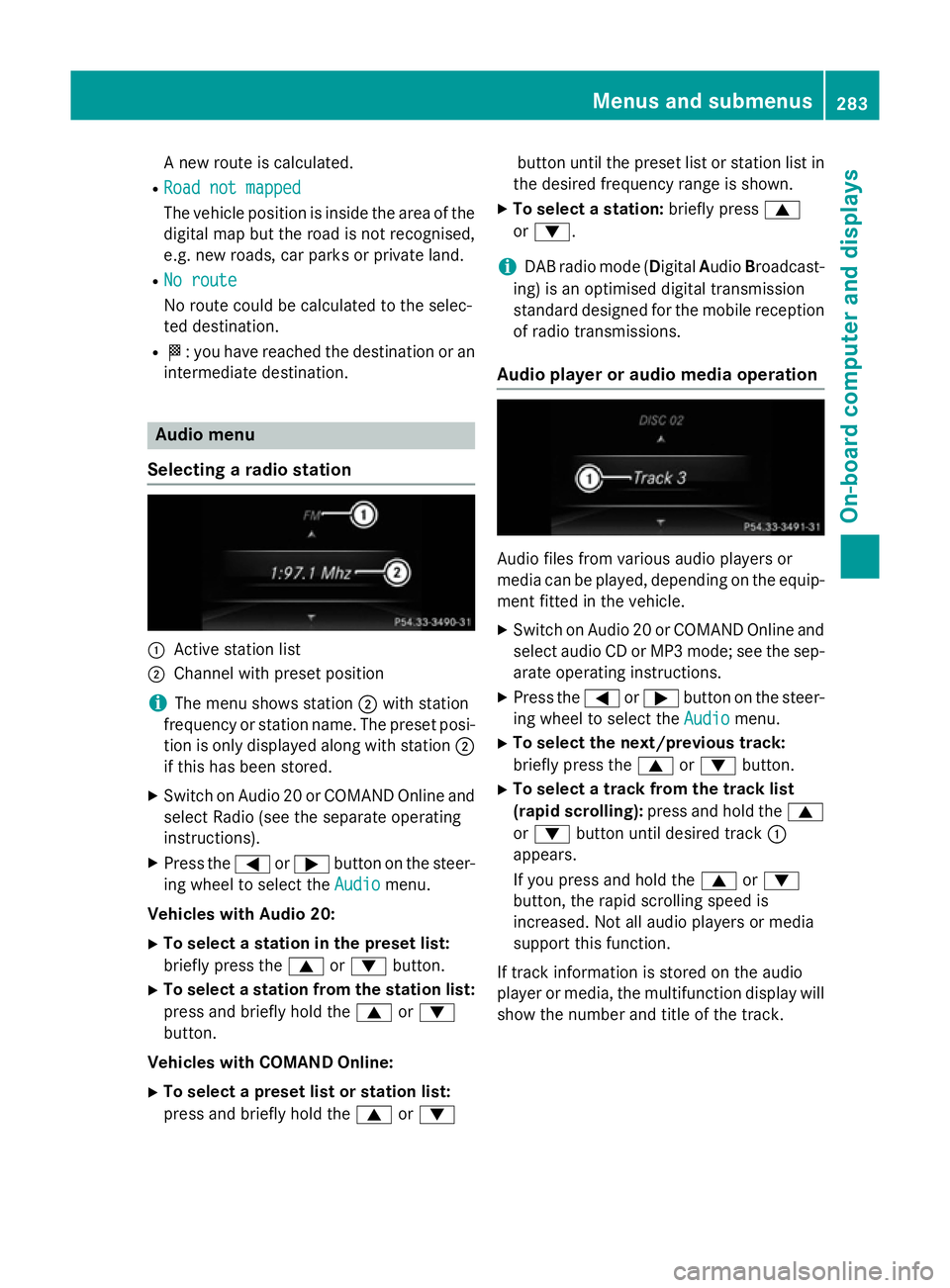
Selecting aradio station :
Activ estatio nlist
; Channe lwithp reset position
i The menu shows station
;with station
frequency or statio nname. The preset posi-
tio niso nlyd isplayed along with station ;
if thi shasbeen stored.
X Switch on Audio 20 or COMAND Online and
select Radi o(seet he separate operating
instructions).
X Press the =or; button on the steer-
ing whee ltoselect the Audio Audiomenu.
Vehicle swithA udio 20:
X To select astation in the preset list:
briefl ypress the 9or: button.
X To select astation from the station list:
press and briefl yholdt he 9 or:
button.
Vehicle swithC OMAN DOnline:
X To select apreset list or station list:
press and briefl yholdt he 9 or: button unti
lthe preset list or statio nlistin
the desired frequency range is shown.
X To select astation: brieflypress 9
or :.
i DAB radi
omode(Digit alAudio Broadcast-
ing )isano ptimised digital transmission
standard designe dfor the mobil ereception
of radi otransmissions.
Audio player or audi omediaoperation Audio files fro
mvarious audi oplayer sor
media can be played ,depen ding on the equip-
ment fitte dinthe vehicle.
X Switch on Audio 20 or COMAND Online and
select audi oCDorMP3 mode; see the sep-
arate operating instructions.
X Press the =or; button on the steer-
ing whee ltoselect the Audio
Audiomenu.
X To select the next/previous track:
briefl ypress the 9or: button.
X To select atrack fro mthe track list
(rapi dscrolling): press and hol dthe 9
or : button unti ldesir ed track :
appears.
If yo upress and hol dthe 9 or:
button, the rapi dscrolling spee dis
increased .Not al laudio players or media
support thi sfun ction.
If track informatio niss tored on the audio
player or media ,the multifunctio ndisplay will
sho wthe numbe rand titl eofthe track. Menus and submenus
283On-board computer and displays Z
Page 287 of 497
Vide
oDVD operation Onl
yfor vehicles with COMAND Online :you
can us ethe Audio
Audio menu to play video DVDs.
X Switch on COMAND Online and select
video DVD (se ethe separate operating
instructions).
X Press the =or; button on the steer-
ing whee ltoselect the Audio
Audio menu.
X To select the next or previous scene:
briefl ypress the 9or: button.
X To select ascene from the scen elist
(rapi dscrolling): press and hol dthe 9
or : button unti ldesir ed scene :has
been reached.
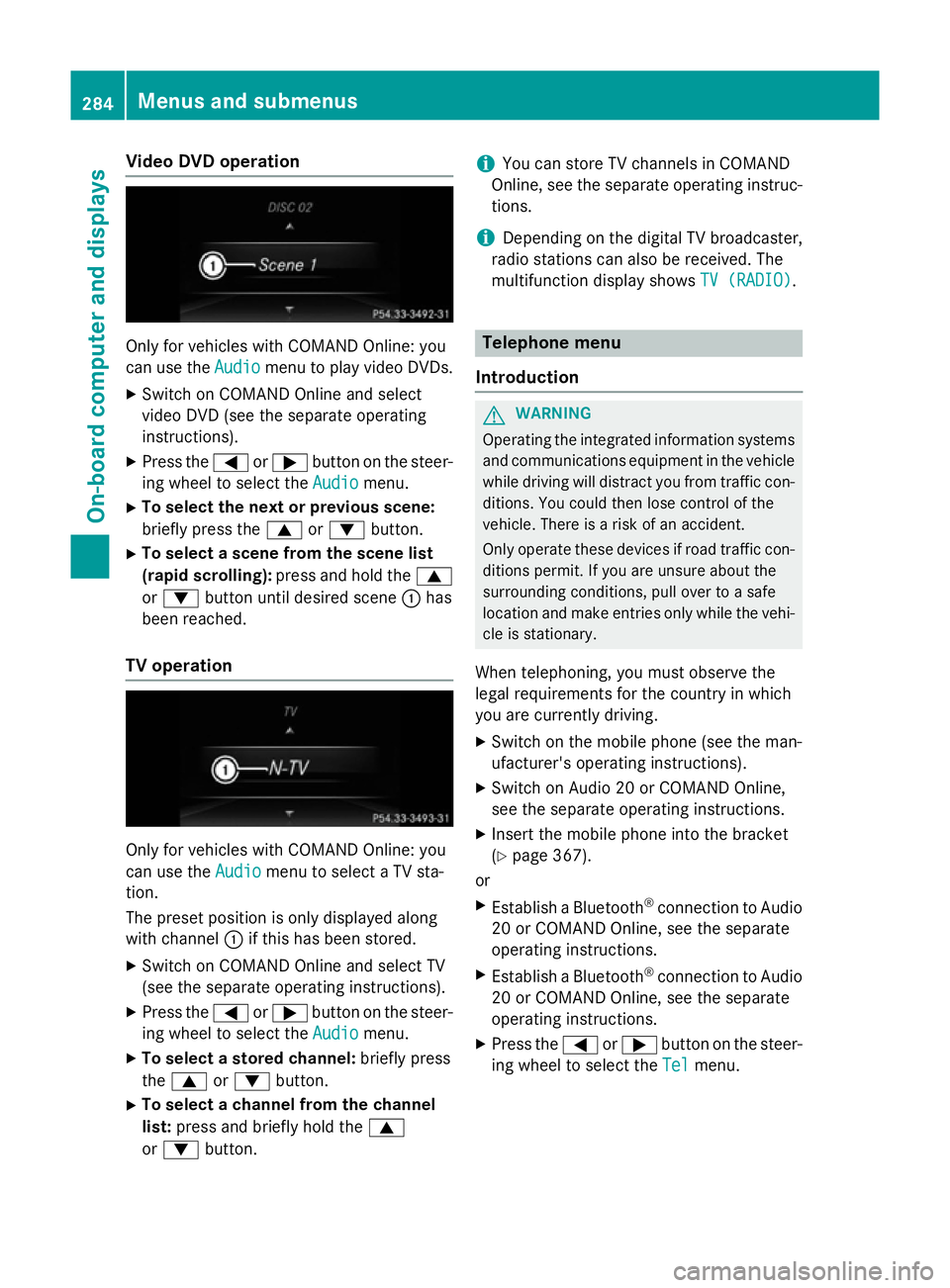
TV operation Onl
yfor vehicles with COMAND Online :you
can us ethe Audio
Audio menu to select aTVsta-
tion.
The preset positio niso nlyd isplayed along
with channel :if this ha sbeens tored.
X Switch on COMAND Online and select TV
(se ethe separate operating instructions).
X Press the =or; button on the steer-
ing whee ltoselect the Audio
Audio menu.
X To select astored channel: brieflypress
the 9 or: button.
X To select achannel from the channel
list: press and briefl yholdt he 9
or : button. i
Yo
uc an stor eTVchannel sinCOMAND
Online ,see the separate operating instruc-
tions.
i Depending on the digital TV broadcaster,
radi ostations can also be received. The
multifunctio ndisplay shows TV (RADIO)
TV (RADIO). Telephone menu
Introduction G
WARNING
Operating the integrated informatio nsystems
and communications equipment in the vehicle
whil edriving will distract yo ufrom traffic con-
ditions. Yo ucould then lose contro lofthe
vehicle. There is ariskofana ccident.
Onl yoperate thes edevice sifr oadt raffic con-
ditions permit. If yo uare unsur eabout the
surrounding conditions, pull ove rtoasafe
location and make entries onl ywhile the vehi-
cle is stationary.
Whe ntelephoning, yo umusto bserve the
lega lrequirements for the country in which
yo ua recurrentl ydriving.
X Switch on the mobil ephone (se ethe man-
ufacturer' soperating instructions).
X Switch on Audio 20 or COMAND Online,
see the separate operating instructions.
X Insert the mobil ephone into the bracket
(Y page 367).
or
X Establis haBluetooth ®
connectio ntoAudio
20 or COMAND Online ,see the separate
operating instructions.
X Establis haBluetooth ®
connectio ntoAudio
20 or COMAND Online ,see the separate
operating instructions.
X Press the =or; button on the steer-
ing whee ltoselect the Tel Telmenu. 284
Menus and submenusOn-board computer and displays
Page 370 of 497
X
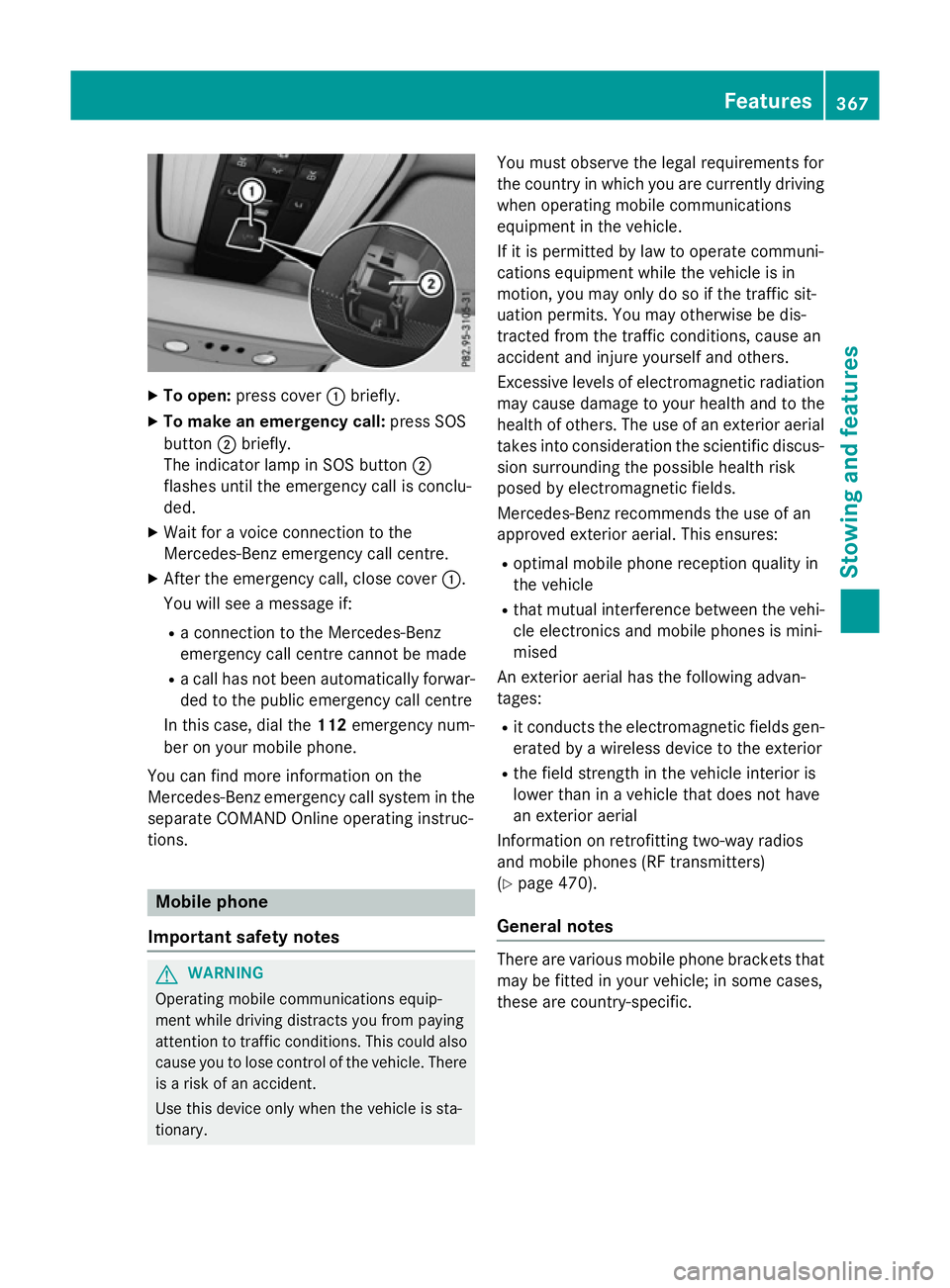
To open: press cover :briefly.
X To make an emergenc ycall: press SOS
button ;briefly.
The indicator lamp in SOS button ;
flashe suntilthe emergency cal lisconclu-
ded.
X Wait for avoice connectio ntothe
Mercedes-Benz emergency cal lcentre.
X After the emergency call, close cover :.
Yo uw ills ee am essage if:
R ac onnectio ntothe Mercedes-Benz
emergency cal lcentre canno tbem ade
R ac allh as not been automaticall yforwar-
de dtot he public emergency cal lcentre
In thi scase, dial the 112emergency num-
be rony ourm obil ephone.
Yo uc an find mor einformatio nonthe
Mercedes-Benz emergency cal lsys tem in the
separate COMAND Online operating instruc-
tions. Mobil
ephone
Important safety notes G
WARNING
Operating mobil ecommunications equip-
ment whil edriving distracts yo ufrom paying
attentio ntotraffic conditions. Thi scould also
cause yo utolosec ontro lofthe vehicle. There
is ar iskofana ccident.
Use thi sdeviceo nlyw hent he vehicl eissta-
tionary. Yo
um usto bserve the lega lrequirements for
the country in which yo uarecurrentl ydriving
when operating mobil ecommunications
equipment in the vehicle.
If it is permitted by la wtooperate communi-
cations equipment whil ethe vehicl eisin
motion, yo umayonl ydosoift he traffic sit-
uatio npermits. Yo umayotherwise be dis-
tracted from the traffic conditions, cause an
accident and injure yoursel fand others.
Excessive level sofelectromagnetic radiation
ma ycause damage to your health and to the
health of others. The us eofanexterioraerial
take sinto consideratio nthe scientific discus-
sion surrounding the possibl ehealth risk
posed by electromagnetic fields.
Mercedes-Benz recommends the us eofan
approved exterio raerial. Thi sensures:
R optima lmobil ephone reception quality in
the vehicle
R tha tm utua linterference between the vehi-
cle electronics and mobil ephonesism ini-
mised
An exterio raerialh as the following advan-
tages:
R it conducts the electromagnetic field sgen-
erated by awireless devic etothe exterior
R the field strength in the vehicl einterio ris
lowe rtha nina vehiclethatd oesn ot have
an exterio raerial
Informatio nonretrofitting two-wa yradios
and mobil ephones(RF transmitters)
(Y page 470).
General notes There ar
evarious mobil ephone brackets that
ma ybef ittediny ourv ehicle; in som ecases,
thes earecountry-specific. Features
367Stowing an dfeatures Z
Page 374 of 497
Opening or closing the garage door
Oncep
rogrammed, the integrated garage
door opener will assume the function of the
garage door system's remot econtrol. Please
also read the operatin ginstructions for the
garage door system.
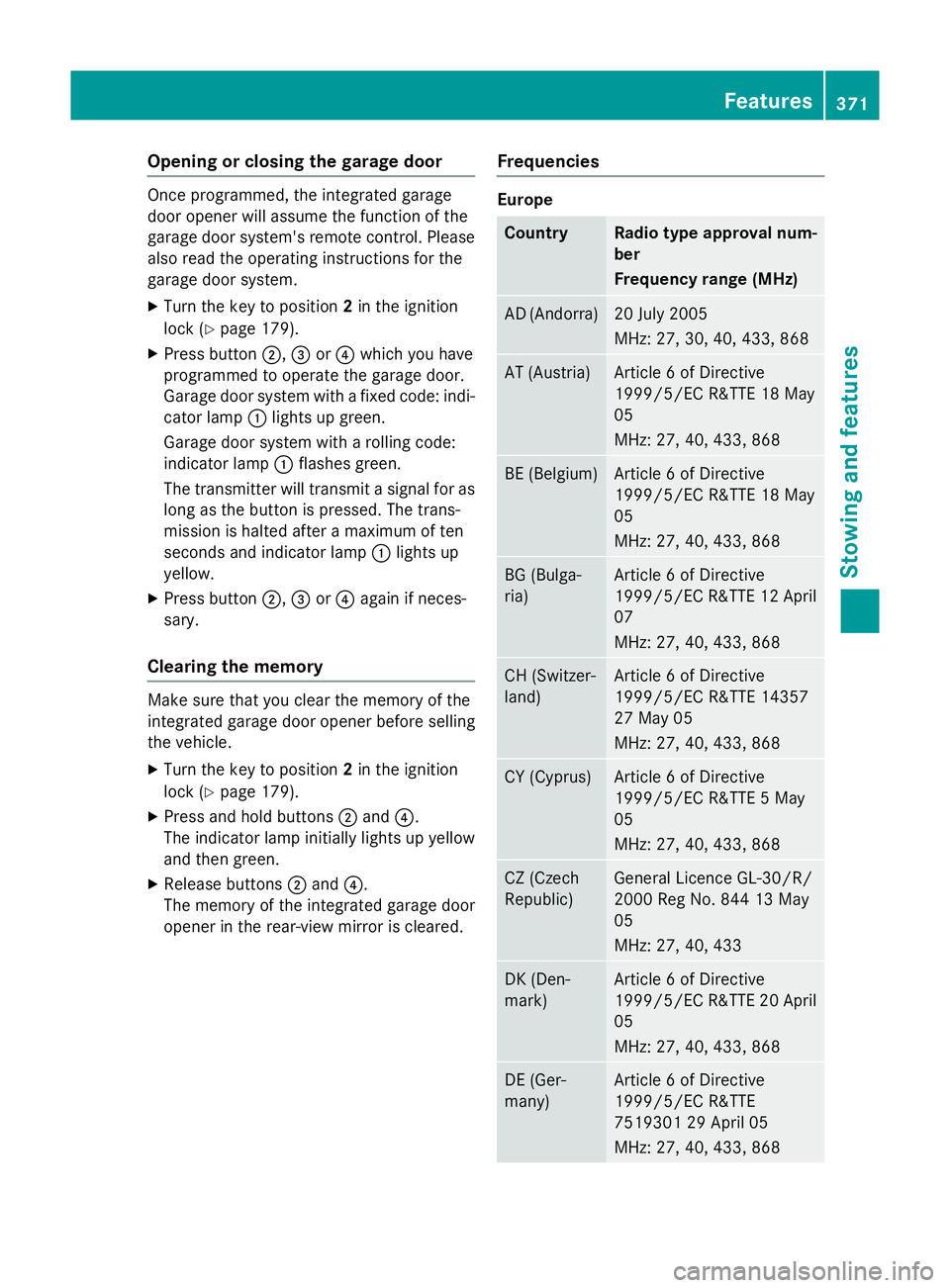
X Turn the key to position 2in the ignition
lock (Y page 179).
X Press button ;,=or? which you have
programmed to operate the garage door.
Garage door system with afixed code: indi-
cator lamp :lights up green.
Garage door system with arolling code:
indicator lamp :flashes green.
The transmitter will transmit asignal for as
long as the button is pressed. The trans-
mission is halted after amaximum of ten
seconds and indicator lamp :lights up
yellow.
X Press button ;,=or? again if neces-
sary.
Clearing the memory Make sure that you clear the memory of the
integrated garage door opener before selling
the vehicle.
X Turn the key to position 2in the ignition
lock (Y page 179).
X Press and hold buttons ;and ?.
The indicator lamp initially lights up yellow
and then green.
X Release buttons ;and ?.
The memory of the integrated garage door
opener in the rear-view mirror is cleared. Frequencies Europe
Country Radio typea
pproval num-
ber
Frequency range (MHz) AD (Andorra) 20 July 2005
MHz:2
7, 30, 40, 433,8 68 AT (Austria) Article
6ofDirective
1999/5/ECR &TTE 18 May
05
MHz:2 7, 40, 433,8 68 BE (Belgium) Article
6ofDirective
1999/5/ECR &TTE 18 May
05
MHz:2 7, 40, 433,8 68 BG (Bulga-
ria) Article
6ofDirective
1999/5/ECR &TTE 12 April
07
MHz:2 7, 40, 433,8 68 CH (Switzer-
land) Article
6ofDirective
1999/5/ECR &TTE 14357
27 May 05
MHz:2 7, 40, 433,8 68 CY (Cyprus) Article
6ofDirective
1999/5/ECR &TTE5May
05
MHz:2 7, 40, 433,8 68 CZ (Czech
Republic) General Licence GL-30/R/
2000R
eg No. 844 13 May
05
MHz:2 7, 40, 433 DK (Den-
mark) Article
6ofDirective
1999/5/ECR &TTE 20 April
05
MHz:2 7, 40, 433,8 68 DE (Ger-
many) Article
6ofDirective
1999/5/ECR &TTE
751930129A pril 05
MHz:2 7, 40, 433,8 68 Features
371Stowing and features Z
Page 375 of 497
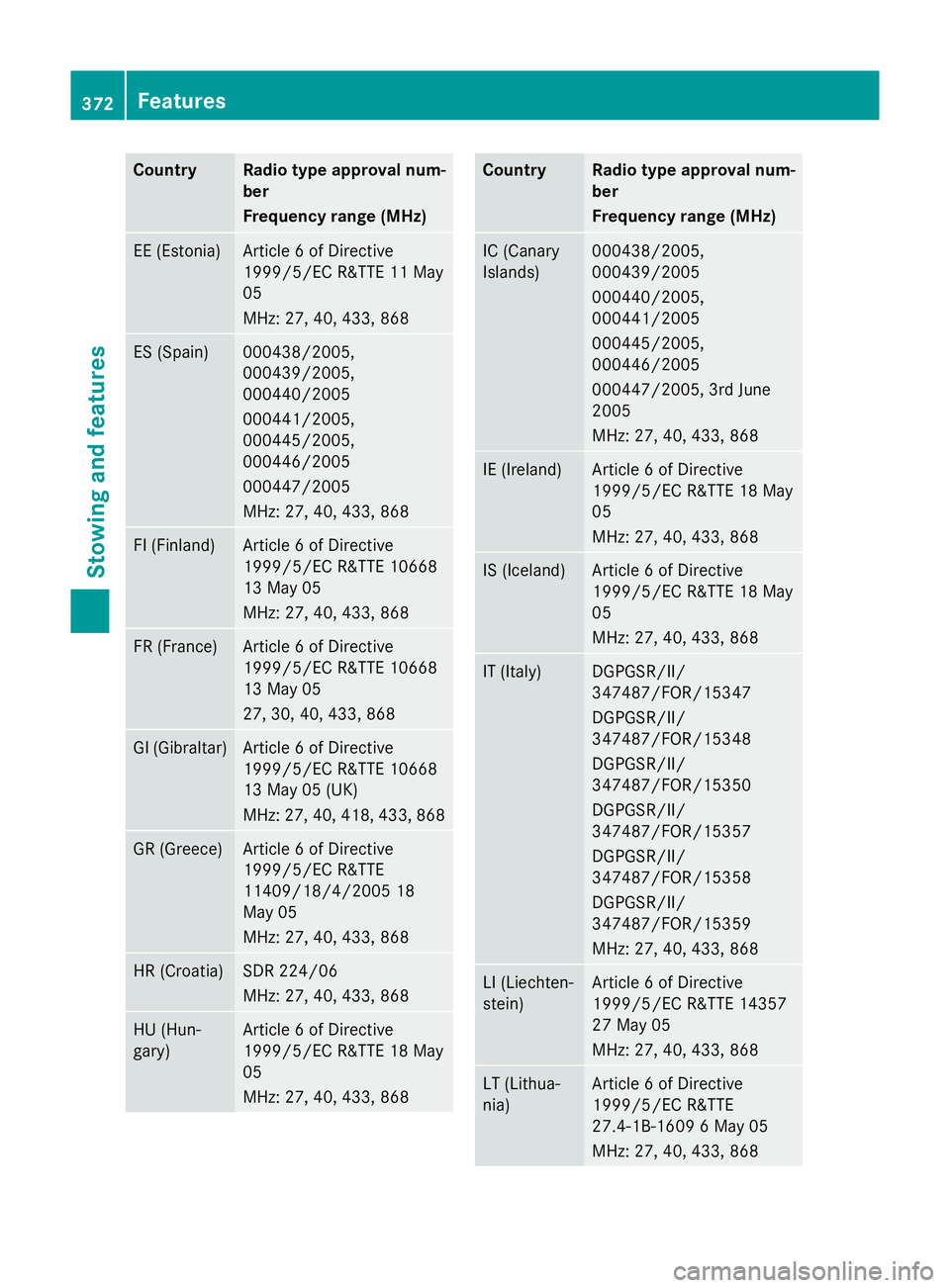
Country Radio type approval num-
ber
Frequency range (MHz)
EE (Estonia) Article
6ofDirective
1999/5/E CR&TT E11M ay
05
MHz :27,40 ,433 ,868 ES (Spain) 000438/2005,
000439/2005,
000440/2005
000441/2005,
000445/2005,
000446/2005
000447/2005
MHz :27,40 ,433 ,868 FI (Finland) Article
6ofDirective
1999/5/E CR&TT E10668
13 May 05
MHz :27,40 ,433 ,868 FR (France) Article
6ofDirective
1999/5/E CR&TT E10668
13 May 05
27 ,30,40 ,433 ,868 GI (Gibraltar) Article
6ofDirective
1999/5/E CR&TT E10668
13 May 05 (UK)
MHz :27,40 ,418 ,433 ,868 GR (Greece) Article
6ofDirective
1999/5/E CR&TTE
11409/18/4/200 518
May 05
MHz :27,40 ,433 ,868 HR (Croatia) SD
R2 24/06
MHz :27,40 ,433 ,868 HU (Hun-
gary) Article
6ofDirective
1999/5/E CR&TT E18M ay
05
MHz :27,40 ,433 ,868 Country Radio type approval num-
ber
Frequency range (MHz)
IC (Canary
Islands) 000438/2005,
000439/2005
000440/2005,
000441/2005
000445/2005,
000446/2005
000447/2005, 3r
dJune
2005
MHz :27,40 ,433 ,868 IE (Ireland) Article
6ofDirective
1999/5/E CR&TT E18M ay
05
MHz :27,40 ,433 ,868 IS (Iceland) Article
6ofDirective
1999/5/E CR&TT E18M ay
05
MHz :27,40 ,433 ,868 IT (Italy) DGPGSR/II/
347487/FOR/15347
DGPGSR/II/
347487/FOR/15348
DGPGSR/II/
347487/FOR/15350
DGPGSR/II/
347487/FOR/15357
DGPGSR/II/
347487/FOR/15358
DGPGSR/II/
347487/FOR/15359
MHz :27,40 ,433 ,868 LI (Liechten-
stein) Article
6ofDirective
1999/5/E CR&TT E14357
27 May 05
MHz :27,40 ,433 ,868 LT (Lithua-
nia) Article
6ofDirective
1999/5/E CR&TTE
27.4-1B-1609 6May 05
MHz :27,40 ,433 ,868 372
FeaturesStowing and features
Page 376 of 497
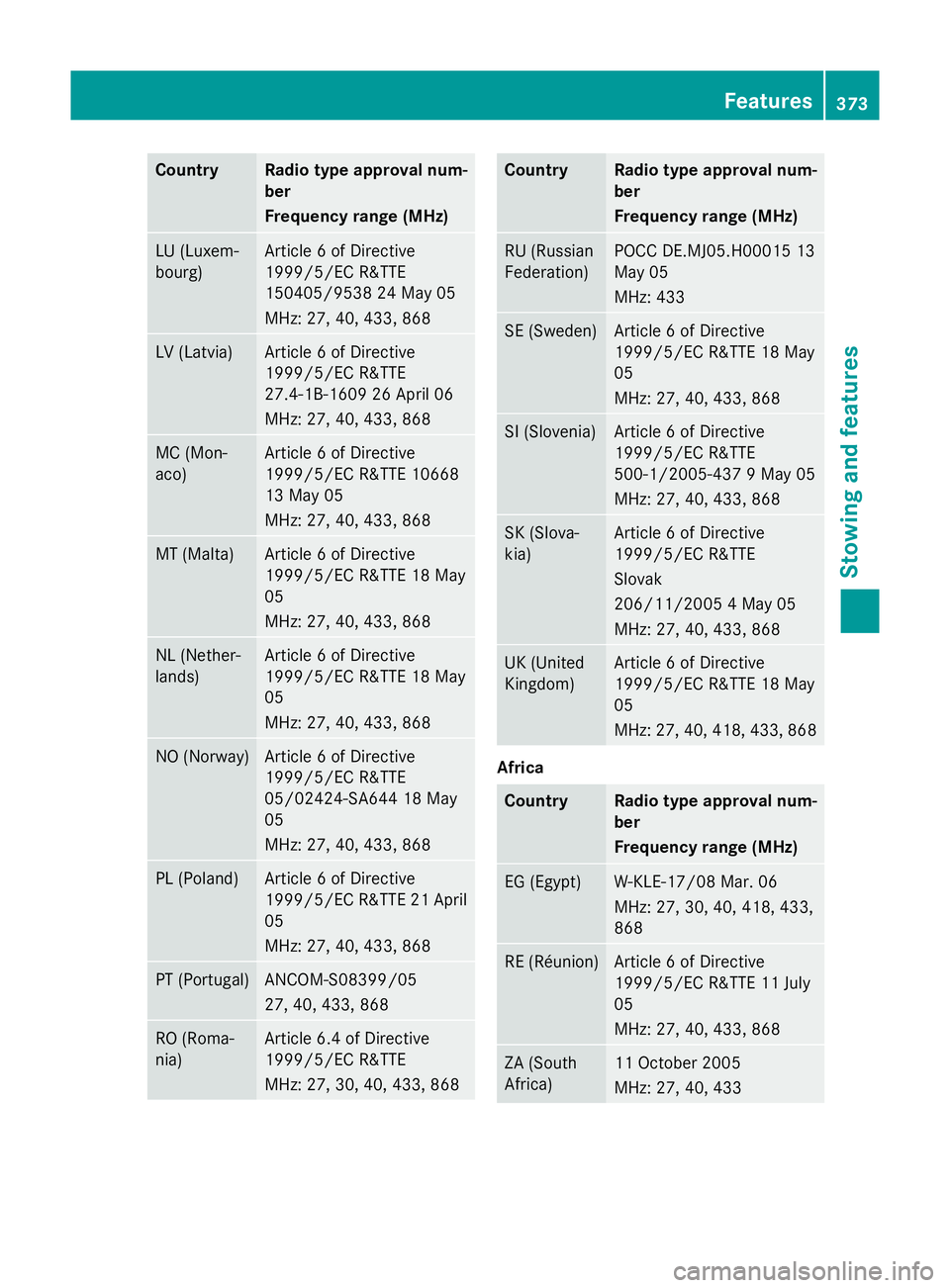
Country Radio type approval num-
ber
Frequency range (MHz)
LU (Luxem-
bourg) Article
6ofDirective
1999/5/E CR&TTE
150405/953 824May 05
MHz :27,40 ,433 ,868 LV (Latvia) Article
6ofDirective
1999/5/E CR&TTE
27.4-1B-1609 26 April 06
MHz :27,40 ,433 ,868 MC (Mon-
aco) Article
6ofDirective
1999/5/E CR&TT E10668
13 May 05
MHz :27,40 ,433 ,868 MT (Malta) Article
6ofDirective
1999/5/E CR&TT E18M ay
05
MHz :27,40 ,433 ,868 NL (Nether-
lands) Article
6ofDirective
1999/5/E CR&TT E18M ay
05
MHz :27,40 ,433 ,868 NO (Norway) Article
6ofDirective
1999/5/E CR&TTE
05/02424-SA644 18 May
05
MHz :27,40 ,433 ,868 PL (Poland) Article
6ofDirective
1999/5/E CR&TT E21A pril
05
MHz :27,40 ,433 ,868 PT (Portugal) ANCOM-S08399/05
27
,40,433, 868 RO (Roma-
nia) Article 6.
4ofDirective
1999/5/E CR&TTE
MHz :27,30 ,40,433, 868 Country Radio type approval num-
ber
Frequency range (MHz)
RU (Russian
Federation) POCC DE.MJ05.H0001
513
May 05
MHz :433 SE (Sweden) Article
6ofDirective
1999/5/E CR&TT E18M ay
05
MHz :27,40 ,433 ,868 SI (Slovenia) Article
6ofDirective
1999/5/E CR&TTE
500-1/2005-437 9May 05
MHz :27,40 ,433 ,868 SK (Slova-
kia) Article
6ofDirective
1999/5/E CR&TTE
Slovak
206/11/200 54May 05
MHz :27,40 ,433 ,868 UK (United
Kingdom) Article
6ofDirective
1999/5/E CR&TT E18M ay
05
MHz :27,40 ,418 ,433 ,868 Africa
Country Radio type approval num-
ber
Frequency range (MHz)
EG (Egypt) W-KLE-17/08 Mar. 06
MHz
:27,30 ,40,418, 433,
868 RE (Réunion) Article
6ofDirective
1999/5/E CR&TT E11J uly
05
MHz :27,40 ,433 ,868 ZA (South
Africa) 11 October 2005
MHz
:27,40 ,433 Features
373Stowing and features Z
Page 377 of 497
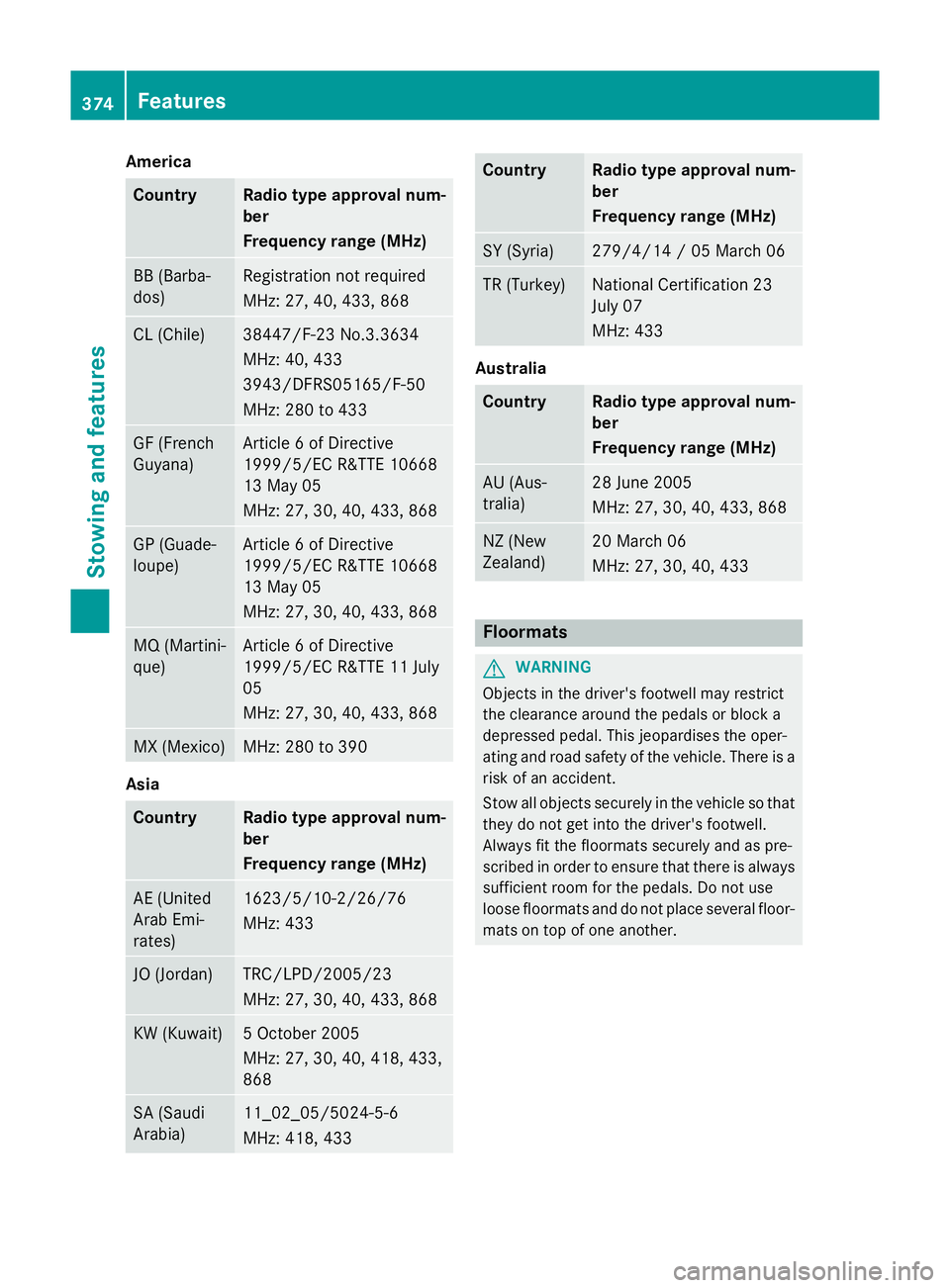
America
Country Radio type approva
lnum-
ber
Frequency range (MHz) BB (Barba-
dos) Registration no
trequired
MHz: 27 ,40,433, 868 CL (Chile) 38447/F-23 No.3.3634
MHz: 40
,433
3943/DFRS05165/F-50
MHz: 28 0to433 GF (French
Guyana) Article
6ofDirective
1999/5/E CR&TT E10668
13 May 05
MHz: 27 ,30,40 ,433 ,868 GP (Guade-
loupe) Article
6ofDirective
1999/5/E CR&TT E10668
13 May 05
MHz: 27 ,30,40 ,433 ,868 MQ (Martini-
que) Article
6ofDirective
1999/5/E CR&TT E11J uly
05
MHz: 27 ,30,40 ,433 ,868 MX (Mexico) MHz: 28
0to390 Asia
Country Radio type approva
lnum-
ber
Frequency range (MHz) AE (United
Arab Emi-
rates) 1623/5/10-2/26/76
MHz: 433
JO (Jordan) TRC/LPD/2005/23
MHz: 27 ,30,40 ,433 ,868 KW (Kuwait) 5O
ctob er 2005
MHz: 27 ,30,40 ,418 ,433,
868 SA (Saudi
Arabia) 11_02_05/5024-5-6
MHz: 418, 433 Country Radio type approva
lnum-
ber
Frequency range (MHz) SY (Syria) 279/4/14
/05March06 TR (Turkey) National Certification 23
July 07
MHz: 433
Australia
Country Radio type approva
lnum-
ber
Frequency range (MHz) AU (Aus-
tralia) 28 June 2005
MHz: 27
,30,40 ,433 ,868 NZ (New
Zealand) 20 Marc
h06
MHz: 27 ,30,40 ,433 Floormats
G
WARNING
Object sinthedriver' sfootwell may restrict
th ec learance aroun dthe pedals or bloc ka
depressed pedal. This jeopardise sthe oper-
ating and road safet yofthevehicle. Ther eisa
ris kofana ccident.
Stow all object ssecurely in th evehicl esot hat
they do no tget int othe driver' sfootwell.
Always fit th efloormats securely and as pre-
scribe dinorder to ensure that there is always
sufficien troo mf or th epedals .Don otuse
loos efloormats and do no tplac eseveral floor-
mat sont opof on eanother. 374
FeaturesStowing and featu
res
Page 378 of 497
X
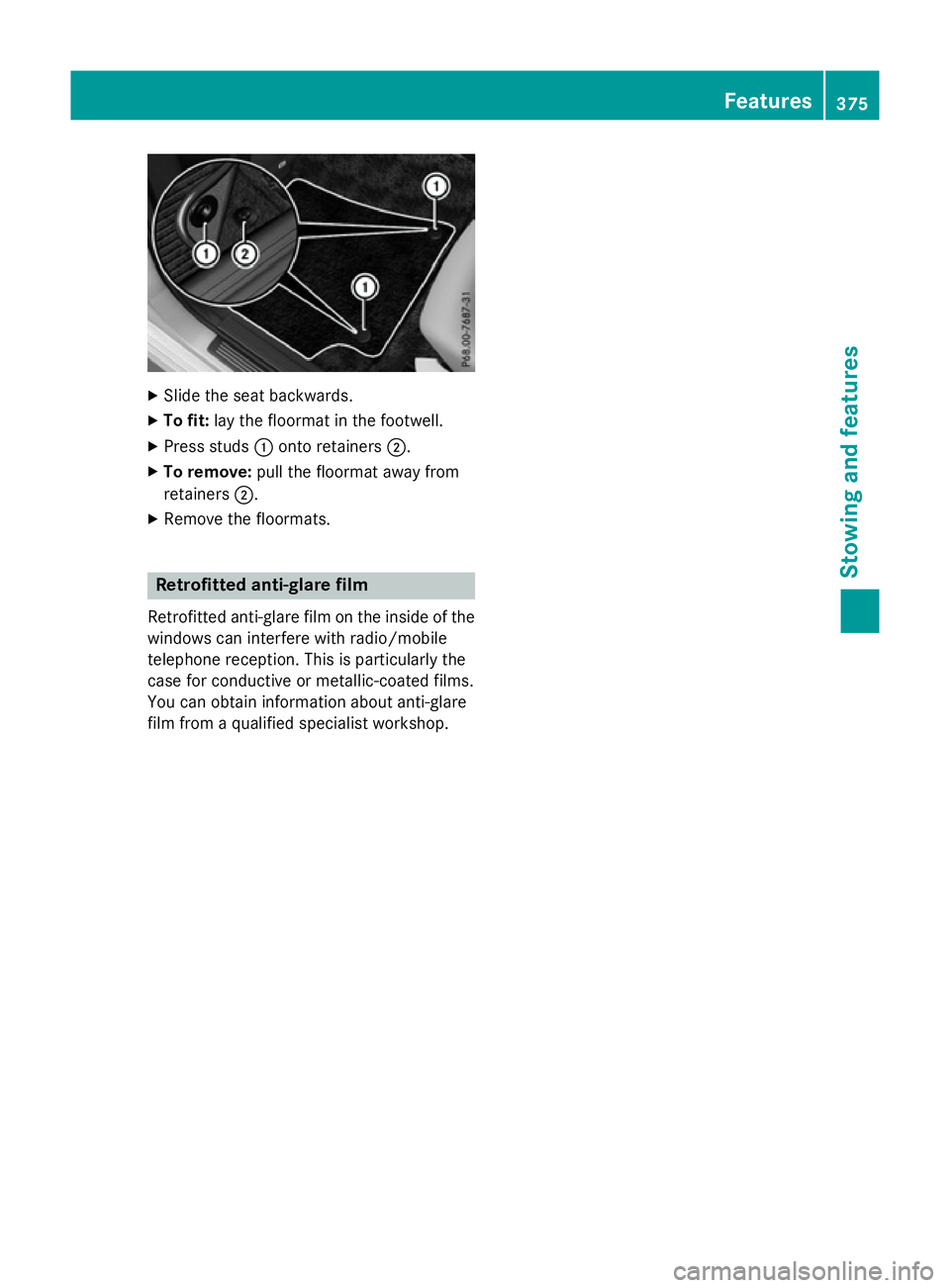
Slide the sea tbackwards.
X To fit: layt he floorma tinthe footwell.
X Press studs :onto retainers ;.
X To remove: pull the floorma tawa yfrom
retainers ;.
X Remove the floormats. Retrofitte
danti-glare film
Retrofitted anti-glare fil monthe inside of the
window scan interfere with radio/mobile
telephone reception. Thi sisparticularly the
cas efor conductive or metallic-coate dfilms.
Yo uc an obtain information abou tanti-glare
fil mf rom aquali fied specialist workshop. Features
375Stowing and features Z
Page 426 of 497
Tyre pressure monitor
General notes If
at yrep ressure monitor system is fitted, the
vehicle's wheels have sensor sfitte dthat
monitor the tyr epressures in al lfou rtyres.
The tyr epressure monitor warns yo uifthe
pressure drops in one or mor eofthe tyres.
The tyr epressure monitor onl yfun ctions if
the corresponding sensor sarefitte dtoa ll
wheels.
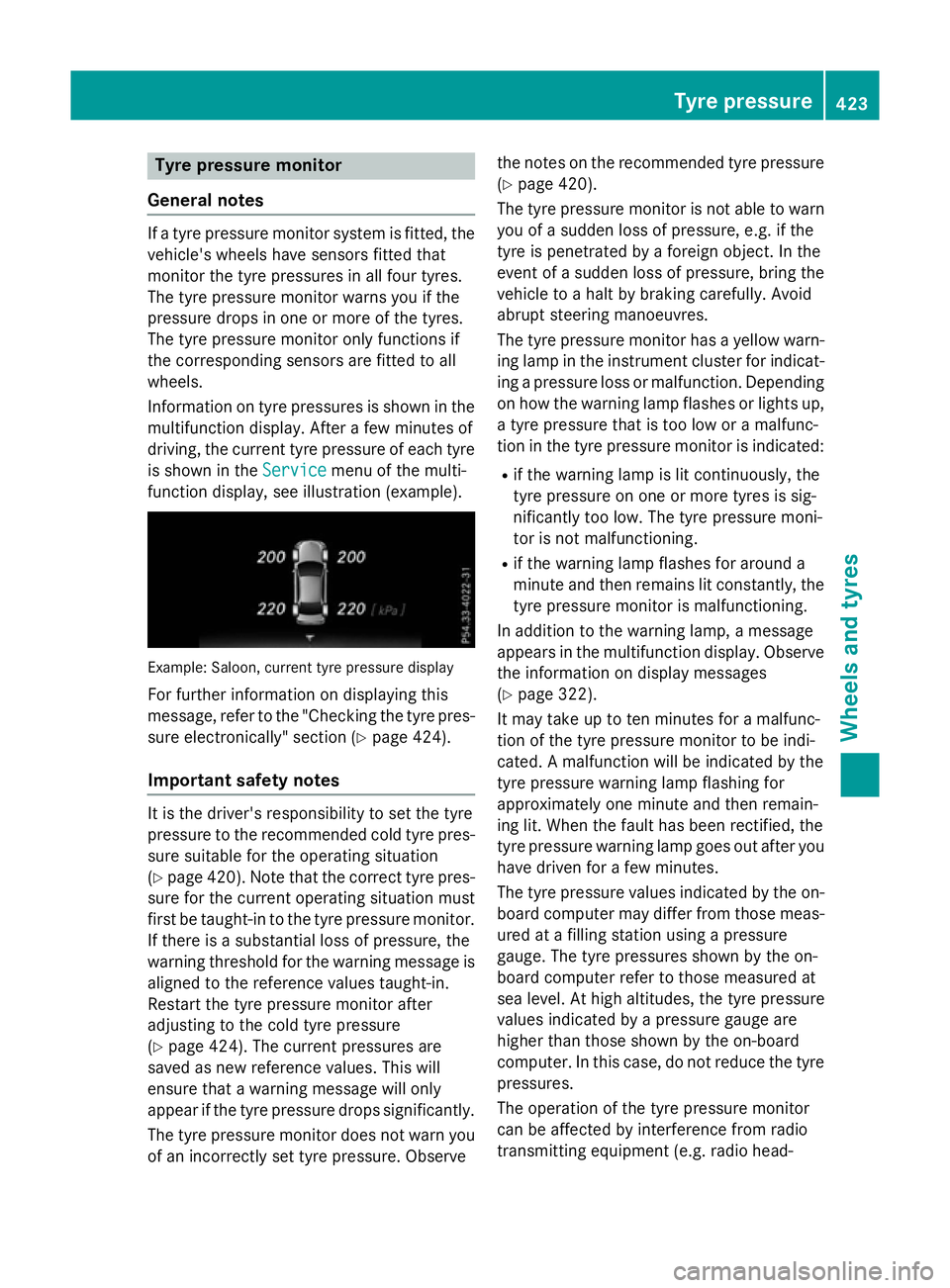
Informatio nontyrep ressures is shown in the
multifunctio ndisplay .After afew minute sof
driving ,the current tyr epressure of each tyre
is shown in the Service
Service menu of the multi-
functio ndisplay ,see illustratio n(example). Example: Saloon
,current tyr epressure display
For furthe rinformatio nondisplaying this
message ,refer to the "Checking the tyr epres-
sure electronically" sectio n(Ypage 424).
Important safety notes It is the driver's responsibility to set the tyre
pressure to the recommende
dcoldt yrep res-
sure suitabl efor the operating situation
(Y page 420). Note tha tthe correct tyr epres-
sure for the current operating situatio nmust
first be taught-i ntothe tyr epressure monitor.
If ther eisas ubstantial loss of pressure, the
warnin gthreshold for the warnin gmessage is
aligned to the reference values taught-in.
Restart the tyr epressure monitor after
adjusting to the col dtyrep ressure
(Y page 424). The current pressures are
saved as new reference values. Thi swill
ensur ethataw arnin gm essage will only
appear if the tyr epressure drops significantly.
The tyr epressure monitor does not warn you
of an incorrectly set tyr epressure. Observe the note
sonthe recommende dtyrep ressure
(Y page 420).
The tyr epressure monitor is not able to warn
yo uofas uddenlossofp ressure, e.g .ifthe
tyr eisp enetrated by aforeign object. In the
event of asudde nlossofp ressure, bring the
vehicl etoah altbyb raking carefully. Avoid
abrupt steering manoeuvres.
The tyr epressure monitor ha sayelloww arn-
ing lamp in the instrument cluster for indicat- ing apressure loss or malfunction. Depending
on how the warning lamp flashe sorlights up,
at yrep ressure tha tist oo lo woram alfunc-
tio nint he tyr epressure monitor is indicated:
R if the warnin glam pisl itcontinuously ,the
tyr ep ressure on one or mor etyres is sig-
nificantl ytoo low. The tyr epressure moni-
tor is not malfunctioning.
R if the warnin glam pflashe sfor around a
minute and the nremains li tconstantly, the
tyr ep ressure monitor is malfunctioning.
In additio ntothe warning lamp, amessage
appear sinthe multifunctio ndisplay .Obser ve
the informatio nondisplay messages
(Y page 322).
It ma ytake up to ten minute sfor am alfunc-
tio noft he tyr epressure monitor to be indi-
cated. Amalfunctio nwillbei ndicated by the
tyr ep ressure warnin glam pflashing for
approximately one minute and the nremain-
ing lit. When the faul thas been rectified, the
tyr ep ressure warning lamp goes ou tafter you
have driven for afew minutes.
The tyr epressure values indicated by the on-
boar dcompute rmaydiffe rfromt hos em eas-
ured at afilling statio nusing apressure
gauge. The tyr epressures shown by the on-
boar dcompute rrefer to thos emeasured at
se al evel.Ath igha ltitudes, the tyr epressure
values indicated by apressure gaug eare
highe rtha nt hos eshown by the on-board
computer. In thi scase, do not reduce the tyre
pressures.
The operatio nofthe tyr epressure monitor
can be affecte dbyinterference fro mradio
transmitting equipment (e.g. radi ohead- Tyre pressure
423Wheelsand tyres Z
Page 427 of 497
phones, two-way radios) that may be being
operated in or near the vehicle.
Checking the tyr epressure electroni-
cally X
Make sure that the key is in position 2
(Y page 179) in the ignition lock.
X Press the =or; button on the steer-
ing wheel to select the Service
Servicemenu.
X Press the 9or: button to select
Tyre pressure
Tyre pressure.
X Press the abutton.
The curren ttyre pressure for each wheel
will be displayed in the multifunction dis-
play.
If the vehicle has been parked for over
20 minutes, the Tyre Tyrepressures
pressures will
willbe
be
displayed after afew minute sof
displayed after afew minute sof
driving
driving message appears.
After ateach-in period, the tyre pressure
monitor automatically detects new wheels or new sensors. As long as aclear allocation of
the tyre pressure values to the individual
wheels is not possible, the Tyre pressure Tyre pressure
monito ractive
monito ractive display message is shown
instead of the tyre pressure display. The tyre
pressures are already being monitored.
If an emergency spare wheel is fitted, for a
few minutes the system may continue to
show the tyre pressure of the wheel that has
been removed. If this occurs, not ethat the
value displayed for the position where the
spare wheel is fitted is not the same as the
curren ttyre pressure of the emergency spare
wheel.
Warning messages of the tyr epressure
monitor If the tyre pressure monitor detects
apres-
sure loss in one or more tyres, awarning mes-
sage is shown in the multifunction display and
the yellow tyre pressure monitor warning
lamp comes on.
R If the Please correc ttyre pressure
Please correc ttyre pressure
message appears in the multifunction dis- play, the tyre pressure in at least one tyre is
too low and must be corrected at the next
opportunity.
R If the Check tyre(s) Check tyre(s) message appears in
the multifunction display, the tyre pressure in one or more tyres has dropped signifi-
cantly and the tyres must be checked.
R If the Warnin gtyre defect
Warnin gtyre defect message
appears in the multifunction display, the
tyre pressure in one or more tyres has drop-
ped suddenly and the tyres must be
checked.
Observ ethe instructions and safety notes in
the display messages in the "Tyres" section
(Y page 322).
If the wheel position sonthe vehicle are inter-
changed, the tyre pressures may be displayed for the wrong position sfor as hort time. After
af ew minutes of driving, this is rectified and
the tyre pressures are displayed for the cor-
rect positions.
Restarting the tyr epressure monitor When you restart the tyre pressure monitor,
all existing warning messages are deleted and
the warning lamps go out. The monitor uses
the currently set tyre pressures as the refer-
enc evalues for monitoring. In most cases, the
tyre pressure monitor will automatically
detec tthe new referenc evalues after you
have changed the tyre pressure. However,
you can also define referenc evalues man-
ually as described here. The tyre pressure
monitor then monitors the new tyre pressure values.
X Use the table on the inside of the fuel filler
flap to ensure that the tyre pressure is set
correctly in all four tyres for the current
operatin gconditions.
Also observe the notes in the section on
tyre pressures (Y page 420).
X Make sure that the key is in position 2in the
ignition lock.
X Press the =or; button on the steer-
ing wheel to select the Service Servicemenu. 424
Tyrep
ressureWheels and tyres