Wheel change MERCEDES-BENZ E-CLASS ESTATE 2016 Owner's Manual
[x] Cancel search | Manufacturer: MERCEDES-BENZ, Model Year: 2016, Model line: E-CLASS ESTATE, Model: MERCEDES-BENZ E-CLASS ESTATE 2016Pages: 565, PDF Size: 11.34 MB
Page 422 of 565
*
NO
TERisk todriving saf ety from retrea‐
ded tyres Re
treaded tyres are nei ther tested nor rec‐
ommended byMercedes-Benz, since pr evi‐
ous damage cannot alw ays be de tected on
re treaded tyres.
Fo rth is reason driving saf ety cannot be guar‐
anteed. #
Do not use used tyres if you ha veno
information about their pr evious usage. *
NO
TEPossible damage towheels or
tyres when driving over obs tacles Lar
gewheels ha vea lo wer tyre section width.
The lo werth e tyre section width, the greater
is therisk of damage towheels or tyres when
driving over obs tacles. #
Avoid obs tacles or drive pa rticular ly
carefully. *
NO
TEDama getoelectronic component
parts from the use of tyre-fitting tools Ve
hicles with a tyre pressure monitoring
sy stem: electronic component parts are
located in the wheel. Tyre-fitting tools should
not be applied in the area of theva lve.
The tools could damage the electronic com‐
ponent parts. #
Have the tyres changed at a qualified
specialist workshop onl y. *
NO
TEDama getosummer tyres at low
ambient temp eratures Using summer tyres at
very low ambient
te mp eratures can cause crac kstoform,
th ereby damaging the tyres permanentl y. #
Attemp eratures below 7 °C use M+S-
tyres. Ac
cessory pa rts th at are not appr ovedfo ryo ur
ve hicle byMercedes-Benz or that are not being
used cor rectly can impair ope rating sa fety. Before pu
rchasing and using non-appr oved
accesso ries, visit a qualified specialist workshop
and enquire about:
R Suitability
R Legal stipulations
R Factory recommendations &
WARNING Risk of accident wi thhigh
per form ance tyres
The special tyre tread in combination with
th e optimised tyre compound, means that
th erisk of skidding or hydroplaning on wet
ro ads is inc reased.
In addition, the tyre grip is greatly reduced at
a low outside temp erature and tyre running
te mp erature. #
Switch on the ESP ®
and adapt your
driving style accordingly. #
Use M+S tyres at outside temp eratures
of less than 50 °F. Wheels and tyres
419
Page 424 of 565
may se
verely impair the driving characteris‐
tics.
The disk brakes or wheel suspension compo‐
nents may also be damaged. #
Rotate front and rear wheels on lyifthe
wheels and tyres are of the same
dimensions. Inter
changing the front and rear wheels if the
wheels or tyres ha vediffere nt dimensions can
re nder thege neral operating pe rmit in valid.
The wear pat tern s on the front and rear wheels
dif fer:
R Front wheels wear more on the shoulder of
th e tyre
R Rear wheels wear more in the cent reofthe
tyre
On vehicles with the same front and rear wheel
size, you can inter change the wheels every
5000 to10000 km, depending on thewe ar.
Ensure the direction of rotation is maintained for
th e wheels. It is imperative
toobser vethe instructions and
saf ety no tes on "Wheel change" when doing so. Note
s onstoring wheels R
Afterre moving wheels, store them in a cool,
dry and preferably dark place.
R Protect the tyres from conta ct withoil,
grease or fuel. Overview of
the ty re-change tool kit Apart from some countr
y-specific variants, vehi‐
cles are not equipped with a tyre-change tool kit.
Fo r more information on which tyre-changing
to ols are requ ired and appr ovedfo r per form ing a
tyre change on your vehicle, consult a qualified
specialist workshop.
Necessary tyre-changing tools may include, for
ex ample:
R jack
R chock
R wheel spanner
R centri ng pin %
The jack weighs appr oximately 3.4 kg.
The maximum load capacity of the jack can
be found on thest icke r af fixe dto the jac k.
The jack is maintenance-free. If there is a
malfunction, please conta ct aqualified spe‐
cialist workshop.
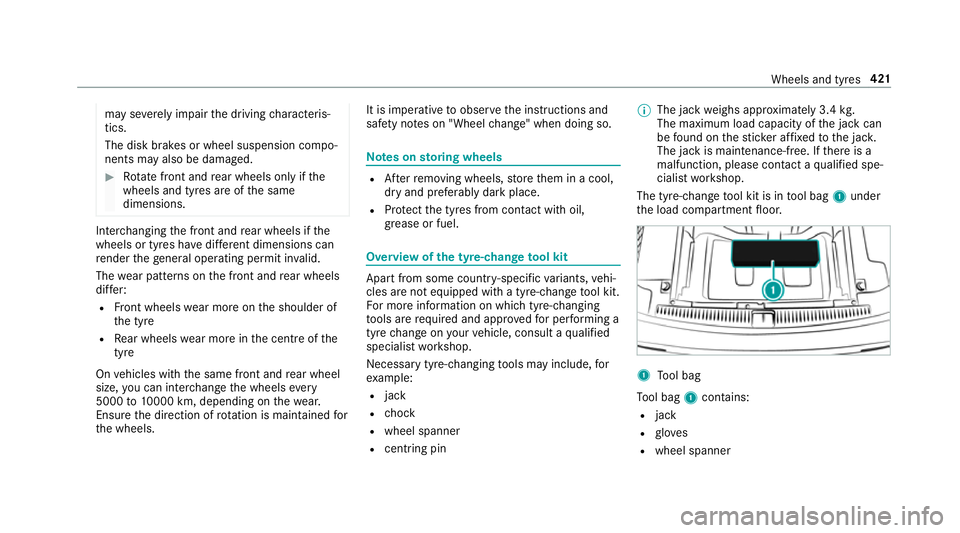
The tyre-change tool kit is in tool bag 1under
th e load compartment floor. 1
Tool bag
To ol bag 1contains:
R jack
R glov es
R wheel spanner Wheels and tyres
421
Page 425 of 565
R
centring pin
R folding wheel chock
R ratchet for jack
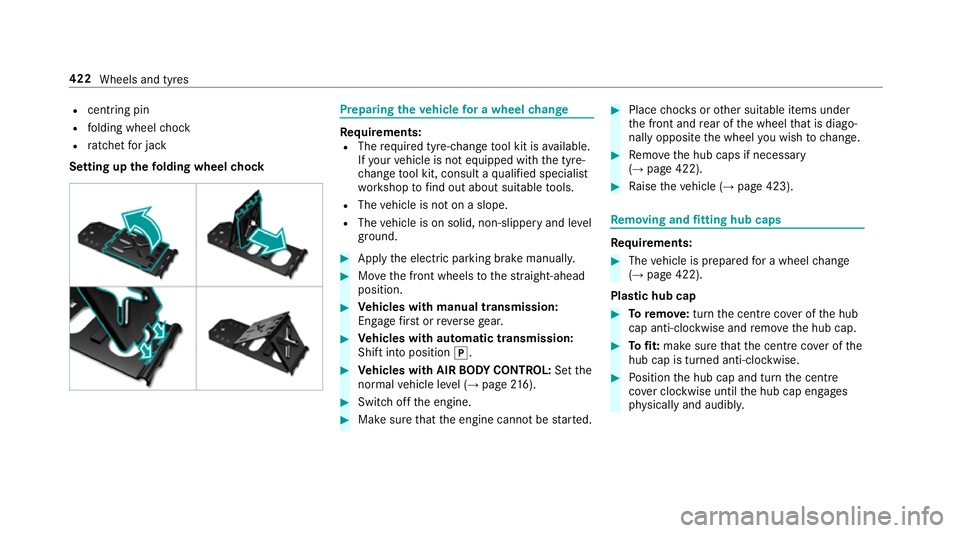
Setting up thefo lding wheel chock Prepa
ring theve hicle for a wheel change Re
quirements:
R The requ ired tyre-change tool kit is available.
If yo ur vehicle is not equipped with the tyre-
ch ange tool kit, consult a qualified specialist
wo rkshop tofind out about suitable tools.
R The vehicle is not on a slope.
R The vehicle is on solid, non-slippery and le vel
ground. #
Apply the electric parking brake manually. #
Movethe front wheels tothest ra ight-ahead
position. #
Vehicles with manual transmission:
Engage firs t or reve rsege ar. #
Vehicles with automatic transmission:
Shift into position j. #
Vehicles with AIR BODY CONT ROL:Set the
normal vehicle le vel (→ page 216). #
Switch off the engine. #
Make sure that the engine cann otbe star ted. #
Place choc ks orother suitable items under
th e front and rear of the wheel that is diago‐
nally opposite the wheel you wish tochange. #
Remo vethe hub caps if necessary
(→ page 422). #
Raise theve hicle (→ page 423). Re
moving and fitting hub caps Re
quirements: #
The vehicle is prepared for a wheel change
(→ page 422).
Pla stic hub cap #
Toremo ve:turn the cent recover of the hub
cap anti-clockwise and remo vethe hub cap. #
Tofit: make sure that the cent recover of the
hub cap is turned anti-clockwise. #
Position the hub cap and turn the cent re
co ver clockwise until the hub cap engages
ph ysically and audibly. 422
Wheels and tyres
Page 426 of 565
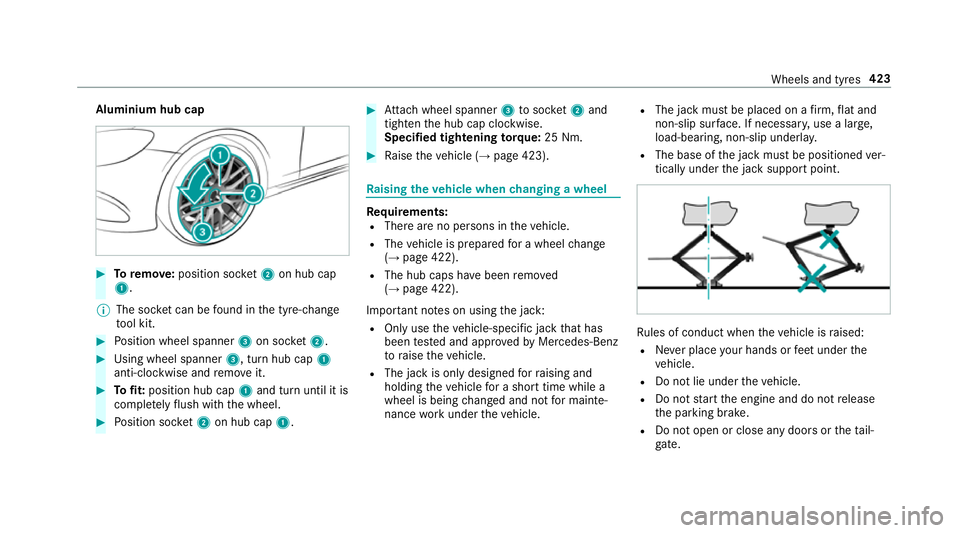
Aluminium hub cap
#
Toremo ve:position soc ket2 on hub cap
1.
% The soc ket can be found in the tyre-change
to ol kit. #
Position wheel spanner 3on soc ket2. #
Using wheel spanner 3, turn hub cap1
anti-clo ckwise and remo veit. #
Tofit: position hub cap 1and turn until it is
comple tely flush with the wheel. #
Position soc ket2 on hub cap 1. #
Attach wheel spanner 3tosoc ket2 and
tighten the hub cap clockwise.
Specified tightening torq ue: 25 Nm. #
Raise theve hicle (→ page 423). Ra
ising theve hicle when changing a wheel Re
quirements:
R There are no persons in theve hicle.
R The vehicle is prepared for a wheel change
(→ page 422).
R The hub caps ha vebeen remo ved
( → page 422).
Impor tant no tes on using the jack:
R Only use theve hicle-specific jack that has
been tested and appr oved byMercedes-Benz
to raise theve hicle.
R The jack is only designed forra ising and
holding theve hicle for a short time while a
wheel is being changed and not for mainte‐
nance workunder theve hicle. R
The jack must be placed on a firm ,fl at and
non-slip sur face. If necessar y,use a lar ge,
load-bearing, non-slip underla y.
R The base of the jack must be positioned ver‐
tically under the jack support point. Ru
les of conduct when theve hicle is raised:
R Never place your hands or feet under the
ve hicle.
R Do not lie under theve hicle.
R Do not start the engine and do not release
th e parking brake.
R Do not open or close any doors or theta il‐
ga te. Wheels and tyres
423
Page 427 of 565
#
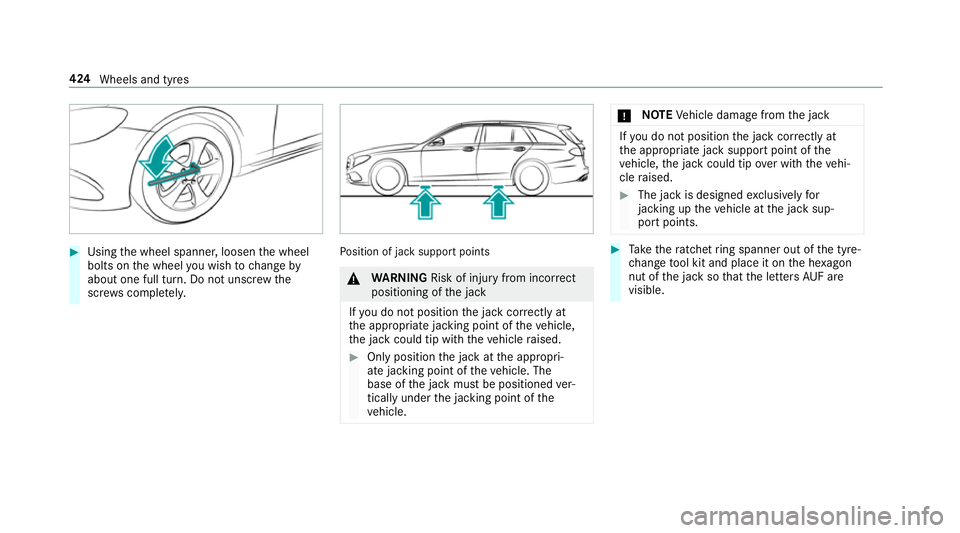
Using the wheel spanner, loosen the wheel
bolts on the wheel you wish tochange by
about one full turn. Do not unscr ewthe
scr ews comple tely. Po
sition of jack support points &
WARNING Risk of inju ryfrom incor rect
positioning of the jack
If yo u do not position the jack cor rectly at
th e appropriate jacking point of theve hicle,
th e jack could tip with theve hicle raised. #
Only position the jack at the appropri‐
ate jacking point of theve hicle. The
base of the jack must be positioned ver‐
tically under the jacking point of the
ve hicle. *
NO
TEVehicle damage from the jack If
yo u do not position the jack cor rectly at
th e appropriate jack support point of the
ve hicle, the jack could tip over with theve hi‐
cle raised. #
The jack is designed exclusively for
jacking up theve hicle at the jack sup‐
port points. #
Take thera tchet ring spanner out of the tyre-
ch ange tool kit and place it on the he xagon
nut of the jack so that the letters AUF are
visible. 424
Wheels and tyres
Page 429 of 565
&
WARNING Risk of accident from losing a
wheel
Oiled, greased or damaged wheel bolt/wheel
nut thre ads or wheel hub/wheel mounting
bolt thre ads can cause the wheel bolts/
wheel nuts tocome loose.
As a result, you could lose a wheel while driv‐
ing. #
Never oil or grease theth re ads. #
Intheeve nt of damage totheth re ads,
con tact a qualified specialist workshop
immediatel y. #
Have the damaged wheel bolts or dam‐
aged hub thre ads replaced. #
Do not continue driving. #
Obser vethe information on thech oice of
tyres (→ page417).
Fo r tyres with a specified direction of rotation,
an ar rowonthe side wall of the tyre indicates
th e cor rect di rection of rotation. Obse rvethe
direction of rotation when fitting. #
Slide the wheel tobe mounted onto the cen‐
tring pin and push it on. &
WARNING Risk of inju ryfrom tightening
wheel bolts andnuts
If yo u tighten the wheel bolts or wheel nuts
when theve hicle is raised, the jack could tip. #
Only tighten wheel bolts or wheel nuts
when theve hicle is on the ground. #
For saf etyre asons, Mercedes-Benz recom‐
mends that you on lyuse wheel bolts which
ha ve been appr oved for Mercedes-Benz vehi‐
cles, as well as forth e wheel in question. #
Tighten the wheel bolts until they are finger-
tight. #
Unscr ew the cent ring pin. #
Tighten the last wheel bolt until it is finger-
tight. #
Lowe rth eve hicle(→ page 426). Lo
weri ngtheve hicle af ter a wheel change Re
quirements:
R The new wheel has been fitted (→ page 425). #
Place thera tchet ring spanner onto the he xa‐
gon nut of the jack so that the letters "AB"
are visible. #
Tolowe r the vehicle: turnthera tchet ring
spanner of the jack anti-clockwise. #
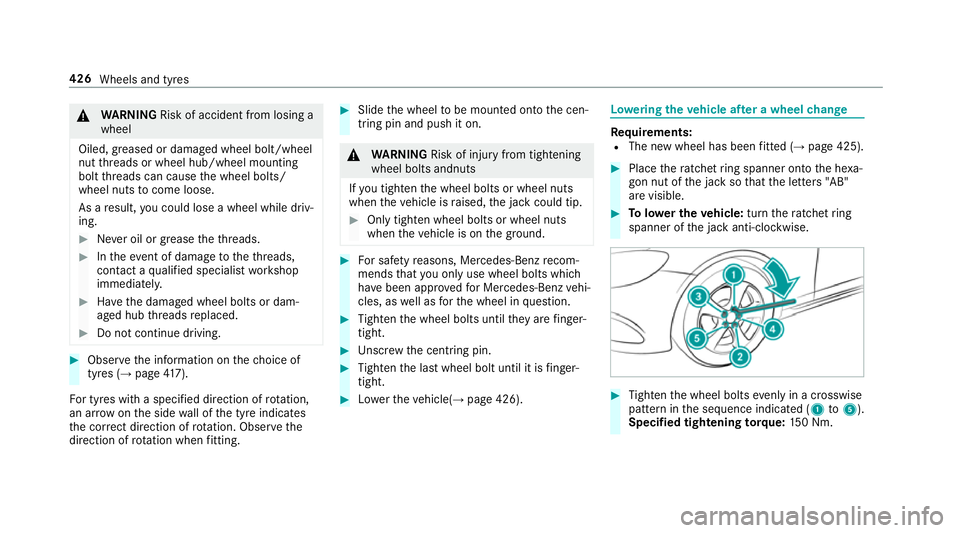
Tighten the wheel bolts evenly in a crosswise
pattern in the sequence indicated (1 to5 ).
Specified tightening torq ue: 150 Nm. 426
Wheels and tyres
Page 525 of 565
HOLD function ....................................
.212
Limited braking ef fect (salt-trea ted
ro ads) .................................................. 16 4
New/replaced brake linings/brake
discs .................................................... 16 4
Ru nning-in no tes ..................................1 64
Brakes see Active Brake Assi st
Braking assistance see BAS (Brake Assi stSystem)
Breakdown ............................................... 390
Assis tance overview .............................. 18
To w- starting ........................................ 405
To wing away ........................................ 401
Tr ansporting theve hicle ......................4 03
Wheel change ...................................... 422
Breakdown assistance call see Service call
Breakdown management see Service call
Bu rm ester ®
sur round sound sy stem .....3 70
Ad justing the balance/fader ................3 71
Ad justing the sound focus ................... 371
Ad justing treble, mid and bass ............ 371Calling up
the sound menu .................. 370
Information .......................................... 370
Switching the sur round sound on/off
............................................................ .371
Buttons Steering wheel .................................... 255 C
CA module (TV) ........................................ 370
Calling up a menu ................................ 370
Inserting .............................................. 369
Call list Making a call ....................................... 324
Options in the call list .......................... 324
Overview ............................................. 324
Calling up the sound menu
Burmes ter®
sur round sound sy stem ... 370
Calls .......................................................... 321
Ac cepting ............................................ 321
Ac tivating functions du ring a call ......... 321
Calls wi thseveral participants ............ .321
Declining ............................................. 321
Ending a call ....................................... .321
Incoming call during an existing call .... 322 Making ................................................
.321
Vi ath eove rhead control panel
(Mercedes me connect) ....................... 327
Camera see 360° Camera
see Reversing camera
Car wash
see Care
Car wash (care) ....................................... 380
Care ..........................................................3 85
AIRPANEL ............................................ 383
Car wash ............................................. 380
Carpet .................................................3 85
Displ ay................................................ 385
Exterior lighting ................................... 383
Genuine wood/trim elements .............3 85
High-p ressure cleaner .........................3 80
Matt finish ........................................... 382
Pa int .................................................... 382
Plastic trim .......................................... 385
Re versing camera/360° Camera ........ 383
Ro of lining ...........................................3 85
Seat belt .............................................. 385
Seat co ver ........................................... 385 522
Index
Page 529 of 565
Display (multimedia sy
stem)
Settings .............................................. .286
Display (on-board comp uter).................. 257
Display content Menu (on-boa rdcompu ter) .................. 264
Display message ..................................... 445
Calling up (on-board co mputer) .......... .445
No tes .................................................. 445
Display messages ? .......................................... .472, 497
A ...................................................4 98
C ................................................... 497
¯ .................................................... 469
Ac tive Blind Spot Assi stcur rently
una vailable See Owner's Manual .........468
Ac tive Blind Spot Assi stinope rative .... 468
Ac tive Blind Spot Assi stnot available
when towing a trailer See Owner's
Manual ................................................ .471
Ac tive bonnet malfunction See Own‐
er's Manual ......................................... 496 Ac
tive Brake Assi stFunctions cur‐
re ntly limited See Owner's Manual ...... 456
Ac tive Brake Assi stFunctions limited
See Owner's Manual ........................... 456
Ac tive Lane Keeping Assist Camera
view restricted See Owner's Manual ... 467
Ac tive Lane Keeping Assist cur rently
una vailable See Owner's Manual .........466
Ac tive Lane Keeping Assist inopera‐
tive ...................................................... 466
bAc tive Light Sy stem inoperative .. 499
Ad aptive Highbeam Assist Plus Cam‐
era view restricted See Owner's
Manual ................................................ 501
Ad aptive Highbeam Assist Plus cur‐
re ntly una vailable See Owner's Man‐
ual ...................................................... .501
Ad aptive Highbeam Assist Plus inop‐
erative ................................................ .500 4Ad
d 1 litre engine oil when next
re fuelling ............................................. 477
Air conditioning Malfunction See
Owner's Manual .................................. 493
App lybrake todeselect Park (P)
position ...............................................4 89
ÀAT TENTION ASSIST inoperative ... 462
ÀAT TENTION ASSIS T:Take a
break! .................................................. 462
bAU TOlights inope rative ............... 500
Au xilia rybattery malfunction .............. 492
_Before starting the engine, turn
th esteering wheel. .............................. 493
Blind Spot Assist cur rently una vaila‐
ble See Owner's Manual ...................... 467
Blind Spot Assist inope rative ............... 468
Blind Spot Assi stnot available when
to wing a trailer See Owner's Manual ...4 71
Brake immediately ............................... 455
ÂChange key bat teries .................. 486 526
Index
Page 535 of 565
Emer
gency key element
Inserting/removing ............................... 66
Un locking theta ilgate ............................ 78
Emer gency operation mode
St arting vehicle ................................... 16 3
Emer gency spare wheel
No tes ................................................... 427
Re moving ............................................ 428
Emer gency spare wheel
see Spare wheel
see Wheel change
Energy consu mption
Ke y ........................................................ 65
Engine ECO start/ stop function ......................1 66
Engine number ................................... .431
St arting (eme rgency operation
mode) .................................................. 16 3
St arting (mobile phone) ...................... .162
St arting (s tart/s top button) .................1 62
St arting assis tance .............................. 398
Switching off (s tart/s top button) ........ 180
Engine bonnet Function (active bonnet) ...................... 373Opening/closing ..................................3
74
Re setting (active bonnet) ..................... 373
Engine data Displaying ............................................ 16 9
Engine electronics Notes .................................................. 429
Engine number ........................................4 31
Engine oil ................................................ .377
Ad ditives .............................................4 38
Che cking the oil le vel using the oil
dipstick ................................................ 376
Checking the oil le vel using the on-
board computer ................................... 376
Filling capacity .................................... 439
MB-F reigabe or MB-Appr oval .............. .439
To pping up ...........................................3 77
Entering characters
Fu nction/no tes ................................... 284
On theto uchpad ................................ .285
Using the controller ............................. 285
ERA-GLONASS test mode
St arting/ending .................................. 332 ESC (Elect
ronic Stability Control)
see ESP ®
(Electronic Stability Prog ram)
ESP ®
(Electronic Stability Prog ram) ...... 189
Crosswind Assist ................................ .193
Fu nction/no tes ................................... 189
Switching on/off ................................. 19 3
Tr ailer stabilisation .............................. 19 3
EU type appr oval number ....................... 431
Exterior lighting Care .................................................... 383
Ex terior lighting
see Lights F
Fa tigue warning
see ATTENTION ASSIST
Fa ult message
see Displ aymessa ge
Favo urites
Ad ding .................................................2 82
Calling up ............................................ 282
Deleting ............................................... 283
Moving ................................................ 283 532
Index
Page 536 of 565
Overview ............................................. 282
Re naming ............................................ 283
Fi lling station sear ch
St arting an automatic filling station
sear ch................................................. 300
Switching the automatic filling sta‐
tion sear chon/off ...............................3 03
Fire extinguisher ..................................... 389
Fi rs t-aid kit (soft sided) .......................... 389
Flacon Inse rting/ removing ............................. 15 3
Flat ty re
MOExtended tyres ...............................3 90
No tes .................................................. 390
TIREFIT kit ...........................................3 92
Wheel change ...................................... 422
Flat ty re
see Breakdown
Floor mat .................................................. 13 0
Fo g light (extended range) ......................1 35
Fo lding bench seat .................................. 101
Fitting and removing the seat cush‐
ion .......................................................1 03Fo
lding back ........................................ 104
Fo lding out .......................................... 102
No tes ................................................... 101
Sui table child restra int sy stems ............ 58
Fr ag rance
see Fragrance sy stem
Fr ag rance sy stem .................................... 15 3
Inserting/removing theflacon ............ .153
Setting ................................................. 15 3
Fr equencies
Mobile phone ...................................... 430
Tw o-w ayradio ...................................... 430
Fr equency band
Selecting (on-board computer) ............ 262
Fr ont airbag .............................................. .36
Fr ont passenger airbag shu toff ............... 39
PA SSENGER AIR BAG indicator lamp .... .41
Po ints toremember when the front
passenger seat is occupied ...................39
St atus display ........................................ 41
Sy stem self-test .....................................41
Fr ont passenger airbag shu toff
see Occupant saf ety Fr
ont passenger seat
Ad justing from the driver's seat ............ 94
Fr ont passenger seat
see Seat
Fu el .......................................................... .435
Ad ditives .............................................4 35
Consu mption ....................................... 437
Diesel .................................................. 436
E10 ...................................................... 434
Low outside temp eratures ...................4 36
Pe trol ................................................... 434
Quality (diesel) .................................... 436
Quality (p etro l) .................................... 434
Re fuelling ............................................. 175
Re ser vefuel le vel ................................ 437
Sulphur con tent ................................... 434
Ta nk capacity ...................................... 437
Fu el consum ption
On-board computer ............................ .259
Fu nction seat
see Door cont rol panel
Fu se insert
see Fuses Index
533