glove box MERCEDES-BENZ E-CLASS ESTATE 2016 Owners Manual
[x] Cancel search | Manufacturer: MERCEDES-BENZ, Model Year: 2016, Model line: E-CLASS ESTATE, Model: MERCEDES-BENZ E-CLASS ESTATE 2016Pages: 565, PDF Size: 11.34 MB
Page 10 of 565
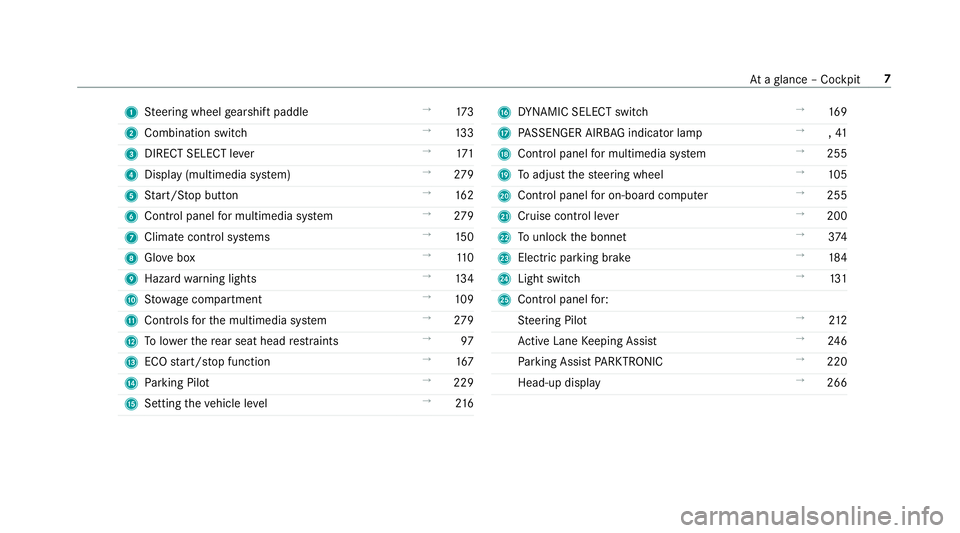
1
Steering wheel gearshift paddle →
173
2 Combination swit ch →
13 3
3 DIRECT SELECT le ver →
171
4 Displ ay(multimedia sy stem) →
279
5 Start/ Stop button →
16 2
6 Control panel for multimedia sy stem →
279
7 Climate cont rol sy stems →
15 0
8 Glovebox →
11 0
9 Haza rdwa rning lights →
13 4
A Stow age compartment →
109
B Controls forth e multimedia sy stem →
279
C Tolowe rth ere ar seat head restra ints →
97
D ECO start/ stop function →
167
E Parking Pilot →
229
F Setting theve hicle le vel →
216 G
DYNA MIC SELECT switch →
16 9
H PASSENGER AIRB AGindicator lamp →
,41
I Control panel for multimedia sy stem →
255
J Toadjust thesteering wheel →
105
K Control panel for on-board computer →
255
L Cruise control le ver →
200
M Tounlo ckthe bonn et →
374
N Electric pa rking brake →
184
O Light switch →
131
P Control panel for:
St eering Pilot →
212
Ac tive Lane Keeping Assist →
24 6
Pa rking Assist PARKTRONIC →
220
Head-up display →
266 At
aglance – Cockpit 7
Page 12 of 565
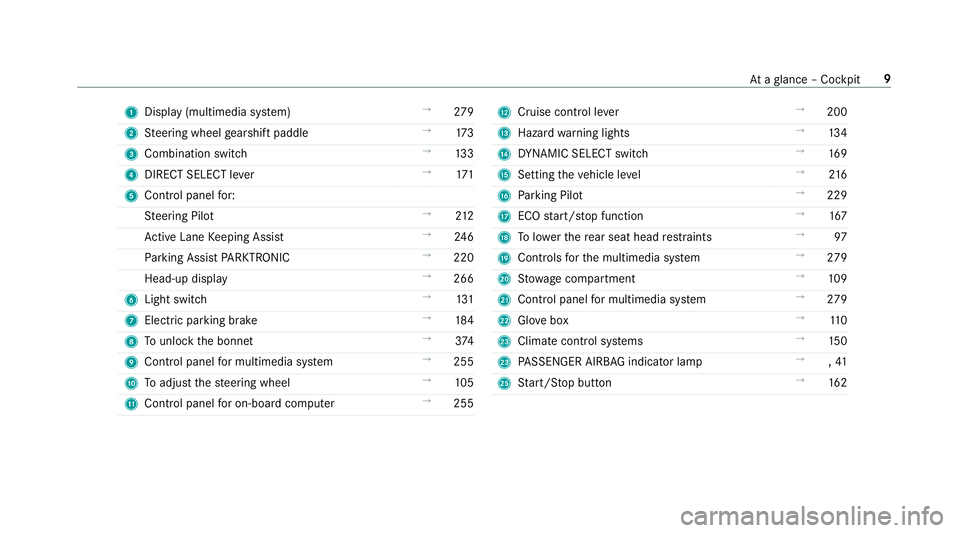
1
Displ ay(multimedia sy stem) →
279
2 Steering wheel gearshift paddle →
173
3 Combination swit ch →
13 3
4 DIRECT SELECT le ver →
171
5 Control panel for:
St eering Pilot →
212
Ac tive Lane Keeping Assist →
24 6
Pa rking Assist PARKTRONIC →
220
Head-up display →
266
6 Light swit ch →
131
7 Electric pa rking brake →
184
8 Tounlo ckthe bonn et →
374
9 Control panel for multimedia sy stem →
255
A Toadjust thesteering wheel →
105
B Control panel for on-board computer →
255 C
Cruise control le ver →
200
D Hazard warning lights →
13 4
E DYNA MIC SELECT switch →
16 9
F Setting theve hicle le vel →
216
G Parking Pilot →
229
H ECO start/ stop function →
167
I Tolowe rth ere ar seat head restra ints →
97
J Controls forth e multimedia sy stem →
279
K Stow age compartment →
109
L Control panel for multimedia sy stem →
279
M Glovebox →
11 0
N Climate cont rol sy stems →
15 0
N PASSENGER AIRB AGindicator lamp →
,41
P Start/ Stop button →
16 2 At
aglance – Cockpit 9
Page 113 of 565
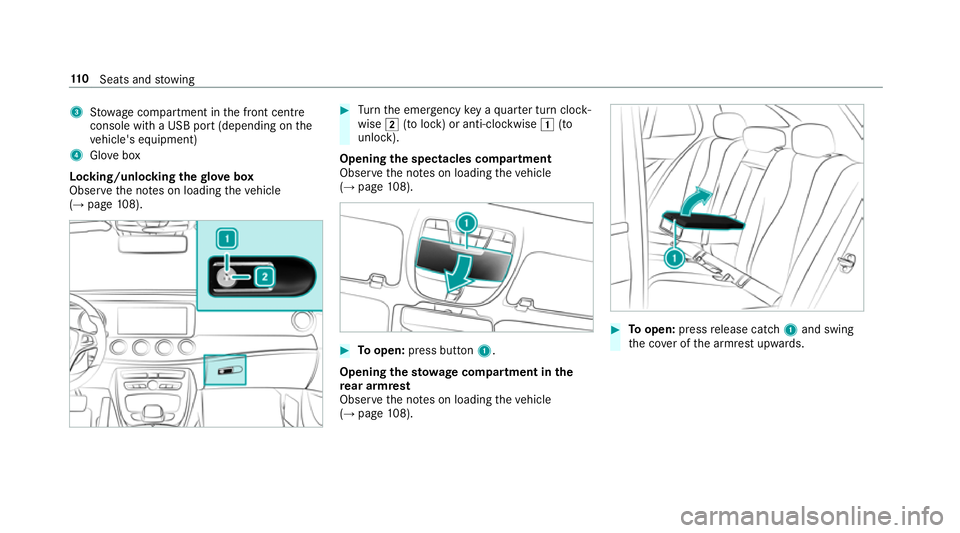
3
Stow age compartment in the front cent re
console wi tha USB port (depending on the
ve hicle's equipment)
4 Glovebox
Locking/unlocking thegl ove box
Obser vethe no tes on loading theve hicle
(→ page 108). #
Turn the emer gency key a quarter turn clock‐
wise 2(to lock) or anti-clockwise 1(to
unlock).
Opening the spectacles compa rtment
Obse rveth e no tes on loading theve hicle
(→ page 108). #
Toopen: press button 1.
Opening thesto wage compa rtment in the
re ar armrest
Obse rveth e no tes on loading theve hicle
(→ page 108). #
Toopen: pressrelease cat ch1 and swing
th e co ver of the armrest upwards. 11 0
Seats and stowing
Page 132 of 565
#
Close the loc kable stow age spaces
before starting a journe y. #
Alw aysstow and secure heavy, hard,
poin ted, sharp-edged, fragile or bulky
objects in the boot/load compartment. Obser
vethe no tes on loading theve hicle. &
WARNING Risk offire from placing
objects in the mobile phone stowage
compartment
If yo u place objects in the mobile phone
stow age compartment, they may heat up
exc essively and even catch fire. #
Do not place additional objects, espe‐
cially those mode of me tal, in the
mobile phone stowage compartment. *
NO
TEDama getoobjects caused by
placing them in the mobile phone stow‐
age compartment If
yo u place objects in the mobile phone
stow age compartment, these may be dam‐
aged byelectromagnetic fields. #
Do not place credit cards, storage
media or other objects sensitive to
electromagnetic fields in the mobile
phone stowage compartment. *
NO
TEDama getothe mobile phone
stow age compartment caused byliquids If liquid is spilled in
the mobile phone stow‐
age compartment, the mobile phone stowage
compartment may be damaged. #
Do not spill liquids into the mobile
phone stowage compartment. R
Depending on theve hicle equipment, the
mobile phone is connected totheve hicle's
ex terior aerial via thech arging module. R
The charging function and wireless connec‐
tion of the mobile phone totheve hicle's
ex terior aerial are only available if the ignition
is switched on.
R Small mobile phones may not be able tobe
ch arge d in everyposition of the mobile
phone stowage compartment.
R Largemobile phones which do not rest flat in
th e mobile phone stowage compartment may
not be able tobe charge d or connec ted with
th eve hicle's exterior aerial.
R The mobile phone may heat up during the
ch arging process. The mobile phone can be
cooled in the mobile phone stowage com‐
partment when the air conditioning sy stem is
switched on. The cooling output in the
mobile phone stowage compartment is high‐
est when the controller in theglove box is
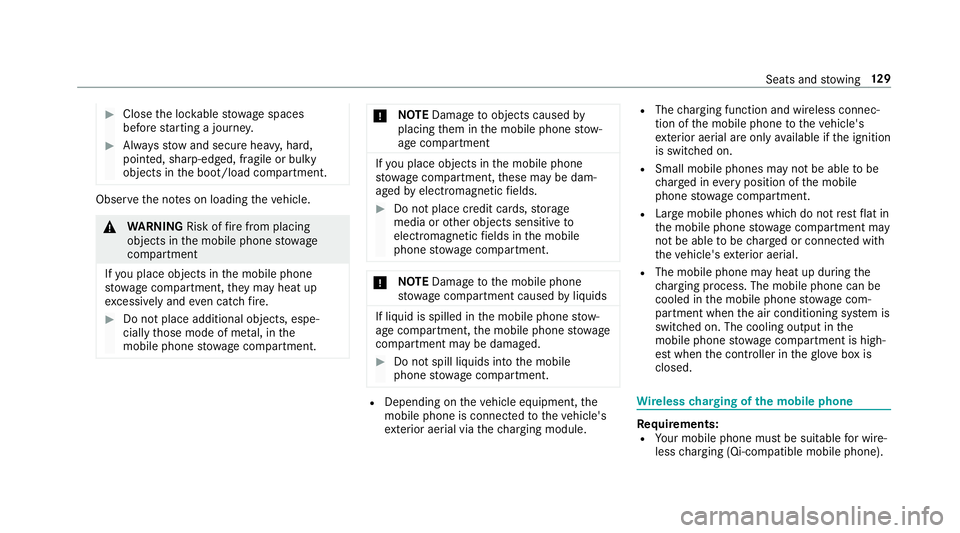
closed. Wire
lesscharging of the mobile phone Re
quirements:
R Your mobile phone must be suitable for wire‐
less charging (Qi-compatible mobile phone). Seats and
stowing 12 9
Page 156 of 565
Ac
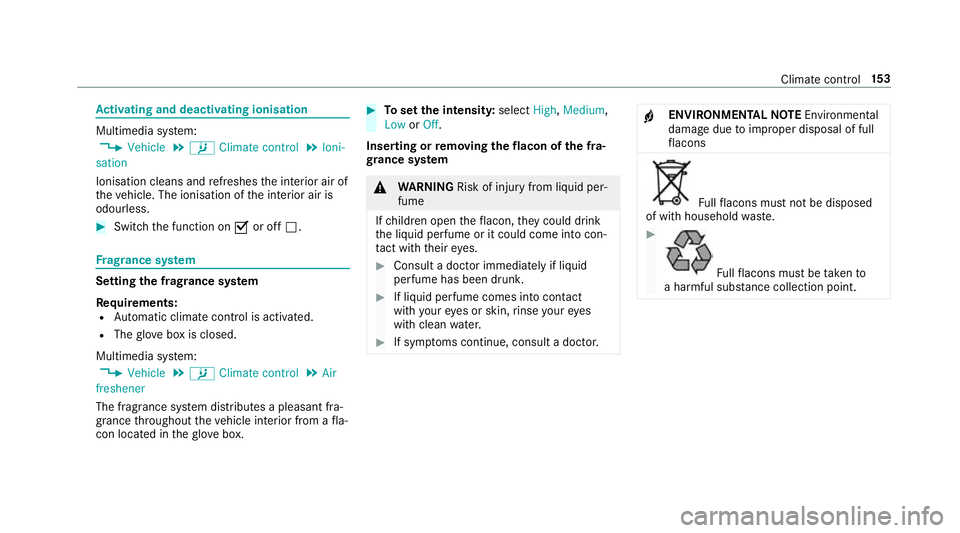
tivating and deactivating ionisation Multimedia sy
stem:
, Vehicle .
b Climate control .
Ioni-
sation
Ionisation cleans and refreshes the interior air of
th eve hicle. The ionisation of the interior air is
odourless. #
Switch the function on Oor off ª. Fr
ag rance sy stem Setting
the frag rance sy stem
Re quirements:
R Automatic clima tecontrol is acti vated.
R The glove box is closed.
Multimedia sy stem:
, Vehicle .
b Climate control .
Air
freshener
The fragrance sy stem distributes a pleasant fra‐
grance thro ughout theve hicle interior from a fla‐
con located in theglove box. #
Toset the intensit y:select High,Medium,
Low orOff.
Inserting or removing the flacon ofthe fra‐
gr ance sy stem &
WARNING Risk of inju ryfrom liquid per‐
fume
If ch ildren open theflacon, they could drink
th e liquid perfume or it could come into con‐
ta ct wi th theireyes. #
Consult a doctor immediately if liquid
perfume has been drunk. #
If liquid perfume comes into conta ct
wi th your eyes or skin, rinse your eyes
with clean water. #
If sym ptoms continue, consult a doctor. +
ENVIRONMENTAL
NOTEEnvironmental
dama gedue toimproper disposal of full
fl acons Fu
llflacons must not be disposed
of with household waste. #
Fu
llflacons must be take nto
a harmful subs tance collection point. Clima
tecontrol 15 3
Page 162 of 565
Air
vents Ad
justing the front air vents &
WARNING ‑ Risk of bu rns/frostbite due
to not maintaining a su fficient dis tance
to the air vents
Ve ry hot or very cold air can flow from the air
ve nts.
This could result in burns or frostbite in the
immediate vicinity of the air vents. #
Alw ays ensure that all vehicle occu‐
pants maintain a suf ficient di stance to
th e air vents. #
If necessa ry,re direct the air flow to
ano ther area of theve hicle interior. #
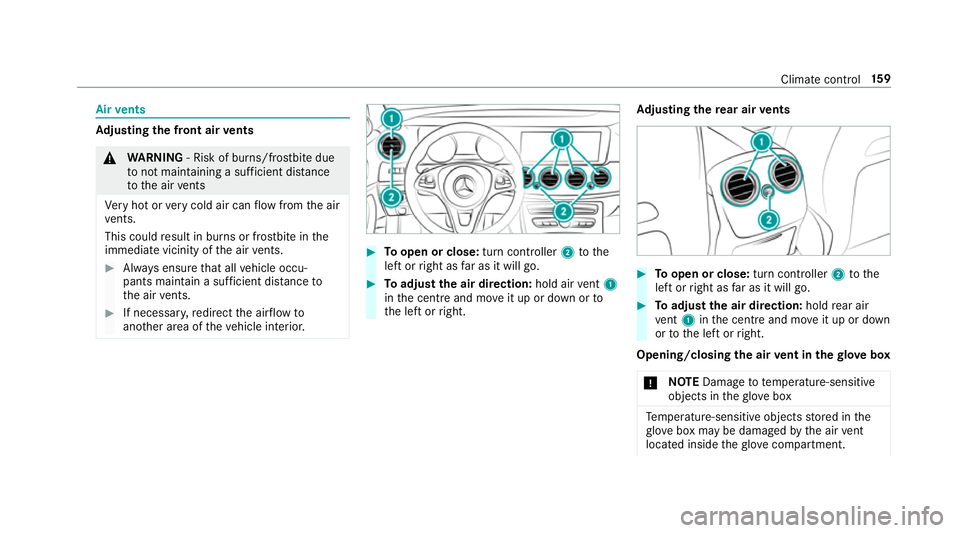
Toopen or close: turn controller2tothe
left or right as far as it will go. #
Toadjust the air direction: hold airvent 1
in the cent reand mo veit up or down or to
th e left or right. Ad
justing the rear air vents #
Toopen or close: turn controller2tothe
left or right as far as it will go. #
Toadjust the air direction: holdrear air
ve nt 1 inthe cent reand mo veit up or down
or tothe left or right.
Opening/closing the air vent in thegl ove box
* NO
TEDama geto te mperature-sensitive
objects in theglove box Te
mp erature-sensitive objects stored in the
gl ove box may be damaged bythe air vent
located inside theglove compa rtment. Climate control
15 9
Page 526 of 565
Senso
rs............................................... 383
Ta ilpipes .............................................. 383
Tr ailer hit ch......................................... 383
Wa shing byhand ................................. 381
Wheels/rims ....................................... 383
Wi ndo ws .............................................. 383
Wi per blades .......................................3 83
Carpet (Care) .......................................... .385
Changing bulbs ........................................ 13 9
Dipped beam ....................................... 14 0
Fitting/removing co ver (front wheel
ar ch ) .................................................... 14 0
Main beam .......................................... 14 0
No tes ................................................... 13 9
Overview ............................................. 13 9
Tu rn signal light (front) ........................ 14 0
Changing hub caps .................................422
Channel tracking Setting ................................................. 362
Charging Battery (vehicle) .................................. 398
Child saf ety lock
Re ar door .............................................. .61
Re ar side wind ows................................. 63 Child seat
................................................... 45
At tach ing (no tes) ................................... 52
Fo lding bench seat suitable .................. .58
Fr ont passenger seat (no tes) ................. 50
Fr ont passenger seat (rear ward-
fa cing/for ward-facing) ........................... 51
Fr ont passenger seat (without airbag
shutoff) .................................................. 51
ISOFIX/i-Size (fitting) ............................ 48
ISOFIX/i-Size (no tes) ............................. 47
No tes ..................................................... 45
Re commended child restra int sys‐
te ms ...................................................... 59
Seats suita blefor belt-secu redch ild
re stra int sy stems ................................... 53
Seats suitable for i‑Size child
re stra int sy stems ................................... 57
Seats suitable for ISOFIX child
re stra int sy stems ................................... 55
To pTe ther ..............................................49
Child ren
Re stra int sy stems ..................................45
Chock Storage location ..................................4 21Chock
see Wheel chock
Cigar ette lighter ...................................... 12 6
City lighting ............................................ .136
Cleaning see Care
Climate control ........................................ 14 9
Ac tivating/deactivating the A/C
function (cont rol panel) ........................ 151
Ac tivating/deactivating the A/C
function (multimedia sy stem) ............... 151
Ac tivating/deactivating the synchro‐
nisation function (cont rol panel) .......... 15 2
Ac tivating/deactivating the synchro‐
nisation function (multimedia sys‐
te m) ..................................................... 15 2
Ad justing the air vents ........................ .159
Air distribution settings ........................ 151
Air-reci rculation mode ........................ .152
Au tomatic control ................................ 151
Climate style function .......................... 151
Demi sting the windo ws....................... 15 2
Demi sting the windscreen ...................1 49
Glove box air vent ................................ 15 9 Index
523