headlamp MERCEDES-BENZ E-CLASS ESTATE 2016 Owners Manual
[x] Cancel search | Manufacturer: MERCEDES-BENZ, Model Year: 2016, Model line: E-CLASS ESTATE, Model: MERCEDES-BENZ E-CLASS ESTATE 2016Pages: 565, PDF Size: 11.34 MB
Page 5 of 565
At
agl ance .................................................... 6
Cockpit ........................................................... 6
Wa rning and indicator lamps ........................ 10
Overhead contro l panel ................................ 14
Door control panel and seat adjustment ....... 16
Emergencies and breakdowns ...................... 18Digital Owner's Manual
.............................20
Calling up the Digital Owner's Manual ..........20 Genera
l notes............................................. 21
Pr otection of the environment ......................21
Ta ke -ba ckof end-of-life vehicles ...................21
Mercedes-Benz GenuineParts ....................... 22
Owner's Manual ...........................................23
Operating saf ety .......................................... .23
Declaration of Conformity ............................. 24
Diagno stics connection ................................ 26
Qualified specialist workshop ....................... 26
Ve hicle registration ....................................... 27
Cor rect use of theve hicle ............................. 27
Implied warranty .......................................... .27
QR code forre scue card ...............................27
Ve hicle data storage .....................................27 Copyright ...................................................... 28 Occupant saf
ety......................................... 30
Re stra int sy stem ...........................................30
Seat belts ..................................................... 32
Airbags ......................................................... 36
PRE-SAFE ®
sy stem ....................................... 43
Children in theve hicle ..................................45
Pe ts in theve hicle ........................................63 Opening and closing
.................................. 64
Ke y .............................................................. .64
Doo rs............................................................ 68
Load compa rtment ....................................... 73
Ro ller sunblinds ............................................ 79
Side windo ws............................................... 79
Sliding sunroof ............................................. 83
Anti-theft pr otection .....................................88 Seats and
stowing ..................................... 90
Cor rect driver's seat position ....................... 90
Seats ............................................................ 91
St eering wheel ............................................ 104Using
the memory function ........................ 107
St ow age areas ............................................ 108
Cup holders ................................................ 12 3
Ashtr ayand cigar ette lighter ...................... .125
Soc kets ....................................................... 12 6
Wi reless charging of the mobile phone
and connection with theex terior aerial ...... 12 8
Fitting/removing floor mats ....................... 13 0 Light and sight
.......................................... 131
Exterior lighting ........................................... 131
Interior lighting ........................................... 13 8
Changing bulbs (on lyforve hicles with
halogen headlamp s) .................................... 13 9
Wi ndsc reen wipers and windscreen
wa sher sy stem ............................................ 141
Mir rors ........................................................ 14 4
Operating the sun visors ............................. 147
Infrared reflective windscreen .................... 147 Climate control
........................................ 14 9
Overview of climate contro l systems ..........1 49
Operating the climate control sy stem ......... 15 0 2
Contents
Page 134 of 565
Exterior lighting
Changing
the lights when driving abroad Ve
hicles with halogen or static LED head‐
lamps: It is not necessa ryto change the head‐
lamps. The legal requ irements are also met in
countries where people drive on theot her side
of thero ad.
Ve hicles with Intelligent Light Sy stem: Before
crossing the border into count ries where they
drive on theot her side, it is necessary toset the
headlamp sto symmetrical dipped beam
(→ page 137).
Af terch anging the headlamps:
R Oncoming tra ffic is not dazzled.
R The edge of thero ad is not illuminated as far
or as high.
R The "mo torw ay mode" and "enhanced fog
light functions" are not available.
The headlamps must be reset toasymm etrical
dipped beam af terre turning from ab road. Lighting sy
stems and your responsibility The
various lighting sy stems of theve hicle are
only aids. The driver of theve hicle is responsible
fo r cor rect vehicle illumination in accordance
with the pr evailing light and visibility conditions,
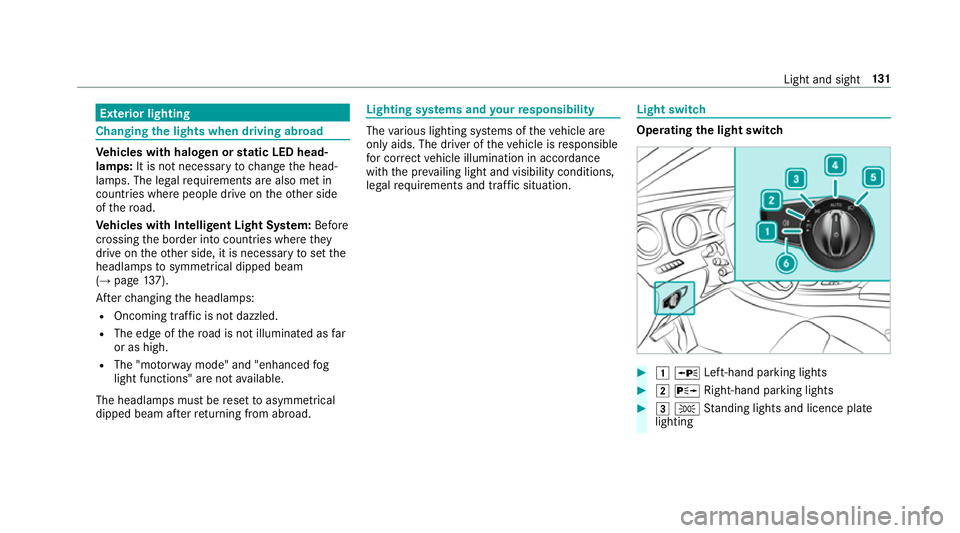
legal requirements and traf fic situation. Light switch
Ope
rating the light switch #
1 W Left-hand pa rking lights #
2 X Right-hand parking lights #
3 T Standing lights and licence plate
lighting Light and sight
131
Page 135 of 565
#
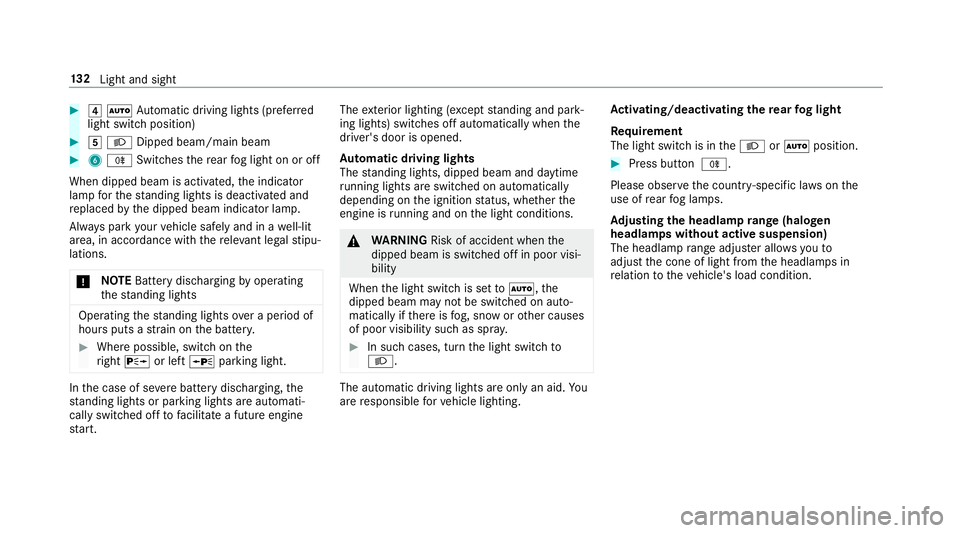
4 Ã Automatic driving lights (prefer red
light switch position) #
5 L Dipped beam/main beam #
6 R Switches there ar fog light on or off
When dipped beam is activated, the indicator
lamp forth est anding lights is deactivated and
re placed bythe dipped beam indicator lamp.
Alw ays park your vehicle safely and in a well-lit
area, in accordance with there leva nt le galst ipu‐
lations.
* NO
TEBattery discharging byoperating
th est anding lights Operating
thest anding lights over a period of
hours puts a stra in on the batter y. #
Where possible, switch on the
ri ght X or left Wparking light. In
the case of se vere battery discharging, the
st anding lights or parking lights are automati‐
cally swit ched off tofacilitate a futu reengine
st art. The
exterior lighting (e xcept standing and park‐
ing lights) swit ches off automatically when the
driver's door is opened.
Au tomatic driving lights
The standing lights, dipped beam and daytime
ru nning lights are switched on au tomatical ly
depending on the ignition status, whe ther the
engine is running and on the light conditions. &
WARNING Risk of accident when the
dipped beam is switched off in poor visi‐
bility
When the light switch is set toà ,the
dipped beam may not be switched on auto‐
matically if there is fog, snow or other causes
of poor visibility such as spr ay. #
In such cases, turn the light switch to
L . The automatic driving lights are only an aid.
Yo u
are responsible forve hicle lighting. Ac
tivating/deactivating the rear fog light
Re quirement
The light switch is in theL orà position. #
Press button R.
Please obser vethe count ry-specific la wsonthe
use of rear fog lamps.
Ad justing the headlamp range (halogen
headla mps without active suspension)
The headlamp range adjus ter allows youto
adjust the cone of light from the headlamps in
re lation totheve hicle's load condition. 13 2
Light and sight
Page 136 of 565
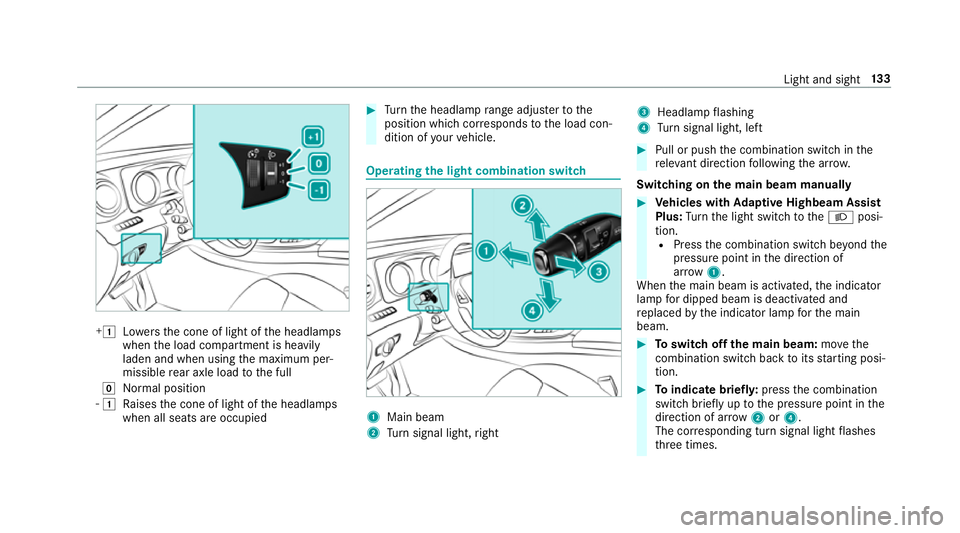
+1
Lowe rsthe cone of light of the headlamps
when the load compartment is heavily
laden and when using the maximum per‐
missible rear axle load tothe full
g Normal position
- 1
Raises the cone of light of the headlamps
when all seats are occupied #
Turn the headlamp range adjus terto the
position which cor responds tothe load con‐
dition of your vehicle. Operating
the light combination switch 1
Main beam
2 Turn signal light, right 3
Headlamp flashing
4 Turn signal light, left #
Pull or push the combination switch in the
re leva nt di rection following the ar row.
Switching on the main beam manually #
Vehicles with Adaptive Highbeam Assist
Plus: Turn the light switch totheL posi‐
tion. R Press the combination switch be yond the
pressure point in the direction of
ar ro w 1.
When the main beam is activated, the indicator
lamp for dipped beam is deactivated and
re placed bythe indicator lamp forth e main
beam. #
Toswitch off the main beam: movethe
combination switch ba cktoits starting posi‐
tion. #
Toindicate briefl y:press the combination
switch briefly up tothe pressure point in the
direction of ar row2or4.
The cor responding turn signal light flashes
th re e times. Light and sight
13 3
Page 137 of 565
#
Toindicate for a duration: pressthe combi‐
nation switch be yond the pressure point in
th e direction of ar row2or4. Ac
tivating/deactivating the hazard warning
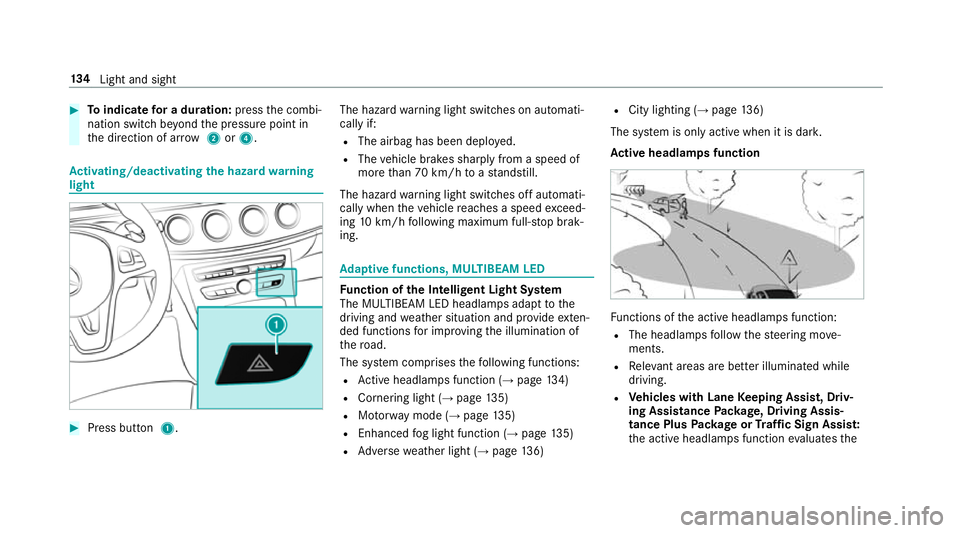
light #
Press button 1. The hazard
warning light switches on automati‐
cally if:
R The airbag has been deplo yed.
R The vehicle brakes sharply from a speed of
more than 70 km/h toast andstill.
The hazard warning light switches off automati‐
cally when theve hicle reaches a speed exceed‐
ing 10km/h following maximum full-s top brak‐
ing. Ad
aptive functions, MULTIBEAM LED Fu
nction of the Intelligent Light Sy stem
The MULTIBEAM LED headlamps adapt tothe
driving and weather situation and pr ovide exten‐
ded functions for impr oving the illumination of
th ero ad.
The sy stem comprises thefo llowing functions:
R Active headla mps function (→ page134)
R Cornering light (→ page135)
R Motorw ay mode (→ page135)
R Enhanced fog light function (→ page135)
R Adversewe ather light (→ page136) R
City lighting (→ page136)
The sy stem is only active when it is dar k.
Ac tive headlamps function Fu
nctions of the active headlamps function:
R The headlamps follow thesteering mo ve‐
ments.
R Releva nt areas are better illumina ted while
driving.
R Vehicles with Lane Keeping Assist, Driv‐
ing Assistance Package, Driving Assis‐
tance Plus Package or Traf fic Sign Assis t:
th e active headlamps function evaluates the 134
Light and sight
Page 139 of 565
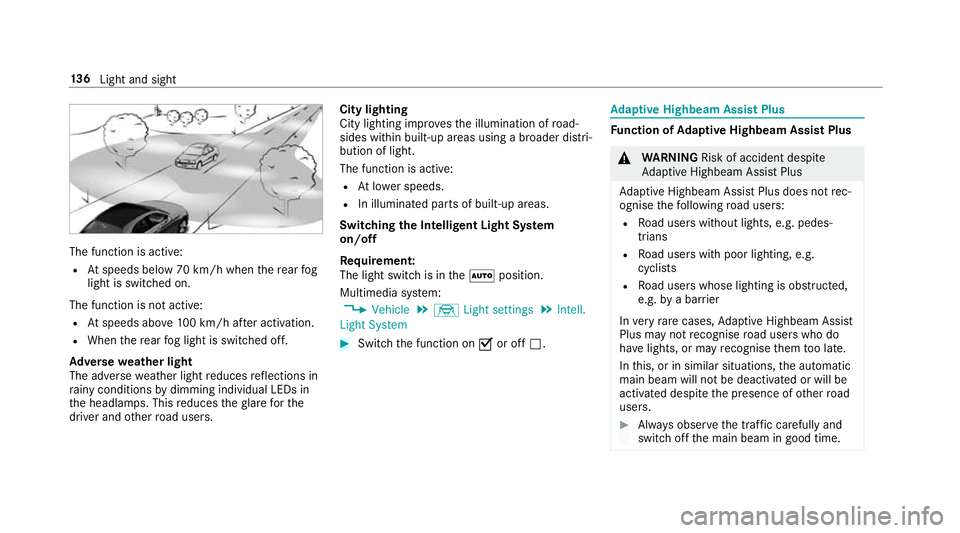
The function is active:
R Atspeeds below 70 km/h when there ar fog
light is switched on.
The function is not active:
R Atspeeds abo ve100 km/h af ter activation.
R When there ar fog light is switched off.
Ad versewe ather light
The adverse weather light reduces reflections in
ra iny conditions bydimming individual LEDs in
th e headlamps. This reduces theglare forthe
driver and other road users. City lighting
City lighting impr
ovesth e illumination of road‐
sides within built-up areas using a broader distri‐
bution of light.
The function is active:
R Atlowe r speeds.
R In illumina ted parts of built-up areas.
Switching the Intelligent Light Sy stem
on/off
Requ irement:
The light switch is in theà position.
Multimedia sy stem:
, Vehicle .
÷ Light settings .
Intell.
Light System #
Switch the function on Oor off ª. Ad
aptive Highbeam Assist Plus Fu
nction of Adaptive Highbeam Assist Plus &
WARNING Risk of accident despi te
Ad aptive Highbeam Assist Plus
Ad aptive Highbeam Assist Plus does not rec‐
ognise thefo llowing road users:
R Road users without lights, e.g. pedes‐
trians
R Road users with poor lighting, e.g.
cyclists
R Road users whose lighting is obstructed,
e.g. bya bar rier
In very rare cases, Adaptive Highbeam Assist
Plus may not recognise road users who do
ha ve lights, or may recognise them too late.
In this, or in similar situations, the automatic
main beam will not be deactivated or will be
activated despite the presence of other road
users. #
Alw ays obser vethe tra ffic carefully and
switch off the main beam in good time. 13 6
Light and sight
Page 140 of 565
Ad
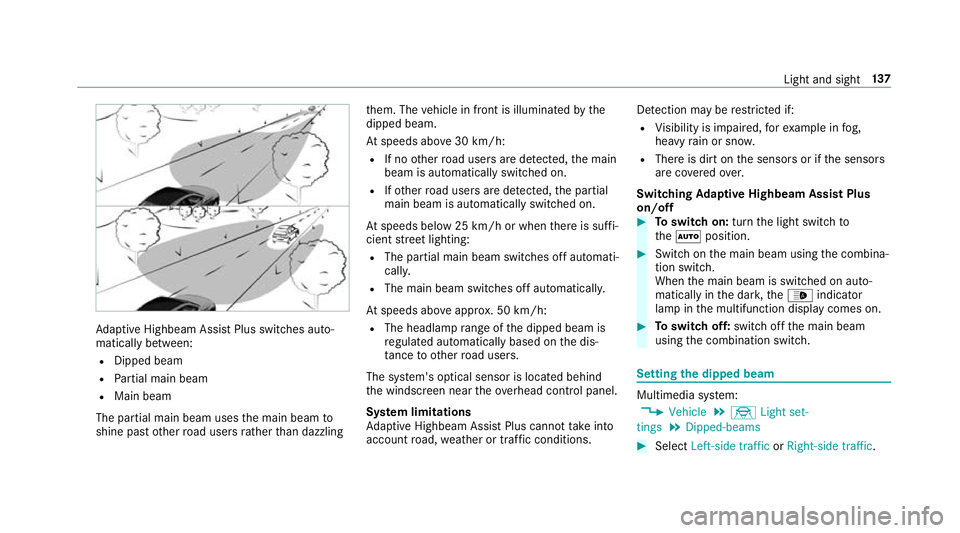
aptive Highbeam Assist Plus swit ches auto‐
matically between:
R Dipped beam
R Partial main beam
R Main beam
The partial main beam uses the main beam to
shine past other road users rath er than dazzling th
em. The vehicle in front is illuminated bythe
dipped beam.
At speeds abo ve30 km/h:
R If no other road users are de tected, the main
beam is automatically switched on.
R Ifot her road users are de tected, the partial
main beam is automatically switched on.
At speeds below 25 km/h or when there is suf fi‐
cient stre et lighting:
R The partial main beam switches off automati‐
cally.
R The main beam switches off automatically.
At speeds abo veappr ox. 50 km/h:
R The headlamp range of the dipped beam is
re gulated automatically based on the dis‐
ta nce to ot herroad users.
The sy stem's optical sensor is located behind
th e windscreen near theove rhead control panel.
Sy stem limitations
Ad aptive Highbeam Assist Plus cannot take into
account road, weather or traf fic conditions. De
tection may be restricted if:
R Visibility is impaired, forex ample in fog,
heavy rain or sno w.
R There is dirt on the sensors or if the sensors
are co veredov er.
Switching Adaptive Highbeam Assist Plus
on/off #
Toswitch on: turnthe light switch to
th eà position. #
Switch on the main beam using the combina‐
tion switch.
When the main beam is switched on auto‐
matically in the dar k,the_ indicator
lamp in the multifunction display comes on. #
Toswitch off: switch offthe main beam
using the combination switch. Setting
the dipped beam Multimedia sy
stem:
, Vehicle .
÷ Light set-
tings .
Dipped-beams #
Select Left-side traffic orRight-side traffic. Light and sight
137
Page 142 of 565
#
Set the colour.
Setting the brightness for zones #
Select Entire vehicle ,Front ,Rear orDisplay. #
Set the brightness value. Setting
the interior lighting switch-off delay
time Multimedia sy
stem:
, Vehicle .
÷ Light settings .
Int.
light delay shut-off #
Set the switch-off delay time. Changing bulbs (only
forve hicles with halo‐
ge n headla mps) Note
s onchanging bulbs &
WARNING Risk of bu rns from hot com‐
ponent parts whilst replacing a bulb
Bulbs, lamps and plug connec tors can
become very hot during operation. When
replacing a bulb, you could burn your‐
self on these component parts. #
Allow the component parts tocool
down before replacing the bulbs. R
Do not use a bulb if it has been dropped or if
itsglass tube has been sc ratched. The bulb
may otherwise explode.
R Do not touch theglass tube with your bare
hands.
R Protect bulbs from moisture and do not allow
bulbs tocome into contact wi thliquids. Overview of light source types
The
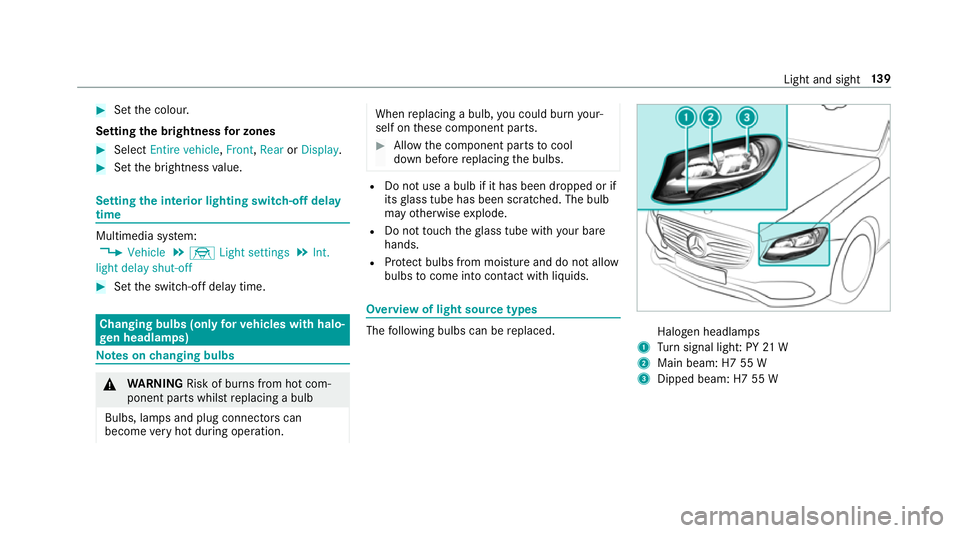
following bulbs can be replaced. Halogen headlamps
1 Turn signal light: PY 21 W
2 Main beam: H7 55 W
3 Dipped beam: H7 55 W Light and sight
13 9
Page 149 of 565
skin,
eyes,respiratory organs or clo thing or
be swallo wed. #
Ifyo u come into contact with electro‐
ly te , obser vethefo llowing:
R Rinse the electrolyte from your skin
and seek medical attention immedi‐
atel y.
R If electrolyte comes into contact
with your eyes, rinse them thor‐
oughly with clean water and seek
medical attention immediately.
R Ifth e electrolyte is swallo wed,
immediately rinse your mouth out
th oroughly. Do not induce vomiting.
Seek medical attention immediately.
R Immedia tely ch ange out of clo thing
which has come into con tact wi th
electrolyte.
R If an allergic reaction occurs, seek
medical attention immediatel y.The outside mir
rors and inside rearview mir rors
on the driver's side automatically go into anti- dazzle mode if light from a headlamp hits
the
inside rearview mir ror.
Sy stem limitations
The mir rors do not go into anti-dazzle mode in
th efo llowing situations:
R the engine is switched off
R reve rsege ar is engaged
R interior lighting is swit ched on Pa
rking position of the passenger outside
mir ror The parking position makes parking easier.
The passenger outside mir ror tilts down wards
and sho wsthere ar wheel on the front passenger
side if:
R the parking position is stored
R the passenger mir ror is selected
R reve rsege ar is engaged
The passenger outside mir ror mo ves back toits
original position in thefo llowing situations: R
ifyo u shift the transmission toano ther trans‐
mission position
R when driving fasterthan 15 km/h
R ifyo u press the button forth e outside mir ror
on the driver's side Saving
the pa rking position of the passenger
outside mir ror Requ
irement:
Re versege ar must not be engaged when storing
using the memory button. 14 6
Light and sight
Page 250 of 565
#
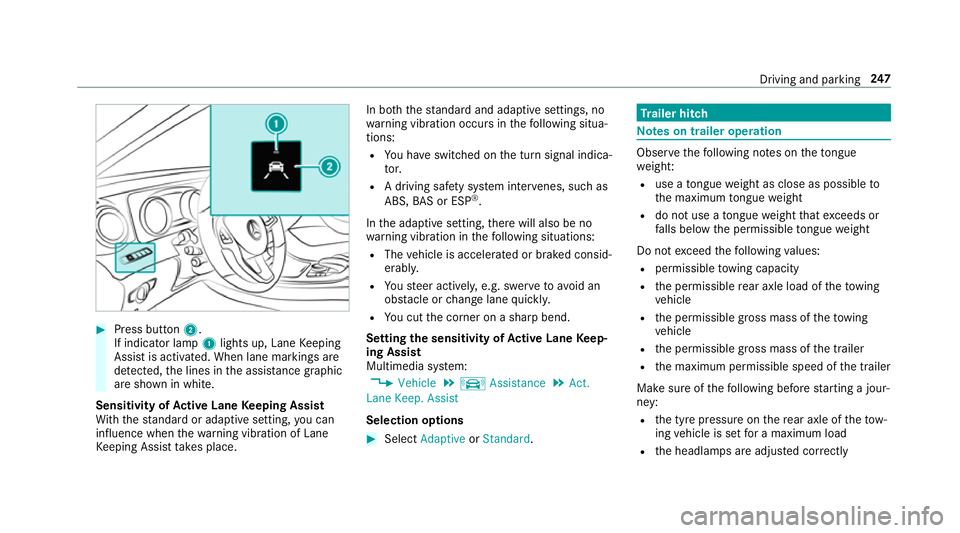
Press button 2.
If indicator lamp 1lights up, Lane Keeping
Assist is activated. When lane markings are
de tected, the lines in the assis tance graphic
are shown in white.
Sensitivity of Active Lane Keeping Assist
Wi th th est andard or adaptive setting, you can
influence when thewa rning vibration of Lane
Ke eping Assist take s place. In bo
th thest andard and adaptive settings, no
wa rning vibration occurs in thefo llowing situa‐
tions:
R You ha veswitched on the turn signal indica‐
to r.
R A driving sa fety sy stem inter venes, su chas
ABS, BAS or ESP ®
.
In the adaptive setting, there will also be no
wa rning vibration in thefo llowing situations:
R The vehicle is accelerated or braked consid‐
erably.
R Yousteer actively, e.g. swer vetoavo id an
obs tacle or change lane quickl y.
R You cut the corner on a sharp bend.
Setting the sensitivity of Active Lane Keep‐
ing Assist
Multimedia sy stem:
, Vehicle .
k Assistance .
Act.
Lane Keep. Assist
Selection options #
Select Adaptive orStandard. Tr
ailer hitch Note
s on trailer operation Obser
vethefo llowing no tes on theto ngue
we ight:
R use a tongue weight as close as possible to
th e maximum tongue weight
R do not use a tongue weight that exc eeds or
fa lls below the permissible tongue weight
Do not exceed thefo llowing values:
R permissible towing capacity
R the permissible rear axle load of theto wing
ve hicle
R the permissible gross mass of theto wing
ve hicle
R the permissible gross mass of the trailer
R the maximum permissible speed of the trailer
Make sure of thefo llowing before starting a jour‐
ney:
R the tyre pressure on there ar axle of theto w‐
ing vehicle is set for a maximum load
R the headlamps are adjus ted cor rectly Driving and pa
rking 247