start stop button MERCEDES-BENZ E-CLASS ESTATE 2016 Owners Manual
[x] Cancel search | Manufacturer: MERCEDES-BENZ, Model Year: 2016, Model line: E-CLASS ESTATE, Model: MERCEDES-BENZ E-CLASS ESTATE 2016Pages: 565, PDF Size: 11.34 MB
Page 10 of 565
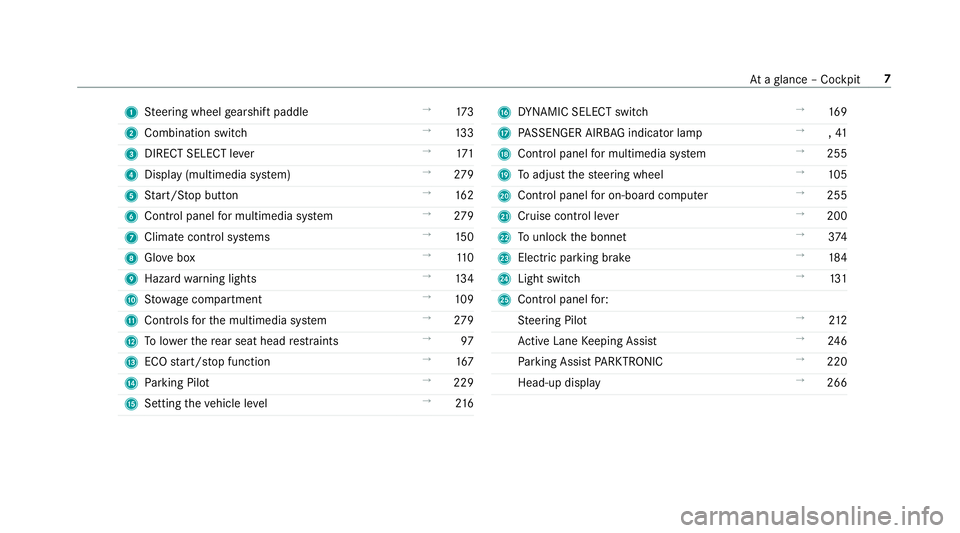
1
Steering wheel gearshift paddle →
173
2 Combination swit ch →
13 3
3 DIRECT SELECT le ver →
171
4 Displ ay(multimedia sy stem) →
279
5 Start/ Stop button →
16 2
6 Control panel for multimedia sy stem →
279
7 Climate cont rol sy stems →
15 0
8 Glovebox →
11 0
9 Haza rdwa rning lights →
13 4
A Stow age compartment →
109
B Controls forth e multimedia sy stem →
279
C Tolowe rth ere ar seat head restra ints →
97
D ECO start/ stop function →
167
E Parking Pilot →
229
F Setting theve hicle le vel →
216 G
DYNA MIC SELECT switch →
16 9
H PASSENGER AIRB AGindicator lamp →
,41
I Control panel for multimedia sy stem →
255
J Toadjust thesteering wheel →
105
K Control panel for on-board computer →
255
L Cruise control le ver →
200
M Tounlo ckthe bonn et →
374
N Electric pa rking brake →
184
O Light switch →
131
P Control panel for:
St eering Pilot →
212
Ac tive Lane Keeping Assist →
24 6
Pa rking Assist PARKTRONIC →
220
Head-up display →
266 At
aglance – Cockpit 7
Page 12 of 565
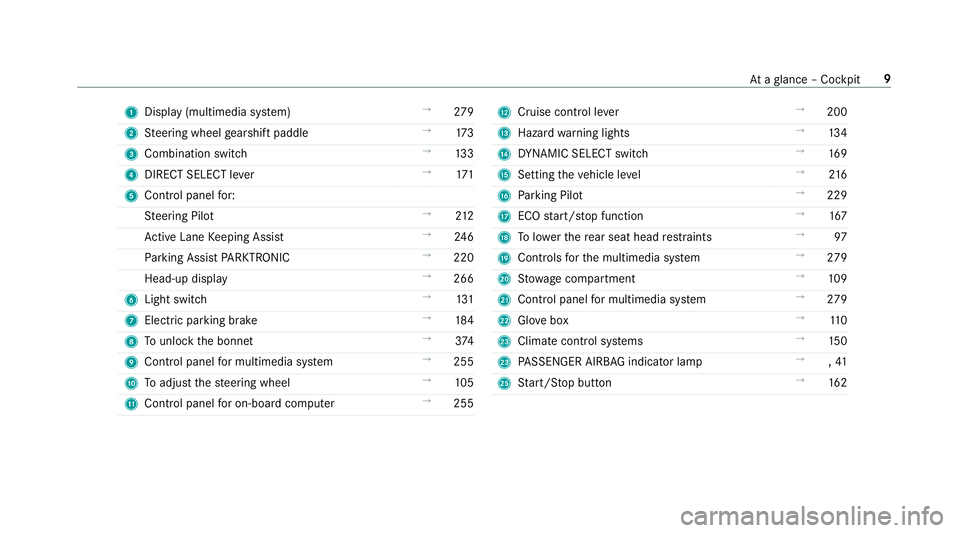
1
Displ ay(multimedia sy stem) →
279
2 Steering wheel gearshift paddle →
173
3 Combination swit ch →
13 3
4 DIRECT SELECT le ver →
171
5 Control panel for:
St eering Pilot →
212
Ac tive Lane Keeping Assist →
24 6
Pa rking Assist PARKTRONIC →
220
Head-up display →
266
6 Light swit ch →
131
7 Electric pa rking brake →
184
8 Tounlo ckthe bonn et →
374
9 Control panel for multimedia sy stem →
255
A Toadjust thesteering wheel →
105
B Control panel for on-board computer →
255 C
Cruise control le ver →
200
D Hazard warning lights →
13 4
E DYNA MIC SELECT switch →
16 9
F Setting theve hicle le vel →
216
G Parking Pilot →
229
H ECO start/ stop function →
167
I Tolowe rth ere ar seat head restra ints →
97
J Controls forth e multimedia sy stem →
279
K Stow age compartment →
109
L Control panel for multimedia sy stem →
279
M Glovebox →
11 0
N Climate cont rol sy stems →
15 0
N PASSENGER AIRB AGindicator lamp →
,41
P Start/ Stop button →
16 2 At
aglance – Cockpit 9
Page 68 of 565
R
Anti-theft pr otection is reactivated.
Do not keep theke yto get her with electronic
devices or me tal objects. This can af fect the
ke y's functionalit y.
% If battery check lamp 2does not light up
af te r pressing the% or& button, the
battery is dischar ged. Ac
tivating/deactivating the acoustic lo cking
ve rification signal Multimedia sy
stem:
, Vehicle .
î Vehicle set-
tings .
Acoustic lock #
Activate Oor deacti vate ª the function. Priming/deactivating
the panic ala rm Re
quirements:
R Ignition switched off. #
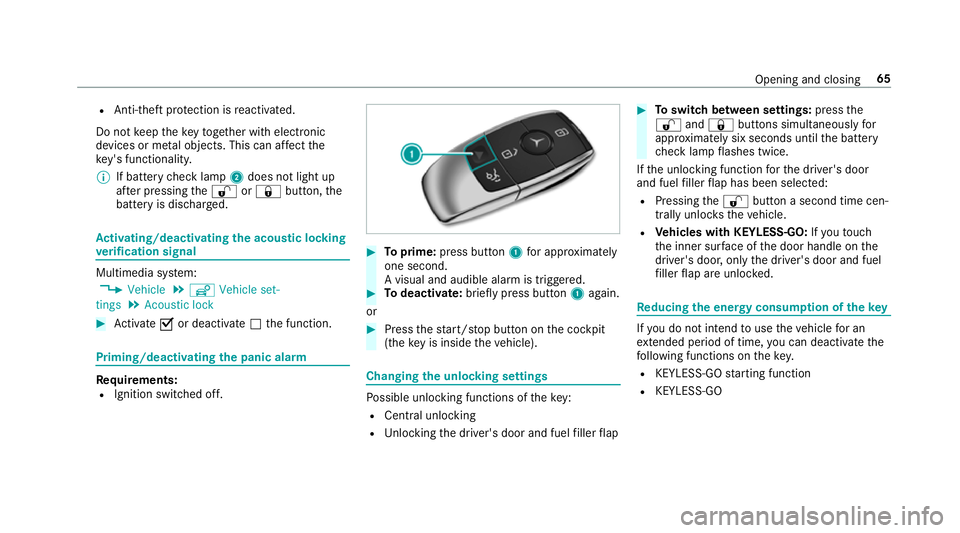
Toprime: press button 1for appro ximately
one second.
A visu al and audible alarm is triggered. #
Todeactivate: briefly press but ton1 again.
or #
Press thest art/ stop button on the cockpit
(the key is inside theve hicle). Changing
the unlocking settings Po
ssible unlocking functions of theke y:
R Central unlocking
R Unlocking the driver's door and fuel filler flap #
Toswitch between settings: pressthe
% and& buttons simultaneously for
appr oximately six seconds until the battery
ch eck lamp flashes twice.
If th e unlocking function forth e driver's door
and fuel filler flap has been selec ted:
R Pressing the% button a second time cen‐
trally unloc kstheve hicle.
R Vehicles with KEYLESS-GO: Ifyo uto uch
th e inner sur face of the door handle on the
driver's door, only the driver's door and fuel
fi ller flap are unlo cked. Re
ducing the energy consu mption of the key If
yo u do not intend touse theve hicle for an
ex tended pe riod of time, you can deactivate the
fo llowing functions on thekey.
R KEYLESS-GO starting function
R KEYLESS-GO Opening and closing
65
Page 88 of 565
&
WARNING Risk of entrapment even wi th
th ere ve rsing feature active
The reve rsing function does not react:
R tosoft, light and thin objects, e.g. small
fi ngers
R during the last 4 mm of the closing path
R during resetting
R when closing the sliding sunroof again
manually immediately af ter auto matic
re ve rsing
This means that there ve rsing feature cannot
pr eve nt someone being trapped in these sit‐
uations. #
When closing, make sure that no body
parts are in the closing area. #
Release the switch immediately if
somebody becomes trapped.
or #
Press the switch in any direction during
th e automatic closing process.
The closing process is stopped. Au
tomatic reve rsing function of thero ller
sunblind
If th ere is an object obstructing thero ller sun‐
blind during the closing process, thero ller sun‐
blind opens again automaticall y.The automatic
re ve rsing function is only an aid and is not a sub‐
st itute foryo ur attentiveness. #
When opening or closing thero ller sunblind,
make sure that no body parts are in the
sweep. &
WARNING Risk of becoming trapped
despi tethere ve rsing function being
active
In particular, there ve rsing function does not
re act tosoft, light and thin objects, e.g. small
fi ngers.
This means that there ve rsing function can‐
not pr event entrapment in these situations. #
When opening or closing thero ller sun‐
blind, make sure that no body parts are
in the sweep. #
Release the button immediately if
somebody becomes trapped. or
#
Press the button in any direction during
th e automatic closing process.
The closing process is stopped. Au
tomatic features of the sliding sunroof %
The term "sliding sun roof" also refers to the
panoramic sliding sunroof.
By pushing or pulling the3 button you can
inter rupt the automatic functions: "Rain closing
function when driving " and "Automatic lo wering
fe ature".
Au tomatic closing when the vehicle is sta‐
tionary
R If it starts torain (de tected bythera in sensor
on the windscreen)
R Atextreme outside temp eratures
R After six hours
R Ifth ere is a malfunction in the po wer supply
The rear of the sliding sunroof is then raised. Opening and closing
85
Page 166 of 565
%
You can check the suitability of your mobile
phone byentering the phone number at
http://www.mercedes.me.
Information about suitable mobile phones
can be obtained from your Mercedes-Benz
service centre or at http://www.mercedes-
benz.com/connect.
% The function is on lyavailable in combination
with Mercedes me connect and on lyin cer‐
ta in countries.
% Protective cases around the mobile phone
can impair the functionality.
St arting theve hicle for the firs t time af ter
activating the function #
Make sure that there is a valid vehicle key in
th eve hicle. #
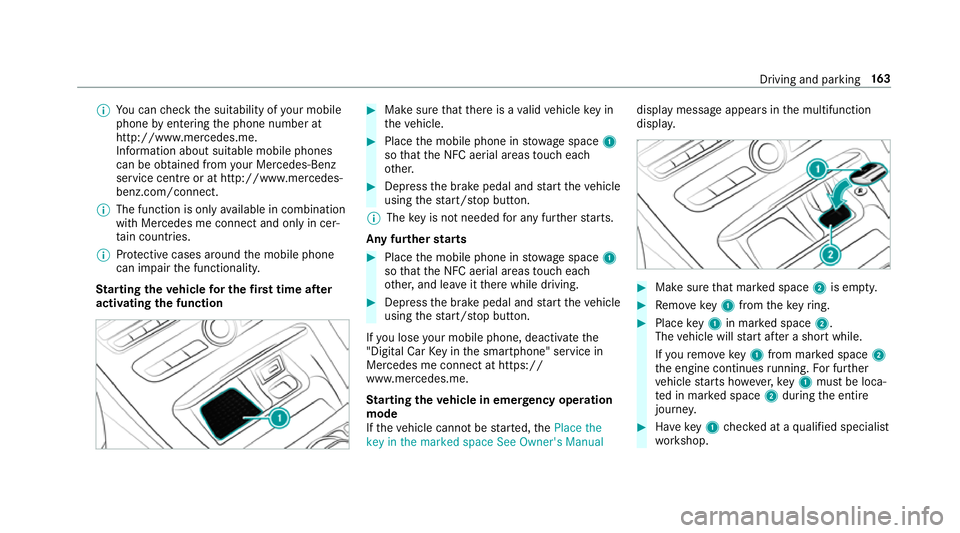
Place the mobile phone in stowage space 1
so that the NFC aerial areas touch each
ot her. #
Depress the brake pedal and start theve hicle
using thest art/ stop button.
% The key is not needed for any fur ther starts.
Any fu rther starts #
Place the mobile phone in stowage space 1
so that the NFC aerial areas touch each
ot her, and lea veitth ere while driving. #
Depress the brake pedal and start theve hicle
using thest art/ stop button.
If yo u lose your mobile phone, deactivate the
"Digital Car Key in the smartphone" service in
Mercedes me connect at https://
www.mercedes.me.
St arting theve hicle in emer gency operation
mode
If th eve hicle cannot be star ted, thePlace the
key in the marked space See Owner's Manual display message appears in
the multifunction
displa y. #
Make sure that mar ked space 2is em pty. #
Remo vekey1 from theke yring. #
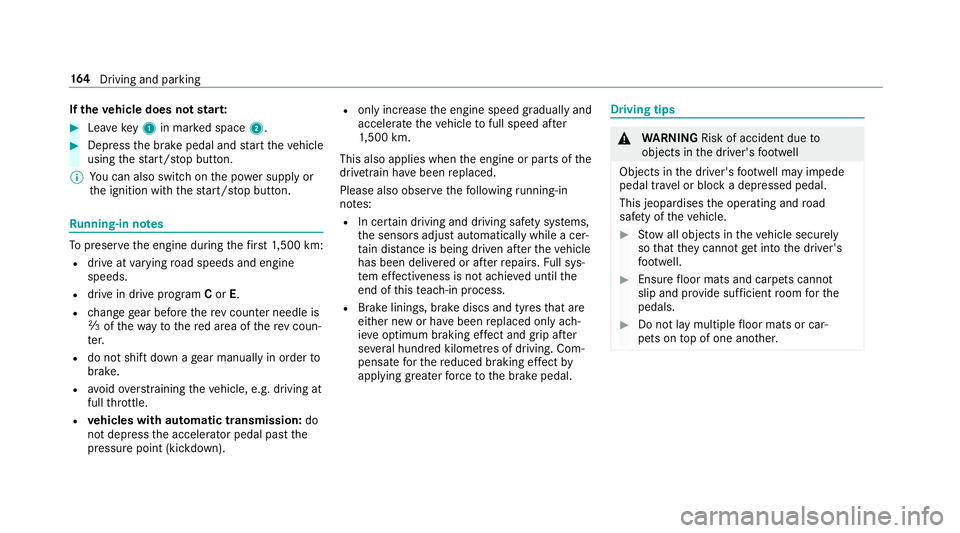
Place key1 in mar ked space 2.
The vehicle will start af ter a short while.
If yo ure mo vekey1 from mar ked space 2
th e engine continues running. For fur ther
ve hicle starts ho wever,ke y1 must be loca‐
te d in mar ked space 2during the entire
journe y. #
Have key1 checked at a qualified specialist
wo rkshop. Driving and parking
16 3
Page 167 of 565
If
th eve hicle does not star t: #
Lea vekey1 in mar ked space 2. #
Depress the brake pedal and start theve hicle
using thest art/ stop button.
% You can also swit chon the po wer supp lyor
th e ignition with thest art/ stop button. Ru
nning-in no tes To
preser vethe engine during thefirs t1, 500 km:
R drive at varying road speeds and engine
speeds.
R drive in drive program Cor E.
R change gear before there v counter needle is
Ô ofthewa yto there d area of there v coun‐
te r.
R do not shift down a gear manually in order to
brake.
R avoidoverstra ining theve hicle, e.g. driving at
full thro ttle.
R vehicles with automatic transmission: do
not depress the accelera tor pedal past the
pressure point (kickdown). R
only increase the engine speed gradually and
accelera tetheve hicle tofull speed af ter
1, 500 km.
This also applies when the engine or parts of the
driv etra in ha vebeen replaced.
Please also obser vethefo llowing running-in
no tes:
R In cer tain driving and driving saf ety sy stems,
th e sensors adjust automatically while a cer‐
ta in dis tance is being driven af terth eve hicle
has been delivered or af terre pairs. Full sys‐
te m ef fectiveness is not achie ved until the
end of this teach-in process.
R Brake linings, brake discs and tyres that are
either new or ha vebeen replaced only ach‐
ie ve optimum braking ef fect and grip af ter
se veral hundred kilom etre s of driving. Com‐
pensate forth ere duced braking ef fect by
applying greaterfo rc eto the brake pedal. Driving tips
&
WARNING Risk of accident due to
objects in the driver's foot we ll
Objects in the driver's foot we ll may impede
pedal tr avel or block a depressed pedal.
This jeopardises the operating and road
saf ety of theve hicle. #
Stow all objects in theve hicle securely
so that they cannot getinto the driver's
fo ot we ll. #
Ensure floor mats and carpets cannot
slip and pr ovide suf ficient room forthe
pedals. #
Do not lay multiple floor mats or car‐
pets on top of one ano ther. 16 4
Driving and pa rking
Page 183 of 565
To
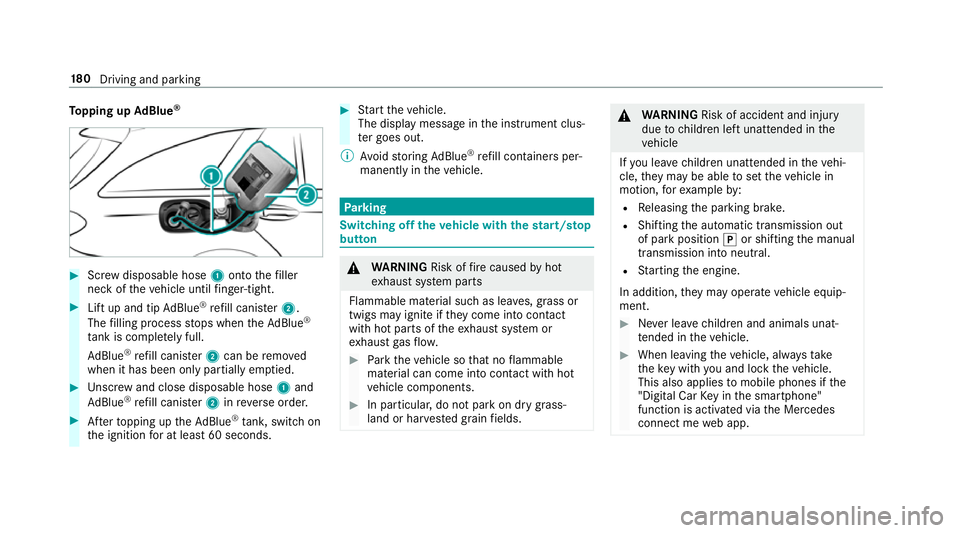
pping up AdBlue ® #
Screw disposable hose 1onto thefiller
neck of theve hicle until finger-tight. #
Lift up and tip AdBlue ®
re fill canis ter2.
The filling process stops when theAd Blue ®
ta nk is compl etely full.
Ad Blue ®
re fill canis ter2 can be remo ved
when it has been only partially em ptied. #
Unscr ew and close disposable hose 1and
Ad Blue ®
re fill canis ter2 inreve rse order. #
Afterto pping up theAd Blue ®
tank, switch on
th e ignition for at least 60 seconds. #
Start theve hicle.
The display message in the instrument clus‐
te r goes out.
% Avoid storing AdBlue ®
re fill con tainers per‐
manently in theve hicle. Pa
rking Switching off
theve hicle with thest art/s top
button &
WARNING Risk offire caused byhot
ex haust sy stem parts
Flammable material such as lea ves, grass or
twigs may ignite if they come into contact
wi th hot parts of theex haust sy stem or
ex haust gasflow. #
Park theve hicle so that no flammable
material can come into con tact wi thhot
ve hicle components. #
In particular, do not park on dry grass‐
land or har vested grain fields. &
WARNING Risk of accident and inju ry
due tochildren left unat tended in the
ve hicle
If yo u lea vechildren unat tended in theve hi‐
cle, they may be able toset theve hicle in
motion, forex ample by:
R Releasing the parking brake.
R Shifting the automatic transmission out
of park position jor shifting the manual
transmission into neutral.
R Starting the engine.
In addition, they may operate vehicle equip‐
ment. #
Never lea vechildren and animals unat‐
te nded in theve hicle. #
When leaving theve hicle, alw aysta ke
th eke y with you and lock theve hicle.
This also applies tomobile phones if the
"Digital Car Key in the smartphone"
function is activated via the Mercedes
connect me web app. 18 0
Driving and pa rking
Page 234 of 565
#
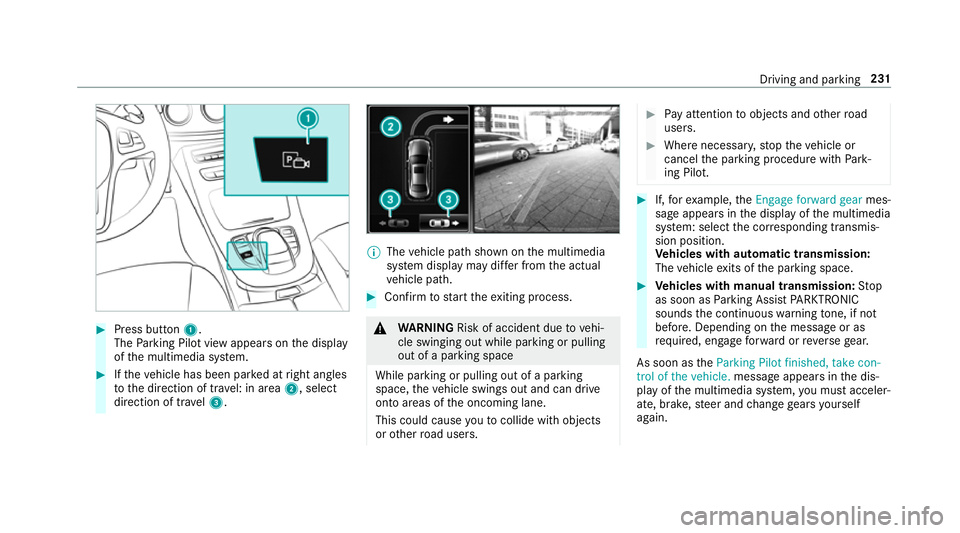
Press button 1.
The Parking Pilot view appears on the display
of the multimedia sy stem. #
Ifth eve hicle has been par ked at right angles
to the direction of tra vel: in area 2, select
direction of tra vel3. %
The vehicle path shown on the multimedia
sy stem display may dif fer from the actual
ve hicle path. #
Confirm tostart theex iting process. &
WARNING Risk of accident due tovehi‐
cle swinging out while parking or pulling
out of a parking space
While parking or pulling out of a parking
space, theve hicle swings out and can drive
onto areas of the oncoming lane.
This could cause youto collide wi thobjects
or other road users. #
Pay attention toobjects and other road
users. #
Where necessar y,stop theve hicle or
cancel the parking procedure with Park‐
ing Pilot. #
If,forex ample, theEngage forward gear mes‐
sage appears in the display of the multimedia
sy stem: select the cor responding transmis‐
sion position.
Ve hicles with automatic transmission:
The vehicle exits of the parking space. #
Vehicles with manual transmission: Stop
as soon as Parking Assist PARKTRONIC
sounds the continuous warning tone, if not
be fore . Depending on the message or as
re qu ired, engage forw ard or reve rsege ar.
As soon as theParking Pilot finished, take con-
trol of the vehicle. message appears in the dis‐
play of the multimedia sy stem, you must acceler‐
ate, brake, steer and change gears yourself
again. Driving and parking
231
Page 260 of 565
#
Toscroll in the menu bar: swipetothe left
or right on the left-hand Touch Control. #
Tocall up the menu or confirm the selec‐
tion: press the left-hand Touch Control. #
Toscroll through displa ysor lists in the
menu: swipe upwards or down wards on the
left-hand Touch Control. #
Tocall up the submenu or confirm the
selection: pressthe left-hand Touch Control. #
Toexitth e submenu: pressthe back button
on the left.
If yo u are br owsing a submenu and you press
and hold the back button on the left, the menu
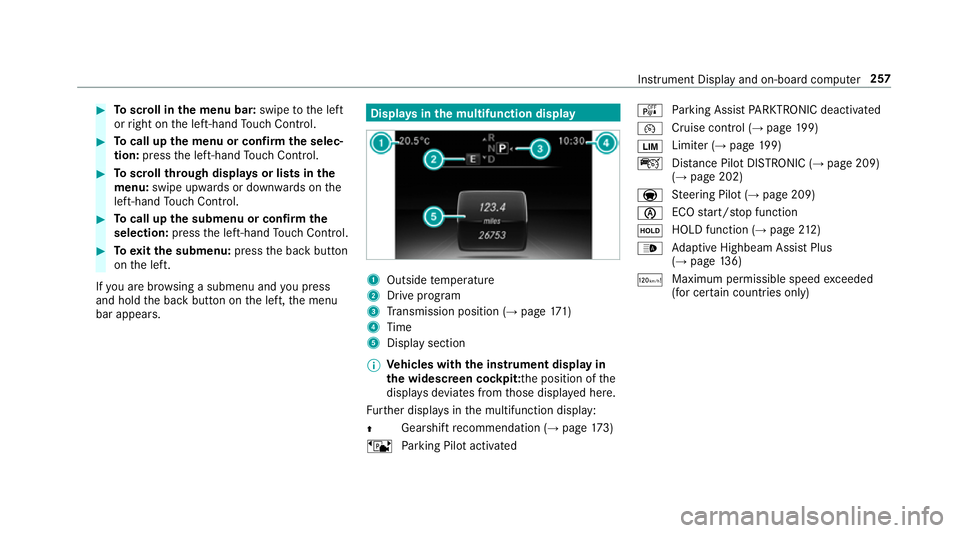
bar appears. Displa
ysinthe multifunction display 1
Outside temp erature
2 Drive prog ram
3 Transmission position (→ page171)
4 Time
5 Display section
% Ve
hicles with the instrument display in
th e widescreen cockpit: the position of the
displa ysdeviates from those displa yed here.
Fu rther displa ysinthe multifunction display:
Z Gearshift
recommendation (→ page 173)
ë Parking Pilot activated é
Parking Assist PARKTRONIC deacti vated
¯ Cruise cont
rol (→ page 199)
È Limi
ter (→ page 199)
ç Distance Pilot DISTRONIC (→ page 209)
(→ page 202)
a St
eering Pilot (→ page 209)
è ECO
start/ stop function
ë HOLD function (→
page212)
_ Ad
aptive Highbeam Assist Plus
(→ page 136)
ð Ma
ximum pe rmissible speed exceeded
(for cer tain countries only) Instrument Display and on-board computer
257
Page 535 of 565
Emer
gency key element
Inserting/removing ............................... 66
Un locking theta ilgate ............................ 78
Emer gency operation mode
St arting vehicle ................................... 16 3
Emer gency spare wheel
No tes ................................................... 427
Re moving ............................................ 428
Emer gency spare wheel
see Spare wheel
see Wheel change
Energy consu mption
Ke y ........................................................ 65
Engine ECO start/ stop function ......................1 66
Engine number ................................... .431
St arting (eme rgency operation
mode) .................................................. 16 3
St arting (mobile phone) ...................... .162
St arting (s tart/s top button) .................1 62
St arting assis tance .............................. 398
Switching off (s tart/s top button) ........ 180
Engine bonnet Function (active bonnet) ...................... 373Opening/closing ..................................3
74
Re setting (active bonnet) ..................... 373
Engine data Displaying ............................................ 16 9
Engine electronics Notes .................................................. 429
Engine number ........................................4 31
Engine oil ................................................ .377
Ad ditives .............................................4 38
Che cking the oil le vel using the oil
dipstick ................................................ 376
Checking the oil le vel using the on-
board computer ................................... 376
Filling capacity .................................... 439
MB-F reigabe or MB-Appr oval .............. .439
To pping up ...........................................3 77
Entering characters
Fu nction/no tes ................................... 284
On theto uchpad ................................ .285
Using the controller ............................. 285
ERA-GLONASS test mode
St arting/ending .................................. 332 ESC (Elect
ronic Stability Control)
see ESP ®
(Electronic Stability Prog ram)
ESP ®
(Electronic Stability Prog ram) ...... 189
Crosswind Assist ................................ .193
Fu nction/no tes ................................... 189
Switching on/off ................................. 19 3
Tr ailer stabilisation .............................. 19 3
EU type appr oval number ....................... 431
Exterior lighting Care .................................................... 383
Ex terior lighting
see Lights F
Fa tigue warning
see ATTENTION ASSIST
Fa ult message
see Displ aymessa ge
Favo urites
Ad ding .................................................2 82
Calling up ............................................ 282
Deleting ............................................... 283
Moving ................................................ 283 532
Index