warning MERCEDES-BENZ E-CLASS ESTATE 2017 Owners Manual
[x] Cancel search | Manufacturer: MERCEDES-BENZ, Model Year: 2017, Model line: E-CLASS ESTATE, Model: MERCEDES-BENZ E-CLASS ESTATE 2017Pages: 585, PDF Size: 11.8 MB
Page 309 of 585
R
Details
Informatio nabout thep ending sy stem
updat eisdisplayed.
R Later
The updat ecan be downloaded manually at a
later time (→ page305).
If th ed ownload is comple teda nd theu pdat eis
re ady fori ns tallation ,you will be informed of this
af te rt he next ignition cycle, fore xamp le.
Re quirements fort he ins tallation:
R The ignition is switched off.
R Notesa nd warnings ha vebeen read and
accep ted.
R The elect ricp arkin gb rake is applied.
If all requ irements ar emet,t he updat ewill be
ins talled. The multimedia sy stem cann otbe
operated while theu pdat eisb eing ins talled and
ve hicle functions ar erestricted. If er
rors should occur during thei nstallation ,the
multimedia sy stem automaticall yattem ptsto
re stor et he pr evious version. If restoration of the
pr ev ious version is no tpossible ,asymbol
appear sonthe centre console displ ay.P lease
consult aqualified specialis tworks hop to
re sol vethep roblem. Re
setfunction Multimedia sy
stem:
, System .
Reset
Pe rsonal dat aisdeleted, fore xamp le:
R statio npresets
R connec tedm obile phones #
Select Yes. If PIN pr
otection is activated, apromp tappears
asking if youa lso wish torestor et his tothef ac‐
to ry settings during areset. #
Select Yes #
Enter thec urrent PIN.
The PIN is reset.
Or #
Select No.
The cur rent PIN stay st he same af terr eset‐
ting.
% Ifyo uh ave forg otteny our PIN ,aMercedes-
Ben zServic eCentr ecan deactivat eyour PIN
pr otection fory ou.
Ap romp tappear sagain asking whe ther you
re all yw ish toreset. #
Select Yes.
The multimedia sy stem is rese ttot hefactory
settings. 306
Multimedia sy stem
Page 321 of 585
option is enabled.
Amessag eappear sand you
will hear acorresponding message.
Selecting notifications
Multimedia sy stem:
, Naviga-
tion .
Z Options .
Announcements #
Switc hannouncements on Oor off ª.
R Announc etraffic warnings
This function is no tavailable in all coun‐
tries.
R Announc estreet names
The multimedia sy stem announces the
names of ther oads that will follo wt he
upcomin gchang eofd irection.
This function is no tavailable in all coun‐
tries and languages.
Displ aying destination information
Requ irements:
R Adestination is entered. Multimedia sy
stem:
, Navigation #
Select Intermediate destinations and info.
The following informatio nisdisplayed:
R intermediat edestinations and destination
The routec an also include up tofour
intermediat edestinations.
R name, address
R remaining driving dis tance
R time of ar rival
Selecting an alternativ eroute
Multimedia sy stem:
, Navigation .
À Route and position #
Select Alternativ eroute.
The routes ar edispl ayed in accordance with
th es etting made in ther out esettings.
The cur rentl ys elected routeiss hown wit ha
dar kblue line. #
Select thea lternativ eroute. Switching
thea utomatic filling station
sear chon/off
Multimedia sy stem:
, Navigation .
Z Options #
Switch Reserve fuel level onO or off ª.
Switched on O:whenthef uel reser velevel
is reached, apromp tappear sasking whe ther
yo uw ant tostar ts ear ching forf illing sta‐
tions.
St arting thea utomatic service station
sear ch
Re quirements:
R ATTENTION ASSIS Tand the Suggest rest
area function ar eactivated (→ page245).
Driving situation
The Attention Assist Do you want to start the
rest area search? messageis shown. #
Select Yes.
The service statio nsear ch st arts.The availa‐
ble servic estations alon gthe routeorint he
vicinity of thev ehicle's cur rent positio nare
displ ayed. 318
Multimedia sy stem
Page 322 of 585
#
Select thes ervice station.
The servic estatio na ddress is displa yed. #
Ifro uteg uidance is no tactive, select Start
rout eguidance .
The selected servic estatio niss etas ad esti‐
nation .Rout eguidance begins.
or #
Ifro uteg uidance is active, select Start new
rout eguidance orSet as next intermediate
destination .
Start ne wrout eguidance:t he selected
service statio niss etas an ew destination.
The pr evious destination and all intermediate
destination saredele ted. Ro uteg uidance to
th es ervice statio nbegins.
Set as nex tintermediat edestination:t he
selected service statio niss etas then ext
intermediat edestination. Routeg uidance
begins. Ro
uteg uidance Note
sonr outeguidance &
WARNING Risk of di stra ction from oper‐
ating integrated communication equip‐
ment while thev ehicle is in motion
If yo uo perat ecommun icationequipment
integrated in thev ehicle when driving, you
will be distracted from thet raffic situation.
This could also cause youtol ose control of
th ev ehicle. #
Onlyoperat ethis equipment when the
traf fics ituation permits. #
Ifyo uc anno tbes ureoft his,stop the
ve hicle whils tpaying attention toroad
and traf ficc onditions and ope rate the
equipment wit hthe vehicle stationar y. Ro
uteg uidance begin soncear outehas been
calculated.
The road and traf ficr ules and regulations alw ays
ha ve priority overmultimedia sy stem driving rec‐
ommendations. Driving
recommendations are:
R Navigation announcements
R Routeg uidance displ ays
R Lane recommendations
If yo udon otfollo wt he navigation announce‐
ments or if youl eave thec alculated route, anew
ro uteisc alculated automaticall y.
Driving recommendations ma ydiffe rf romt he
actual road and traf ficc onditions if:
R ther out eisd iverted.
R thed irection of aone- ways tree thas been
ch anged.
Fo rthis reason ,you mus talway so bser veroad
and traf ficr ules and regulations during your
journe y.
The routem aydifferf romt he ideal routed ueto
th ef ollowing:
R roadwor ks
R incomple tedigital map data Multimedia sy
stem 319
Page 330 of 585
#
Creat eauser accoun tatMercedes me at:
http://www.mercedes.me. Avalid email
address is requ ired fort his. #
Regis tert he vehicle using thev ehicle identifi‐
cation number (VIN). #
Have thev ehicle linked totheM ercedes me
user account at aMercedes-Benz Service
Centre. The vehicle registration documents
and aformofi dentification ar erequired for
th is. #
Accep tthe general and specific term sofu se.
Extending asubscription
Re quirement: youh ave auser accoun tonthe
Mercedes me website. #
Call up theM ercedes me user account. #
Switc htothe Mercedes me connect online
st or ev iathel inked vehicle. #
Extend theL iveT raffic In form ation service. #
Select thee xtension pe riod. #
Addthe product tothes hopping bask et. #
Accep tthe general and specific term sofu se.
Liv eT raffic In form ation remains activated for
th es elected extension pe riod. Activation
begins on thed ateofe xtension.
Displ aying thet raffic map
Re quirements:
R ForL iveT raffic In form ation: thev ehicle is
equipped wit hacommunication module fea‐
turing an activated, integrated SI Mcard.
R When thev ehicle is star ted, thec ommunica‐
tion module automaticall yestablishes an
Interne tconnection .Traffic in form ation is
mad eavailable shortl yafter wa rds.
Multimedia sy stem:
, Navigation .
Z Options .
Map
menu #
Alternatively: if them ap is displa yedinf ull
screen mode, press theT ouc hControl, the
controller or thet ouchpad.
The map menu appears. #
Activate ºO. The traf
ficm ap sho ws thefollowing information,
fo re xamp le:
R traf fici ncidents ,for example:
- roadwor ks
- road bloc ks
- warning messages
The symbols fort raffic incidentsa redis‐
pl ay ed in colour (on ther oute) or gr ey(off
th er oute).
R traf ficf lowi nformation:
- traf ficj am (red line)
- conges tedt raffic condition s(orang eline)
- slow-moving traf fic( yellow line)
- free-flowing traf fic( green line)
R displ ay fo rtraffic dela yson ther out elasting
at leas tone minute
R warning messag esymbols:
- symbol d
- additional road saf etyn otes when
approaching atraffic incident,e .g.the
end of atraffic jam Multimedia sy
stem 327
Page 331 of 585
If
th ev ehicle approaches adanger area
on ther oute, awarning messag eisdis‐
pla yedont he map. Awarning message
ma yalso be issued (→ page328).
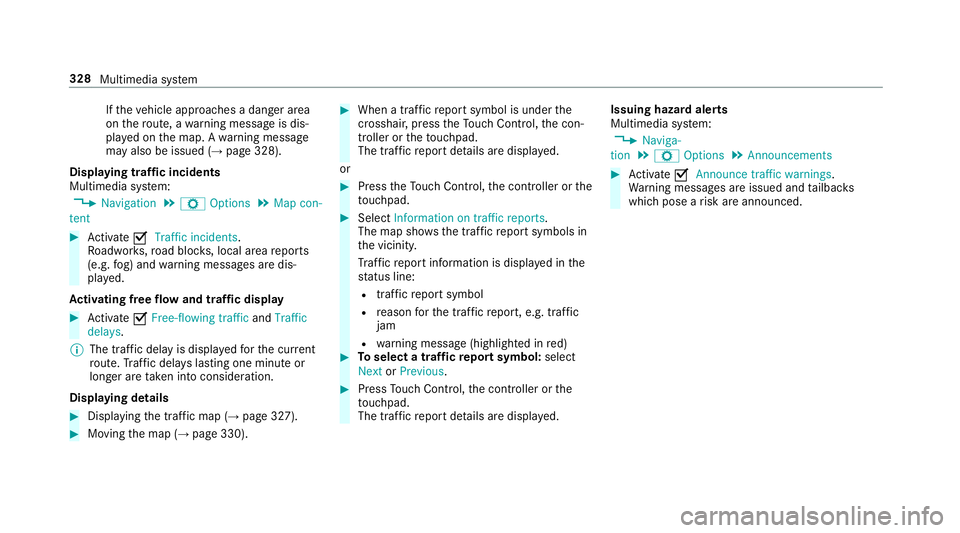
Displaying traf fici ncidents
Multimedia sy stem:
, Navigation .
Z Options .
Map con-
tent #
Activate OTraffi cincidents.
Ro adwor ks,road bloc ks,local area reports
(e.g. fog) and warning messages ar edis‐
pla yed.
Ac tivatin gfreef lowa nd traf ficd isplay #
Activate OFree-flowing traffic andTraffic
delays.
% The traf ficd elay is displa yedf or thec urrent
ro ute. Traf ficd elay sl asting one minut eor
longer ar etaken int oconsideration.
Displaying details #
Displaying thet raffic map (→ page327). #
Movin gthe map (→ page330). #
When atraffic repor tsymbol is under the
crosshair ,press theT ouc hControl, thec on‐
troller or thet ouchpad.
The traf ficr epor tdetails ar edispla yed.
or #
Press theT ouc hControl, thec ontroller or the
to uchpad. #
Select Information on traffic reports .
The map sho ws thetraffic repor tsymbols in
th ev icinit y.
Tr af ficr epor tinformation is displa yedint he
st atus line:
R traf ficr epor tsymbol
R reason fort he traf ficr eport, e.g. tra ffic
jam
R warning messag e(highligh tedinr ed) #
Toselect atraffic repor tsymbol: select
Next orPrevious. #
Press Touc hC ontrol, thec ontroller or the
to uchpad.
The traf ficr epor tdetails ar edispla yed. Issuing hazar
dalerts
Multimedia sy stem:
, Naviga-
tion .
Z Options .
Announcements #
Activate OAnnounce traffi cwarnings .
Wa rning messages ar eissued and tailbac ks
whic hpose arisk ar eannounced. 328
Multimedia sy stem
Page 339 of 585
Blue
tooth ®
profil eoverview Blue
tooth ®
profile
of the mobile phone Fu
nction
PBAP (Phone Book
Access Profile) Contact
sareauto‐
matically displa yedin
th em ultimedia sys‐
tem
MAP (Message
Access Profile) Messag
efunctions
can be used Te
lephon yoperating modes overview
Depending on your equipment ,the following tel‐
ephon yoperatin gmodes ar eavailable:
R Am obile phon eisconnec tedtot he multime‐
dia sy stem via Blue tooth®
(→ pag e337).
R Am obile phone is connec tedtot he multime‐
dia sy stem as an SAP(Sim Acc ess Profile)
te lephon e(→pag e338).
R OnlyaS IM car disconnec tedtot he multime‐
dia sy stem (→ page338).
Am obile phone is being used parallel to a
SIM card (→ page 338). Note
sont elephony &
WARNING Risk of di stra ction from oper‐
ating integrated communication equip‐
ment while thev ehicle is in motion
If yo uo perat ecommun icationequipment
integrated in thev ehicle when driving, you
will be distracted from thet raffic situation.
This could also cause youtol ose control of
th ev ehicle. #
Onlyoperat ethis equipment when the
traf fics ituation permits. #
Ifyo uc anno tbes ureoft his,stop the
ve hicle whils tpaying attention toroad
and traf ficc onditions and ope rate the
equipment wit hthe vehicle stationar y. &
WARNING Risk of di stra ction from oper‐
ating mobil ecommunication equipment
while thev ehicle is in motion
If yo uo perat ecommun icationequipment
integrated in thev ehicle when driving, you
will be distracted from thet raffic situation. This could also cause
youtol ose control of
th ev ehicle.
Onl yoperat ethis equipment when thev ehi‐
cle is stationar y. Yo
um usto bse rvet he legal requ irements fort he
countr yinwhich youa recur rentl yd riving when
operating mobil ecommunication equipment in
th ev ehicle.
Fu rther information can be obtained from a
Mercedes-BenzS ervice Centreorat:http://
www.mercedes-benz.com/connect.
Information on telephony
The following situations can lead tothec all
being disconnected while thev ehicle is in
motion:
R ther eisi nsufficient networ kcove rage inthe
area
R youm ovef romo ne GSM or UMT Stransmit‐
te r/receiver area (cell )int oa nother and no
communication channels ar efree
R theS IM car dused is no tcompatible wit hthe
networ kavailable 336
Multimedia sy stem
Page 360 of 585
#
Tostar tt he test mode: pressand hol dthe
~ button on them ultifunction steering
wheel foratl east five seconds.
The test mode is star teda nd automatically
ends af tert he languag etesth as been per‐
fo rm ed. #
Toend thet estm ode manuall y:switc hoff
th ei gnition.
The test mode is ended. Online and Interne
tfunctions Interne
tconnection Information on connecting
totheI nternet &
WARNING Risk of di stra ction from infor‐
mation sy stems and communications
equipment
If yo uo perat einformation and communica‐
tio ne quipment integ ratedint hevehicle
when driving, youw ill be distracted from the
traf fics ituation. Thi scould also cause youto
lose control of thev ehicle. #
Onlyoperat ethis equipment when the
traf fics ituation permits. #
Ifyo uc anno tbes ureoft his,stop the
ve hicle whils tpaying attention toroad
and traf ficc onditions and ope rate the
equipment wit hthe vehicle stationar y. Yo
um usto bse rvet he legal requirements fort he
countr yinwhich youa recur rentl yd riving when
operating them ultimedia sy stem.
Depending on thev ehicle's equipment, youc an
es tablish an Interne tconnection in thef ollowing
wa ys:
R Vehicles with acom municatio nmodule:
Interne tuse including Mercedes me connect
services and dat aroaming (→ page357).
R Vehicles without acom municatio nmod‐
ule:
- via Blue tooth®
wit had ata-enabled
mobile phon e(→pag e359)
- viaWi-Fi wi thad ata-enabled mobile
phon e(→pag e357)
- via business telephon y(→ pag e358) The Interne
tfunction scan onl ybeusedtoalimi‐
te dd egreew hilstdriving.
Interne tconnection via communication mod‐
ule
On vehicles wit habuilt-in communication mod‐
ule, theI nterne tconnection is es tablished via an
integ ratedS IM card.
If th ed atav olume limit is reached, thea vailabil‐
ity of Mercedes me connec tservices is limited.
The dat avolume mus tbepurch ased via
Mercedes me connect.
Setting up an Interne tconnection via Wi-Fi
Re quirements:
R theW i-Fifunctio nisa ctivatedont he multi‐
media sy stem (→ page298).
R theW i-Fifunctio nisa ctivatedont heextern al
devic e(see them anufacturer's operating
instructions).
R Interne taccess via Wi-Fi is acti vated( see the
manufacturer's operating instructions). Multimedi
asyst em 357
Page 368 of 585
Setting
theI nterne tradio options
Multimedia sy stem:
, Radio .
Þ Radio source .
TuneIn
Radio .
Z Options
The following option sareavailable:
R Select Stream:s electthe stre am qualit y.
R Login to TuneIn Account :log in to your
Tu neIn user account.
R Log Ou tofAccount :log outofy ourTuneIn
user account. #
Select an option. Media
Au
dio mode In
fo rm ation on thea udio mode &
WARNING Risk of di stra ction whe nhan‐
dling da tastorag emedia
If yo uh andle adatas torage medium while
driving, your attentio nisdivertedf romt he traf
ficc onditions .Thisc ould also cause you
to lose control of thev ehicle. #
Onlyhandle adatas tora ge medium
when thev ehicle is stationar y. Pe
rm issible file sy stems:
R FAT32
R exFAT
R NTFS
Pe rm issible dat astorage medium:
R SD card
R USB storag edevice
R iPod ®
/iPhone ®
R MTP devices
R Blue tooth ®
audio equipment
% R
The multimedia sy stem supports atotal
of up to50,000 files.
R Dat astorage media up to2TBa resup‐
por ted( 32-bit address space). Suppor
tedf ormats:
R MP3
R WMA
R AAC
R WAV
R FLAC
R ALAC
% Obser vethef ollowing no tes:
R Due tothel arge variet yofa vailable
music files rega rding encoders, sampling
ra tesa nd dat arates, playba ckcannot
alw aysbeg uaranteed.
R Due tothew ide rang eofU SB devices
av ailable on them arke t, pl aybac kcann ot
be guaranteed fora ll USB devices.
R Cop y-pr otected music files or DRM
enc rypte dfiles canno tbeplaye db ack.
R MP3 pla yers mus tsuppor tMediaTrans‐
fe rP rotocol (MTP). Multimedia sy
stem 365
Page 395 of 585
Batter
ydisconnection periods The AS
SYST PLUS service inter vald isplay
can onl ycalculat ethe servic edue date when
th eb attery is connected. #
Notedown thes ervice due dat edispla yedon
th ei nstrument displa ybefor edisconnecting
th eb atter y(→pag e391). Engine compartment
Ac
tiv eb onne t(pedestrian pr otection) Operation of
thea ctiv ebonne t(pedestrian
pr otection)
In cer tain accident situations ,the risk of injury
to pedestrians can be reduced bythea ctuation
of thea ctiv ebonnet .The rear area of thee ngine
bonn etisraised byappr oximatel y85m m.
Fo rthe driv etotheworkshop, rese tthe trig‐
ge reda ctiv ebonn etyourself .Ifthe activ ebonnet
has been triggered, pedestrian pr otection may
be limited.
Aq ualified specialis tworks hop mus tre-ins tate
th ef ull functionality of thea ctiv ebonnet. The activ
ebonne tisnotavailable in all coun‐
tries.
Re setting thea ctiv ebonnet &
WARNING Danger of bu rnsf romh ot
component parts in thee ngine compart‐
ment
Cer tain component parts in thee ngine com‐
partmen tmaybe very hot, e.g. thee ngine,
th er adiator and parts of thee xhau stsystem. #
Letthe engine cool down and only
to uc ht he component parts described
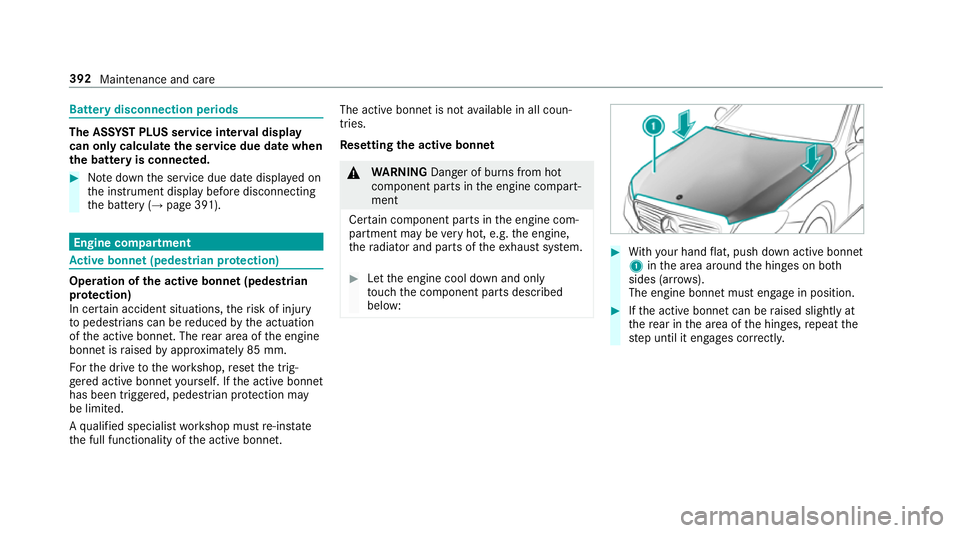
below: #
With your han dflat, push down activ ebonnet
1 inthea reaa round theh inges on bo th
sides (ar rows).
The engine bonne tmuste ngag einp osition. #
Ifth ea ctiv ebonnet can be raised slight lyat
th er ear in thea reaoft he hinges, repeat the
st ep until it engages cor rectl y. 392
Maintenanc eand care
Page 396 of 585
Opening/closing
theb onnet &
WARNING Risk of accident du etodriv‐
ing wit hthe engine bonne tunlo cked
An unloc kede ngin ebonn etma yopen up
when thev ehicle is in motion and bloc kyour
vie w. #
Neveru nloc kthe engine bonne twhen
driving. #
Befor eevery trip, ensur ethat the
engine bonn etis loc ked. &
WARNING Risk of accident and inju ry
when opening and closing thee ngine
bonn et
When opening or closing thee ngine bonn et,
it ma ysuddenly drop int othe end position.
Ther eisar isk of inju ryfora nyo ne in the
engine bonn et's rang eofm ovement. #
Onlyopen or close thee ngine bonn et
when ther ea reno persons in the
engine bonn et's rang eofm ovement. &
WARNING Danger of bu rnsw hen open‐
ing theb onnet
If yo uo pen thee ngine bonn etwhen the
engine has overheated or during afireint he
engine compartment, youc ould come into
contact wit hhotgases or other escaping
operating fluids. #
Befor eopening theb onnet ,allowt he
engine tocool down. #
Inthee vent of afireint he engine com‐
partment, keep thee ngine bonn et
closed and cal lthe fire service. &
WARNING Risk of inju rydue tomoving
parts
Cer tain component sinthe engine compart‐
ment ma ycontinue tomo veor suddenly
mo veagain evenafter thei gnition has been
switched off, e.g. thec ooler fan.
Ma kesur eoft hefollowing befor eperform ing
ta sk sint he engine compartment: #
Switc hthe ignition off. #
Nevertouc hthe danger zone sur round‐
ing movin gcomponent pa rts, e.g. the
ro tatio na reaoft hefan. #
Remo vejewe ller yand watches. #
Keep items of clo thing and hair away
from moving parts. &
WARNING Risk of inju ryfrom touching
co mp onent parts under voltage
The ignition sy stem and thef uel injection
sy stem workunder high voltage. If yout ouch
component parts whic hareunder voltage,
yo uc ouldrecei vean electric shoc k. #
Nevertouc hcomponents of thei gnition
sy stem or thef uel injection sy stem
when thei gnition is switched on. &
WARNING Danger of bu rnsf romh ot
component parts in thee ngine compart‐
ment
Cer tain component parts in thee ngine com‐
partmen tmaybe very hot, e.g. thee ngine, Maintenanc
eand care 393