lights MERCEDES-BENZ E-CLASS ESTATE 2017 User Guide
[x] Cancel search | Manufacturer: MERCEDES-BENZ, Model Year: 2017, Model line: E-CLASS ESTATE, Model: MERCEDES-BENZ E-CLASS ESTATE 2017Pages: 585, PDF Size: 11.8 MB
Page 144 of 585
Ad
aptiv eHighbeam Assis tPlus Ad
aptiv eHighbeam Assis tPlus function &
WARNING Risk of accident despi te
Ad aptiv eHighbeam Assis tPlus
Ad aptiv eHighbeam Assis tPlus does no trec‐
ognise thef ollowing road users:
R Road user swithout lights, e.g .pedes‐
trians
R Road user swithp oor lighting ,e.g.
cyclists
R Road user swhos elighting is obstructed,
e.g .bya barrier
On very rare occasions, Adaptiv eHighbeam
Assis tPlus ma yfail torecognise other road
user sthat ha velights, or ma yrecognise
th em tool ate.
In this, or in similar situations ,the automatic
main beam will no tbedeactivated or will be
activated despit ethe presence of other road
users. #
Alw ayso bser vethet raffic carefull yand
switc hoffthem ain beam in good time. Sy
stem limitations
Ad aptiv eHighbeam Assis tPlus canno ttak ei nto
account road, weather or traf ficc onditions.
De tection ma yberestricted if:
R Visibility is impaired, fore xamp le in fog,
heavy rain or sno w.
R Ther eisd irtont he sensor sorthe sensors
ar eo bscured.
Ad aptiv eHighbeam Assis tPlus is on lyan aid.
Yo ua re re sponsible fora dju sting thev ehicle's
lighting tothep reva ilin glight ,visibilit yand traf‐
fi cc onditions. Ad
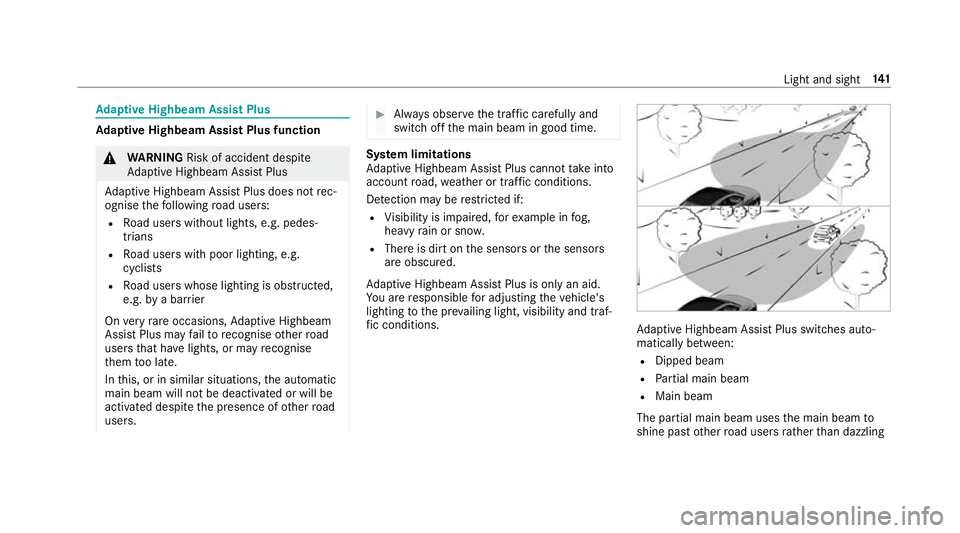
aptiv eHighbeam Assis tPlus swit ches auto‐
maticall ybetwe en:
R Dipped beam
R Partial main beam
R Main beam
The partial main beam uses them ain beam to
shine pas tother road user srather than dazzling Ligh
tand sight 141
Page 145 of 585
th
em. The vehicle in front is illuminated bythe
dipped beam.
At speeds abo ve30 km/h:
R If no other road user saredetected, them ain
beam is automaticall yswitched on.
R Ifot her road user saredetected, thep artial
main beam is automaticall yswitched on.
At speeds belo w25km/h or when ther eiss uffi‐
cient stre et lighting:
R The partial main beam switches of fautomati‐
call y.
R The main beam switches of fautomatically.
At speeds abo veappr ox.50k m/h:
R The headlamp rang eoft he dipped beam is
re gulated automatically based on thed is‐
ta nce to ot herroad users.
The sy stem's optical sensor is located behind
th ew indscreen near theo verhead control panel. Switching
Adaptiv eHighbeam Assis tPlus
on/off #
Toswitc hon:tur nthe light switc htothe
à position. #
Switc hont he main beam using thec ombina‐
tion switch.
When them ain beam is switched on auto‐
maticall yinthe dar k,the _ indicator
lam pont he multifunction displa ycomes on. #
Toswitc hoff:switc hoffthem ain beam
using thec ombination switch. Setting
thed ipped beam Multimedia sy
stem:
, Vehicle .
÷ Light set-
tings .
Dipped-beams #
Select Left-side traffic orRight-side traffic. Setting
thee xterior ligh ting switch-of fdelay
time Multimedia sy
stem:
, Vehicle .
÷ Light settings .
Ext.
light. del. shut-off #
Setthe switch-of fdela ytime. Setting
thes urround lighting Multimedi
asystem:
, Vehicle .
÷ Light settings .
Loca-
tor lighting #
Switc hthe function on Oor off ª.
If th es urround lighting is swit ched on, thee xte‐
ri or lighting remains lit for40s econds af tert he
ve hicle is unloc ked. When yous tart thev ehicle,
th es urround lighting is swit ched of fand auto‐
matic driving lights ar eactivated. 14 2
Light and sight
Page 164 of 585
#
Press button 1.
The redorb lue indicator lam pinbutton 1
lights up or goes out.
Indicator lam pcolours:
R blue: stationar yventilation is switche don
R red: stationar yheater is swit ched on
R yello w: departur etime is preselected
The stationar yheater/ stationar yventilation
switche soffau tomatically af ter50m inutes.
Operation using thea pp: thes tationary
heater/ ventilation can also be operated via the
Mercedes me connect app. Further information
can be found in thes eparat eOwner's Manual
under http://manuals.daimler.com/baix/cars/
connectme/de_DE/index.html.
Setting thes tationar yheater/stationar yven‐
tilation using them ultimedia sy stem
Multimedia sy stem:
, Vehicle .
b Climate control .
Aux-
iliary heating
Yo uc an pre-se tthree departur etimes fora uto‐
matic activation of thes tationar yheater. #
Select an option.
Setting thes tationar yheater/stationar yven‐
tilation via remo tecont rol
Re quirements:
R The fuel tank is filled toat leas treser vefuel
le ve l.
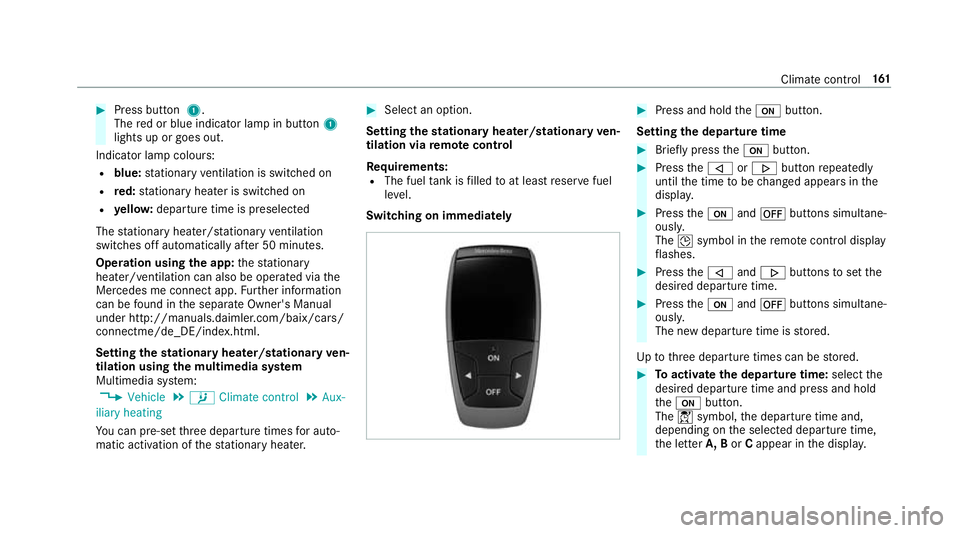
Switching on immedia tely #
Press and hold theu button.
Setting thed epartu retime #
Brie flyp ress the u button. #
Press the, or. button repeatedly
until thet ime tobe changed appear sinthe
displa y. #
Press theu and^ buttons simultane‐
ousl y.
The Îsymbol in ther emo tecontrol displ ay
fl ashes. #
Press the, and. buttons tosetthe
desired departur etime. #
Press theu and^ buttons simultane‐
ousl y.
The ne wdepartur etime is stored.
Up tothre ed epartur etimes can be stored. #
Toactivat ethe departur etime: select the
desired departur etime and press and hold
the u button.
The Ísymbol, thed epartur etime and,
depending on thes elected departur etime,
th el etter A, B orCappear in thed ispla y. Climat
econtrol 161
Page 178 of 585
Yo
uh ave driven economicall ywhen:
R thet hree outer segments ar ecomple tely fil‐
led simultaneousl y.
R theE CO displa yborder lights up.
The additional rang ea chieve dasar esult of your
drivin gstyle in co mparison toad rive rw itha
ve ry sporty driving styleiss hown under Bonus
from start.T herang ed ispl ay ed does no tindicate
af ixed reduction in consum ption. DY
NA MIC SELECT switch Fu
nction of theD YNAMI CSELECT switch Plug-i
nhybrid: observethen otes in theS upple‐
ment .Otherwise, youm ayfailto recognise dan‐
ge rs.
Mercedes-AMG vehicles: observet he no tesin
th eS upplement .Otherwise, youm ayfailto rec‐
ognise dangers.
Use theD YNAMI CSELECT switc htochange
between thef ollowing driv eprograms:
R I(Individual): individual settings R
Allvehicles exceptA ll‑Ter rain vehicles: S
+( Spo rtPlus): particularly sporty driving
st yle
R S(Sport): sporty driving style
R C(Comfort): comfortable and economical
drivin gstyle
R E(Eco): particular lyeconomical driving style
R All‑Ter rain vehicles: All‑Ter rain: thed rive
prog ramf or all sur faces
Depending on thed rive program selected, the
fo llowing vehicle characteristic swillch ange:
R driv esystem
- engine and transmission management
- ActiveD ista nce Assi stDISTRONIC
R ESP ®
R chassis
R steering Selecting
thed rive prog ram #
Press DYNA MIC SELECT switch 1forw ards
or backwards.
The driv eprogram selected appea rsinthe
multifunction displa y. Driving and pa
rking 175
Page 193 of 585
th
ep reviously pressed but tona gain until the
ga rage door opens or closes.
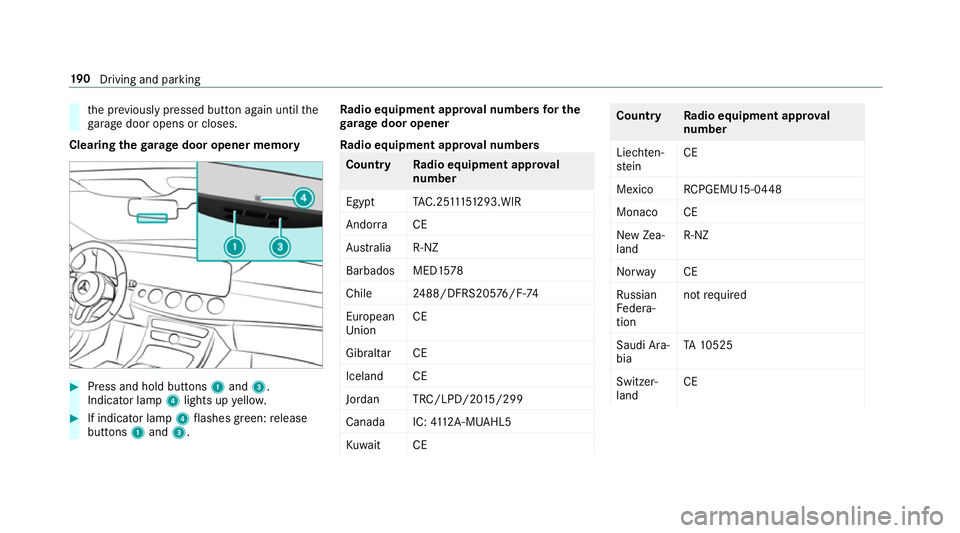
Clearing theg arag edooro pene rmemo ry #
Press and hold buttons 1and 3.
Indicator lamp 4lights up yello w. #
If indicator lamp 4flashes green: release
buttons 1and 3. Ra
dio equipment appr oval number sfor the
ga rage doo ropener
Ra dio equipment appr oval numbers Countr
yRadio equipment appr oval
number
Egyp tT AC.25 111 51293.WIR
Andor ra CE
Au stra lia R-NZ
Barbados MED1 578
Chile 2488/DFRS205 76/F-74
European
Union CE
Gibral tarCE
Iceland CE
Jordan TRC/LPD/20 15/299
Canad aI C:4112 A-MUAHL5
Ku wa it CE Count
ryRadio equipment appr oval
number
Liechten‐
st ein CE
Mexico RCPGEMU15-0448
Monaco CE
Ne wZ ea‐
land R-
NZ
Nor wayCE
Ru ssian
Fe dera‐
tion no
trequired
Saudi Ara‐
bia TA
10525
Switzer‐
land CE 19 0
Driving and pa rking
Page 195 of 585
function is activated via
theM ercedes
me connect weba pp. The elect
ricp arkin gb rake is applied if thet rans‐
mission is in position jand one of thef ollow‐
ing condition sisfulfilled:
R The engin eisswitched off.
R The seat belt tongu eisn otinser tedint he
seat belt buckle of thed rive r's seat and the
driver's door is opened.
% Toprev ent application: pull theh andle of the
electric parking brake.
In thef ollowing situations, thee lectric parking
brak eisa lso engaged:
R ActiveD ista nce Assi stant DI STRO NIC is
bringing thev ehicle toas tandstill.
R The HOL Dfunction is keeping thev ehicle sta‐
tionar y.
R ActiveP arking Assis tiskeeping thev ehicle
st ationar y. This is onl
ythe case if one of thef ollowing con‐
ditions is also fulfilled:
R The engine is switched off.
R The seat belt tongu eisn otinser tedint he
seat belt buckle of thed rive r's seat and the
driver's door is opened.
R Ther eisas ystemm alfunction.
R The po wersupply is insuf ficient.
R The vehicle is stationar yfor alengt hyperiod.
When thee lectric parking brak eisapplied,
the ! indicator lam plights up in thei nstru‐
ment clus ter.
The electric parking brak eisnotautomatically
applied if thee ngine is switched of fbythe ECO
st art/ stop function.
Electric parking brak efunction (releasing
automatically)
The electric parking brak eisreleased when the
fo llowing condition sarefulfilled:
R The engin eisrunning.
R Thes eatb eltt ongue is inser tedi ntot he seat
belt buckle of thed rive r's seat. R
The transmission is in position hork and
yo ud epress thea ccelera torp eda lory ou
shif tfromt ransmission position jtoh or
k.
R Ifth et ransmission is in position k,thetail‐
ga te mus tbec losed.
If th es eat belt tongu eisn otinser tedi ntot he
seat belt buckle of thed rive r's seat, thef ollow‐
ing condition smustbef ulfilled:
R The driver's door is closed.
R Youm ovet he transmission out of transmis‐
sion position joryouh ave prev iously
driven fasterthan 3k m/ h.
R Ifth et ransmission is in position k,thetail‐
ga te mus tbec losed.
If th ee lectric parking brak eisreleased,
the ! indicator lam pinthe instrument clus‐
te rg oes out. 19 2
Driving and pa rking
Page 205 of 585
an aid. The driver is
responsible for
maintaining asuita ble dis tance tothe
ve hicle in front, vehicle speed and for
braking in good time. #
Be prepared tobrak eors werveifn ec‐
essar y. Als
oo bserve thes ysteml imitations of Active
Brak eAssist. The individua
lsubfunctions ar eavailable in
th ef ollowing speed ranges:
Distance warning function
The dis tance warning function issues awarning
at speeds:
R From appr oximatel y30k m/h, if overseveral
seconds thed ista nce maintained tothev ehi‐
cle tra velling in front is insuf ficient fort he driving speed. The
·distance warning
lam pthen lights up in thei nstrument clus ter.
R From appr oximatel y7km/h, if your vehicle
is criticall yclose toav ehicle or pedestrian.
An intermittent warning tone sounds and the
· distance warning lam plight supint he
instrument clus ter.
Brak eimmediately or take evasiv eaction ,provi‐
ded it is saf etodosoa ndthet raffic situation
allo wsthis.
Th ed istance warning function can aid youint hefollowing situations wit hanintermit tent wa rning tone and awarnin glamp: Ve
hicles tr avelling in
front St
ationar yvehicles Crossin gvehicles Crossin gpedestrians Stationar ypedes‐
trians
Ve hicles without Driv‐
ing Assis tance pa ck‐
age up
toappr ox.
250 km/h up
toappr ox.80k m/h no reaction uptoappr ox.60k m/h no reaction
Ve hicles wit hDriving
Assis tance pa ckage up
toappr ox.
250 km/h up
toappr ox.
10 0k m/h up
toappr ox.70k m/h up toappr ox.70k m/h up toappr ox.70k m/h 202
Driving and pa rking
Page 208 of 585
Sy
stem limitations
The sy stem ma ybeimpaired or ma ynotfunction
in thef ollowing situations:
R In sno w,rain, fog, heavy spr ay,ift hereis
gl are, in direct sunlight or in greatlyvarying
light conditions.
R Ifth es ensor saredirty ,miste du p, damaged
or co vered.
R Ifth es ensor smalfunction due to otherradar
source inter fere nce, fore xamp lestro ng radar
re flections in multi-s toreyc ar par ks.
R Ifal oss of tyr epressur eorad efectivetyre
has been de tected and displ ayed.
The sy stem ma ynotreact cor rectly:
R In compl extraf fics ituations whe reobjects
cannot alwaysbec learly identified.
R Topedestrians or vehicles if they mo ve
qu ickl yintot he sensor de tection range.
R Topedestrians who ar ehidden by other
objects.
R Ifth et ypical outline of apedestrian cann ot
be distinguished from theb ackg round. R
Ifap edestrian is no trecognised as such, e.g.
due tospecial clo thing or other objects.
R On bends wit hatightradius. Setting
Activ eB rake Assi st Multimedia sy
stem:
, Vehicle .
k Assistance .
Active
Brak eAssist
Ve hicles without Drivin gAssistanc epack‐
age: The settings can be made af ters tartin gt he
ve hicle.
Ve hicles with Drivin gAssistanc epacka ge:
The setting scan be made when thei gnition is
switched on.
% It is recommended that youa lway sl ea ve
Ac tiveB rake Assi stswitched on.
Select one of thef ollowing settings: #
Early :your selection is retained when the
ve hicle is next star ted. #
Medium :your selection is retained when the
ve hicle is next star ted. #
Late:y our selection is retained when the
ve hicle is next star ted. #
Off:
The dis tance warning function and thea uton‐
omous braking function ar edeactivated.
Ve hicles without Drivin gAssistanc epack‐
age: when thev ehicle is next star ted, the
mediu msetting is auto matically selected.
Ve hicles with Drivin gAssistanc epack‐
age: Evasi veSteering Assis tisnotavailable.
When thei gnition is next star ted, them iddle
setting is selected automaticall yand Evasive
St eering Assis tisavailable.
% When ActiveB rake Assi stis deactivated, the
æ symbol appears inthea ssis tance
graphi cinthe multifunction displa y. Ad
aptiv eBrake Lights function Ad
aptiv eBrake Lights warnfollowing traf ficinan
emergency braking situation:
R Byflashin gbrake lamps
R By activatin gthe hazard warning lights Drivin
gand parking 205
Page 225 of 585
ri
ses slightly and then returns tothes etlevel
shortl yafter wa rds.
Yo uora nyone else in thev icinit yoft he
whee larches or theu nderbody could thus
become trapped.
The vehicle can also be lo wereda fter being
loc ked. #
When leaving thev ehicle, mak esure
th at nobody is in thev icinit yoft he
whee larches or theu nderbody. Re
quirements:
R The vehicle has been star ted.
R Allvehicles exceptA ll-Te rrain vehicles:
th ev ehicle mus tnotbe moving fasterthan
60 km/h.
R All-Terrain vehicles: thev ehicle mus tnotbe
moving fasterthan 35 km/h. Ra
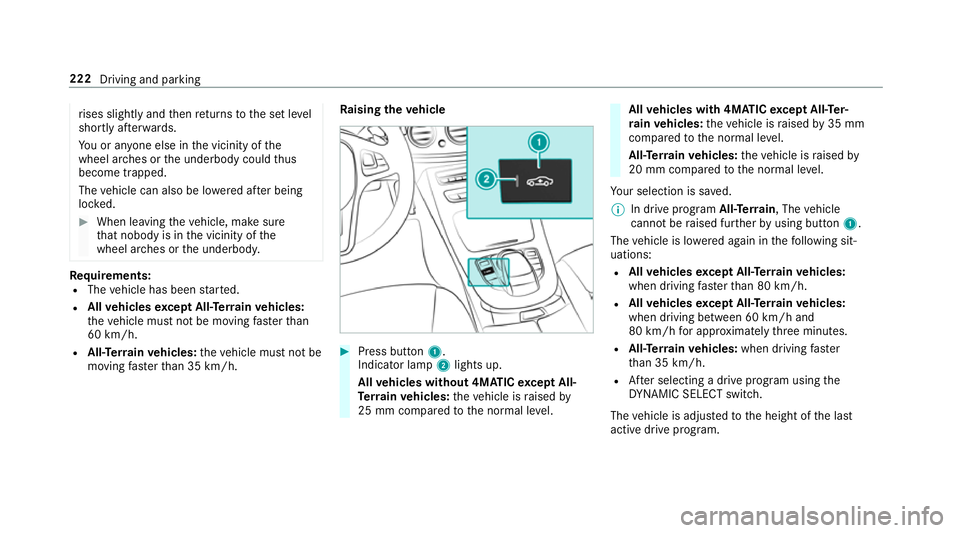
ising thev ehicle #
Press but ton1.
Indica torlamp 2lights up.
All vehicles without 4MATIC exceptA ll-
Te rrain vehicles: thev ehicle is raised by
25 mm compared tothen ormal le vel. All
vehicles with 4MATIC exceptA ll-Te r‐
ra in vehicles: thev ehicle is raised by35 mm
compared tothen ormal le vel.
All- Terrain vehicles: thev ehicle is raised by
20 mm compared tothen ormal le vel.
Yo ur selection is sa ved.
% In driv eprogram All-Terrain,T hevehicle
canno tberaised fur ther by usin gbutton 1.
The vehicle is lo wereda gain in thef ollowing sit‐
uations:
R Allvehicles exceptA ll-Te rrain vehicles:
when driving fasterthan 80 km/h.
R Allvehicles exceptA ll-Te rrain vehicles:
when driving between 60 km/h and
80 km/h fora pproxima tely thre em inutes.
R All-Terrain vehicles: when driving faster
th an 35 km/h.
R Afters electing adrive program using the
DY NA MIC SELECT switch.
The vehicle is adjus tedtot he height of thel ast
activ edrive program. 222
Driving and parking
Page 256 of 585
In suc
hcases, Lane Keeping Assis tcan:
R giveanu nnecessar ywarning
R notg iveaw arning #
Alw aysp ayparticular attention tothe
traf fics ituation and keep within the
lane, especiall yifActiveLaneK eeping
Assis talerts you. Re
quirement:
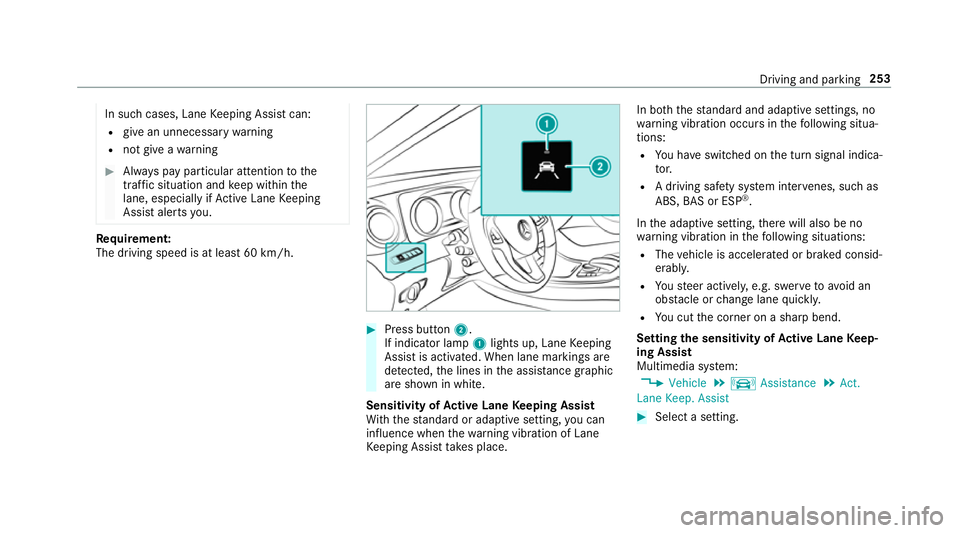
The driving speed is at leas t60k m/h. #
Press button 2.
If indicator lamp 1lights up, Lane Keeping
Assis tisactivated. When lane marking sare
de tected, thel ines in thea ssis tance graphic
ar es hown in white.
Sensitivity of Activ eL aneK eeping Assist
Wi th th estandar dora daptiv esetting ,you can
influence when thew arning vibration of Lane
Ke eping Assis ttakes place. In bo
th thestandar dand adaptiv esettings, no
wa rning vibration occur sinthefollowing situa‐
tions:
R Youh ave switched on thet urns ignal indica‐
to r.
R Adriving sa fety sy stem inter venes, su chas
ABS, BASorE SP®
.
In thea daptiv esetting, ther ew ill also be no
wa rning vibration in thef ollowing situations:
R The vehicle is accelerated or braked consid‐
erably.
R Yous teer actively ,e.g. swer vetoavo id an
obs tacle or chang elane quickl y.
R Youc utthec orner on ashar pbend.
Setting thes ensitivit yofActive Lan eKeep‐
ing Assist
Multimedia sy stem:
, Vehicle .
k Assistance .
Act.
Lane Keep. Assist #
Select asetting. Driving and parking
253