park assist MERCEDES-BENZ E-CLASS ESTATE 2017 User Guide
[x] Cancel search | Manufacturer: MERCEDES-BENZ, Model Year: 2017, Model line: E-CLASS ESTATE, Model: MERCEDES-BENZ E-CLASS ESTATE 2017Pages: 585, PDF Size: 11.8 MB
Page 220 of 585
mak
esuret hat then eighbouring lane is free
(shoulder view).
% The availabilit yofthefollowing function is
countr y-dependent.
Ac tiveS teering Assis tremain sactiv eevenift he
tur ns igna lindica toriss witched on. ActiveS teer‐
ing Assis tthen assists thed rive rw hen changing
lane sbya pplying steering torques toinitiat ethe
lane change.
Assis tance when changing lane sisprovide difa ll
th ef ollowing condition sareme t:
R Youa redrivin gonam otorway or high-speed
multi-lane major road wit hmultiple lane sin
th ed irection of tr avel.
R The neighbouring lane is free and separated
by ab roke nl ane marking.
R The driven spee disbetwe en 80 km/h and
18 0k m/h.
R The tur nsigna lindicator is switched on for
longer than tw oseconds.
If th es ystem is impaired, ActiveL aneC hange
Assi stma ybec ancelled. If an inter ruption
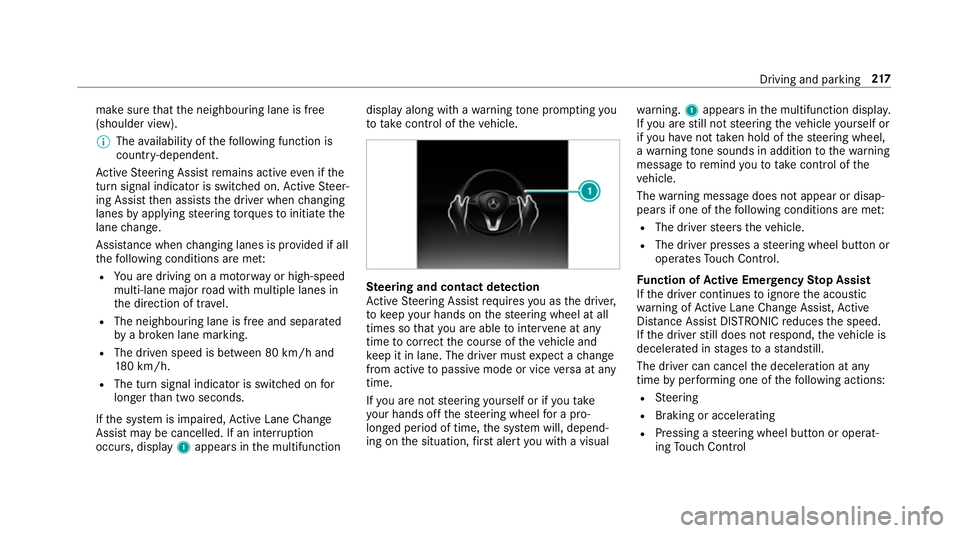
occurs, display 1appear sinthe multifunction displa
yalong wit hawarning tone prom pting you
to take control of thev ehicle. Ste
ering and contact de tection
Ac tiveS teering Assis trequires youast he driver,
to keep your hands on thes teering wheel at all
times so that youa reable tointer vene at any
time tocor rect thec ourse of thev ehicle and
ke ep it in lane. The driver mus texpect achange
from activ etopassivemode or vice versaata ny
time.
If yo ua renots teering yourself or if yout ake
yo ur hands of fthe steering wheel forap ro‐
longed period of time, thes ystemw ill, depend‐
ing on thes ituation ,first aler tyou wit havisual wa
rning. 1appear sinthe multifunction displa y.
If yo ua restill no tsteering thev ehicle yourself or
if yo uh ave nottaken hold of thes teering wheel,
aw arning tone sounds in additio ntothewarning
messag etoremind youtot akec ontrol of the
ve hicle.
The warning messag edoes no tappear or disap‐
pear sifo ne of thef ollowing condition sareme t:
R The driver steer sthe vehicle.
R The driver presses asteering wheel button or
operates Touc hC ontrol.
Fu nction of Activ eE me rgency Stop Assist
If th ed rive rc ontinues toigno rethea coustic
wa rning of ActiveL aneC hangeA ssist,A ctive
Dis tance Assi stDISTRONI Creduces thes peed.
If th ed rive rs tilld oes no trespond, thev ehicle is
decelerated in stages toas tandstill.
The driver can cancel thed eceleration at any
time byper form ing one of thef ollowing actions:
R Steering
R Braking or accelerating
R Pressing asteering wheel button or operat‐
ing Touc hC ontrol Drivin
gand parking 217
Page 221 of 585
R
Activating or deacti vating ActiveS teering
Assis torD ista nce Assi stDISTRONIC
The driver mu stbe ready totake control of the
ve hicle at an ytime. Information on Hill
StartA ssist Hill
StartA ssisth olds thev ehicle foras hort
time when pulling away on ahill under thef ol‐
lowing conditions:
R The transmission is in position hork.
R The electric parking brak eisreleased.
This gives youe nough tim etomoveyour foot
from theb rake pedal tothea ccelerator pedal
and depress it befor ethe vehicle begins toroll. &
WARNING Risk of accident and inju ry
caused bythev ehicle rolling away
Af teras horttime, Hill StartA ssistnol onger
holds thev ehicle and it can rollaw ay. #
Therefore, swiftl ymove your foot from
th eb rake pedal tothea ccelerator pedal. Ne
vera ttem pttolea vethev ehi‐
cle if it is being held byHillStart Assist. HOLD function
HOLD function
The HOL
Dfunction holds thev ehicle at astand‐
st ill without requ iring youtod epress theb rake
pedal, e.g. when pulling away on steep slopes.
Sy stem limitations
R The incline mus tnotbe grea tert han 30%.
Ac tivating/deactivatin gthe HOL Dfunction &
WARNING Risk of an accident du etothe
HOLD function being acti vatedw heny ou
lea vethev ehicle
If yo ul eave thev ehicle while onl ythe HOLD
function is braking thev ehicle, thev ehicle
can rollaw ay inthef ollowing situations:
R Ifth er eisam alfunction in thes ystemor
in thep owe rsupply. R
Ifth eH OLD function is deactivated by
depressing thea ccelera torp eda lort he
brak epedal, e.g. byavehicle occupant.
R Ifth ee lectrics in thee ngine compart‐
ment ,the batter yorthe fuses ar etam‐
pered wit horifthe batter yisdisconnec‐
te d. #
Alw aysd eactivat ethe HOLD function
and secur ethe vehicle agains trolling
aw ay befor eleaving thev ehicle. *
NO
TEDama gefrom auto matic braking When
ActiveB rake Assi st,A ctiv eDista nce
Assi stDISTRONI Corthe HOLD function are
activated, thev ehicle brakes autonomously
in cer tain situations.
To avo id damag etothevehicle, deactivate
th ese sy stems in thef ollowing or similars it‐
uations: #
During towing #
Inac arwa sh 218
Driving and pa rking
Page 227 of 585
Ve
hicles wit hActiv eParking Assis tand a360°
Camera
Sy stem limitations
Pa rking Assis tPARKTRONIC does no tneces sa‐
ri ly tak eintoa ccount thef ollowing obs tacles:
R Obs tacle sb elow thed etection range, e.g.
pe rsons, animals or objects.
R Obs tacle sabove thed etection range, e.g.
ov erhanging loads, overhang sorl oading
ra mp sofl orries.
The sensor smustbef reeofd irt, ice and slush.
Otherwise, they ma ynotfunction cor rectly. Clea
nthe sensor sregularly ,taking care no tto
scratc hordamagethem.
Ve hicles with traile rhitch: Parking Assist
PA RKTRONI Cisdeactivatedf or ther ear zone
when youe stablish an elect rical connection
between your vehicle and atrailer.
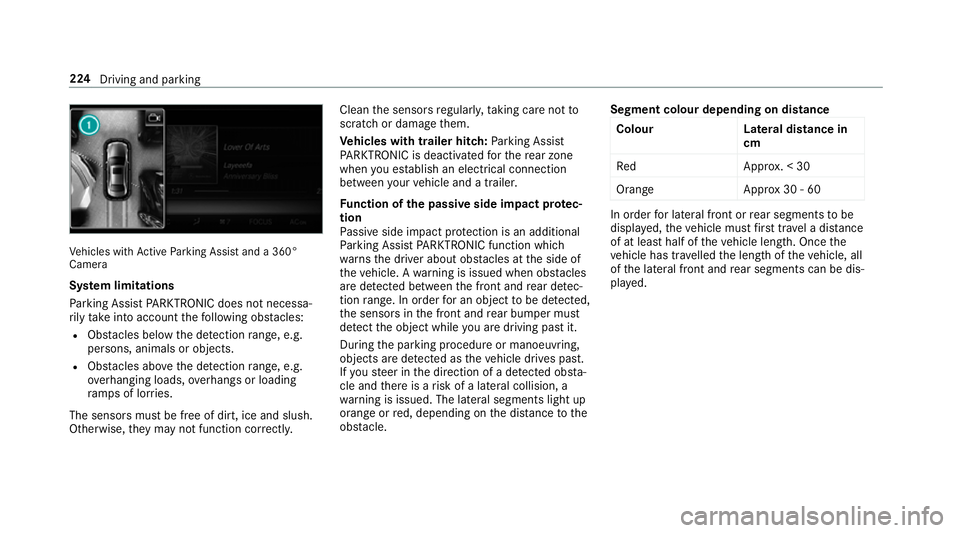
Fu nction of thep assiv es ide impact pr otec‐
tion
Pa ssiv eside impact pr otection is an additional
Pa rking Assis tPARKTRONIC functio nwhich
wa rnst he driver about obs tacle satt he side of
th ev ehicle. Awarning is issued when obs tacles
ar ed etected between thef ront and rear de tec‐
tion range. In orde rfor an objec ttobedetected,
th es ensor sinthe front and rear bumper must
de tect theo bjec twhile youa redrivin gpastit.
During thep arking procedur eormanoeuvring,
objects ar edetected as thev ehicle drives past.
If yo us teer in thed irection of adetected obs ta‐
cle and ther eisar isk ofalateral collision, a
wa rning is issued. The lateral segment slight up
orang eorred, depending on thed ista nce tothe
obs tacle. Segment colour dependin
gondistance
Colour Lateral distance in
cm
Re dA pprox.<30
Orang eA pprox30 -60 In order
forl ateral front or rear segment stobe
displa yed, thev ehicle mus tfirst trave lad ista nce
of at leas thalfoft hevehicle length. Once the
ve hicle has tr avelled thel engt hoft hevehicle, all
of thel ateral front and rear segment scan be dis‐
pla yed. 224
Driving and parking
Page 228 of 585
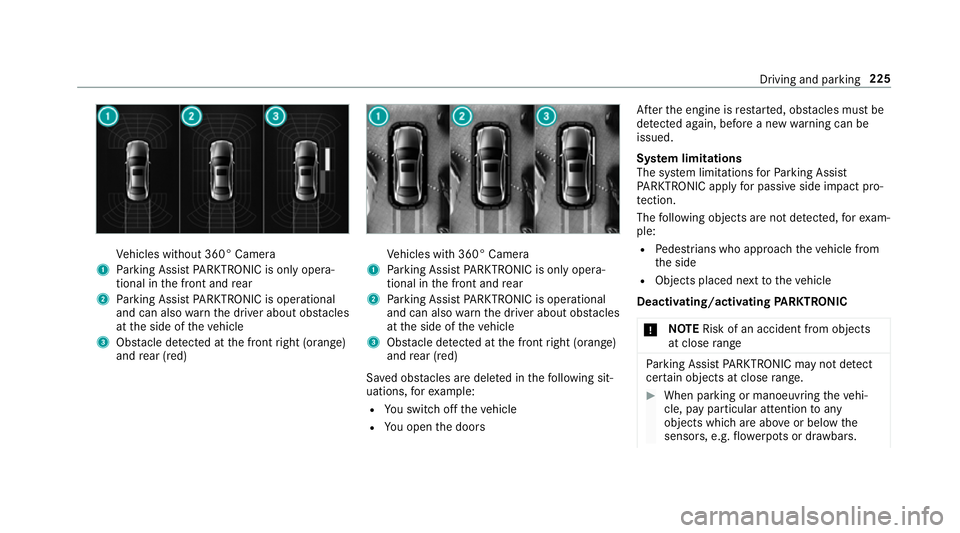
Ve
hicles without 360° Camera
1 Parking Assis tPARKTRONIC is only opera‐
tiona linthe front and rear
2 Parking Assis tPARKTRONIC is operational
an dc an also warnthed rive ra bout obs tacles
at thes ide of thev ehicle
3 Obstacle de tected at thef ront right (orange)
and rear (red) Ve
hicles wit h360° Camera
1 Parking Assis tPARKTRONIC is only opera‐
tiona linthe front and rear
2 Parking Assis tPARKTRONIC is operational
an dc an also warnthed rive ra bout obs tacles
at thes ide of thev ehicle
3 Obstacle de tected at thef ront right (orange)
and rear (red)
Sa vedo bstacle saredel eted in thef ollowing sit‐
uations, fore xamp le:
R Yous wit ch offt he vehicle
R Youo pen thed oors Af
tert he engine is restar ted, obs tacle sm ustbe
de tected again, befor eanew wa rning can be
issued.
Sy stem limitations
The sy stem limitations forP arking Assist
PA RKTRONI Capplyfor passiv eside impact pro‐
te ction.
The following object sarenotd etected, fore xam‐
ple:
R Pedestrians who approac hthe vehicle from
th es ide
R Objects placed next tothev ehicle
Deactivating/acti vating PARKTRONIC
* NO
TERisk of an accident from objects
at close range Pa
rking Assis tPARKTRONIC ma ynotdetect
cer tain object satcloserange. #
When parking or manoeuvring thev ehi‐
cle, pa yparticular attention toany
object swhicha reabo veor belo wthe
sensors, e.g. flowe rpotsord rawbars. Driving and parking
225
Page 229 of 585
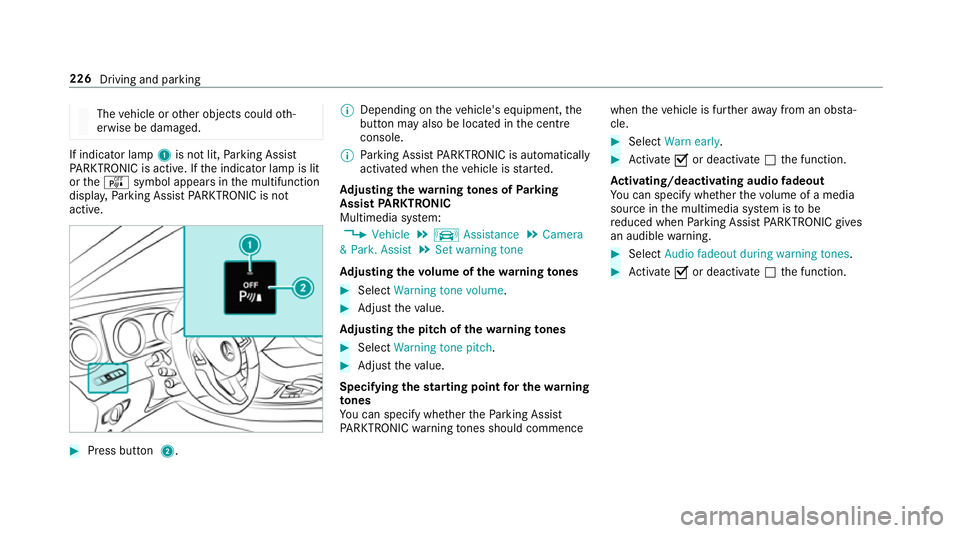
The
vehicle or other objects could oth‐
erwise be damaged. If indicator lamp
1is no tlit, Parking Assist
PA RKTRONI Cisactive. If thei ndicator lam pislit
or the é symbol appear sinthe multifunction
displa y,Pa rking Assis tPARKTRONIC is not
active. #
Pres sbutton 2. %
Depending on thev ehicle's equipment, the
button ma yalso be located in thec ent re
console.
% Parking Assis tPARKTRONIC is au tomatical ly
activated when thev ehicle is star ted.
Ad justin gthe warning tones of Parking
Assis tPARKTRONIC
Multimedia sy stem:
, Vehicle .
k Assistance .
Camera
&P ark. Assist .
Set warning tone
Ad justin gthe volum eoft hewarning tones #
Select Warning tonev olume. #
Adjus tthe value.
Ad justin gthe pitc hofthewarning tones #
Select Warning tonep itch. #
Adjus tthe value.
Specifying thes tarting point fort he warning
to nes
Yo uc an specify whe ther theP arking Assist
PA RKTRONI Cwarning tones shoul dcommence when
thev ehicle is fur ther aw ay from an obs ta‐
cle. #
Select Warn early. #
Activate Oor deacti vate ª thef unction.
Ac tivating/deactivatin gaudi ofadeout
Yo uc an specify whe ther thev olume of amedia
source in them ultimedia sy stem is tobe
re duced when Parking Assis tPARKTRONIC gi ves
an audible warning. #
Select Audio fadeout durin gwarnin gtones . #
Activate Oor deacti vate ª thef unction. 226
Driving and parking
Page 230 of 585
Re
versing camera Fu
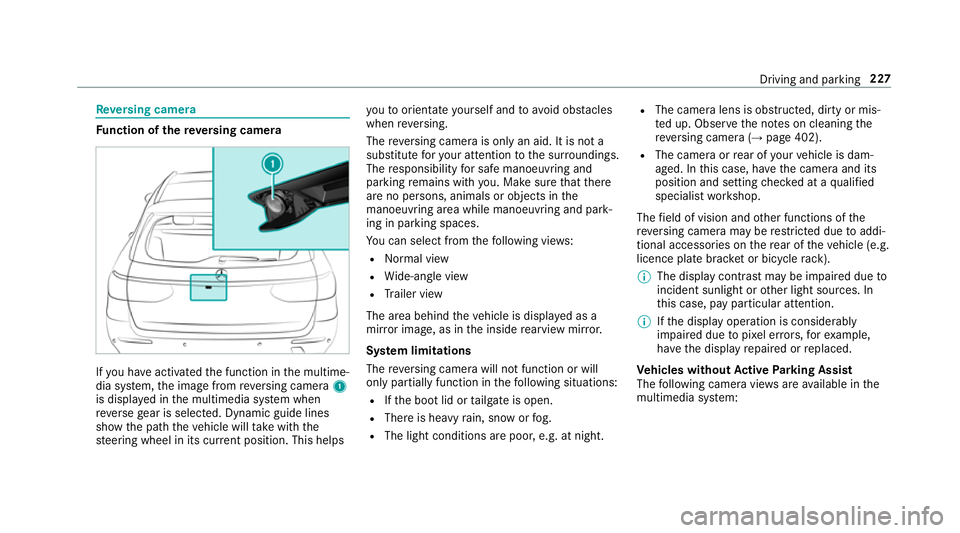
nction of ther eve rsing camera If
yo uh ave activated thef unction in them ultime‐
dia sy stem, thei mag efromr eve rsing camera 1
is displa yedint he multimedia sy stem when
re ve rseg ear is selected. Dynamic guide lines
sho wthe pat hthe vehicle will take wit hthe
st eering wheel in its cur rent position. Thi shelps yo
utoo rientat eyourself and toavo id obs tacles
whe nreve rsing.
The reve rsing camer aisonlyana id. It is no ta
substitut efor your attentio ntothe sur roundings.
The responsibility fors afem anoeuvring and
parking remains wit hyou. Mak esuret hat there
ar enop ersons, animals or objects in the
manoeuvring area whil emanoeuvring and park‐
ing in parking spaces.
Yo uc an select from thef ollowing vie ws:
R Normal view
R Wide-angle view
R Trailer view
The area behin dthe vehicle is displa yedasa
mir rorimage, as in thei nside rearvie wmirro r.
Sy stem limitations
The reve rsing camera will no tfunction or will
onl ypartiall yfunction in thef ollowing situations:
R Ifth eb ootlid or tailgat eiso pen.
R Ther eish eavyrain, sno worfog.
R The light conditions ar epoor ,e.g. at night. R
The camer alens is obstructed, dirty or mis‐
te du p. Obser vethen otes on cleaning the
re ve rsing camer a(→pag e402).
R The camera or rear of your vehicle is dam‐
aged. In this case, ha vethec amer aand its
position and setting checkedataq ualified
specialis tworks hop.
The field of vision and other functions of the
re ve rsing camera ma yberestricted due toaddi‐
tional accesso ries on ther ear of thev ehicle (e.g.
licence plat ebrack et or bicycle rack ).
% The displa ycontras tmaybe impaired due to
incident sunligh torother light sources. In
th is case, pa yparticular attention.
% Ifth ed ispla yoperation is considerably
impaired due topixel er rors,for example,
ha ve thed ispla yrepaired or replaced.
Ve hicles without Activ eP arking Assist
The following camera vie wsarea vailable in the
multimedia sy stem: Driving and parking
227
Page 231 of 585
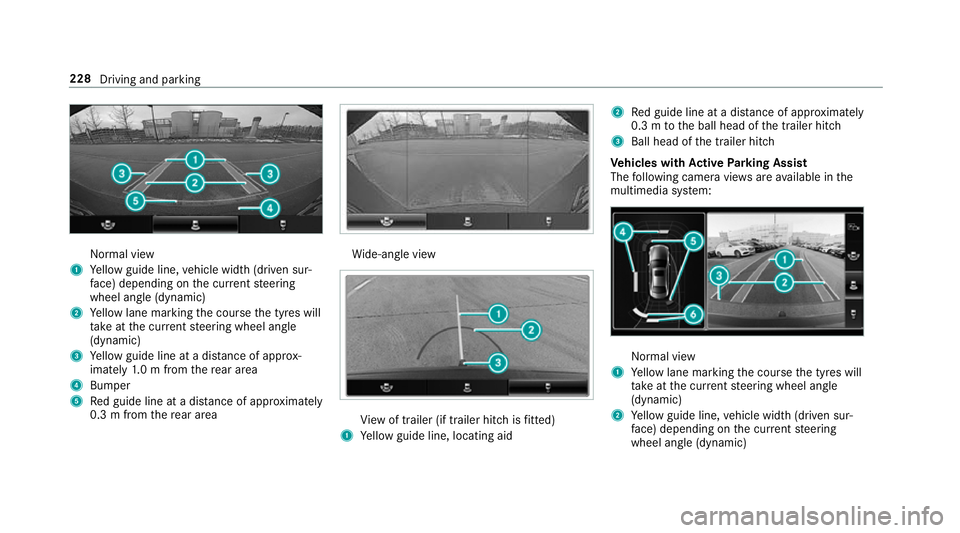
Normal view
1 Yello wg uide line, vehicle widt h(driven sur‐
fa ce) depending on thec urrent steering
wheel angle (dynamic)
2 Yello wl ane markin gthe course thet yres will
ta ke atthec urrent steering wheel angle
(dynamic)
3 Yello wg uide line at adista nce of appr ox‐
imatel y1.0mf romt herear area
4 Bumper
5 Redg uide line at adista nce of appr oximately
0. 3mf romt herear area Wi
de-angle view Vi
ew of trailer (if trailer hitc hisfitted)
1 Yello wg uide line, locating aid 2
Redg uide line at adista nce of appr oximately
0. 3mtot he ball head of thet railer hitch
3 Ball head of thet railer hitch
Ve hicles with Activ eP arking Assist
The following camera vie wsarea vailable in the
multimedia sy stem: Normal view
1 Yello wl ane markin gthe course thet yres will
ta ke atthec urrent steering wheel angle
(dynamic)
2 Yello wg uide line, vehicle widt h(driven sur‐
fa ce) depending on thec urrent steering
wheel angle (dynamic) 228
Driving and parking
Page 232 of 585
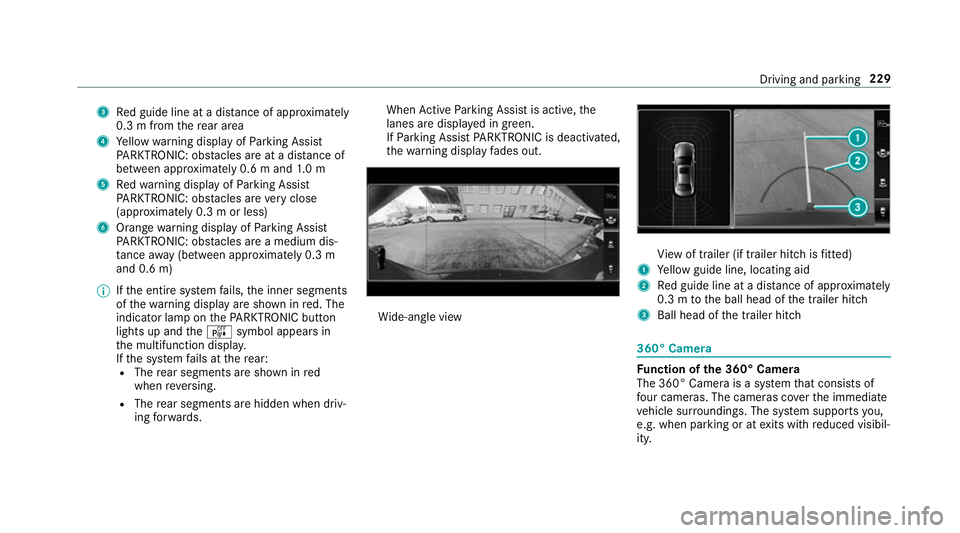
3
Redg uide line at adista nce of appr oximately
0. 3mf romt herear area
4 Yello ww arning displa yofParking Assist
PA RKTRONIC: obstacles ar eatadista nce of
betwee napproximately 0.6 mand1.0m
5 Redw arning displa yofParking Assist
PA RKTRONIC: obstacles ar everyc lose
(appr oximatel y0.3mo rless)
6 Orang ewarning displa yofParking Assist
PA RKTRONIC: obstacles ar eamedium dis‐
ta nce away (between appr oximatel y0.3 m
and 0. 6m)
% Ifth ee ntir esystemf ails, thei nner segments
of thew arning displa yareshown in red. The
indicator lam ponthePARKTRONI Cbutton
light supa ndthe é symbol appear sin
th em ultifunction displa y.
If th es ystemf ails at ther ear:
R The rear segment sareshown in red
when reve rsing.
R The rear segment sarehidde nwhen driv‐
ing forw ards. When
ActiveP arking Assis tisactive, the
lanes ar edispla yeding reen.
If Pa rking Assis tPARKTRONIC is deactivated,
th ew arning displa yfades out. Wi
de-angle view Vi
ew of trailer (if trailer hitc hisfitted)
1 Yello wg uide line, locating aid
2 Redg uide line at adista nce of appr oximately
0. 3mtot he ball head of thet railer hitch
3 Ball head of thet railer hitch 360° Camera
Fu
nction of the3 60° Camera
The 360° Camera is asyst em that consists of
fo ur cameras. The cameras co verthe immediate
ve hicle sur roundings. The sy stem supports you,
e.g .when parkin goratexitsw ithr educed visibil‐
ity. Driving and parking
229
Page 233 of 585
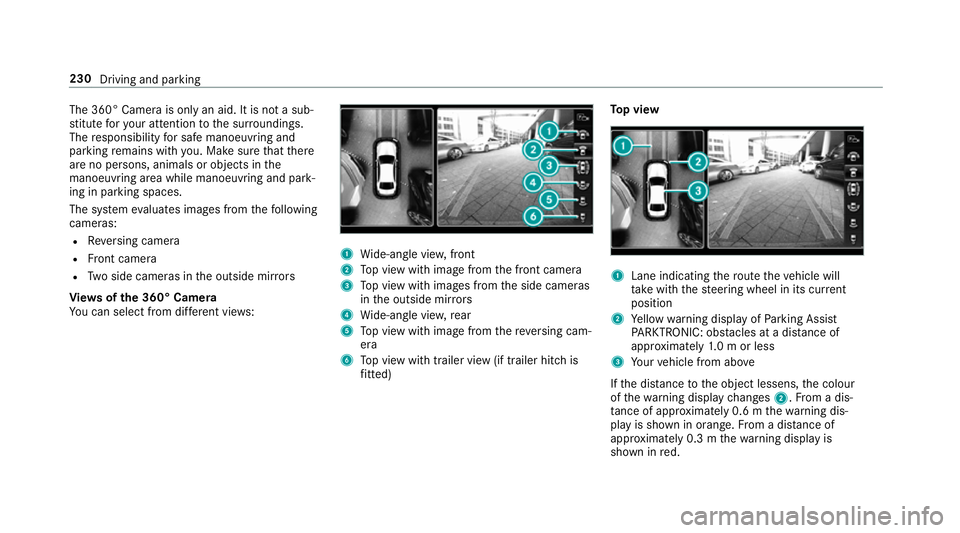
The 360° Camer
aisonlyana id. It is no tasub‐
st itut efor your attentio ntothe sur roundings.
The responsibility fors afem anoeuvring and
parking remains wit hyou. Mak esuret hat there
ar enop ersons, animals or objects in the
manoeuvring area whil emanoeuvring and park‐
ing in parking spaces.
The sy stem evaluates images from thef ollowing
cameras:
R Reversing camera
R Front camera
R Twos ide cameras in theo utside mir rors
Vi ew soft he 360 °Camera
Yo uc an select from dif fere nt vie ws: 1
Wide-angle vie w,front
2 Topv ieww ithi mag efromt he front camera
3 Topv ieww ithi mages from thes ide cameras
in theo utside mir rors
4 Wide-angle vie w,rear
5 Topv ieww ithi mag efromt hereve rsing cam‐
era
6 Topv ieww itht railer vie w(if trailer hitc his
fi tted) To
pv iew 1
Lane indicating ther out ethe vehicle will
ta ke wit hthe steering wheel in its cur rent
position
2 Yello ww arning displa yofParking Assist
PA RKTRONIC: obstacles at adista nce of
appr oximatel y1.0morl ess
3 Your vehicle from abo ve
If th ed ista nce totheo bjec tlessens, thec olour
of thew arning displa ychanges 2.Fromad is‐
ta nce of appr oximatel y0.6mt hewarning dis‐
pla yiss hown in orange. From adistan ce of
appr oximatel y0.3mt hewarning displa yis
shown in red. 230
Driving and parking
Page 236 of 585
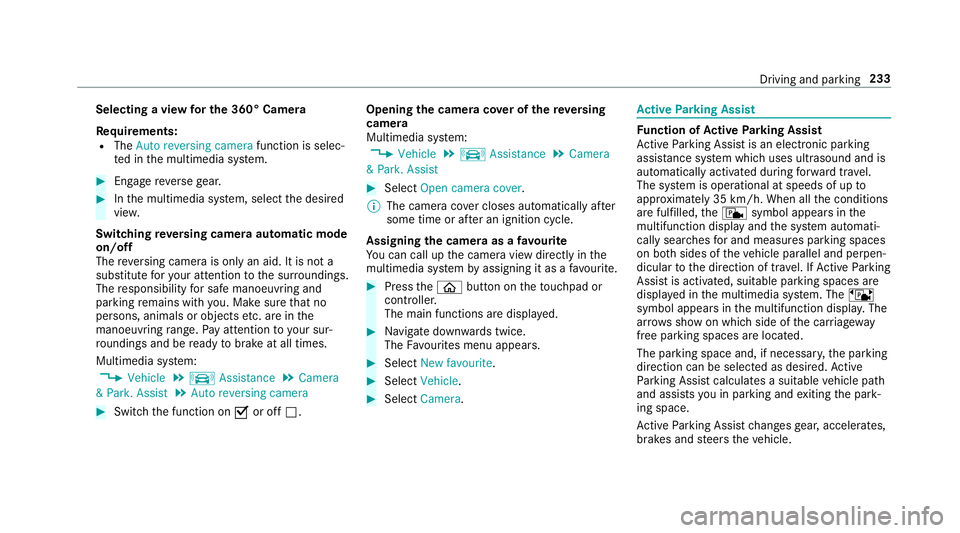
Selecting
aviewf or th e360°C amera
Re quirements:
R The Autoreversing camera function is selec‐
te dint he multimedia sy stem. #
Enga gereve rseg ear. #
Inthem ultimedia sy stem, select thed esired
vie w.
Switching reve rsing camer aautomatic mode
on/off
The reve rsing camer aisonlyana id. It is no ta
substitut efor your attentio ntothe sur roundings.
The responsibility fors afem anoeuvring and
parking remains wit hyou. Mak esuret hat no
persons, animals or objectse tc. areinthe
manoeuvring range. Paya ttention to your sur‐
ro unding sand be ready tobrak eata ll times.
Multimedia sy stem:
, Vehicle .
k Assistance .
Camera
&P ark. Assist .
Auto reversin gcamera #
Switc hthe function on Oor off ª. Opening
thec amer acove rofthe reve rsing
camera
Multimedia sy stem:
, Vehicle .
k Assistance .
Camera
&P ark. Assist #
Select Open camera cover.
% The camer acover closes automaticall yafter
some time or af terani gnitio ncycle.
Assigning thec amer aasaf avourite
Yo uc an call up thec amer aviewd irectly in the
multimedia sy stem byassignin gitasaf avourite. #
Press theò button on thet ouchpad or
contro ller.
The main function saredispla yed. #
Navigat edownwards twice.
The Favourites men uappears. #
Select New favourite. #
Select Vehicle . #
Select Camera. Ac
tiv eP arking Assist Fu
nction of Activ eP arking Assist
Ac tiveP arking Assis tisanelectronic pa rking
assis tance sy stem whic huses ultrasound and is
automaticall yactivated during forw ardt rave l.
The sy stem is operational at speeds of up to
appr oximatel y35k m/h.When all thec onditions
ar ef ulfilled, thec symbol appear sinthe
multifunction displa yand thes ystema utomati‐
cally sear ches fora nd measu resp arking spaces
on bo thsides of thev ehicle parallel and perpen‐
dicular tothed irection of tra vel. If ActiveP arking
Assis tisactivated, suitable parkin gspaces are
displa yedint he multimedia sy stem. The ë
symbol appear sinthe multifunction displa y.The
ar row sshowonw hichs ide of thec arriag eway
free parking spaces ar eloca ted.
The parkin gspace and, if necessar y,thep arking
direction can be selected as desired. Active
Pa rking Assis tcalculates asuitable vehicle path
and assists youinp arkingand exitin gthe park‐
ing space.
Ac tiveP arking Assis tchanges gear,a ccelerates,
brakes and steer sthe vehicle. Driving and parking
233