steering wheel MERCEDES-BENZ E-CLASS ESTATE 2017 User Guide
[x] Cancel search | Manufacturer: MERCEDES-BENZ, Model Year: 2017, Model line: E-CLASS ESTATE, Model: MERCEDES-BENZ E-CLASS ESTATE 2017Pages: 585, PDF Size: 11.8 MB
Page 175 of 585
&
WARNING Risk of accident if thei gnition
is switched of fwhile driving
If yo us wit ch offt he ignition while driving,
functionsr elevant tosaf etya re re stricted or
no longer available. This ma yeffect, for
ex ample, thep owe rsteering sy stem and the
brak eforce boosting.
Yo uw illthen need touse considerabl ymore
fo rc etos teer and brake. #
Do no tswitc hoffthei gnition while driv‐
ing. &
WARNING Risk ofexhaus tgas poisoning
Combustio nengines emit poisonous exhaust
ga ses suc hascarbon monoxide. Inhaling
th ese exhaus tgases causes poisoning. #
Neverlea ve thee ngine running in an
enclose dspace wi thout suf ficient venti‐
lation. &
WARNING Risk of skidding and of an
accident du etoshifting down on slippery
ro ad sur faces
If yo us hiftd ow nons lipperyroad sur faces to
inc rease thee ngine braking ef fect, thed rive
wheels ma ylose traction. #
Do no tshif td ow nons lipperyroad sur‐
fa ces toinc rease thee ngine braking
ef fect. &
DANG ER Risk of fata linjuries due topoi‐
sonous exhaus tgases
If th et ailpipe is bloc kedors ufficient ventila‐
tio nisn otpossible, poisonou sexhau stgases
suc hasc arbon monoxide ma yenter thev ehi‐
cle. This is thec ase, fore xamp le, if thev ehi‐
cle is stuc kins now. #
When thee ngine or thes tationary
heater ar erunning, keep thet ailpipe
and thea reaa round thev ehicle clear of
sno w. #
Open awindo wont he side of thev ehi‐
cle facing thew ind toensur eana de‐
qu ates uppl yoff resh air. &
WARNING Risk of accident du etothe
brak esystemo verheating
If yo ul eave your foot on theb rake pedal
when driving, theb rake system ma yover‐
heat.
This increases theb raking dis tance and the
brak esystemm ayeve nfail. #
Neveru se theb rake pedal as afootrest. #
Do no tdepress theb rake pedal and the
accelerator pedal at thes ame time
while driving. *
NO
TECausing wearto theb rake linings
by permanentl ydepressing theb rake
pedal #
Do no tpermanentl ydepress theb rake
pedal while driving. 17 2
Driving and pa rking
Page 182 of 585
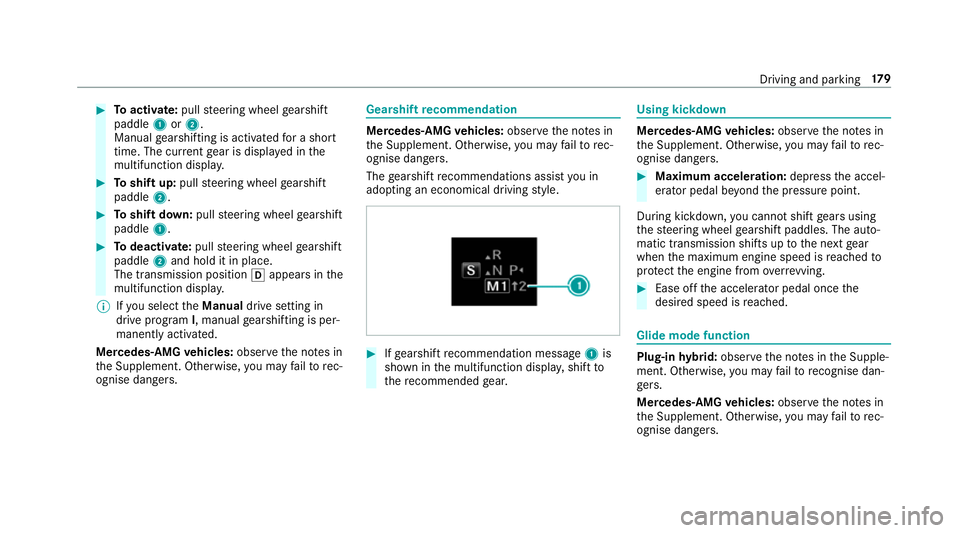
#
Toactivate: pullsteering wheel gearshift
paddle 1or2.
Manual gearshiftin gisactivated foras hort
time. The cur rent gear is displa yedint he
multifunction displa y.#
Toshif tup:pull steering wheel gearshift
paddle 2. #
Toshif tdow n:pull steering wheel gearshift
paddle 1. #
Todeactivate: pullsteering wheel gearshift
paddle 2and hold it in place.
The transmissio nposition happear sinthe
multifunction displa y.
% Ifyo us elect theManual drivesetting in
driv eprogram I,m anua lgearshifting is per‐
manently activated.
Mercedes-AMG vehicles: observet he no tesin
th eS upplement .Otherwise, youm ayfailto rec‐
ognise dangers. Gearshi
ftrecommendation Mercedes
-AMG vehicles: observet he no tesin
th eS upplement .Otherwise, youm ayfailto rec‐
ognise dangers.
The gearshif trecommendations assis tyou in
adopting an economical driving style. #
Ifge arshif trecommendatio nmessage 1is
shown in them ultifunction displa y,shif tto
th er ecommende dgear. Using kickdown
Mercedes-AMG
vehicles: observet he no tesin
th eS upplement .Otherwise, youm ayfailto rec‐
ognise dangers. #
Maximum acceleration: depress thea ccel‐
erator pedal be yond thep ressur epoint.
During kickdown, youc anno tshif tgear susing
th es teering wheel gearshif tpaddles .The auto‐
matic transmissio nshifts up tothen extg ear
when them aximum engine speed is reached to
pr otect thee ngine from overrev ving. #
Ease of fthe accelera torp eda lonce the
desired speed is reached. Glid
emodef un ction Plug-in
hybrid: obser vethen otes in theS upple‐
ment .Otherwise, youm ayfailto recognise dan‐
ge rs.
Mercedes-AMG vehicles: observet he no tesin
th eS upplement .Otherwise, youm ayfailto rec‐
ognise dangers. Driving and pa
rking 17 9
Page 204 of 585
ST
EER CONT ROLfunction ST
EER CONTROL help syou bytransmitting a
noticeable steering forc etot hesteering wheel in
th ed irection requ ired forv ehicle stabilisation.
This steering recommendation is given pa rticu‐
larly in thef ollowing situations:
R Both right wheels or bo thleftw heels ar eon
aw etor slippe ryroad sur face whe nyou
brake.
R The vehicle starts toskid.
Sy stem limitations
ST EER CONTROL ma ybeimpairedorm aynot
function in thef ollowing situations:
R ESP ®
is deactivated.
R ESP ®
is malfunctioning.
R The steering is malfunctioning.
If ESP ®
is malfunctioning, youw ill be assis ted
fur ther by thee lectric po wersteering. Fu
nction of Activ eB rake Assi st Ac
tiveB rake Assi stconsi stso f:
R Distance warning function
R Autonomous braking function
R Situation-dependent braking assi stance
R Vehicles with Drivin gAssistanc ePack‐
age: Evasi veSteering Assist
Ac tiveB rake Assi stcan hel pyou tominimis ethe
ri sk of acollision wit hvehicles or pedestrians or
to reduce thee ffects of suc hacollision.
If Ac tiveB rake Assi sthas de tected arisk of colli‐
sion ,you will be warned visually and acousti‐
cally.
If yo udon otreact tothev isual or acoustic warn‐
ing, autonomous brakin gcan be initiated in criti‐
cal situations.
In especially critical situations ,Activ eBrake
Assi stcan initia teautonomous brakin gdirect ly.
In this case, thev isual and acoustic warning
occur ssimultaneousl ywitht he braking applica‐
tion. If
yo ua ppl ythe brak eyourself in acritical situa‐
tio nora pplythe brak eduring autonomous brak‐
ing, situation-dependen tbraking assis tance
occu rs.T he brak epressur eincreases up tomax‐
imum full-s topb raking if necessar y.
If th ea utonomous braking function or thes itua‐
tion-dependen tbraking assis tance is trig gered,
additional pr eventiv emeasures foro ccupant
pr otection (PRE-SAFE ®
)m ayalso be initiated, if
th ev ehicle is equipped wit hthese. &
WARNING Risk of an accident caused by
limited de tection per form anc eofA ctive
Brak eAssist
Ac tiveB rake Assi stcanno talway sc learly
identify objects and compl extraf fics itua‐
tions.
In su chcases, ActiveB rake Assi stmight:
R Giveaw arning or brak ewithout reason
R Notgiveaw arning or no tbrake #
Alw aysp aycareful attention tothet raf‐
fi cs ituation; do no trely on ActiveB rake
Assi stalone. ActiveB rake Assi stis only Drivin
gand parking 201
Page 218 of 585
#
Remo veyour foot from theb rake pedal. #
Brief lypull thec ruise control le vertow ards
you 3.
or #
Accelerat ebrief ly.
Yo ur vehicle pulls away and adapts its speed
to that of thev ehicle in front. If no vehicle is
de tected in front, your vehicle accelerates to
th es etspeed.
Ad opting thes peed limit as thes toreds peed
Re quirements:
R ActiveS peed Limi tAssistis activated in the
multimedia sy stem (→ page247).
R ActiveD ista nce Assi stDISTRONI Cisactiva‐
te d.
R The sy stem de tects atraffic sign indicating a
speed limit. #
Brief lypull thec ruise control le vertow ards
you 3.
The displ ayed speed limit is adop tedast he
st ored speed. Your vehicle adapts its speed
to that of thev ehicle in front, but onl yupto
th es tore ds peed. If ActiveS peed Limi tAssist is activated, an
ydetected changes in the
speed limit ar eadop tedbyt he system.
Collision warning
If Ac tiveD ista nce Assi stDISTRONI Cisunableto
suf ficiently decele rate thev ehicle in order to
pr eve nt it from approa ching thev ehicle in front,
yo uw ill be warned visuall yand acousticall y.An
intermittent warning tone will then sound and
th ed ista nce warning lam pwill light up in the
instrumen tclus ter. #
Brak eimmediately in order toinc rease the
dis tance from thev ehicle in front.
or #
Take evasiv eaction pr ovided it is saf etodo
so. Ac
tiv eS teering Assist Fu
nction of Activ eS teering Assist
Ac tiv eS teering Assis tisonlya vailable for
ve hicles with theD riving Assistance Pack‐
age.
R ActiveS teering Assis tisoperational at
speeds up to210k m/h and helps youtos tay in
thec ent reofthel ane bymeans of moder‐
at es teering inter ventions.
R It uses thev ehicle in front and thel ane mark‐
ings as areferenc edepen ding on thed riven
speed.
R ActiveS teering Assis trequires youast he
driver ,tokeepyour hands on thes teering
wheel at all times so that youa reable to
inter vene at an ytime tocor rect thec ourse of
th ev ehicle and keep it in lane.
R ActiveS teering Assis tcan be overridden at
an yt ime bysteering thev ehicle yourself.
R When thes ystemisa ctivelysteering, the
è symbol is shown in green in them ulti‐
function displa y.
Sy stem limitations of Activ eS teering Assist
Ac tiveS teering Assis thas alimited steering tor‐
qu efor lateral guidance. In some cases ,the
st eering inter ventio nisn otsufficien ttok eepthe
ve hicle in thel ane.
If th ed etection of lane markings and vehicles
ahead is impaired, ActiveS teering Assist
switches topassiv emode. The sy stem pr ovides
no suppor tinthis case. During thet ransition Driving and parking
215
Page 220 of 585
mak
esuret hat then eighbouring lane is free
(shoulder view).
% The availabilit yofthefollowing function is
countr y-dependent.
Ac tiveS teering Assis tremain sactiv eevenift he
tur ns igna lindica toriss witched on. ActiveS teer‐
ing Assis tthen assists thed rive rw hen changing
lane sbya pplying steering torques toinitiat ethe
lane change.
Assis tance when changing lane sisprovide difa ll
th ef ollowing condition sareme t:
R Youa redrivin gonam otorway or high-speed
multi-lane major road wit hmultiple lane sin
th ed irection of tr avel.
R The neighbouring lane is free and separated
by ab roke nl ane marking.
R The driven spee disbetwe en 80 km/h and
18 0k m/h.
R The tur nsigna lindicator is switched on for
longer than tw oseconds.
If th es ystem is impaired, ActiveL aneC hange
Assi stma ybec ancelled. If an inter ruption
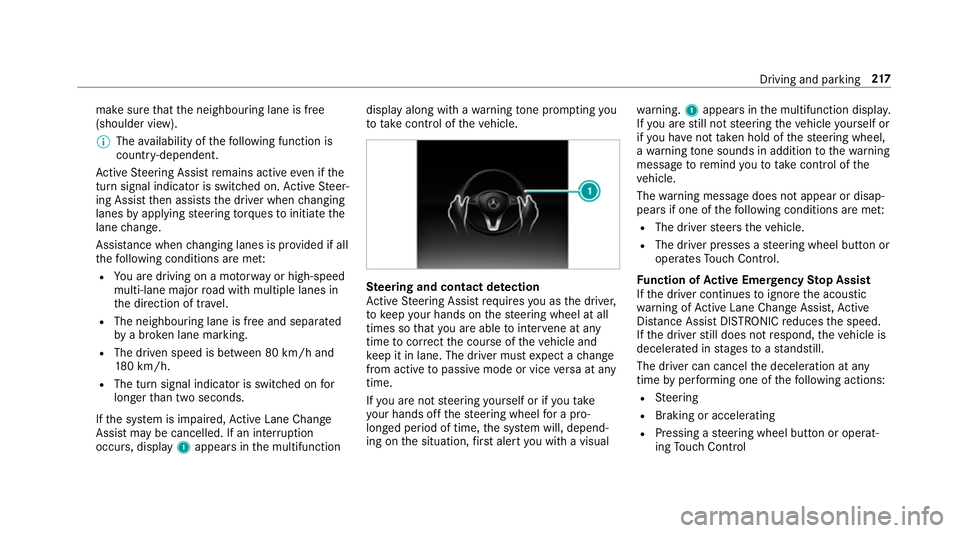
occurs, display 1appear sinthe multifunction displa
yalong wit hawarning tone prom pting you
to take control of thev ehicle. Ste
ering and contact de tection
Ac tiveS teering Assis trequires youast he driver,
to keep your hands on thes teering wheel at all
times so that youa reable tointer vene at any
time tocor rect thec ourse of thev ehicle and
ke ep it in lane. The driver mus texpect achange
from activ etopassivemode or vice versaata ny
time.
If yo ua renots teering yourself or if yout ake
yo ur hands of fthe steering wheel forap ro‐
longed period of time, thes ystemw ill, depend‐
ing on thes ituation ,first aler tyou wit havisual wa
rning. 1appear sinthe multifunction displa y.
If yo ua restill no tsteering thev ehicle yourself or
if yo uh ave nottaken hold of thes teering wheel,
aw arning tone sounds in additio ntothewarning
messag etoremind youtot akec ontrol of the
ve hicle.
The warning messag edoes no tappear or disap‐
pear sifo ne of thef ollowing condition sareme t:
R The driver steer sthe vehicle.
R The driver presses asteering wheel button or
operates Touc hC ontrol.
Fu nction of Activ eE me rgency Stop Assist
If th ed rive rc ontinues toigno rethea coustic
wa rning of ActiveL aneC hangeA ssist,A ctive
Dis tance Assi stDISTRONI Creduces thes peed.
If th ed rive rs tilld oes no trespond, thev ehicle is
decelerated in stages toas tandstill.
The driver can cancel thed eceleration at any
time byper form ing one of thef ollowing actions:
R Steering
R Braking or accelerating
R Pressing asteering wheel button or operat‐
ing Touc hC ontrol Drivin
gand parking 217
Page 231 of 585
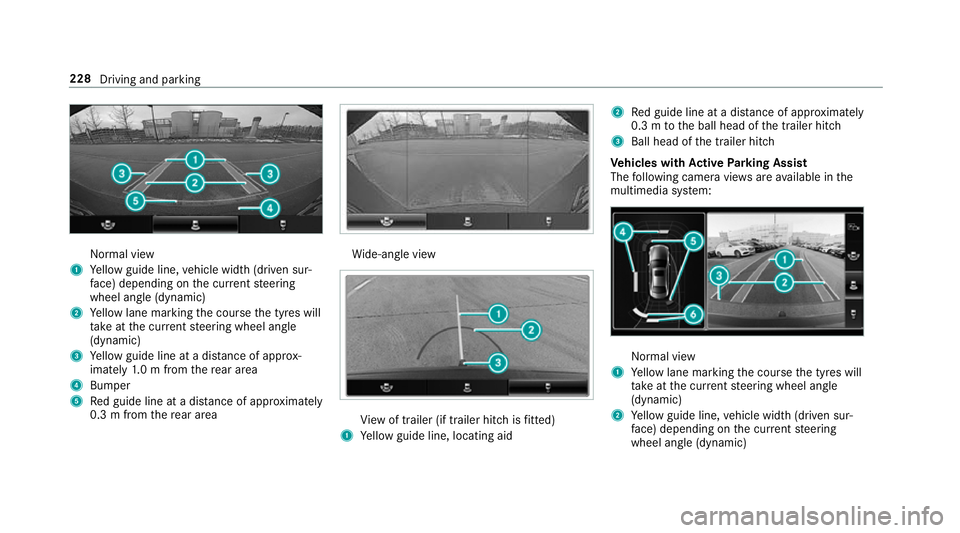
Normal view
1 Yello wg uide line, vehicle widt h(driven sur‐
fa ce) depending on thec urrent steering
wheel angle (dynamic)
2 Yello wl ane markin gthe course thet yres will
ta ke atthec urrent steering wheel angle
(dynamic)
3 Yello wg uide line at adista nce of appr ox‐
imatel y1.0mf romt herear area
4 Bumper
5 Redg uide line at adista nce of appr oximately
0. 3mf romt herear area Wi
de-angle view Vi
ew of trailer (if trailer hitc hisfitted)
1 Yello wg uide line, locating aid 2
Redg uide line at adista nce of appr oximately
0. 3mtot he ball head of thet railer hitch
3 Ball head of thet railer hitch
Ve hicles with Activ eP arking Assist
The following camera vie wsarea vailable in the
multimedia sy stem: Normal view
1 Yello wl ane markin gthe course thet yres will
ta ke atthec urrent steering wheel angle
(dynamic)
2 Yello wg uide line, vehicle widt h(driven sur‐
fa ce) depending on thec urrent steering
wheel angle (dynamic) 228
Driving and parking
Page 233 of 585
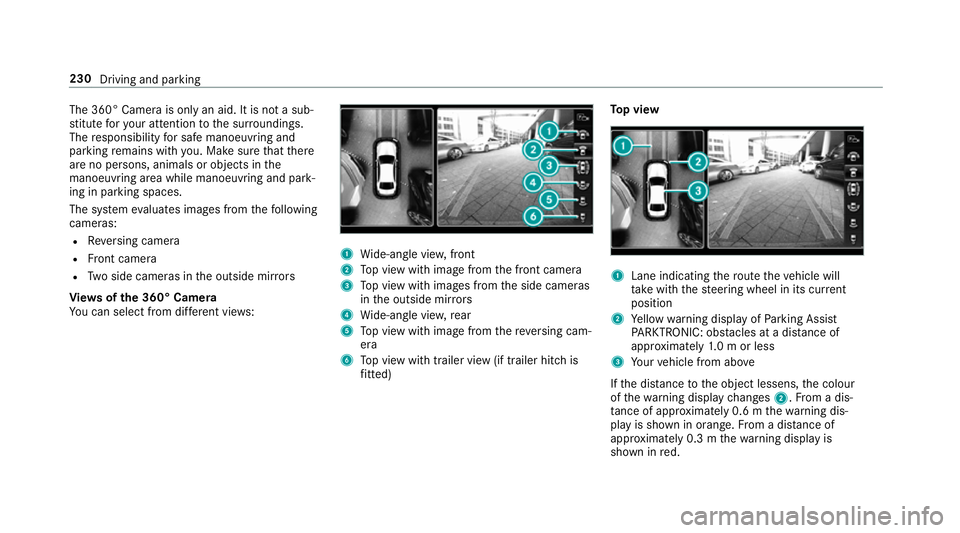
The 360° Camer
aisonlyana id. It is no tasub‐
st itut efor your attentio ntothe sur roundings.
The responsibility fors afem anoeuvring and
parking remains wit hyou. Mak esuret hat there
ar enop ersons, animals or objects in the
manoeuvring area whil emanoeuvring and park‐
ing in parking spaces.
The sy stem evaluates images from thef ollowing
cameras:
R Reversing camera
R Front camera
R Twos ide cameras in theo utside mir rors
Vi ew soft he 360 °Camera
Yo uc an select from dif fere nt vie ws: 1
Wide-angle vie w,front
2 Topv ieww ithi mag efromt he front camera
3 Topv ieww ithi mages from thes ide cameras
in theo utside mir rors
4 Wide-angle vie w,rear
5 Topv ieww ithi mag efromt hereve rsing cam‐
era
6 Topv ieww itht railer vie w(if trailer hitc his
fi tted) To
pv iew 1
Lane indicating ther out ethe vehicle will
ta ke wit hthe steering wheel in its cur rent
position
2 Yello ww arning displa yofParking Assist
PA RKTRONIC: obstacles at adista nce of
appr oximatel y1.0morl ess
3 Your vehicle from abo ve
If th ed ista nce totheo bjec tlessens, thec olour
of thew arning displa ychanges 2.Fromad is‐
ta nce of appr oximatel y0.6mt hewarning dis‐
pla yiss hown in orange. From adistan ce of
appr oximatel y0.3mt hewarning displa yis
shown in red. 230
Driving and parking
Page 234 of 585
When
Parking Assis tPARKTRONIC is operational
an dnoo bjectisd etected, thes egment softhe
wa rning displa yareshown in grey.
% Ifth ee ntir esystemf ails, thes egment sof
th ew arning displa yareshown in red. The
indicator lam ponthePARKTRONI Cbutton
light supa ndthe é symbol appear sin
th em ultifunction displa y.
If th es ystemf ails at ther ear ,the displa yof
th es egment schanges as follo ws:
R The rear segment sareshown in red
when reve rsing.
R The rear segment sarehidde nwhen driv‐
ing forw ards.
If Pa rking Assis tPARKTRONIC is deactivated,
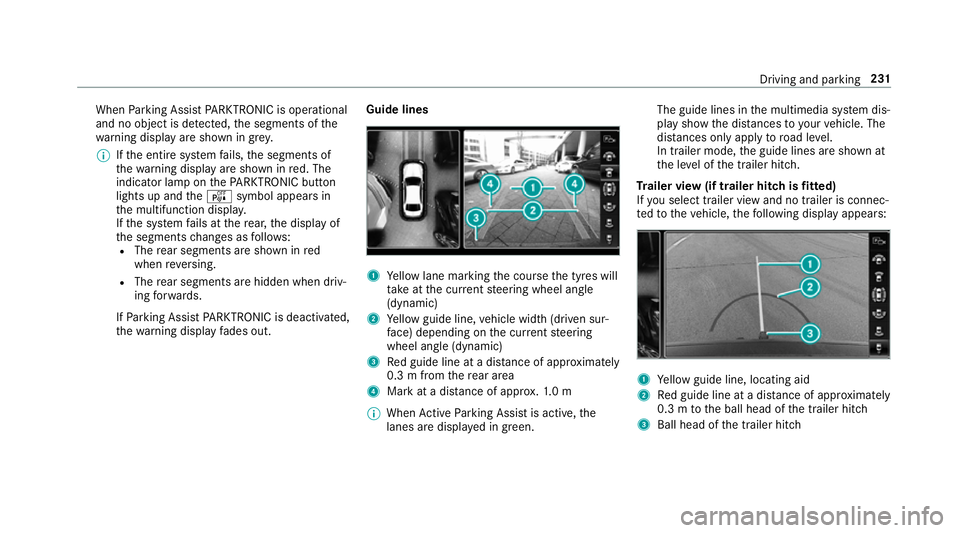
th ew arning displa yfades out. Guid
elines 1
Yello wl ane markin gthe course thet yres will
ta ke atthec urrent steering wheel angle
(dynamic)
2 Yello wg uide line, vehicle widt h(driven sur‐
fa ce) depending on thec urrent steering
wheel angle (dynamic)
3 Redg uide line at adista nce of appr oximately
0. 3mf romt herear area
4 Markatad istance of appr ox.1 .0 m
% When ActiveP arking Assis tisactive, the
lanes ar edispla yeding reen. The guide lines in
them ultimedia sy stem dis‐
pla yshowt he dis tances toyour vehicle. The
dis tances only apply toroad le vel.
In trailer mode, theg uide lines ar eshown at
th el eve loft he trailer hitch.
Tr aile rview( if traile rhitchisf itted)
If yo us elect trailer vie wand no trailer is connec‐
te dtot hevehicle, thef ollowing displa yappears: 1
Yello wg uide line, locating aid
2 Redg uide line at adista nce of appr oximately
0. 3mtot he ball head of thet railer hitch
3 Ball head of thet railer hitch Driving and parking
231
Page 277 of 585
Note
sono perating saf ety &
WARNING Risk of di stra ction from infor‐
mation sy stems and communications
equipment
If yo uo perat einformation and communica‐
tio ne quipment integ ratedint hevehicle
when driving, youw ill be distracted from the
traf fics ituation. Thi scould also cause youto
lose control of thev ehicle. #
Onlyoperat ethis equipment when the
traf fics ituation permits. #
Ifyo uc anno tbes ureoft his,stop the
ve hicle whils tpaying attention toroad
and traf ficc onditions and ope rate the
equipment wit hthe vehicle stationar y. &
WARNING Risk of di stra ction from oper‐
ating mobil ecommunication equipment
while thev ehicle is in motion
If yo uo perat ecommun icationequipment
integrated in thev ehicle when driving, you
will be distracted from thet raffic situation. This could also cause
youtol ose control of
th ev ehicle.
Onl yoperat ethis equipment when thev ehi‐
cle is stationar y. Fo
ry our owns afet y, alwa ys obser vethef ollow‐
ing points when operating mobile communica‐
tions equipment and especiall yyour voice con‐
trol sy stem:
R Obser vethel egal requ irements fort he coun‐
tr yinw hichyou ar edriving.
R While driving, on ly operatem obile communi‐
cation sequipment and your voice control
sy stem when thet raffic condition spermit it.
Yo um ayotherwise be distracted from the
traf ficc onditions and cause an accident,
inju ring yourself and others.
R Do no tuse thev oice control sy stem in an
emer gency as your voice can chang eand
yo ur telephon ecall can be unnecessarily
dela yed.
R Familiarise yourself wit hthe voice control
sy stem function sbefor estartin gt he journe y. Operation
Operating
them ultifunction steering wheel LINGU
ATRO NIC is operational appr oximately
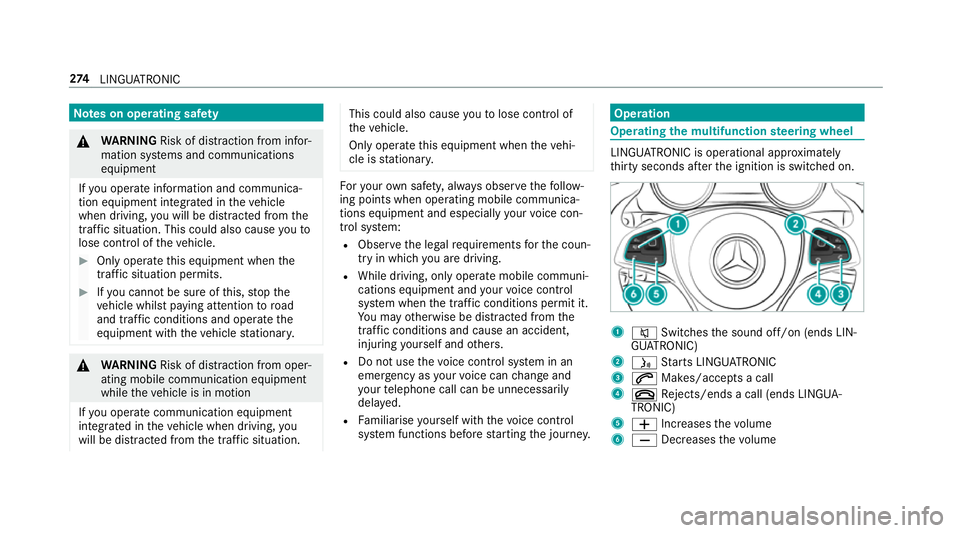
th irty seconds af tert he ignition is switched on. 1
8 Switches thes ound off/on (ends LIN‐
GU ATRO NIC)
2 ó Starts LINGU ATRO NIC
3 6 Makes/accepts acall
4 ~ Rejects/end sacall( en ds LINGUA‐
TRONIC)
5 W Increases thev olume
6 X Decreases thev olume 274
LINGU ATRO NIC
Page 278 of 585
Conductin
gadialogue #
Tostar torc ontinue adialogue: pressthe
ó button on them ultifunction steering
wheel.
Yo uc an sa yavoice command af teran
acou stic signal. #
Tocor rect an ent ry:sayt he Correction
vo ice command. #
Toselect an entr yfromt he selection lis t:
sa yt he line number or thec ontents. #
Tobrows ethe selection lis t:sa yt he Next
or Back voice command. #
Tointer rupt thed ialogue: sayt he Pause
vo ice command. #
Tocancel thed ialogue: sayt he Cancel
vo ice command or press the8 button on
th em ultifunction steering wheel. Operable functions
Yo
uc an use theL INGU ATRO NIC voice control
sy stem tooperat ethe following equipment
depending on thef eatures: R
Telephone
R Text messa ges
R Navigation
R Address book
R Radio
R Audio (memor ycard, Media Inter face, USB
and Blu etoo th®
audio)
R TV
R Vehicle Overvie
woftypes of voice commands Ad
istinction is made between thef ollowing
vo ice commands:
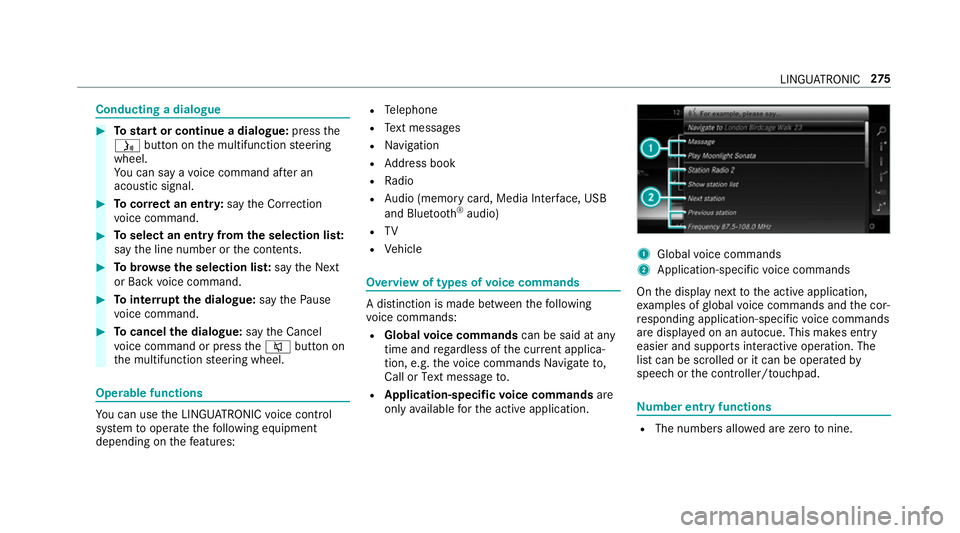
R Global voice commands can be said at any
time and rega rdless of thec urrent applica‐
tion, e.g .the voice commands Navigateto,
Call orText message to.
R Application-specific voice commands are
onl yavailable fort he activ eapplication. 1
Global voice commands
2 Application-specific voice commands
On thed ispla ynexttot he activ eapplication,
ex amples of global voice command sand thec or‐
re sponding application-specific voice commands
ar ed ispla yedonana utocue. This makes ent ry
easier and supports interactiv eoperation. The
lis tc an be scrolled or it can be operated by
speec horthe controller/touchpad. Nu
mbe rentry functions R
The numbe rsallo weda rezero tonine . LING
UATRONIC 275