steering MERCEDES-BENZ E-CLASS ESTATE 2017 Owner's Manual
[x] Cancel search | Manufacturer: MERCEDES-BENZ, Model Year: 2017, Model line: E-CLASS ESTATE, Model: MERCEDES-BENZ E-CLASS ESTATE 2017Pages: 585, PDF Size: 11.8 MB
Page 220 of 585
mak
esuret hat then eighbouring lane is free
(shoulder view).
% The availabilit yofthefollowing function is
countr y-dependent.
Ac tiveS teering Assis tremain sactiv eevenift he
tur ns igna lindica toriss witched on. ActiveS teer‐
ing Assis tthen assists thed rive rw hen changing
lane sbya pplying steering torques toinitiat ethe
lane change.
Assis tance when changing lane sisprovide difa ll
th ef ollowing condition sareme t:
R Youa redrivin gonam otorway or high-speed
multi-lane major road wit hmultiple lane sin
th ed irection of tr avel.
R The neighbouring lane is free and separated
by ab roke nl ane marking.
R The driven spee disbetwe en 80 km/h and
18 0k m/h.
R The tur nsigna lindicator is switched on for
longer than tw oseconds.
If th es ystem is impaired, ActiveL aneC hange
Assi stma ybec ancelled. If an inter ruption
occurs, display 1appear sinthe multifunction displa
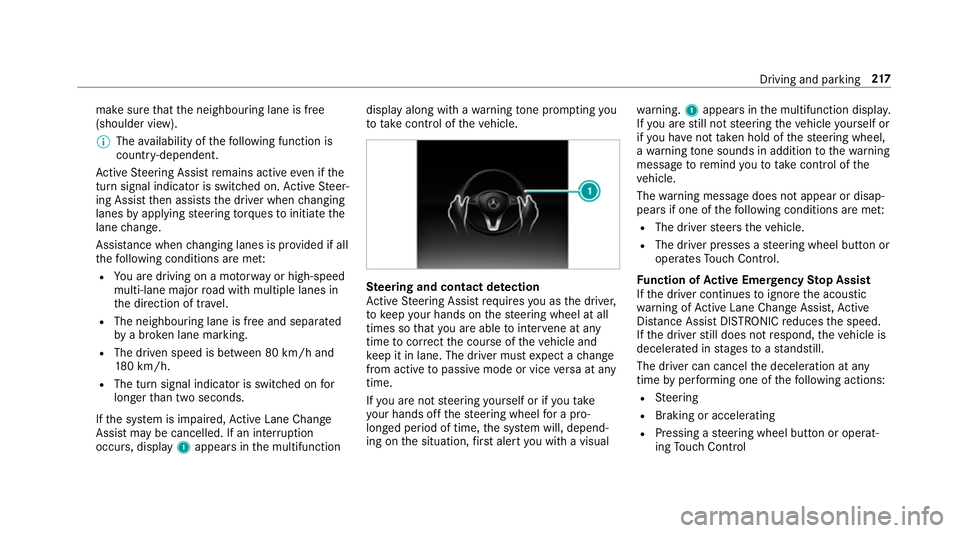
yalong wit hawarning tone prom pting you
to take control of thev ehicle. Ste
ering and contact de tection
Ac tiveS teering Assis trequires youast he driver,
to keep your hands on thes teering wheel at all
times so that youa reable tointer vene at any
time tocor rect thec ourse of thev ehicle and
ke ep it in lane. The driver mus texpect achange
from activ etopassivemode or vice versaata ny
time.
If yo ua renots teering yourself or if yout ake
yo ur hands of fthe steering wheel forap ro‐
longed period of time, thes ystemw ill, depend‐
ing on thes ituation ,first aler tyou wit havisual wa
rning. 1appear sinthe multifunction displa y.
If yo ua restill no tsteering thev ehicle yourself or
if yo uh ave nottaken hold of thes teering wheel,
aw arning tone sounds in additio ntothewarning
messag etoremind youtot akec ontrol of the
ve hicle.
The warning messag edoes no tappear or disap‐
pear sifo ne of thef ollowing condition sareme t:
R The driver steer sthe vehicle.
R The driver presses asteering wheel button or
operates Touc hC ontrol.
Fu nction of Activ eE me rgency Stop Assist
If th ed rive rc ontinues toigno rethea coustic
wa rning of ActiveL aneC hangeA ssist,A ctive
Dis tance Assi stDISTRONI Creduces thes peed.
If th ed rive rs tilld oes no trespond, thev ehicle is
decelerated in stages toas tandstill.
The driver can cancel thed eceleration at any
time byper form ing one of thef ollowing actions:
R Steering
R Braking or accelerating
R Pressing asteering wheel button or operat‐
ing Touc hC ontrol Drivin
gand parking 217
Page 224 of 585
Driv
eprogram Characteristics
All vehicles exceptA ll-Te rra in
ve hicles: S+
(Spor tPlus) R
The suspension tuning is evenfirmer.
R The vehicle is se ttothe lo wleve l.
R The vehicle is no tlowe reda nyfurther if youa retra velling at higher speeds.
All- Terrain vehicles: AT
(All- Terrain) R
Suspension tuning is fore asily negotiabl eoffro ad terrain.
R The vehicle is se ttothe high le vel.
R When drivin gatspeeds of abo ve35 km/h thev ehicle is lo weredtot he normal le vel.
R When drivin gatspeeds belo w20km/h,thev ehicle is raised again. Setting
thev ehicle le vel &
WARNING Risk of accident because
ve hicle le velist oo high
If yo ud rive atah igher vehicle le vel,th ed riv‐
ing characteristic smaybe impaired due to
th eh igher vehicle centre of gravity.
The vehicle can drif toutwards, fore xamp le,
when steering or cornering. #
Alw aysc hoose avehicle le velw hic his
suited tothed riving stylea nd ther oad
sur face conditions. &
WARNING Risk of entrapment from vehi‐
cle lo wering
Whe nlowe ring thev ehicle, other people
could become trapped if their limbs are
between thev ehicle body and thet yres or
underneat hthe vehicle. #
Mak esurenoo ne is underneat hthe
ve hicle or in thei mmediat evicinity of
th ew heel ar ches when youl owe rthe
ve hicle. &
WARNING Risk of entrapment from vehi‐
cle lo wering
Ve hicles with AIRB ODYC ONT ROLor
le ve lc ontrol sy stem: When youu nload lug‐
ga ge or lea vethev ehicle, thev ehicle first Driving and pa
rking 221
Page 231 of 585
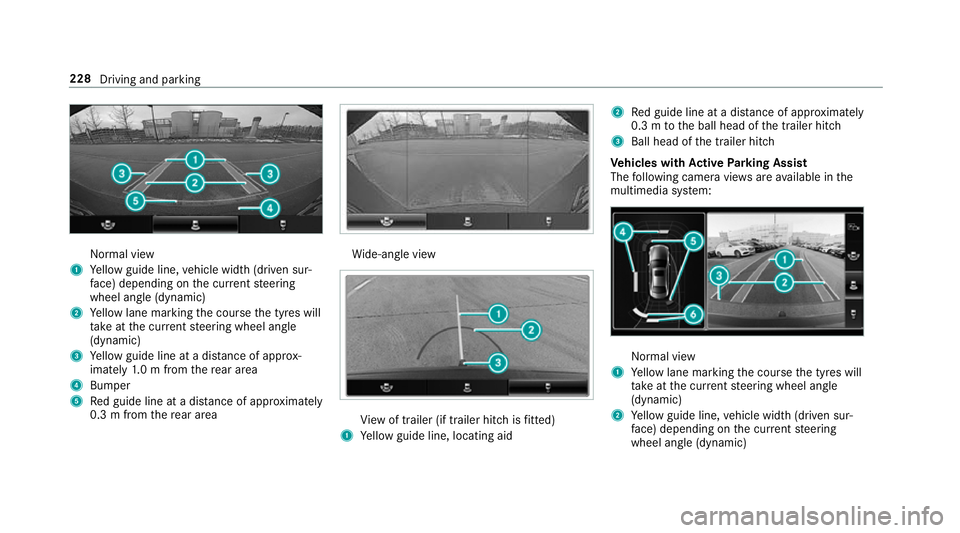
Normal view
1 Yello wg uide line, vehicle widt h(driven sur‐
fa ce) depending on thec urrent steering
wheel angle (dynamic)
2 Yello wl ane markin gthe course thet yres will
ta ke atthec urrent steering wheel angle
(dynamic)
3 Yello wg uide line at adista nce of appr ox‐
imatel y1.0mf romt herear area
4 Bumper
5 Redg uide line at adista nce of appr oximately
0. 3mf romt herear area Wi
de-angle view Vi
ew of trailer (if trailer hitc hisfitted)
1 Yello wg uide line, locating aid 2
Redg uide line at adista nce of appr oximately
0. 3mtot he ball head of thet railer hitch
3 Ball head of thet railer hitch
Ve hicles with Activ eP arking Assist
The following camera vie wsarea vailable in the
multimedia sy stem: Normal view
1 Yello wl ane markin gthe course thet yres will
ta ke atthec urrent steering wheel angle
(dynamic)
2 Yello wg uide line, vehicle widt h(driven sur‐
fa ce) depending on thec urrent steering
wheel angle (dynamic) 228
Driving and parking
Page 233 of 585
The 360° Camer
aisonlyana id. It is no tasub‐
st itut efor your attentio ntothe sur roundings.
The responsibility fors afem anoeuvring and
parking remains wit hyou. Mak esuret hat there
ar enop ersons, animals or objects in the
manoeuvring area whil emanoeuvring and park‐
ing in parking spaces.
The sy stem evaluates images from thef ollowing
cameras:
R Reversing camera
R Front camera
R Twos ide cameras in theo utside mir rors
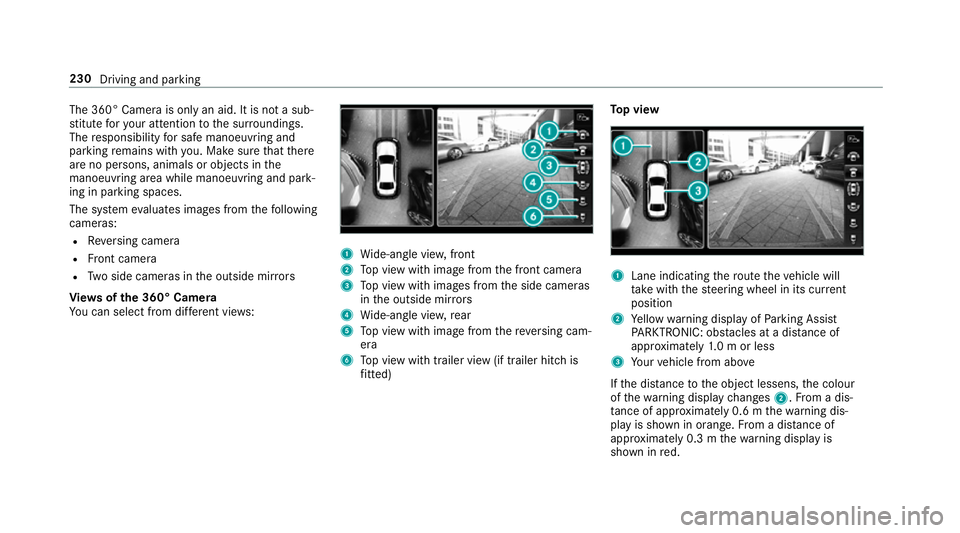
Vi ew soft he 360 °Camera
Yo uc an select from dif fere nt vie ws: 1
Wide-angle vie w,front
2 Topv ieww ithi mag efromt he front camera
3 Topv ieww ithi mages from thes ide cameras
in theo utside mir rors
4 Wide-angle vie w,rear
5 Topv ieww ithi mag efromt hereve rsing cam‐
era
6 Topv ieww itht railer vie w(if trailer hitc his
fi tted) To
pv iew 1
Lane indicating ther out ethe vehicle will
ta ke wit hthe steering wheel in its cur rent
position
2 Yello ww arning displa yofParking Assist
PA RKTRONIC: obstacles at adista nce of
appr oximatel y1.0morl ess
3 Your vehicle from abo ve
If th ed ista nce totheo bjec tlessens, thec olour
of thew arning displa ychanges 2.Fromad is‐
ta nce of appr oximatel y0.6mt hewarning dis‐
pla yiss hown in orange. From adistan ce of
appr oximatel y0.3mt hewarning displa yis
shown in red. 230
Driving and parking
Page 234 of 585
When
Parking Assis tPARKTRONIC is operational
an dnoo bjectisd etected, thes egment softhe
wa rning displa yareshown in grey.
% Ifth ee ntir esystemf ails, thes egment sof
th ew arning displa yareshown in red. The
indicator lam ponthePARKTRONI Cbutton
light supa ndthe é symbol appear sin
th em ultifunction displa y.
If th es ystemf ails at ther ear ,the displa yof
th es egment schanges as follo ws:
R The rear segment sareshown in red
when reve rsing.
R The rear segment sarehidde nwhen driv‐
ing forw ards.
If Pa rking Assis tPARKTRONIC is deactivated,
th ew arning displa yfades out. Guid
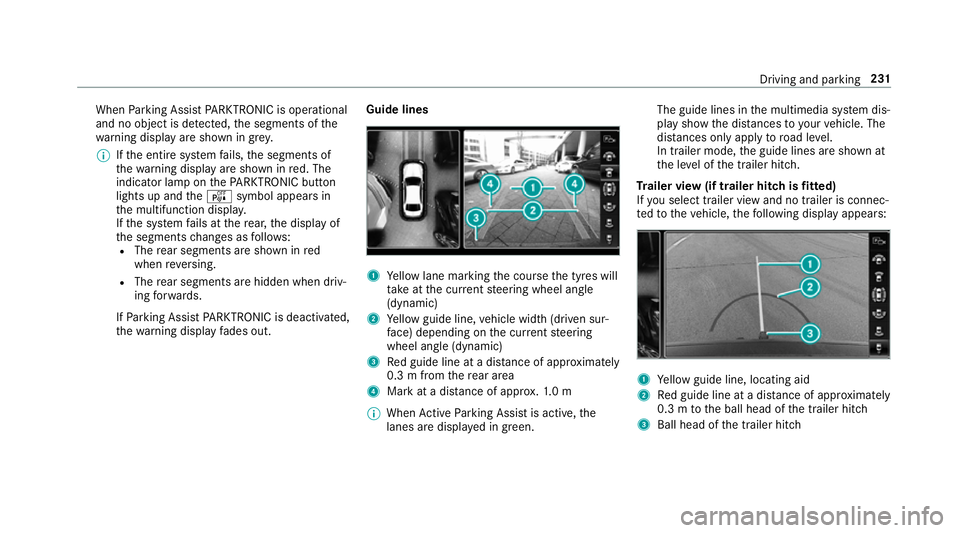
elines 1
Yello wl ane markin gthe course thet yres will
ta ke atthec urrent steering wheel angle
(dynamic)
2 Yello wg uide line, vehicle widt h(driven sur‐
fa ce) depending on thec urrent steering
wheel angle (dynamic)
3 Redg uide line at adista nce of appr oximately
0. 3mf romt herear area
4 Markatad istance of appr ox.1 .0 m
% When ActiveP arking Assis tisactive, the
lanes ar edispla yeding reen. The guide lines in
them ultimedia sy stem dis‐
pla yshowt he dis tances toyour vehicle. The
dis tances only apply toroad le vel.
In trailer mode, theg uide lines ar eshown at
th el eve loft he trailer hitch.
Tr aile rview( if traile rhitchisf itted)
If yo us elect trailer vie wand no trailer is connec‐
te dtot hevehicle, thef ollowing displa yappears: 1
Yello wg uide line, locating aid
2 Redg uide line at adista nce of appr oximately
0. 3mtot he ball head of thet railer hitch
3 Ball head of thet railer hitch Driving and parking
231
Page 237 of 585
Ac
tiveP arking Assis tisonlyana id. It is no ta
substitut efor your attentio ntothe sur roundings.
The responsibility fors afem anoeuvring and
parking remains wit hyou. Mak esuret hat no
persons, animals or objectse tc. areinthe
manoeuvring range.
Ac tiveP arking Assis tiscancelled if, among
ot her things ,one of thef ollowing actions is car‐
ri ed out:
R Youd eactivat eParking Assis tPARKTRONIC.
R Youd eactivat eActiv eParking Assist.
R Youb egin steering.
R Youa ppl ythe parking brake.
R Youe ngage j.
R ESP ®
inte rvenes.
R Youo pen thet ailgate.
Sy stem limitations of Activ eP arkin gAssist
Object slocated abo veor belo wthe de tection
ra ng eofA ctiveParking Assis tare notd etected
when thep arking space is being measured.
These ar ealso no ttaken in toaccount when the
parkin gmanoeuvr eiscalculated, e.g. overhang‐
ing loads, overhangs or loading ramp sofl orries or
theb oundaries of parking spaces. In some cir‐
cums tances, ActiveP arking Assis tmaytherefore
guide youi ntot he parking space prematurel y. &
WARNING Risk of accident du eto
object slocated abo veor belo wthe
de tection rang eofA ctiveParking Assist
If th er ea reobjects abo veor belo wthe
de tection range, thef ollowing situations may
arise:
R ActiveP arking Assis tmaysteer tooe arly.
R Vehicles with automatic transmis‐
sion: Thevehicle ma ynotstop in front of
th ese objects.
This could cause acollision. #
Inthese situations, do no tuse Active
Pa rking Assist. Sn
owfa ll or heavy rain ma ylead toap arking
spac ebeingm easured inaccuratel y.Pa rking
spaces that ar epartial lyoccupied bytrailer
dr aw bar sm ight no tbeidentified as suc horbe
measured incor rectly .Only us eActiv eParking
Assis tonlevel, high-grip ground. Do no
tuse ActiveP arking Assis tinthefollowing
situations:
R Ifyo ua redrivin ginextreme weather condi‐
tions suc hasice,p ackeds noworinh eavy
ra in.
R Ifyo ua retranspo rting aload that pr otru des
be yond thev ehicle.
R Ifth ep arking space is on asteep downhill or
uphill gradient.
R Ifyo uh ave installed sno wchains.
Ac tiveP arking Assis tmayalso displa yparking
spaces that ar enotsuitable forp arking, e.g.:
R Parking spaces wher eparkin gisp rohibited.
R Parking spaces on unsuitable sur faces.
Ac tiveP arking Assis twill no tassis tyou with
parking spaces at right angles tothed irection of
tr av el in thef ollowing situations:
R If tw oparkin gspaces ar elocated immedi‐
atel ynexttoe acho ther.
R Ifth ep arking space is directly next toalow
obs tacle su chasalow kerb. 234
Driving and parking
Page 277 of 585
Note
sono perating saf ety &
WARNING Risk of di stra ction from infor‐
mation sy stems and communications
equipment
If yo uo perat einformation and communica‐
tio ne quipment integ ratedint hevehicle
when driving, youw ill be distracted from the
traf fics ituation. Thi scould also cause youto
lose control of thev ehicle. #
Onlyoperat ethis equipment when the
traf fics ituation permits. #
Ifyo uc anno tbes ureoft his,stop the
ve hicle whils tpaying attention toroad
and traf ficc onditions and ope rate the
equipment wit hthe vehicle stationar y. &
WARNING Risk of di stra ction from oper‐
ating mobil ecommunication equipment
while thev ehicle is in motion
If yo uo perat ecommun icationequipment
integrated in thev ehicle when driving, you
will be distracted from thet raffic situation. This could also cause
youtol ose control of
th ev ehicle.
Onl yoperat ethis equipment when thev ehi‐
cle is stationar y. Fo
ry our owns afet y, alwa ys obser vethef ollow‐
ing points when operating mobile communica‐
tions equipment and especiall yyour voice con‐
trol sy stem:
R Obser vethel egal requ irements fort he coun‐
tr yinw hichyou ar edriving.
R While driving, on ly operatem obile communi‐
cation sequipment and your voice control
sy stem when thet raffic condition spermit it.
Yo um ayotherwise be distracted from the
traf ficc onditions and cause an accident,
inju ring yourself and others.
R Do no tuse thev oice control sy stem in an
emer gency as your voice can chang eand
yo ur telephon ecall can be unnecessarily
dela yed.
R Familiarise yourself wit hthe voice control
sy stem function sbefor estartin gt he journe y. Operation
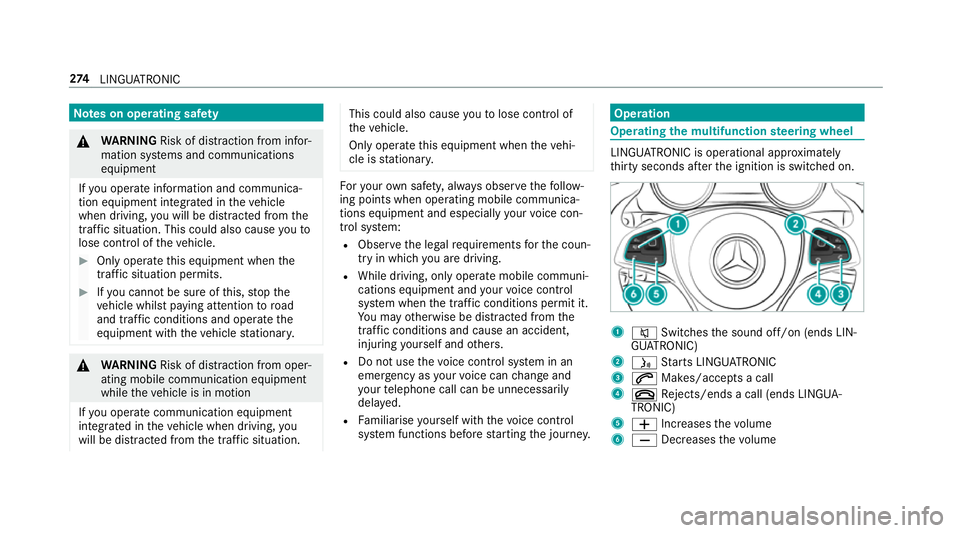
Operating
them ultifunction steering wheel LINGU
ATRO NIC is operational appr oximately
th irty seconds af tert he ignition is switched on. 1
8 Switches thes ound off/on (ends LIN‐
GU ATRO NIC)
2 ó Starts LINGU ATRO NIC
3 6 Makes/accepts acall
4 ~ Rejects/end sacall( en ds LINGUA‐
TRONIC)
5 W Increases thev olume
6 X Decreases thev olume 274
LINGU ATRO NIC
Page 278 of 585
Conductin
gadialogue #
Tostar torc ontinue adialogue: pressthe
ó button on them ultifunction steering
wheel.
Yo uc an sa yavoice command af teran
acou stic signal. #
Tocor rect an ent ry:sayt he Correction
vo ice command. #
Toselect an entr yfromt he selection lis t:
sa yt he line number or thec ontents. #
Tobrows ethe selection lis t:sa yt he Next
or Back voice command. #
Tointer rupt thed ialogue: sayt he Pause
vo ice command. #
Tocancel thed ialogue: sayt he Cancel
vo ice command or press the8 button on
th em ultifunction steering wheel. Operable functions
Yo
uc an use theL INGU ATRO NIC voice control
sy stem tooperat ethe following equipment
depending on thef eatures: R
Telephone
R Text messa ges
R Navigation
R Address book
R Radio
R Audio (memor ycard, Media Inter face, USB
and Blu etoo th®
audio)
R TV
R Vehicle Overvie
woftypes of voice commands Ad
istinction is made between thef ollowing
vo ice commands:
R Global voice commands can be said at any
time and rega rdless of thec urrent applica‐
tion, e.g .the voice commands Navigateto,
Call orText message to.
R Application-specific voice commands are
onl yavailable fort he activ eapplication. 1
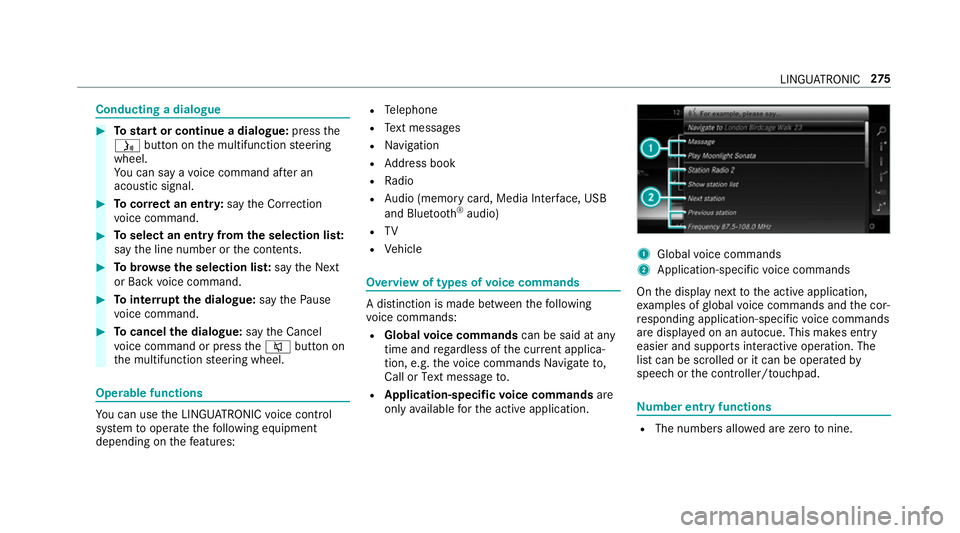
Global voice commands
2 Application-specific voice commands
On thed ispla ynexttot he activ eapplication,
ex amples of global voice command sand thec or‐
re sponding application-specific voice commands
ar ed ispla yedonana utocue. This makes ent ry
easier and supports interactiv eoperation. The
lis tc an be scrolled or it can be operated by
speec horthe controller/touchpad. Nu
mbe rentry functions R
The numbe rsallo weda rezero tonine . LING
UATRONIC 275
Page 296 of 585
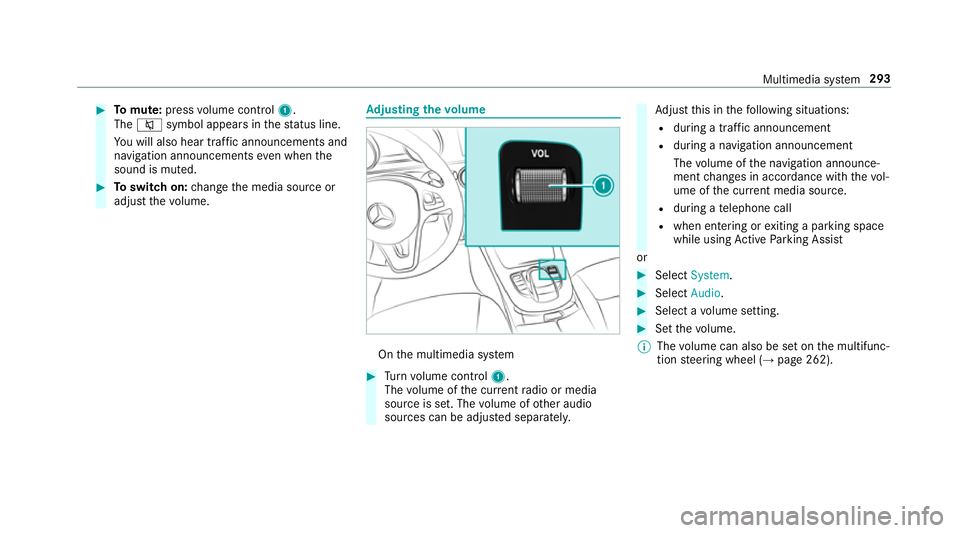
#
Tomute: pressvolume control 1.
The 8 symbol appear sinthestatus line.
Yo uw ill also hear traf fica nnouncements and
navigation announcements even when the
sound is muted. #
Toswitc hon:chang ethe media source or
adjus tthe volume. Ad
justin gthe volume On
them ultimedia sy stem #
Turn volume control 1.
The volume of thec urrent radio or media
source is set. The volume of other audio
sources can be adjus teds eparatel y. Ad
jus tthis in thef ollowing situations:
R during atraf fica nnouncement
R during anavigation announcement
The volume of then avigation announce‐
ment changes in accordanc ewitht he vol‐
ume of thec urrent media sou rce.
R during atelephone call
R when entering or exitin gap arkin gspace
while using ActiveP arking Assist
or #
Select System. #
Select Audio. #
Selec tavolume setting. #
Setthe volume.
% The volume can also be se tonthe multifunc‐
tion steering wheel (→ page262). Multimedia sy
stem 293
Page 310 of 585
ENERGIZIN
Gcomfort ENERGIZIN
Gcomfor tprogram overview Prog
ramo verview Prog
rams Function
Re fresh
Can maketarget ed changes tothei nterior climat etorefresh vehicle occupants. Cooling air flow and ionisa‐
tio np urify thea ir.T he vehicle interior is illuminated wit hcool colour sand thes eats ar eventilated.
Wa rmth
Can increase thec omfor tleve loft he occupants. The vehicle's panel, seat and steering wheel heater pro‐
duce acosy warmth.T he ai risp urifie dusing ionisation and apleasant fragrance is released. The vehicle
interior is illuminated wit hwarml ighting.
Vi tality
Can countera ct fatigue in mono tonou sdriving situations. Fast-paced musi cand avitalizing massa gepro‐
vide invigorating stimulatio nfor thev ehicle occupants. The air is purified using ionisation and apleasant
fragrance is released. The vehicle interior is illuminated in astimulating hu eand thes eat is ventilated.
Pleasure Canp romo teap ositiv emoodint he occupants. Moderatel yfastm usicisp laye da nd am assag eprogram is
activated. The air is purified using ionisation and apleasant fragrance is released. The vehicle interior is
illuminated wit hamicable lighting. Multimedia sy
stem 307