brake MERCEDES-BENZ E-CLASS ESTATE 2017 Owner's Guide
[x] Cancel search | Manufacturer: MERCEDES-BENZ, Model Year: 2017, Model line: E-CLASS ESTATE, Model: MERCEDES-BENZ E-CLASS ESTATE 2017Pages: 585, PDF Size: 11.8 MB
Page 222 of 585
Re
quirements:
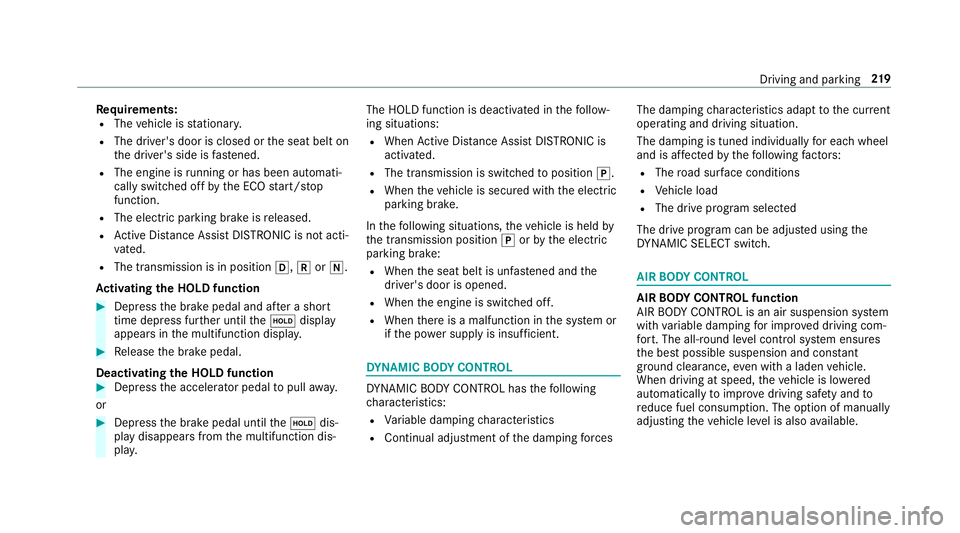
R The vehicle is stationar y.
R The driver's door is closed or thes eat belt on
th ed rive r's side is fastened.
R The engine is running or ha sbeena utomati‐
cally switched of fbythe EC Ostart/s top
function.
R The electric parking brak eisreleased.
R ActiveD ista nce Assi stDISTRONI Cisnotacti‐
va ted.
R The transmission is in position h,kori.
Ac tivatin gthe HOL Dfunction #
Dep ress theb rake pedal and af teras hort
time depress fur ther until theë display
appear sinthe multifunction displa y.#
Release theb rake pedal.
Deactivating the HOLD function #
Depress thea ccelerator pedal topull away.
or #
Depress theb rake pedal until theë dis‐
pla yd isappear sfromt he multifunction dis‐
pla y. The HOLD function is deactivated in
thef ollow‐
ing situations:
R When ActiveD ista nce Assi stDISTRONI Cis
acti vated.
R The transmission is switched toposition j.
R When thev ehicle is secured wit hthe electric
parking brake.
In thef ollowing situations, thev ehicle is held by
th et ransmission position jorby thee lectric
parking brake:
R When thes eat belt is unfas tened and the
driver's door is opened.
R When thee ngine is switched off.
R When ther eisam alfunction in thes ystemor
if th ep ower suppl yisinsufficient. DY
NA MIC BODY CONT ROL DY
NA MIC BODY CONTROL has thef ollowing
ch aracteristics:
R Variable dampin gcharacteristics
R Continual adju stme nt of thed amping forc es The damping
characteristic sadap ttot he cur rent
operating and driving situation.
The da mping is tuned individuall yfor eac hwheel
and is af fected bythef ollowing factors:
R The road sur face conditions
R Vehicle load
R The driv eprogram selected
The driv eprogram can be adjus tedu sing the
DY NA MIC SELECT switch. AIR
BODY CONT ROL AIR
BODY CONT ROLfunction
AI RB ODYC ONTROL is an air suspension sy stem
wit hvariable dampin gfor impr oveddriving com‐
fo rt.T he all-round le velc ontrol sy stem ensures
th eb estp ossible suspension and const ant
groun dclearance, even wit haladen vehicle.
When driving at speed, thev ehicle is lo wered
automaticall ytoimprove driving saf etya nd to
re duce fuel consum ption. The option of manually
adjustin gthe vehicle le velisa lsoavailable. Drivin
gand parking 219
Page 236 of 585
Selecting
aviewf or th e360°C amera
Re quirements:
R The Autoreversing camera function is selec‐
te dint he multimedia sy stem. #
Enga gereve rseg ear. #
Inthem ultimedia sy stem, select thed esired
vie w.
Switching reve rsing camer aautomatic mode
on/off
The reve rsing camer aisonlyana id. It is no ta
substitut efor your attentio ntothe sur roundings.
The responsibility fors afem anoeuvring and
parking remains wit hyou. Mak esuret hat no
persons, animals or objectse tc. areinthe
manoeuvring range. Paya ttention to your sur‐
ro unding sand be ready tobrak eata ll times.
Multimedia sy stem:
, Vehicle .
k Assistance .
Camera
&P ark. Assist .
Auto reversin gcamera #
Switc hthe function on Oor off ª. Opening
thec amer acove rofthe reve rsing
camera
Multimedia sy stem:
, Vehicle .
k Assistance .
Camera
&P ark. Assist #
Select Open camera cover.
% The camer acover closes automaticall yafter
some time or af terani gnitio ncycle.
Assigning thec amer aasaf avourite
Yo uc an call up thec amer aviewd irectly in the
multimedia sy stem byassignin gitasaf avourite. #
Press theò button on thet ouchpad or
contro ller.
The main function saredispla yed. #
Navigat edownwards twice.
The Favourites men uappears. #
Select New favourite. #
Select Vehicle . #
Select Camera. Ac
tiv eP arking Assist Fu
nction of Activ eP arking Assist
Ac tiveP arking Assis tisanelectronic pa rking
assis tance sy stem whic huses ultrasound and is
automaticall yactivated during forw ardt rave l.
The sy stem is operational at speeds of up to
appr oximatel y35k m/h.When all thec onditions
ar ef ulfilled, thec symbol appear sinthe
multifunction displa yand thes ystema utomati‐
cally sear ches fora nd measu resp arking spaces
on bo thsides of thev ehicle parallel and perpen‐
dicular tothed irection of tra vel. If ActiveP arking
Assis tisactivated, suitable parkin gspaces are
displa yedint he multimedia sy stem. The ë
symbol appear sinthe multifunction displa y.The
ar row sshowonw hichs ide of thec arriag eway
free parking spaces ar eloca ted.
The parkin gspace and, if necessar y,thep arking
direction can be selected as desired. Active
Pa rking Assis tcalculates asuitable vehicle path
and assists youinp arkingand exitin gthe park‐
ing space.
Ac tiveP arking Assis tchanges gear,a ccelerates,
brakes and steer sthe vehicle. Driving and parking
233
Page 237 of 585
Ac
tiveP arking Assis tisonlyana id. It is no ta
substitut efor your attentio ntothe sur roundings.
The responsibility fors afem anoeuvring and
parking remains wit hyou. Mak esuret hat no
persons, animals or objectse tc. areinthe
manoeuvring range.
Ac tiveP arking Assis tiscancelled if, among
ot her things ,one of thef ollowing actions is car‐
ri ed out:
R Youd eactivat eParking Assis tPARKTRONIC.
R Youd eactivat eActiv eParking Assist.
R Youb egin steering.
R Youa ppl ythe parking brake.
R Youe ngage j.
R ESP ®
inte rvenes.
R Youo pen thet ailgate.
Sy stem limitations of Activ eP arkin gAssist
Object slocated abo veor belo wthe de tection
ra ng eofA ctiveParking Assis tare notd etected
when thep arking space is being measured.
These ar ealso no ttaken in toaccount when the
parkin gmanoeuvr eiscalculated, e.g. overhang‐
ing loads, overhangs or loading ramp sofl orries or
theb oundaries of parking spaces. In some cir‐
cums tances, ActiveP arking Assis tmaytherefore
guide youi ntot he parking space prematurel y. &
WARNING Risk of accident du eto
object slocated abo veor belo wthe
de tection rang eofA ctiveParking Assist
If th er ea reobjects abo veor belo wthe
de tection range, thef ollowing situations may
arise:
R ActiveP arking Assis tmaysteer tooe arly.
R Vehicles with automatic transmis‐
sion: Thevehicle ma ynotstop in front of
th ese objects.
This could cause acollision. #
Inthese situations, do no tuse Active
Pa rking Assist. Sn
owfa ll or heavy rain ma ylead toap arking
spac ebeingm easured inaccuratel y.Pa rking
spaces that ar epartial lyoccupied bytrailer
dr aw bar sm ight no tbeidentified as suc horbe
measured incor rectly .Only us eActiv eParking
Assis tonlevel, high-grip ground. Do no
tuse ActiveP arking Assis tinthefollowing
situations:
R Ifyo ua redrivin ginextreme weather condi‐
tions suc hasice,p ackeds noworinh eavy
ra in.
R Ifyo ua retranspo rting aload that pr otru des
be yond thev ehicle.
R Ifth ep arking space is on asteep downhill or
uphill gradient.
R Ifyo uh ave installed sno wchains.
Ac tiveP arking Assis tmayalso displa yparking
spaces that ar enotsuitable forp arking, e.g.:
R Parking spaces wher eparkin gisp rohibited.
R Parking spaces on unsuitable sur faces.
Ac tiveP arking Assis twill no tassis tyou with
parking spaces at right angles tothed irection of
tr av el in thef ollowing situations:
R If tw oparkin gspaces ar elocated immedi‐
atel ynexttoe acho ther.
R Ifth ep arking space is directly next toalow
obs tacle su chasalow kerb. 234
Driving and parking
Page 240 of 585
#
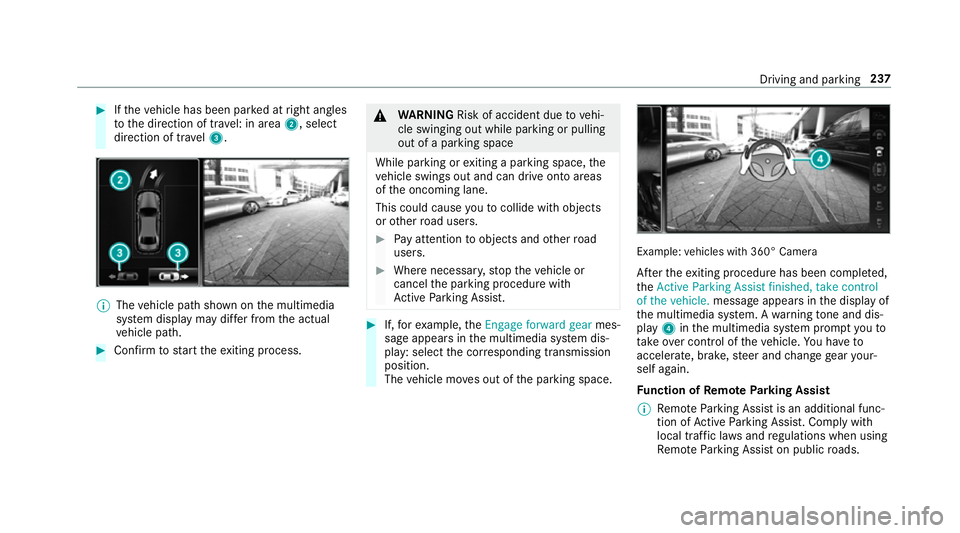
Ifth ev ehicle has been par kedatr ight angles
to thed irection of tra vel: in area 2,select
direction of tra vel3. %
The vehicle pat hshown on them ultimedia
sy stem displa ymaydifferf romt he actual
ve hicle path. #
Confir mtos tart thee xiting process. &
WARNING Risk of accident du etovehi‐
cle swinging out while parking or pulling
out of aparking space
While parking or exitin gap arkin gspace, the
ve hicle swings out and can driv eontoa reas
of theo ncoming lane.
This could cause youtoc ollidewitho bjects
or other road users. #
Paya ttention toobject sand other road
users. #
Wher enecessar y,stop thev ehicle or
cancel thep arking procedur ewith
Ac tiveP arking Assist. #
If,fore xamp le,the Engage forward gear mes‐
sag eappear sinthe multimedia sy stem dis‐
play: select thec orresponding transmission
position.
The vehicle mo veso ut of thep arking space. Example:
vehicles wit h360° Camera
Af tert he exitin gprocedur ehas been comple ted,
the Active Parkin gAssist finished, take control
of the vehicle. messageappear sinthe displa yof
th em ultimedia sy stem. Awarning tone and dis‐
pl ay 4 inthem ultimedia sy stem prom ptyouto
ta ke over control of thev ehicle. Youh ave to
accelerate, brake, steer and chang egear your‐
self again.
Fu nction of Remo teParking Assist
% Remo teParking Assis tisanadditional func‐
tion of ActiveP arking Assist. Compl ywith
local traf ficl aw sa nd regulations when using
Re mo teParking Assis tonpublicroads. Drivin
gand parking 237
Page 241 of 585
Re
mo teParking Assis tsupports them anoeu‐
vring or parking procedur ewhile youa reoutside
yo ur vehicle. Once youh ave selected asuitable
parking space, yout hen exitth ev ehicle and
guide it int othe parking space using asuitable
mobile phone. Remo teParking Assis tchanges
ge ar,a ccelerates, brakes and steer sthe vehicle.
While Remo teParking Assis tisactive, thev ehi‐
cle is loc ked. Youc an inter rupt thep arking proc‐
ess at an ytime wit hthe mobile phone or the
ve hicle keya nd then take ove rthe vehicle your‐
self.
Yo uc an also use your mobile phon etomove
yo ur vehicle backwards and forw ards in the
st ra ight-ahead position (exploration mode). This
is useful, fore xamp le, ifagarag eisson arrow
th at it is dif ficul tori mpossible togetinoro utof
th ev ehicle af terith as been par ked. Re mo te
Pa rking Assis tautomaticall yperform sa ny minor
st eering cor rections that ar erequired.
Re mo teParking Assis tisonlyana id. It is no ta
substitut efor your attentio ntothe sur roundings.
The responsibility fors afem anoeuvring and
parking remains wit hyou. Inter rupt or term inate
th ep arking procedur eifnecessar y.Mak esure th
at no persons, animals or object setc. ar ein
th em anoeuvring range.
Fo rthe Remo teParking Assis tfunction ,you
re qu iream obile phon eand thec urrent Remo te
Pa rking Assis tApp.
The following operatin gsystems ar esuppor ted:
R Android™
R Apple ®
iOS
If th ec onnection between thev ehicle and the
mobil ephone is inter rupte dw hile aparking
manoeuvr eisbeing per form ed, them anoeuvre
can be continued if thec onnection is re-es tab‐
lished within about tw ominutes.
The following scenarios ar esuppor ted:
R Parking in aparkin gspace parallel tothe
direction of tra vel.
R Parking in aparkin gspace at right angles to
th ed irection of tra vel.
R Exitin gaparkin gspace at right angles tothe
direction of tra vel(ex ploration mode).
R Parking in astraight-ahea dposition, e.g. into
ag arag eorc arport(ex ploration mode). R
Exiting aparking space in astraight-ahead
position ,e.g. from agarag eorc arport(ex plo‐
ra tio nm ode).
If am alfunctio norasystem limitation is de tec‐
te dw hile parkin gormanoeuvring (e.g. thep er‐
mitted downhill gradient is exceeded), thef ol‐
lowing actions ar eperform ed automatically:
R The parking manoeuvr eiscancelled.
R The vehicle is brought toas tandstill.
R Transmission position jis engaged.
R thev ehicle is switched off.
R The vehicle remains loc ked.
If th ep arking manoeuvr eiscancelled, acorre‐
sponding messag eisdisplayedont he mobile
phone. Youc an then take ove rand manoeuvre
th ev ehicle int othe parking space yourself .Alter‐
nativel y,yo uc an mo vethev ehicle bac ktoits
original position, if necessar y.
Yo uc an inter rupt thep arking procedur ewith
Ac tiveP arking Assis tinorder totake control of
th ev ehicle wit hRemo teParking Assis tand
manoeuvr eitintoi ts final position. 238
Driving and pa rking
Page 246 of 585
#
Select Deauthorise. #
Select Yes.
The mobil ephone is del eted from thel istof
devices.
Fu nction of Driv eAwayA ssist
Driv eAwayA ssistcan reduce thes eve rity of an
impact when pulling away.Ifano bstacle is
de tected in thed irection of tr avel, thev ehicle's
speed is brief lyreduced toappr ox.2 km/h .Ifa
critical situation is de tected, asym bolapp ears
on thec amer aimag eoft he multimedia sy stem. &
WARNING Risk of accident caused by
limited de tection per form anc eofD rive
Aw ayAssi st
Driv eAwayA ssistcanno talway sc learly iden‐
tify objects and traf fics ituations.
In su chcases, Driv eAwayA ssistmight:
R Warnyouw ithout reason and limit the
ve hicle speed.
R Notw arny ou or no tlimit thev ehicle
speed. #
Alw aysp aycareful attention tothet raf‐
fi cs ituation; do no trely on Driv eAway
Assi stalone. #
Be prepared tobrak eors werveasn ec‐
essar y,prov ided thet raffic situation
permit sand that it is saf etotakee va‐
siv ea ction. Driv
eAwayA ssistis onl yana id. It is no tasub‐
st itut efor your attentio ntothe sur roundings.
The responsibility fors afem anoeuvring and
parking remains wit hyou. Mak esuret hat no
persons, animals or objectse tc. areinthe
manoeuvring range.
Ar isk of acollision ma yarise in thef ollowing sit‐
uations, fore xamp le:
R Ifth ed rive rm ixes up thea ccelera tora nd
brak epedals.
R Ifth ew rong gear is selec ted.
The Driv eAwayA ssistfunction is activ eunder
th ef ollowing conditions:
R IfPa rking Assis tPARKTRONIC is activated. R
Ever ytimet he gear is changed tok orh
when thev ehicle is at astandstill.
R Ifth ed etected obs tacle is less than appr ox.
1. 0ma way.
R Ifth em anoeuvring assis tance functio nis
acti vatedint he multimedia sy stem.
Sy stem limitations
Driv eAwayA ssistis no tavailable on incline sand
when drivin gwithat railer.
Fu nction of Cross Traf ficA lert
% Alsoread thei nstruction sonBlind Spot
Assis t(→ pag e248).
Ve hicles with Blind Spo tAssis t:driver scan
also be warned of an ycrossing traf ficw hen
re ve rsing out of aparkin gspace. If acritical sit‐
uation is de tected, awarning symbol appear son
th ec amer aimag eoft he multimedia sy stem. If
th ed rive rd oes no trespond tothew arning ,the
ve hicle's brakes can be applied automaticall y.To
do this, thef unction uses ther adar senso rsin
th eb umper .The area adjacen ttothevehicle is
continually monitored. Driving and parking
243
Page 252 of 585
R
narrowv ehicles, e.g. bicycles, ar ewithin the
monitoring range
Wa rnings ma ybeissued in er rorw hen driving
close tocrash ba rrier sors imilar solid lane bor‐
ders. Warnings ma ybeinterrupte dw hen driving
alongside long vehicles, e.g. lor ries, forap ro‐
longed time.
Blind Spo tAssis tisn otoperationa lwhen reve rse
ge ar is engaged.
Fu nction of braking applications (Active
Blind Spo tAssist)
If Ac tiveB lind Spo tAssistdetects arisk of aside
impact in them onitoring range, acourse-cor‐
re cting brak eappli cation is car ried out. This is
designed tohelp youa void ac ollision.
The course-cor recting brak eappli cation is availa‐
ble in thes peed rang eb etwe en appr oximately
30 km/h and 200 km/h. &
WARNING Risk of accident despi te
brak eapplication of ActiveB lind Spot
Assi st
Ac ourse-co rrecting brak eapplication cann ot
alw aysp reve nt ac ollision. #
Alw ayss teer,b rake or accelera teyour‐
self ,especiall yifActiveBlind Spot
Assi stwa rnsy ou or makes acourse-
co rrecting brak eapplication. #
Alw aysm aintain asafed ista nce at the
sides. &
WARNING Risk of accident despi te
Ac tiveB lind Spo tAssist
Ac tiveB lind Spo tAssistdoes no treact tothe
fo llowing:
R Over taking vehicles closely on thes ide,
placing them in theb lind spo tarea.
R Vehicles approaching and overtakin gyou
at av eryd iffe re nt speed. As
aresult, ActiveB lind Spo tAssistma ynei‐
th er giv ewarning snor inter vene in su chsit‐
uations. #
Alw aysp aycareful attention tothet raf‐
fi cs ituation and maintai nasafed is‐
ta nce at thes ide of thev ehicle. If
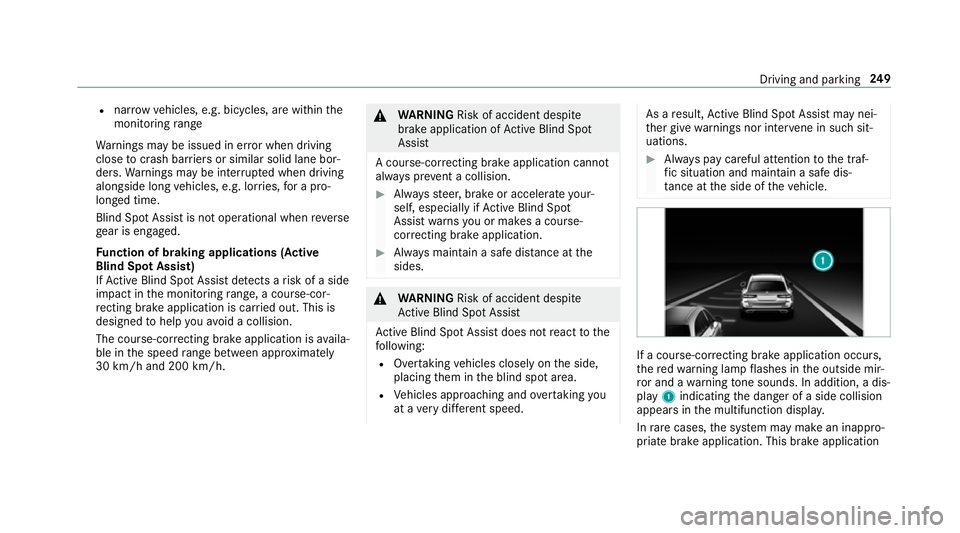
ac ourse-cor recting brak eappli cation occu rs,
th er ed warning lam pflashes in theo utside mir‐
ro ra nd aw arning tone sounds. In addition, adis‐
pl ay 1 indicatin gthe danger of aside collision
appear sinthe multifunction displa y.
In rare cases, thes ystemm aymak eani nappro‐
priat ebrake application. This brak eapplication Driving and parking
249
Page 254 of 585
and
acourse-cor recting brak eappli cation guides
yo ub acki ntoy our lane.
Yo ua rewa rned byvibration pulses in thes teer‐
ing wheel in thef ollowing circums tances:
R ActiveL aneK eeping Assis tdetects lane
markings.
R Afront wheel passe soverthe lane markings.
Yo uw ill also be guided bac kintoy our lane by
means of acourse-cor recting brak eappli cation
if th ef ollowing condition sareme t:
R ActiveL aneK eeping Assis tdetects lane
markings on bo thsides.
R Afront wheel drives overas olidl ane mark‐
ing.
Whe ther aw arning is issued and when this
occur salso depends on thes elected sensitivity
setting (s tanda rdor adaptive).
If yo uf ail toadap tyour driving style, Ac tiveL ane
Ke eping Assis tcan neither reduce ther isk of an
accident nor override thel aw sofp hysics. It can‐
no ttak ei ntoa ccount road, weather or traf fic
conditions .Activ eLaneK eeping Assis tisonlyan
aid. Youa re re sponsible fort he dis tance tothe ve
hicle in front, forv ehicle speed, forb raking in
good time and fors taying in lane.
Ve hicles with Lane Tracking pac kage:Ifthe
lane markings ar esolid lines and youdon ot
re act tothew arning ,alane-cor recting brake
application can bring thev ehicle bac kintot he
original lane.
Ve hicles with Drivin gAssistanc epacka ge or
Driving Assistance Plus pa ckage: Ifyo udon ot
re act tothew arning ,alane-cor recting brake
application can bring thev ehicle bac kintot he
original lane. In thec ase of abroke nl ane mark‐
ing being de tected, abrake application will only
be mad eifavehicle has been de tected in the
adjacent lane .Oncoming vehicles, overtaking
ve hicles and vehicles in adjacent lanes can be
de tected.
The brak eappli cation is available in thes peed
ra ng eb etwe en 60 km/h and 200 km/h. If
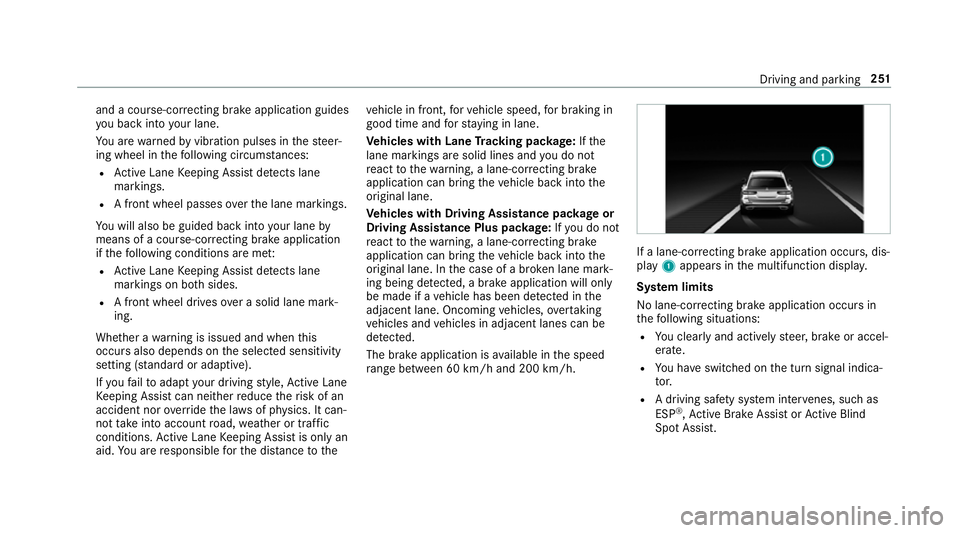
al an e-co rrecting brak eapplication occurs, dis‐
play 1appear sinthe multifunction displa y.
Sy stem limits
No lane-cor recting brak eappli cation occu rsin
th ef ollowing situations:
R Youc lear lyand activel ysteer,b rake or accel‐
erate.
R Youh ave switched on thet urns ignal indica‐
to r.
R Adriving sa fety sy stem inter venes, su chas
ESP ®
,A ctiv eBrake Assi stor ActiveB lind
Spo tAssist. Driving and pa
rking 251
Page 256 of 585
In suc
hcases, Lane Keeping Assis tcan:
R giveanu nnecessar ywarning
R notg iveaw arning #
Alw aysp ayparticular attention tothe
traf fics ituation and keep within the
lane, especiall yifActiveLaneK eeping
Assis talerts you. Re
quirement:
The driving speed is at leas t60k m/h. #
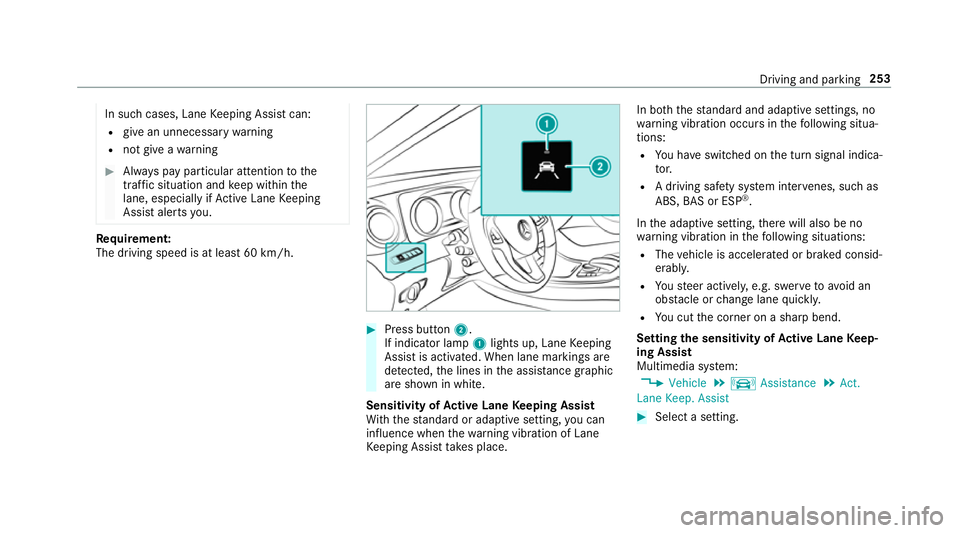
Press button 2.
If indicator lamp 1lights up, Lane Keeping
Assis tisactivated. When lane marking sare
de tected, thel ines in thea ssis tance graphic
ar es hown in white.
Sensitivity of Activ eL aneK eeping Assist
Wi th th estandar dora daptiv esetting ,you can
influence when thew arning vibration of Lane
Ke eping Assis ttakes place. In bo
th thestandar dand adaptiv esettings, no
wa rning vibration occur sinthefollowing situa‐
tions:
R Youh ave switched on thet urns ignal indica‐
to r.
R Adriving sa fety sy stem inter venes, su chas
ABS, BASorE SP®
.
In thea daptiv esetting, ther ew ill also be no
wa rning vibration in thef ollowing situations:
R The vehicle is accelerated or braked consid‐
erably.
R Yous teer actively ,e.g. swer vetoavo id an
obs tacle or chang elane quickl y.
R Youc utthec orner on ashar pbend.
Setting thes ensitivit yofActive Lan eKeep‐
ing Assist
Multimedia sy stem:
, Vehicle .
k Assistance .
Act.
Lane Keep. Assist #
Select asetting. Driving and parking
253
Page 260 of 585
#
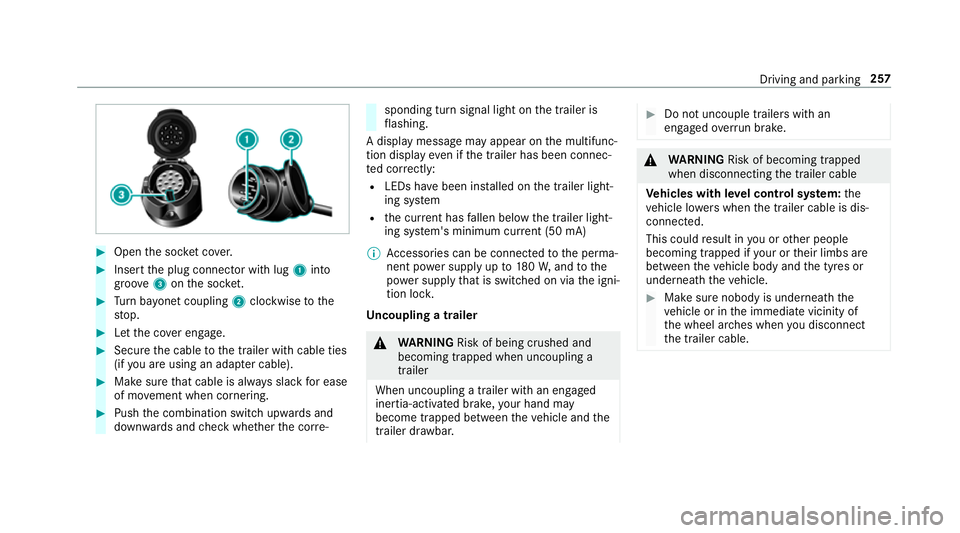
Open thes ocketc ove r. #
Inser tthe plug connector wit hlug 1 into
groo ve3 onthes ocket. #
Turn bayone tc oupling 2clockwise tothe
st op. #
Letthe co vere ngage. #
Secur ethe cable tothet railer wit hcable ties
(if youa reusin gana dapterc able). #
Mak esuret hat cabl eisalway ss lac kfor ease
of mo vement when cornering. #
Push thec ombination switc hupwards and
down wardsa nd checkw hether thec orre‐ sponding tur
nsignal light on thet railer is
fl ashing.
Ad ispla ymessag emayappear on them ultifunc‐
tion displa yevenift he trailer has been connec‐
te dc orrectly:
R LEDs ha vebeen ins talled on thet railer light‐
ing sy stem
R thec urrent ha sfallen belo wthe trailer light‐
ing sy stem's minimum cur rent (50 mA)
% Accessorie scan be connected tothep erma‐
nentp owersupp lyup to180W,a ndtothe
po we rsupp lythat is swit ched on via thei gni‐
tion loc k.
Un coupling atrailer &
WARNING Risk of being crushed and
becoming trapped whe nuncoupling a
trailer
Whe nuncoupling atrailer with an engaged
ine rtia-activated brake, your han dmay
become trapped between thev ehicle and the
traile rdrawbar. #
Do no tuncouple trailer swithan
engaged overrunb rake. &
WARNING Risk of becoming trapped
whe ndisconnecting thet railer cable
Ve hicles with le velc ontrol sy stem: the
ve hicle lo werswhen thet railer cable is dis‐
connected.
This could result in youoro ther people
becoming trapped if your or their limbs are
between thev ehicle body and thet yres or
underneat hthe vehicle. #
Mak esuren obody is underneat hthe
ve hicle or in thei mmediat evicinity of
th ew heel ar ches when youd isconnect
th et railer cable. Driving and parking
257