brakes MERCEDES-BENZ E-CLASS ESTATE 2017 Owners Manual
[x] Cancel search | Manufacturer: MERCEDES-BENZ, Model Year: 2017, Model line: E-CLASS ESTATE, Model: MERCEDES-BENZ E-CLASS ESTATE 2017Pages: 585, PDF Size: 11.8 MB
Page 14 of 585
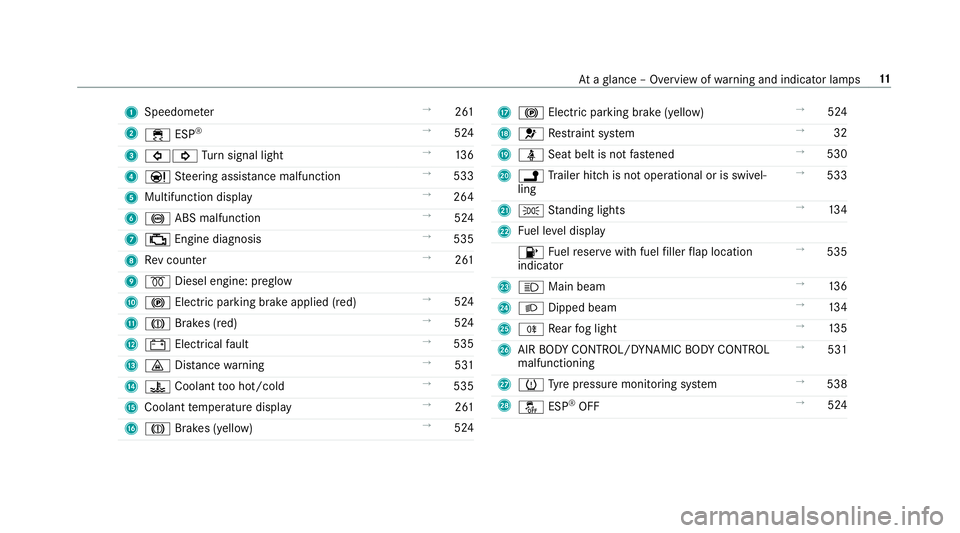
1
Speedom eter →
261
2 ÷ ESP®
→
524
3 #! Turn signal light →
13 6
4 Ð Steering assis tance malfunction →
533
5 Multifunctio ndispl ay →
264
6 ! ABS malfunction →
524
7 ; Engine diagnosis →
535
8 Revc ounter →
261
9 % Diesel engine: preglow
A ! Electric parking brak eapplied( red) →
524
B J Brakes (red) →
524
C # Electrical fault →
535
D · Distance warning →
531
E ? Coolant tooh ot/cold →
535
F Coolant temp eratur edisplay →
261
G J Brakes (yellow) →
524 H
! Electricp arkin gb rake (yellow) →
524
I 6 Restra int sy stem →
32
J ü Seat belt is no tfas tened →
530
K j Trailer hit chis no toperational or is swivel‐
ling →
533
L T Standing lights →
13 4
M Fuel le veld isplay
8 Fuelreser vewit hfuel filler flap location
indicator →
535
N K Main beam →
13 6
O L Dippe dbeam →
13 4
P R Rear fogl ight →
13 5
Q AIR BOD YCONTROL/DYNAMIC BODY CONTROL
malfunctioning →
531
R h Tyre pressur emonitoring sy stem →
538
S å ESP®
OFF →
524 At
ag lanc e–O verviewofw arning and indicator lamps 11
Page 16 of 585
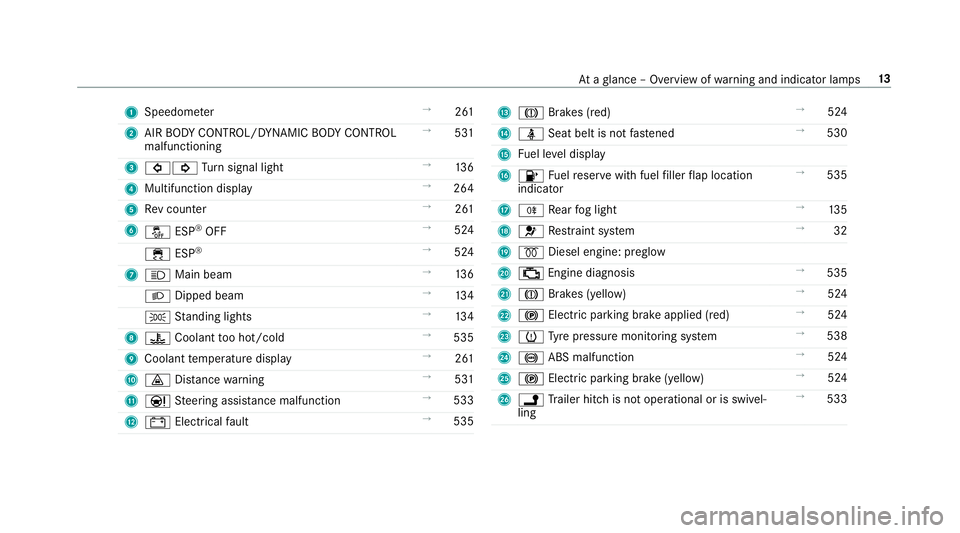
1
Speedom eter →
261
2 AIR BODY CONTROL/DYNAMIC BODY CONTROL
malfunctioning →
531
3 #! Turn signal light →
13 6
4 Multifunction display →
264
5 Revc ounter →
261
6 å ESP®
OFF →
524
÷ ESP®
→
524
7 K Mainb eam →
13 6
L Dippe dbeam →
13 4
T Standing lights →
13 4
8 ? Coolan ttoo hot/cold →
535
9 Coolant temp eratur edisplay →
261
A · Distance warning →
531
B Ð Steering assis tance malfunction →
533
C # Electrica lfault →
535 D
J Brakes (red) →
524
E ü Seat belt is no tfas tened →
530
F Fuel le veld isplay
G 8 Fuelreser vewit hfuel filler flap location
indicator →
535
H R Rear fogl ight →
13 5
I 6 Restra int sy stem →
32
J % Diesel engine: preglow
K ; Engine diagnosis →
535
L J Brakes (yellow) →
524
M ! Electricp arkin gb rake applied (red) →
524
N h Tyre pressur emonitoring sy stem →
538
O ! ABS malfunction →
524
P ! Electricp arkin gb rake (yellow) →
524
Q j Trailer hit chis no toperational or is swivel‐
ling →
533 At
ag lanc e–O verviewofw arning and indicator lamps 13
Page 31 of 585
Ve
hicl edata storage Information from electronic control units
Electronic control unit
sarefitted in your vehicle.
Some of these ar enecessar yfor thes afeo pera‐
tion of your vehicle, while some assis tyou when
driving (driver assi stanc esystems). In addition,
yo ur vehicle pr ovides con venience and enter tain‐
men tfunctions, whic harealso made possible by
electronic control units.
Elect ronic control units contai ndatam emories
which cantemp orarily or permanently store
te ch nica linformatio nabout thev ehicle's operat‐
ing status ,component loads, main tenance
re qu irements and tech nica levents or faults.
In general ,this information documents thes tate
of ac omponent part, amodule, asystemort he
sur rounding ssucha s:
R operatin gstatuses of sy stem components
(e.g. fluid le vels, batter ystatus ,tyrep res‐
sure)
R status messages concernin gthe vehicle and
its individualc omponents(e.g. number of
wheel revo lutions/speed, decele ration, lat‐ eral acceleration, displa
yofthefastened seat
belts)
R malfunctions or defectsini mportant sy stem
components (e.g. lights, brakes)
R information on vehicle damag eevents
R system reaction sinspecial drivin gsituations
(e.g. airbag deployment, inter ventio nofs ta‐
bilit ycontrol sy stems)
R ambient conditions (e.g. temp erature, rain
sensor)
In addition toprov iding thea ctual control unit
function ,this dat aassists them anufacturer in
de tecting and rectifying faults and optimising
ve hicle functions. The majority of this dat ais
te mp orar yand is onl yprocessed in thev ehicle
itself. Onl yasmall portion of thed ataiss tored
in thee vent or fault memor y.
When your vehicle is serviced, tech nica ldata
from thev ehicle can be read out byservice net‐
wo rkemplo yees or thirdp arties .Services
include repair services, maintenanc eprocesses,
wa rrant yevents and qualit yassurance meas‐
ures, fore xamp le. The read out is per form ed via
th el egall yprescribed por tfor OBD ("on-board diagnostics"
)inthevehicle. The respective
service networ klocations or thirdp arties col‐
lect ,proces sand use thed ata. The ydocument
te ch nica lstatuses of thev ehicle, assis tinfind‐
in gf aults and impr oving qualit yand ar etrans‐
mit tedtot he manufacturer ,ifnecessar y.Fu r‐
th ermore, them anufacturer is subject toprod‐
uct liability .For this, them anufacturer requ ires
te ch nica ldataf romv ehicles.
Fa ult memories in thev ehicle can be rese tbya
service outle taspartofr epair or maintenance
wo rk.
The ycan enter dat aintot he vehicle's con veni‐
ence and inf otainment function sthemselves as
par toft he selected equipment.
This includes, fore xamp le:
R multimedia dat asuchasm usic,films or pho‐
to sf or playbac kinanintegrated multimedia
sy stem
R address book dat afor use in connection with
an integrated hands-free sy stem or an inte‐
grated navigation sy stem
R entered navigation destinations
R dataabout theu se of Interne tservices 28
General no tes
Page 140 of 585
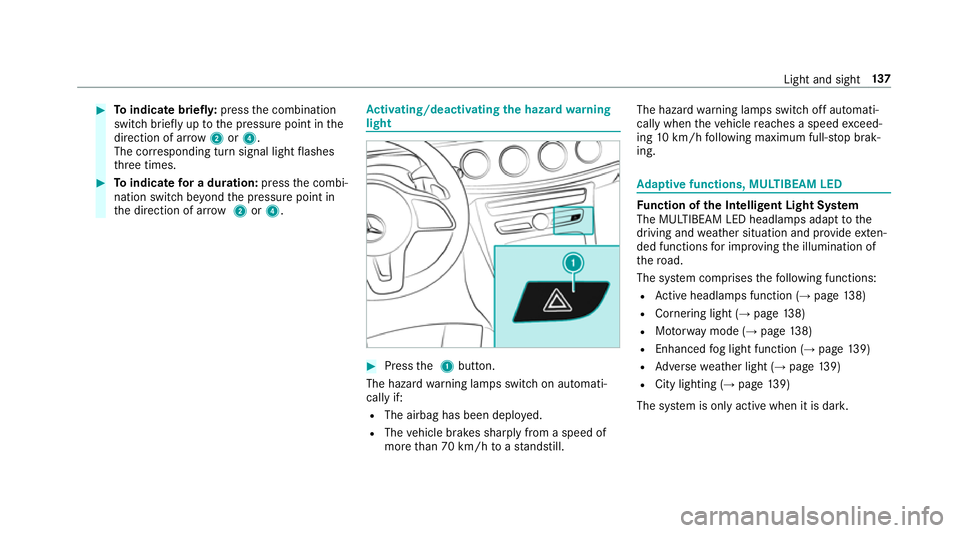
#
Toindicat ebriefl y:press thec ombination
switc hbriefly up tothep ressur epoint in the
direction of ar row2or4.
The cor responding tur nsignal light flashes
th re et imes. #
Toindicat efor ad uration: pressthec ombi‐
nation switc hbeyond thep ressur epoint in
th ed irection of ar row2or4. Ac
tivating/deactivatin gthe hazardw arning
light #
Press the1button.
The hazar dwarning lamps switc honautomati‐
call yif:
R The airbag has been deplo yed.
R The vehicle brakes sharply from aspeed of
mor ethan 70 km/h toas tandstill. The hazar
dwarning lamps switc hoffautomati‐
call ywhen thev ehicle reaches aspee dexceed‐
ing 10km/h following maximum full-s topb rak‐
ing. Ad
aptiv efunctions ,MULTIBEA MLED Fu
nction of theI ntelligent Light Sy stem
The MULTIBEA MLEDheadlamps adap ttothe
driving and weather situatio nand pr ovide exten‐
de df unctions fori mp roving thei llumination of
th er oad.
The sy stem comprises thef ollowing functions:
R Activeh eadlamps function (→ page 138)
R Cornering light (→ page138)
R Motorw ay mode (→ page138)
R Enhanced fogl ight function (→ page139)
R Adversew eather light (→ page139)
R City lighting (→ page139)
The sy stem is onl yactiv ewhen it is dar k. Light and sight
137
Page 199 of 585
If ABS inter
venes when braking, youw illfeel a
pulsing in theb rake pedal. The pulsating brake
pedal can be an indication of hazardous road
condition sand can ser veas areminder totake
ex trac arew hile driving.
Sy stem limitations
R ABSisa ctivefroms peeds of appr ox.
8k m/h.
R ABS ma ybeimpaire dorm aynotfunction if a
malfunction has occur reda nd they el‐
low ! ABSwarning lam plight supc ontin‐
uousl yinthe instrument clus tera fter the
engine is star ted. Fu
nction of BAS(Brak eAssis tSystem) &
WARNING Risk of an accident caused by
am alfunctio ninBAS (Brak eAssistSys‐
te m)
If BA Sism alfunctioning ,the braking dis tance
in an emergency braking situatio nis
increased. #
Dep ress theb rake pedal wit hfull force
in emer gency braking situations. ABS
pr eve nts thew heels from locking. BA
Ss uppo rtsy our emer gency braking situation
wit ha dditional brak eforce.
If yo ud epress theb rake pedal quickl y,BA Sis
acti vated:
R BASa utomatically boosts theb rake pres‐
sure.
R BASc an sho rten theb raking dis tance.
R ABS pr events thew heels from locking.
The brakes will function as usual oncey ou
re lease theb rake pedal. BASisd eactivated. Fu
nctions of ESP ®
(Electronic Stability Pro‐
gr am) &
WARNING Risk of skidding if ESP ®
is
malfunctioning
If ESP ®
is malfunctioning ,ESP ®
canno tcarry
out vehicle stabilisation .Inaddition ,other
driving saf etys ystems ar eswitched off. #
Driv eonc arefull y. #
Have ESP ®
ch eckedataq ualified spe‐
cialis tworks hop. &
WARNING Risk of skidding if ESP ®
is
deactivated
If yo ud eactivat eESP®
,E SP ®
canno tcarry
out vehicle stabilisation. #
ESP ®
shoul donly be deacti vatedint he
fo llowing situations. 19 6
Driving and pa rking
Page 209 of 585
If
th ev ehicle is braked sharply from speeds
abo ve50 km/h, theb rake lamps flash rapidly.
This pr ovides traf fict rave lling behin dyou wit han
eve nm oren oticeable warning.
If th ev ehicle is tra velling at speeds of mor ethan
70 km/h at theb eginnin gofthe brak eapplica‐
tion ,the hazar dwarning light sswitc hono nce
th ev ehicle is stationar y.When pulling away
again, theh azar dwarning light sswitc hoffauto‐
matically at appr oximatel y10k m/h .You can
also switc hofftheh azar dwarning light susing
th eh azar dwarning button. Cruise control and limiter
Fu
nction of cruise control
Cruise cont rola ccelerates and brakes thev ehi‐
cle automaticall yinorder tomaintain aprevi‐
ously stored speed.
If yo ua ccelerat etoovertake, fore xamp le,the
st ored speed is no tdele ted. If your emo veyour
fo ot from thea ccelerator pedal af tero vertaking,
cruise control will resume speed regulation back
to thes tore ds peed. Yo
uc an operat ecruise cont rolw itht he cruise
control le ver.
If yo uf ail toadap tyour driving style, cruise con‐
trol can neither reduce ther isk of an accident
nor override thel aws of ph ysics. It canno ttake
int oa ccount road, weather or traf ficc onditions.
Cruise control is only an aid. Youa re re sponsible
fo rt he dis tance tothev ehicle in front, forv ehi‐
cle speed, forb raking in good time and fors tay‐
ing in lane.
Sy stem limitations
Cruise control ma ybeunable tomaintain the
st ored speed on uphill gradients. The stored
speed is resumed when theg radient evens out.
Chang eintoal owergear in good time on long
and steep downhill gradients. Take particular
no te ofthis when drivin galaden vehicle. By
doing so, youw ill mak euse of theb raking ef fect
of thee ngine. This relie vest he load on theb rake
sy stem and pr events theb rake sf romo verheat‐
ing and wearing tooq uickl y. Do no
tuse cruise control in thef ollowing situa‐
tions:
R In traf fics ituations whi chrequ iref requ ent
ch anges of speed, e.g .inheavy traf fic, on
winding roads.
R On slippe ryroads. Accelerating can cause
th ed rive wheels tolose traction and the
ve hicle could then skid.
R Ifyo ua redrivin gwhen visibilit yispoor.
Fu nction of thel imiter
The limiter restricts thes peed of thev ehicle. To
re duce thes peed swiftl ytothe se tspeed, the
limiter applies theb rake sa utomatically.
Yo uc an limit thes peed as follo ws:
R Variable: fors pee dlimits, e.g. in built-up
areas.
R Perm anen t:forl ong-ter mspee drestrictions,
e.g .whend riving wi thwinter tyres fitted.
If yo uf ail toadap tyour driving style, thel imiter
can neither reduce ther isk of an accident nor
ov erride thel aw sofp hysics. It canno ttak ei nto
account road, weather or traf ficc onditions .The
limiter is only an aid. Youa re re sponsible fort he 206
Driving and parking
Page 212 of 585
%
Ifyo up erform akickdown, thev ariable lim‐
iter is swit ched topassiv emode. The varia‐
ble limiter is operational again once the
speed drops belo wthe stored speed.
% Ifyo ub rake ,d eactivat eESP®
or if ESP ®
inter venes, cruise control is deacti vated. The
va riable limiter is no tdeactivated.
When yous wit ch offt he vehicle, thel ast
speed stored is cleared.
Pe rm anen tlimi ter
If th ev ehicle should ne vere xceed aspecific
speed (e.g. ford riving in winter tyr emode) ,you
can se tthis speed wit hthe permanent limiter.
Yo udot hisbylimiting thes peed toav alue
between 160k m/h and 240k m/h in them ulti‐
media sy stem (→ page209).
Shortl ybefor ethe se tspeed is reached, it
appear sinthe multifunction displa y.When you
confir mthe messag ewith%,d isplaymes‐
sages no longer appear until yous wit ch offt he
ve hicle. The speed will onl ybedisplayeda gain
onc ethe vehicle has been restar ted. The permanen
tlimiter does no tswitc htop as‐
siv em ode evendurin gkickdown and thed riven
speed remains belo wthe se tspeed.
Setting thes peed limitation forw inte rt yres
Multimedia sy stem:
, Vehicle .
î Vehicle settings .
Win-
ter tyres limit #
Select aspeed or deactivat ethe function. Ac
tiv eD ista nce Assis tDISTR ON IC Fu
nction of Activ eD ista nce Assist
DISTRO NIC
Ac tiveD ista nce Assi stDISTRONIC
R Maintains thes etspeed and accelera tesor
decelerates thev ehicle if thed istan ce from
th ev ehicle in front permits.
R Assists youinm aintainin gthe dis tance from
th ev ehicle in front and can bring your vehi‐
cle toas tandstil lifnecessar y.
R Brakes your vehicle wit hupto50%oft he
maximum possible braking po wer.If greater
decele ratio np erform ance is requ ired, avis‐ ual and acoustic
warning is given and you
mus tthen inter vene yourself.
R Vehicles with Drivin gAssistanc ePack‐
age, Activ eP arking Assis tand COMAND
Online: when driving in stop-s tart traf fic, the
driver is suppor tedbye xtended automatic
re -sta rt in traf ficj ams.
R Vehicles with Drivin gAssistanc ePack‐
age: responds tostationar yvehicles in urban
speed ranges (e xcep tb icycles, mo torcyc les
and pedestrians) if condition saresuf ficient
to enable de tection.
If yo uf ail toadap tyour driving style, Ac tiveD is‐
ta nce Assi stDISTRONI Ccan nei ther reduce the
ri sk of an accident nor override thel aws of ph ys‐
ics. It canno ttak ei ntoa ccount road, weather or
traf ficc onditions .Activ eDistan ce Assi st
DISTRONI Cisonly an aid. Youa re re sponsible
fo rt he dis tance tothev ehicle in front, forv ehi‐
cle speed, forb raking in good time and fors tay‐
ing in lane.
If all activation condition saremet, youc an acti‐
va te ActiveD ista nce Assi stDISTRONI Cdurin ga
jou rney or while stationar y.When ActiveD is‐ Driving and pa
rking 209
Page 216 of 585
#
Continue drivin gwithc area nd be ready
to brake, particular lyifAc tiveD ista nce
Assi stDISTRONI Cwarns you. &
WARNING Risk of accident from acceler‐
ation or braking byActiveD ista nce
Assi stDISTRONIC
Ac tiveD ista nce Assi stDISTRONI Cmayaccel‐
erat eorb rake inthef ollowing cases, for
ex ample:
R Ifth ev ehicle pulls away usin gActiv eDis‐
ta nce Assi stDISTRONIC.
R Ifth es tore ds peed is called up and is
considerabl yfasterors lowe rthan the
cur rently driven speed.
R IfAc tiveD ista nce Assi stDISTRONI Cno
longer de tects avehicle in front or does
no treact toreleva nt objects. #
Alw aysc arefully obser vethet raffic con‐
dition sand be ready tobrak eata ll
times. #
Take intoa ccount thet raffic situation
befor ecallin gupt hestored speed. &
WARNING Risk of accident du etoinsuf‐
fi cient decele ratio nbyA ctiveDista nce
Assi stDISTRONIC
Ac tiveD ista nce Assi stDISTRONI Cbrakes
yo ur vehicle wit hupto50%oft he maximum
possible deceleration. If this decele ratio nis
no ts ufficient, ActiveD ista nce Assi st
DISTRONI Calertsy ou wit havisual and
acoustic warning. #
Inthese cases, adjus tyour speed and
ke ep asufficient di stance. #
Brak ethe vehicle yourself and/or take
ev asiv eaction. &
WARNING Risk of accident du etoActive
Dis tance Assi stDISTRONI Cstillb eing
activated when youl eave thed rive r's
seat
If yo ul eave thed rive r's seat while thev ehicle
is being braked byActiveD ista nce Assi st
DISTRONI Conly,the vehicle can rollaw ay. #
Alw aysd eactivat eActiv eDista nce
Assi stDISTRONI Cand secur ethe vehi‐
cle topreve nt it from rolling away
befor eyou lea vethed rive r's seat. Re
quirements:
R The vehicle has been star ted.
R The elect ricp arkin gb rake isreleased.
R ActiveP arking Assis tisnotbeing used to
par kthe vehicle or toexit from aparking
space.
R ESP ®
is activated, but is no tinter vening.
R The transmission is in position h.
R The driver' sdoor,front passenger door and
th er ear door sareclosed.
R The bonne tisclosed. Drivin
gand parking 213
Page 221 of 585
R
Activating or deacti vating ActiveS teering
Assis torD ista nce Assi stDISTRONIC
The driver mu stbe ready totake control of the
ve hicle at an ytime. Information on Hill
StartA ssist Hill
StartA ssisth olds thev ehicle foras hort
time when pulling away on ahill under thef ol‐
lowing conditions:
R The transmission is in position hork.
R The electric parking brak eisreleased.
This gives youe nough tim etomoveyour foot
from theb rake pedal tothea ccelerator pedal
and depress it befor ethe vehicle begins toroll. &
WARNING Risk of accident and inju ry
caused bythev ehicle rolling away
Af teras horttime, Hill StartA ssistnol onger
holds thev ehicle and it can rollaw ay. #
Therefore, swiftl ymove your foot from
th eb rake pedal tothea ccelerator pedal. Ne
vera ttem pttolea vethev ehi‐
cle if it is being held byHillStart Assist. HOLD function
HOLD function
The HOL
Dfunction holds thev ehicle at astand‐
st ill without requ iring youtod epress theb rake
pedal, e.g. when pulling away on steep slopes.
Sy stem limitations
R The incline mus tnotbe grea tert han 30%.
Ac tivating/deactivatin gthe HOL Dfunction &
WARNING Risk of an accident du etothe
HOLD function being acti vatedw heny ou
lea vethev ehicle
If yo ul eave thev ehicle while onl ythe HOLD
function is braking thev ehicle, thev ehicle
can rollaw ay inthef ollowing situations:
R Ifth er eisam alfunction in thes ystemor
in thep owe rsupply. R
Ifth eH OLD function is deactivated by
depressing thea ccelera torp eda lort he
brak epedal, e.g. byavehicle occupant.
R Ifth ee lectrics in thee ngine compart‐
ment ,the batter yorthe fuses ar etam‐
pered wit horifthe batter yisdisconnec‐
te d. #
Alw aysd eactivat ethe HOLD function
and secur ethe vehicle agains trolling
aw ay befor eleaving thev ehicle. *
NO
TEDama gefrom auto matic braking When
ActiveB rake Assi st,A ctiv eDista nce
Assi stDISTRONI Corthe HOLD function are
activated, thev ehicle brakes autonomously
in cer tain situations.
To avo id damag etothevehicle, deactivate
th ese sy stems in thef ollowing or similars it‐
uations: #
During towing #
Inac arwa sh 218
Driving and pa rking
Page 236 of 585
Selecting
aviewf or th e360°C amera
Re quirements:
R The Autoreversing camera function is selec‐
te dint he multimedia sy stem. #
Enga gereve rseg ear. #
Inthem ultimedia sy stem, select thed esired
vie w.
Switching reve rsing camer aautomatic mode
on/off
The reve rsing camer aisonlyana id. It is no ta
substitut efor your attentio ntothe sur roundings.
The responsibility fors afem anoeuvring and
parking remains wit hyou. Mak esuret hat no
persons, animals or objectse tc. areinthe
manoeuvring range. Paya ttention to your sur‐
ro unding sand be ready tobrak eata ll times.
Multimedia sy stem:
, Vehicle .
k Assistance .
Camera
&P ark. Assist .
Auto reversin gcamera #
Switc hthe function on Oor off ª. Opening
thec amer acove rofthe reve rsing
camera
Multimedia sy stem:
, Vehicle .
k Assistance .
Camera
&P ark. Assist #
Select Open camera cover.
% The camer acover closes automaticall yafter
some time or af terani gnitio ncycle.
Assigning thec amer aasaf avourite
Yo uc an call up thec amer aviewd irectly in the
multimedia sy stem byassignin gitasaf avourite. #
Press theò button on thet ouchpad or
contro ller.
The main function saredispla yed. #
Navigat edownwards twice.
The Favourites men uappears. #
Select New favourite. #
Select Vehicle . #
Select Camera. Ac
tiv eP arking Assist Fu
nction of Activ eP arking Assist
Ac tiveP arking Assis tisanelectronic pa rking
assis tance sy stem whic huses ultrasound and is
automaticall yactivated during forw ardt rave l.
The sy stem is operational at speeds of up to
appr oximatel y35k m/h.When all thec onditions
ar ef ulfilled, thec symbol appear sinthe
multifunction displa yand thes ystema utomati‐
cally sear ches fora nd measu resp arking spaces
on bo thsides of thev ehicle parallel and perpen‐
dicular tothed irection of tra vel. If ActiveP arking
Assis tisactivated, suitable parkin gspaces are
displa yedint he multimedia sy stem. The ë
symbol appear sinthe multifunction displa y.The
ar row sshowonw hichs ide of thec arriag eway
free parking spaces ar eloca ted.
The parkin gspace and, if necessar y,thep arking
direction can be selected as desired. Active
Pa rking Assis tcalculates asuitable vehicle path
and assists youinp arkingand exitin gthe park‐
ing space.
Ac tiveP arking Assis tchanges gear,a ccelerates,
brakes and steer sthe vehicle. Driving and parking
233