fog light MERCEDES-BENZ E-CLASS ESTATE 2020 User Guide
[x] Cancel search | Manufacturer: MERCEDES-BENZ, Model Year: 2020, Model line: E-CLASS ESTATE, Model: MERCEDES-BENZ E-CLASS ESTATE 2020Pages: 489, PDF Size: 9.15 MB
Page 233 of 489
R
The weather conditions are poor, e.g. heavy
ra in, sno w,fog, storm or spr ay.
R The light conditions are poor, e.g. at night.
R Cameras, or vehicle components in which
th e cameras are fitted, are dama ged, dirty or
co vered. Obser vethe information on vehicle
sensors and cameras (/ page194).
% Do not use there ve rsing camera in these
types of situations. You could otherwise
injure others or collide with objects when
parking theve hicle.
% The contra stof the display may be impaired
by direct sunlight or by other light sources,
e.g. when driving out of a garage . In this
case, pay particular attention.
% Have the display repaired or replaced if, for
ex ample, pixel er rors considerably restrict its
use. 360° Came
ra Fu
nction of the 360° Camera
The 360° Camera is a sy stem that consists of
fo ur cameras which co verth e immediate sur‐ ro
undings of theve hicle. The sy stem assists you
when you are parking or at exits with reduced
visibility, forex ample.
The vie wsofthe 360° Camera are alw aysav aila‐
ble when driving forw ards up toa speed of
appr ox.16 km/h and when reve rsing.
The 360° Camera is only an aid and may show a
dis torted view of obs tacles, show them incor‐
re ctly or not show them at all. It is not a substi‐
tute foryo ur attention tothe sur roundings. The
re sponsibility for safe manoeuvring and parking
re mains with you. Make sure that there are no
persons, animals or objects etc., in the manoeu‐
vring area while manoeuvring and parking.
The sy stem evaluates images from thefo llowing
cameras:
R Reversing camera
R Front camera
R Two side cameras in the outside mir rors Vi
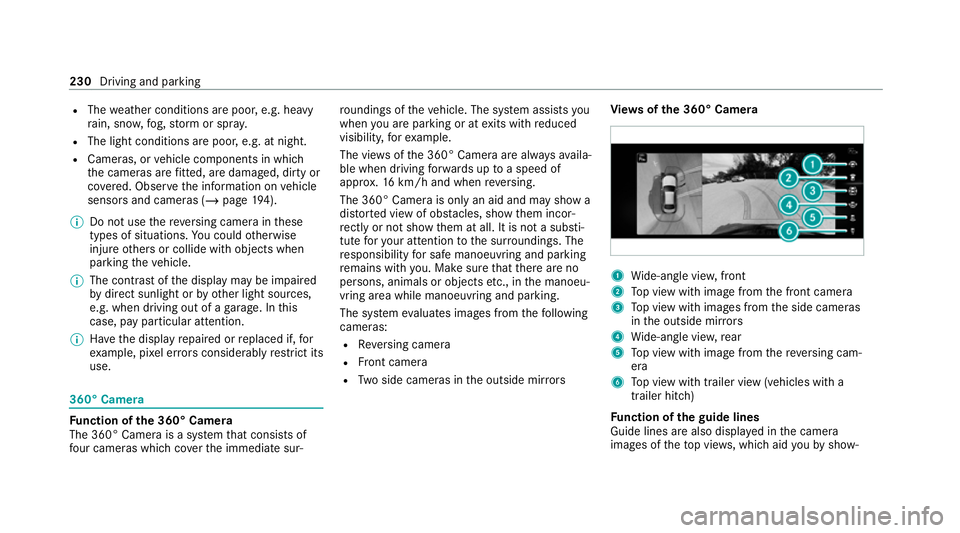
ew s of the 360° Camera 1
Wide-angle vie w,front
2 Top view with image from the front camera
3 Top view with images from the side cameras
in the outside mir rors
4 Wide-angle vie w,rear
5 Top view with image from there ve rsing cam‐
era
6 Top view with trailer view (vehicles with a
trailer hitch)
Fu nction of the guide lines
Guide lines are also displa yed in the camera
images of theto p vie ws, which aid youby show‐ 230
Driving and parking
Page 236 of 489
Sy
stem limits
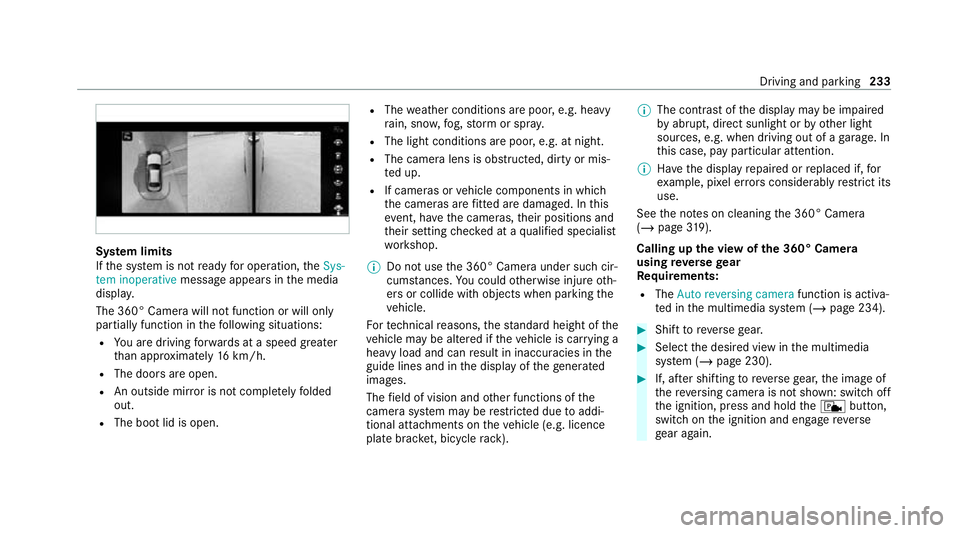
If th e sy stem is not ready for operation, theSys-
tem inoperative message appears in the media
displa y.
The 360° Camera will not function or will only
partially function in thefo llowing situations:
R You are driving forw ards at a speed greater
th an appr oximately 16km/h.
R The doors are open.
R An outside mir ror is not comple tely folded
out.
R The boot lid is open. R
The weather conditions are poor, e.g. heavy
ra in, sno w,fog, storm or spr ay.
R The light conditions are poor, e.g. at night.
R The camera lens is obstructed, dirty or mis‐
te d up.
R If cameras or vehicle components in which
th e cameras are fitted are dama ged. In this
eve nt, ha vethe cameras, their positions and
th eir setting checked at a qualified specialist
wo rkshop.
% Do not use the 360° Camera under such cir‐
cums tances. You could otherwise injure oth‐
ers or collide with objects when parking the
ve hicle.
Fo rte ch nical reasons, thest andard height of the
ve hicle may be altered if theve hicle is car rying a
heavy load and can result in inaccuracies in the
guide lines and in the display of thege nerated
ima ges.
The field of vision and other functions of the
came rasystem may be restricted due toaddi‐
tional attachments on theve hicle (e.g. licence
plate brac ket, bicycle rack ). %
The contrast of the display may be impaired
by abrupt, direct sunlight or by other light
sources, e.g. when driving out of a garage . In
th is case, pay particular attention.
% Have the display repaired or replaced if, for
ex ample, pixel er rors considerably restrict its
use.
See the no tes on cleaning the 360° Camera
(/ page 319).
Calling up the view of the 360° Camera
using reve rsege ar
Re quirements:
R The Auto reversing camera function is activa‐
te d in the multimedia sy stem (/ page 234). #
Shift toreve rsege ar. #
Select the desired view in the multimedia
sy stem (/ page 230). #
If, af ter shifting toreve rsege ar, the image of
th ere ve rsing camera is not shown: switch off
th e ignition, press and hold thec button,
switch on the ignition and engage reve rse
ge ar again. Driving and parking
233
Page 245 of 489
If
Traf fic Sign Assi stcannot de term ine the maxi‐
mum permissible speed (e.g. due tomissing
signs), thefo llowing display appears in the
Instrument Display: This is display
ed continuously if theve hicle is in
a country where Traf fic Sign Assi stis not sup‐
por ted. Traf fic Sign Assi stis not available in all
countries.
% Also obse rveth e information on display mes‐
sages in Traf fic Sign Assi st (/ page 379).
Wa rning when app roaching pedestrian cross‐
ings (vehicles with Driving AssistancePack‐
age)
The sy stem can warnyou if you approach a
pedestrian crossing with your vehicle. The ¯
Watch for pedestrians message appearsinthe
instrument clus ter.
The warning occurs only if appropriate traf fic
signs or lane markings are de tected and pedes‐
trians are present in the danger zone. Sy
stem limits
The sy stem may be impaired or may not function
particular lyin thefo llowing situations:
R Ifth ere is poor visibility, e.g. due toinsuf fi‐
cient illumination of thero ad, if there are
highly variable shade conditions or in rain,
sno w,fog or heavy spr ay.
R Ifth ere is glare, e.g. from oncoming traf fic,
di re ct sunlight or reflections.
R Ifth e windscreen in the area of the multi‐
function camera is dirty, or if the camera is
mis ted up, damaged or co vered.
R Ifth e tra ffic signs are hard todetect, e.g. due
to dirt or sno w,because they are co vered, or
due toinsuf ficient lighting.
R Ifth e information in the navigation sy stem's
digital map is incor rect or out-of-da te.
R Ifth e signs are ambiguous, e.g. tra ffic signs
on con stru ction sites or in adjacent lanes.
R Ifyo u turn sharply when passing traf fic signs
outside the camera's field of vision.
Setting Traf fic Sign Assist
Requ irements: R
Only vehicles with Driving Assistance
Pa ckage:
Ac tive Dis tance Assi stDISTRONIC mu stbe
activated forth e automatic adoption of
speed limits.
Multimedia sy stem:
4 © 5
Settings 5
Assistance
5 Traffic Sign Assist
Ac tivating or deactivating automatic adop‐
tion of speed limits (only vehicles with Driv‐
ing Assistance Package) #
Select Adopt limit. #
Activate or deacti vate the function.
The speed limits de tected byTraf fic Sign
Assi stare automatically adop tedby Active
Dis tance Assi stDISTRONIC.
% If one of thefo llowing sy stems is activated,
th e de tected speed can be manually adop ted
as the speed limit:
R Active Dis tance Assi stDISTRONIC
R Cruise control
R Variable limiter 242
Driving and pa rking
Page 440 of 489
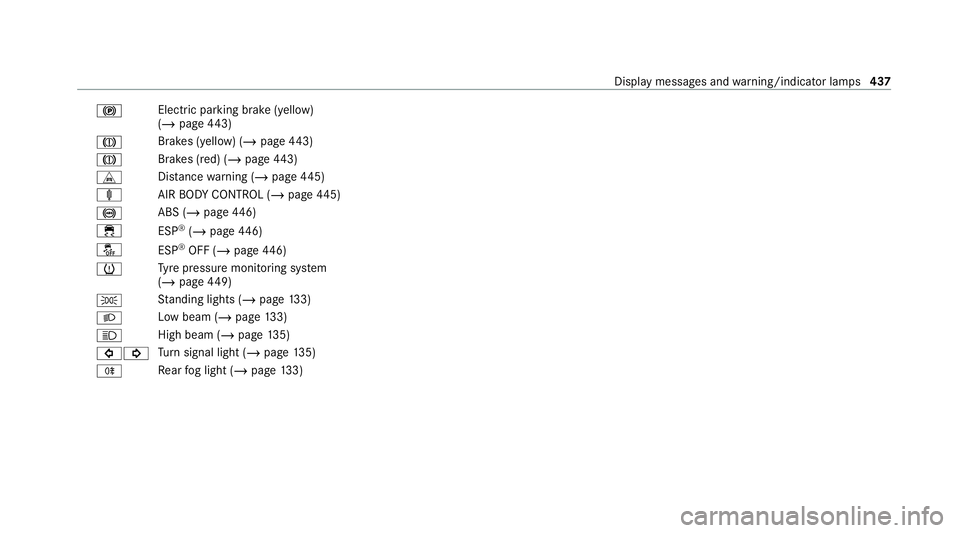
!
Electric pa
rking brake (yellow)
(/ page 443)
J Brakes (yell
ow) (/ page 443)
J Brakes (red) (/
page 443)
L Distance warning (/ page445)
ä AIRBODY CONTROL (/ page445)
! ABS (/
page446)
÷ ESP®
(/ page 446)
å ESP®
OFF (/ page446)
h Ty
re pressure monitoring sy stem
(/ page 449)
T St
anding lights (/ page133)
L Low beam (/
page133)
K High beam (
/page 135)
#! Tu
rn signal light (/ page135)
R Re
ar fog light (/ page133) Displ
aymessa ges and warning/indicator lamps 437
Page 472 of 489
Lighting
see In terior lighting
see Lights
Lights ........................................................ 13 3
Ac tive headla mps ................................ 13 6
Ad aptive Highbeam Assist .................. .138
Ad aptive Highbeam Assist Plus .......... .139
Ad versewe ather light .......................... 13 8
Au tomatic driving lights ....................... 13 4
City lighting ........................................ .138
Combination switch ............................ .135
Cornering light ..................................... 13 6
Driving ab road (symm etrical low
beam) .................................................. 13 3
Fo g light (extended range) ................... 137
Haza rdwa rning lights .......................... 13 5
Headla mpflashing .............................. .135
High beam .......................................... .135
Intelligent Light Sy stem ....................... 13 6
Light switch .........................................1 33
Low beam ............................................ 13 3
Mo torw ay mode ................................... 137
Pa rking lights ...................................... .133
Re ar fog light ....................................... 13 3
Re sponsibility for lighting sy stems ...... 13 3Setting
the dipped beam ......................1 41
Setting theex terior lighting switch-
off delay time ....................................... 141
St anding lights .................................... .133
Switching the sur round lighting
on/off .................................................. 141
Tu rn signal indicator ............................1 35
Limi ter ...................................................... 204
Ac tivating ............................................ 205
Buttons ................................................ 205
Calling up a speed ............................... 205
Deactivating ........................................ 205
Fu nction .............................................. 204
Pa ssive mode ...................................... 204
Pe rm anent setting .............................. .207
Re quirements ...................................... 205
Selecting ............................................ .205
Setting a speed ................................... 205
St oring a speed ................................... 205
Sy stem limitations ...............................2 04
Limiting speed see Limi ter
Limiting the opening angle (tailgate) ......84LINGU
ATRO NIC
Fu nction .............................................. 269
St arting .............................................. .269
Live Traf fic Information
Swit ching the tra ffic information dis‐
play on ................................................ 283
Load compa rtment co ver
Extending/r etra cting ........................... 12 2
No tes ................................................... 121
Loading .................................................... .124
Bag hook ............................................. 12 5
No tes ................................................... 11 5
Ro of luggage rack ................................ 12 8
Ti e-down eyes ...................................... 124
Loading see EA SY-PAC K load-securing kit
Loading guidelines ................................... 11 5
Loads Securing .............................................. .115
Locking/unlocking Activating/deactivating the auto‐
matic locking feature ............................ .77
Ad ditional door lock ...............................74 Index
469
Page 478 of 489
Ra
dio
Overview of the functions and sym‐
bols ..................................................... 304
Ra dio ope rating permits ......................... 363
Ra in-closing feature
Side wind ows ........................................86
Sliding sunroof ....................................... 91
REA CHregulation ...................................... 30
Re ading light
Switching on/off with hand mo ve‐
ments .................................................. 271
Re ading light
see Interior lighting
Re ar door (child saf ety lock) .................... 68
Re ar fog light
Switching on/off .................................1 34
Re ar seat
see Seat
Re ar seat belt
St atus display ........................................ 41
Re ar seat belt status display .................... 41Re
ar window
Changing the wiper blade .................... 14 6
Ro ller sunblind ...................................... 93
Re ar window heater ................................ 151
Re ar window wipers
Ac tivating/deactivating ...................... .144
Re ar-view mir ror
see Outside mir rors
Re cycling
see Take -ba ckof end-of-life vehicles
Re ducing agent
see AdBlue ®
Re fuelling
Re fuelling theve hicle ........................... 181
To pping up AdBlue ®
............................. 184
Re gistration
Ve hicle .................................................. 30
Re mo tecont rol (stationa ryheater/
ve ntilation)
Displa ys............................................... 15 8
Problems ............................................. 16 0
Re placing the battery .......................... 15 9
Setting ................................................. 157Re
mo teOnline
Charging thest ar ter battery ............... .165
Cooling or heating theve hicle inte‐
ri or .......................................................1 65
St arting theve hicle ............................. 16 5
Re scue card ............................................... 31
Re ser ve
Fu el ..................................................... 369
Re sidual heat ...........................................1 54
Re stra int sy stem ...................................... .35
Basic instructions forch ildren .............. .50
Fu nction in an accident ........................ .36
Fu nctionality .......................................... 35
Malfunction ........................................... 36
Pr otection ..............................................35
Re duced pr otection ...............................35
Self-test ................................................. 35
Wa rning lamp ........................................ 35
Re versege ar
Inserting .............................................. 17 7
Re versing camera .................................... 227
Care .................................................... .319
Fu nction .............................................. 227 Index
475