display MERCEDES-BENZ E-CLASS ESTATE 2020 Workshop Manual
[x] Cancel search | Manufacturer: MERCEDES-BENZ, Model Year: 2020, Model line: E-CLASS ESTATE, Model: MERCEDES-BENZ E-CLASS ESTATE 2020Pages: 489, PDF Size: 9.15 MB
Page 226 of 489
All
vehicles except All- Terrain vehicles:
R Uptoappr oximately 30 km/h: the high le vel
can be selected rega rdless of the drive pro‐
gram.
R From appr ox. 30 km/h: theve hicle is adjus‐
te dto normal le vel,re ga rdless of drive pro‐
gram.
All- Terrain vehicles:
R Uptoappr oximately 35 km/h: the high le vel
can be selected rega rdless of the drive pro‐
gram.
R From appr oximately 35 km/h: theve hicle is
set tothe normal le velre ga rdless of the drive
prog ram.
R Below appro ximately 20 km/ h intheG
drive program, theve hicle is raised back up
to the high le vel. Pa
rking Assist PARKTRONIC Fu
nction of Parking Assist PARKTRONIC
Pa rking Assist PARKTRONIC is an electronic
parking assi stance sy stem which monitors thearea sur
rounding your vehicle and sho wsyouthe
dis tance between theve hicle and a de tected
obs tacle visually and audibly.
Pa rking Assist PARKTRONIC is on lyan aid. It is
not a substitute foryo ur attention tothe sur‐
ro undings. The responsibility for safe manoeu‐
vring and parking remains with you. Make sure
th at there are no persons, animals or objects in
th e manoeuvring area while manoeuvring and
parking in/exiting parking spaces.
The passive side impact pr otection also warns
yo u of obs tacles tothe side. During the parking
procedure or manoeuvring, objects are de tected
as theve hicle drives past. If yousteer in the
direction of a de tected obs tacle and there is a
ri sk of a lateral collision, a warning is issued. In
order for an object on the side tobe de tected,
th e sensors in the front and rear bumper must
fi rs t de tect the object while you are driving past
it.
In order for front or rear obs tacles tothe side to
be displa yed, theve hicle must firs t tr avel a dis‐
ta nce of at least half a vehicle length. Once the
ve hicle has tr avelled one vehicle length, obs ta‐
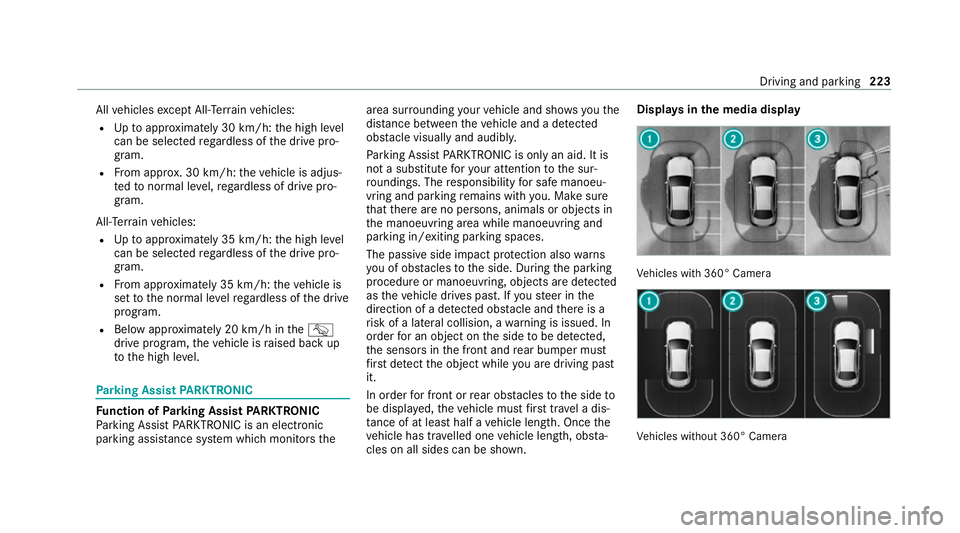
cles on all sides can be shown. Displa
ysinthe media display Ve
hicles with 360° Camera Ve
hicles without 360° Camera Driving and parking
223
Page 227 of 489
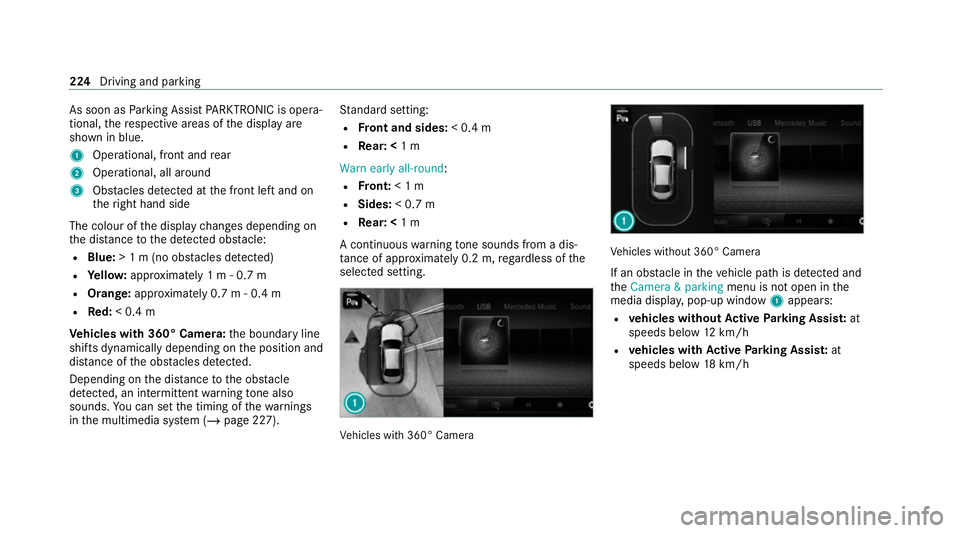
As soon as
Parking Assist PARKTRONIC is opera‐
tional, there spective areas of the display are
shown in blue.
1 Operational, front and rear
2 Operational, all around
3 Obstacles de tected at the front left and on
th eright hand side
The colour of the display changes depending on
th e dis tance tothe de tected obs tacle:
R Blue: > 1 m (no obs tacles de tected)
R Yello w: appr oximately 1 m - 0.7 m
R Orange: approximately 0.7 m - 0.4 m
R Red:< 0.4 m
Ve hicles with 360° Camera: the boundary line
shifts dynamically depending on the position and
dis tance of the obs tacles de tected.
Depending on the dis tance tothe obs tacle
de tected, an intermittent warning tone also
sounds. You can set the timing of thewa rnings
in the multimedia sy stem (/ page 227). St
andard setting:
R Front and sides: < 0.4 m
R Rear: < 1 m
Warn early all-round :
R Front: < 1 m
R Sides: < 0.7 m
R Rear: < 1 m
A continuous warning tone sounds from a dis‐
ta nce of appr oximately 0.2 m, rega rdless of the
selected setting. Ve
hicles with 360° Camera Ve
hicles without 360° Camera
If an obs tacle in theve hicle path is de tected and
th eCamera & parking menu is not open in the
media displa y,pop-up window 1appears:
R vehicles without Active Parking Assis t:at
speeds below 12km/h
R vehicles with Active Parking Assis t:at
speeds below 18km/h 224
Driving and pa rking
Page 228 of 489
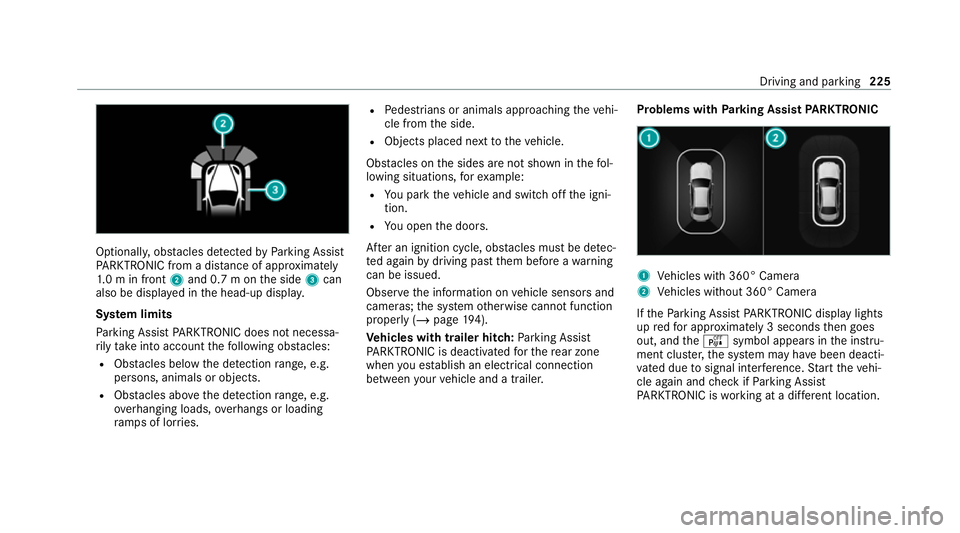
Optionally, obs
tacles de tected byParking Assist
PA RKTRONIC from a dis tance of appr oximately
1. 0 m in front 2and 0.7 m on the side 3can
also be displa yed in the head-up displa y.
Sy stem limits
Pa rking Assist PARKTRONIC does not necessa‐
ri ly take into account thefo llowing obs tacles:
R Obs tacles bel ow the detection range, e.g.
pe rsons, animals or objects.
R Obs tacles ab oveth e de tection range, e.g.
ove rhanging loads, overhangs or loading
ra mp s of lor ries. R
Pedestrians or animals approaching theve hi‐
cle from the side.
R Objects placed next totheve hicle.
Obs tacles on the sides are not shown in thefo l‐
lowing situations, forex ample:
R You park theve hicle and switch off the igni‐
tion.
R You open the doors.
Af ter an ignition cycle, obs tacles must be de tec‐
te d again bydriving past them before a warning
can be issued.
Obser vethe information on vehicle sensors and
cameras; the sy stem otherwise cannot function
properly (/ page194).
Ve hicles with trailer hitch: Parking Assist
PA RKTRONIC is deacti vatedfo rth ere ar zone
when you es tablish an elect rical connection
between your vehicle and a trailer. Problems with
Parking Assist PARKTRONIC 1
Vehicles with 360° Camera
2 Vehicles without 360° Camera
If th ePa rking Assist PARKTRONIC display lights
up redfo r appro ximately 3 seconds then goes
out, and theé symbol appears in the instru‐
ment clus ter,th e sy stem may ha vebeen deacti‐
va ted due tosignal inter fere nce. Start theve hi‐
cle again and check if Parking Assist
PA RKTRONIC is working at a dif fere nt location. Driving and pa
rking 225
Page 230 of 489
Setting
thewa rning tones of Parking Assist
PA RKTRONIC
Multimedia sy stem:
4 © 5
Settings 5
Assistance
5 Camera & parking
Ad justing the volume of thewa rning tones #
Select Warning tone volume. #
Set a value.
Ad justing the pitch of the warning tones #
Select Warning tone pitch. #
Set a value.
Specifying thest arting point for the warning
to nes
Yo u can specify whe ther thePa rking Assist
PA RKTRONIC warning tones should commence
when theve hicle is fur ther aw ay from an obs ta‐
cle. #
Select Warn early all-round. #
Activate or deacti vate the function. Ac
tivating/deactivating audio fadeout
Yo u can specify whe ther thevo lume of a media
source in the multimedia sy stem is tobe
re duced when Parking Assist PARKTRONIC
sounds a warning tone. #
Select Audio fadeout during warning tones. #
Activate or deacti vate the function. Re
versing camera Fu
nction of there ve rsing camera
If yo u ha veactivated the function in the multime‐
dia sy stem (/ page 234), the image from the
re ve rsing camera is shown in the media display
when there ve rsege ar is engaged. Dynamic
guide lines show the path theve hicle will take
with the cur rent steering angle. This helps youto
orient yourself and toavoid obs tacles when
re ve rsing.
The reve rsing camera is only an aid. It is not a
substitute foryo ur attention tothe sur roundings.
The responsibility for safe manoeuvring and
parking remains with you. Make sure that there
are no persons, animals or objects etc., in the manoeuvring area while manoeuvring and park‐
ing.
The guide lines in
the media display show the
dis tances to yourvehicle. The dis tances dis‐
pl ay ed only apply toroad le vel.
Depending on theve hicle equipment, you can
select from thefo llowing vie ws:
R Normal view
R Wide-angle view
R Trailer view
The area behind theve hicle is displa yed as a
mir ror image, as in the inside rearview mir ror.
Ve hicles without Parking Assist PARKTRONIC
The following camera vie wsare available in the
multimedia sy stem: Driving and parking
227
Page 231 of 489
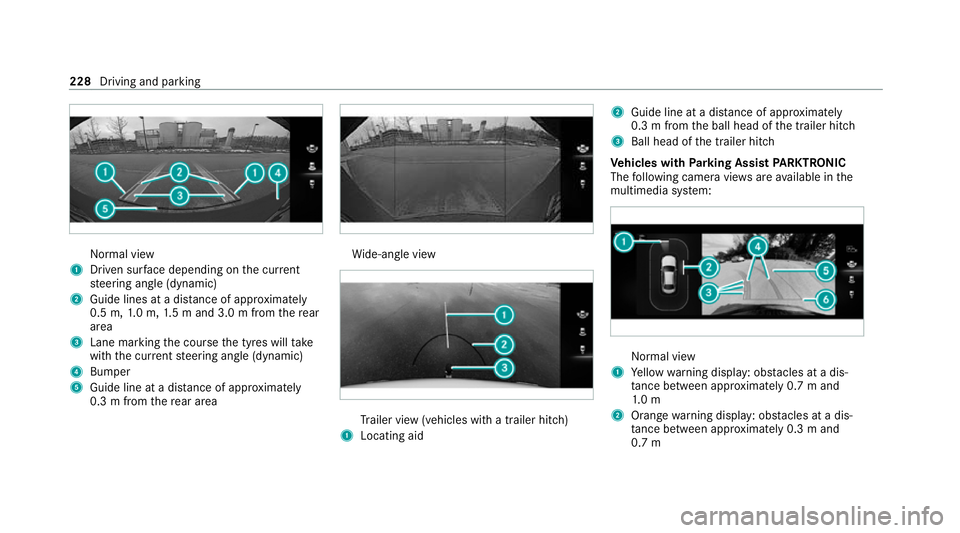
Normal view
1 Driven sur face depending on the cur rent
st eering angle (dynamic)
2 Guide lines at a dis tance of appr oximately
0.5 m, 1.0 m, 1.5 m and 3.0 m from there ar
area
3 Lane marking the course the tyres will take
with the cur rent steering angle (dynamic)
4 Bumper
5 Guide line at a dis tance of appr oximately
0.3 m from there ar area Wi
de-angle view Tr
ailer view (vehicles with a trailer hit ch)
1 Locating aid 2
Guide line at a dis tance of appr oximately
0.3 m from the ball head of the trailer hitch
3 Ball head of the trailer hitch
Ve hicles with Parking Assist PARKTRONIC
The following camera vie wsare available in the
multimedia sy stem: Normal view
1 Yellow warning display: obs tacles at a dis‐
ta nce between appr oximately 0.7 m and
1. 0 m
2 Orange warning display: obs tacles at a dis‐
ta nce between appr oximately 0.3 m and
0.7 m 228
Driving and parking
Page 232 of 489
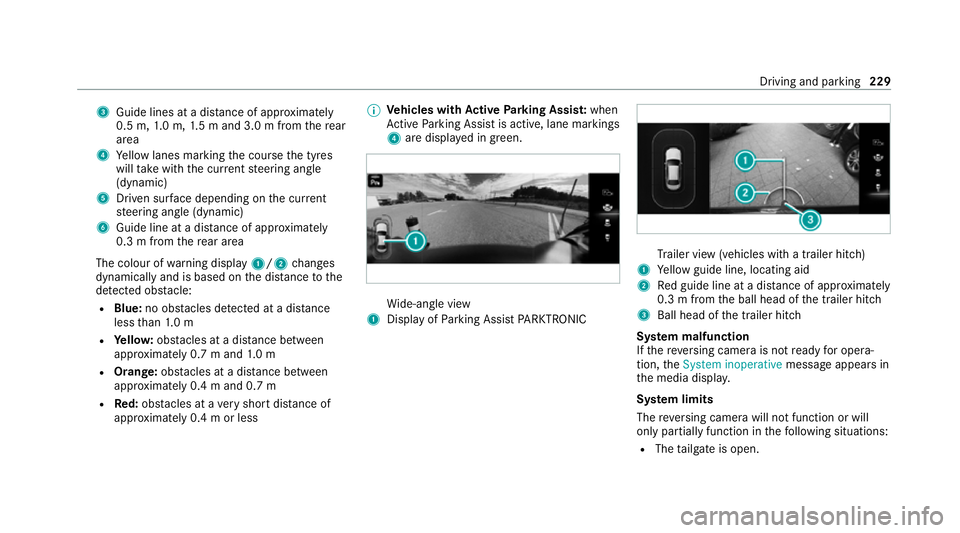
3
Guide lines at a dis tance of appr oximately
0.5 m, 1.0 m, 1.5 m and 3.0 m from there ar
area
4 Yellow lanes marking the course the tyres
will take with the cur rent steering angle
(dynamic)
5 Driven sur face depending on the cur rent
st eering angle (dynamic)
6 Guide line at a dis tance of appr oximately
0.3 m from there ar area
The colour of warning display 1/2changes
dynamically and is based on the dis tance tothe
de tected obs tacle:
R Blue: no obs tacles de tected at a di stance
less than 1.0 m
R Yello w: obs tacles at a di stance between
appr oximately 0.7 m and 1.0 m
R Orange: obstacles at a di stance between
appr oximately 0.4 m and 0.7 m
R Red:obs tacles at a very short dis tance of
appr oximately 0.4 m or less %
Vehicles with Active Parking Assis t:when
Ac tive Parking Assist is active, lane markings
4 are displa yed in green. Wi
de-angle view
1 Display of Parking Assist PARKTRONIC Tr
ailer view (vehicles with a trailer hit ch)
1 Yellow guide line, locating aid
2 Red guide line at a dis tance of appr oximately
0.3 m from the ball head of the trailer hitch
3 Ball head of the trailer hitch
Sy stem malfunction
If th ere ve rsing camera is not ready for opera‐
tion, theSystem inoperative message appears in
th e media displa y.
Sy stem limits
The reve rsing camera will not function or will
only partially function in thefo llowing situations:
R The tailgate is open. Driving and parking
229
Page 233 of 489
R
The weather conditions are poor, e.g. heavy
ra in, sno w,fog, storm or spr ay.
R The light conditions are poor, e.g. at night.
R Cameras, or vehicle components in which
th e cameras are fitted, are dama ged, dirty or
co vered. Obser vethe information on vehicle
sensors and cameras (/ page194).
% Do not use there ve rsing camera in these
types of situations. You could otherwise
injure others or collide with objects when
parking theve hicle.
% The contra stof the display may be impaired
by direct sunlight or by other light sources,
e.g. when driving out of a garage . In this
case, pay particular attention.
% Have the display repaired or replaced if, for
ex ample, pixel er rors considerably restrict its
use. 360° Came
ra Fu
nction of the 360° Camera
The 360° Camera is a sy stem that consists of
fo ur cameras which co verth e immediate sur‐ ro
undings of theve hicle. The sy stem assists you
when you are parking or at exits with reduced
visibility, forex ample.
The vie wsofthe 360° Camera are alw aysav aila‐
ble when driving forw ards up toa speed of
appr ox.16 km/h and when reve rsing.
The 360° Camera is only an aid and may show a
dis torted view of obs tacles, show them incor‐
re ctly or not show them at all. It is not a substi‐
tute foryo ur attention tothe sur roundings. The
re sponsibility for safe manoeuvring and parking
re mains with you. Make sure that there are no
persons, animals or objects etc., in the manoeu‐
vring area while manoeuvring and parking.
The sy stem evaluates images from thefo llowing
cameras:
R Reversing camera
R Front camera
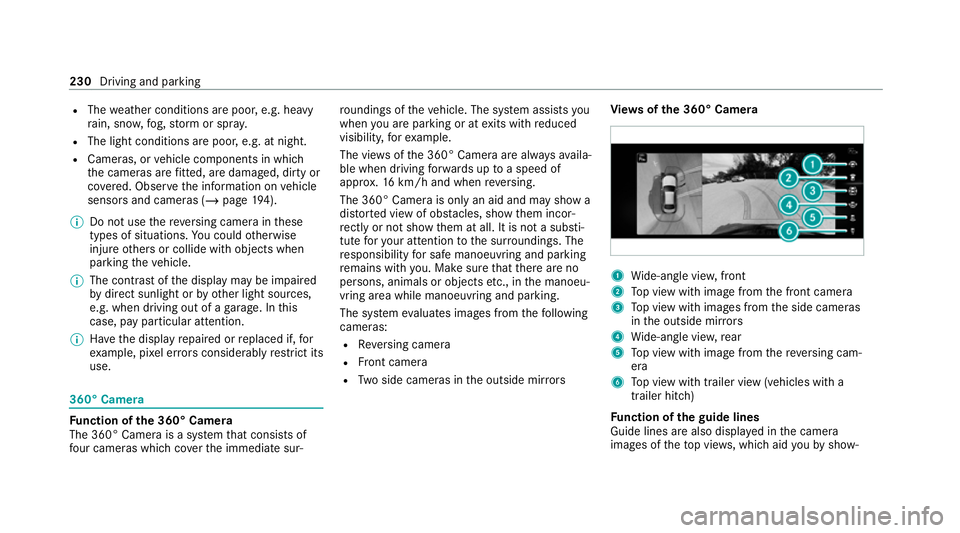
R Two side cameras in the outside mir rors Vi
ew s of the 360° Camera 1
Wide-angle vie w,front
2 Top view with image from the front camera
3 Top view with images from the side cameras
in the outside mir rors
4 Wide-angle vie w,rear
5 Top view with image from there ve rsing cam‐
era
6 Top view with trailer view (vehicles with a
trailer hitch)
Fu nction of the guide lines
Guide lines are also displa yed in the camera
images of theto p vie ws, which aid youby show‐ 230
Driving and parking
Page 234 of 489
ing
youth e calculated vehicle path as well as the
dis tance toobjects and other vehicles, based on
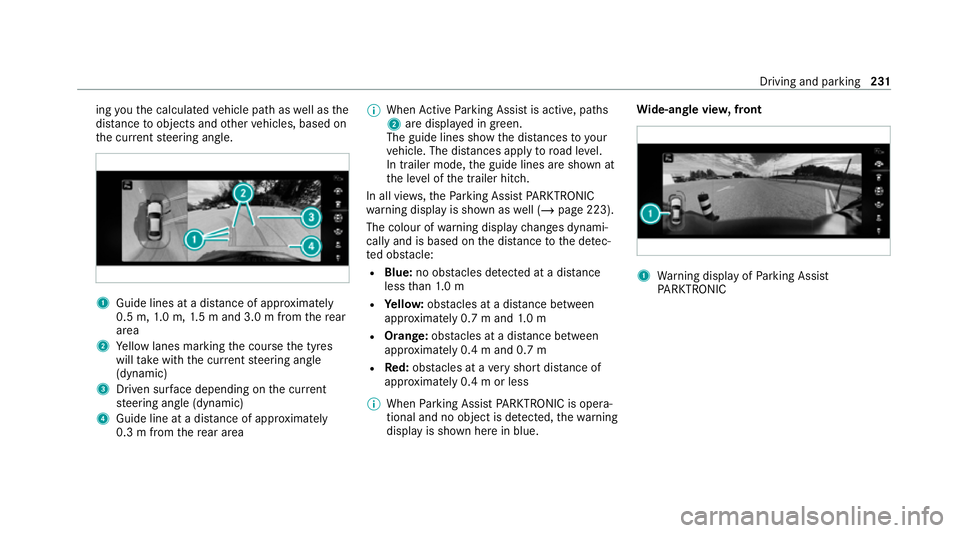
th e cur rent steering angle. 1
Guide lines at a dis tance of appr oximately
0.5 m, 1.0 m, 1.5 m and 3.0 m from there ar
area
2 Yellow lanes marking the course the tyres
will take with the cur rent steering angle
(dynamic)
3 Driven sur face depending on the cur rent
st eering angle (dynamic)
4 Guide line at a dis tance of appr oximately
0.3 m from there ar area %
When Active Parking Assist is active, paths
2 are displa yed in green.
The guide lines show the dis tances to your
ve hicle. The dis tances apply toroad le vel.
In trailer mode, the guide lines are shown at
th e le vel of the trailer hitch.
In all vie ws,th ePa rking Assist PARKTRONIC
wa rning display is shown as well (/ page 223).
The colour of warning display changes dynami‐
cally and is based on the dis tance tothe de tec‐
te d obs tacle:
R Blue: no obs tacles de tected at a di stance
less than 1.0 m
R Yello w: obs tacles at a di stance between
appr oximately 0.7 m and 1.0 m
R Orange: obstacles at a di stance between
appr oximately 0.4 m and 0.7 m
R Red:obs tacles at a very short dis tance of
appr oximately 0.4 m or less
% When Parking Assist PARKTRONIC is opera‐
tional and no object is de tected, thewa rning
display is shown here in blue. Wi
de-an gle vie w,front 1
Warning display of Parking Assist
PA RKTRONIC Driving and parking
231
Page 235 of 489
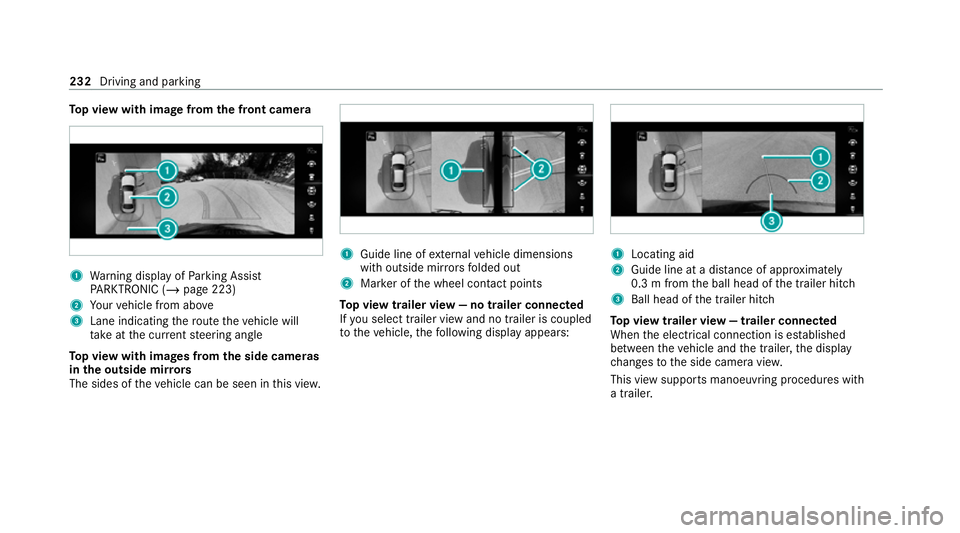
To
p view with image from the front came ra1
Warning display of Parking Assist
PA RKTRONIC (/ page 223)
2 Your vehicle from abo ve
3 Lane indicating thero ute theve hicle will
ta ke atthe cur rent steering angle
To p view with images from the side came ras
in the outside mir rors
The sides of theve hicle can be seen in this vie w. 1
Guide line of extern al vehicle dimensions
with outside mir rors folded out
2 Marker of the wheel conta ct points
To p view trailer view — no trailer connected
If yo u select trailer view and no trailer is coupled
to theve hicle, thefo llowing display appears: 1
Locating aid
2 Guide line at a dis tance of appr oximately
0.3 m from the ball head of the trailer hitch
3 Ball head of the trailer hitch
To p view trailer view — trailer connected
When the electrical connection is es tablished
between theve hicle and the trailer, the display
ch anges tothe side camera vie w.
This view supports manoeuvring procedures with
a trailer. 232
Driving and parking
Page 236 of 489
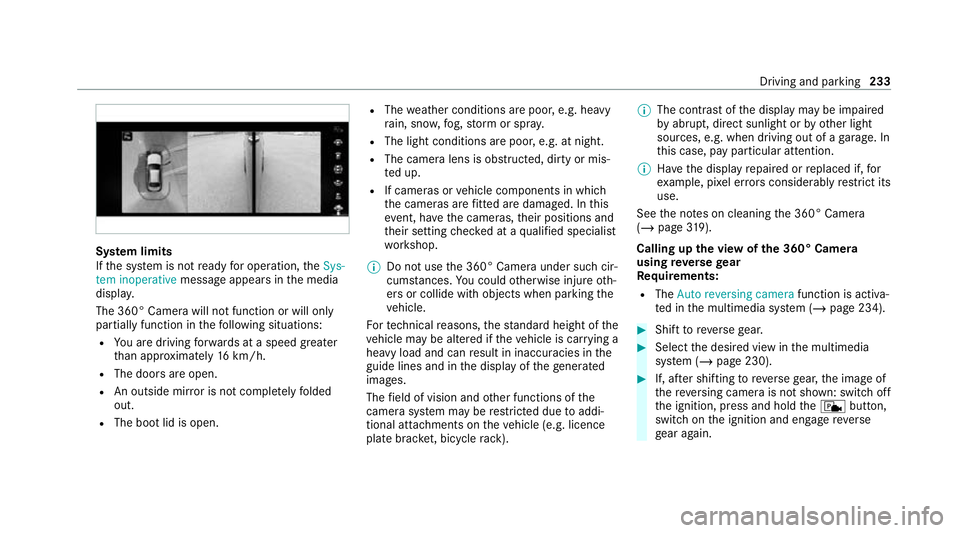
Sy
stem limits
If th e sy stem is not ready for operation, theSys-
tem inoperative message appears in the media
displa y.
The 360° Camera will not function or will only
partially function in thefo llowing situations:
R You are driving forw ards at a speed greater
th an appr oximately 16km/h.
R The doors are open.
R An outside mir ror is not comple tely folded
out.
R The boot lid is open. R
The weather conditions are poor, e.g. heavy
ra in, sno w,fog, storm or spr ay.
R The light conditions are poor, e.g. at night.
R The camera lens is obstructed, dirty or mis‐
te d up.
R If cameras or vehicle components in which
th e cameras are fitted are dama ged. In this
eve nt, ha vethe cameras, their positions and
th eir setting checked at a qualified specialist
wo rkshop.
% Do not use the 360° Camera under such cir‐
cums tances. You could otherwise injure oth‐
ers or collide with objects when parking the
ve hicle.
Fo rte ch nical reasons, thest andard height of the
ve hicle may be altered if theve hicle is car rying a
heavy load and can result in inaccuracies in the
guide lines and in the display of thege nerated
ima ges.
The field of vision and other functions of the
came rasystem may be restricted due toaddi‐
tional attachments on theve hicle (e.g. licence
plate brac ket, bicycle rack ). %
The contrast of the display may be impaired
by abrupt, direct sunlight or by other light
sources, e.g. when driving out of a garage . In
th is case, pay particular attention.
% Have the display repaired or replaced if, for
ex ample, pixel er rors considerably restrict its
use.
See the no tes on cleaning the 360° Camera
(/ page 319).
Calling up the view of the 360° Camera
using reve rsege ar
Re quirements:
R The Auto reversing camera function is activa‐
te d in the multimedia sy stem (/ page 234). #
Shift toreve rsege ar. #
Select the desired view in the multimedia
sy stem (/ page 230). #
If, af ter shifting toreve rsege ar, the image of
th ere ve rsing camera is not shown: switch off
th e ignition, press and hold thec button,
switch on the ignition and engage reve rse
ge ar again. Driving and parking
233