height MERCEDES-BENZ E-CLASS ESTATE 2020 Owners Manual
[x] Cancel search | Manufacturer: MERCEDES-BENZ, Model Year: 2020, Model line: E-CLASS ESTATE, Model: MERCEDES-BENZ E-CLASS ESTATE 2020Pages: 489, PDF Size: 9.15 MB
Page 18 of 489
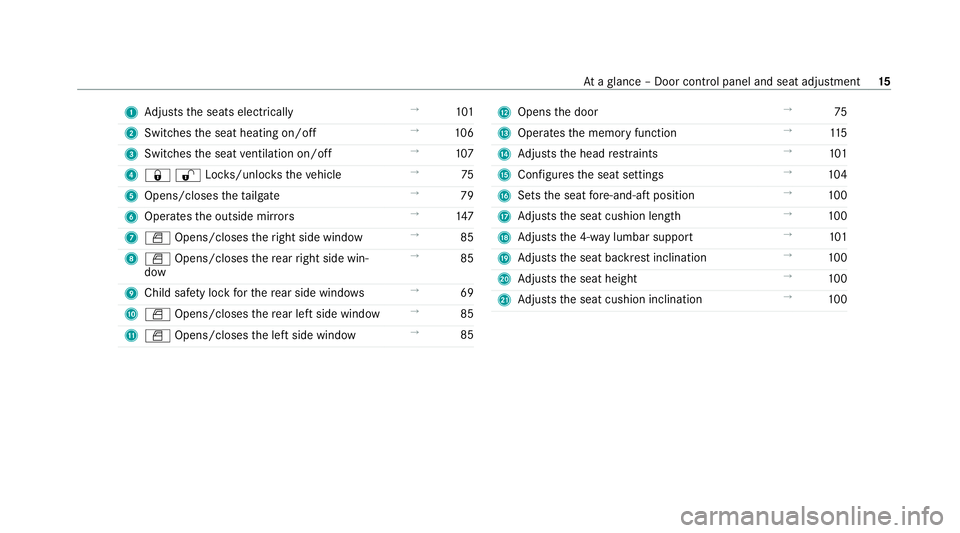
1
Adjusts the seats electrically →
101
2 Switches the seat heating on/off →
106
3 Switches the seat ventilation on/o ff →
107
4 &%Loc ks/unloc kstheve hicle →
75
5 Opens/closes theta ilgate →
79
6 Opera testh e outside mir rors →
147
7 W Opens/closes theright side window →
85
8 W Opens/closes there ar right side win‐
dow →
85
9 Child saf ety lock forth ere ar side wind ows →
69
A W Opens/closes there ar left side wind ow→
85
B W Opens/closes the left side window →
85 C
Opens the door →
75
D Operates the memory function →
11 5
E Adjusts the head restra ints →
101
F Configures the seat settings →
104
G Sets the seat fore -and-aft position →
100
H Adjusts the seat cushion length →
100
I Adjusts the 4-w aylumbar support →
101
J Adjusts the seat backrest inclination →
100
K Adjusts the seat height →
100
L Adjusts the seat cushion inclination →
100 At
aglance – Door control panel and seat adjustment 15
Page 53 of 489
Sy
stem limits
The sy stem will not initiate any action in thefo l‐
lowing situations:
R when reve rsing
or
R when theve hicle is towing a trailer and there
is a risk of a rear impact
The sy stem will not initiate any braking applica‐
tion in thefo llowing situations:
R whilst driving
or
R when entering or exiting a parking space
while using Active Parking Assist Fu
nction of PRE-SAFE ®
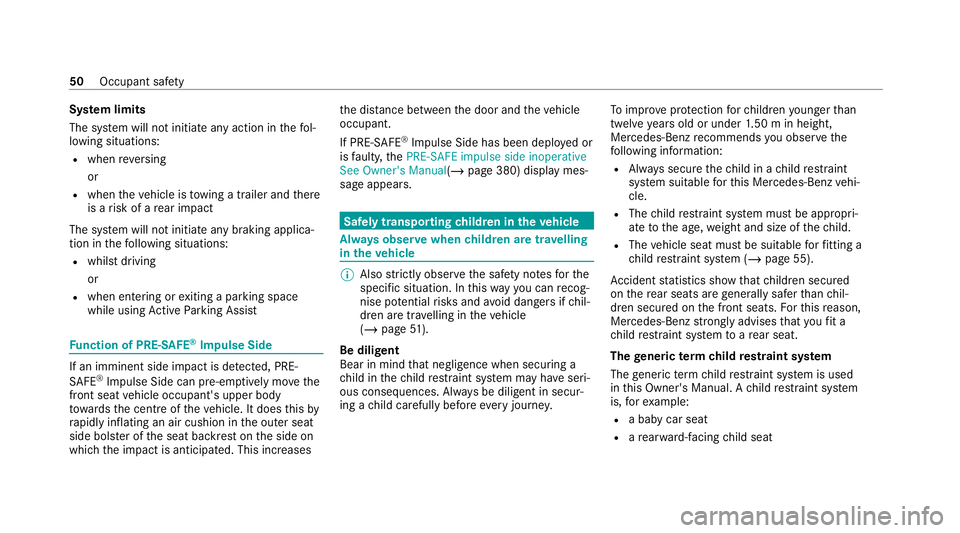
Impulse Side If an imminent side impact is de
tected, PRE-
SA FE®
Impulse Side can pre-emptively mo vethe
front seat vehicle occupant's upper body
to wa rdsth e cent reoftheve hicle. It does this by
ra pidly inflating an air cushion in the outer seat
side bols ter of the seat backrest on the side on
which the impact is anticipated. This increases th
e dis tance between the door and theve hicle
occupant.
If PRE-SAFE ®
Impulse Side has been deplo yed or
is faulty, thePRE-SAFE impulse side inoperative
See Owner's Manual( /page 380) display mes‐
sage appears. Safely transporting
children in theve hicle Alw
ays obser vewhen children are tr avelling
in theve hicle %
Also strictly obser vethe saf ety no tesfo rthe
specific situation. In this wa yyo u can recog‐
nise po tential risks and avoid dangers if chil‐
dren are tr avelling in theve hicle
(/ page 51).
Be diligent
Bear in mind that negligence when securing a
ch ild in thech ild restra int sy stem may ha veseri‐
ous consequences. Alw ays be diligent in secur‐
ing a child carefully before everyjou rney. To
impr oveprotection forch ildren younger than
twelve years old or under 1.50 m in height,
Mercedes-Benz recommends you obse rvethe
fo llowing information:
R Alw ays secure thech ild in a child restra int
sy stem suitable forth is Mercedes-Benz vehi‐
cle.
R The child restra int sy stem must be appropri‐
ate tothe age, weight and size of thech ild.
R The vehicle seat must be suitable forfitting a
ch ild restra int sy stem (/ page 55).
Ac cident statistics show that children secured
on there ar seats are general lysafer than chil‐
dren secured on the front seats. Forth is reason,
Mercedes-Benz strongly advises that youfit a
ch ild restra int sy stem toare ar seat.
The generic termchild restra int sy stem
The generic term child restra int sy stem is used
in this Owner's Manual. A child restra int sy stem
is, forex ample:
R a baby car seat
R are ar wa rd-f acing child seat 50
Occupant saf ety
Page 101 of 489
Seats
Ad
justing the front seat mechanically and
electrically (without Seat Comfort Package) &
WARNING Risk of becoming trapped if
th e seats are adjus tedby children
Children could become trapped if they adjust
th e seats, particularly when unattended. #
When leaving theve hicle, alw aysta ke
th eke y with you and lock theve hicle. #
Never lea vechildren unat tended in the
ve hicle. This also applies
tothe Digital Vehicle Key
st icke r.
Yo u can adjust the seats when the ignition is
switched off. &
WARNING Risk of becoming trapped
du ring seat adjustment
When you adjust a seat, you or other vehicle
occupants could become trapped, e.g. on the
seat guide rail. #
Make sure when adjusting a seat that
no one has any body parts in the sweep
of the seat. Obser
vethe saf ety no tes on "Airbags" and "Chil‐
dren in theve hicle". &
WARNING Risk of accident due tothe
driver's seat not being engaged
The driver's seat may mo veunexpectedly
while driving.
This could cause youto lose control of the
ve hicle. #
Alw ays make sure that the driver's seat
is engaged before starting theve hicle. &
WARNING Risk of accident due to
adjusting vehicle settings while theve hi‐
cle is in motion
Yo u could lose cont rol of theve hicle in the
fo llowing situations in particular:
R Ifyo u adjust the driver's seat, the head
re stra ints, thesteering wheel or the mir‐
ro r while theve hicle is in motion.
R Ifyo ufast enyour seat belt while theve hi‐
cle is in motion. #
Before starting the engine: adjust the
driver's seat, the head restra ints, the
st eering wheel and the mir ror and fas‐
te nyo ur seat belt. &
WARNING Risk of becoming trapped if
th e seat height is adjus ted carelessly
If yo u adjust the seat height carelessly, you
or other vehicle occupants could be trapped
and thereby injured. 98
Seats and stowing
Page 102 of 489
Children in particular could acciden
tally
press the electrical seat adjustment buttons
and become trapped. #
While moving the seats, make sure that
hands or other body parts do not get
under the le ver assembly of the seat
adjustment sy stem. &
WARNING Risk of inju rydue tohead
re stra ints not being fitted or being adjus‐
te d incor rectly
If head restra ints ha venot been ins talled or
ha ve not been adjus ted cor rectly, there is an
increased risk of injury in the head and neck
area, e.g. in theev ent of an accident or when
braking. #
Alw ays drive with the head restra ints
fi tted. #
Before driving off, ma kesure forev ery
ve hicle occupant that the cent reofthe
head restra int supports the back of the
head at about eye le vel. Do not inter
change the head restra ints of the
front and rear seats. Otherwise, you will not be
able toadjust the height and angle of the head
re stra ints cor rectl y.
Ad just the head restra int fore -and-aft position so
th at it is as close as possible tothe back of your
head. &
WARNING Risk of inju ryor death due to
an incor rect seat position
The seat belt does not of ferth e intended
le ve l of pr otection if you ha venot mo vedthe
seat backrest toan almost vertical position.
Yo u could slip beneath the seat belt and
injure yourself. #
Adjust the seat proper lybefore com‐
mencing your journe y. #
Alw ays ensure that the seat backrest is
in an almost vertical position and that
th e shoulder belt is routed across the
centre of your shoulder. *
NO
TEDama getothe seats when moving
th e seats back The seats may be damaged
byobjects when
moving the seats bac k. #
When moving the seats bac k,make
sure that there are no objects in the
fo ot we ll, under or behind the seats. Seats and
stowing 99
Page 103 of 489
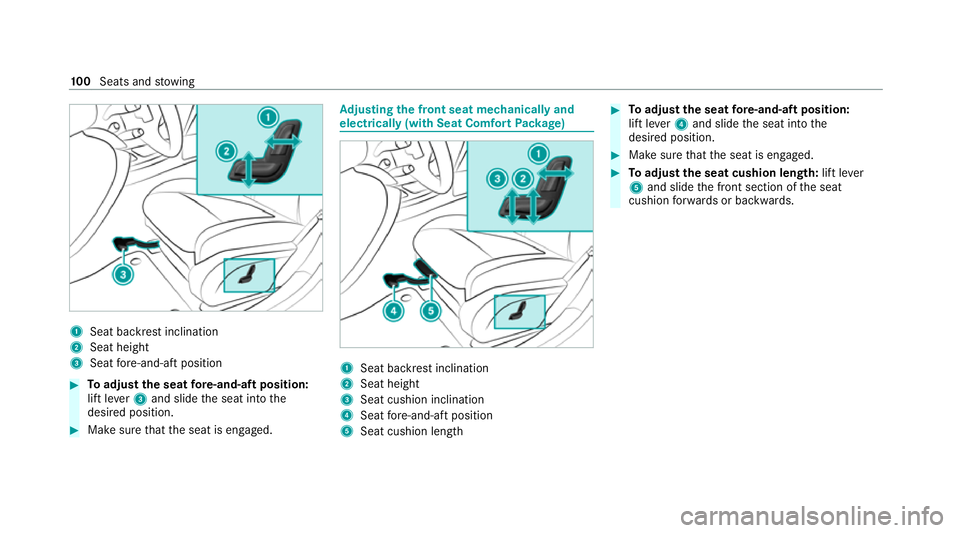
1
Seat ba ckrest inclination
2 Seat height
3 Seat fore -and-aft position #
Toadjust the seat fore -and-aft position:
lift le ver3 and slide the seat into the
desired position. #
Make sure that the seat is engaged. Ad
justing the front seat mechanically and
electrically (with Seat Comfort Package) 1
Seat backrest inclination
2 Seat height
3 Seat cushion inclination
4 Seat fore -and-aft position
5 Seat cushion length #
Toadjust the seat fore -and-aft position:
lift le ver4 and slide the seat into the
desired position. #
Make sure that the seat is engaged. #
Toadjust the seat cushion length: lift lever
5 and slide the front section of the seat
cushion forw ards or backwards. 100
Seats and stowing
Page 104 of 489
Ad
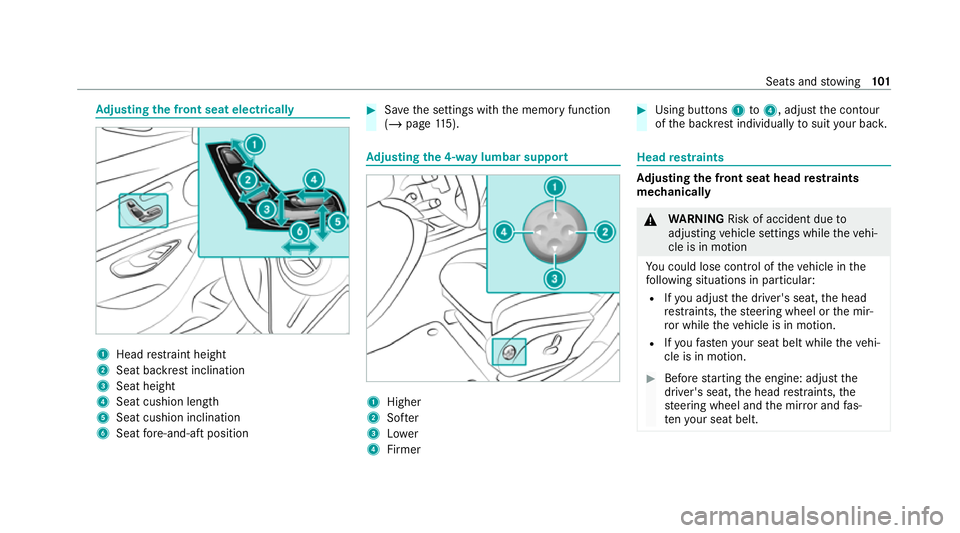
justing the front seat electrically 1
Head restra int height
2 Seat backrest inclination
3 Seat height
4 Seat cushion length
5 Seat cushion inclination
6 Seat fore -and-aft position #
Save the settings with the memory function
(/ page 115). Ad
justing the 4-w aylumbar support 1
Higher
2 Softer
3 Lower
4 Firmer #
Using buttons 1to4 , adjust the conto ur
of the backrest individually tosuit your bac k. Head
restra ints Ad
justing the front seat head restra ints
mechanically &
WARNING Risk of accident due to
adjusting vehicle settings while theve hi‐
cle is in motion
Yo u could lose cont rol of theve hicle in the
fo llowing situations in particular:
R Ifyo u adjust the driver's seat, the head
re stra ints, thesteering wheel or the mir‐
ro r while theve hicle is in motion.
R Ifyo ufast enyour seat belt while theve hi‐
cle is in motion. #
Before starting the engine: adjust the
driver's seat, the head restra ints, the
st eering wheel and the mir ror and fas‐
te nyo ur seat belt. Seats and
stowing 101
Page 105 of 489
&
WARNING Risk of inju rydue tohead
re stra ints not being fitted or being adjus‐
te d incor rectly
If head restra ints ha venot been ins talled or
ha ve not been adjus ted cor rectly, there is an
increased risk of injury in the head and neck
area, e.g. in theev ent of an accident or when
braking. #
Alw ays drive with the head restra ints
fi tted. #
Before driving off, ma kesure forev ery
ve hicle occupant that the cent reofthe
head restra int supports the back of the
head at about eye le vel. Do not inter
change the head restra ints of the
front and rear seats. Otherwise, you will not be
able toadjust the height and angle of the head
re stra ints cor rectl y.
Ad just the head restra int fore -and-aft position so
th at it is as close as possible tothe back of your
head. #
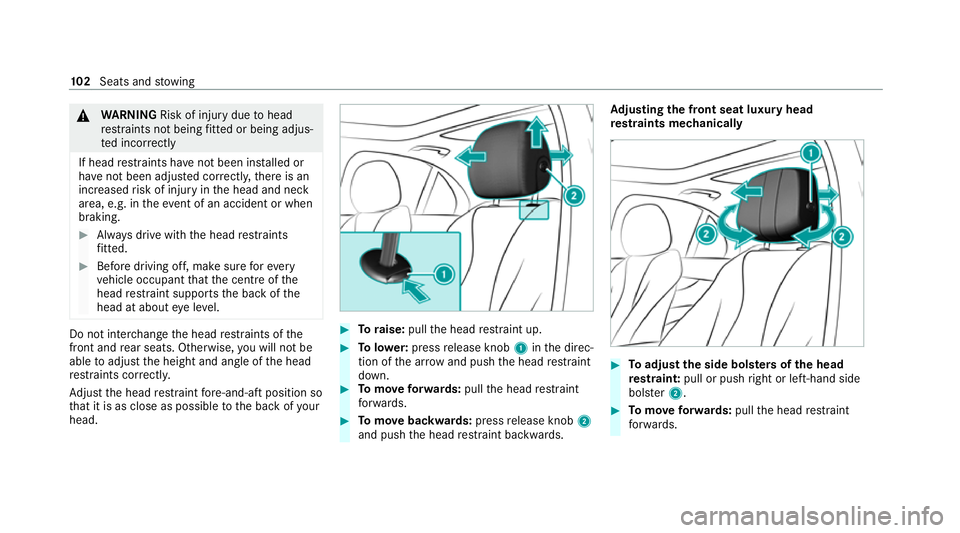
Toraise: pullthe head restra int up. #
Tolowe r:press release knob 1inthe direc‐
tion of the ar row and push the head restra int
down. #
Tomo veforw ards: pullthe head restra int
fo rw ards. #
Tomo vebackwards: pressrelease knob 2
and push the head restra int backwards. Ad
justing the front seat luxury head
re stra ints mechanically #
Toadjust the side bols ters of the head
re stra int: pull or push right or left-hand side
bols ter2. #
Tomo veforw ards: pullthe head restra int
fo rw ards. 102
Seats and stowing
Page 115 of 489
#
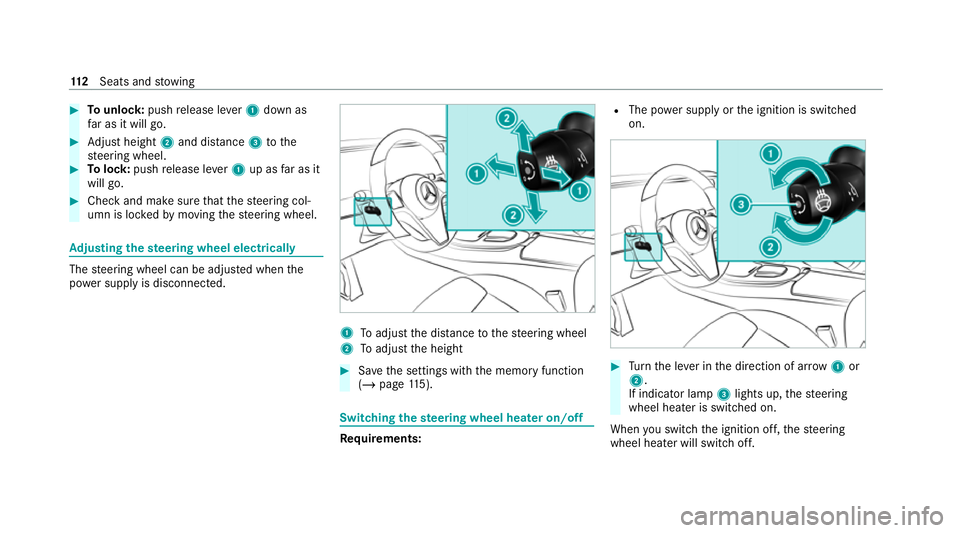
Tounlo ck:push release le ver1 down as
fa r as it will go. #
Adjust height 2and di stance 3tothe
st eering wheel. #
Tolock: pushrelease le ver1 up as far as it
will go. #
Check and make sure that thesteering col‐
umn is loc kedby moving thesteering wheel. Ad
justing the steering wheel electrically The
steering wheel can be adjus ted when the
po we r supp lyis disconnected. 1
Toadjust the dis tance tothesteering wheel
2 Toadjust the height #
Save the settings with the memory function
(/ page 115). Swi
tching the steering wheel heater on/off Re
quirements: R
The po wer supply or the ignition is switched
on. #
Turn the le ver in the direction of ar row1or
2.
If indicator lamp 3lights up, thesteering
wheel heater is switched on.
When you swit ch the ignition off, thesteering
wheel heater will switch off. 11 2
Seats and stowing
Page 183 of 489
The automatic transmission shifts up
tothe next
ge ar when the maximum engine speed is
re ached toprotect the engine from overrev ving. Glide mode function
*
NO
TEMercedes-AMG vehicles #
Obser vethe no tes in the Supplement.
Yo u could otherwise failto recognise
dangers. *
NO
TEPlug-in hybrid #
Obser vethe no tes in the Supplement.
Yo u could otherwise failto recognise
dangers. Wi
th an anticipatory driving style, Glide mode
helps youto reduce fuel consum ption.
Glide mode is characterised bythefo llowing:
R the combustion engine is disconnected from
th e driv etra in and continues torun in neutral.
R the transmission position display his
shown in green. R
Vehicles with 48 V on-board electrical
sy stem (EQ-Boost technology): the com‐
bustion engine can be switched off. All of the
ve hicle functions remain active.
Glide mode is activated if thefo llowing condi‐
tions are me t:
R drive program ;is selected.
R the speed is within a suitable range.
R thero ad's course is suitable, e.g. no steep
uphill or downhill inclines or tight bends.
R There is no trailer coupled tothe trailer hitch,
and no bicycle rack fitted.
R you do not depress the accelerator or brake
pedal (e xcept for light brake applications).
% Glide mode can also be activated if you ha ve
selected the "Eco" setting forth e drive in the
drive prog ram =.
Glide mode is deactivated again if one of the
conditions is no longer met.
Glide mode can also be pr evented bythefo llow‐
ing parame ters:
R incline R
Downhill gradient
R temp erature
R height
R Speed
R operating status of the engine
R traffic situation Fu
nction of the 4MATIC
4MATIC ensures that all four wheels are driven.
To get her with ESP ®
and 4ETS, 4MATIC impr oves
th e traction of your vehicle whene ver a driven
wheel spins due toinsuf ficient traction.
If yo ufa ilto adapt your driving style, 4MATIC can
neither reduce therisk of an accident nor over‐
ri de the la wsof ph ysics. 4MATIC cannot take
ac count of road, weather and traf fic conditions.
4MATIC is only an aid. You are responsible espe‐
cially for maintaining a safe dis tance from the
ve hicle in front, forve hicle speed, for braking in
good time and forst ay ing in lane. 18 0
Driving and pa rking
Page 225 of 489
immediate vicinity of
the body when the
ve hicle is being lo wered. *
NO
TEMercedes-AMG vehicles #
Obser vethe no tes in the Supplement.
Yo u could otherwise failto recognise
dangers. Re
quirements:
R The vehicle has been star ted.
R Allvehicles except All- Terrain vehicles:
th eve hicle must not be moving fasterthan
60 km/h.
R All-Terrain vehicles: theve hicle must not be
moving fasterthan 35 km/h. Ra
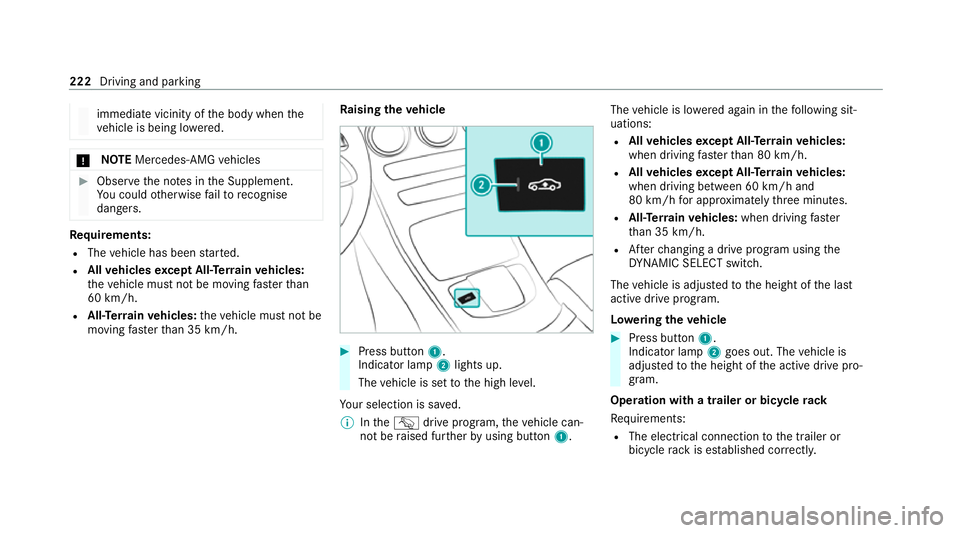
ising theve hicle #
Press button 1.
Indica tor lamp 2lights up.
The vehicle is set tothe high le vel.
Yo ur selection is sa ved.
% IntheG drive prog ram, theve hicle can‐
not be raised fur ther by using but ton1. The
vehicle is lo wered again in thefo llowing sit‐
uations:
R Allvehicles except All- Terrain vehicles:
when driving fasterthan 80 km/h.
R Allvehicles except All- Terrain vehicles:
when driving between 60 km/h and
80 km/h for appro ximately thre e minutes.
R All-Terrain vehicles: when driving faster
th an 35 km/h.
R Afterch anging a drive prog ram using the
DY NA MIC SELECT switch.
The vehicle is adjus tedto the height of the last
active drive prog ram.
Lo weri ngtheve hicle #
Press button 1.
Indica tor lamp 2goes out. The vehicle is
adjus tedto the height of the active drive pro‐
gram.
Operation with a trailer or bicycle rack
Re quirements:
R The elect rical connection tothe trailer or
bicycle rack is es tablished cor rectl y. 222
Driving and parking