bonnet MERCEDES-BENZ E-CLASS SALOON 2008 User Guide
[x] Cancel search | Manufacturer: MERCEDES-BENZ, Model Year: 2008, Model line: E-CLASS SALOON, Model: MERCEDES-BENZ E-CLASS SALOON 2008Pages: 401, PDF Size: 6.89 MB
Page 226 of 401
Engine compartment
223
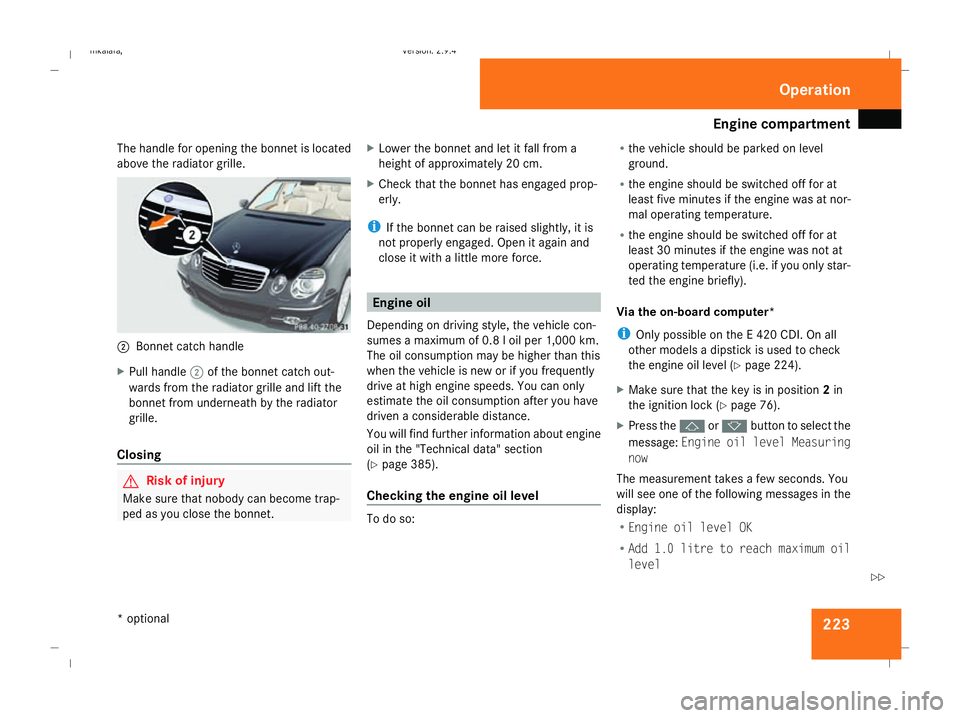
The handle for opening the bonnet is located
above the radiator grille. 2
Bonnet catch handle
X Pull handle 2of the bonnet catch out-
wards from the radiator grille and lift the
bonnet from underneath by the radiator
grille.
Closing G
Risk of injury
Make sure that nobody can become trap-
ped as you close the bonnet. X
Lower the bonnet and let it fall from a
height of approximately 20 cm.
X Check that the bonnet has engaged prop-
erly.
i If the bonnet can be raised slightly, it is
not properly engaged. Open it again and
close it with a little more force. Engine oil
Depending on driving style, the vehicle con-
sumes a maximum of 0.8 l oil per 1,000 km.
The oil consumption may be higher than this
when the vehicle is new or if you frequently
drive at high engine speeds. You can only
estimate the oil consumption after you have
driven a considerable distance.
You will find further information about engine
oil in the "Technical data" section
(Y page 385).
Checking the engine oil level To do so:R
the vehicle should be parked on level
ground.
R the engine should be switched off for at
least five minutes if the engine was at nor-
mal operating temperature.
R the engine should be switched off for at
least 30 minutes if the engine was not at
operating temperature (i.e. if you only star-
ted the engine briefly).
Via the on-board computer*
i Only possible on the E 420 CDI. On all
other models a dipstick is used to check
the engine oil level (Y page 224).
X Make sure that the key is in position 2in
the ignition lock (Y page 76).
X Press the jork button to select the
message: Engine oil level Measuring
now
The measurement takes a few seconds. You
will see one of the following messages in the
display:
R Engine oil level OK
R Add 1.0 litre to reach maximum oil
level Operation
* optional
211_AKB; 2; 5, en-GB
mkalafa,
Version: 2.9.4 2008-02-29T16:57:07+01:00 - Seite 223 ZDateiname: 6515_3416_02_buchblock.pdf; preflight
Page 249 of 401
Care
246R
battery
R connectors
R lights
R seals
Damaged seals or electrical components
can lead to failures or leaks.
Cleaning the wiper blades and the out-
side of the windscreen G
Risk of injury
Turn the key to position 0in the ignition
lock before cleaning the windscreen or the
wiper blades. There is otherwise a risk of
the windscreen wipers being set in motion
and causing injury.
X Turn the key to position 1in the ignition
lock (Y page 76).
X Set the windscreen wipers to position
u on the combination switch
(Y page 105).
X Turn the key to position 0or remove it when
the wiper arms are vertical (Y page 76).!
Only fold the wiper arms away from the
windscreen when they are in a vertical posi-
tion, otherwise you will damage the bonnet.
X Fold the wiper arms away from the wind-
screen until you feel them engage.
X Clean the windscreen and the wiper blades.
X Fold the windscreen wipers back again
before the ignition is switched on.
! Do not clean the wiper blades too often,
otherwise the rubber may become porous,
resulting in wiper noise.
Cleaning the windows !
Do not use dry cloths, abrasive products,
solvents or cleaning agents containing sol-
vents to clean the inside of the windows.
Clean the insides of the windows with a
damp cloth or commercially-available glass
cleaner. Avoid touching the inside of the
rear windscreen and the side windows with
hard objects, e.g. ice scrapers or rings. You
could otherwise cause damage to the win-
dows, rear window heating or aerial on the
rear window. i
Anti-glare film retrofitted to the insides of
the windows could interfere with radio or
mobile phone reception, especially if it is
conductive or metal-coated film. Informa-
tion about anti-glare film can be obtained
from any Mercedes-Benz Service Centre.
Cleaning the headlamps X
Clean the headlamp lenses with a wet
sponge.
! Only use washer fluid which is suitable
for plastic lenses. Unsuitable washer fluid
could damage the plastic lenses of the
headlamps.
Do not use the following:
R dry cloths
R abrasive cleaning agents
R solvents
R cleaning agents containing solvent
You could otherwise scratch or damage the
surface of the lenses. Operation
211_AKB; 2; 5, en-GB
mkalafa,
Version: 2.9.4 2008-02-29T16:57:07+01:00 - Seite 246Dateiname: 6515_3416_02_buchblock.pdf; preflight
Page 264 of 401
Display
messages 261Display messages Possible cause/consequence Possible solution
P Selector lever in
park position You have switched off the engine with the
KEYLESS GO button* and opened the driv-
er's door.
or
With HOLD activated, you have either:
R
opened the driver’s door and released
the seat belt or
R switched off the engine or
R opened the bonnet
The horn may also sound at regular inter-
vals. The horn becomes louder if you
attempt to lock the vehicle.
The engine cannot be started. X
Move the selector lever to P.
The engine can be started again. P Selector lever in
park position You have tried to switch off the engine
with the KEYLESS GO button* while the
selector lever is in position
Ror D. X
Move the selector lever to P.Please shift to P or N You have attempted to start the engine
while the selector lever is not in position
P
or N. X
Move the selector lever to Por N. Practical advi
ce
* optional
211_AKB; 2; 5, en-GB
mkalafa,
Version: 2.9.4 2008-02-29T16:57:07+01:00 - Seite 261 ZDateiname: 6515_3416_02_buchblock.pdf; preflight
Page 268 of 401
Display
messages 265Display messages Possible cause/consequence Possible solution
HOLD cannot be activa-
ted See Owner's
Manual A condition for activating HOLD has not
been met. Check the conditions for activating HOLD
(Y
page 155).
X Close the bonnet.
X Close the driver's door.
X Start the engine.
X Release the parking brake.
X Switch off all consumers that are not required.
HOLD can be reactivated as soon as the on-
board voltage is sufficient. HOLD inoperative See
Owner's Manual A malfunction has occurred. X
Visit a qualified specialist workshop. Cruise control
and SPEEDTRONIC inoperative Speedtronic and cruise control or Dis-
tronic* are not operational. X
Visit a qualified specialist workshop. SRS Restraint system
malfunction Con-
sult workshop G
Risk of injury
The restraint systems are faulty. X
Visit a qualified specialist workshop immedi-
ately. Cruise control - - - A condition for activating cruise control
has not been met. X
Activate ESP ®
(Y page 60)
X If conditions permit, drive faster than
30 km/h and store the speed (Y page 143). Practical advi
ce
* optional
211_AKB; 2; 5, en-GB
mkalafa,
Version: 2.9.4 2008-02-29T16:57:07+01:00 - Seite 265 ZDateiname: 6515_3416_02_buchblock.pdf; preflight
Page 270 of 401
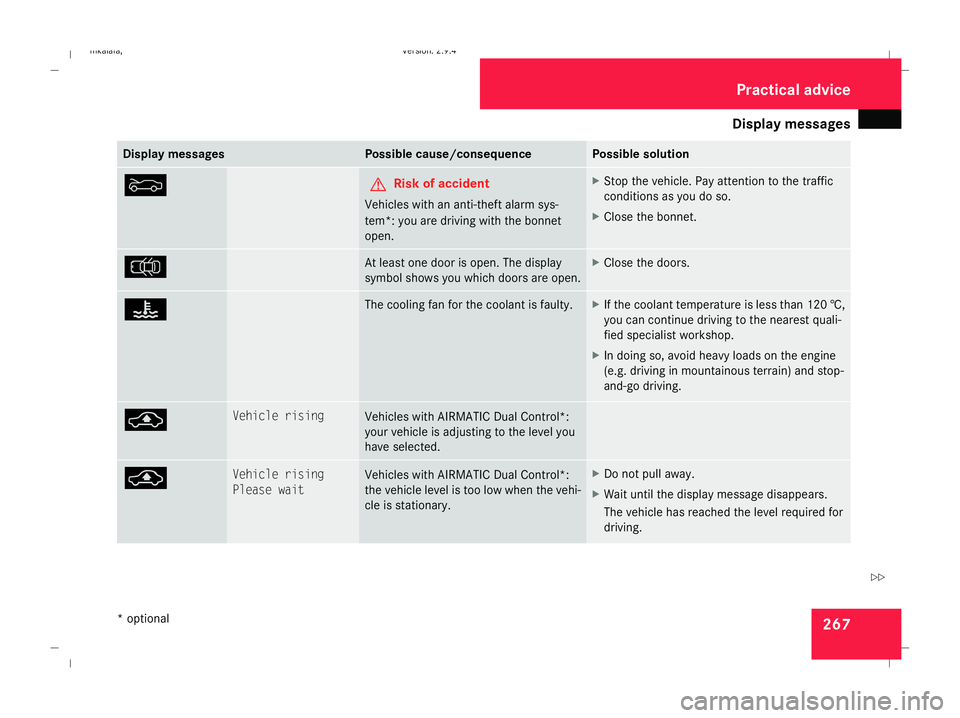
Display
messages 267Display messages Possible cause/consequence Possible solution
Y G
Risk of accident
Vehicles with an anti-theft alarm sys-
tem*: you are driving with the bonnet
open. X
Stop the vehicle. Pay attention to the traffic
conditions as you do so.
X Close the bonnet. V At least one door is open. The display
symbol shows you which doors are open. X
Close the doors. D The cooling fan for the coolant is faulty. X
If the coolant temperature is less than 120 †,
you can continue driving to the nearest quali-
fied specialist workshop.
X In doing so, avoid heavy loads on the engine
(e.g. driving in mountainous terrain) and stop-
and-go driving. @ Vehicle rising
Vehicles with AIRMATIC Dual Control*:
your vehicle is adjusting to the level you
have selected.
@ Vehicle rising
Please wait Vehicles with AIRMATIC Dual Control*:
the vehicle level is too low when the vehi-
cle is stationary. X
Do not pull away.
X Wait until the display message disappears.
The vehicle has reached the level required for
driving. Practical advi
ce
* optional
211_AKB; 2; 5, en-GB
mkalafa,
Version: 2.9.4 2008-02-29T16:57:07+01:00 - Seite 267 ZDateiname: 6515_3416_02_buchblock.pdf; preflight
Page 272 of 401
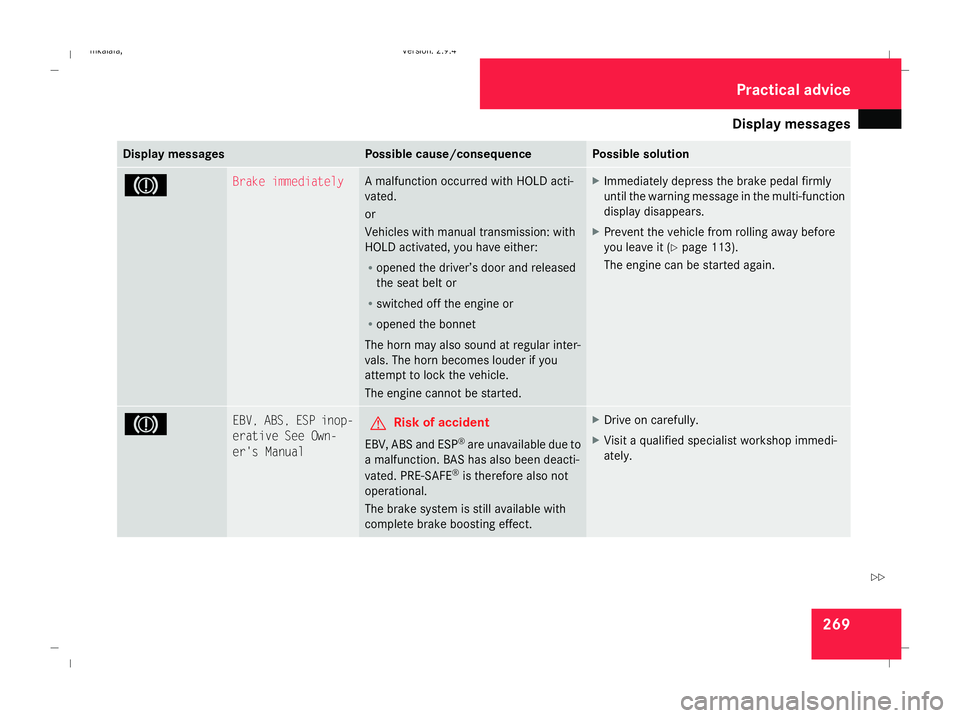
Display
messages 269Display messages Possible cause/consequence Possible solution
3 Brake immediately A malfunction occurred with HOLD acti-
vated.
or
Vehicles with manual transmission: with
HOLD activated, you have either:
R
opened the driver’s door and released
the seat belt or
R switched off the engine or
R opened the bonnet
The horn may also sound at regular inter-
vals. The horn becomes louder if you
attempt to lock the vehicle.
The engine cannot be started. X
Immediately depress the brake pedal firmly
until the warning message in the multi-function
display disappears.
X Prevent the vehicle from rolling away before
you leave it (Y page 113).
The engine can be started again. 3 EBV, ABS, ESP inop-
erative See Own-
er's Manual G
Risk of accident
EBV, ABS and ESP ®
are unavailable due to
a malfunction. BAS has also been deacti-
vated. PRE-SAFE ®
is therefore also not
operational.
The brake system is still available with
complete brake boosting effect. X
Drive on carefully.
X Visit a qualified specialist workshop immedi-
ately. Practical advi
ce
211_AKB; 2; 5, en-GB
mkalafa,
Version: 2.9.4 2008-02-29T16:57:07+01:00 - Seite 269 ZDateiname: 6515_3416_02_buchblock.pdf; preflight
Page 295 of 401
Troubleshooting
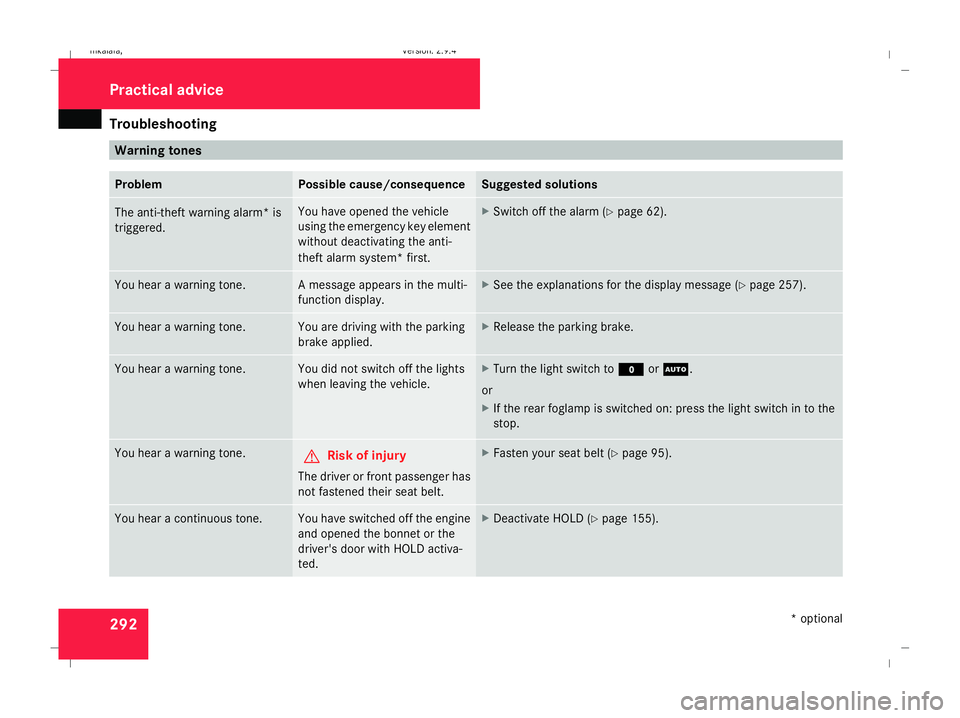
292 Warning tones
Problem Possible cause/consequence Suggested solutions
The anti-theft warning alarm* is
triggered. You have opened the vehicle
using the emergency key element
without deactivating the anti-
theft alarm system* first. X
Switch off the alarm (Y page 62).You hear a warning tone. A message appears in the multi-
function display. X
See the explanations for the display message (Y page 257).You hear a warning tone. You are driving with the parking
brake applied. X
Release the parking brake. You hear a warning tone. You did not switch off the lights
when leaving the vehicle. X
Turn the light switch to MorU.
or
X If the rear foglamp is switched on: press the light switch in to the
stop. You hear a warning tone.
G
Risk of injury
The driver or front passenger has
not fastened their seat belt. X
Fasten your seat belt (Y page 95).You hear a continuous tone. You have switched off the engine
and opened the bonnet or the
driver's door with HOLD activa-
ted. X
Deactivate HOLD (Y page 155). Practical advice
* optional
211_AKB; 2; 5, en-GB
mkalafa
,V ersion: 2.9.4
2008-02-29T16:57:07+01:00 - Seite 292 Dateiname: 6515_3416_02_buchblock.pdf; preflight
Page 317 of 401
Changing the bulbs
314 Changing the front bulbs
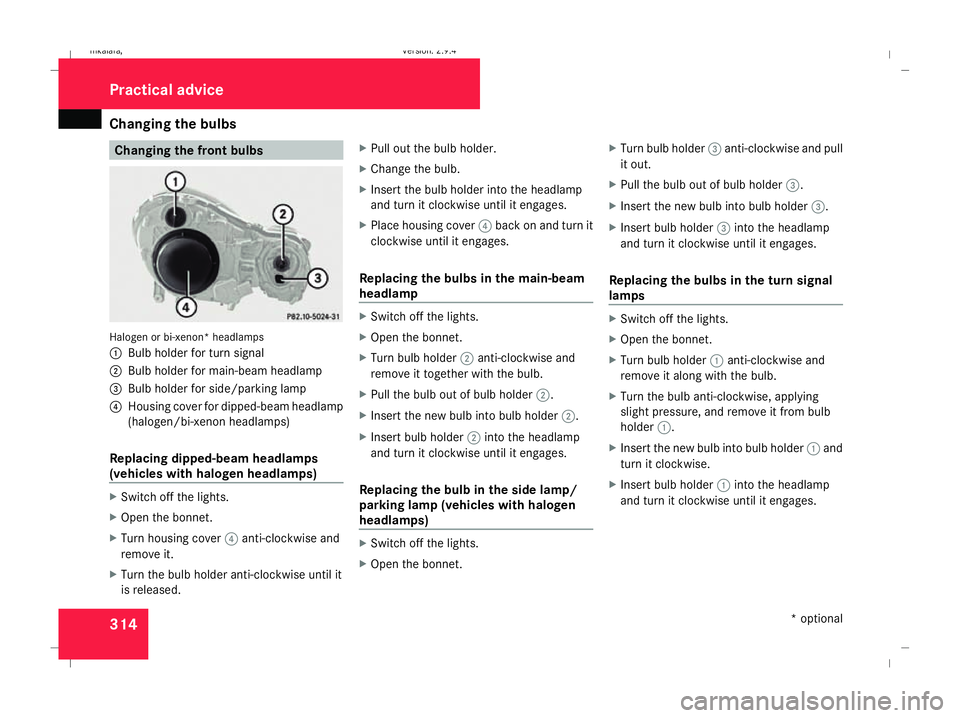
Halogen or bi-xenon* headlamps
1
Bulb holder for turn signal
2 Bulb holder for main-beam headlamp
3 Bulb holder for side/parking lamp
4 Housing cover for dipped-beam headlamp
(halogen/bi-xenon headlamps)
Replacing dipped-beam headlamps
(vehicles with halogen headlamps) X
Switch off the lights.
X Open the bonnet.
X Turn housing cover 4anti-clockwise and
remove it.
X Turn the bulb holder anti-clockwise until it
is released. X
Pull out the bulb holder.
X Change the bulb.
X Insert the bulb holder into the headlamp
and turn it clockwise until it engages.
X Place housing cover 4back on and turn it
clockwise until it engages.
Replacing the bulbs in the main-beam
headlamp X
Switch off the lights.
X Open the bonnet.
X Turn bulb holder 2anti-clockwise and
remove it together with the bulb.
X Pull the bulb out of bulb holder 2.
X Insert the new bulb into bulb holder 2.
X Insert bulb holder 2into the headlamp
and turn it clockwise until it engages.
Replacing the bulb in the side lamp/
parking lamp (vehicles with halogen
headlamps) X
Switch off the lights.
X Open the bonnet. X
Turn bulb holder 3anti-clockwise and pull
it out.
X Pull the bulb out of bulb holder 3.
X Insert the new bulb into bulb holder 3.
X Insert bulb holder 3into the headlamp
and turn it clockwise until it engages.
Replacing the bulbs in the turn signal
lamps X
Switch off the lights.
X Open the bonnet.
X Turn bulb holder 1anti-clockwise and
remove it along with the bulb.
X Turn the bulb anti-clockwise, applying
slight pressure, and remove it from bulb
holder 1.
X Insert the new bulb into bulb holder 1and
turn it clockwise.
X Insert bulb holder 1into the headlamp
and turn it clockwise until it engages. Practical advice
* optional
211_AKB; 2; 5, en-GB
mkalafa,
Version: 2.9.4 2008-02-29T16:57:07+01:00 - Seite 314Dateiname: 6515_3416_02_buchblock.pdf; preflight