display MERCEDES-BENZ E-CLASS SALOON 2008 User Guide
[x] Cancel search | Manufacturer: MERCEDES-BENZ, Model Year: 2008, Model line: E-CLASS SALOON, Model: MERCEDES-BENZ E-CLASS SALOON 2008Pages: 401, PDF Size: 6.89 MB
Page 16 of 401
13
Shift ranges
Automatic transmission . . . . . . . . .116
Display in the speedometer . . . . . .115
Sidebags . . . . . . . . . . . . . . . . . . . . . . . .45
Side window Fault . . . . . . . . . . . . . . . . . . . . . . . .300
Opening/closing . . . . . . . . . . . . . .107
Resetting . . . . . . . . . . . . . . . . . . . .108
Side windows
Cleaning . . . . . . . . . . . . . . . . . . . . .246
Skibag . . . . . . . . . . . . . . . . . . . . . . . . .188
Sliding/tilting sunroof . . . . . . . . . ..180
Rain closing feature . . . . . . . . . . . .182
Resetting . . . . . . . . . . . . . . . . . . . .182
Sliding sunroof
see Panorama sliding/tilting sunroof
see Sliding/tilting sunroof
Snow chains . . . . . . . . . . . . . . . . . . . .235
Socket Cockpit . . . . . . . . . . . . . . . . . . . . . .210
Rear compartment . . . . . . . . . . . . .210
Spare wheel
Fitting . . . . . . . . . . . . . . . . . . . . . . .323
Storage location . . . . . . . . . . . . . . .254
Technical data . . . . . . . . . . . . . . . .365
Spectacles compartment . . . . . . . ..206
Speed Technical data . . . . . . . . . . . . . . . .352
Speed limiter
Speedtronic . . . . . . . . . . . . . . . . . .152 Speedometer
Digital speedometer (on-board
computer) . . . . . . . . . . . . . . . . . . .126
Segments . . . . . . . . . . . . . . . . . . . .121
Setting the unit (on-board com-
puter) . . . . . . . . . . . . . . . . . . . . . . .133
Speedtronic . . . . . . . . . . . . . . . . . . . .152
Display message . . . . . . . . . . . . . .265
Permanent . . . . . . . . . . . . . . . . . . .154
Variabl e.. . . . . . . . . . . . . . . . . . . .152
SRS (Supplemental Restraint Sys-
tem) . . . . . . . . . . . . . . . . . . . . . . . . . . . .41
Warning lamp . . . . . . . . . . . . . . . . . .41
Standard display (on-board com-
puter) . . . . . . . . . . . . . . . . . . . . . . . . .125
Selecting the displa y.. . . . . . . . ..134
Station
see Radio
Status line (on-board computer) . ..1 23
Selecting the displa y.. . . . . . . . ..134
Steering wheel
Adjusting . . . . . . . . . . . . . . . . . . . . .89
Buttons (on-board computer) . . . . .122
Storing settings . . . . . . . . . . . . . . . .93
Steering wheel gearshift paddles ..1 18
Steering wheel heating . . . . . . . . . . ..90
Malfunction indicator lamp . . . . . .283
Stowage compartment . . . . . . . . . ..205
Armrest (in front) . . . . . . . . . . . . . .206
Armrest (under) . . . . . . . . . . . . . . .206 Centre console . . . . . . . . . . . . . . .
.206
Centre console (rear) . . . . . . . . . . .207
Glove compartment . . . . . . . . . . . .205
Rear seat armrest . . . . . . . . . . . . .207
Stowage compartments
Overview . . . . . . . . . . . . . . . . . . . . .36
Stowage space
Cup holder . . . . . . . . . . . . . . . . . . .186
Stowage well
Boot floor (underneath) . . . . . . . . .192
underneath luggage compart-
ment floo r.. . . . . . . . . . . . . . . . . .192
Submenu (on-board computer) . . ..1 32
Convenience . . . . . . . . . . . . . . . . .133
Dynamic driving sea t.. . . . . . . . ..139
Heating . . . . . . . . . . . . . . . . . . . . .133
Instrument cluster . . . . . . . . . . . . .132
Lighting . . . . . . . . . . . . . . . . . . . . .133
Time/date . . . . . . . . . . . . . . . . . . .132
Vehicle . . . . . . . . . . . . . . . . . . . . . .133
Summer opening . . . . . . . . . . . . . . . .109
Sun visor . . . . . . . . . . . . . . . . . . . . . . .207
Supplemental Restraint System see SRS
Supplemental Restraint System (SRS)
Display message . . . . . . . . . . . . . .265
Warning lamp . . . . . . . . . . . . . . . . .289
Surround lighting
Switching on/off (on-board com-
puter) . . . . . . . . . . . . . . . . . . . . . . .135 Index
211_AKB; 2; 5, en-GB
mkalafa,
Version: 2.9.4
2008-02-29T16:57:07+01:00 - Seite 13 Dateiname: 6515_3416_02_buchblock.pdf; preflight
Page 17 of 401
14
Switching off the alarm
ATA . . . . . . . . . . . . . . . . . . . . . . . . . .62T
Tailgate Display message . . . . . . . . . . . . . .266
Emergency unlocking . . . . . . . . . . .308
Limiting the opening angl e.. . . . . ..76
Opening/closing (manually) . . . . . . .70
Tail lamps
Display message . . . . . . . . . . . . . .276
Tank capacity . . . . . . . . . . . . . . . . . . .377
Technical data Acceleration . . . . . . . . . . . . . . . . . .354
Engine . . . . . . . . . . . . . . . . . . . . . .348
Speed . . . . . . . . . . . . . . . . . . . . . . .352
Trailer loads . . . . . . . . . . . . . . . . . .376
Tyres . . . . . . . . . . . . . . . . . . . . . . .357
Vehicle dimensions . . . . . . . . . . . .366
Vehicle weights . . . . . . . . . . . . . . .369
Wheels . . . . . . . . . . . . . . . . . . . . . .357
Telephone
see Mobile phone
Telescopic lever . . . . . . . . . . . . . . . . .239
Telescopic rod (Easy-Pack fix kit) ..2 04
Temperature Engine oil (on-board computer) . . .126
Outside temperature . . . . . . . . . . .121 Thermatic
Malfunction indicator lamp . . . . . .283
Thermotronic
Malfunction indicator lamp . . . . . .283
Third brake lamp
Display message . . . . . . . . . . . . . .274
Through-loading feature . . . . . . . . ..195
Tightening torque . . . . . . . . . . . . . ..327
Time Lap time (on-board computer) . . . .127
Setting (on-board computer) . . . . .134
Setting the time (on-board com-
puter) . . . . . . . . . . . . . . . . . . . . . . .134
Timer (on-board computer) . . . . . ..127
TIREFIT kit Storage location . . . . . . . . . . . . . . .255
Using . . . . . . . . . . . . . . . . . . . . . . .318
Total distance recorder
. . . . . . . . . . . . . . . . . . . . . . . . . . . . .27, 29
Resetting the trip meter . . . . . . . . .121
Tow-away protection . . . . . . . . . . . . ..63
Towing . . . . . . . . . . . . . . . . . . . . . . . .339
Towing eye Fitting . . . . . . . . . . . . . . . . . . . . . . .338
Removing . . . . . . . . . . . . . . . . . . . .339
Tow-starting . . . . . . . . . . . . . . . . . . . .339
Trailer 7-pin connector . . . . . . . . . . . . . . .242
Display message . . . . . .268, 272, 273
Power supply . . . . . . . . . . . . . . . . .242 Trailer loads
Technical data . . . . . . . . . . . . . . . .376
Trailer tow hitch . . . . . . . . . . . . . . . .239
Notes on care . . . . . . . . . . . . . . . .248
Trailer towing
Driving tips . . . . . . . . . . . . . . . . . . .240
Mounting dimensions . . . . . . . . . . .375
Parktroni c.. . . . . . . . . . . . . . . . . .161
Transmission output (maximum)
Telephone/two-way radio . . . . . . .345
Transport (vehicle) . . . . . . . . . . . . ..340
Trip computer Menu (on-board computer) . . . . . .139
Trip meter . . . . . . . . . . . . . . . . . . . . . .125
Resetting . . . . . . . . . . . . . . . . . . . .121
Turn signal lamps
Display message . . . . . . . . . .273, 274
TV
Operating (on-board computer) . . .130
Two-way radio
Installatio n.. . . . . . . . . . . . . . . . . .345
Tyre grip . . . . . . . . . . . . . . . . . . . . . . .237
Tyre pressure . . . . . . . . . . . . . . . . . . .229
Calling up (on-board computer) . .232
Display message . . . . . . . . . .262, 278
Table (see Fuel filler flap) . . . . . . . .219
see Tyre pressure
Tyre pressure loss warning system 230
Tyre pressure monitor Warning lamp . . . . . . . . . . . . . . . . .289 Index
211_AKB; 2; 5, en-GB
mkalafa,
Version: 2.9.4 2008-02-29T16:57:07+01:00 - Seite 14Dateiname: 6515_3416_02_buchblock.pdf; preflight
Page 18 of 401
15
Tyre pressures
Table . . . . . . . . . . . . . . . . . . . . . . .356
Tyres
Direction of rotatio n.. . . . . . . . . . .229
General notes . . . . . . . . . . . . . . . . .227
Technical data . . . . . . . . . . . . . . . .357
Tyre tread . . . . . . . . . . . . . . . . . . . . . .229 U
Unit for distance Setting (on-board computer) . . . . .133
Unladen weight
. . . . . . . . . . . . . .369, 370, 372, 373, 374
Unlocking Emergency unlocking . . . . . . . . . . .306
From the inside (central unlocking
button) . . . . . . . . . . . . . . . . . . . . . . .70
Up (display message) . . . . . . . . . . ..126 V
Variable Speedtronic . . . . . . . . . . . ..152
Vehicle Emergency unlocking . . . . . . .306, 307
Individual settings (on-board com-
puter) . . . . . . . . . . . . . . . . . . . . . . .131
Leaving parked up . . . . . . . . . . . . .305
Towing . . . . . . . . . . . . . . . . . . . . . .339
Tow-starting . . . . . . . . . . . . . . . . . .339
Transporting . . . . . . . . . . . . . . . . . .340 Vehicle battery
. . . . . . . . . . . . . . . . .329
Vehicle dimensions . . . . . . . . . . . . ..366
Vehicle electronics . . . . . . . . . . . . ..345
Vehicle identification number
(VIN) . . . . . . . . . . . . . . . . . . . . . .346, 347
Vehicle identification plates . . . . ..346
Vehicle level Display message . . . . . . . . . . . . . .267
Setting (AIRMATIC DC) . . . . . . . . .156
Vehicle tool kit . . . . . . . . . . . . . . . . . .254
Vehicle weights . . . . . . . . . . . . . . . . .369 W
Warning and indicator lamp ABS (yellow) . . . . . . . . . . . . . . . . . .285
LIM (Cruise control) . . . . . . . . . . . .143
LIM (Distronic) . . . . . . . . . . . . . . . .146
LIM (variable Speedtronic) . . . . . . .152
Warning signal
Audible . . . . . . . . . . . . . . . . . . . . . .292
Warning triangle . . . . . . . . . . . . . . . .252
Washer fluid Display message . . . . . . . . . . . . . .281
Wearing seat belts . . . . . . . . . . . . . . ..95
Wheel bolts Tightening torque . . . . . . . . . . . . . .327
Wheel chock
Use . . . . . . . . . . . . . . . . . . . . . . . . .256 Wheels
General notes . . . . . . . . . . . . . . . . .227
Interchanging . . . . . . . . . . . . . . . . .233
Technical data . . . . . . . . . . . . . . . .357
Windowbags . . . . . . . . . . . . . . . . . . . . .46
Windows Cleaning . . . . . . . . . . . . . . . . . . . . .246
Cleaning the windscreen . . . . . . . .246
Side windows . . . . . . . . . . . . . . . . .107
Windscreen
Cleaning . . . . . . . . . . . . . . . . . . . . .246
Infrared reflecting . . . . . . . . . . . . .214
Windscreen washer fluid . . . . . . . ..390
Topping up . . . . . . . . . . . . . . . . . . .226
Windscreen washer fluid reservoir
. . . . . . . . . . . . . . . . . . . . . . . . . .226, 390
Windscreen washer reservoir Capacity . . . . . . . . . . . . . . . . . . . . .390
Windscreen washer system . . . . . ..390
Windscreen wipers . . . . . . . . . . . . ..105
Cleaning . . . . . . . . . . . . . . . . . . . . .246
Malfunction . . . . . . . . . . . . . . . . . .299
Replacing the wiper blades . . . . . .315
Winter diesel . . . . . . . . . . . . . . . . . . .221
Winter driving . . . . . . . . . . . . . .234, 235
Winter tyres . . . . . . . . . . . . . . . . . . . .234
Limiting the speed (on-board com-
puter) . . . . . . . . . . . . . . . . . . . . . . .154 Index
211_AKB; 2; 5, en-GB
mkalafa,
Version: 2.9.4
2008-02-29T16:57:07+01:00 - Seite 15 Dateiname: 6515_3416_02_buchblock.pdf; preflight
Page 30 of 401
Instrument cluster
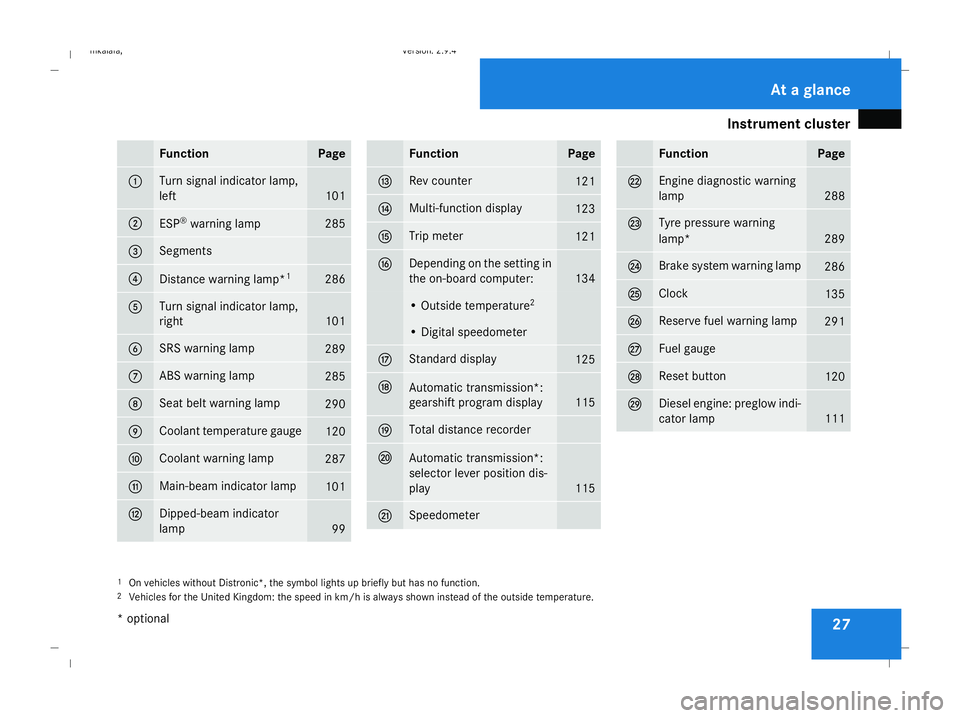
27Function Page
1 Turn signal indicator lamp,
left
101
2
ESP
®
warning lamp 285
3 Segments
4
Distance warning lamp*
1 286
5 Turn signal indicator lamp,
right
101
6 SRS warning lamp
289
7 ABS warning lamp
285
8 Seat belt warning lamp
290
9 Coolant temperature gauge
120
a Coolant warning lamp
287
b Main-beam indicator lamp
101
c Dipped-beam indicator
lamp
99 Function Page
d Rev counter
121
e Multi-function display
123
f Trip meter
121
g Depending on the setting in
the on-board computer:
134
• Outside temperature
2 • Digital speedometer
h Standard display
125
j
Automatic transmission*:
gearshift program display
115
k Total distance recorder
l
Automatic transmission*:
selector lever position dis-
play
115
m Speedometer Function Page
n Engine diagnostic warning
lamp
288
o Tyre pressure warning
lamp*
289
p Brake system warning lamp
286
q Clock
135
r Reserve fuel warning lamp
291
s Fuel gauge
t Reset button
120
u Diesel engine: preglow indi-
cator lamp
111
1
On vehicles without Distronic*, the symbol lights up briefly but has no function.
2 Vehicles for the United Kingdom: the speed in km/h is always shown instead of the outside temperature. At a glance
* optional
211_AKB; 2; 5, en-GB
mkalafa,
Version: 2.9.4 2008-02-29T16:57:07+01:00 - Seite 27Dateiname: 6515_3416_02_buchblock.pdf; preflight
Page 32 of 401
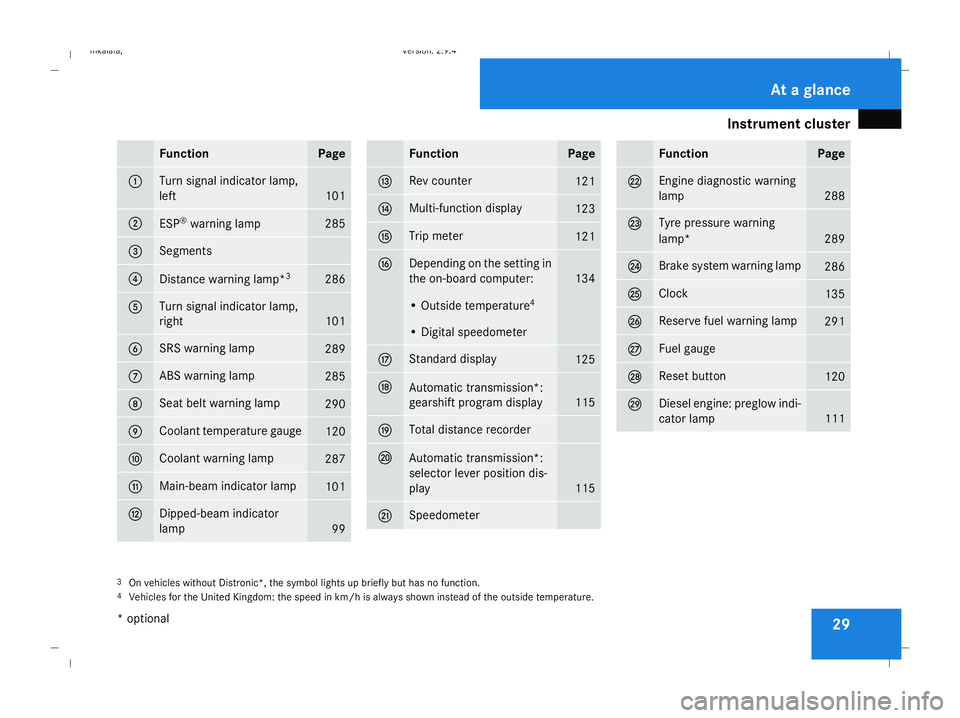
Instrument cluster
29Function Page
1 Turn signal indicator lamp,
left
101
2
ESP
®
warning lamp 285
3 Segments
4
Distance warning lamp*
3 286
5 Turn signal indicator lamp,
right
101
6 SRS warning lamp
289
7 ABS warning lamp
285
8 Seat belt warning lamp
290
9 Coolant temperature gauge
120
a Coolant warning lamp
287
b Main-beam indicator lamp
101
c Dipped-beam indicator
lamp
99 Function Page
d Rev counter
121
e Multi-function display
123
f Trip meter
121
g Depending on the setting in
the on-board computer:
134
• Outside temperature
4 • Digital speedometer
h Standard display
125
j
Automatic transmission*:
gearshift program display
115
k Total distance recorder
l
Automatic transmission*:
selector lever position dis-
play
115
m Speedometer Function Page
n Engine diagnostic warning
lamp
288
o Tyre pressure warning
lamp*
289
p Brake system warning lamp
286
q Clock
135
r Reserve fuel warning lamp
291
s Fuel gauge
t Reset button
120
u Diesel engine: preglow indi-
cator lamp
111
3
On vehicles without Distronic*, the symbol lights up briefly but has no function.
4 Vehicles for the United Kingdom: the speed in km/h is always shown instead of the outside temperature. At a glance
* optional
211_AKB; 2; 5, en-GB
mkalafa,
Version: 2.9.4 2008-02-29T16:57:07+01:00 - Seite 29Dateiname: 6515_3416_02_buchblock.pdf; preflight
Page 33 of 401
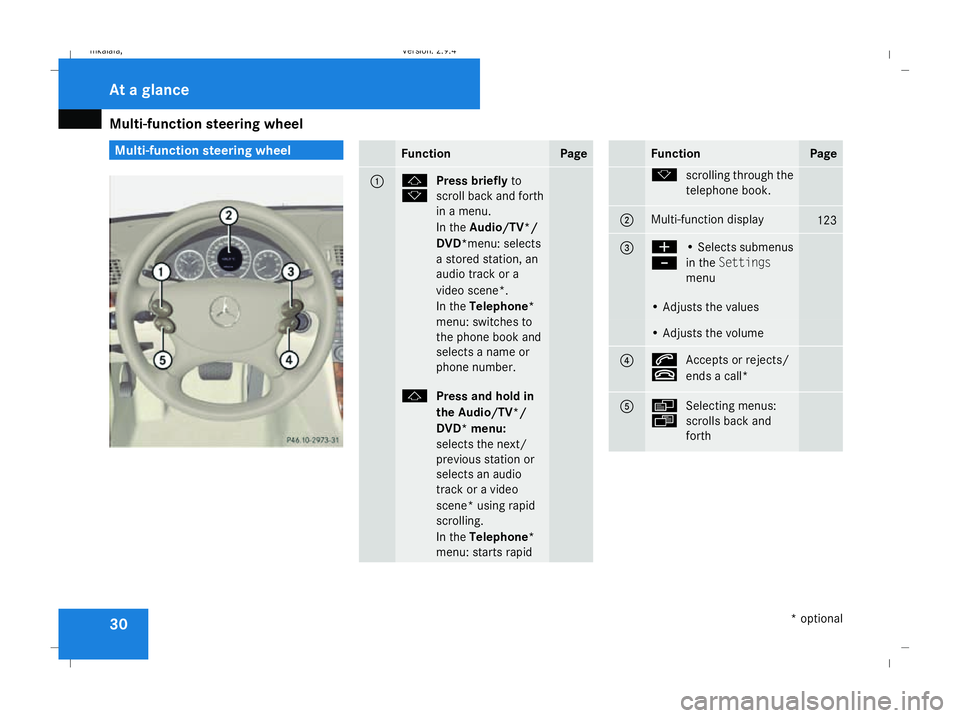
Multi-function steering wheel
30 Multi-function steering wheel
Function Page
1 j
k
Press briefly
to
scroll back and forth
in a menu.
In the Audio/TV*/
DVD*menu: selects
a stored station, an
audio track or a
video scene*.
In the Telephone*
menu: switches to
the phone book and
selects a name or
phone number. j
Press and hold in
the Audio/TV*/
DVD* menu:
selects the next/
previous station or
selects an audio
track or a video
scene* using rapid
scrolling.
In the Telephone*
menu: starts rapid Function Page
k
scrolling through the
telephone book. 2 Multi-function display
123
3 æ
-
• Selects submenus
in the
Settings
menu • Adjusts the values
• Adjusts the volume
4 s
t
Accepts or rejects/
ends a call* 5 è
ÿ
Selecting menus:
scrolls back and
forth At a glance
* optional
211_AKB; 2; 5, en-GB
mkalafa
, Version: 2.9.4 2008-02-29T16:57:07+01:00 - Seite 30Dateiname: 6515_3416_02_buchblock.pdf; preflight
Page 71 of 401
Opening and closing
68(Y
page 109). You can close them using
the convenience closing feature
(Y page 109).
i If the vehicle has been parked for a long
time, you must pull the door handle to acti-
vate the KEYLESS GO functions.
Important notes R
If the KEYLESS GO key is removed from the
vehicle (e.g. in luggage or an article of
clothing), it will no longer be possible to
lock or start the vehicle.
R If the KEYLESS GO key is removed from the
vehicle while the engine is running, e.g. if
the front passenger leaves the vehicle with
the KEYLESS GO key, the following mes-
sage will appear in the multi-function dis-
play as you pull away: Key not detec-
ted.
R If the KEYLESS GO key is in the vehicle, the
vehicle can be started at any time. If you
have left the KEYLESS GO key in the vehi-
cle, the following message will appear in
the multi-function display when you lock
the vehicle: Key still in vehicle .Factory settings X
To unlock centrally: pull the door handle.
The turn signals flash once. The locking
knobs in the doors pop up. The anti-theft
alarm system* is deactivated.
When it is dark, the surround lighting also
comes on if it is activated in the on-board
computer.
i If you do not open either a door or the
boot lid/tailgate after you have unlocked
the vehicle, it will automatically relock after
approximately 40 seconds.
i There is a danger of the vehicle being
unlocked unintentionally. This could occur
if the KEYLESS GO key is within one metre
of the vehicle and the door handle is
splashed with water. This could also occur
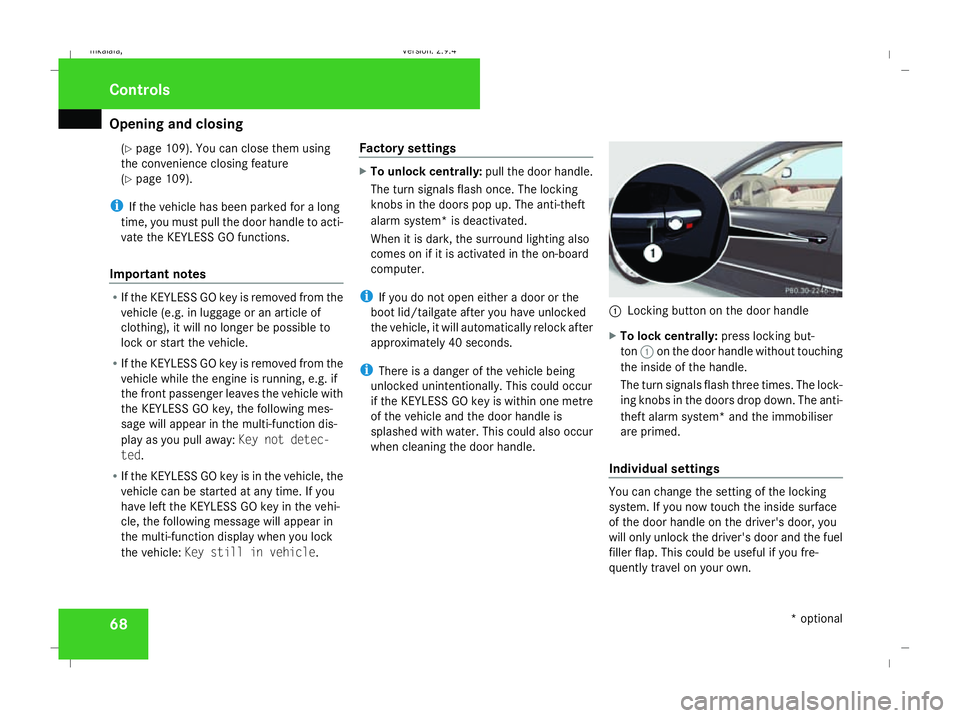
when cleaning the door handle. 1
Locking button on the door handle
X To lock centrally: press locking but-
ton 1on the door handle without touching
the inside of the handle.
The turn signals flash three times. The lock-
ing knobs in the doors drop down. The anti-
theft alarm system* and the immobiliser
are primed.
Individual settings You can change the setting of the locking
system. If you now touch the inside surface
of the door handle on the driver's door, you
will only unlock the driver's door and the fuel
filler flap. This could be useful if you fre-
quently travel on your own. Controls
* optional
211_AKB; 2; 5, en-GB
mkalafa,
Version: 2.9.4 2008-02-29T16:57:07+01:00 - Seite 68Dateiname: 6515_3416_02_buchblock.pdf; preflight
Page 88 of 401
Seats
85
5
Lumbar region support
6 Seat cushion length
X To activate/deactivate: press button1.
The indicator lamp in the button lights up/
goes out.
When switched on, the message Driving
dynamics seat adjustment appears in
the multi-function display for five seconds.
Massage function (PULSE) The massage function helps you to prevent
muscle tension on long journeys.
X Press button 3.
The indicator lamp in the button lights up.
The air cushions in the lumbar region
vibrate for approximately five minutes. Seat ventilation*
The three blue indicator lamps in the button
indicate the ventilation level you have selec-
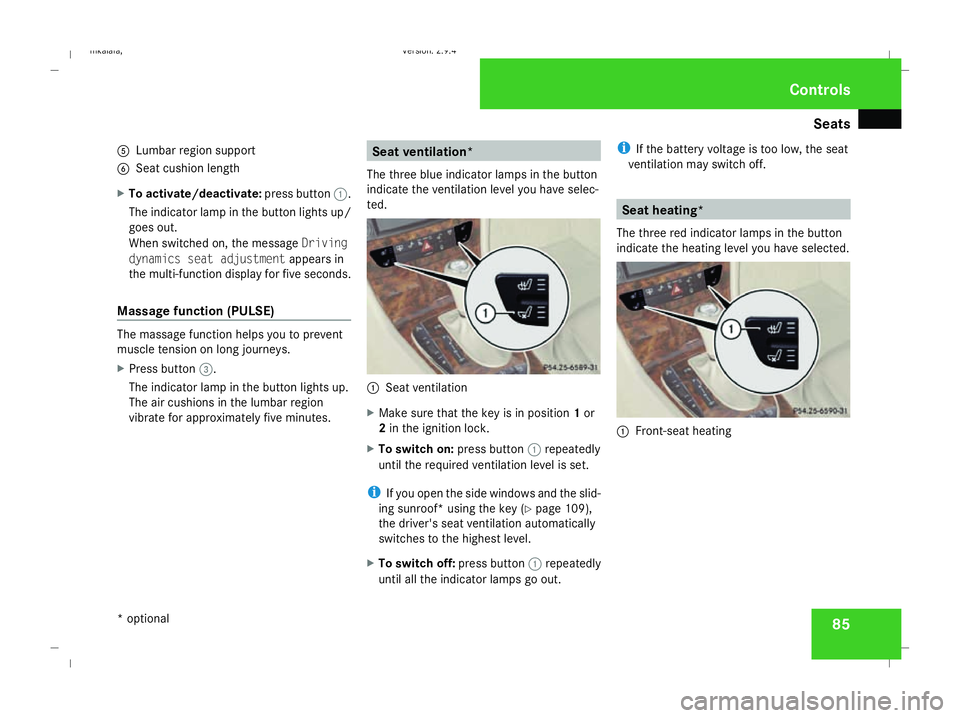
ted. 1
Seat ventilation
X Make sure that the key is in position 1or
2 in the ignition lock.
X To switch on: press button1repeatedly
until the required ventilation level is set.
i If you open the side windows and the slid-
ing sunroof* using the key (Y page 109),
the driver's seat ventilation automatically
switches to the highest level.
X To switch off: press button1repeatedly
until all the indicator lamps go out. i
If the battery voltage is too low, the seat
ventilation may switch off. Seat heating*
The three red indicator lamps in the button
indicate the heating level you have selected. 1
Front-seat heating Controls
* optional
211_AKB; 2; 5, en-GB
mkalafa,
Version: 2.9.4 2008-02-29T16:57:07+01:00 - Seite 85 ZDateiname: 6515_3416_02_buchblock.pdf; preflight
Page 92 of 401
Steering wheel
89Steering wheel
Points to remember
Depending on the vehicle equipment, you can
adjust the steering wheel either manually or
electrically*. G
Risk of injury
The electrically adjustable steering
wheel* can be adjusted when the key is
removed from the ignition lock. Therefore,
do not leave children unsupervised in the
vehicle as they could become trapped as
the steering wheel is adjusted. G
Risk of accident
Only adjust the steering wheel when the
vehicle is stationary and do not pull away
until the steering wheel adjustment mech-
anism is locked in position. You might oth-
erwise drive without the steering wheel
adjustment mechanism being locked in
position. As a result you could be distracted
from road and traffic conditions by an unex-
pected movement of the steering wheel
and thereby cause an accident.
The steerability of the vehicle is however
not affected. When you adjust the steering wheel, make
sure that:
R
the steering wheel can be reached with
your arms slightly bent
R you can move your legs freely
R you can see all the displays in the instru-
ment cluster clearly Adjusting the steering wheel man-
ually
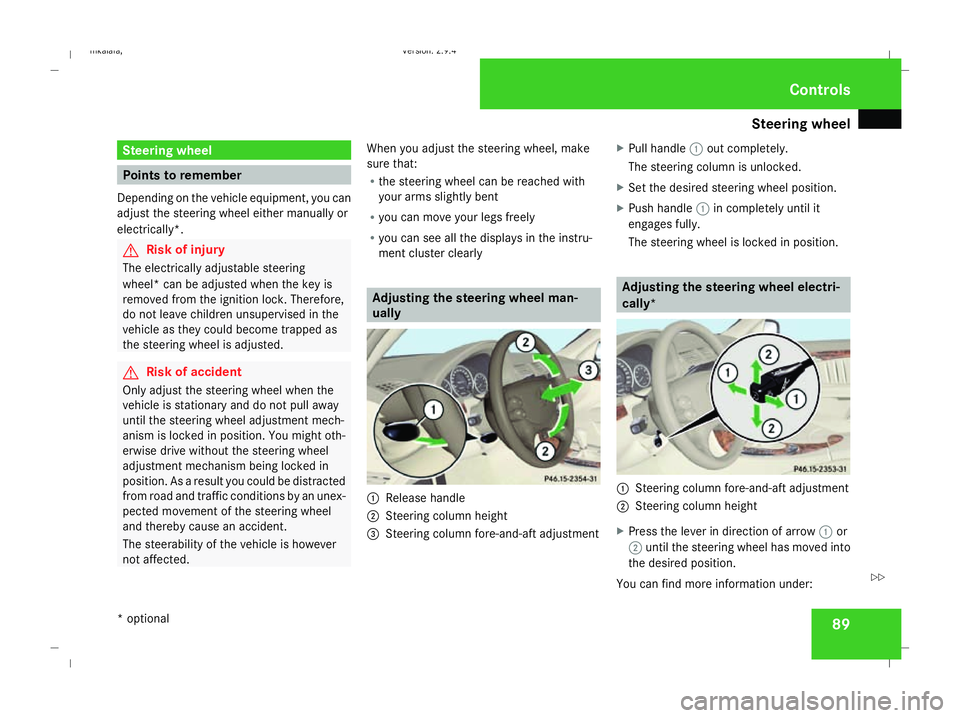
1
Release handle
2 Steering column height
3 Steering column fore-and-aft adjustment X
Pull handle 1out completely.
The steering column is unlocked.
X Set the desired steering wheel position.
X Push handle 1in completely until it
engages fully.
The steering wheel is locked in position. Adjusting the steering wheel electri-
cally*
1
Steering column fore-and-aft adjustment
2 Steering column height
X Press the lever in direction of arrow 1or
2 until the steering wheel has moved into
the desired position.
You can find more information under: Controls
* optional
211_AKB; 2; 5, en-GB
mkalafa,
Version: 2.9.4 2008-02-29T16:57:07+01:00 - Seite 89 ZDateiname: 6515_3416_02_buchblock.pdf; preflight
Page 101 of 401
Seat belts
98 G
Risk of accident
Only adjust the driver's seat when the vehi-
cle is stationary. You will otherwise be dis-
tracted from the road and traffic conditions
and you could lose control of the vehicle as
a result of the seat moving. This could
cause an accident. G
Risk of accident
Only adjust the steering wheel when the
vehicle is stationary and do not pull away
until the steering wheel adjustment mech-
anism is locked in position. You might oth-
erwise drive without the steering wheel
adjustment mechanism being locked in
position. As a result you could be distracted
from road and traffic conditions by an unex-
pected movement of the steering wheel
and thereby cause an accident.
The steerability of the vehicle is however
not affected.
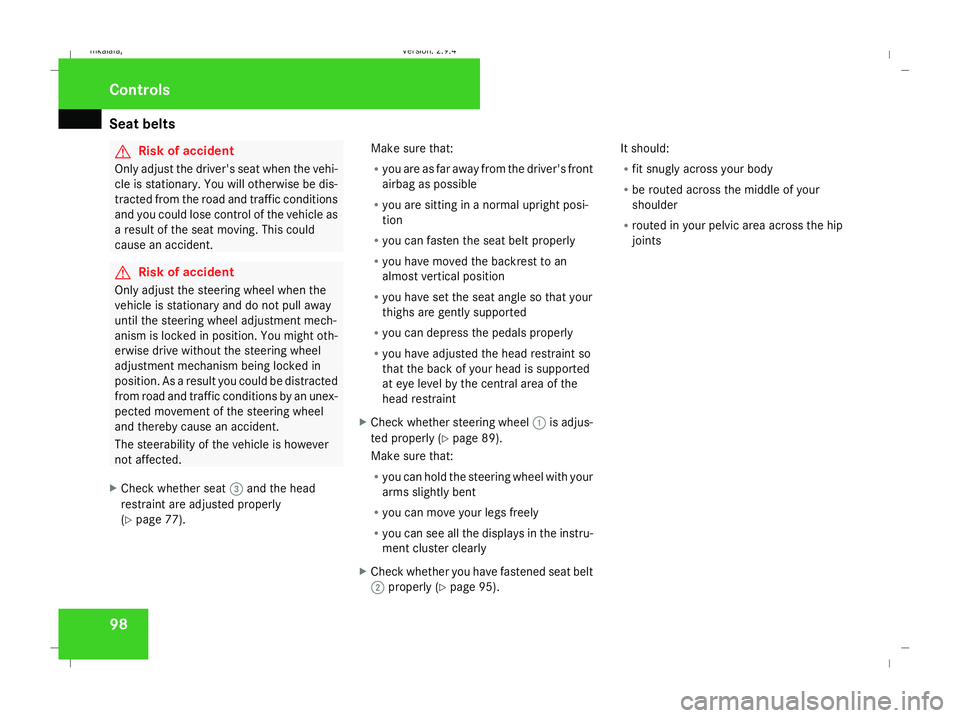
X Check whether seat 3and the head
restraint are adjusted properly
(Y page 77). Make sure that:
R
you are as far away from the driver's front
airbag as possible
R you are sitting in a normal upright posi-
tion
R you can fasten the seat belt properly
R you have moved the backrest to an
almost vertical position
R you have set the seat angle so that your
thighs are gently supported
R you can depress the pedals properly
R you have adjusted the head restraint so
that the back of your head is supported
at eye level by the central area of the
head restraint
X Check whether steering wheel 1is adjus-
ted properly (Y page 89).
Make sure that:
R you can hold the steering wheel with your
arms slightly bent
R you can move your legs freely
R you can see all the displays in the instru-
ment cluster clearly
X Check whether you have fastened seat belt
2 properly (Y page 95). It should:
R
fit snugly across your body
R be routed across the middle of your
shoulder
R routed in your pelvic area across the hip
joints Controls
211_AKB; 2; 5, en-GB
mkalafa,
Version: 2.9.4 2008-02-29T16:57:07+01:00 - Seite 98Dateiname: 6515_3416_02_buchblock.pdf; preflight