buttons MERCEDES-BENZ E-CLASS SALOON 2008 Owner's Manual
[x] Cancel search | Manufacturer: MERCEDES-BENZ, Model Year: 2008, Model line: E-CLASS SALOON, Model: MERCEDES-BENZ E-CLASS SALOON 2008Pages: 401, PDF Size: 6.89 MB
Page 260 of 401
Display
messages 257Display messages
Notes
The on-board computer shows warnings or
malfunctions in the multi-function display.
Certain display messages are accompanied
by a warning tone or a continuous tone.
The multi-function display shows high-priority
display messages in red. In the following
tables, these display messages are printed in
red.
Please respond in accordance with the dis-
play messages and follow the additional
notes in this Owner's Manual. G
Risk of accident
No further messages can be displayed if the
instrument cluster and/or the multi-func-
tion display fails.
This means that you will not see information
about the driving situation, such as the speed, outside temperature, warning/indi-
cator lamps, display messages or system
failures. The vehicle's handling character-
istics may be affected. Adjust your driving
style and speed accordingly.
Immediately consult a qualified specialist
workshop which has the necessary special-
ist knowledge and tools to carry out the
work required. Mercedes-Benz recom-
mends that you use a Mercedes-Benz
Service Centre for this purpose. In particu-
lar, work relevant to safety or on safety-
related systems must be carried out at a
qualified specialist workshop.
When you stop and park the vehicle, please
observe the instructions provided for HOLD
(Y page 155) and parking ( Ypage 113).
The following tables contain all the display
messages. Hiding display messages After a few seconds, the on-board computer
automatically hides some low priority display
messages. Other messages remain visible in
the multi-function display until you hide them
yourself.
Some high priority display messages cannot
be hidden. The multi-function display shows
these messages continuously until the cau-
ses of the messages have been remedied.
Use the buttons on the multi-function steer-
ing wheel.
X
Use the è,·,jork button
to select another display.
The on-board computer saves certain dis-
play messages in the message mem-
ory (Ypage 131). Practical advice
211_AKB; 2; 5, en-GB
mkalafa,
Version: 2.9.4
2008-02-29T16:57:07+01:00 - Seite 257 ZDateiname: 6515_3416_02_buchblock.pdf; preflight
Page 285 of 401
Troubleshooting
282 Troubleshooting
Points to remember
G
Risk of accident and injury
The operating safety of the vehicle could be impaired if service work is carried out incorrectly. There is a risk that you could lose control of
the vehicle and cause an accident. The safety systems may no longer be able to protect you or others as they are designed to do.
Always have maintenance work carried out at a qualified specialist workshop which has the necessary specialist knowledge and tools to
carry out the work required.
Mercedes-Benz recommends that you use a Mercedes-Benz Service Centre for this purpose.
In particular, work relevant to safety or on safety-related systems must be carried out at a qualified specialist workshop. Indicator and warning lamps in switches and buttons
Problem Possible cause/consequence Suggested solutions
One or all of the indicator lamps
in the seat ventilation* button are
flashing. There is insufficient voltage
because too many consumers are
switched on. The seat ventila-
tion* has switched itself off auto-
matically. X
Switch off consumers that are not required, e.g. reading lamps,
interior lighting, etc.
The seat ventilation* will automatically switch back on as soon as
there is sufficient voltage again. One or all of the indicator lamps
in the seat heating* button are
flashing. There is insufficient voltage
because too many consumers are
switched on. The seat heating*
has switched itself off automati-
cally. X
Switch off consumers that are not required, e.g. reading lamps,
interior lighting, etc.
The seat heating* will automatically switch back on as soon as
there is sufficient voltage again. Practical advice
* optional
211_AKB; 2; 5, en-GB
mkalafa
,V ersion: 2.9.4
2008-02-29T16:57:07+01:00 - Seite 282 Dateiname: 6515_3416_02_buchblock.pdf; preflight
Page 314 of 401
Changing the bulbs
311
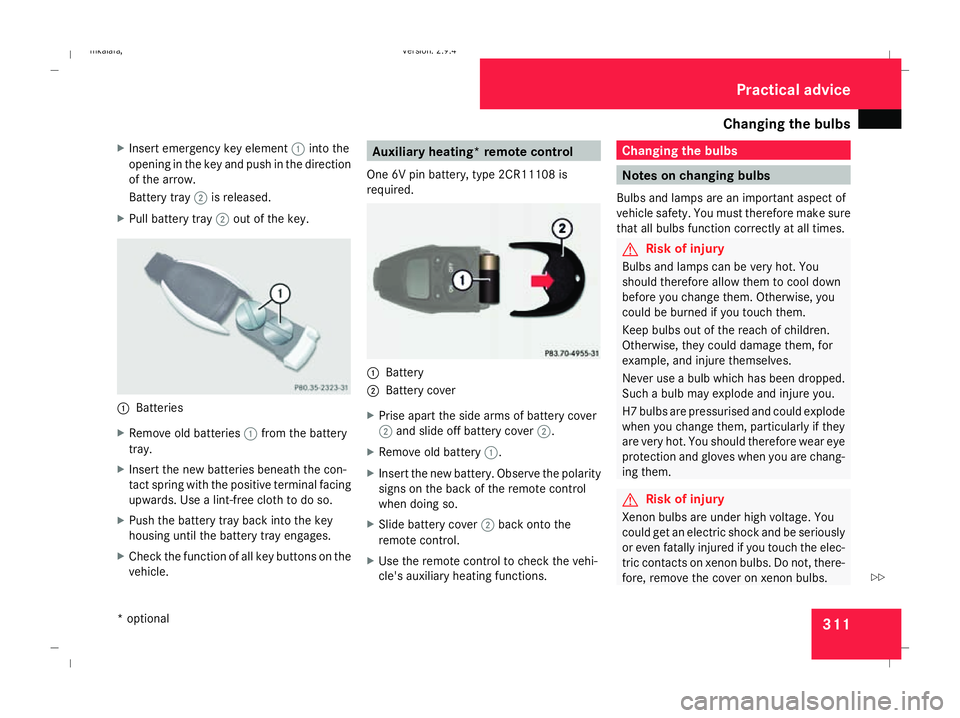
X
Insert emergency key element 1into the
opening in the key and push in the direction
of the arrow.
Battery tray 2is released.
X Pull battery tray 2out of the key. 1
Batteries
X Remove old batteries 1from the battery
tray.
X Insert the new batteries beneath the con-
tact spring with the positive terminal facing
upwards. Use a lint-free cloth to do so.
X Push the battery tray back into the key
housing until the battery tray engages.
X Check the function of all key buttons on the
vehicle. Auxiliary heating* remote control
One 6V pin battery, type 2CR11108 is
required. 1
Battery
2 Battery cover
X Prise apart the side arms of battery cover
2 and slide off battery cover 2.
X Remove old battery 1.
X Insert the new battery. Observe the polarity
signs on the back of the remote control
when doing so.
X Slide battery cover 2back onto the
remote control.
X Use the remote control to check the vehi-
cle's auxiliary heating functions. Changing the bulbs
Notes on changing bulbs
Bulbs and lamps are an important aspect of
vehicle safety. You must therefore make sure
that all bulbs function correctly at all times. G
Risk of injury
Bulbs and lamps can be very hot. You
should therefore allow them to cool down
before you change them. Otherwise, you
could be burned if you touch them.
Keep bulbs out of the reach of children.
Otherwise, they could damage them, for
example, and injure themselves.
Never use a bulb which has been dropped.
Such a bulb may explode and injure you.
H7 bulbs are pressurised and could explode
when you change them, particularly if they
are very hot. You should therefore wear eye
protection and gloves when you are chang-
ing them. G
Risk of injury
Xenon bulbs are under high voltage. You
could get an electric shock and be seriously
or even fatally injured if you touch the elec-
tric contacts on xenon bulbs. Do not, there-
fore, remove the cover on xenon bulbs. Practical advice
* optional
211_AKB; 2; 5, en-GB
mkalafa,
Version: 2.9.4 2008-02-29T16:57:07+01:00 - Seite 311 ZDateiname: 6515_3416_02_buchblock.pdf; preflight