heating MERCEDES-BENZ E-CLASS SALOON 2008 Owner's Manual
[x] Cancel search | Manufacturer: MERCEDES-BENZ, Model Year: 2008, Model line: E-CLASS SALOON, Model: MERCEDES-BENZ E-CLASS SALOON 2008Pages: 401, PDF Size: 6.89 MB
Page 165 of 401
Air conditioning
162 Air conditioning
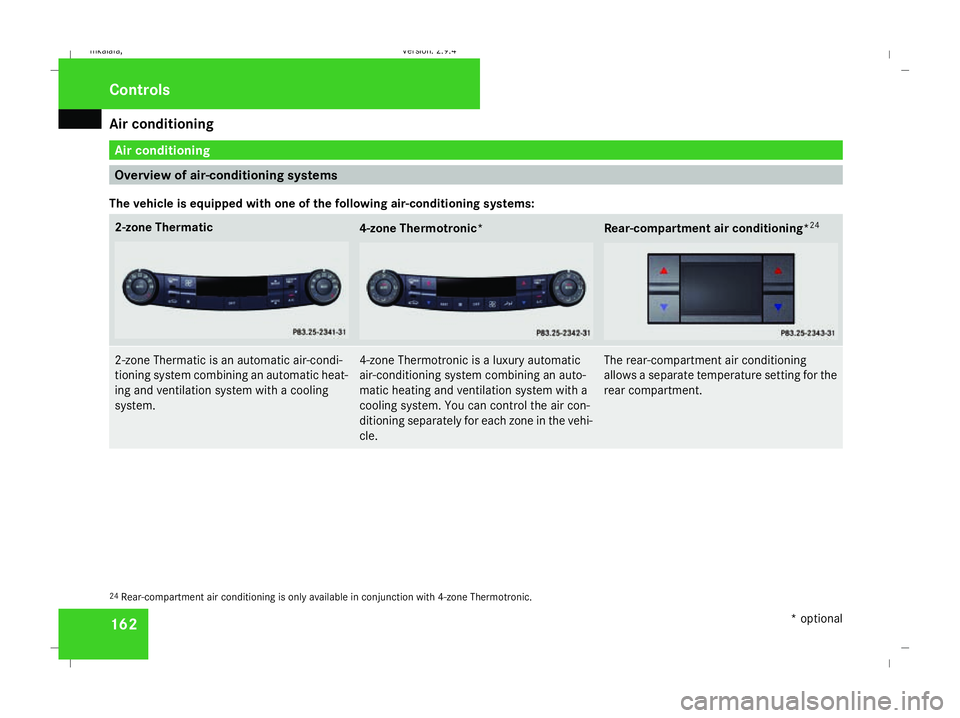
Overview of air-conditioning systems
The vehicle is equipped with one of the following air-conditioning systems: 2-zone Thermatic
4-zone Thermotronic*
Rear-compartment air conditioning*
242-zone Thermatic is an automatic air-condi-
tioning system combining an automatic heat-
ing and ventilation system with a cooling
system. 4-zone Thermotronic is a luxury automatic
air-conditioning system combining an auto-
matic heating and ventilation system with a
cooling system. You can control the air con-
ditioning separately for each zone in the vehi-
cle. The rear-compartment air conditioning
allows a separate temperature setting for the
rear compartment.
24
Rear-compartment air conditioning is only available in conjunction with 4-zone Thermotronic. Cont
rols
* optional
211_AKB; 2; 5, en-GB
mkalafa
,V ersion: 2.9.4
2008-02-29T16:57:07+01:00 - Seite 162 Dateiname: 6515_3416_02_buchblock.pdf; preflight
Page 168 of 401
Air conditioning
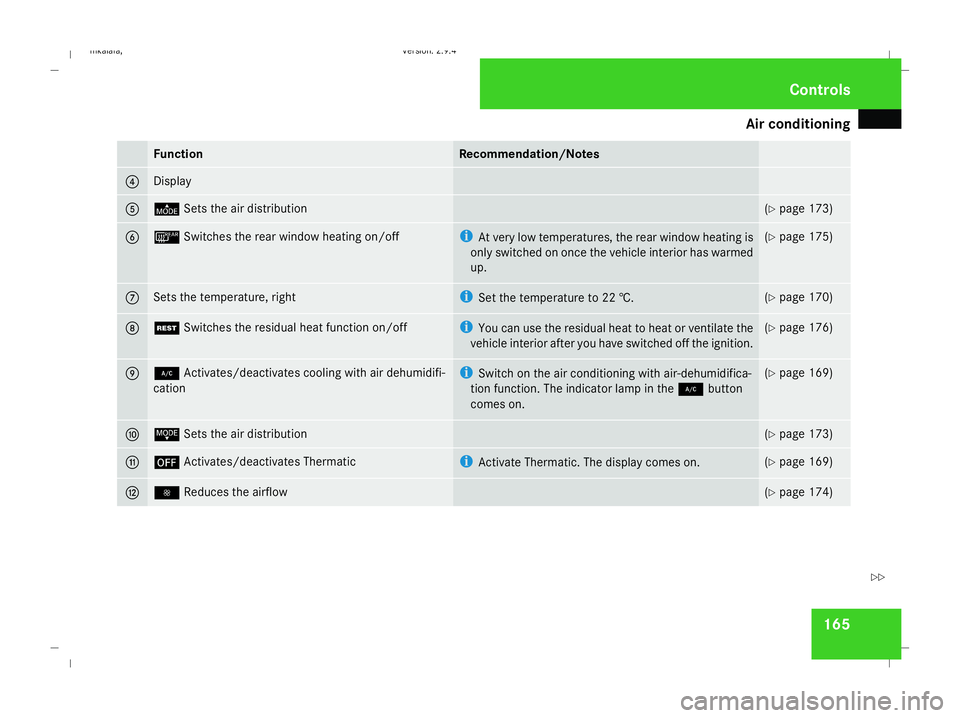
165Function Recommendation/Notes
4 Display
5 ©
Sets the air distribution (Y
page 173) 6 ¯
Switches the rear window heating on/off i
At very low temperatures, the rear window heating is
only switched on once the vehicle interior has warmed
up. (Y
page 175) 7 Sets the temperature, right i
Set the temperature to 22 †. (Y
page 170) 8 T
Switches the residual heat function on/off i
You can use the residual heat to heat or ventilate the
vehicle interior after you have switched off the ignition. (Y
page 176) 9 2
Activates/deactivates cooling with air dehumidifi-
cation i
Switch on the air conditioning with air-dehumidifica-
tion function. The indicator lamp in the 2button
comes on. (Y
page 169) a ª
Sets the air distribution (Y
page 173) b ´
Activates/deactivates Thermatic i
Activate Thermatic. The display comes on. (Y
page 169) c ·
Reduces the airflow (Y
page 174) Cont
rols
211_AKB; 2; 5, en-GB
mkalafa
,V ersion: 2.9.4
2008-02-29T16:57:07+01:00 - Seite 165 ZDateiname: 6515_3416_02_buchblock.pdf; preflight
Page 170 of 401
Air conditioning
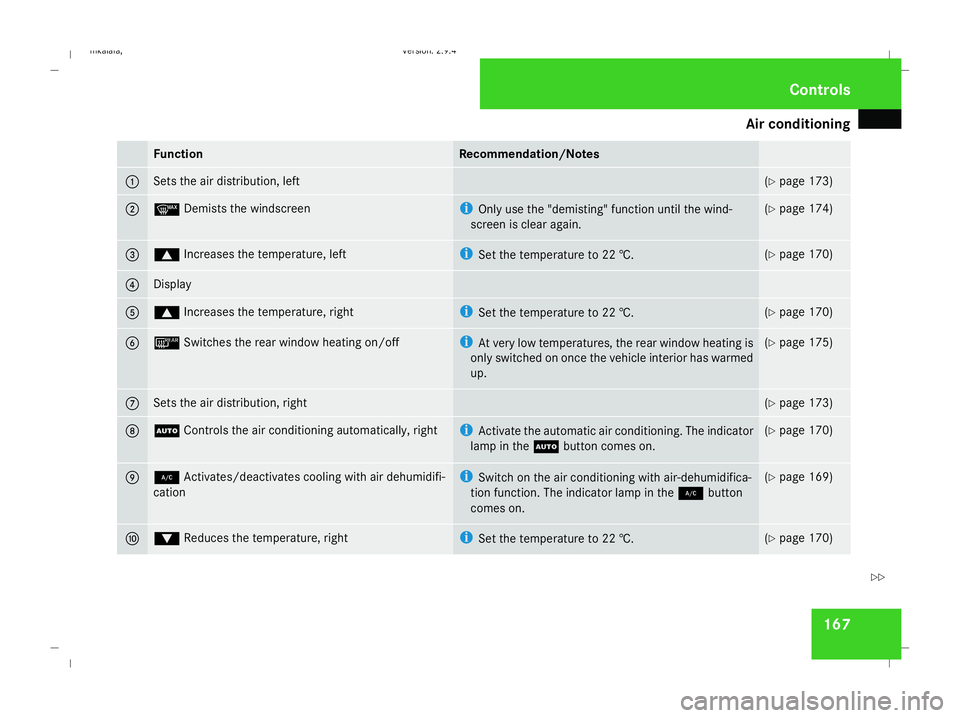
167Function Recommendation/Notes
1 Sets the air distribution, left (Y
page 173) 2 y
Demists the windscreen i
Only use the "demisting" function until the wind-
screen is clear again. (Y
page 174) 3 $
Increases the temperature, left i
Set the temperature to 22 †. (Y
page 170) 4 Display
5 $
Increases the temperature, right i
Set the temperature to 22 †. (Y
page 170) 6 ¯
Switches the rear window heating on/off i
At very low temperatures, the rear window heating is
only switched on once the vehicle interior has warmed
up. (Y
page 175) 7 Sets the air distribution, right (Y
page 173) 8 U
Controls the air conditioning automatically, right i
Activate the automatic air conditioning. The indicator
lamp in the Ubutton comes on. (Y
page 170) 9 2
Activates/deactivates cooling with air dehumidifi-
cation i
Switch on the air conditioning with air-dehumidifica-
tion function. The indicator lamp in the 2button
comes on. (Y
page 169) a %
Reduces the temperature, right i
Set the temperature to 22 †. (Y
page 170) Cont
rols
211_AKB; 2; 5, en-GB
mkalafa
,V ersion: 2.9.4
2008-02-29T16:57:07+01:00 - Seite 167 ZDateiname: 6515_3416_02_buchblock.pdf; preflight
Page 178 of 401
Air conditioning
175Demisting the windows
Windows misted up on the inside X
Activate the "cooling function with air-
dehumidification" function.
X Activate the automatic mode.
X If the windows continue to mist up, activate
the "demisting" function.
Windows misted up on the outside X
Activate the windscreen wipers.
X 2-zone Thermatic: press and hold the
© orª button until the a,Ú
or Y symbol is shown in the display.
X 4-zone Thermotronic*: turn the thumb-
wheel for air distribution to the Yor
a symbol.
i You should only select this setting until
the windscreen is clear again. Switching the rear window heating
on/off
G
Risk of accident
Clear all windows of ice or snow before set-
ting off. Impaired visibility could otherwise
endanger you and others.
i At very low temperatures, the rear win-
dow heating is only switched on once the
vehicle interior has warmed up.
i The rear window heating has a high cur-
rent draw. You should therefore switch it
off as soon as the window is clear, as it only
switches off automatically after approxi-
mately six to twenty minutes.
i If the battery voltage is too low, the rear
window heating may switch off.
i Saloon: there are aerial wires in the upper
area of the rear window; this area is there-
fore not heated.
X Make sure that the key is in position 2in
the ignition lock.
X Press the ¯button.
The indicator lamp in the ¯button lights
up or goes out. Activating/deactivating air-recircula-
tion mode
You can deactivate the flow of fresh air if
unpleasant odours are entering the vehicle
from outside. The air already inside the vehi-
cle will then be recirculated. G
Risk of accident
Only switch over to air-recirculation mode
briefly at low outside temperatures. Other-
wise, the windows could mist up, thus
impairing visibility and endangering your-
self and others. This may prevent you from
observing the traffic conditions, thereby
causing an accident.
X Make sure that the key is in position 2in
the ignition lock.
X To activate: press the,button.
The indicator lamp in the ,button
comes on.
i Air-recirculation mode is activated auto-
matically at high outside temperatures.
When air-recirculation mode is activated
automatically, the indicator lamp in
the , button is not lit.
Outside air is added after about
30 minutes. Cont
rols
* optional
211_AKB; 2; 5, en-GB
mkalafa ,V ersion: 2.9.4
2008-02-29T16:57:07+01:00 - Seite 175 ZDateiname: 6515_3416_02_buchblock.pdf; preflight
Page 179 of 401
Air conditioning
176
X
To deactivate: press the,button.
The indicator lamp in the ,button goes
out.
i Air-recirculation mode switches off auto-
matically:
R after approximately five minutes at out-
side temperatures below approximately
5 †
R after approximately five minutes if the air
dehumidification is deactivated
R after approximately 30 minutes at out-
side temperatures above approximately
5 †
Air-recirculation mode with the conve-
nience opening/closing feature G
Risk of injury
Make sure that nobody can become trap-
ped between the side window and the door
frame as the side windows are opened and
closed. Do not place objects or lean against
the side window when it is being opened or
closed. You or the objects could be drawn
in or become trapped between the side
window and the door frame as the window moves. If there is a risk of entrapment,
press the
,button again. If necessary,
press the switch that stops, opens or closes
the side window in the opposite direction.
Make sure that nobody can become trap-
ped when you open or close the sliding/
tilting sunroof*/panorama sliding sun-
roof*. If there is a risk of entrapment, press
the , button again. If necessary, press
the switch that stops, opens or closes the
sliding/tilting sunroof*/panorama sliding
sunroof* in the opposite direction.
X Convenience closing: press and hold
the , button until the side windows and
the sliding/tilting sunroof*/panorama
sliding sunroof* have closed.
The indicator lamp in the ,button
comes on. Air-recirculation mode is activa-
ted.
X Convenience opening: press and hold
the , button until the side windows and
the sliding/tilting sunroof*/panorama
sliding sunroof* have reached their original
position.
The indicator lamp in the ,button goes
out. Air-recirculation mode is deactivated. i
If you open the side windows or the slid-
ing/tilting sunroof* or panorama sliding
sunroof* manually after closing using the
convenience closing feature, it will remain
in this position when opened using the con-
venience opening feature. Switching the residual heat on and off
It is possible to make use of the residual heat
of the engine to continue heating the station-
ary vehicle for up to 30 minutes after the
engine has been switched off. The heating
time depends on the set interior temperature.
i The blower will run at a low speed regard-
less of the airflow setting.
i If you activate the "residual heat" function
at high temperatures, only the ventilation
will be activated. The blower runs at
medium speed.
X Make sure that the key is in position 0in
the ignition lock or that it has been
removed.
X To switch on: press theTbutton.
REST appears in the display. Cont
rols
* optional
211_AKB; 2; 5, en-GB
mkalafa
,V ersion: 2.9.4
2008-02-29T16:57:07+01:00 - Seite 176 Dateiname: 6515_3416_02_buchblock.pdf; preflight
Page 180 of 401
Air conditioning
177
X
To deactivate: press theTbutton.
REST is no longer shown in the display.
i The residual heat automatically switches
off after around 30 minutes or if:
R the ignition is switched on
R the battery voltage drops Switching auxiliary heating/ventila-
tion* on/off
G
Risk of poisoning
Exhaust fumes are produced when the aux-
iliary heating is in operation. Inhaling these
exhaust fumes can be poisonous. You
should therefore switch off the auxiliary
heating in confined spaces without an
extraction system, e.g. a garage. G
Risk of fire
When operating the auxiliary heating, parts
of the vehicle may become very hot, and
highly inflammable material such as fuels
could be ignited. Operating the auxiliary
heating is thus prohibited at filling stations
or when your vehicle is being refuelled. You must therefore switch off the auxiliary heat-
ing at filling stations.
The auxiliary heating heats the air in the vehi-
cle interior to a temperature between 20 †
and 24 †, without depending on heat emitted
by the running engine. The auxiliary heating
is operated using fuel directly from the vehi-
cle's fuel tank. For this reason, the tank con-
tent must be at least at reserve fuel level to
ensure that the auxiliary heating functions.
The auxiliary heating/ventilation automati-
cally adjusts to changes in temperature and
weather conditions. For this reason, the aux-
iliary heating could switch from ventilation
mode to heating mode or from heating mode
to ventilation mode.
You cannot use the auxiliary ventilation to
cool the vehicle interior to a temperature
lower than the outside temperature.
Before activating X
Make sure that the key is in position 2in
the ignition lock.
X Set the temperature to a value between
20 † and 24 †.
The auxiliary heating/ventilation can be acti-
vated even when the air conditioning is being controlled manually. Optimum comfort can
be attained when the system is set to auto-
matic mode. Set the desired temperature
within this range. If a higher temperature is
set, the vehicle is heated to 24 †. If a lower
temperature is set, the vehicle is heated to
20 †.
Activating/deactivating the auxiliary
heating/ventilation
The auxiliary heating/ventilation can be acti-
vated or deactivated using the remote control
or the button on the centre console.
The on-board computer can be used to spec-
ify up to three departure times, one of which
may be preselected (Y
page 138). Cont
rols
* optional
211_AKB; 2; 5, en-GB
mkalafa ,V ersion: 2.9.4
2008-02-29T16:57:07+01:00 - Seite 177 ZDateiname: 6515_3416_02_buchblock.pdf; preflight
Page 181 of 401
Air conditioning
178
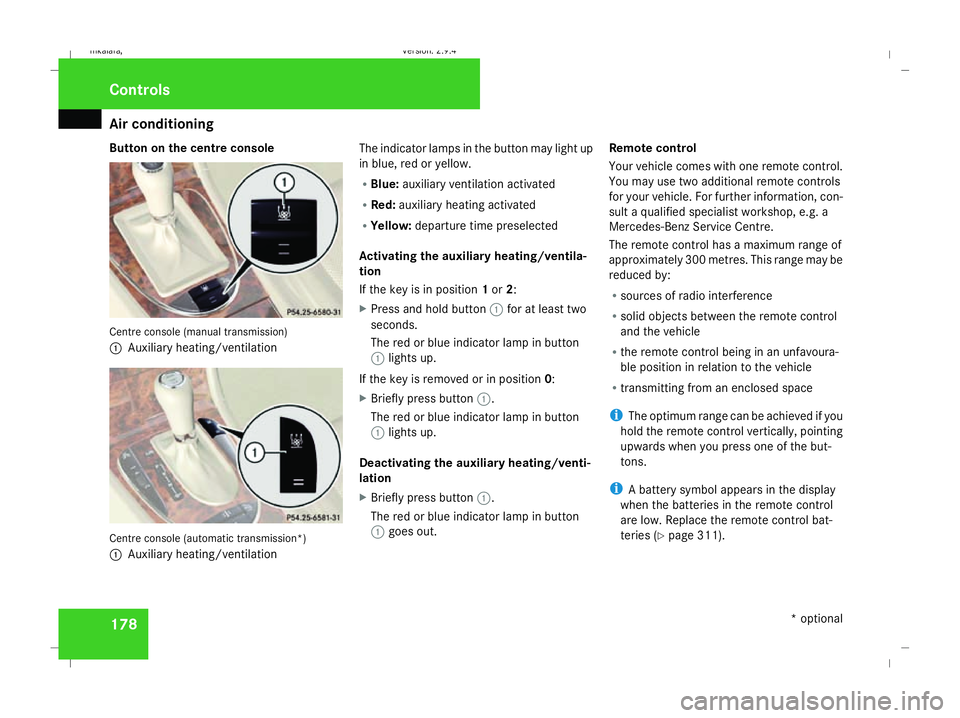
Button on the centre console
Centre console (manual transmission)
1
Auxiliary heating/ventilation Centre console (automatic transmission*)
1 Auxiliary heating/ventilation The indicator lamps in the button may light up
in blue, red or yellow.
R
Blue: auxiliary ventilation activated
R Red: auxiliary heating activated
R Yellow: departure time preselected
Activating the auxiliary heating/ventila-
tion
If the key is in position 1or 2:
X Press and hold button 1for at least two
seconds.
The red or blue indicator lamp in button
1 lights up.
If the key is removed or in position 0:
X Briefly press button 1.
The red or blue indicator lamp in button
1 lights up.
Deactivating the auxiliary heating/venti-
lation
X Briefly press button 1.
The red or blue indicator lamp in button
1 goes out. Remote control
Your vehicle comes with one remote control.
You may use two additional remote controls
for your vehicle. For further information, con-
sult a qualified specialist workshop, e.g. a
Mercedes-Benz Service Centre.
The remote control has a maximum range of
approximately 300 metres. This range may be
reduced by:
R sources of radio interference
R solid objects between the remote control
and the vehicle
R the remote control being in an unfavoura-
ble position in relation to the vehicle
R transmitting from an enclosed space
i The optimum range can be achieved if you
hold the remote control vertically, pointing
upwards when you press one of the but-
tons.
i A battery symbol appears in the display
when the batteries in the remote control
are low. Replace the remote control bat-
teries (Y page 311). Controls
* optional
211_AKB; 2; 5, en-GB
mkalafa
, Version: 2.9.4 2008-02-29T16:57:07+01:00 - Seite 178Dateiname: 6515_3416_02_buchblock.pdf; preflight
Page 182 of 401
Air conditioning
179
i
More information about the auxiliary
heating can be found in the "Practical
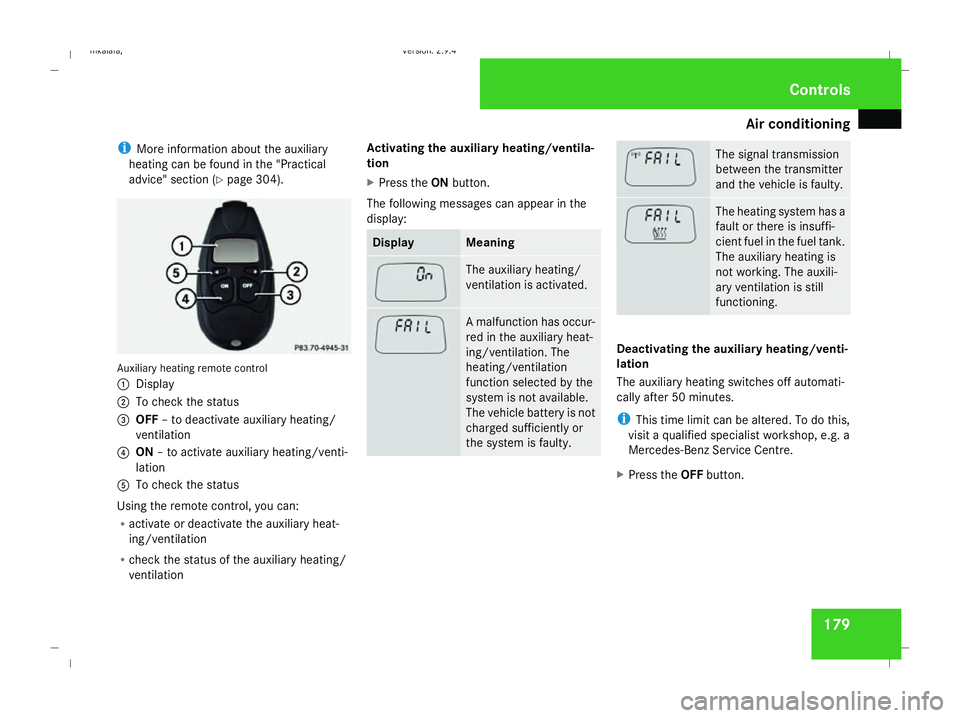
advice" section (Y page 304). Auxiliary heating remote control
1 Display
2 To check the status
3 OFF – to deactivate auxiliary heating/
ventilation
4 ON – to activate auxiliary heating/venti-
lation
5 To check the status
Using the remote control, you can:
R activate or deactivate the auxiliary heat-
ing/ventilation
R check the status of the auxiliary heating/
ventilation Activating the auxiliary heating/ventila-
tion
X
Press the ONbutton.
The following messages can appear in the
display: Display Meaning
The auxiliary heating/
ventilation is activated.
A malfunction has occur-
red in the auxiliary heat-
ing/ventilation. The
heating/ventilation
function selected by the
system is not available.
The vehicle battery is not
charged sufficiently or
the system is faulty. The signal transmission
between the transmitter
and the vehicle is faulty.
The heating system has a
fault or there is insuffi-
cient fuel in the fuel tank.
The auxiliary heating is
not working. The auxili-
ary ventilation is still
functioning.
Deactivating the auxiliary heating/venti-
lation
The auxiliary heating switches off automati-
cally after 50 minutes.
i
This time limit can be altered. To do this,
visit a qualified specialist workshop, e.g. a
Mercedes-Benz Service Centre.
X Press the OFFbutton. Cont
rols
211_AKB; 2; 5, en-GB
mkalafa
, Version: 2.9.4 2008-02-29T16:57:07+01:00 - Seite 179 ZDateiname: 6515_3416_02_buchblock.pdf; preflight
Page 183 of 401
Sliding sunroof
180
The following messages can appear in the
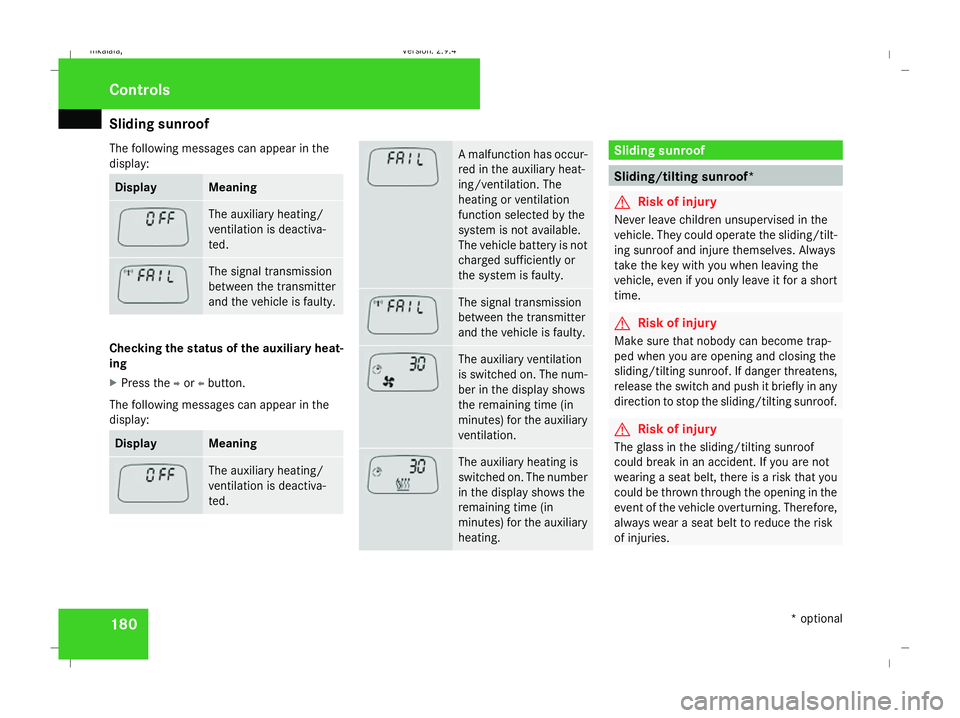
display: Display Meaning
The auxiliary heating/
ventilation is deactiva-
ted.
The signal transmission
between the transmitter
and the vehicle is faulty.
Checking the status of the auxiliary heat-
ing
X
Press the por obutton.
The following messages can appear in the
display: Display Meaning
The auxiliary heating/
ventilation is deactiva-
ted. A malfunction has occur-
red in the auxiliary heat-
ing/ventilation. The
heating or ventilation
function selected by the
system is not available.
The vehicle battery is not
charged sufficiently or
the system is faulty.
The signal transmission
between the transmitter
and the vehicle is faulty.
The auxiliary ventilation
is switched on. The num-
ber in the display shows
the remaining time (in
minutes) for the auxiliary
ventilation.
The auxiliary heating is
switched on. The number
in the display shows the
remaining time (in
minutes) for the auxiliary
heating. Sliding sunroof
Sliding/tilting sunroof*
G
Risk of injury
Never leave children unsupervised in the
vehicle. They could operate the sliding/tilt-
ing sunroof and injure themselves. Always
take the key with you when leaving the
vehicle, even if you only leave it for a short
time. G
Risk of injury
Make sure that nobody can become trap-
ped when you are opening and closing the
sliding/tilting sunroof. If danger threatens,
release the switch and push it briefly in any
direction to stop the sliding/tilting sunroof. G
Risk of injury
The glass in the sliding/tilting sunroof
could break in an accident. If you are not
wearing a seat belt, there is a risk that you
could be thrown through the opening in the
event of the vehicle overturning. Therefore,
always wear a seat belt to reduce the risk
of injuries. Controls
* optional
211_AKB; 2; 5, en-GB
mkalafa,
Version: 2.9.4 2008-02-29T16:57:07+01:00 - Seite 180Dateiname: 6515_3416_02_buchblock.pdf; preflight
Page 200 of 401
Loading and stowing
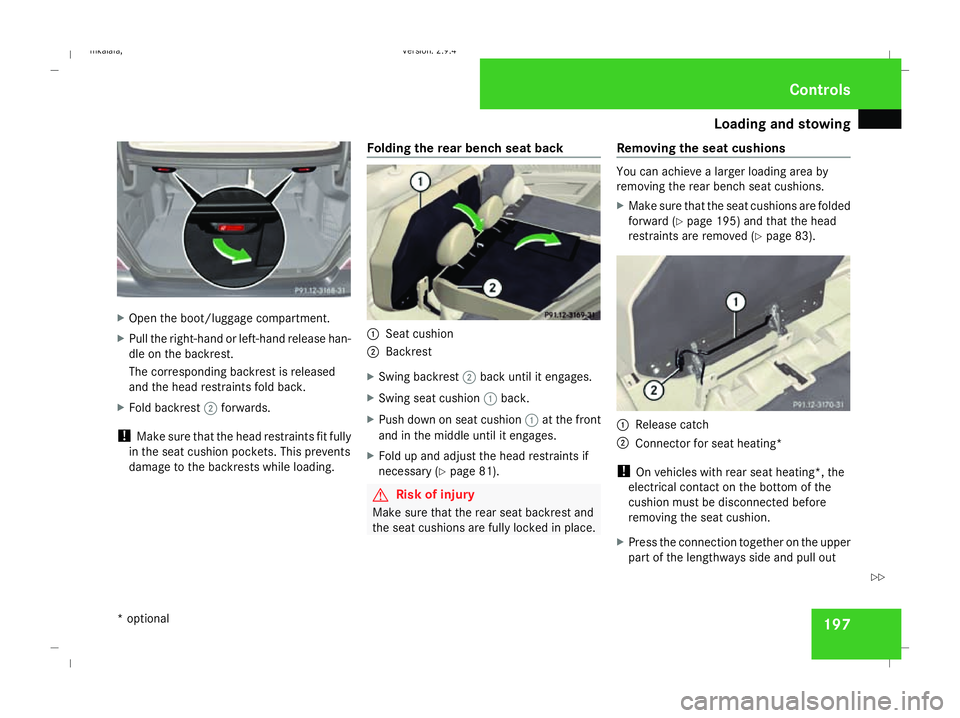
197X
Open the boot/luggage compartment.
X Pull the right-hand or left-hand release han-
dle on the backrest.
The corresponding backrest is released
and the head restraints fold back.
X Fold backrest 2forwards.
! Make sure that the head restraints fit fully
in the seat cushion pockets. This prevents
damage to the backrests while loading. Folding the rear bench seat back 1
Seat cushion
2 Backrest
X Swing backrest 2back until it engages.
X Swing seat cushion 1back.
X Push down on seat cushion 1at the front
and in the middle until it engages.
X Fold up and adjust the head restraints if
necessary (Y page 81). G
Risk of injury
Make sure that the rear seat backrest and
the seat cushions are fully locked in place. Removing the seat cushions You can achieve a larger loading area by
removing the rear bench seat cushions.
X
Make sure that the seat cushions are folded
forward (Y page 195) and that the head
restraints are removed (Y page 83). 1
Release catch
2 Connector for seat heating*
! On vehicles with rear seat heating*, the
electrical contact on the bottom of the
cushion must be disconnected before
removing the seat cushion.
X Press the connection together on the upper
part of the lengthways side and pull out Controls
* optional
211_AKB; 2; 5, en-GB
mkalafa,
Version: 2.9.4 2008-02-29T16:57:07+01:00 - Seite 197 ZDateiname: 6515_3416_02_buchblock.pdf; preflight