reset MERCEDES-BENZ E-CLASS SALOON 2008 Owner's Guide
[x] Cancel search | Manufacturer: MERCEDES-BENZ, Model Year: 2008, Model line: E-CLASS SALOON, Model: MERCEDES-BENZ E-CLASS SALOON 2008Pages: 401, PDF Size: 6.89 MB
Page 246 of 401
Service
243
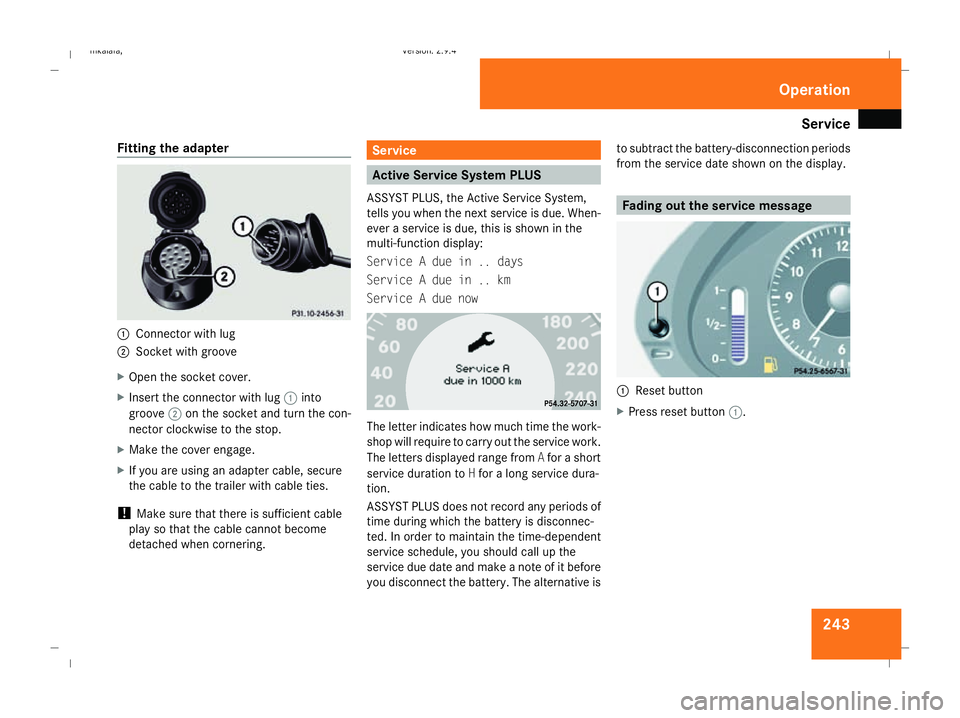
Fitting the adapter
1
Connector with lug
2 Socket with groove
X Open the socket cover.
X Insert the connector with lug 1into
groove 2on the socket and turn the con-
nector clockwise to the stop.
X Make the cover engage.
X If you are using an adapter cable, secure
the cable to the trailer with cable ties.
! Make sure that there is sufficient cable
play so that the cable cannot become
detached when cornering. Service
Active Service System PLUS
ASSYST PLUS, the Active Service System,
tells you when the next service is due. When-
ever a service is due, this is shown in the
multi-function display:
Service A due in .. days
Service A due in .. km
Service A due now The letter indicates how much time the work-
shop will require to carry out the service work.
The letters displayed range from
Afor a short
service duration to Hfor a long service dura-
tion.
ASSYST PLUS does not record any periods of
time during which the battery is disconnec-
ted. In order to maintain the time-dependent
service schedule, you should call up the
service due date and make a note of it before
you disconnect the battery. The alternative is to subtract the battery-disconnection periods
from the service date shown on the display. Fading out the service message
1
Reset button
X Press reset button 1. Operation
211_AKB; 2; 5, en-GB
mkalafa,
Version: 2.9.4
2008-02-29T16:57:07+01:00 - Seite 243 ZDateiname: 6515_3416_02_buchblock.pdf; preflight
Page 247 of 401
Care
244 Exceeding the service due date
One of the following messages appears in the
multi-function display:
Service A overdue by .. days
Service A overdue by .. km
You will also hear a warning tone.
A qualified specialist workshop, e.g. a
Mercedes-Benz Service Centre, will reset the
service indicator when it carries out the nec-
essary service work.
i If you fail to have the service performed
by the specified date, you may be contra-
vening the relevant laws, your warranty
may be invalidated and ex gratia claims
may be refused. Calling up the service due date
Use the buttons on the multi-function steer-
ing wheel.
X Switch on the ignition.
X Press èorÿ to select the Basic
display menu (Y page 125).
X Press jork to select the service
information.
The 9 service symbol and the service
due date are displayed.
X To select a different display, press j,
è orÿ. Care
Notes on care
Regular and proper care maintains the value
of your vehicle.
i It is advisable to use Mercedes-Benz care
products.
Scratches, corrosive deposits, areas affected
by corrosion and damage caused by inade-
quate care cannot always be completely
repaired. In such cases, visit a qualified spe-
cialist workshop immediately, e.g. a
Mercedes-Benz Service Centre.
Repair damage caused by loose chippings
and remove the following substances imme-
diately, whilst avoiding rubbing too hard:
R Soak insect remains with insect remover
and rinse off afterwards.
R Soak bird droppings with water and rinse
off afterwards.
R Remove tree resin, oils, fuels and greases
by rubbing gently with a cloth soaked in
petroleum ether or lighter fluid.
R Use silicone remover to remove wax.
R Use tar remover to remove tar stains. Operation
211_AKB; 2; 5, en-GB
mkalafa,
Version: 2.9.4 2008-02-29T16:57:07+01:00 - Seite 244Dateiname: 6515_3416_02_buchblock.pdf; preflight
Page 254 of 401
251
Where will I find...?
...........................252
Display messages ............................. 257
Troubleshooting ................................ 282
Locking/unlocking in an emer-
gency ................................................. 306
Resetting triggered NECK-PRO
head restraints .................................. 309
Changing the batteries .....................310
Changing the bulbs ...........................311
Replacing the wiper blades ..............315
Flat tyre ............................................. 317
Battery ............................................... 329
Jump-starting .................................... 333
Towing and tow-starting ..................337
Fuses .................................................. 340 Practical advice
211_AKB; 2; 5, en-GB
mkalafa,
Version: 2.9.4 2008-02-29T16:57:07+01:00 - Seite 251Dateiname: 6515_3416_02_buchblock.pdf; preflight
Page 296 of 401
Troubleshooting
293Accident
Problem Possible cause/consequence Suggested solutions
Fuel is leaking from the vehicle.
G
Risk of fire
The fuel line or the fuel tank has
been damaged. The leaking fuel
creates a risk of fire or explosion. X
Switch off the ignition immediately.
X Remove the ignition key.
Do not restart the engine under any circumstances. The leaking fuel
creates a risk of fire or explosion.
X Consult a qualified specialist workshop. You are unable to determine the
extent of the damage. X
Consult a qualified specialist workshop. You cannot detect any damage. X
Start the engine as normal. The NECK-PRO head restraints
on the driver's and front-
passenger seats have been trig-
gered. Your vehicle has been involved in
a rear-end collision. X
Reset the NECK-PRO head restraints (Y page 309). Practical advice
211_AKB; 2; 5, en-GB
mkalafa
,V ersion: 2.9.4
2008-02-29T16:57:07+01:00 - Seite 293 ZDateiname: 6515_3416_02_buchblock.pdf; preflight
Page 312 of 401
Resetting triggered NECK-PRO head restraints
309
X
Pull cover 2off the tailgate trim.
X Push release catch 1to the left as far as
the stop and open the tailgate. Releasing the parking lock manually
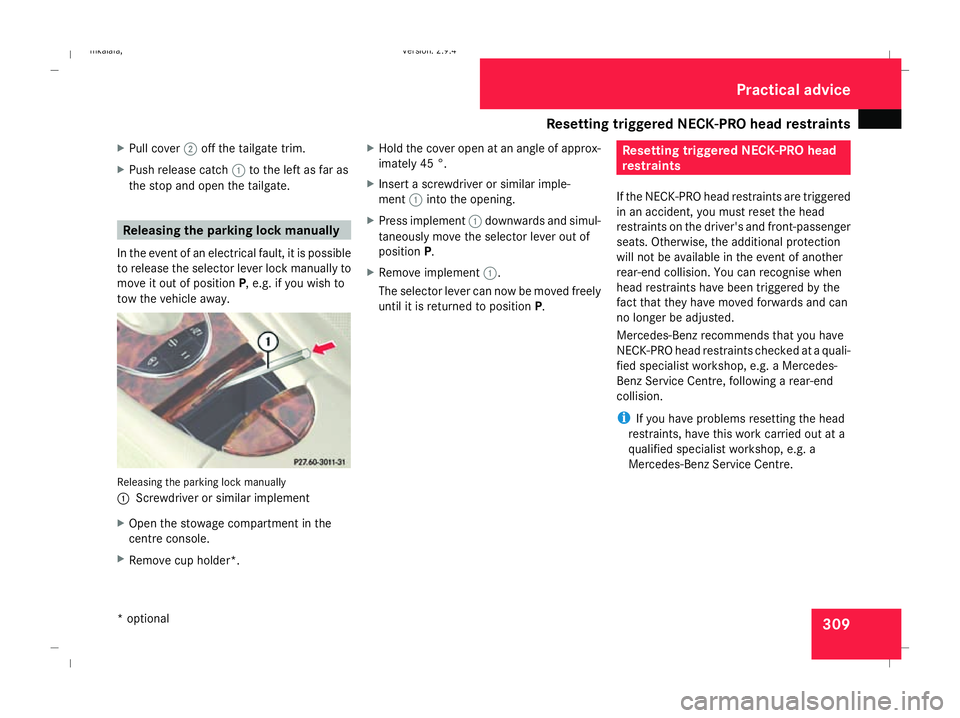
In the event of an electrical fault, it is possible
to release the selector lever lock manually to
move it out of position P, e.g. if you wish to
tow the vehicle away. Releasing the parking lock manually
1 Screwdriver or similar implement
X Open the stowage compartment in the
centre console.
X Remove cup holder*. X
Hold the cover open at an angle of approx-
imately 45 °.
X Insert a screwdriver or similar imple-
ment 1into the opening.
X Press implement 1downwards and simul-
taneously move the selector lever out of
position P.
X Remove implement 1.
The selector lever can now be moved freely
until it is returned to position P. Resetting triggered NECK-PRO head
restraints
If the NECK-PRO head restraints are triggered
in an accident, you must reset the head
restraints on the driver's and front-passenger
seats. Otherwise, the additional protection
will not be available in the event of another
rear-end collision. You can recognise when
head restraints have been triggered by the
fact that they have moved forwards and can
no longer be adjusted.
Mercedes-Benz recommends that you have
NECK-PRO head restraints checked at a quali-
fied specialist workshop, e.g. a Mercedes-
Benz Service Centre, following a rear-end
collision.
i If you have problems resetting the head
restraints, have this work carried out at a
qualified specialist workshop, e.g. a
Mercedes-Benz Service Centre. Practical advice
* optional
211_AKB; 2; 5, en-GB
mkalafa
, Version: 2.9.4 2008-02-29T16:57:07+01:00 - Seite 309 ZDateiname: 6515_3416_02_buchblock.pdf; preflight
Page 313 of 401
Changing the batteries
3101
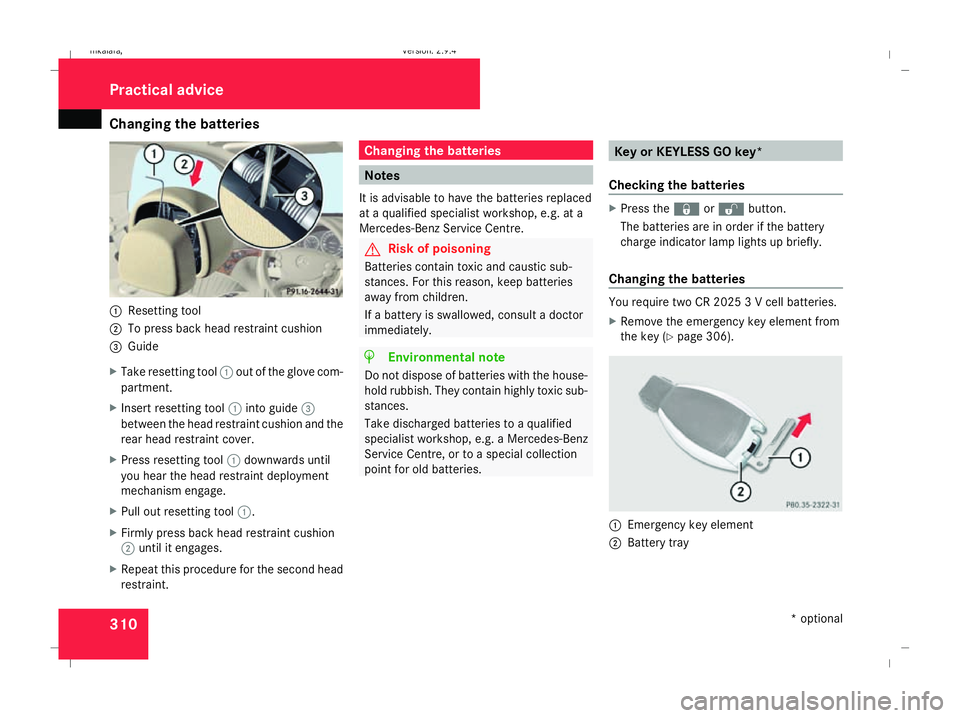
Resetting tool
2 To press back head restraint cushion
3 Guide
X Take resetting tool 1out of the glove com-
partment.
X Insert resetting tool 1into guide 3
between the head restraint cushion and the
rear head restraint cover.
X Press resetting tool 1downwards until
you hear the head restraint deployment
mechanism engage.
X Pull out resetting tool 1.
X Firmly press back head restraint cushion
2 until it engages.
X Repeat this procedure for the second head
restraint. Changing the batteries
Notes
It is advisable to have the batteries replaced
at a qualified specialist workshop, e.g. at a
Mercedes-Benz Service Centre. G
Risk of poisoning
Batteries contain toxic and caustic sub-
stances. For this reason, keep batteries
away from children.
If a battery is swallowed, consult a doctor
immediately. H
Environmental note
Do not dispose of batteries with the house-
hold rubbish. They contain highly toxic sub-
stances.
Take discharged batteries to a qualified
specialist workshop, e.g. a Mercedes-Benz
Service Centre, or to a special collection
point for old batteries. Key or KEYLESS GO key*
Checking the batteries X
Press the jork button.
The batteries are in order if the battery
charge indicator lamp lights up briefly.
Changing the batteries You require two CR 2025 3 V cell batteries.
X
Remove the emergency key element from
the key (Y page 306). 1
Emergency key element
2 Battery tray Practical advice
* optional
211_AKB; 2; 5, en-GB
mkalafa,
Version: 2.9.4 2008-02-29T16:57:07+01:00 - Seite 310Dateiname: 6515_3416_02_buchblock.pdf; preflight
Page 336 of 401
Jump-starting
333
X
Charge the battery. Observe the notes in
the operating instructions for your battery
charger.
X Refit the charged battery.
To do this, follow the steps described in
"Removing the battery" (Y page 332) in
reverse order.
! Do not fit refillable batteries without elec-
trostatic protection. The electrostatic dis-
charge could otherwise cause the battery
to explode. The battery acid released could
cause damage to your vehicle.
Further information on electrostatic protec-
tion (Y page 331). G
Risk of injury
Battery acid is caustic. Avoid contact with
the skin, eyes or clothing. Reconnecting the battery
! Always reconnect the battery in the
sequence described below. Never swap the
terminal clamps. You may otherwise dam-
age the vehicle electronics.
X Switch off all electrical consumers.
X Connect the positive terminal clamp and
secure the cover.
X Connect the negative terminal clamp.
X Connect the breather hose. Make sure that
a cell cap is fitted between the battery and
the breather hose.
X Refit the electrostatic protection if neces-
sary (Y page 331).
i If the battery power supply has been inter-
rupted (e.g. if it has been reconnected), you
must carry out the following tasks:
R Set the time (Y page 135).
R Reset the sliding/tilting sunroof*
(Y page 182).
R Reset the function for folding the exterior
mirrors in/out automatically* by folding
the mirrors out once (Y page 91). Jump-starting
Jump-starting your vehicle
If your vehicle's battery is discharged, the
engine can be jump-started from another
vehicle or from an external battery using jump
leads.
Observe the following points:
R Jump-starting may only be performed when
the engine and catalytic converter are cold.
R Do not start the engine if the battery is fro-
zen. Let the battery thaw first.
R Jump-starting may only be performed from
batteries with a nominal voltage of 12 V.
R Only use jump leads which are protected
against polarity reversal and which have a
sufficient cross-section and insulated ter-
minal clamps.
i Jump leads which are protected against
polarity reversal and further information
about jump-starting can be obtained from
any Mercedes-Benz Service Centre.
! Avoid repeated and lengthy starting
attempts.
Never start the vehicle using a rapid battery
charger. Practical advice
* optional
211_AKB; 2; 5, en-GB
mkalafa,
Version: 2.9.4
2008-02-29T16:57:07+01:00 - Seite 333 ZDateiname: 6515_3416_02_buchblock.pdf; preflight