radio MERCEDES-BENZ E-CLASS SALOON 2011 Owner's Manual
[x] Cancel search | Manufacturer: MERCEDES-BENZ, Model Year: 2011, Model line: E-CLASS SALOON, Model: MERCEDES-BENZ E-CLASS SALOON 2011Pages: 409, PDF Size: 10.47 MB
Page 271 of 409
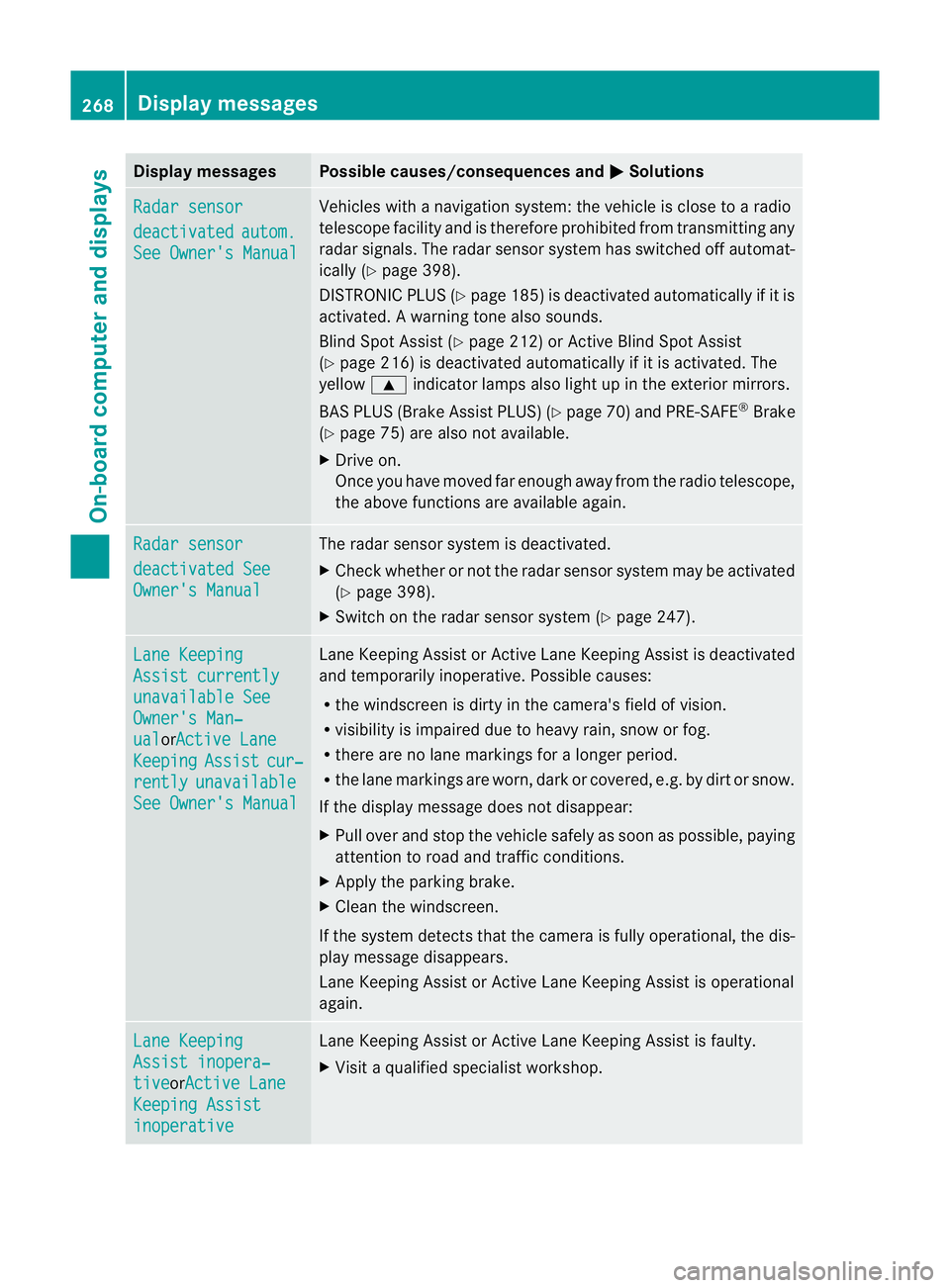
Display messages Possible causes/consequences and
M Solutions
Radar sensor
deactivated autom.
See Owner's Manual Vehicles with a navigation system: the vehicle is close to a radio
telescope facility and is therefore prohibited from transmitting any
rada
rsignals .The radar sensor system has switched off automat-
ically (Y page 398).
DISTRONIC PLUS (Y page 185) is deactivated automatically if it is
activated. Awarning tone also sounds.
Blind Spo tAssist (Y page 212) or Active Blind Spot Assist
(Y page 216) is deactivated automatically if it is activated. The
yellow 9indicator lamps also light up in the exterior mirrors.
BAS PLUS (Brake Assist PLUS) (Y page 70) and PRE-SAFE®
Brake
(Y page 75) are also not available.
X Drive on.
Once you have moved far enough away from the radio telescope,
the above functions are available again. Radar sensor
deactivated See
Owner's Manual The radar sensor system is deactivated.
X
Check whether or not the radar sensor system may be activated
(Y page 398).
X Switch on the radar sensor system (Y page 247).Lane Keeping
Assist currently
unavailable See
Owner's Man‐
ual orActive Lane
Keeping Assist cur‐
rently unavailable
See Owner's Manual Lane Keeping Assist or Active Lane Keeping Assist is deactivated
and temporarily inoperative. Possible causes:
R
the windscreen is dirty in the camera's field of vision.
R visibility is impaired due to heavy rain, snow or fog.
R there are no lane markings for a longer period.
R the lane markings are worn, dark or covered, e.g. by dirt or snow.
If the display message does not disappear:
X Pull over and stop the vehicle safely as soon as possible, paying
attention to road and traffic conditions.
X Apply the parking brake.
X Cleant he windscreen.
If the system detects that the camera is fully operational, the dis-
play message disappears.
Lane Keeping Assist or Active Lane Keeping Assist is operational
again. Lane Keeping
Assist inopera‐
tive orActive Lane
Keeping Assist
inoperative Lane Keeping Assist or Active Lane Keeping Assist is faulty.
X
Visit a qualified specialist workshop. 268
Display messagesOn-board computer and displays
Page 272 of 409
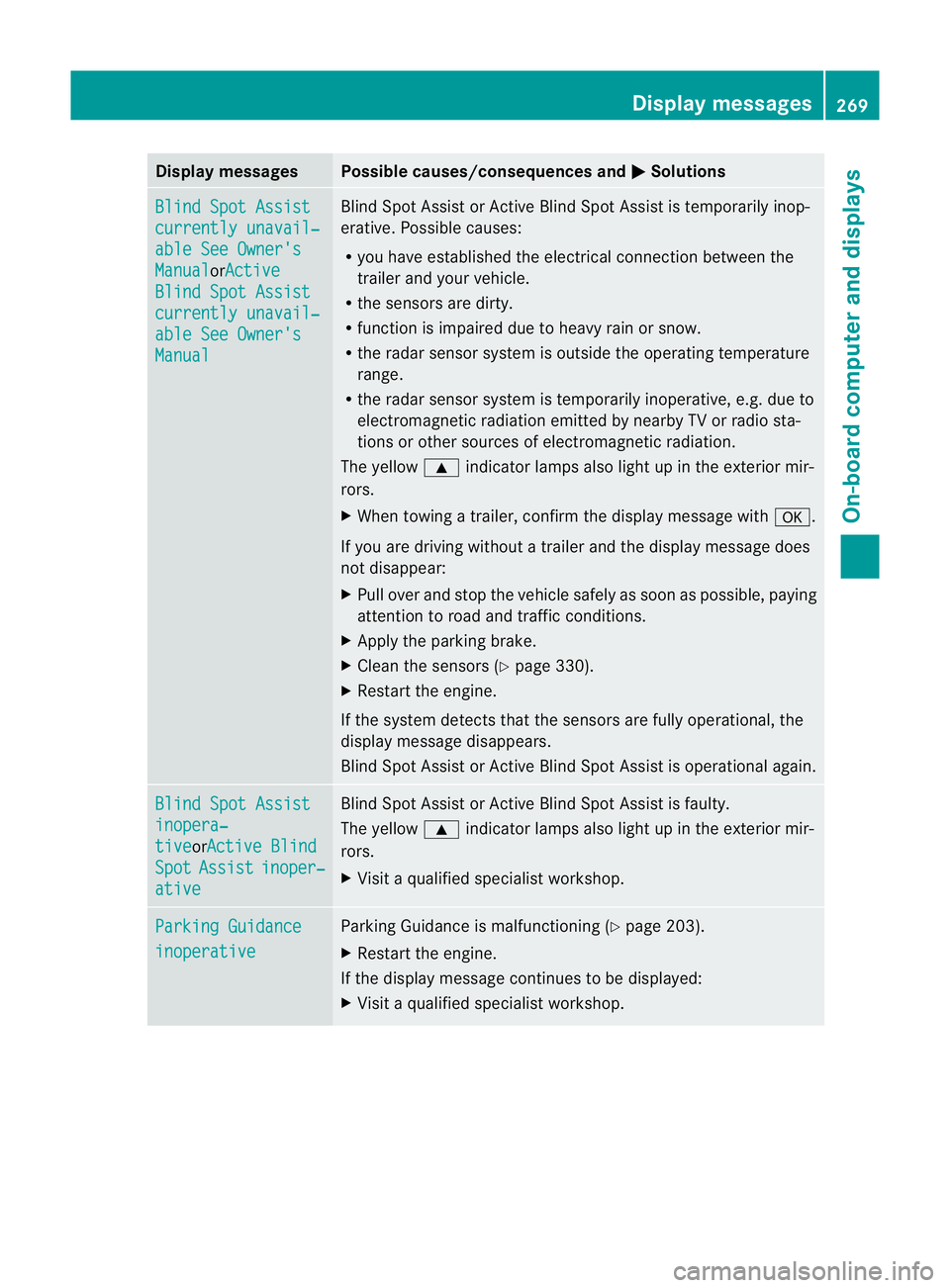
Display messages Possible causes/consequences and
M Solutions
Blind Spot Assist
currently unavail‐
able See Owner's
Manual orActive
Blind Spot Assist
currently unavail‐
able See Owner's
Manual Blind Spot Assis
torActive Blind Spot Assist is temporarily inop-
erative .Possible causes:
R you have established the electrical connection between the
trailer and your vehicle.
R the sensors are dirty.
R function is impaired due to heavy rain or snow.
R the radar sensor system is outside the operating temperature
range.
R the radar sensor system is temporarily inoperative, e.g. due to
electromagnetic radiation emitted by nearby TV or radio sta-
tions or other sources of electromagnetic radiation.
The yellow 9indicator lamps also light up in the exterior mir-
rors.
X When towing a trailer, confirm the display message with a.
If you are driving without a trailer and the display message does
not disappear:
X Pull over and stop the vehicle safely as soon as possible, paying
attention to road and traffic conditions.
X Apply the parking brake.
X Clean the sensors (Y page 330).
X Restart the engine.
If the system detects that the sensors are fully operational, the
display message disappears.
Blind Spot Assist or Active Blind Spot Assist is operational again. Blind Spot Assist
inopera‐
tive orActive Blind
Spot Assist inoper‐
ative Blind Spot Assist or Active Blind Spot Assist is faulty.
The yellow 9indicator lamps also light up in the exterior mir-
rors.
X Visit a qualified specialist workshop. Parking Guidance
inoperative Parking Guidance is malfunctioning (Y
page 203).
X Restart the engine.
If the display message continues to be displayed:
X Visit a qualified specialist workshop. Display messages
269On-board computer and displays Z
Page 274 of 409
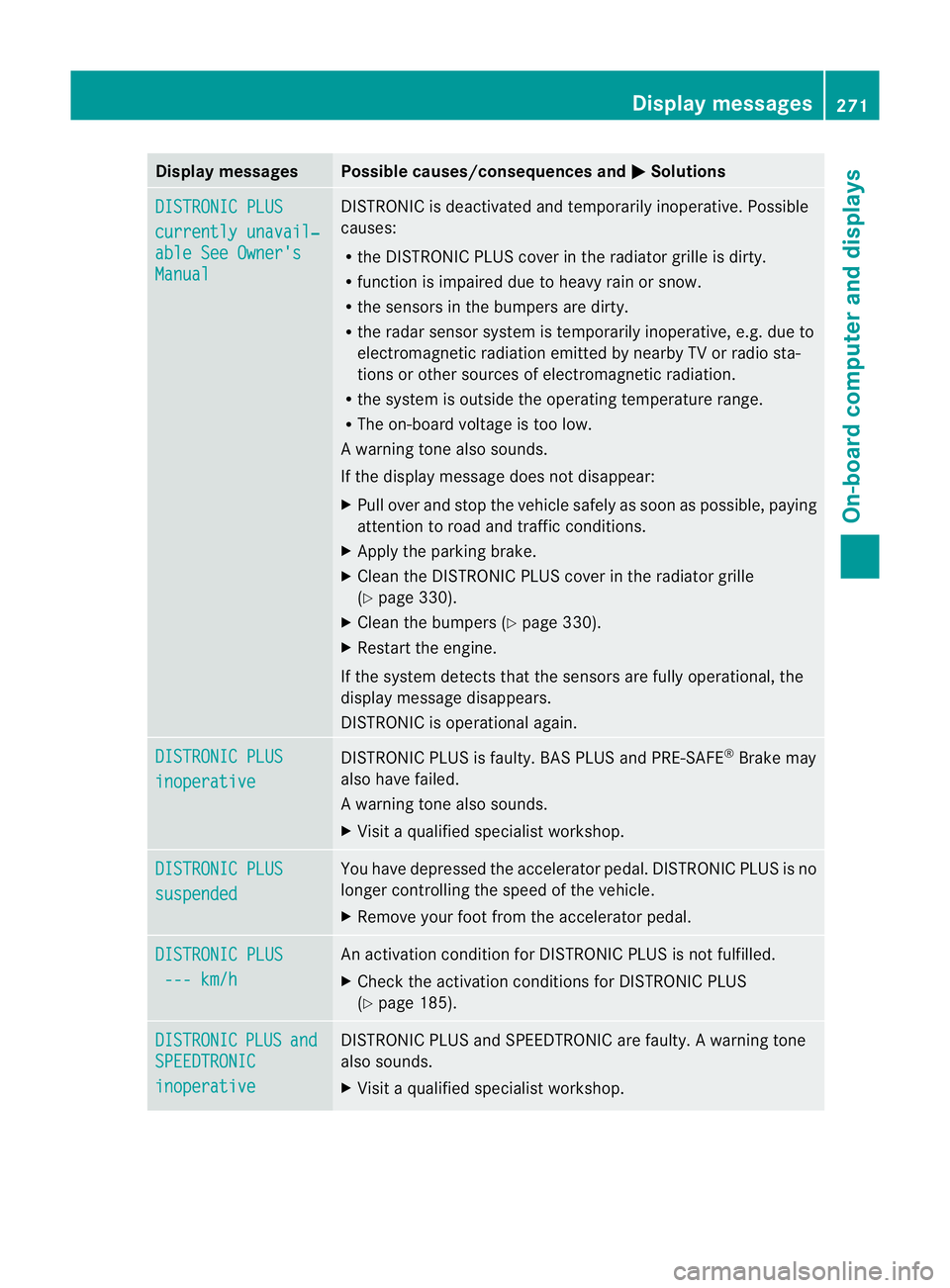
Display messages Possible causes/consequences and
M Solutions
DISTRONIC PLUS
currently unavail‐
able See Owner's
Manual DISTRONIC is deactivated and temporarily inoperative. Possible
causes:
R
the DISTRONIC PLUS cover in the radiator grille is dirty.
R function is impaired due to heavy rain or snow.
R the sensors in the bumpers are dirty.
R the rada rsensor system is temporarily inoperative, e.g. due to
electromagnetic radiation emitted by nearby TV or radio sta-
tions or other sources of electromagnetic radiation.
R the system is outside the operating temperature range.
R The on-board voltage is too low.
Aw arning tone also sounds.
If the display message does no tdisappear:
X Pull over and stop the vehicle safely as soon as possible, paying
attention to road and traffic conditions.
X Apply the parking brake.
X Clean the DISTRONIC PLUS cover in the radiator grille
(Y page 330).
X Clean the bumpers (Y page 330).
X Restar tthe engine.
If the system detects that the sensors are fully operational, the
display message disappears.
DISTRONIC is operational again. DISTRONIC PLUS
inoperative DISTRONIC PLUS is faulty. BAS PLUS and PRE-SAFE
®
Brake may
also have failed.
Aw arning tone also sounds.
X Visi taqualified specialist workshop. DISTRONIC PLUS
suspended You have depressed the accelerator pedal. DISTRONIC PLUS is no
longer controlling the speed of the vehicle.
X
Remove your foot from the accelerator pedal. DISTRONIC PLUS
--- km/h An activation condition for DISTRONIC PLUS is not fulfilled.
X
Check the activation conditions for DISTRONIC PLUS
(Y page 185). DISTRONIC PLUS and
SPEEDTRONIC
inoperative DISTRONIC PLUS and SPEEDTRONIC are faulty. A warning tone
also sounds.
X Visit a qualified specialist workshop. Display messages
271On-board computer and displays Z
Page 277 of 409
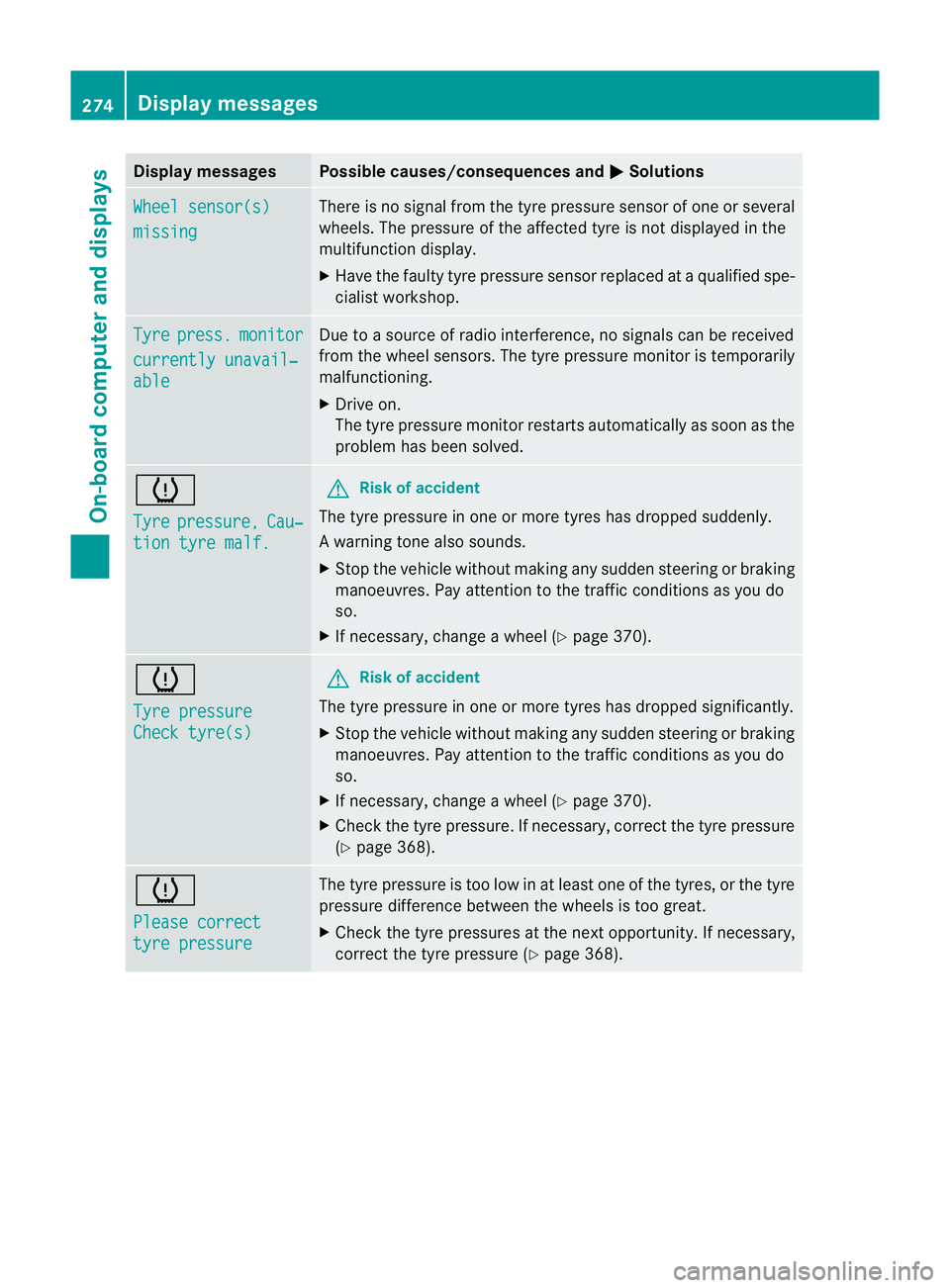
Display messages Possible causes/consequences and
M Solutions
Wheel sensor(s)
missing There is no signal from the tyre pressure sensor of one or several
wheels. The pressure of the affected tyre is no
tdisplayed in the
multifunction display.
X Have the faulty tyre pressure sensor replaced at a qualified spe-
cialist workshop. Tyre press. monitor
currently unavail‐
able Due to a source of radio interference, no signals can be received
fro
mt he wheel sensors. The tyre pressure monitor is temporarily
malfunctioning.
X Drive on.
The tyre pressure monitor restarts automatically as soon as the
problem has been solved. h
Tyre
pressure, Cau‐
tion tyre malf. G
Risk of accident
The tyre pressure in one or more tyres has dropped suddenly.
Aw arning tone also sounds.
X Stop the vehicle without making any sudde nsteering or braking
manoeuvres .Pay attentio nto the traffic conditions as you do
so.
X If necessary, change a wheel (Y page 370).h
Tyre pressure
Check tyre(s) G
Risk of accident
The tyre pressure in one or more tyres has dropped significantly.
X Stop the vehicle without making any sudden steering or braking
manoeuvres. Pay attention to the traffic conditions as you do
so.
X If necessary, change a wheel (Y page 370).
X Check the tyre pressure. If necessary, correc tthe tyre pressure
(Y page 368). h
Please correct
tyre pressure The tyre pressure is too low in at least one of the tyres, or the tyre
pressure difference between the wheels is too great.
X
Check the tyre pressures at the next opportunity. If necessary,
correct the tyre pressure (Y page 368).274
Display messagesOn-board computer and displays
Page 282 of 409
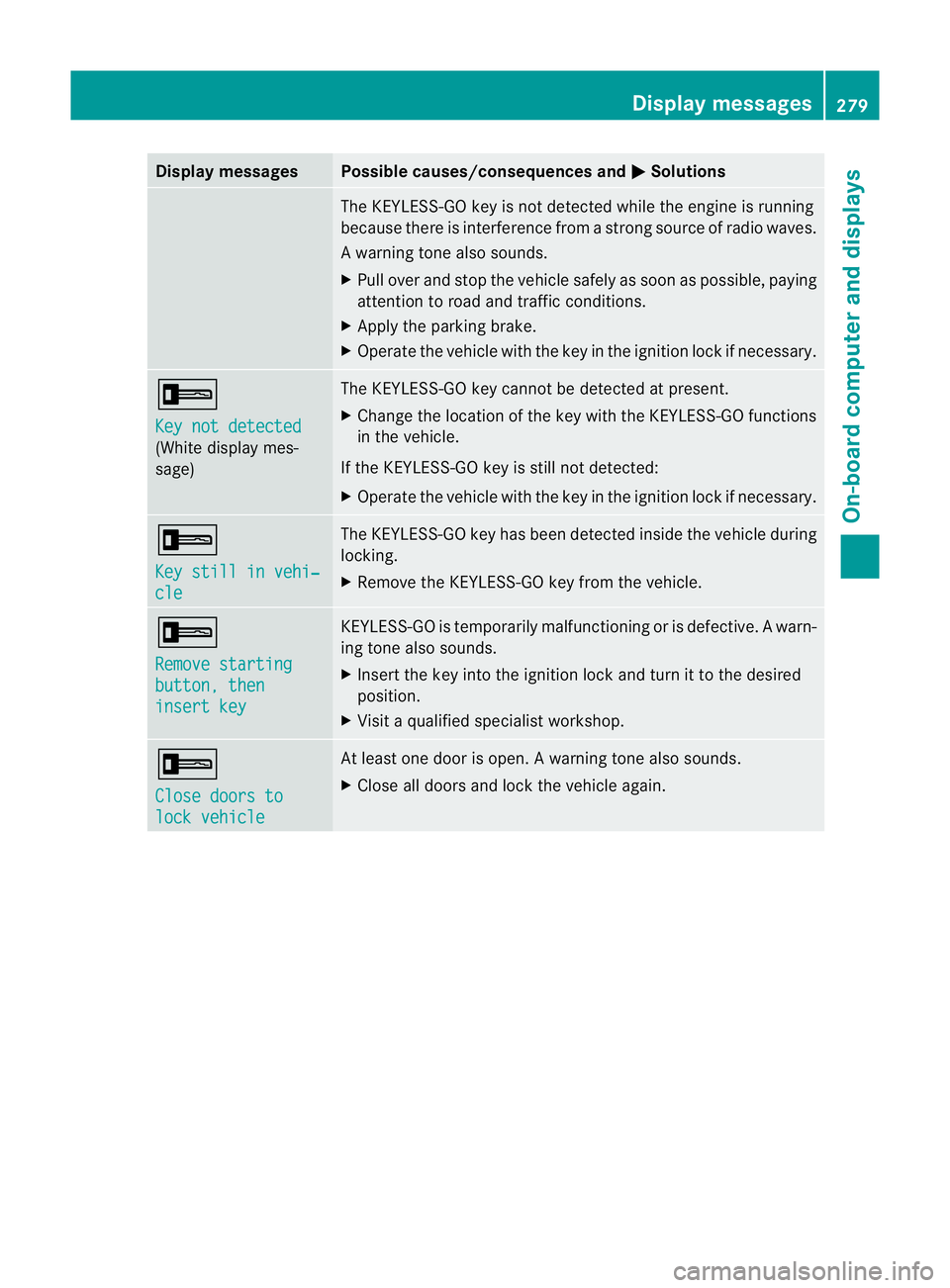
Display messages Possible causes/consequences and
M Solutions
The KEYLESS-GO key is no
tdetected while the engine is running
because there is interference from a strong source of radio waves.
Aw arning tone also sounds.
X Pull ove rand stop the vehicle safely as soo nas possible, paying
attention to road and traffic conditions.
X Apply the parking brake.
X Operate the vehicle with the key in the ignition lock if necessary. +
Key not detected
(White display mes-
sage) The KEYLESS-GO key cannot be detected at present.
X
Change the location of the key with the KEYLESS-GO functions
in the vehicle.
If the KEYLESS-GO key is still not detected:
X Operate the vehicle with the key in the ignition lock if necessary. +
Key still in vehi‐
cle The KEYLESS-GO key has been detected inside the vehicle during
locking.
X
Remove the KEYLESS-GO key from the vehicle. +
Remove starting
button, then
insert key KEYLESS-GO is temporarily malfunctioning or is defective.
Awarn-
ing tone also sounds.
X Insert the key into the ignition lock and turn it to the desired
position.
X Visi taqualified specialist workshop. +
Close doors to
lock vehicle At least one door is open.
Awarning tone also sounds.
X Close all doors and loc kthe vehicle again. Display messages
279On-board computer and displays Z
Page 315 of 409
i
An emergency cut-off ensures tha tthe on-
board voltage does not drop too low. If the
on-board voltage is too low, the power to
the sockets is automatically cut. This
ensures that there is sufficient power to
start the engine.
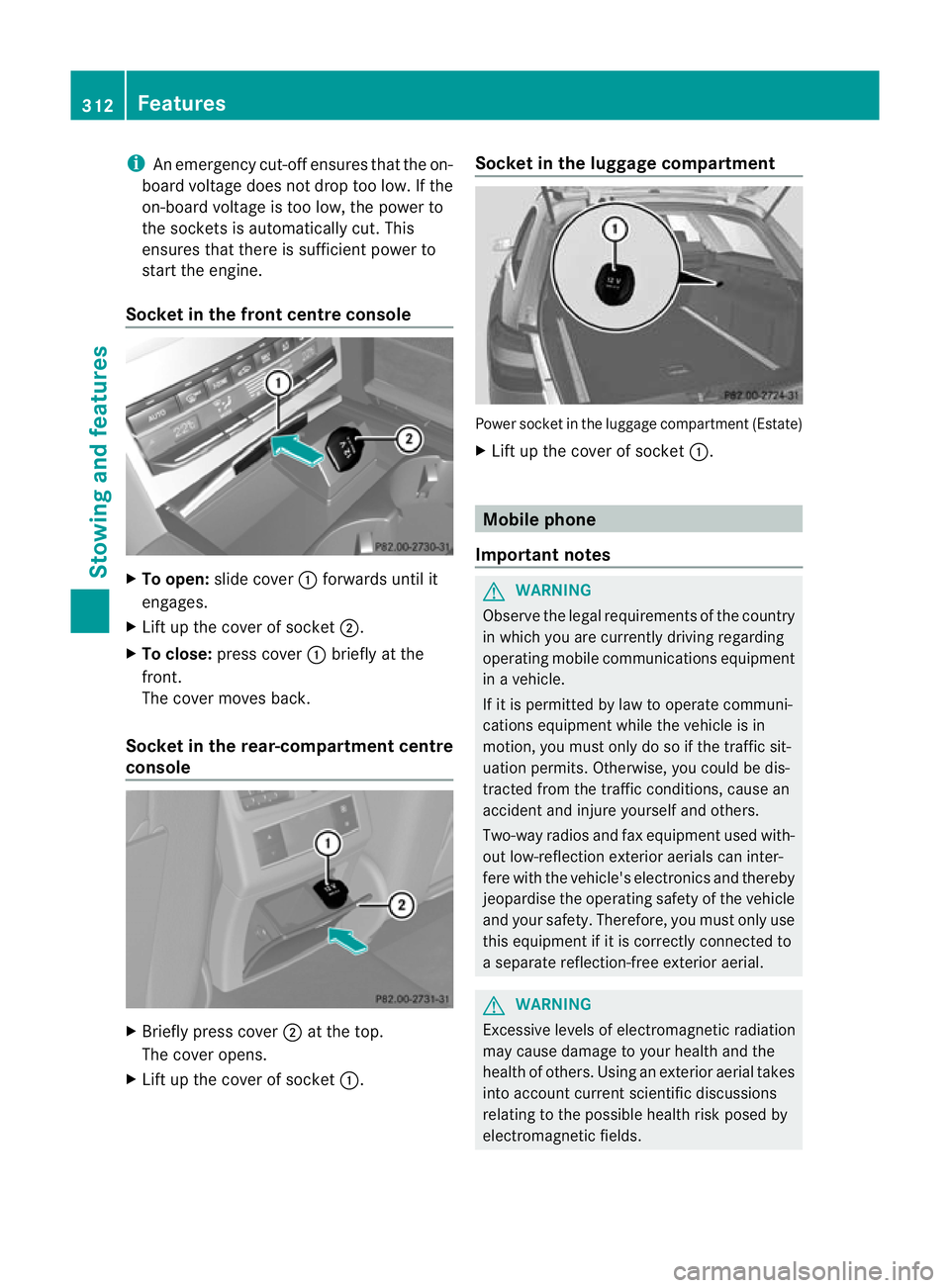
Socket in the front centre console X
To open: slide cover :forwards until it
engages.
X Lift up the cover of socket ;.
X To close: press cover :briefly at the
front.
The cover moves back.
Socket in the rear-compartment centre
console X
Briefly press cover ;at the top.
The cover opens.
X Lift up the cover of socket :.Socket in the luggage compartment
Power socket in the luggage compartmen
t(Estate)
X Lift up the cover of socket :. Mobile phone
Important notes G
WARNING
Observe the legal requirements of the country
in which you are currently driving regarding
operating mobile communications equipment
in a vehicle.
If it is permitted by law to operate communi-
cations equipment while the vehicle is in
motion, you must only do so if the traffic sit-
uatio npermits .Otherwise, you could be dis-
tracted from the traffic conditions, cause an
accident and injure yourself and others.
Two-way radios and fa xequipment used with-
out low-reflection exterior aerials can inter-
fere with the vehicle's electronics and thereby
jeopardise the operating safety of the vehicle
and your safety. Therefore, you must only use
this equipment if it is correctly connected to
a separate reflection-free exterior aerial. G
WARNING
Excessive levels of electromagnetic radiation
may cause damage to your health and the
health of others. Using an exterior aerial takes
into account current scientific discussions
relating to the possible health risk posed by
electromagnetic fields. 312
FeaturesStowing and features
Page 321 of 409
Frequencies for the garage door opener
The radio type approval number and the frequency range for the garage door opener can be
found on the Internet at: http://www.mercedes-benz.de/betriebsanleitung. Floormat on the driver's side
G
WARNING
Make sure that there is sufficien tclearance
around the pedals when floormats are used,
and that the floormats are properly secured.
The floormats must be correctly secured at all
times using the securing knob and retainers.
Before you drive off, chec kthe floormats and
secure them if necessary. Afloormat which is
not properly secured can slip and thereby
interfere with the movemen tofthe pedals.
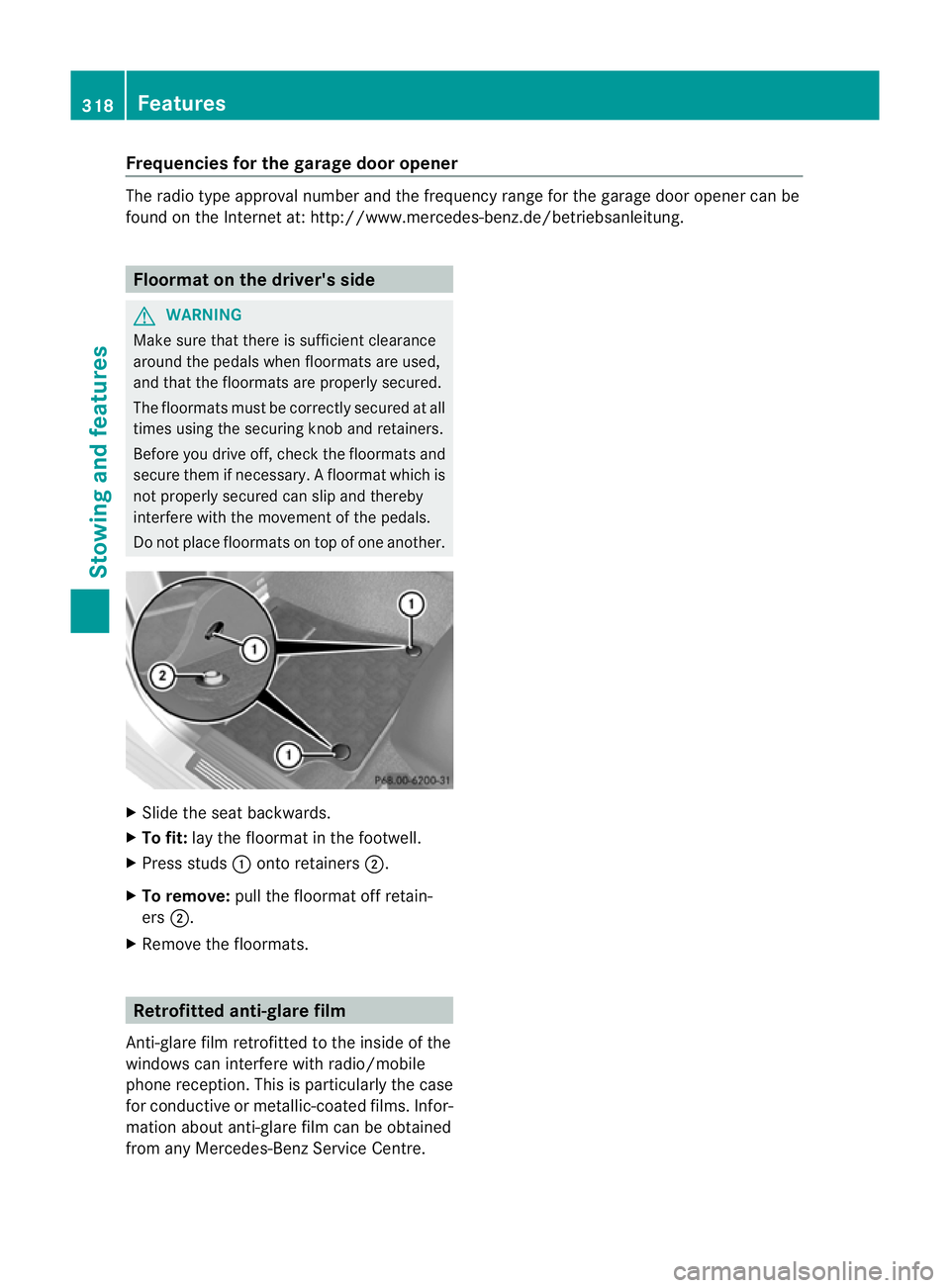
Do not place floormats on top of one another. X
Slide the seat backwards.
X To fit: lay the floormat in the footwell.
X Press studs :onto retainers ;.
X To remove: pull the floormat off retain-
ers ;.
X Remove the floormats. Retrofitted anti-glare film
Anti-glare film retrofitted to the inside of the
windows can interfere with radio/mobile
phone reception. This is particularly the case
for conductive or metallic-coated films. Infor-
mation about anti-glare film can be obtained
from any Mercedes-Benz Service Centre. 318
FeaturesStowing and features
Page 354 of 409
environmentally responsible
recycling system.
Dispose of batteries in an
environmentally responsible
manner. Take discharged
batteries to a qualified spe-
cialist workshop or to a col-
lection point for used batter-
ies.
G
WARNING
For safety reasons, Mercedes-Benz recom-
mends that you only use batteries which have
been tested and approved for your vehicle by
Mercedes-Benz .These batteries provide
increased impact protection to prevent vehi-
cle occupants from suffering acid burns
should the battery be damaged in the event
of an accident.
To prevent acid burns, observe the following
safety notes when handling batteries:
R do not lean over the battery.
R do not place any metal objects on a battery.
Otherwise, you could cause a short circuit
and the battery's gas mixture could ignite.
R make sure that you do not create an elec-
trostatic charge, e.g. by wearing synthetic
clothing or as a result of friction on fabrics.
Therefore, you should not pull or slide the
battery over carpets or other synthetic
materials.
R never touch the battery first. To discharge
a possible electrostatic charge, step out of
the vehicle first and touch the bodywork.
R do not wipe the battery using a cloth. The
battery may explode as a result of electro-
static charge or due to flying sparks.
! Switch off the engine and remove the key
before disconnecting the terminal clamps
from the battery. On vehicles with KEY-
LESS-GO, make sure that the ignition is
switched off. Check that all the indicator
lamps in the instrumentc luster are off.You
may otherwise destroy electronic compo-
nents, such as the alternator. i
When you park the vehicle, remove the
key if you do not require any electrical con-
sumers. The vehicle will then use very little
energy, thus conserving battery power.
Mercedes-Benz recommends that you do not
carry out work on batteries yourself, e.g.
removing or charging. Have this work per-
formed at a qualified specialist workshop. Installation location of the battery
Your vehicle is equipped with a battery in the
engine compartment.Iti s located on the front
bulkhead under the filter box on the right-
hand side of the vehicle when viewed in the
direction of travel.
X Apply the parking brake firmly and, on vehi-
cles with automatic transmission, shift the
transmission to position P.
X Switch off all electrical consumers (e.g.
radio, blower, etc.).
X Turn the key to position 0(Ypage 155) in
the ignition lock and remove it, or, on vehi-
cles with KEYLESS-GO, make sure that the
ignition has been switched off
(Y page 155). All indicator lamps in the
instrument cluster must be off.
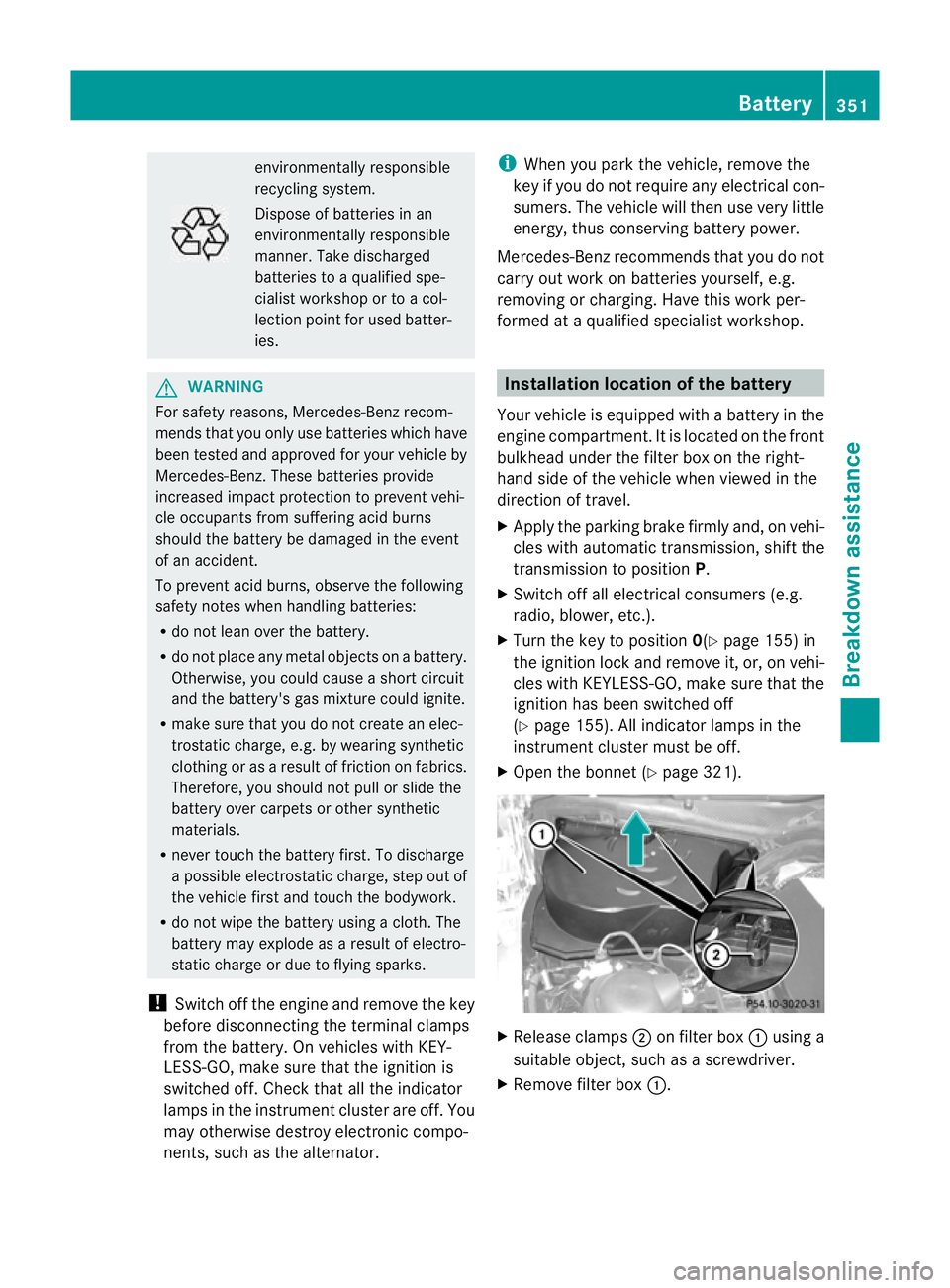
X Open the bonnet (Y page 321). X
Release clamps ;on filter box :using a
suitable object, such as a screwdriver.
X Remove filter box :. Battery
351Breakdown assistance Z
Page 355 of 409
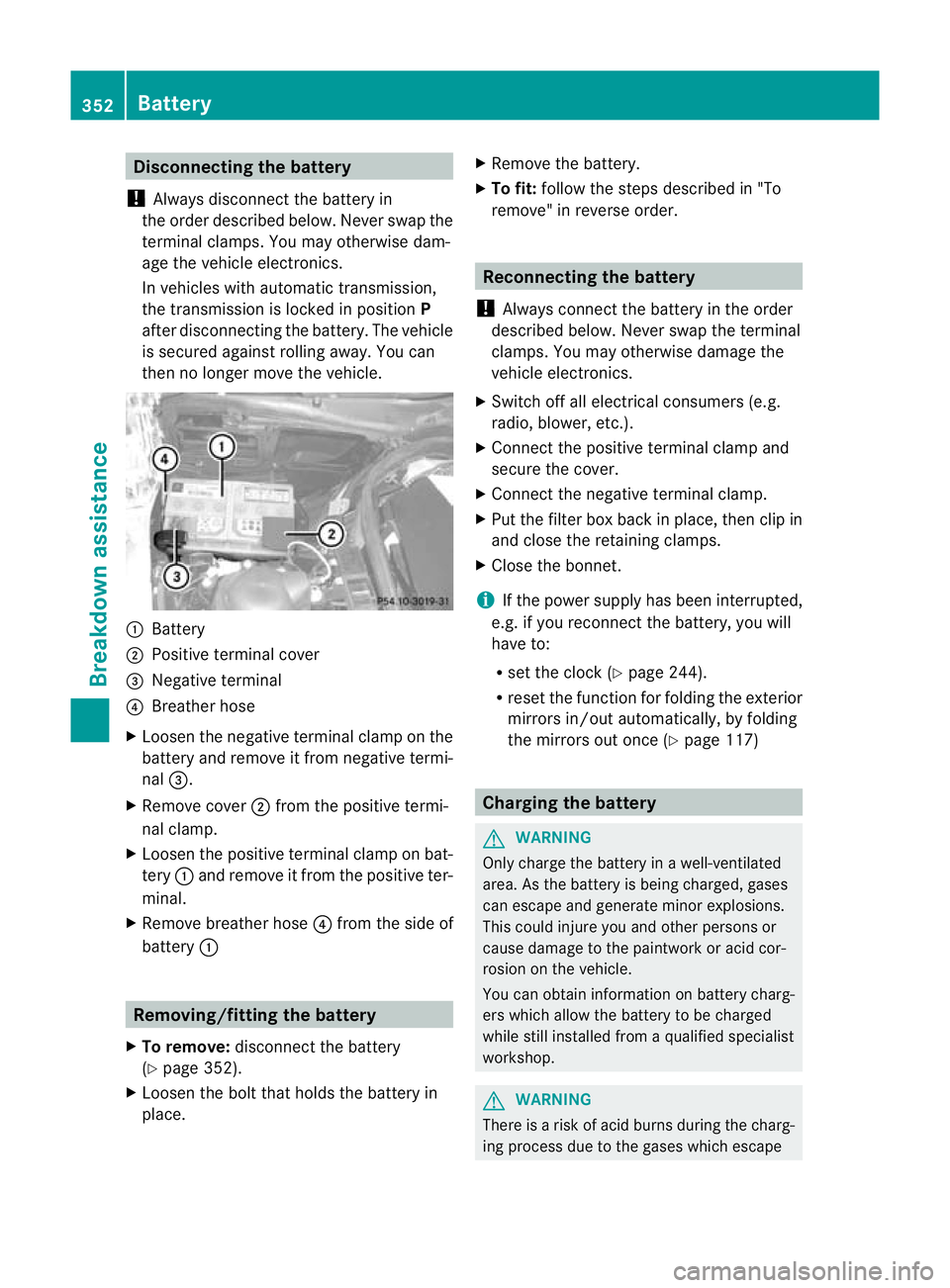
Disconnecting the battery
! Always disconnec tthe battery in
the order described below. Never swap the
terminal clamps. You may otherwise dam-
age the vehicle electronics.
In vehicles with automatic transmission,
the transmission is locked in position P
after disconnecting the battery. The vehicle
is secured against rolling away.Y ou can
then no longer move the vehicle. :
Battery
; Positive terminal cover
= Negative terminal
? Breather hose
X Loosen the negative terminal clamp on the
battery and remove it from negative termi-
nal =.
X Remove cover ;from the positive termi-
nal clamp.
X Loosen the positive terminal clamp on bat-
tery :and remove it from the positive ter-
minal.
X Remove breather hose ?from the side of
battery : Removing/fitting the battery
X To remove: disconnect the battery
(Y page 352).
X Loosen the bolt that holds the battery in
place. X
Remove the battery.
X To fit: follow the steps described in "To
remove" in reverse order. Reconnecting the battery
! Always connect the battery in the order
described below. Never swap the terminal
clamps. You may otherwise damage the
vehicle electronics.
X Switch off all electrical consumers (e.g.
radio, blower, etc.).
X Connect the positive terminal clamp and
secure the cover.
X Connect the negative terminal clamp.
X Put the filter box back in place, then clip in
and close the retaining clamps.
X Close the bonnet.
i If the power supply has been interrupted,
e.g. if you reconnect the battery, you will
have to:
R set the clock (Y page 244).
R reset the function for folding the exterior
mirrors in/out automatically, by folding
the mirrors out once (Y page 117) Charging the battery
G
WARNING
Only charge the battery in a well-ventilated
area. As the battery is being charged, gases
can escape and generate minor explosions.
This could injure you and other persons or
cause damage to the paintwork or acid cor-
rosion on the vehicle.
You can obtain information on battery charg-
ers which allow the battery to be charged
while still installed from a qualified specialist
workshop. G
WARNING
There is a risk of acid burns during the charg-
ing process due to the gases which escape 352
BatteryBreakdown assistance
Page 357 of 409
Jump-starting
G
WARNING
There is a risk of acid burns when jump-starting a vehicle due to the gases which escape from
the battery. Do not lean over the battery while the engine is being jump-started. G
WARNING
Gases escaping from the battery during jump-starting may cause minor explosions. Avoid cre-
ating sparks. Keep naked flames away from the battery, and do not smoke.
Comply with safety precautions when handling batteries. You will find these under "Battery (vehi-
cle)" in the index. G
WARNING
Non-combusted fuel can collect in the exhaust system and ignite. There is a risk of fire. Avoid
repeated and lengthy starting attempts.
! Avoid repeated and lengthy starting attempts. Otherwise, the catalytic converter could be
damaged by the non-combusted fuel.
Do not use a rapid charging device to start the vehicle. If your vehicle's battery is discharged,
the engine can be jump-started from another vehicle or from a second battery using jump
leads. Observe the following points:
R the battery is not accessible in all vehicles. if the other vehicle's battery is not accessible,
jump-start the vehicle using a second battery or ajump-starting device.
R you may only jump-start the vehicle when the engine and catalyti cconverter are cold.
R do not start the engine if the battery is frozen. let the battery thaw first.
R jump-starting may only be performed from batteries with a nominal voltage of 12 V.
R only use jump leads that have a sufficient cross-section and insulated terminal clamps.
R If the battery is fully discharged, leave the battery that is being used to jump-start connected
for a few minutes before attempting to start.T his charges the empty battery a little.
R Make sure that the two vehicles do not touch.
Make sure that:
R the jump leads are not damaged.
R bare parts of the terminal clamp do not come into contact with other metal parts while the
jump leads are connected to the battery.
R the jump leads cannot come into contact with parts such as the V-belt pulley or the fan.
These parts move when the engine is started and while it is running.
X Apply the parking brake firmly.
X Manual transmission: engage neutral.
X Automatic transmission: move the selector lever toP.
X Switch off all electrical consumers (e.g. radio, blower, etc.).
X Open the bonnet (Y page 321).354
Jump-startingBreakdown assistance