washer fluid MERCEDES-BENZ E-CLASS SALOON 2011 Owners Manual
[x] Cancel search | Manufacturer: MERCEDES-BENZ, Model Year: 2011, Model line: E-CLASS SALOON, Model: MERCEDES-BENZ E-CLASS SALOON 2011Pages: 409, PDF Size: 10.47 MB
Page 21 of 409
Adjusting the head restraint
..........107
Cleaning the cover .........................332
Correct driver's sea tposition ........104
Important safety notes ..................105
Multicontour sea t.......................... 109
Seat heating problem ....................113
Seat ventilation problem ................114
Storing settings (memory func-
tion) ............................................... 119
Switching sea theating on/off .......113
Switching the sea tventilation on/
off .................................................. 114
Sensors (cleaning instructions) .......330
Service see ASSYST PLUS service interval
display
Service Centre
see Qualified specialist workshop
Service menu (on-board computer) .242
Service products
AdBlue ®
special additive s.............. 388
Brake fluid ..................................... 390
Coolant (engine) ............................ 390
Engine oil ....................................... 388
Fuel ................................................ 384
Important safety notes ..................383
Washer fluid .................................. .391
Settings
Factory (on-board computer) .........249
On-board computer .......................243
Setting the air distribution ...............141
Setting the airflow ............................142
SETUP (on-board computer) .............250
Shifting to neutral (manual trans-
mission) ............................................. 164
Short journeys (diesel particle fil-
ter) ...................................................... 178
Sidebag ................................................ 46
Side marker lamp Display mes-
sage .................................................... 261
Side windows Convenience closing ........................96
Convenience opening ......................96
Important safety notes ....................95
Opening/closing .............................. 96
Problem (malfunction) .....................98
resetting .......................................... 97Skibag
................................................ 293
Sliding sunroof Important safety information ...........98
Opening/closing .............................. 99
Problem (malfunction) ...................101
Rain closing feature .........................99
Resetting ......................................... 99
see Panorama sliding sunroof
Snow chains ...................................... 365
Socket Centre console .............................. 312
Luggage compartment ...................312
Points to observe before use .........311
Rea rcompartmen t......................... 312
Spare wheel
Storage location ............................ 339
Storing ........................................... 340
see Emergency spare wheel
Specialist workshop ............................ 25
Spectacles compartment .................291
Speed, controlling see Cruise control
Spee dLimit Assist
Activating/deactivating the warn-
ing function .................................... 240
Displayin g...................................... 240
Display message ............................ 267
Display message in the multifunc-
tion displa y.................................... 209
Important safety notes ..................208
Speedometer
Activating/deactivating the addi-
tional speedometer ........................243
Digita l............................................ 235
In the Instrument cluster .................30
Segments ...................................... 231
Selecting the unit of measure-
ment .............................................. 243
see Instrument cluster
SPEEDTRONIC
Deactivating variabl e..................... 185
Display message ............................ 271
Function/notes ............................. 183
Important safety notes ..................183
LIM indicator lamp .........................183
Permanent ..................................... 185
Selecting ........................................ 184 18
Index
Page 24 of 409
Tyre pressure monitor
Function/note s............................. 368
Restarting ...................................... 369
Warning lamp ................................. 287
Tyres
Checking ........................................ 363
Direction of rotatio n...................... 371
Display message ............................ 272
Grip ................................................ 180
Important safety notes ..................362
Replacing ....................................... 370
Service life ..................................... 363
Storing ........................................... 371
Tyr esize (data) .............................. 371
Tyr etread ...................................... 363
see Flat tyre U
Unladen weight ................................. 392
Unlocking Emergency unlocking .......................90
From inside the vehicle (central
unlocking button) ............................. 89 V
Vanity mirror (in sun visor) ..............309
Variable SPEEDTRONIC see SPEEDTRONIC
Vehicle
Correct use ...................................... 25
Data acquisition ............................... 26
Display message ............................ 275
Electronics ..................................... 381
Emergency unlocking .......................90
Equipment ....................................... 23
Implied warranty .............................. 26
Individua lsettings .......................... 243
Leaving parked up .........................177
Locking (in an emergency) ...............90
Locking (key )................................... 82
Lowering ........................................ 348
Pulling away ................................... 157
Raising ........................................... 345
Registration ..................................... 25
Towing away .................................. 355
Tow-starting ................................... 355
Transporting .................................. 358Unlocking (in an emergency)
...........90
Unlocking (key )................................ 82
Vehicle data ................................... 392
Vehicle battery
see Battery (vehicle)
Vehicle data ....................................... 392
Vehicle dimensions ...........................392
Vehicle emergency locking ................90
Vehicle identification number see VIN
Vehicle identification plate ..............382
Vehicle level AIRMATIC ...................................... 197
AMG RIDE CONTROL sports sus-
pension .......................................... 199
Vehicle level (display message) .......266
Vehicle tool kit .................................. 337
Vehicle weights ................................. 392
Vents see Air vents
Video (DVD) ........................................ 238
Video DVD (on-board computer) ......238
VIN ...................................................... 382 W
Warning and indicator lamps ABS ................................................ 282
Brakes ........................................... 281
Distance warning signa l................. 287
ESP ®
.............................................. 283
ESP ®
OFF ....................................... 283
LIM (cruise control) ........................ 181
LIM (DISTRONIC PLUS) ..................186
LIM (variable SPEEDTRONIC) .........183
Overview .......................................... 32
PASSENGER AIRBAG OFF ................56
Reserve fuel ................................... 285
Seat bel t........................................ 280
SRS ................................................ 284
Tyr ep ressure monitor ...................287
Warning triangle ................................ 336
Washer fluid Display message ............................ 278
Wheel bol ttightening torque ...........348
Wheel chock ...................................... 344 Index
21
Page 25 of 409
Wheels
Changing/replacing .......................370
Changing awheel .......................... 344
Checking ........................................ 363
Cleaning ......................................... 328
Fitting awheel ............................... 347
Important safety notes ..................362
Removing awheel .......................... 347
Storing ........................................... 371
Tightening torque ........................... 348
Whee lsize/tyre size ...................... 371
Windowbag
Display message ............................ 259
Operation ........................................ .47
Windows
Cleaning ......................................... 329
see Side windows
Windscreen
Demisting ...................................... 142
Windscreen washe rfluid
see Windscreen washer system
Windscreen washer system .............324
Notes ............................................. 391
Windscreen wipers
Problem (malfunction) ...................134
Rea rwindow wiper ........................ 133
Replacing the wiper blades ............133
Switching on/off ........................... 132
Winter operation
Important safety notes ..................364
Radiator cover ............................... 322
Slippery road surfaces ...................180
Snow chains .................................. 365
Winter tyres
Limiting the speed (on-board com-
puter) ............................................. 246
M+S tyres ...................................... 364
Wiper blades
Cleaning ......................................... 329
Important safety notes ..................133
Wooden trim (cleaning instruc-
tions) .................................................. 332
Workshop see Qualified specialist workshop 22
Index
Page 127 of 409
X
Press the Rbutton.
The yellow Rindicator lamp in the
instrument cluster lights up.
X To switch off the rear foglamp: press the
R button.
The yellow Rindicator lamp in the
instrument cluster goes out.
Vehicles with frontf oglamps: when the light
switch is in the Tposition, the rear fog-
lamp can only be switched on if the foglamps
(without dipped-beam headlamps) are
switched on.
i If you switch the engine off (key in posi-
tion 1in the ignition lock) and then restart
it, the previous rear foglamp settings are
restored.
Adjusting the headlam prange (halogen
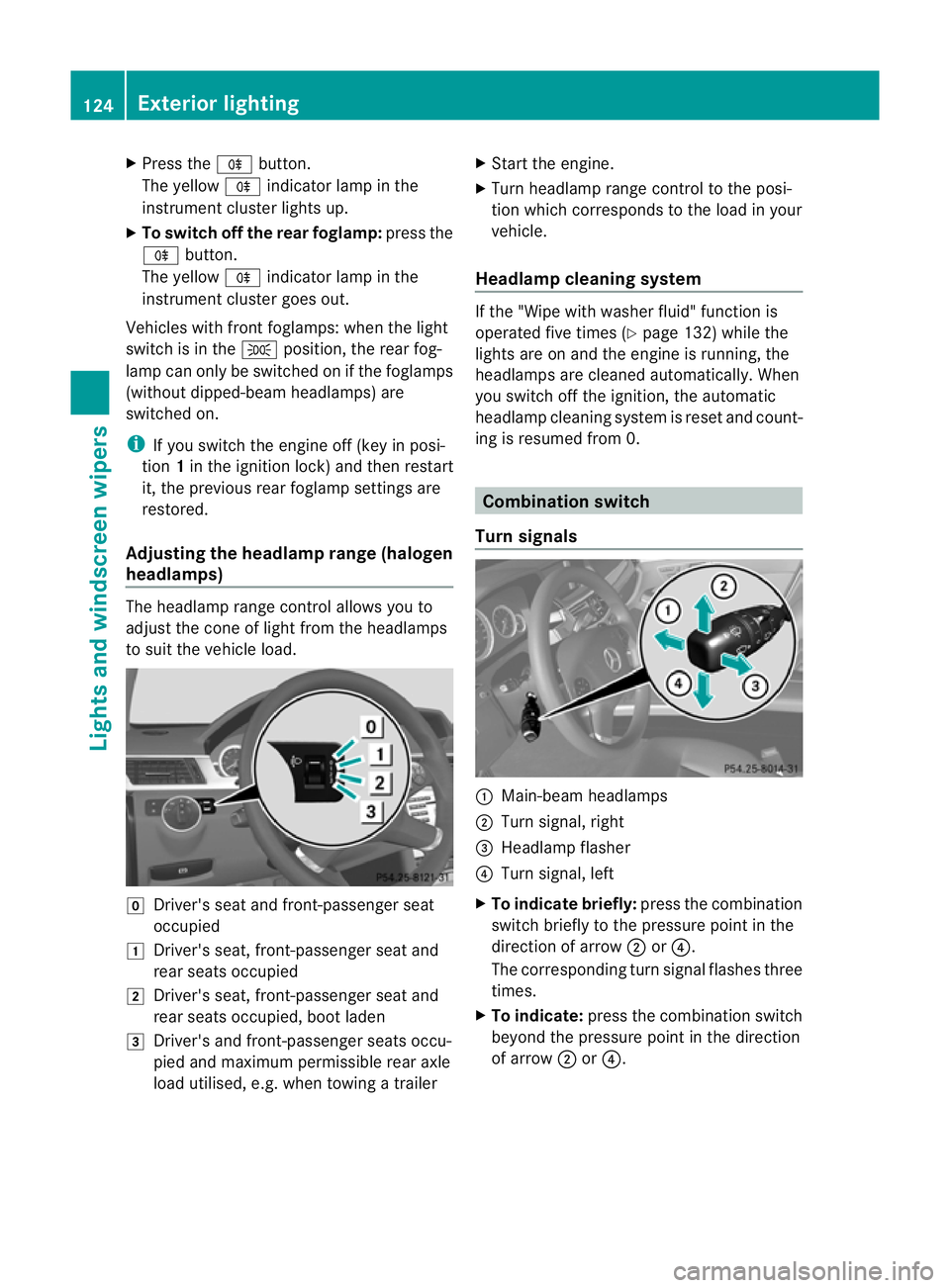
headlamps) The headlamp range control allows you to
adjust the cone of light from the headlamps
to sui tthe vehicle load. g
Driver's seat and front-passenger seat
occupied
1 Driver's seat, front-passenger seat and
rear seats occupied
2 Driver's seat, front-passenger seat and
rear seats occupied, boot laden
3 Driver's and front-passenger seats occu-
pied and maximum permissible rear axle
load utilised, e.g. when towing a trailer X
Start the engine.
X Turn headlamp range control to the posi-
tion which corresponds to the load in your
vehicle.
Headlampc leaning system If the "Wipe with washer fluid" function is
operated five times (Y
page 132) while the
lights are on and the engine is running, the
headlamps are cleaned automatically. When
you switch off the ignition, the automatic
headlamp cleaning syste mis reset and count-
ing is resumed from 0. Combination switch
Turn signals :
Main-beam headlamps
; Turn signal, right
= Headlamp flasher
? Turn signal, left
X To indicate briefly: press the combination
switch briefly to the pressure point in the
direction of arrow ;or?.
The corresponding turn signal flashes three
times.
X To indicate: press the combination switch
beyond the pressure point in the direction
of arrow ;or?. 124
Exterior lightingLights and windscreen wipers
Page 135 of 409
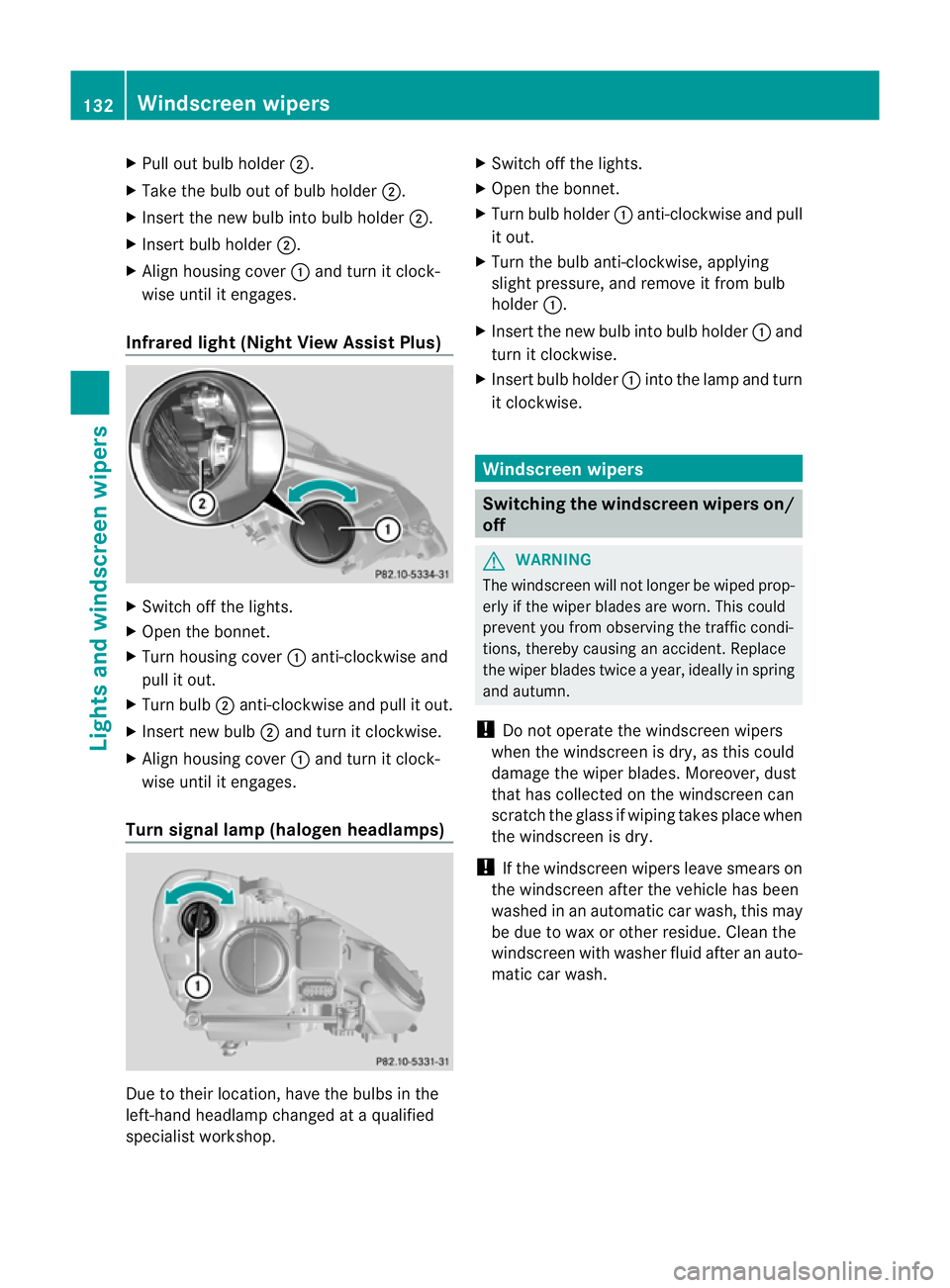
X
Pull out bulb holder ;.
X Take the bulb out of bulb holder ;.
X Inser tthe new bulb into bulb holder ;.
X Insert bulb holder ;.
X Align housing cover :and turn it clock-
wise until it engages.
Infrared light (Night View Assist Plus) X
Switch off the lights.
X Open the bonnet.
X Turn housing cover :anti-clockwise and
pull it out.
X Turn bulb ;anti-clockwise and pull it out.
X Insert new bulb ;and turn it clockwise.
X Align housing cover :and turn it clock-
wise until it engages.
Turn signal lamp (halogen headlamps) Due to their location, have the bulbs in the
left-hand headlamp changed at a qualified
specialist workshop. X
Switch off the lights.
X Open the bonnet.
X Turn bulb holder :anti-clockwise and pull
it out.
X Turn the bulb anti-clockwise, applying
slight pressure, and remove it from bulb
holder :.
X Insert the new bulb into bulb holder :and
turn it clockwise.
X Insert bulb holder :into the lamp and turn
it clockwise. Windscreen wipers
Switching the windscreen wipers on/
off
G
WARNING
The windscreen will not longer be wiped prop-
erly if the wiper blades are worn. This could
prevent you from observing the traffic condi-
tions, thereby causing an accident. Replace
the wiper blades twice a year, ideally in spring
and autumn.
! Do not operate the windscreen wipers
when the windscreen is dry, as this could
damage the wiper blades. Moreover, dust
that has collected on the windscreen can
scratch the glass if wiping takes place when
the windscreen is dry.
! If the windscreen wipers leave smears on
the windscreen after the vehicle has been
washed in an automatic car wash, this may
be due to wax or other residue. Cleant he
windscreen with washer fluid after an auto-
matic car wash. 132
Windscreen wipersLights and windscreen wipers
Page 136 of 409
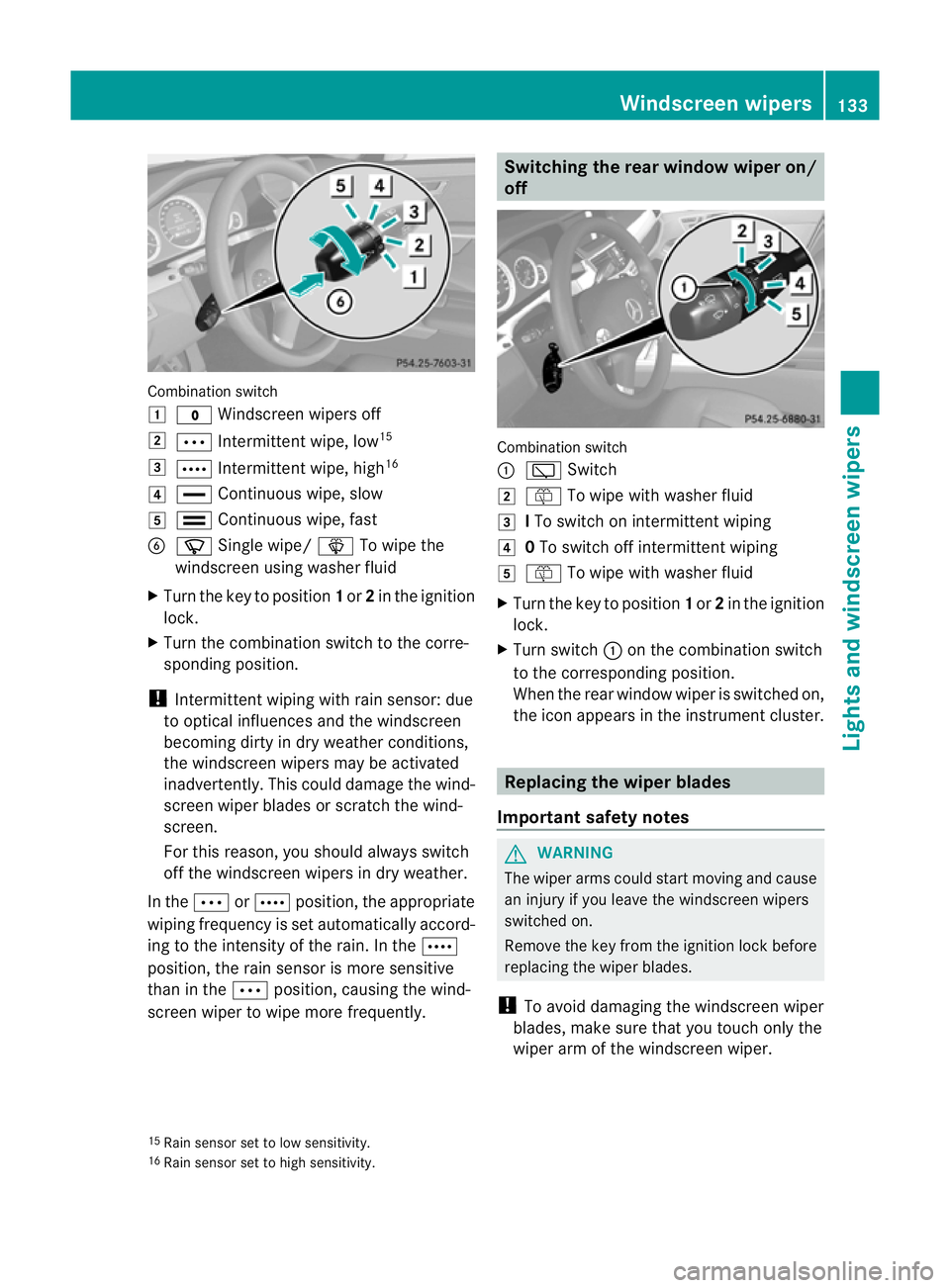
Combination switch
1
$ Windscreen wipers off
2 Ä Intermittent wipe, low 15
3 Å Intermittent wipe, high 16
4 ° Continuous wipe, slow
5 ¯ Continuous wipe, fast
B í Single wipe/ îTo wipe the
windscreen using washer fluid
X Turn the key to position 1or 2in the ignition
lock.
X Turn the combination switch to the corre-
sponding position.
! Intermittent wiping with rain sensor: due
to optical influences and the windscreen
becoming dirty in dry weather conditions,
the windscreen wipers may be activated
inadvertently. This could damage the wind-
screen wiper blades or scratch the wind-
screen.
For this reason, you shoul dalways switch
off the windscreen wipers in dry weather.
In the ÄorÅ position, the appropriate
wiping frequency is set automatically accord-
ing to the intensity of the rain. In the Å
position, the rain sensor is more sensitive
than in the Äposition, causing the wind-
screen wiper to wipe more frequently. Switching the rea
rwindow wiper on/
off Combination switch
:
è Switch
2 ô To wipe with washer fluid
3 ITo switch on intermittent wiping
4 0To switch off intermittent wiping
5 ô To wipe with washer fluid
X Turn the key to position 1or 2in the ignition
lock.
X Turn switch :on the combination switch
to the corresponding position.
When the rear window wiper is switched on,
the icon appears in the instrumen tcluster. Replacing the wiper blades
Important safety notes G
WARNING
The wiper arms could star tmoving and cause
an injury if you leave the windscreen wipers
switched on.
Remove the key from the ignition lock before
replacing the wiper blades.
! To avoid damaging the windscreen wiper
blades, make sure that you touch only the
wiper arm of the windscreen wiper.
15 Rain sensor set to low sensitivity.
16 Rain sensor set to high sensitivity. Windscreen wipers
133Lights and windscreen wipers Z
Page 137 of 409

!
Never open the bonnet if a windscreen
wiper arm has been folded away from the
windscreen.
Never fold a windscreen wiper arm without
a wiper blade back onto the windscreen/
rear window.
Hold the windscreen wiper arm firmly when
you change the wiper blade. If you release
the windscreen wiper arm without a wiper
blade and it falls onto the windscreen, the
windscreen may be damaged by the force
of the impact.
Mercedes-Benz recommends that you have
the wiper blades replaced by aqualified
specialist workshop, e.g. at a Mercedes-
Benz Service Centre. Problems with the windscreen wipers
The windscreen wipers are obstructed Leaves or snow, for example, may be
obstructing the windscree nwiper movement.
The wiper motor has been deactivated.
X For safety reasons, you should remove the
key from the ignition lock.
or
X Switch off the engine using the Start/Stop
button and open the driver's door.
X Remove the cause of the obstruction.
X Switch the windscreen wipers back on.
The windscreen wipers are inoperative The windscreen wiper drive is malfunctioning.
X
Selec tanothe rwiper speed on the combi-
nation switch.
X Have the windscreen wipers checked at a
qualified specialist workshop.
The spray nozzles are misaligned The windscreen washer fluid fro
mthe spray
nozzles no longer hits the centre of the wind-
screen. The spray nozzles are misaligned. X
Have the spray nozzles adjusted at a quali-
fied specialist workshop. 134
Windscreen wipersLights and windscreen wipers
Page 281 of 409
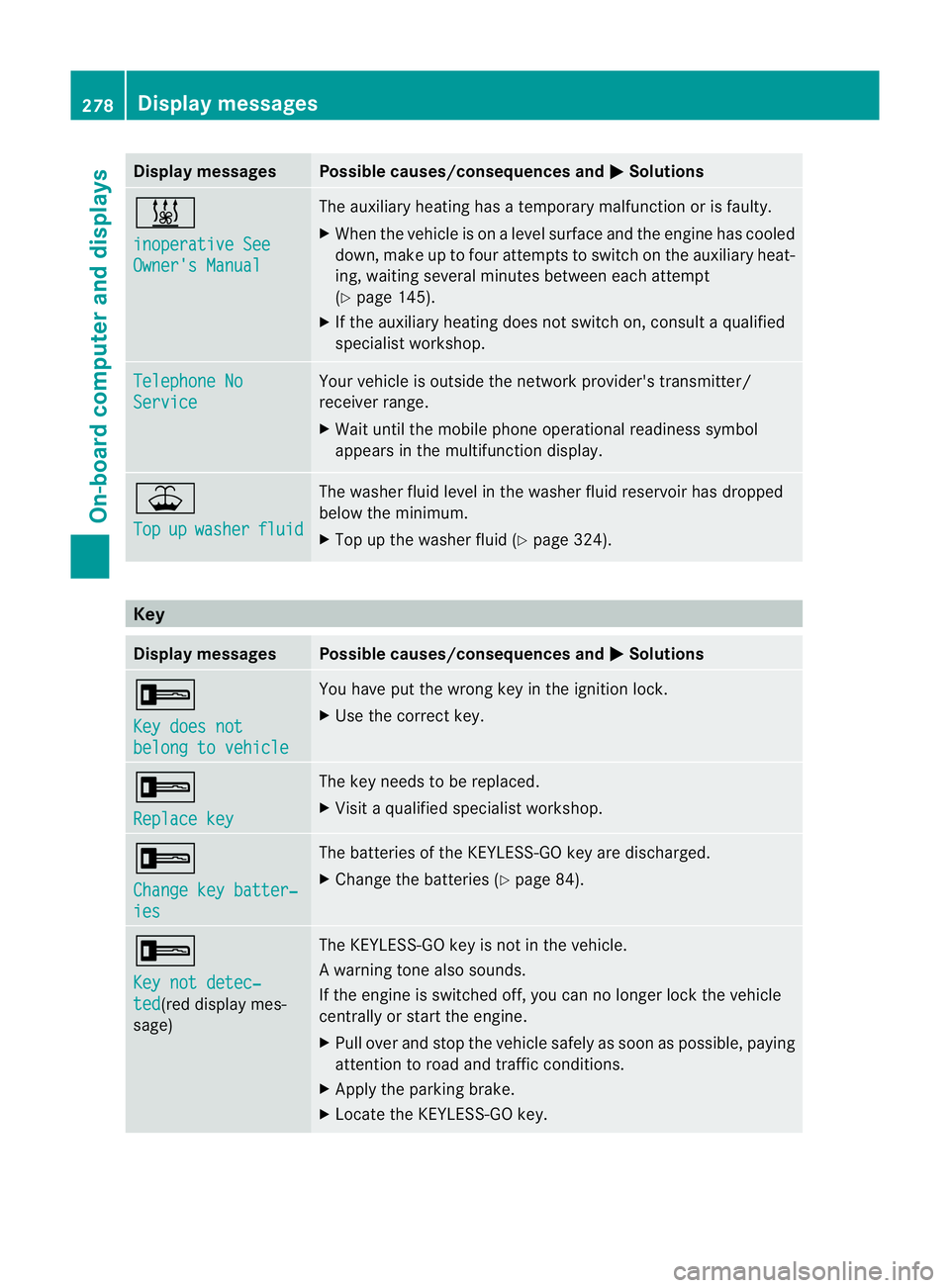
Display messages Possible causes/consequences and
M Solutions
&
inoperative See
Owner's Manual The auxiliary heating has a temporary malfunction or is faulty.
X
Whe nthe vehicle is on alevel surface and the engine has cooled
down, make up to four attempts to switch on the auxiliary heat-
ing, waiting several minutes between each attempt
(Y page 145).
X If the auxiliary heating does not switch on, consult a qualified
specialist workshop. Telephone No
Service Your vehicle is outside the network provider's transmitter/
receiver range.
X
Wait until the mobile phone operational readiness symbol
appears in the multifunction display. ¥
Top
up washer fluid The washer fluid level in the washer fluid reservoir has dropped
below the minimum.
X
Top up the washer fluid (Y page 324).Key
Display messages Possible causes/consequences and
M Solutions
+
Key does not
belong to vehicle You have put the wrong key in the ignition lock.
X
Use the correct key. +
Replace key The key needs to be replaced.
X
Visit a qualified specialist workshop. +
Change key batter‐
ies The batteries of the KEYLESS-GO key are discharged.
X
Change the batteries (Y page 84).+
Key not detec‐
ted (red display mes-
sage) The KEYLESS-GO key is not in the vehicle.
Aw
arning tone also sounds.
If the engine is switched off, you can no longer loc kthe vehicle
centrally or start the engine.
X Pull over and stop the vehicle safely as soon as possible, paying
attention to road and traffic conditions.
X Apply the parking brake.
X Locate the KEYLESS-GO key. 278
Display messagesOn-board computer and displays
Page 327 of 409
X
Replace cap :on the filler neck and turn
clockwise.
Make sure that the cap locks into place
securely.
X Chec kthe oil level again with the oil dip-
stick (Y page 323).
Further information on engine oil
(Y page 388). Checking and adding other service
products
Checking the coolant level G
WARNING
The cooling system is pressurised. Therefore,
only unscrew the cap once the engine has
cooled down. The coolant temperature gauge
must display less than 70 †.Otherwise, you
could be scalded if hot coolant escapes. X
Park the vehicle on a level surface.
Only check the coolant level if the vehicle
is on a level surface and the engine has
cooled down.
X Turn the key to position 2in the ignition
lock (Y page 155).
On vehicles with KEYLESS-GO, press the
Start/Stop button twice (Y page 155).
X Check the coolant temperature display in
the instrument cluster.
The coolant temperature must be below
70 †.
X Turn the key to position 0(Ypage 155) in
the ignition lock. X
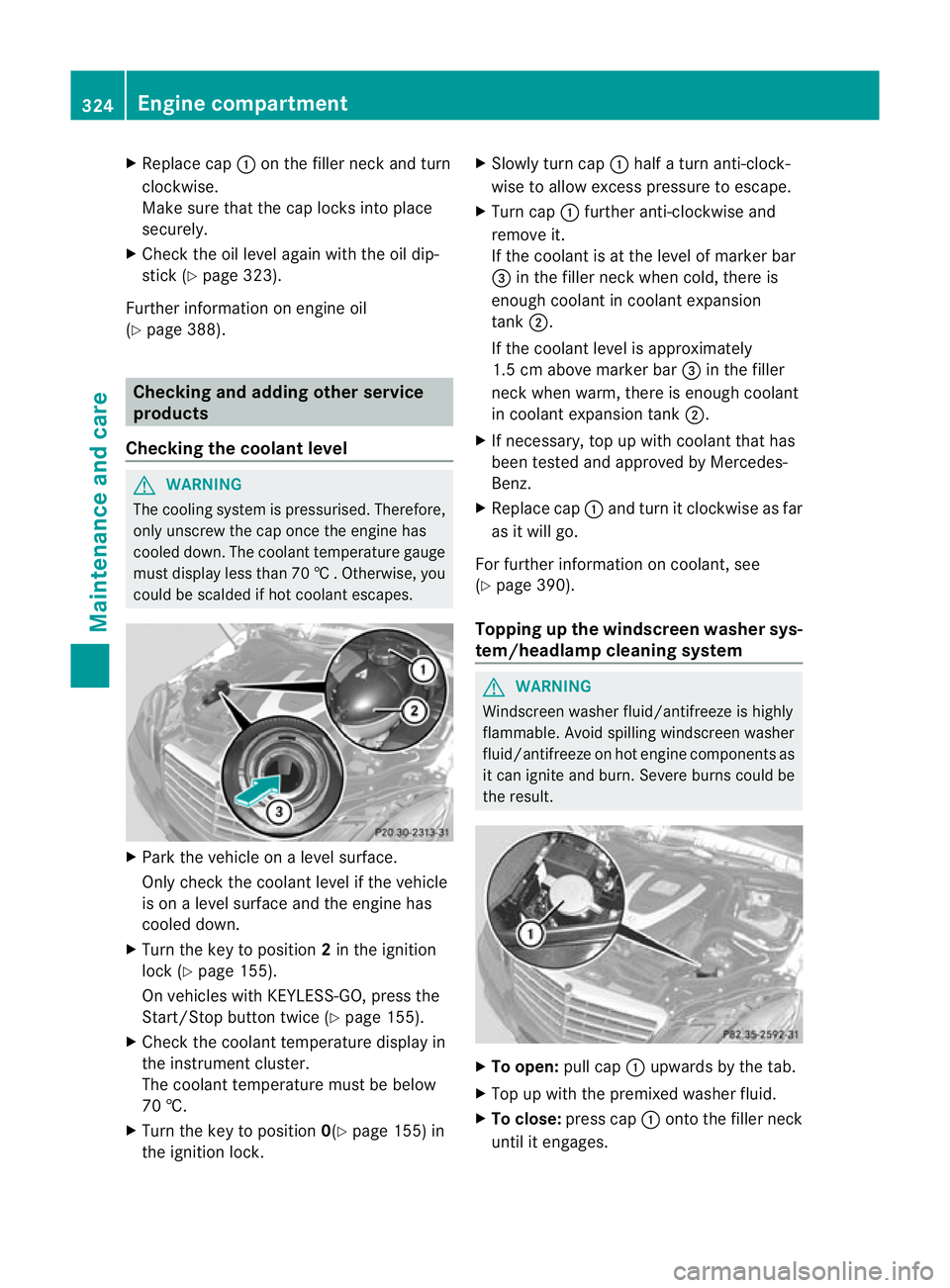
Slowly tur ncap : half a turn anti-clock-
wise to allow excess pressure to escape.
X Turn cap :further anti-clockwise and
remove it.
If the coolant is at the level of marker bar
= in the fille rneck when cold, there is
enough coolant in coolant expansion
tank ;.
If the coolant level is approximately
1.5 cm above marker bar =in the filler
neckw hen warm, there is enough coolant
in coolant expansion tank ;.
X If necessary, top up with coolant that has
been tested and approved by Mercedes-
Benz.
X Replace cap :and turn it clockwise as far
as it will go.
For further information on coolant, see
(Y page 390).
Topping up the windscreen washer sys-
tem/headlampc leaning system G
WARNING
Windscreen washer fluid/antifreeze is highly
flammable. Avoid spilling windscreen washer
fluid/antifreeze on hot engine components as
it can ignite and burn. Severe burns could be
the result. X
To open: pull cap:upwards by the tab.
X Top up with the premixed washer fluid.
X To close: press cap :onto the filler neck
until it engages. 324
Engine compartmentMaintenance and care
Page 328 of 409
The washer fluid reservoir is used for both the
windscreen washer system and the headlamp
cleaning system.
For further information on windscreen
washer fluid/antifreeze (Y page 391).Maintenance
ASSYST PLUS service interval display
Service messages Information on the type of service and service
intervals (see separate Service Booklet).
You can obtain further information from a
Mercedes-Benz Service Centre.
The ASSYST PLUS service interval display
informs you when the next service is due.
If a service due date has been exceeded, you
also hear an acoustic signal.
The multifunction display shows a service
message for a few seconds, e.g.
Next service A due in .. days Service A due
Service A overdue by ... days
The letter indicates which service is due.
Astands for a minor service and
B for a major
service. A number or another letter may be
displayed after the letter .This figure indicates
any necessary additional maintenance work
to be performed.
If you report this displayed information to a
qualified specialist workshop, for example a
Mercedes-Benz Service Centre, they can
inform you of the costs the service will incur.
The ASSYST PLUS service interval display
does not take into account any periods of
time during which the battery is disconnec-
ted. Maintaining the time-dependent service
schedule:
X
Note down the service due date displayed
in the multifunction display before discon-
necting the battery.
or
X Subtract the battery disconnection periods
from the service date shown on the display
after reconnecting the battery.
i The ASSYST PLUS service interval display
does not show any information on the
engine oil level. Observe the notes on the
engine oil level (Y page 322).
Hiding aservice message X
Press the %ora button on the steer-
ing wheel.
Displaying service messages X
Switch on the ignition.
X Press =or; on the steering wheel
to selec tthe Serv. menu.
X Press 9or: to select the ASSYST PLUS submenu and press
ato confirm.
The service due date appears in the multi-
function display.
Points to remember Resetting the ASSYST PLUS service inter-
val display
Aq
ualified specialist workshop, e.g. a
Mercedes-Ben zService Centre, will reset the
ASSYST PLUS service interval display after
the necessary service work has been carried
out.
You can obtain further information, e.g.
regarding service work, from a Mercedes-
Benz Service Centre or directly from
Mercedes-Benz.
! If the ASSYST PLUS service interval dis-
play has been inadvertently reset, this set- Maintenance
325Maintenance and care Z