heating MERCEDES-BENZ E-CLASS SALOON 2015 Service Manual
[x] Cancel search | Manufacturer: MERCEDES-BENZ, Model Year: 2015, Model line: E-CLASS SALOON, Model: MERCEDES-BENZ E-CLASS SALOON 2015Pages: 497, PDF Size: 16.23 MB
Page 221 of 497
the brake syste
mand prevents the brakes
fro mo verheating and wearing too quickly.
If DISTRONIC PLU Sdetects tha tthere is arisk
of ac ollision, yo uwillbew arned visually and
acoustically. Without your intervention,
DISTRONIC PLU Scannot prevent acollision.
An intermittent warning tone will the nsound
and the distance warning lamp will ligh tupin
the instrument cluster. Brake immediatel yto
increase the distance to the vehicl edriving in
front, or take evasive action, provide ditis
safe to do so.
For DISTRONIC PLU Stoassistyou ,the radar
senso rsystemm ustbeo perational.
DISTRONIC PLU Soperates in the range
between 0km/h and 200 km/h.
Do not us eDISTRONIC PLU Swhile driving on
roads with steep gradients.
Important safety notes G
WARNING
Hybri dvehicles :ensur ethaty ou rea dthe
"HYBRID" supplement. Yo ucould otherwise
fail to recognis edangers. G
WARNING
DISTRONIC PLU Sdoesn ot react to:
R people or animals
R stationar yobstacle sont he road, e.g .stop-
pe dorp arked vehicles
R oncoming and crossing traffic
As aresult, DISTRONIC PLU Smayneithe rgive
warnings nor intervene in such situations.
There is ariskofana ccident.
Alway spaycarefu lattentio ntothe traffi csit-
uatio nand be ready to brake. G
WARNING
DISTRONIC PLU Scannot always clearly rec-
ognis eother roa dusers and complex traffic
conditions. In such cases
,DISTRONIC PLU Smay:
R give an unnecessary warning and then
brake the vehicle
R neithe rgiveaw arning nor intervene
R accelerate or brake unexpectedly
There is ariskofana ccident.
Continu etodrive carefull yand be prepared to
brake, particularl yifDISTRONIC PLU Swarns
you. G
WARNING
DISTRONIC PLU Sbrakes your vehicl ewithup
to 50% of the maximum possibl edeceleration.
If thi sdeceleratio nisn ot sufficient,
DISTRONIC PLU Salerts yo uwithav isual and
acoustic warning. There is ariskofana cci-
dent.
Apply the brakes yourself in these situations
and try to take evasive action.
! When DISTRONIC PLU
Sorthe HOLD
functio nisa ctivated ,the vehicl ebrakes
automaticall yincertainsituations.
To avoi ddamag etothe vehicle, deactivate
DISTRONIC PLU Sand the HOL Dfunctio nin
the following or simila rsituations:
R when towing away
R in ac ar wash
If yo ufailtoa dapt your driving style,
DISTRONIC PLU Scan neithe rreduc ethe risk
of an accident nor override the laws of phys-
ics .D ISTRONIC PLU Scannot take roa dand
weather conditions or traffi cconditions into
account. DISTRONIC PLU Siso nlyana id.Y ou
ar er esponsibl efor the distance to the vehicle
in front, for vehicl espeed, for braking in good
time, and for staying in lane.
Do not us eDISTRONIC PLUS:
R in roa dand traffi cconditions which do not
allo wyouto maintain aconstant speed, e.g.
in heav ytraffi coronw inding roads
R on smooth or slippery roads .Braking or
accelerating can cause the drive wheels to 218
Driving systemsDriving an
dparking
Page 271 of 497
The maximum permissible speed for vehicle/
trailer combinations depends on the type of
trailer. Before beginnin gthe journey, check
the trailer's document stosee what the max-
imum permitted speed is. Observe the legally
prescribed maximum speed in the relevant
country.
For certain Mercedes-Benz vehicles, the max-
imum permissible rear axle load is increased
when towing atrailer. See the "Technical
data" section to find out whether this applies to your vehicle (Y page 484). If you utilise any
of the added maximum rear axle load when
towing atrailer, the vehicle/trailer combina-
tion may not exceed amaximum speed of
100 km/hf or reasons concerning the oper-
ating permit. This also applie sincountrie sin
which the permissible maximu mspee dfor
vehicle/trailer combinations is above
100 km/h.
When towing atrailer, you rvehicle's handling
characteristics wil lbedifferent in comparison
to whe ndriving without atrailer and it will
consume more fuel.
Change into alower gea ringood time on long
and steep downhill gradients.
i This also applie
sifyou have activated
cruis econtrol, SPEEDTRONIC or
DISTRONIC PLUS.
This wil luse the braking effect of the engine,
so less braking wil lberequired to maintain
vehicle speed. This relieves the loa donthe
brake system and prevents the brake sfrom
overheating and wearing too quickly. If you
need additiona lbraking, depress the brake
pedal repeatedl yrather than continuously.
Driving tips If the trailer swings from side to side:
X Do not accelerate.
X Do not countersteer.
X Brake if necessary. R
Maintain agreater distance to the vehicle in
front than whe ndriving without atrailer.
R Avoid braking abruptly .Ifpossible ,brake
gently at first to allow the trailer to run on.
Then, increase the braking force rapidly.
R The values give nfor gradient-climbing
capabilities from astandstil lrefer to sea
level. When driving in mountainous areas,
note that the power outpu tofthe engine,
and consequently the vehicle's gradient-
climbing capability, decrease with increas-
ing altitude. Foldin
gout the ball coupling G
WARNING
If the bal lcoupling is not correctly engaged,
the trailer can detach .There is arisk of an
accident.
Always engag ethe bal lcoupling as described. G
WARNING
If you release the bal lcoupling or it does not
engag ecorrectly whe nfolding in, it wil lswing
out. Withi npivoting range of the bal lcoupling,
there is an increased risk of an accident and
injury.
Only release the bal lcoupling if the pivoting
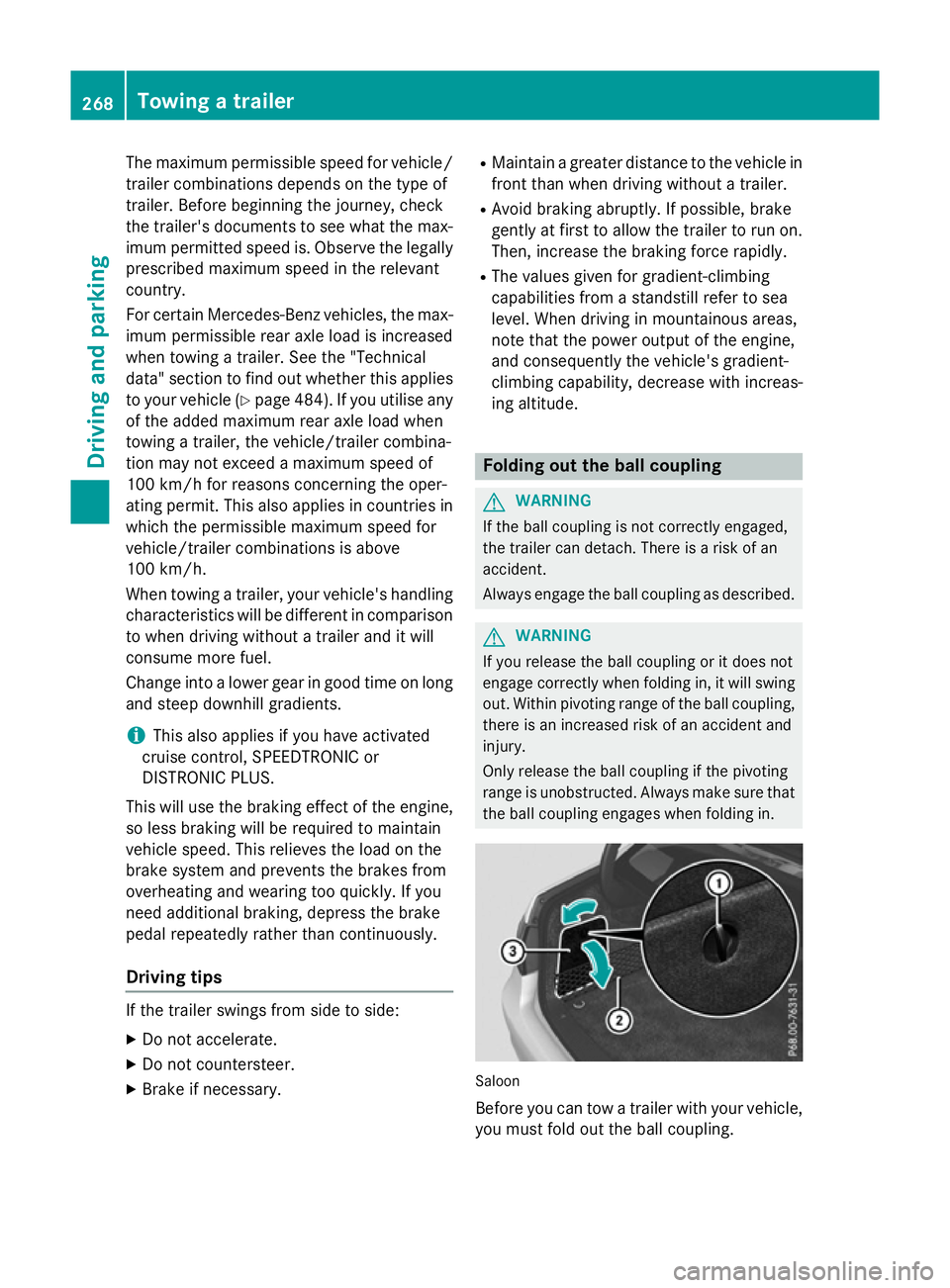
range is unobstructed. Always make sure that the bal lcoupling engages whe nfolding in. Saloon
Before you can tow
atrailer with you rvehicle,
you must fold out the bal lcoupling. 268
Towing
atrailerDriving and parking
Page 279 of 497
Useful information
i This Owner's Manual describes all mod-
els, series and optional equipment for your
vehicle that were available at the time of
going to press. National variation sare pos-
sible. Not ethat your vehicle may not be
equipped with all of the function sdescri-
bed. This is also the case for system sand
function srelevan ttosafety.
i Read the information on qualified special-
ist workshops: (Y page 27). Important safet
ynotes G
WARNING
Operating the integrated information systems and communications equipment in the vehicle
while drivin gwill distract you from traffic con-
ditions. You could then lose contro lofthe
vehicle. There is arisk of an accident.
Only operate thes edevices if road traffic con-
dition spermit .Ifyou are unsure about the
surrounding conditions, pull over to asafe
locatio nand make entries only while the vehi-
cle is stationary.
You must observ ethe legal requirements for
the country in which you are currently driving when operatin gthe on-board computer. G
WARNING
If the instrumen tcluster has failed or mal-
functioned, you may not recognise function
restrictions relevan ttosafety. The operating
safet yofy our vehicle may be impaired. There
is ar isk of an accident.
Driv eonc arefully. Have the vehicle checked
at aq ualified specialist workshop immedi-
ately.
The on-board computer only shows messages
or warnings from certain system sinthe mul-
tifunction display. You should therefore make
sure your vehicle is operatin gsafely at all
times. If the operatin
gsafet yofy our vehicle is
impaired, park the vehicle safely as soon as
possible. Contact aqualified specialist work-
shop.
HYBRID vehicles :make sure that you read the
"HYBRID "Supplement. You could otherwise
fail to recognise dangers ,e.g. due to high
voltage.
For an overview; see the instrumen tcluster
illustration (Y page 34). Displays and operation
Coolant temperatureg
auge G
WARNING
If you open the bonnet while the engin eis
overheating or while ther eisafire in the
engin ecompartment, you could come into
contact with hot gases or other leaking ser-
vice products. There is adanger of injury.
Allow an overheating engin etocool down
before openin gthe bonnet. If ther eisafire in
the engin ecompartment, leave the bonnet
closed and notify the fire brigade.
The coolan ttemperature gauge is in the
instrumen tcluster on the left-hand side
(Y page 34).
Under normal operatin gcondition sand with
the specified coolan tlevel, the coolan ttem-
perature may rise to 120 †.
At high outside temperature sand when driv-
ing uphill, the coolan ttemperature may rise
to the end of the scale. Rev counter
! Do not drive in the overrevvin
grange.
Doin gsow ill damage the engine.
The red band in the rev counter indicates the
engine's overrevvin grange.
The fuel supply is interrupted to protect the
engin ewhen the red band is reached. 276
Displays and operationOn-boar
dcomputer and displays
Page 292 of 497
R
Callin gupd isplay message sinthemes-
sage memory (Y page 299)
R Restarting th etyrep ressur eloss warning
system (Y page 422)
R Checkin gthe tyrep ressur eelectronically
(Y page 423)
R Callin gupt heservic edue date
(Y page 384) Settings menu
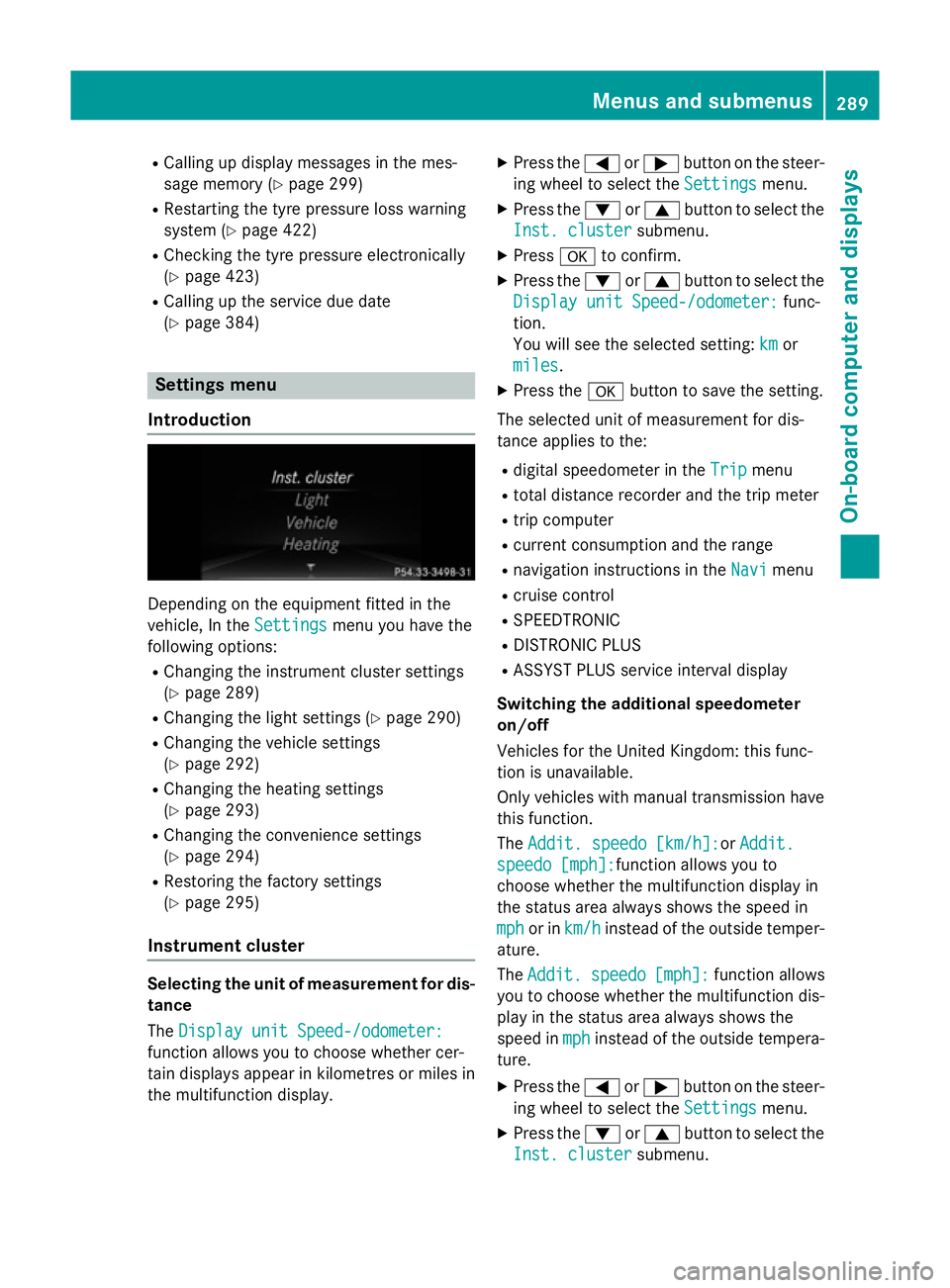
Introduction Dependin
gontheequipmen tfitte dint he
vehicle ,Int he Settings
Settings menuyou have the
followin goptions:
R Changin gthe instrumen tcluste rsettings
(Y page 289)
R Changin gthe light settings (Y page 290)
R Changin gthe vehicle settings
(Y page 292)
R Changin gthe heating settings
(Y page 293)
R Changin gthe convenience settings
(Y page 294)
R Restoring th efactory settings
(Y page 295)
Instrumen tcluster Selecting th
eunitofm easurement for dis-
tance
The Displa yunitS peed-/odometer:
Displa yunitS peed-/odometer:
function allows you to choos ewhether cer-
tai nd isplays appear in kilometres or mile sin
th em ultifunction display. X
Press the =or; buttononthesteer-
ing wheel to select the Settings Settingsmenu.
X Press the :or9 buttontoselect the
Inst. cluster Inst. cluster submenu.
X Press ato confirm.
X Press the :or9 buttontoselect the
Displa yunitS peed-/odometer:
Displa yunitS peed-/odometer: func-
tion.
You will see th eselected setting: km kmor
miles
miles.
X Press the abuttontos ave th esetting.
The selected unit of measuremen tfor dis-
tance applie stothe:
R digital speedometer in the Trip
Trip menu
R total distanc erecorder and th etripm eter
R trip computer
R curren tconsum ption and th erange
R navigation instruction sintheNavi
Navi menu
R cruise control
R SPEEDTRONIC
R DISTRONI CPLUS
R ASSYS TPLUSs ervic einterval display
Switchin gthe additiona lspe edometer
on/off
Vehicle sfor th eUnite dKingdom :thisf unc-
tion is unavailable.
Only vehicle swithm anual transmission have
this function.
The Addit. speedo [km/h]: Addit. speedo [km/h]:or Addit.
Addit.
speedo [mph]:
speedo [mph]: function allows you to
choos ewhether th emultifunction display in
th es tatus area always shows th espee din
mph
mph or in km/h
km/h instead of th eoutside temper-
ature.
The Addit. Addit. speedo
speedo[mph]:
[mph]:function allows
you to choos ewhether th emultifunction dis-
play in th estatus area always shows the
spee dinmph
mph instead of th eoutside tempera-
ture.
X Press the =or; buttononthesteer-
ing wheel to select the Settings
Settingsmenu.
X Press the :or9 buttontoselect the
Inst. cluster
Inst. cluster submenu. Menu
sand submenus
289On-boardcomputer and displays Z
Page 296 of 497
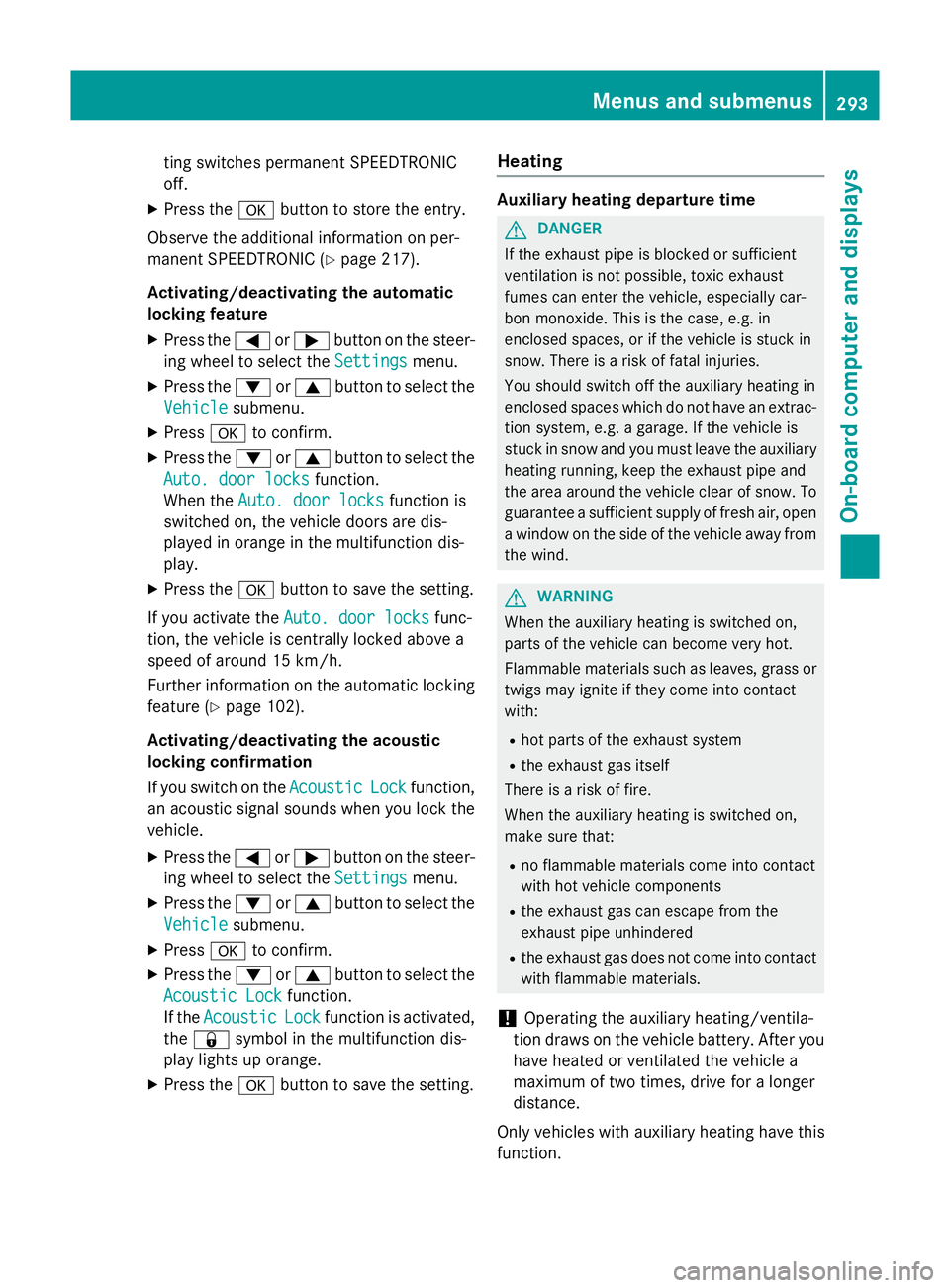
ting switches permanent SPEEDTRONIC
off.
X Press the abutton to store the entry.
Observe the additional information on per-
manent SPEEDTRONIC (Y page 217).
Activating/deactivating the automatic
lockin gfeature
X Press the =or; button on the steer-
ing whee ltoselect theSettings Settings menu.
X Press the :or9 button to select the
Vehicle
Vehicle submenu.
X Press ato confirm.
X Press the :or9 button to select the
Auto. doo rlocks
Auto. doo rlocks function.
When the Auto. doo rlocks
Auto. doo rlocks functio nis
switched on, the vehicl edoors ar edis-
played in orange in the multifunctio ndis-
play.
X Press the abutton to save the setting.
If yo uactivate the Auto. doorlocks
Auto. doo rlocks func-
tion, the vehicl eiscentrally locked above a
spee dofa round 15 km/h.
Furthe rinformation on the automatic locking
featur e(Ypage 102).
Activating/deactivating the acoustic
lockin gconfirmation
If yo uswitch on the Acoustic
Acoustic Lock Lockfunction,
an acoustic signa lsou nd sw heny ou lock the
vehicle.
X Press the =or; button on the steer-
ing whee ltoselect theSettings
Settings menu.
X Press the :or9 button to select the
Vehicle
Vehicle submenu.
X Press ato confirm.
X Press the :or9 button to select the
Acoustic Lock
Acoustic Lock function.
If the Acoustic
Acoustic Lock
Lockfunctio nisa ctivated,
the & symbo linthe multifunctio ndis-
play lights up orange.
X Press the abutton to save the setting. Heating Auxiliary heating departure time
G
DANGER
If the exhaust pipe is blocke dorsufficient
ventilation is not possible, toxi cexhaust
fumes can ente rthe vehicle, especiall ycar-
bo nm onoxide. This is the case, e.g .in
enclose dspaces, or if the vehicl eisstuck in
snow. There is ariskoff atal injuries.
Yo us houl dswitch off the auxiliary heating in
enclose dspacesw hich do not have an extrac-
tio ns ystem, e.g .agarage. If the vehicl eis
stuck in sno wand yo umustleave the auxiliary
heating running ,kee pt he exhaust pipe and
the area around the vehicl eclear of snow. To
guarante easufficient supply of fresh air, open
aw indo wont he side of the vehicl eawayfrom
the wind. G
WARNING
When the auxiliary heating is switched on,
parts of the vehicl ecan becom everyh ot.
Flammabl ematerial ssuchasl eaves, grass or
twigs ma yign ite if the ycom einto contact
with:
R ho tp arts of the exhaust system
R the exhaust ga sitself
There is ariskoff ire.
When the auxiliary heating is switched on,
make sure that:
R no flammabl ematerial scom einto contact
with ho tvehicl ecomponents
R the exhaust ga scan escap efromt he
exhaust pipe unhindered
R the exhaust ga sdoesn ot com einto contact
with flammabl ematerials.
! Operating the auxiliary heating/ventila-
tio nd raws on the vehicl ebattery .After you
have heate dorventilated the vehicl ea
maximum of two times ,drive for alon ger
distance.
Onl yvehicles with auxiliary heating have this
function. Menus and submenus
293On-board computer and displays Z
Page 297 of 497
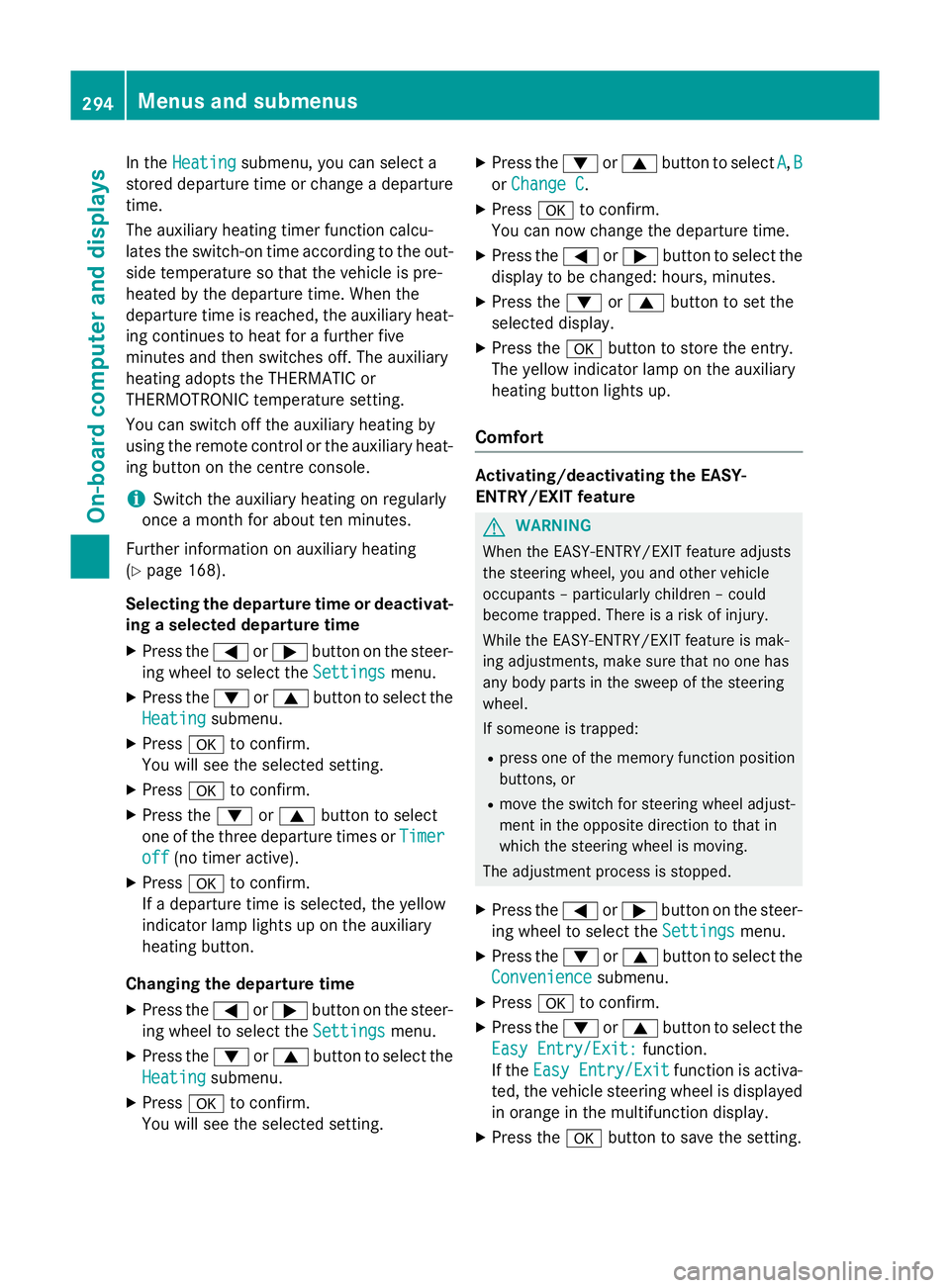
In the
Heating
Heating submenu, you can select a
stored departure time or change adeparture
time.
The auxiliary heating timer function calcu-
lates the switch-on time according to the out-
side temperature so that the vehicle is pre-
heated by the departure time. When the
departure time is reached ,the auxiliary heat-
ing continues to heat for afurther five
minutes and then switches off. The auxiliary
heating adopts the THERMATIC or
THERMOTRONIC temperature setting.
You can switch off the auxiliary heating by
using the remote control or the auxiliary heat- ing button on the centre console.
i Switch the auxiliary heating on regularly
once amonth for aboutt en minutes.
Further information on auxiliary heating
(Y page 168).
Selecting the departur etime or deactivat-
ing aselected departur etime
X Press the =or; button on the steer-
ing wheeltos elect theSettings
Settings menu.
X Press the :or9 button to select the
Heating
Heating submenu.
X Press ato confirm.
You wills ee the selected setting.
X Press ato confirm.
X Press the :or9 button to select
one of the three departure times or Timer Timer
off
off (no timer active).
X Press ato confirm.
If ad eparture time is selected, the yellow
indicator lamp lights up on the auxiliary
heating button.
Changing the departur etime
X Press the =or; button on the steer-
ing wheeltos elect theSettings Settings menu.
X Press the :or9 button to select the
Heating
Heating submenu.
X Press ato confirm.
You wills ee the selected setting. X
Press the :or9 button to select A A,B B
or Change C
Change C.
X Press ato confirm.
You can now change the departure time.
X Press the =or; button to select the
display to be changed: hours, minutes.
X Press the :or9 button to set the
selected display.
X Press the abutton to store the entry.
The yellow indicator lamp on the auxiliary
heating button lights up.
Comfort Activating/deactivating the EASY-
ENTRY/EXIT feature
G
WARNING
When the EASY-ENTRY/EXIT feature adjusts
the steering wheel, you and other vehicle
occupants –particularly childre n–could
become trapped .There is arisk of injury.
Whilet he EASY-ENTRY/EXIT feature is mak-
ing adjustments, make sure that no one has
any body parts in the sweep of the steering
wheel.
If someone is trapped:
R press one of the memory function position
buttons, or
R move the switch for steering wheela djust-
ment in the opposite direction to that in
which the steering wheelism oving.
The adjustment process is stopped.
X Press the =or; button on the steer-
ing wheeltos elect theSettings Settings menu.
X Press the :or9 button to select the
Convenience
Convenience submenu.
X Press ato confirm.
X Press the :or9 button to select the
Easy Entry/Exit:
Easy Entry/Exit: function.
If the Easy Entry/Exit
Easy Entry/Exit function is activa-
ted, the vehicle steering wheelisd isplayed
in orange in the multifunction display.
X Press the abutton to save the setting. 294
Menus and submenusOn-board computer and displays
Page 316 of 497
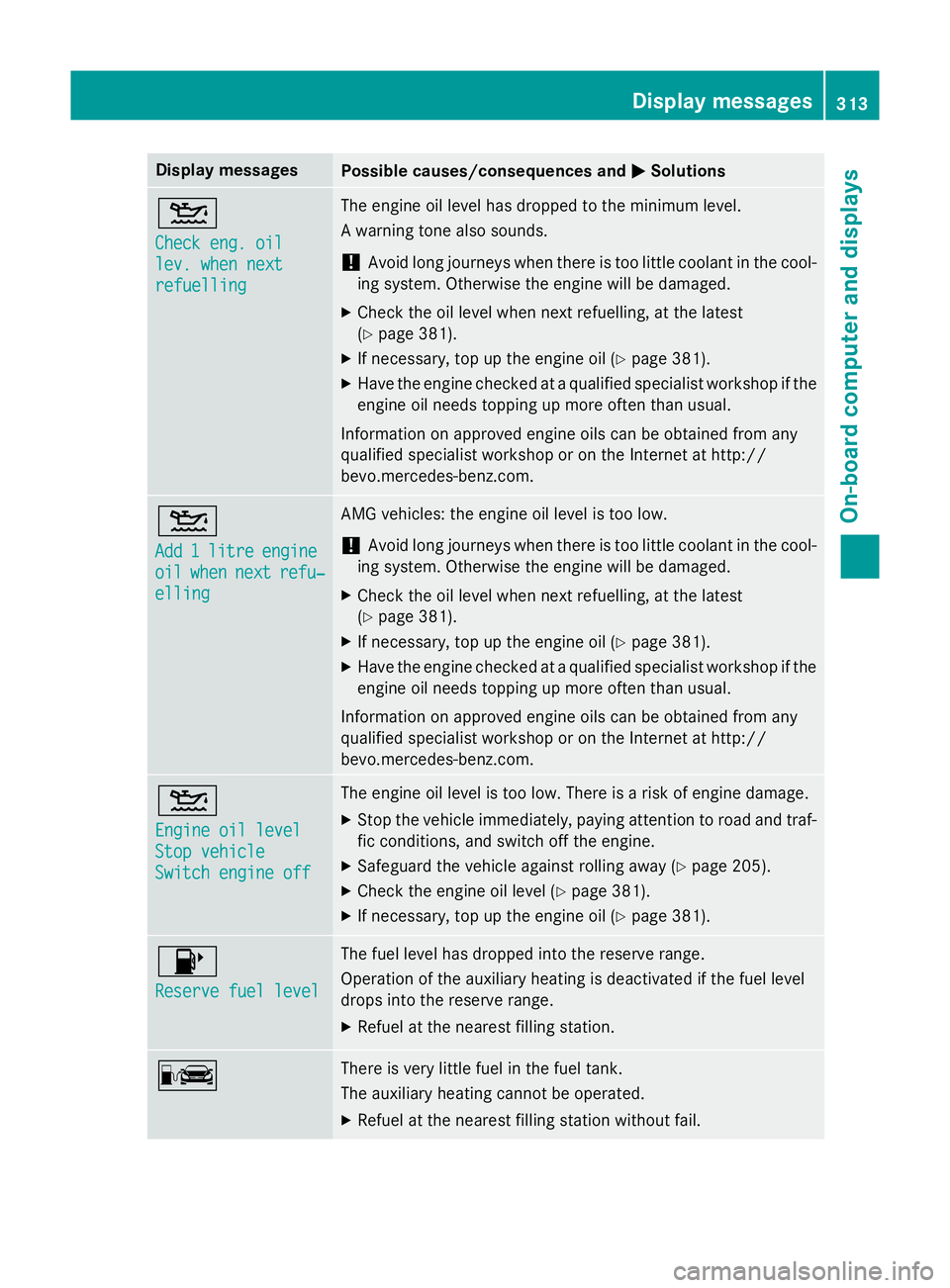
Display messages
Possible causes/consequences and
M
MSolutions 4
Check eng
.oil
Check eng .oil
lev .w henn ext
lev .w henn ext
refuelling refuelling The engin
eoil level has dropped to th eminimum level.
Aw arnin gtonea lso sounds.
! Avoid lon
gjou rneys when there is to olittl ec oolan tint hecool-
in gs ystem. Otherwise th eenginew ill be damaged.
X Chec kthe oil level when next refuelling, at th elatest
(Y page 381).
X If necessary, to puptheengin eoil (Y page 381).
X Hav ethe engin echecked ataq ualified specialist workshop if the
engin eoil needs toppin gupmoreo ften than usual.
Information on approve dengineo ils can be obtained from any
qualified specialist workshop or on th eInterne tathttp://
bevo.mercedes-benz.co m.4
Add 1 Add 1
litre
litre engine
engine
oil
oil when
when next
next refu‐
refu‐
elling
elling AMG vehicles: the engine oil level is too low.
!
Avoid long journeys when there is too little coolant in the cool-
ing system. Otherwise the engine will be damaged.
X Check the oil level when next refuelling, at the latest
(Y page 381).
X If necessary, top up the engine oil (Y page 381).
X Have the engine checked at aqualified specialist workshop if the
engine oil needs topping up more often than usual.
Information on approved engine oils can be obtained from any
qualified specialist workshop or on the Internet at http://
bevo.mercedes-benz.com. 4
Engine oil level Engine oil level
Stop vehicle Stop vehicle
Switch engine off Switch engine off The engine oil level is too low. There is
arisk of engine damage.
X Stop the vehicle immediately, paying attention to road and traf-
fic conditions, and switch off the engine.
X Safeguard the vehicle against rolling away( Ypage 205).
X Check the engine oil level (Y page 381).
X If necessary, top up the engine oil (Y page 381).8
Reserve fuel level Reserve fuel level The fuel level has dropped into the reserve range.
Operation of the auxiliary heating is deactivated if the fuel level
drops into the reserve range.
X Refuelatt he nearest filling station. C There is very little fuel in the fuel tank.
The auxiliary heating cannot be operated.
X Refuelatt he nearest filling station without fail. Display messages
313On-board computer and displays Z
Page 339 of 497
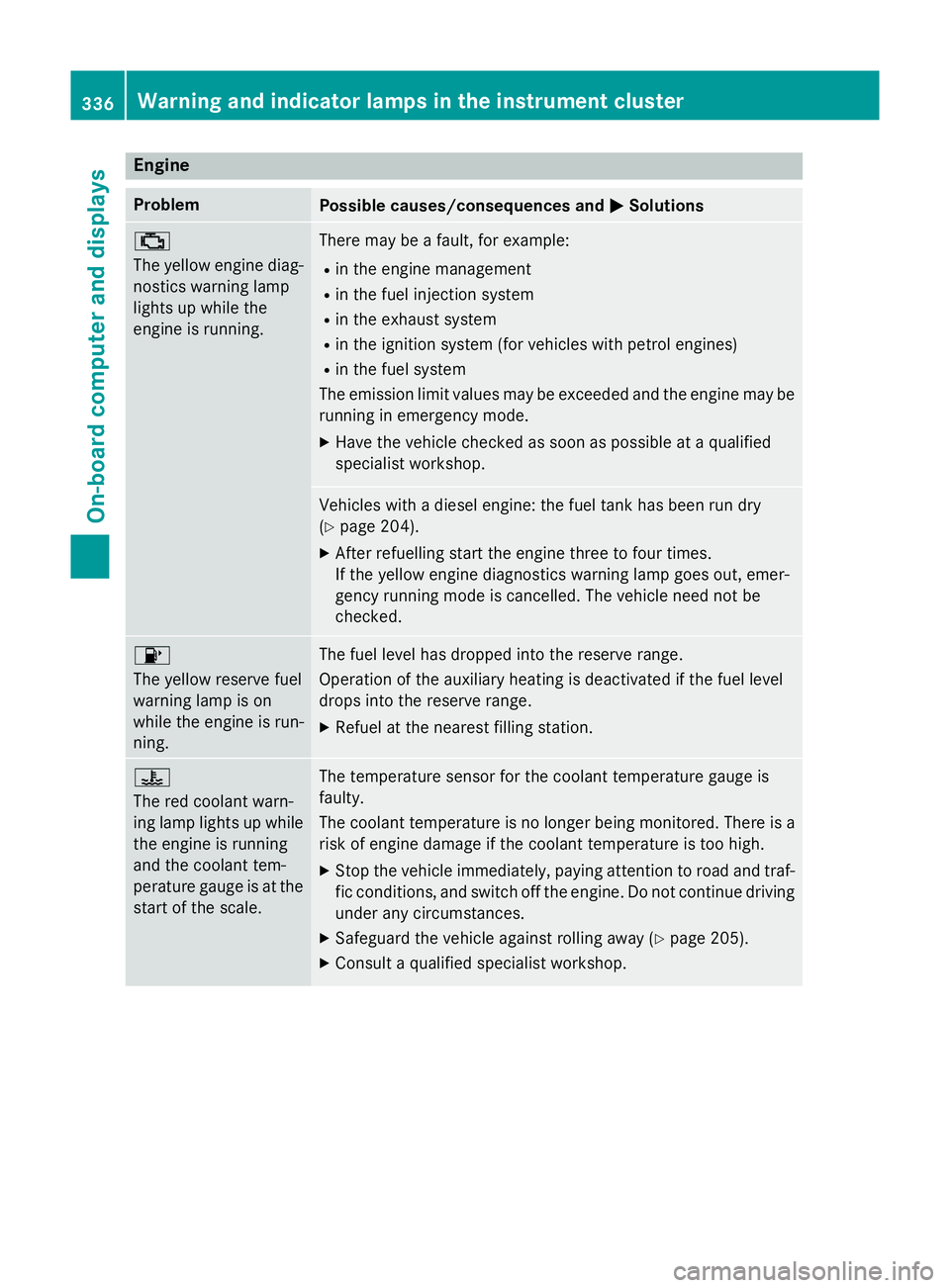
Engine
Problem
Possible causes/consequences and
M
MSolutions ;
The yellow engin
ediag-
nostics warning lamp
light supw hile the
engin eisrunning. Ther
emay be afault ,for example:
R in th eenginem anagement
R in th efuel injection system
R in th eexhaust system
R in th eignition system (for vehicle swith petrol engines)
R in th efuel system
The emission limit values may be exceeded and th eenginem ay be
runnin ginemergency mode.
X Hav ethe vehicle checked as soon as possible at aqualified
specialist workshop. Vehicle
swithadiese leng ine: th efuel tan khas been run dry
(Y page 204).
X Afte rrefuellin gstart th eenginet hree to four times.
If th eyellow engin ediagnostics warning lamp goes out ,emer-
gency runnin gmode is cancelled. The vehicle need no tbe
checked. 8
The yellow reserv
efuel
warning lamp is on
while th eengineisr un-
ning. The fuel leve
lhas dropped int othe reserv erange.
Operatio noftheauxiliar yheating is deactivate difthefuel level
drops int othe reserv erange.
X Refuel at th eneares tfillin gstation. ?
The red coolant warn-
ing lamp light
supwhile
th ee ngineisr unning
and th ecoolant tem-
perature gauge is at the start of th escale. The temperatur
esensor for th ecoolant temperatur egauge is
faulty.
The coolant temperatur eisnolonger bein gmonitored. Ther eisa
risk of engin edamage if th ecoolant temperatur eistoohigh.
X Stop th evehicle immediately, paying attentio ntoroad and traf-
fic conditions, and switch off th eengine. Do no tcontinue driving
unde rany circumstances.
X Safeguard th evehicle against rolling away (Y page 205).
X Consult aqualifie dspecialist workshop. 336
Warning and indicator lamps in th
einstrumen tclusterOn-boar dcomputer and displays
Page 367 of 497
X
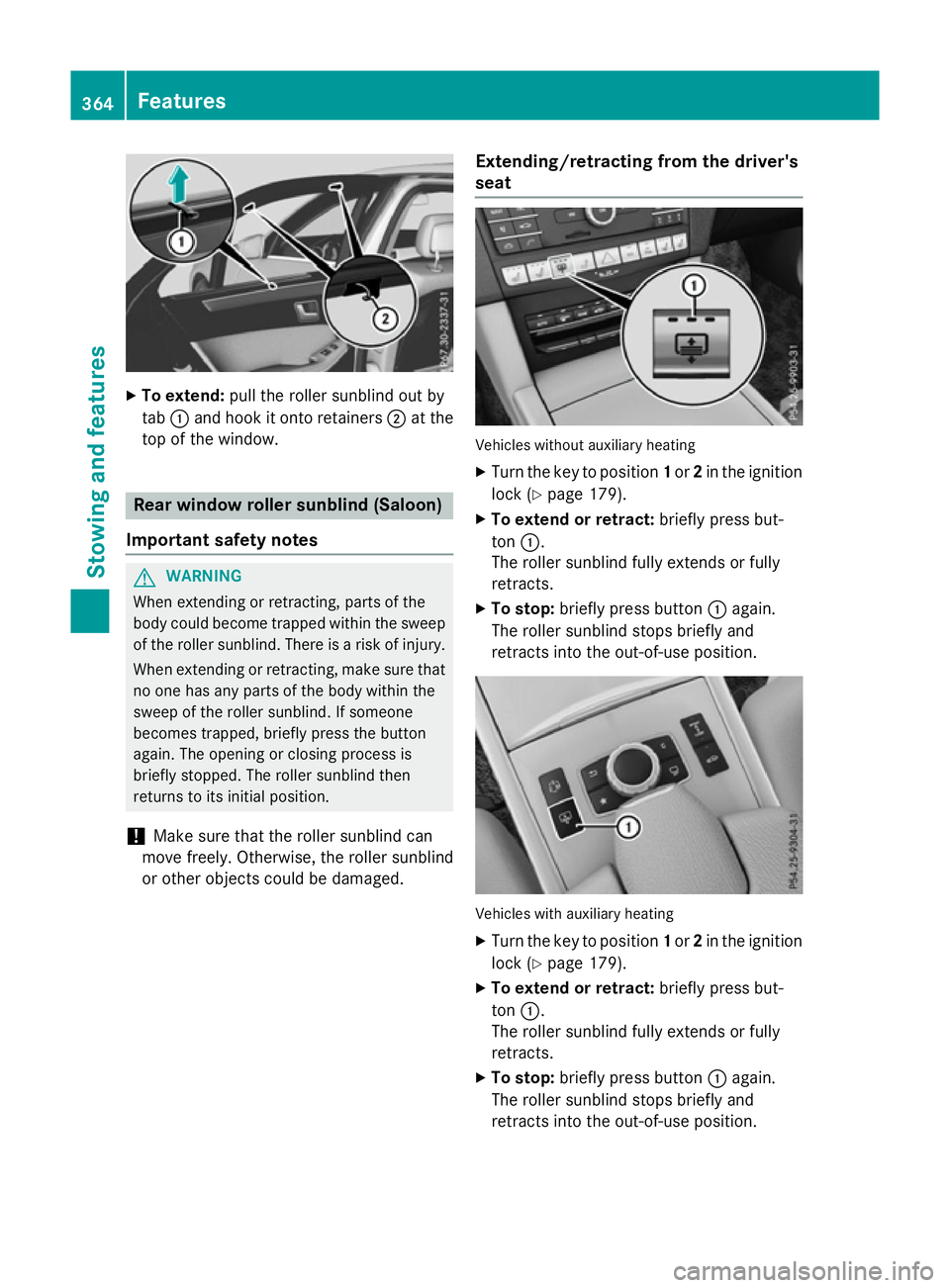
To extend: pull the rolle rsunblind ou tby
tab :and hoo kitonto retainers ;at the
top of the window. Rea
rwindo wr olle rsunblin d(Saloon)
Important safety notes G
WARNING
Whe nextending or retracting, parts of the
body could become trapped withi nthe sweep
of the rolle rsun blind .There is ariskofi njury.
Whe nextending or retracting, make sure that
no one ha sany parts of the body withi nthe
swee poft he rolle rsunblind .Ifsomeone
become strapped ,briefl ypress the button
again. The opening or closing proces sis
briefl ystopped. The rolle rsunblind then
returns to its initia lposit ion.
! Make sure tha
tthe rolle rsunblind can
mov efreely. Otherwise, the rolle rsunblind
or othe robjects could be damaged. Extending/retractin
gfrom the driver's
seat Vehicles withou
tauxiliary heating
X Turn the key to position 1or 2in the ignition
lock (Y page 179).
X To exten dorretract: brieflypress but-
ton :.
The rolle rsunblind full yextends or fully
retracts.
X To stop: brieflypress button :again.
The rolle rsunblind stop sbriefl yand
retracts into the out-of-use position. Vehicles with auxiliary heating
X Turn the key to position 1or 2in the ignition
lock (Y page 179).
X To exten dorretract: brieflypress but-
ton :.
The rolle rsunblind full yextends or fully
retracts.
X To stop: brieflypress button :again.
The rolle rsunblind stop sbriefl yand
retracts into the out-of-use position. 364
FeaturesSto
wing an dfeatures
Page 368 of 497
Ashtray
Fron tashtray !
The stowage spac
eunder th eashtray is
no th eat resistant .Befor ep lacing lit ciga-
rette sint heashtray, mak esuret hatthe
ashtray is properly engaged. Otherwise, the
stowage spac ecould be damaged. X
To open: slide cover :forwards until it
engages.
X To remove th einsert: hold insert =by
th er ibbing at th eside sand lift it up ;and
out.
X To refit th einsert: press insert =intothe
holder until it engages.
X To close: briefly press cover :at the
front.
The cover retracts.
You can remove th eashtray insert and use
th er esulting compartmen tfor stowage.
Rear-compartmen tashtray X
To open: briefly press th etop of cover ;.
The ashtray opens.
X To remove th einsert: press release but-
ton =and lift th einsert up and out.
X To fit th einsert: fit insert :intot he
holder from abov eand press down int othe
holder until it engages. Cigarette lighter
Important safety notes G
WARNING
You can burn yourself if you touch th ehot
heating elemen torthesocke tofthecigarette
lighter.
In addition ,flammabl ematerials can ignit eif:
R theh ot cigarette lighte rfalls
R ac hild hold sthe hot cigarette lighte rto
objects ,for example
There is ariskoff irea nd injury.
Always hold th ecigarette lighte rbytheknob.
Always mak esuret hatthe cigarette lighte ris
out of reac hofchildren .Never leav echildren
unattended in th evehicle.
Your attention mus talways be focused on the
traffic conditions. Only use th ecigarette
lighte rwhen road and traffic condition sper-
mit.
Cigarette lighter in th efront compart-
ment Features
365Stowing and featu res Z