wheel MERCEDES-BENZ E-CLASS SALOON 2015 Workshop Manual
[x] Cancel search | Manufacturer: MERCEDES-BENZ, Model Year: 2015, Model line: E-CLASS SALOON, Model: MERCEDES-BENZ E-CLASS SALOON 2015Pages: 497, PDF Size: 16.23 MB
Page 139 of 497
If you close the driver's door with the key
inserted in the ignition lock, the steering
wheelisa utomaticall ymoved to the previ-
ouslys et position.
The last positio nofthe steering wheelis
stored when you switch off the ignition or
when you store the setting with the memory
function (Y page 139).
Crash-responsive EASY-EXIT feature If the crash-responsive EASY-EXIT feature is
triggered in an accident, the steering column
willm ove upwards when the driver's door is
opened. This occurs irrespective of the posi-
tion of the key in the ignition lock. This makes it easier to exit the vehicle and rescue the
occupants.
The crash-responsive EASY-EXIT feature is
only operational if the EASY-EXIT/ENTRY fea-
ture is activated in the on-board computer
(Y page 294). Mirrors
Rear-view mirror
X
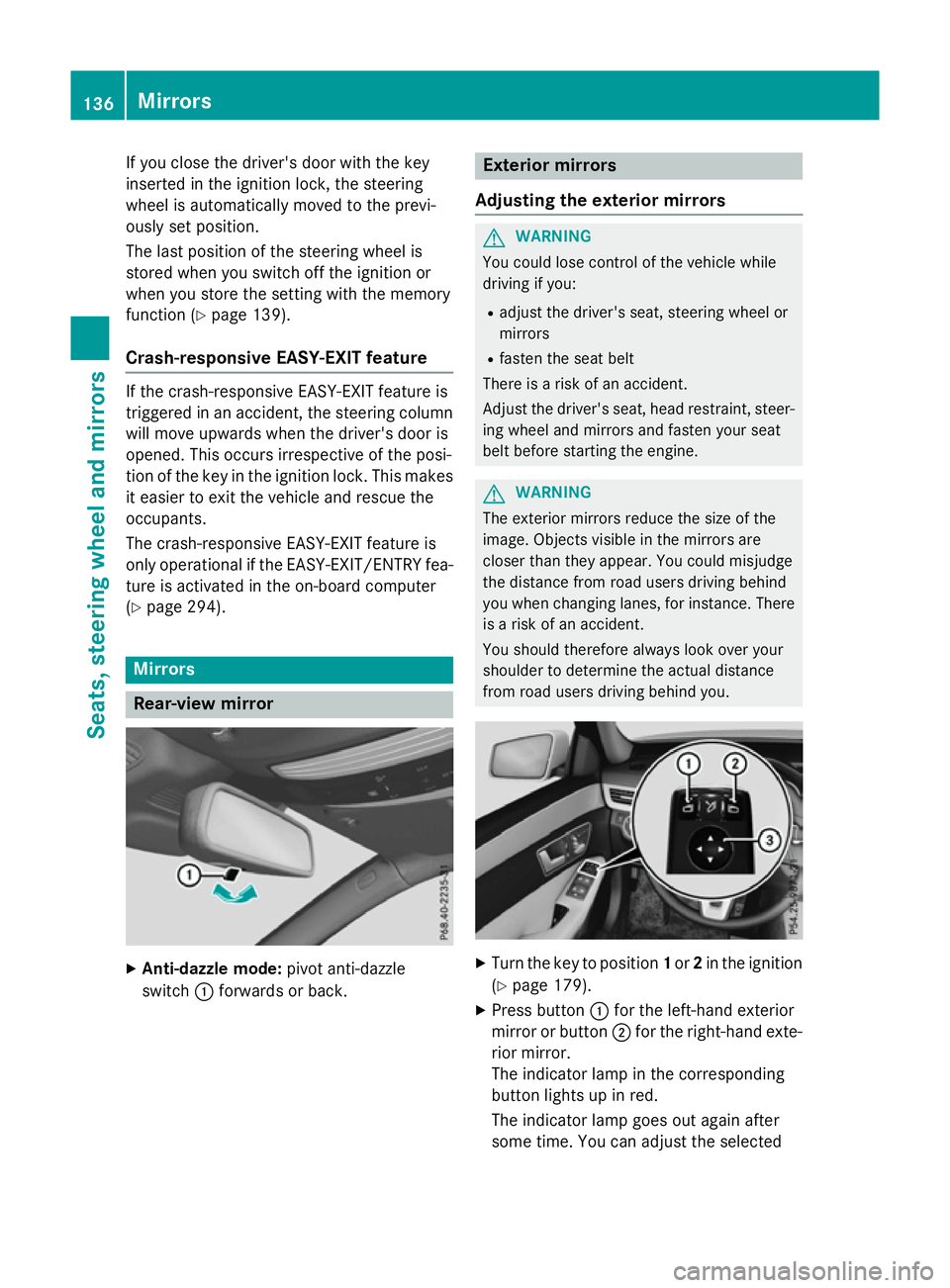
Anti-dazzle mode: pivot anti-dazzle
switch :forward sorback. Exterio
rmirrors
Adjusting the exterio rmirrors G
WARNING
You could lose control of the vehicle while
driving if you:
R adjust the driver's seat, steering wheelor
mirrors
R fasten the seat belt
There is arisk of an accident.
Adjust the driver's seat, head restraint, steer-
ing wheela nd mirrors and fasten yours eat
belt before starting the engine. G
WARNING
The exterior mirrors reduce the size of the
image.O bjects visible in the mirrors are
closer than they appear. You could misjudge
the distance from road users driving behind
you when changing lanes, for instance. There is ar isk of an accident.
You shouldt herefore always look over your
shoulder to determine the actual distance
from road users driving behind you. X
Turn the key to position 1or 2in the ignition
(Y page 179).
X Press button :for the left-hand exterior
mirror or button ;for the right-hand exte-
rior mirror.
The indicator lamp in the corresponding
button lights up in red.
The indicator lamp goes out again after
some time. You can adjustt he selected136
MirrorsSeats, steeringw
heel and mirrors
Page 140 of 497
mirror using adjustment button
=as long
as the indicator lamp is lit.
X Press adjustment button =up, down, or to
the left or right until you have adjusted the
exterior mirror to the correct position. You
should have agood overvie woftraffic con-
ditions.
The convex exterior mirrors provid ealarger
fiel dofv ision.
After the engine has been started, the exte-
rior mirrors are automatically heated if the
rear windo wheating is switched on and the
outsid etemperature is low.H eating takes a
maximu moften minutes.
i The exterior mirrors can alsobeh
eated
manually by switching on the rear window
heating.
Folding the exterio rmirrors in/out elec-
trically X
Turn the key to position 1or 2in the ignition
(Y page1 79).
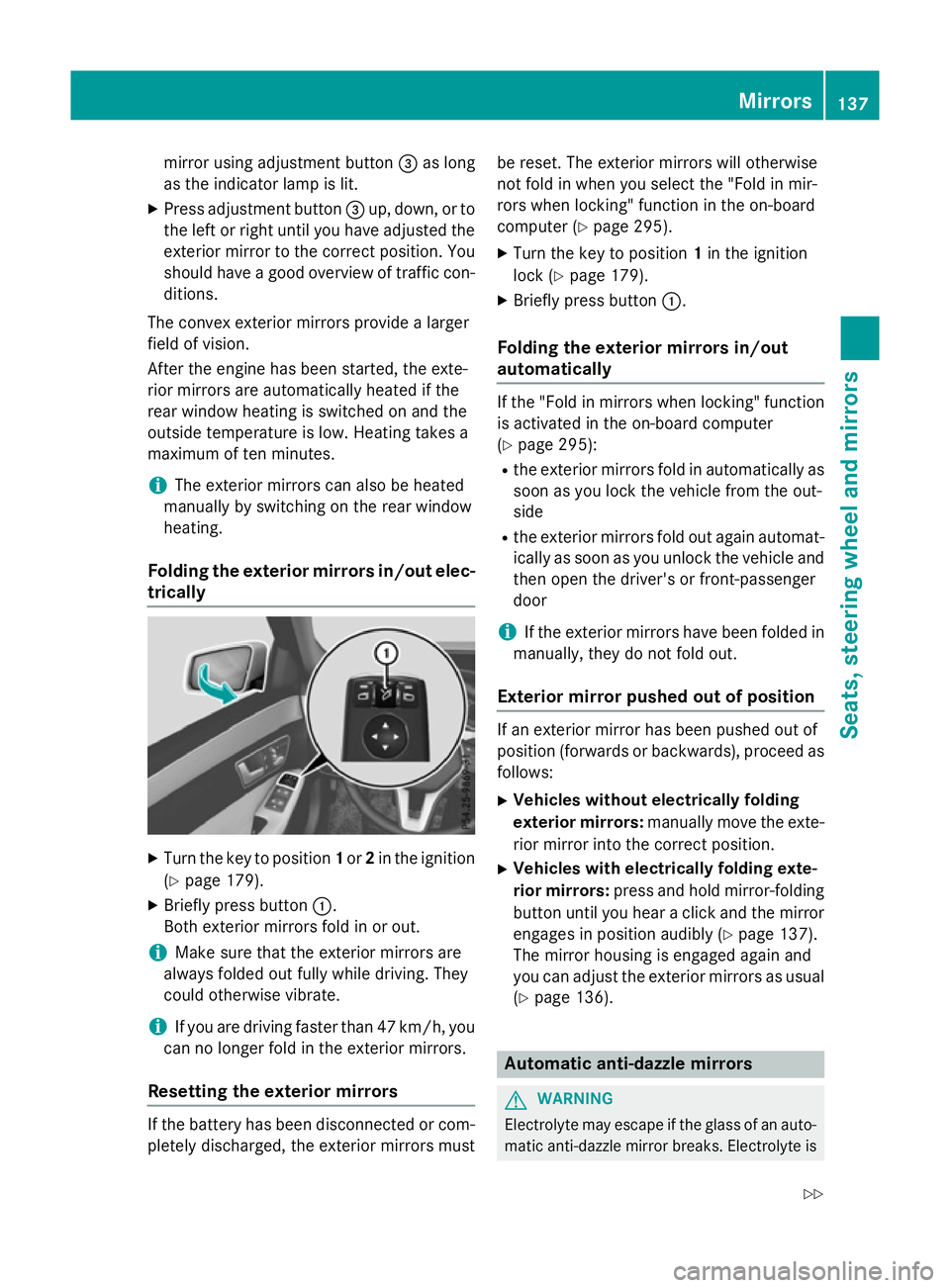
X Briefly press button :.
Both exterior mirrors fold in or out.
i Make sure that the exterior mirrors are
alwaysf oldedout full ywhile driving. They
could otherwise vibrate.
i If you are driving faster than 47 km/h, you
can no longer fold in the exterior mirrors.
Resetting the exterio rmirrors If the battery has been disconnected or com-
pletely discharged, the exterior mirrors must be reset. The exterior mirrors willo
therwise
not fold in when you select the "Fol dinmir-
rors when locking" function in the on-board
computer (Y page295).
X Turn the key to position 1in the ignition
lock (Y page179).
X Briefly press button :.
Folding the exterio rmirrors in/out
automatically If the "Fol
dinmirrors when locking" function
is activated in the on-board computer
(Y page2 95):
R the exterior mirrors fold in automatically as
soon as you lock the vehicl efrom the out-
side
R the exterior mirrors fold out again automat-
ically as soon as you unlock the vehicl eand
then open the driver' sorfront-passenger
door
i If the exterior mirrors have been folde
din
manually,t hey do not fold out.
Exterio rmirror pushed out of position If an exterior mirror has been pushed out of
position (forwards or backwards), proceed as
follows:
X Vehicles without electrically folding
exterio rmirrors: manually move the exte-
rior mirror into the correct position.
X Vehicles with electrically folding exte-
rior mirrors: press and hold mirror-folding
button until you hear aclick and the mirror
engage sinposition audibly (Y page137).
The mirror housing is engage dagain and
you can adjust the exterior mirrors as usual
(Y page1 36). Automatic anti-dazzle mirrors
G
WARNING
Electrolyte may escap eifthe glass of an auto-
matic anti-dazzle mirror breaks. Electrolyte is Mirrors
137Seats, steering wheel and mirrors
Z
Page 141 of 497
harmful and causes irritation. It must not
come into contact with your skin, eyes, res-
piratory organs or clothing or be swallowed.
There is arisk of injury.
If you come into contact with electrolyte,
observe the following:
R immediately rinse off electrolyte from your
skin with water.
R immediately and thoroughly rinse electro-
lyte out of eyes using clean water.
R if electrolyte is swallowed, immediately
rinse out your mouth thoroughly. Do not
induce vomiting.
R if electrolyte comes into contact with skin
or eyes or is swallowed, seek medical atten-
tion immediately.
R immediately change out of clothing that has
been in contact with electrolyte.
R if an allergic reaction occurs, seek medical
attention immediately.
The rear-view mirror and the exterior mirror
on the driver's side automatically go into anti- dazzle mode if the following conditionsa re
met simultaneously:
R the ignition is switched on and
R incident light from headlamps strikes the
sensor in the rear-view mirror
The mirrors do not dip if reverse gear is
engaged or if the interior lighting is switched
on. Parking position of the exterior mirror
on the front-passenger side
Setting and storing the parking position Using reverse gear
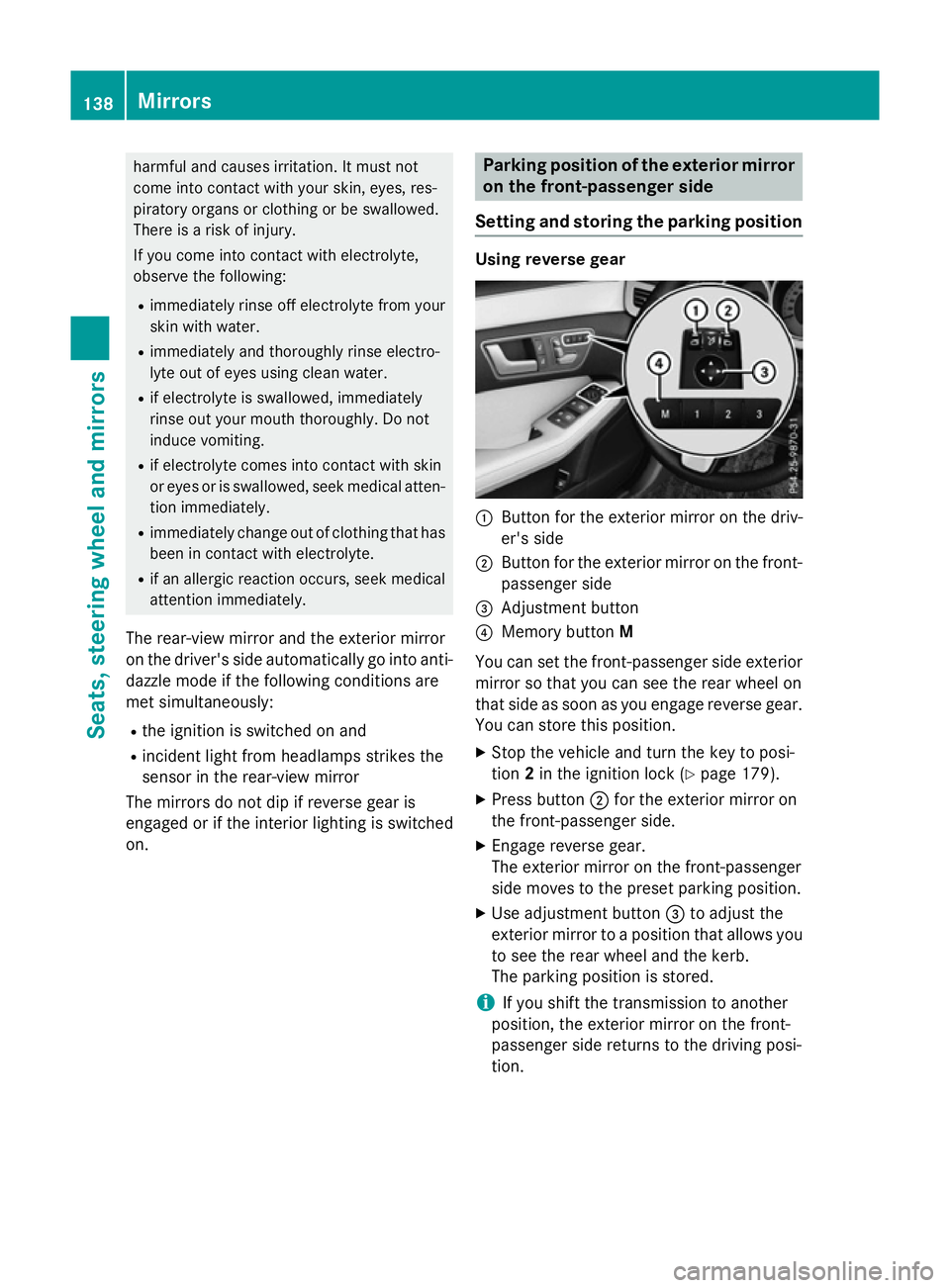
:
Button for the exterior mirror on the driv-
er's side
; Button for the exterior mirror on the front-
passenger side
= Adjustment button
? Memory button M
You can set the front-passenger side exterior
mirror so that you can see the rear wheel on
that side as soon as you engage reverse gear.
You can store this position.
X Stop the vehicle and turn the key to posi-
tion 2in the ignition lock (Y page 179).
X Press button ;for the exterior mirror on
the front-passenger side.
X Engage reverse gear.
The exterior mirror on the front-passenger
side moves to the preset parking position.
X Use adjustment button =to adjust the
exterior mirror to aposition that allowsy ou
to see the rear wheel and the kerb.
The parking position is stored.
i If you shift the transmission to another
position, the exterior mirror on the front-
passenger side returns to the driving posi-
tion. 138
MirrorsSeats, steering wheela
nd mirrors
Page 142 of 497
Using the memory button
You can set the front-passenger side exterior
mirror so that you can see the rear wheel on
that side as soon as you engage reverse gear.
This setting can be stored using memor ybut-
ton M?.
X Turn the key to position 2in the ignition
lock (Y page 179).
X With the exterior mirror on the front-
passenger side activated, use adjustment
button =to adjust the exterior mirror .The
rear wheel and the kerb should be visible in
the exterior mirror.
X Press memor ybutton M? and one of the
arrows on adjustment button =within
three seconds.
The parkin gposition is stored if the exterior
mirror does not move.
X If the exterior mirror moves out of position,
repeat the steps.
Calling up astored parking position X
Turn the key to position 2in the ignition
lock (Y page 179).
X Adjust the exterior mirror on the front-
passenger side using button ;.
X Engage reverse gear.
The exterior mirror on the front-passenger
side moves to the stored parkin gposition.
The exterior mirror on the front-passenger
side moves back to its original position:
R as soon as you exceed aspeed of
15 km/h
R if you press button :for the exterior mir-
ror on the driver' sside Memor
yfunction Storing settings
G
WARNING
If you use the memor yfunction on the driver's
side while driving, the adjustment scould cause you to lose contro
lofthe vehicle. There
is ar isk of an accident.
Only use the memor yfunction on the driver's
side while the vehicle is stationary. G
WARNING
If children activate the memor yfunction ,they
could become trapped, especially if they are
unattended. There is arisk of injury.
When leaving the vehicle, always tak ethe key
with you and lock the vehicle. Never leave
children unattended in the vehicle. G
WARNING
When the memor yfunction adjust sthe seat or
steering wheel, you and other vehicle occu-
pant s–p articularly children –could become
trapped. There is arisk of injury.
While the memor yfunction is makin gadjust-
ments, make sure that no one has any body
parts in the sweep of the seat or steering
wheel. If somebody becomes trapped, imme-
diately release the memor yfunction position
button. The adjustment proces sisstopped.
The memor yfunction can be used at any time,
e.g. even when the key isn't in the ignition
lock.
With the memor yfunction ,you can stor eup
to three different settings, e.g. for three dif-
feren tpeople.
The following settings are stored as asingle
memor ypreset:
R position of the seat, backrest and head
restraint
R activ emulticontour seat: seat contour,
dynamic function level
R driver' sside: position of the exterior mir-
rors on the driver' sand front-passenger
sides Memor
yfunction
139Seats, steering wheel and mirrors Z
Page 143 of 497
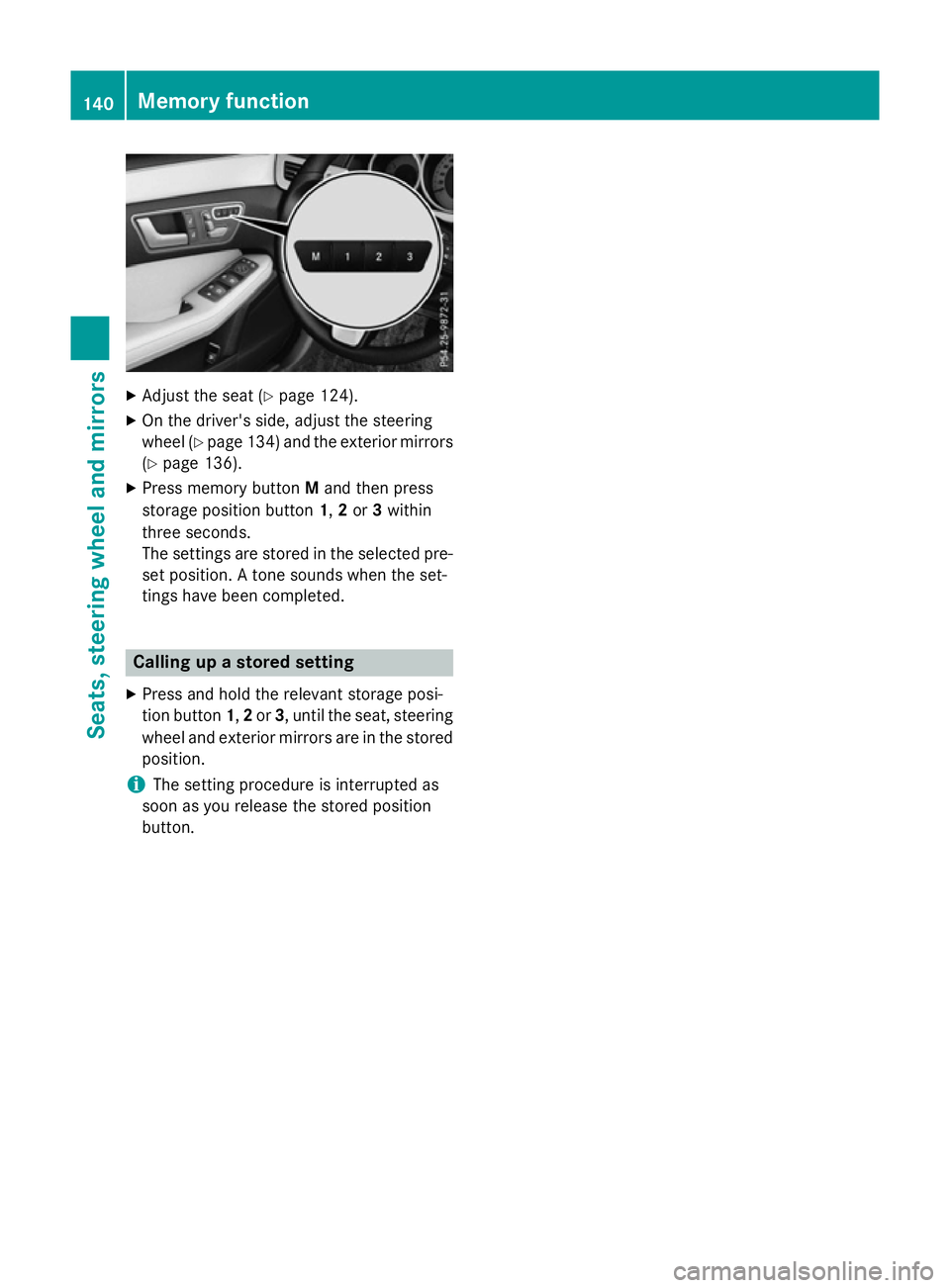
X
Adjust the sea t(Ypage 124).
X On the driver's side ,adjus tthe steering
whee l(Ypage 134 )and the exterio rmirrors
(Y page 136).
X Press memory button Mand then press
storag eposit ionb utton 1,2or 3within
thre eseconds.
The settings ar estored in the selecte dpre-
set position. Atone sounds when the set-
ting shaveb eenc ompleted. Calling up
astored setting
X Press and hol dthe relevant storag eposi-
tio nb utton 1,2or 3,u ntilthe seat, steering
whee land exterio rmirrors ar einthe stored
position.
i The setting procedur
eisinterrupte das
soo nasyou release the stored position
button. 140
Memory functionSeats, steering
wheel andmirrors
Page 148 of 497
The blue
Kindicator lamp in the instru-
ment cluster lights up when the main-beam headlamps are switched on.
X To deactivate: move the combination
switch back to its normal position.
The blue Kindicator lamp in the instru-
ment cluster goes out.
Vehicles with Adaptive Highbeam Assist
Plus: when Adaptive Highbeam Assist Plus is
activated, it automatically controls activation
and deactivation of the main-beam head-
lamps (Y page 147).
Headlam pflasher X
To switch on: turn the key in the ignition
lock to position 1or 2,ors tart the engine.
X Pull the combination switch in the direction
of arrow =. Hazard warning lamps
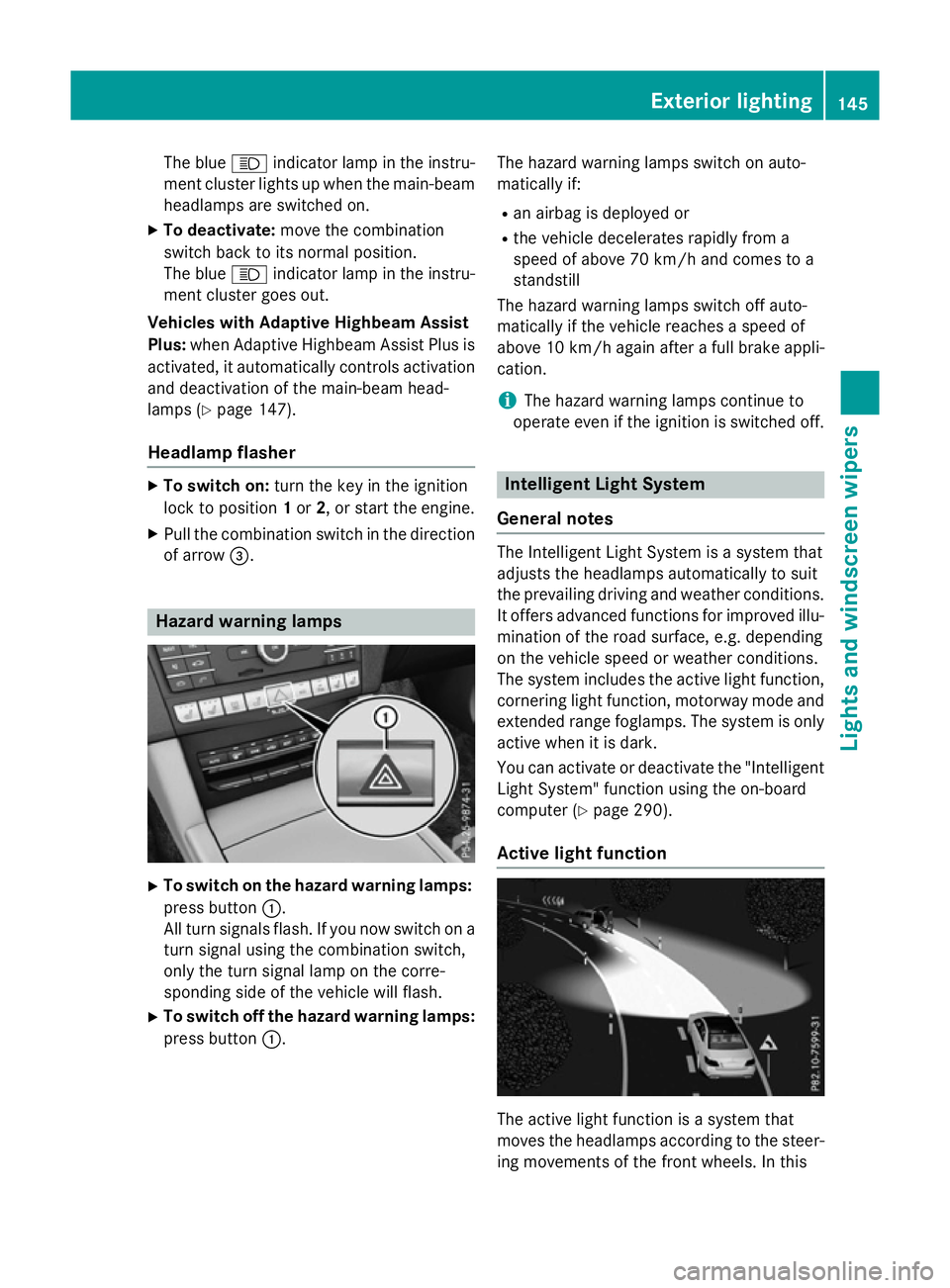
X
To switch on the hazard warning lamps:
press button :.
All turn signals flash. If you now switch on a turn signal using the combination switch,
only the turn signal lamp on the corre-
sponding side of the vehicle will flash.
X To switch off the hazard warning lamps:
press button :. The hazard warning lamps switch on auto-
matically if:
R an airbag is deployed or
R the vehicle decelerates rapidly from a
speed of above 70 km/ha nd comes to a
standstill
The hazard warning lamps switch off auto-
matically if the vehicle reaches aspeed of
above 10 km/ha gain afterafull brake appli-
cation.
i The hazard warning lamps continue to
operate even if the ignition is switched off. Intelligent Light System
General notes The Intelligent Light System is
asystem that
adjusts the headlamps automatically to suit
the prevailing driving and weather conditions.
It offers advanced functions for improved illu-
mination of the road surface, e.g. depending
on the vehicle speed or weather conditions.
The system includes the active light function, cornering light function, motorway mode and
extended range foglamps. The system is only active when it is dark.
You can activate or deactivate the "IntelligentLight System" function using the on-board
computer (Y page 290).
Active light function The active light function is
asystem that
moves the headlamps according to the steer-
ing movements of the front wheels. In this Exterior lighting
145Lights and windscreen wipers Z
Page 149 of 497
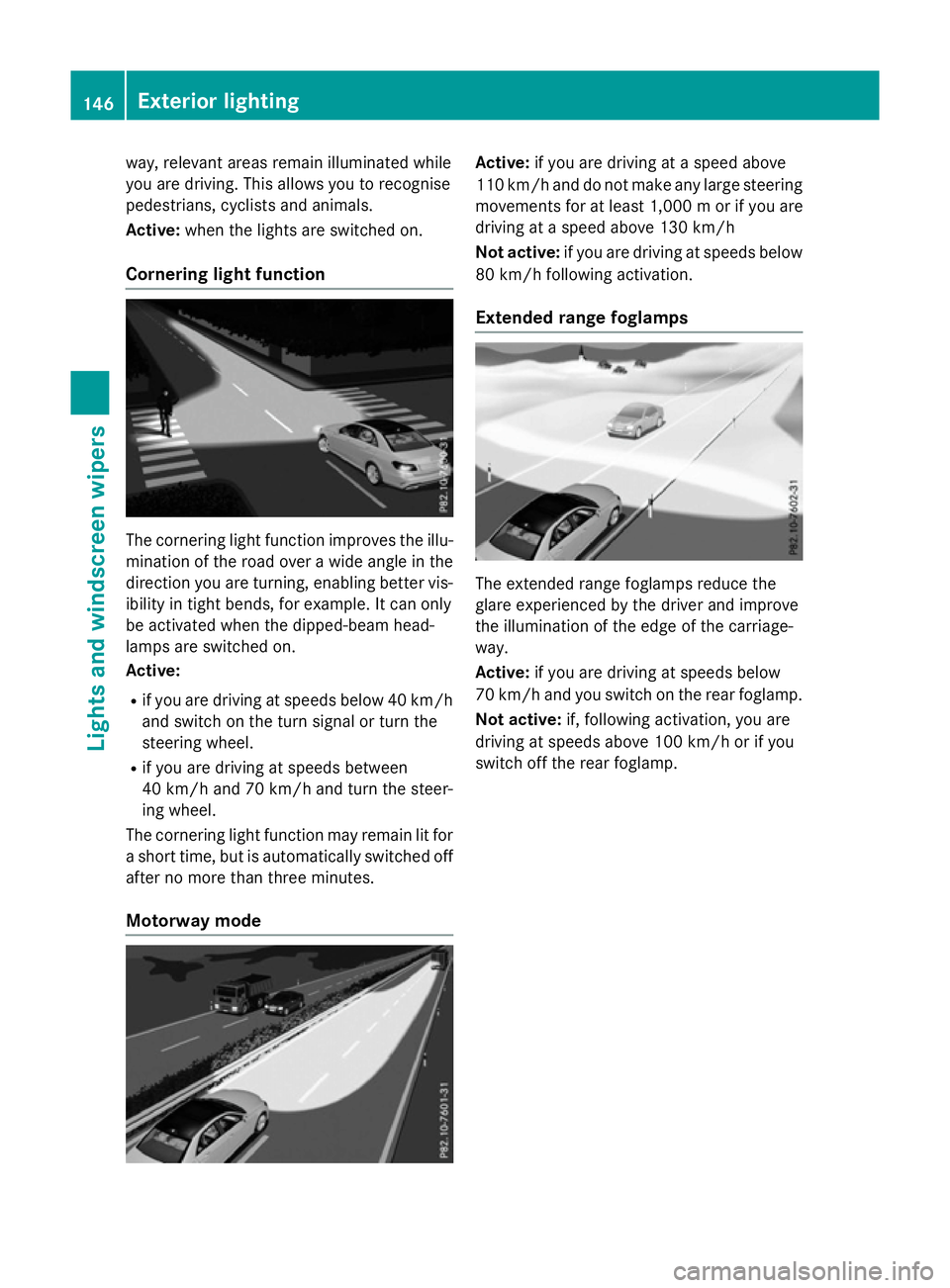
way, relevant areas remain illuminated while
you are driving .This allows you to recognise
pedestrians ,cyclist sand animals.
Active: when thelight sare switche don.
Cornering light function The cornering light function improves th
eillu-
minatio noftheroad over awide angle in the
directio nyou are turning, enabling better vis-
ibilit yint ight bends, for example. It can only
be activated when th edipped-beam head-
lamps are switche don.
Active:
R if you are driving at speed sbelow 40 km/h
and switch on th eturns ignal or tur nthe
steerin gwheel.
R if you are driving at speed sbetween
40 km/h and 70 km/h and tur nthe steer-
ing wheel.
The cornering light function may remain lit for as hor ttime, but is automatically switche doff
after no mor ethant hree minutes.
Motorwa ymode Active:
if you are driving at aspeed above
11 0k m/ hand do not mak eany large steering
movements for at least 1,000 morify ou are
driving at aspee dabove 130 km/h
Not active: if you are driving at speeds below
80 km/h following activation.
Extended range foglamps The extended range foglamps reduce the
glare experienced by the drive
rand improve
the illumination of the edge of the carriage-
way.
Active: if you are driving at speeds below
70 km/h and you switch on the rear foglamp.
Not active: if, following activation, you are
driving at speeds above 100 km/h or if you
switch off the rear foglamp. 146
Exterio
rlightingLights and windscreen wipers
Page 171 of 497
Auxiliary heating
Important safety notes G
DANGER
If th eexhaust pipe is blocke dorsufficient
ventilation is no tpossible, toxic exhaust
fumes can ente rthe vehicle, especially car-
bon monoxide. This is th ecase, e.g. in
enclosed spaces, or if th evehicl eiss tuck in
snow. There is ariskoff atal injuries.
You should switch off th eauxiliary heating in
enclosed spaces whic hdonothav eane xtrac-
tion system, e.g. agarage. If th evehicl eis
stuck in snow and you mus tleav ethe auxiliary
heating running, keep th eexhaust pipe and
th ea rea around th evehicl eclear of snow. To
guarantee asufficien tsupply of fresh air, open
aw indow on th eside of th evehicl eaway from
th ew ind. G
WARNING
When th eauxiliary heating is switched on,
part soft hevehicl ecan become ver yhot.
Flammabl ematerials suc hasleaves, gras sor
twigs may ignit eiftheyc om eintoc ontact
with:
R hot part softheexhaust system
R thee xhaust gas itself
There is ariskoff ire.
When th eauxiliary heating is switched on,
mak esuret hat:
R no flammabl ematerials come int ocontact
wit hh ot vehicl ecom ponents
R thee xhaust gas can escape from the
exhaust pipe unhindered
R thee xhaust gas does no tcom eintoc ontact
wit hflammabl ematerials.
The auxiliary heating and th eexhaust gas dis-
charge location can be foun dinfrontof the
right-hand fron twheel.
! Operating th
eauxiliary heating/ventila-
tion draws on th evehicl ebattery. Afte ryou
hav eheated or ventilated th evehicl ea maximum of two times
,drivef or alonger
distance.
i Switc
hthe auxiliary heating on regularly
once amonth for about te nminutes.
The auxiliary heating heat sthe air in th evehi-
cle interior to th eset temperature. This
occur swithout usin gthe heat of th erunning
engine. The auxiliary heating is operated
directly usin gthe vehicle's fuel .For this rea-
son ,the tan kcontent mustbeatl east at
reserv efuel level to ensur ethatthe auxiliary
heating functions.
The auxiliary heating/ventilation automati-
call yadjust stoc hanges in temperature and
weather conditions. Fo rthisr eason ,the aux-
iliar yheating could switch from ventilation
mod etoh eating mod eorfromh eating mode
to ventilation mode.
The auxiliary heating switches off automati-
call yafter 50 minutes. This time limi tcan be
altered. To do this, visit aqualified specialist
workshop.
You canno tuse th eauxiliary ventilation to
cool th evehicl einterior to atem perature
lower than th eoutside temperature.
Before switchin gon X
Turn th ekeyto position 2in th eignition
loc k(Ypage 179).
X Se tthe desired temperature.
Auxiliar yheating or auxiliary ventilation can
also be switched on if th emanually set cli-
mat econtro lisactivated. Optimum comfort
is attained by setting th esystem to automatic
mode. Se tthe temperature to 22 †.
The auxiliary heating or auxiliary ventilation
can be switched on/off usin gthe butto non
th ec entre console or th eremot econtrol.
The on-board computer can be used to spec-
ify up to three departur etimes,o ne of which
may be preselected (Y page 293).168
Operating th
eclimat econtro lsystemClimat econt rol
Page 177 of 497
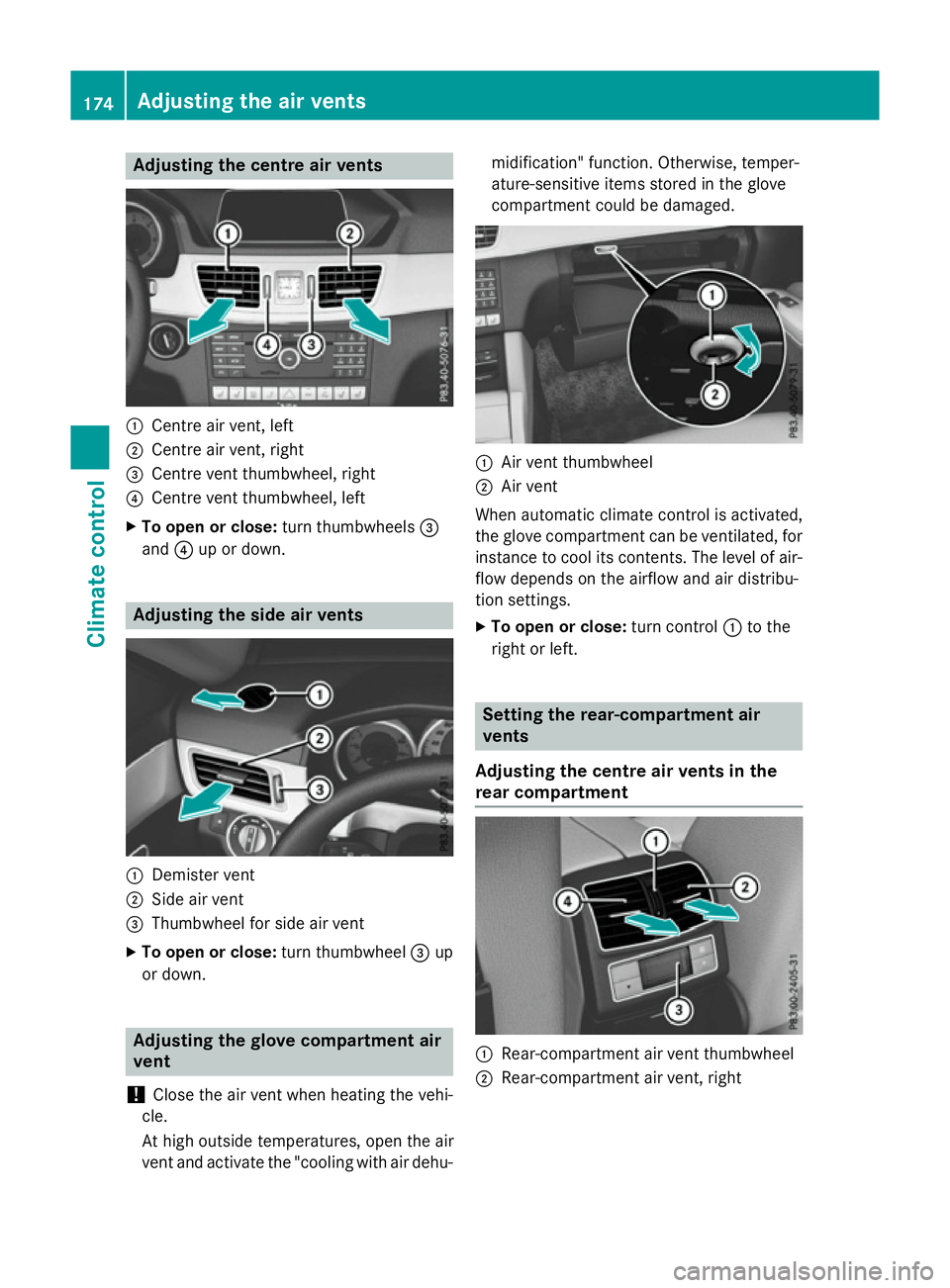
Adjusting th
ecentre air vents :
Centr eair vent, left
; Centr eair vent, right
= Centr eventthu mbwheel, right
? Centr eventthu mbwheel, left
X To open or close: turnthumbwheels =
and ?up or down. Adjusting th
esidea ir vents :
Demiste rvent
; Sideair vent
= Thumbwheel for side air vent
X To open or close: turnthumbwheel =up
or down. Adjusting th
eglove compartmen tair
vent
! Close th
eair ven twhen heating th evehi-
cle.
At high outside temperatures ,open th eair
ven tand activat ethe "coolin gwitha ir dehu- midification
"function .Otherwise, temper-
ature-sensitive items store dintheglove
compartmen tcould be damaged. :
Airv entthu mbwheel
; Airv ent
When automatic climat econtro lisactivated,
th eg lovec om partmen tcan be ventilated, for
instance to cool it scontents. The level of air-
flo wd epend sontheairflow and air distribu-
tion settings.
X To open or close: turnc ontrol :to the
right or left. Setting th
erear-compartmen tair
vents
Adjusting th ecentre air vent sinthe
rea rcompartment :
Rear-compartmen tair ven tthu mbwheel
; Rear-compartmen tair vent, right 174
Adjusting th
eair ventsClimat econt rol
Page 178 of 497
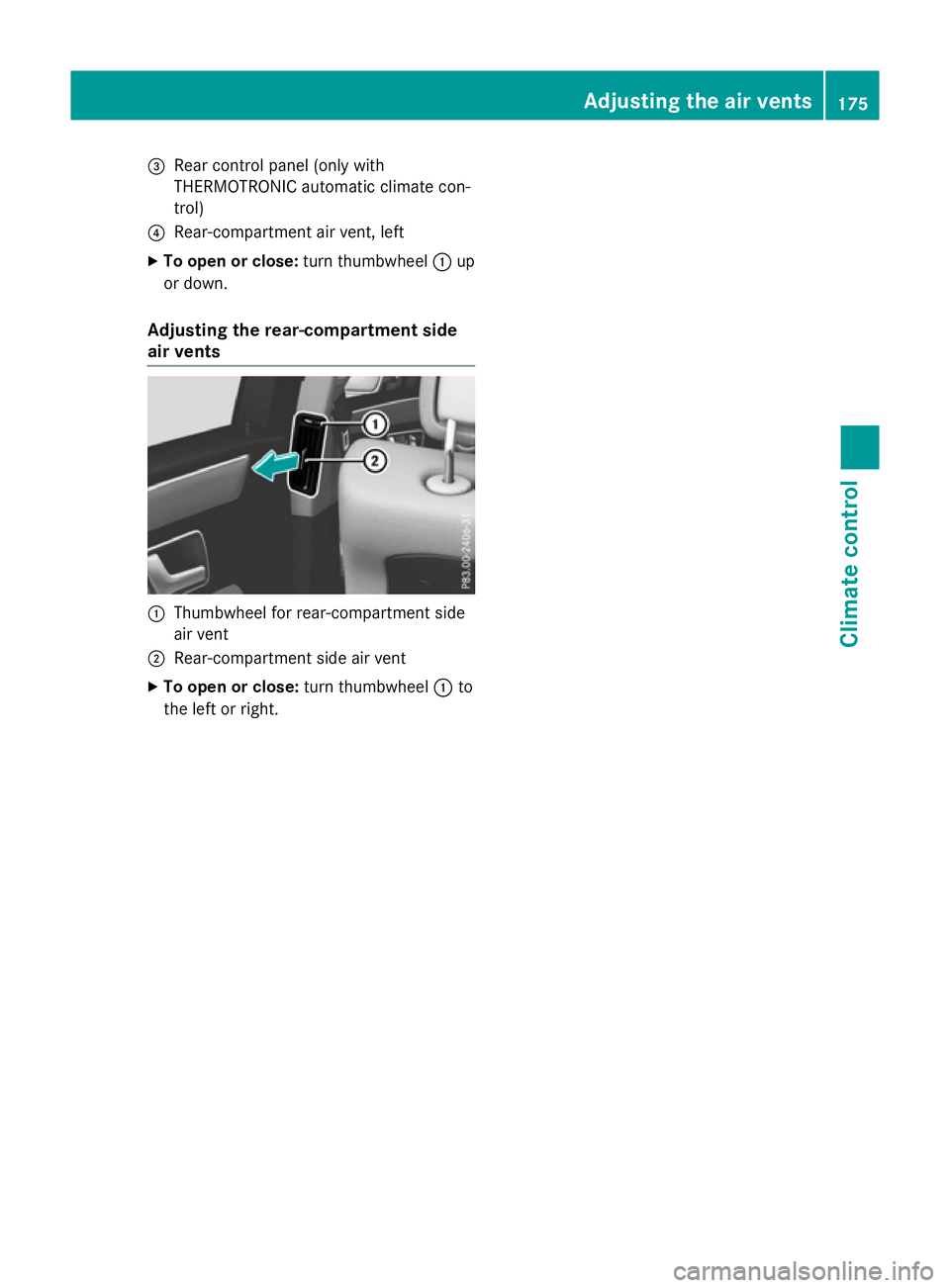
=
Rear control panel (only with
THERMOTRONI Cautomatic climat econ-
trol)
? Rear-compartmen tair vent, left
X To ope norclose:turnthumbwheel :up
or down.
Adjusting th erear-c ompartment side
air vents :
Thumbwheel for rear-compartmen tside
air vent
; Rear-compartmen tside air vent
X To ope norclose:turnthumbwheel :to
th el eftorr ight. Adjusting th
eair vents
175Climatecont rol Z